What's New in Zoho Inventory | April & May 2026
Hello users,
We're excited to roll out the latest Zoho Inventory updates for April and May 2026. These enhancements are designed to make your daily operations smoother and more efficient, from advanced inventory management and flexible pricing to automated tax compliance and useful mobile features. These updates help you save time, reduce costs, and manage your inventory more effectively.
Items & Locations Enhancements
Default Inventory Valuation Method
You can now configure a default inventory valuation method (FIFO or WAC) for your items. Once configured, the selected method will be automatically filled when creating new items, ensuring consistency across your inventory records.
The configured method will also be applied when:
-
Importing items without specifying an inventory valuation method.
-
Creating items through API requests without providing the inventory_valuation_method node.
To configure a default inventory valuation method: Settings > General > Items > Default Inventory Valuation Method> Select your preferred inventory valuation method and save the changes.

Similar to customers, price lists can now be associated with business locations for more flexible pricing. When creating a transaction, the price list assigned to the customer is applied automatically. If no price list is assigned to the customer, the price list associated with the selected business location is used.
To configure, go to Settings > Organization > Locations> create or select the location, and associate a price list with the required business location.

Alias Name in Items List View
The Alias Name column is now available in the items list view page. You can enable this in the settings and add it through Column Customization to display in the Items List View page. It makes it easier to identify items by their alternative names.
To enable this, Settings > General> Items> Field Customization > Enable Alias Name
Purchase & Warehouse Operations
Introducing Purchase Returns
We have introduced the Purchase Returns module to manage returns to vendors more efficiently. Purchase Returns helps you initiate return requests, commit stock for return, update inventory, and adjust vendor payables. Once a purchase return is confirmed, you can create picklists, packages, shipments, and vendor credits directly from it. Learn More
To enable Purchase Returns: Settings > General> Purchase Returns
Note: This feature is available in the India, US, and Global editions of Zoho Inventory for Enterprise plans. To enable it, contact support@zohoinventory.com
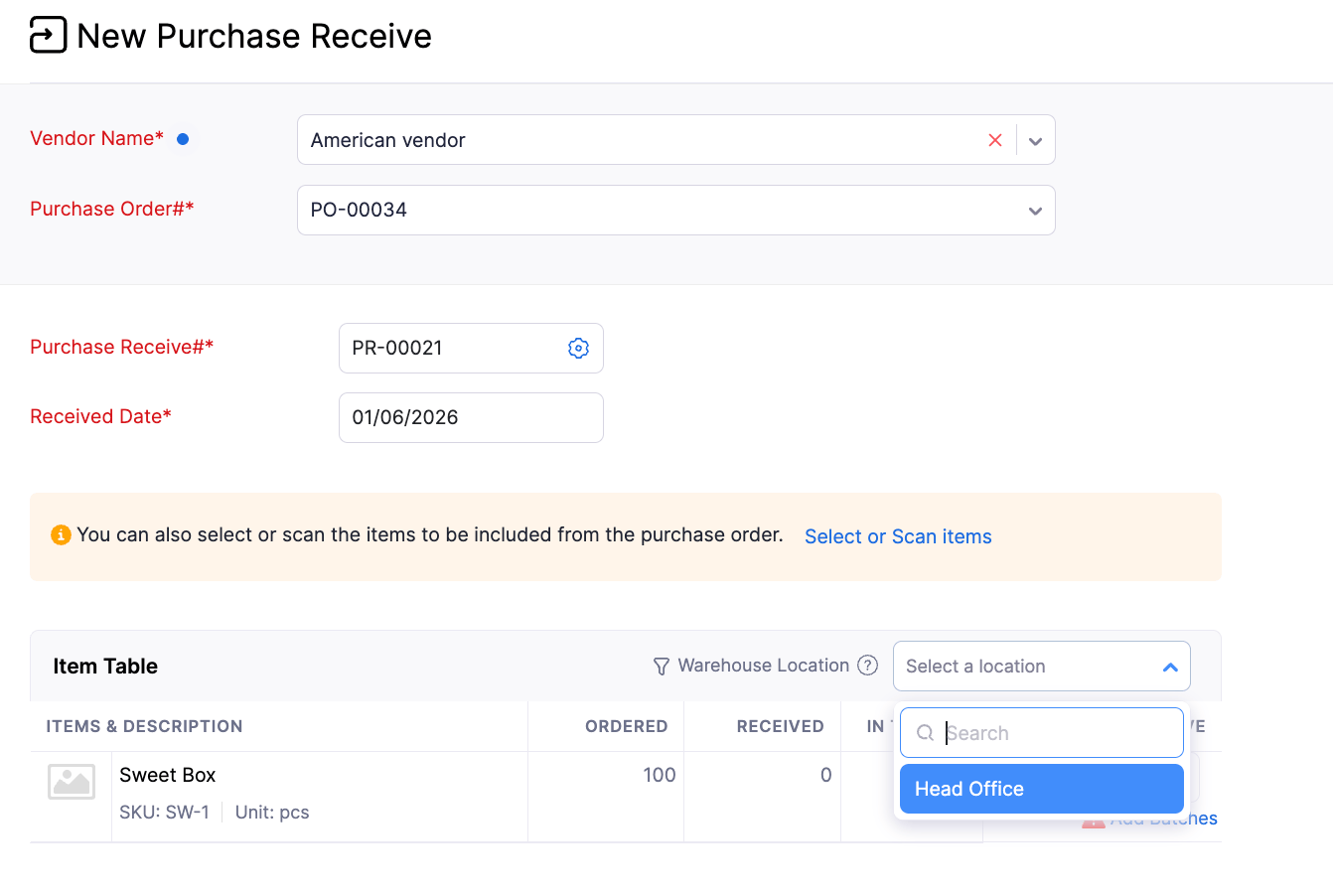
Filter Items by Warehouse Location in Purchase Receives
When creating a purchase receive from a purchase order that contains items in multiple warehouses for the selected location, you can now filter line items by warehouse location. This makes it easier to identify and receive items for a specific warehouse without manually reviewing and removing unrelated line items. The filter displays only the warehouses associated with the selected purchase order, helping streamline the receiving process and improve efficiency when managing inventory across multiple warehouses.
Partial Replenishments
The Replenishments module now allows partial replenishments. This makes it easier to fully restock items when the order quantity parameter Maximum Order Quantity is applied. If an order created from a replenishment task does not fulfill the entire required quantity, the system automatically creates a new replenishment task for the remaining quantity. The new task retains the original replenishment details and provides visibility into the quantities that have already been replenished.
Invoice and Sales Channels Management
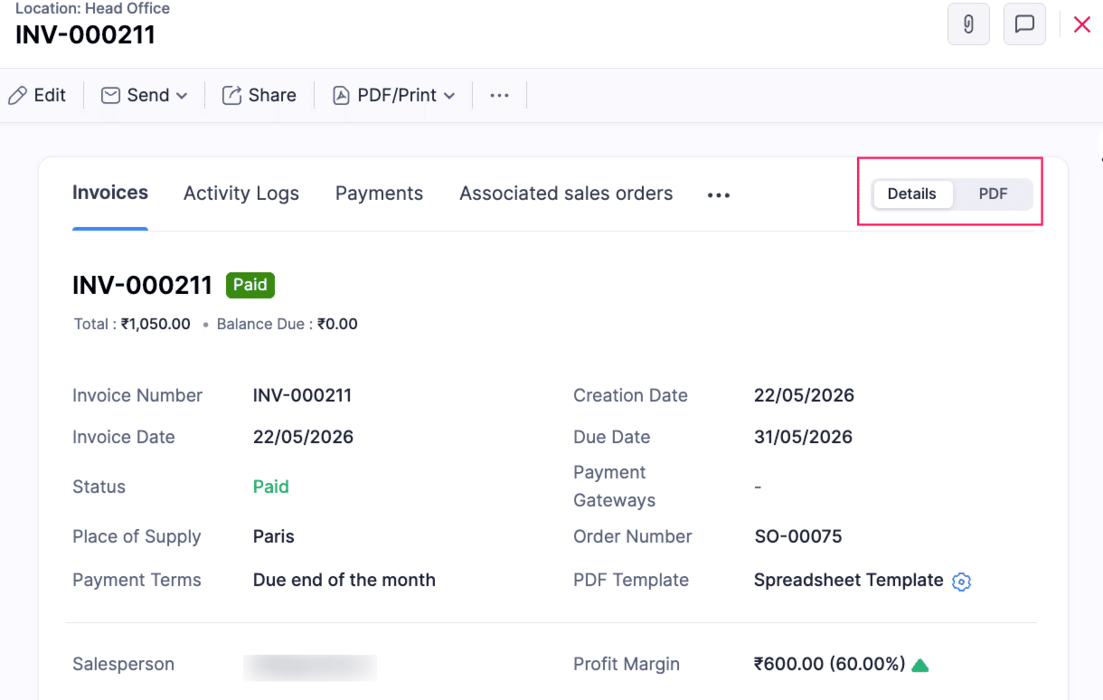
Revamped Invoice Details Page
The Invoice details page now opens in a non-PDF view by default, with associated transactions organized into separate tabs. It also displays invoice details, customer information, custom fields, line items, email receipts, and transaction-level reporting tags in a structured layout.
Note: This update is currently available for the France Edition and newly created organizations. It will be rolled out gradually to existing organizations.
Sync Sales Order and Invoice Numbers from Sales Channels
Two new configuration options have been introduced in the Sales Channel preference page to help maintain the same transaction numbering between sales channels and Zoho Inventory.
-
When the Sync Sales Order Number option is enabled, sales orders synced from will retain the same sales order number from the sales channel instead of using the auto-generated number series in Zoho Inventory.
-
When the Sync Invoice Number option is enabled, Invoices synced from Sales Channels will retain the same Invoice number from the sales channel instead of using the auto-generated number series in Zoho Inventory.
Sales Return Sync in Shopify Integration
Sales Return Sync in Shopify is now available across all editions. Once enabled in the Shopify integration preferences, sales returns and their associated inventory updates are automatically synced to Zoho Inventory. This helps streamline returns management, maintain accurate stock levels, and reduce manual effort in keeping return transactions synchronized across both platforms.
Walmart Integration [US Edition]
You can connect your Walmart seller account with Zoho Inventory either through the Walmart Seller Center or directly from Zoho Inventory. Once connected, items, orders, inventory levels, and shipment updates are synced automatically between the two platforms. Items are mapped based on whether they are single or variant items, while orders are created as Sales Orders in Zoho Inventory. With configurable sync frequency, stock update controls, and customer mapping options, businesses can efficiently manage Walmart sales and fulfillment from a single platform.
To integrate in Zoho Inventory: Go to Settings > Integrations & Marketplace > eCommerce > click Set Up Now under Walmart Integration.
Reporting & Analytics
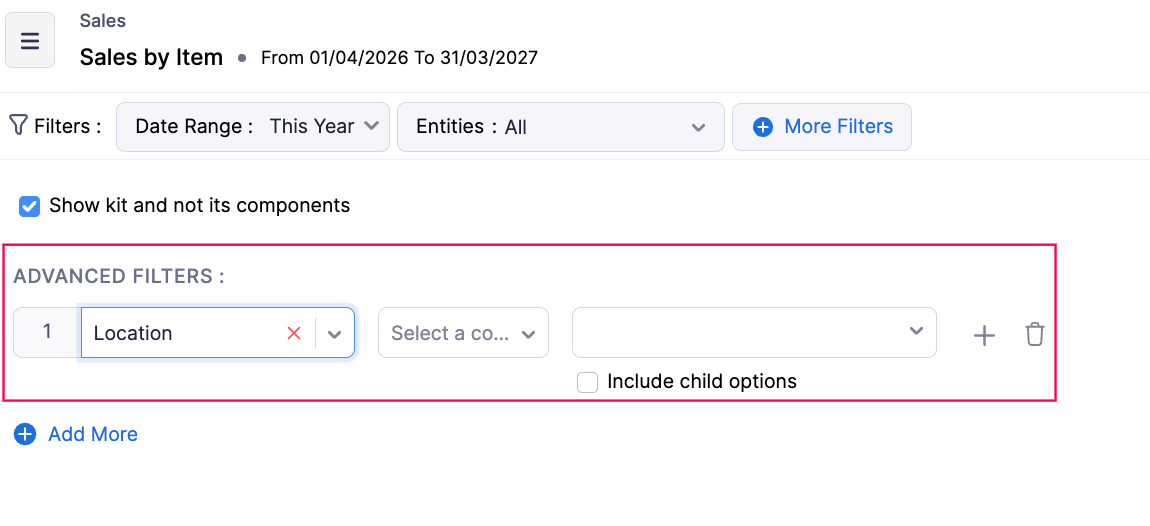
Include Child Options in Reporting Tag Filters
Advanced Filters in Reports now support Include Child Options for reporting tags. When you select a parent option and enable Include Child Options, the report automatically includes all associated child options. This makes it easier to filter hierarchical reporting tag data without manually selecting each child option.
Export reports and custom reports along with organization details by enabling the Organization Details option under Configure Report Layout before exporting.
To enable this, Reports> Category> More icon > Configure Report > Choose Details to Display > Enable Organization Details

Custom Report Enhancements
Custom Report permissions have been enhanced for admin users. Admins can now access, edit, clone, and delete all Custom Reports in the organization, including reports created by other users in the organization. Additionally, admins can now filter custom reports by date ranges directly from the report page without editing the report preferences.
To do this, go to Reports> Select the custom report > Click the dropdown > Select the action
Taxes & Compliance
Introducing Withholding Tax for Customers and Vendors [Kenya]
We have introduced the Withholding Tax preference for customers and vendors. Withholding tax is a direct tax deducted at source on specific payments such as interest, dividends, royalties, and management fees made to residents or non-residents. After enabling this preference for a customer or vendor, you can apply withholding tax at the line-item level in invoices and bills, and record payments after deducting the withheld amount.
To enable this, go to Settings >Organization Settings> Taxes and Compliance >Withholding Tax > Withholding Tax Settings >Slide the toggle to enable Withholding Tax > Select the Customers, Vendors, or both you want to enable withholding tax settings. Learn More

Sales Tax Automation [US & Canada Edition]
Sales Tax Automation is now enabled for the US and Canada editions. This feature automatically calculates accurate sales tax in real time based on where you're registered, what you sell, and where you sell. The system applies the correct tax on every sale, automatically identifies whether an item is taxable, zero-rated, or exempt, and ensures compliance as you expand sales across states. Tax rates update automatically with changing tax rules. You can configure address preferences, verify customer addresses, switch tax modes, recalculate tax, and view detailed tax calculation breakdowns. Check out the help docs available for the US and CA editions to learn more.
Supply Date and Service Period Support in Credit Notes [Germany Edition]
Credit Notes now support Supply Date, Service Start Date, Service End Date, and Transaction Posting Date as system custom fields. These four date fields can be configured from Settings to help businesses capture and manage legally relevant dates more accurately across credit note workflows.
To enable this: Go to Settings > Sales > Credit Notes > Field Customization > Select field > Mark as Active
View Total Amount Before TDS Deduction [India & Singapore]
The Total Amount Excluding TDS option has been added to the invoice details page to show the invoice amount before TDS deduction. This helps clearly view the original total for sharing invoices and accounting reference.
To enable this option: Go to Settings > Customization > PDF Template > Choose the Invoice template > Total > Enable Total Amount Excluding TDS
TDS Columns in Applied Excess Payment Import
You can now import TDS details while importing Applied Excess Vendor Payments. This enhancement helps you accurately apply excess vendor payments to bills along with the associated tax deductions.
Supported columns:
-
India: Bill TDS Amount
-
Global: Bill TDS Amount, TDS Account
-
Australia: Bill PAYG Withholding Amount, PAYG Withholding Account
Early Access Features
Track Record Participants and Non-Participants
The Record Participants and Non-Participants feature helps you track the users associated with a transaction record. Users automatically become participants when they create, edit, add comments, get mentioned in comments, or approve a record. Based on these actions, the system automatically categorizes users as Participants and Non-Participants for better visibility. This feature is currently supported for modules such as Items, Invoices, Inventory Adjustment, Packages, Shipment, Customers, Sales Orders, Delivery Challans, Sales Returns, Vendors, Purchase Receives, and Vendor Credits.
To track the record Participants and Non-Participants in the comment: Go to the module that supports this feature> Details Page> Comment icon > Enter "@" in the message box > You can view the Record Participants and Non-Participant users
Note: This feature is available by default for new organizations. For existing organizations, it is in Early Access. Contact support@zohoinventory.com to enable it
Auto Batch Assignment with FIFO, FEFO, and LIFO Strategies
The Auto Batch Assignment feature automatically identifies and allocates inventory batches for batch-tracked items during outward transactions based on a configured assignment strategy. Businesses can choose from the following allocation methods:
-
FIFO (First In, First Out) – Moves the oldest available stock first.
-
FEFO (First Expiry, First Out) – Prioritizes batches that are closest to expiry.
-
LIFO (Last In, First Out) – Consumes the most recently received stock first.
The system automatically handles batch allocation in the background during sales orders, invoices, picklists, and other outward transactions, eliminating repetitive manual batch selection. This helps improve inventory rotation, reduce stock aging and expiry-related losses, accelerate fulfillment workflows, and ensure consistent inventory handling across warehouse operations.
Note: This feature is available in Early Access for Enterprise plans. Contact support@zohoinventory.com to enable it for your organization.
Other Enhancements & Availability
Feature Availability
-
The Unit of Measurement feature is now enabled by default for all organizations in the Premium and Enterprise plans.
-
The Items Unified Flow has been enabled for all plans except the US and India editions. For the US and India editions, it is currently available for Free Plans.
-
Sales Return and Receive sync functionality in Shopify is now available for all editions.
Minor Enhancements
-
Barcode scanning is now supported in Custom Tables for easier item entry and management.
-
The Packing History Report now supports show/hide columns, advanced filters, custom reports, and current view export.
-
The Profit by Item Report now includes category filters.
-
The Batch Details Report has been enhanced with additional inward, outward, and price-related columns, along with Transaction Date filters.
-
Bulk Update support for Reporting Tags is now available.
Mobile App Updates
Updates for Both Android and iOS
-
Preferred Bin Locations in Picklists
Preferred bin locations are now displayed while adding items in Picklists, helping users pick items faster and more accurately.

-
Sales Return Status Update
Sales Return status now displays as Accepted instead of Approved for clearer tracking. -
Mobile Number with Country Code Selection
Mobile number fields now include country code selection for better global formatting.

-
Custom Fields in Assemblies Module
Custom fields are now supported in the Assemblies module, allowing additional information to be captured during assembly creation. -
Line Item Custom Fields in Purchase Receives & Picklists
Purchase Receives and Picklists now support custom fields at the line item level for more detailed tracking. -
Draft Status in Payments Received
The Payments Received module now supports Draft status, allowing users to save and edit before final submission. -
Tap to Pay Support
Tap to Pay support has been introduced in Australia, Austria, Belgium, Denmark, Finland, France, Germany, Ireland, Italy, Malaysia, the Netherlands, New Zealand, Poland, Singapore, Sweden, Switzerland, and the United Kingdom for faster in-person contactless payments. Payments can be accepted using cards and digital wallets without additional hardware
Android Specific Updates
-
Faster Stock Counts Experience
Users can now start Stock Counts immediately while data loads in the background for improved speed. -
Purchase Receives Enhancements
Purchase Receives now supports editing and simple approval workflows for smoother processing. -
Transfer Order Approvals
Transfer Orders now support simple approval workflows for better control and validation. -
Image Upload in Custom Fields
Custom fields now support image uploads for richer data capture. -
Custom Buttons for Customer & Vendor Modules
Custom buttons are now supported for the Customer and Vendor modules to enable quick actions. -
Revamped Custom Modules UI
Custom Modules now come with a refreshed and improved user interface. -
Sales Returns Draft Support
Sales Returns now support Draft status for flexible editing before finalization. -
Default Inventory Valuation Method at Item Creation
Default inventory valuation methods can now be set during item creation for consistent costing. -
Customer View Status in Documents
Customer view status is now displayed in Invoices and Retainer Invoices to track customer visibility.
iOS Specific Updates
-
Multi-Select Lookup Fields Support
Multi-select lookup custom fields are now supported across all modules that support custom fields. -
Tap to Pay via Stripe Integration
Tap to Pay is now available for organizations integrated with Stripe. Digital payments can be accepted directly on an iPhone using debit cards, credit cards, Apple Pay, and other digital wallets without additional hardware.
We hope these updates empower you to manage your inventory more effectively and deliver exceptional value to your customers. As always, we're committed to continuously improving Zoho Inventory based on your feedback and evolving business needs. If you have any queries, feel free to reach out to us at support@zohoinventory.com. Stay tuned for more updates from Zoho Inventory!
Best regards,
The Zoho Inventory Team
Topic Participants
Rithiga devi S
Nathan
Rithiga
Arian
Sonny Jelinek
Recent Topics
SubForm Custom Sort - Deluge Workflows
I have been experimenting with the Custom Order function of Subforms, it works beautifully within the subform itself and retains the sorting order. However, I need to be able to iterate through the records in Deluge using the sort order (The usage caseHow to embed Google Analytics GA4 tracking on a standalone Public Page (outside Customer Portal)?
Hi, Is there an official or recommended way to embed Google Analytics (GA4) tracking directly onto a standalone public Zoho Creator Page (outside of a Customer Portal)? I’m considering using an invisible Custom JS Widget as a workaround, but I’d loveBank feeds automation is broken - requires manual intervention and authentication
Yodlee supports Australian Open Banking CDR protocols natively, but Zoho Books' implementation is still triggering legacy screen-scraping MFA blocks on CBA and other business banking accounts. When will Zoho update its Australian bank feed pipeline toCannot Access Subform Display Order in Deluge
As highlighted in this community post, we still have to deal with the significant limitation of not being able to access the user-sorted order of subform rows through Deluge. This creates a major disconnect between the UI capabilities and backend automation,Process FOR loop for subform items in the order of the manual sorting
Hi Guys, I have searched everywhere and tried everything, but I still not able to resolve one particular challenge. I have a subform in my Invoice with rows for each item. I made it so that we can change the order of the items manually. I need to be ableAugmenting subform capabilities
Greetings, everyone! Finally, the day has come for us to announce some of the most anticipated, requested, and exciting updates to subforms in Zoho Creator. As you're aware, subforms are an integral part of Creator forms, as they help in establishingBuild appointment scheduling into your vibe-coded apps with Zoho Bookings
Exploring vibe coding? Wondering how an app built with AI can handle appointment scheduling? Join our upcoming live webinar to discover how Zoho Bookings APIs can help connect applications to scheduling capabilities. Here's what we'll explore: • ShowIs there a way to make Reason For Loss field mandatory at Closed Lost stage?
Hi guys, Reason For Loss system picklist appears on Verify Details page but it is not mandatory so as a result, AEs tend to omit it (leave at default value -None-). Is there a way to make it mandatory at Closed Lost? I tried layout rule but this fieldIntroducing the Zoho Campaigns MCP server
Hello everyone, We are pleased to announce that Zoho Campaigns is now available in Zoho MCP. You can now connect your Zoho Campaigns organization to AI tools such as Claude, ChatGPT, GitHub Copilot in VS Code, and Cursor, and manage your email marketingCannot reorder fields in Page Layout in Expenses and Purchase Requests
It is very inconvenient that the custom fields in Page Layout cannot be re-ordered. The only way is to remove the fields and re-create them; however, it is impractical. This would affect the reports and dashboards we are having. Not able to re-order theRequest for Zoho Desk Version and Module Details
Kindly help us confirm the version of Zoho Desk currently being used in our portal, along with the module/edition name. We require this information urgently for our internal documentation.How to customize the displayed name of contacts in Trident?
Hello, For work purposes, I sort different customers into different folders, and I also change their display names in Contacts so I can easily recognize them later. However, Trident doesn’t seem to support this. Even after I edit a contact’s name in Contacts,User and mailbox reports in Zoho Mail: Review account status, storage, and login activity of users
Administrators often need answers to questions such as which users have never logged in, whose storage is almost full, or which mailboxes are accessed through POP or IMAP. The User and Mailbox reports in the Zoho Mail Admin Console provide these detailsZOHO CRM APP - SALESINBOX
Is it possible to access SALESINBOX in the CRM MOBILE APPUnbundle feature for composite items
We receive composite items from our vendors and sell them either individually or create other composite items out of them. So, there is a lot of bundling and unbundling involved with our composite items. Previously, this feature was supported in formTip #96 – See more of the remote screen with Virtual Monitor – 'Insider Insights'
Hello Zoho Assist Community! Say you're supporting a device that has no monitor attached, like a server in a closet or a kiosk PC. You connect, and the screen is tiny, blurry, or distorted. Text overlaps and windows end up in odd places. TroubleshootingUnderstanding transactional channels in Zoho CPaaS
Every interaction with a business creates an opportunity to communicate.Whether it's welcoming a new user, confirming a payment, sharing an order update, or verifying a login, timely communication keeps users informed and connected. But how do businessesAutoscan Settings
I saw that autoscan is now included in my plan which is great however when I import pdf invoices from my main supplier which contain inventory lines and some also include shipping charges the autoscan doesn't match any of the items and also misses theHow to resubscribe to email after using unsubscribe link in Zoho
I was testing the unsubscribe link feature from our contacts module in ZohoCRM and I sent my personal email a version of an email template with the default embedded unsubscribe link to see if it would utilize the "Email Opt Out" field to track un-subscription.WhatsApp Calling Integration via Zoho Desk
Dear Zoho Desk Team, I would like to request a feature that allows users to call WhatsApp numbers directly via Zoho Desk. This integration would enable sending and receiving calls to and from WhatsApp numbers over the internet, without the need for traditional[ZohoDesk] Improve Status View with a new editeble kanban view
A kanban view with more information about the ticket and the contact who created the ticket would be valueble. I would like to edit the fields with the ones i like to see at one glance. Like in CRM where you can edit the canvas view, i would like to editNo access to contact categories in Zoho Mail Apps
I have set up a number of contact categories for my organization. When I compose an email using a web browser these categories are visible. When I compose an email using your Android or iOS Apps no contact categories are visible. Is this expected? IfZoho Plug In
Is there anyone out there who is able to use it? I have seen lots of problems posted, unable to get any satisfactory suppport at the moment! I would be really appreciate hearing from users that have it installed and working, my team are loosing belief it will ever work. Be great to hear from those that have a more positive experienceOutlook to Zoho sync
I am the admin for our company and I have (1) single user that is having difficulties with her emails syncing. I have found where the problem is, but I don't know 100% if what is happening is how the plug-in works or if it's a setup issue. My boss createdCant' find the CRM plug in for outlook
I want to be able to tag emails that I have received into accounts. But I can't find the plug in for out look in the other apps section. Where can I download it from?Problems with Zoho CRM Microsoft Outlook Plug-In (Add-On)
I am having problems with the Zoho CRM Microsoft Outlook Plug-In. I was able to install and setup the Plug-In correctly I believe in Microsoft Outlook, but contacts are now being created in Zoho CRM when an email is sent from MS Outlook. A contact is created and appears under Contacts in Zoho CRM but no other information is populated in the fields; for instance only the name is there (for instance "rfairley" ) which matches the beginning of their email address; but no phone numbers. Also, otherzoho for outlook
it would be woderfull to be able to add an email to a case, just as it is possible to add an email to a potential VincentMail Addon issue
Hi, I am trying to make the mail add on feature work without clutter. The issues is that all emails from the contact are being listed in every opportunity that contact is involved in/ linked to. I want to filter out the emails that are not relevant to the opportunity. It is ok to have all the mails of a contact under in the contact module. But under the opportunity it shall show only the relevant emails. Is there a way i could do this? Atleast if I could manually assign or amend the listed emailsEliminate duplicate tickets in one department using Email Deduplication
Hello everyone, A department can have multiple email addresses designed for different purposes for example, support@zpad.com and help@zpad.com. When a customer sends an email or thread response to both addresses, or includes both in the To, CC, or BCC"Pinning" a Note
It would be really helpful to have a way to "Pin" a note to the top of the notes section. This is really important when you have something important about someone and do not want the note to get buried farther and farther down the note stream. For instance:Feature Request - Copy Reschedule Link
Hi Bookings Team, I had a client contact me today, to let me know that she can't make a meeting she booked this week. I can't remember if I included a reschedule link in email notifications, but I was thinking that it would be great if I could just openIssue While Rescheduling Interviews in Zoho Recruit
Dear Zoho Support Team, We are facing an issue with the Interview Rescheduling functionality in Zoho Recruit integrated with Microsoft Teams. Problem Description When an interview is rescheduled through Zoho Recruit: The new interview is created successfullyEnhancement Request for Job Publishing Management in Zoho Recruit
Provide a centralized view to Publish/Unpublish job openings across: - Job Portals - Career Portal - Employee Referral Portal Add filters to view job openings based on: Published to Career Portal Published to Employee Referral Portal Published to specificMass Update Option for Changing Work Order Owner
Hello FSM Team/Mr. Abid, We would like to inquire if there is an option to mass update or bulk change the Owner of Work Orders in Zoho FSM. Current Situation: At the moment, the Owner of a Work Order can only be changed individually, which becomes time-consumingCategorize Items with Item Headers
Hello customers, Did you ever want to classify items based on specific categories to help your customers understand your invoice better? With the new Item Header feature, you can easily categorize items in your invoices and estimates and give them a common title. Item Headers are available in the Invoices, the Recurring Invoices and the Estimates module. It can be carried forward from estimates to invoices at the time of converting the estimates. To add an item header: Go to the Estimates, InvoicesCareers Site & Job Openings
Hello, It would be good to have a section in the careers site with past and inactive jobs. On that note, active jobs to automatically move to this section once the target date in the job opening is reached. At the moment, Recruit administrator will haveTeamInbox - Configure Email Sending Delay
Hello, The feature in Zoho Mail to automatically DELAY a sent message by X minutes is a wonderful feature to catch mistakes before they are sent out. Is this possible with TeamInbox? If not, is it on the roadmap to add it in? ThanksZoho Desk API Custom Module not all data is showing up
When i get a record by id for my new module: responseDetailed = invokeurl [ url :"https://desk.zoho.eu/api/v1/cm_tickets_CM/" + record.getJSON("id") type :GET parameters:"" connection:"desk_connection" ]; The response doesnt contain all fields, the fieldCan you sync CRM contacts to TeamInbox?
Can you sync CRM contacts to TeamInbox? Or at least upload them? From what I can see, you have to enter them manually one at a time.Team Inbox Support Is TERRIBLE
Team inbox has the worst support team i've ever dealt with. They take forever to reply to your emails/issues, if you even get a reply. They don't have a phone number so you can't talk with anyone. There is clearly bugs in their system and they don't addressNext Page