Zoho Inventory - Gestion des produits
Les articles sont soit des articles que vous achetez à vos fournisseurs et que vous vendez à vos clients, soit des services que vous fournissez et pour lesquels vous êtes payé. Dans Zoho Inventory, vous pouvez ajouter ces articles facilement et gérer leur inventaire de sorte que, chaque fois que vous créez une demande d'achat à votre fournisseur, le stock augmente et lorsque vous vendez les articles, le stock diminue automatiquement.
Produits dans Zoho Inventory
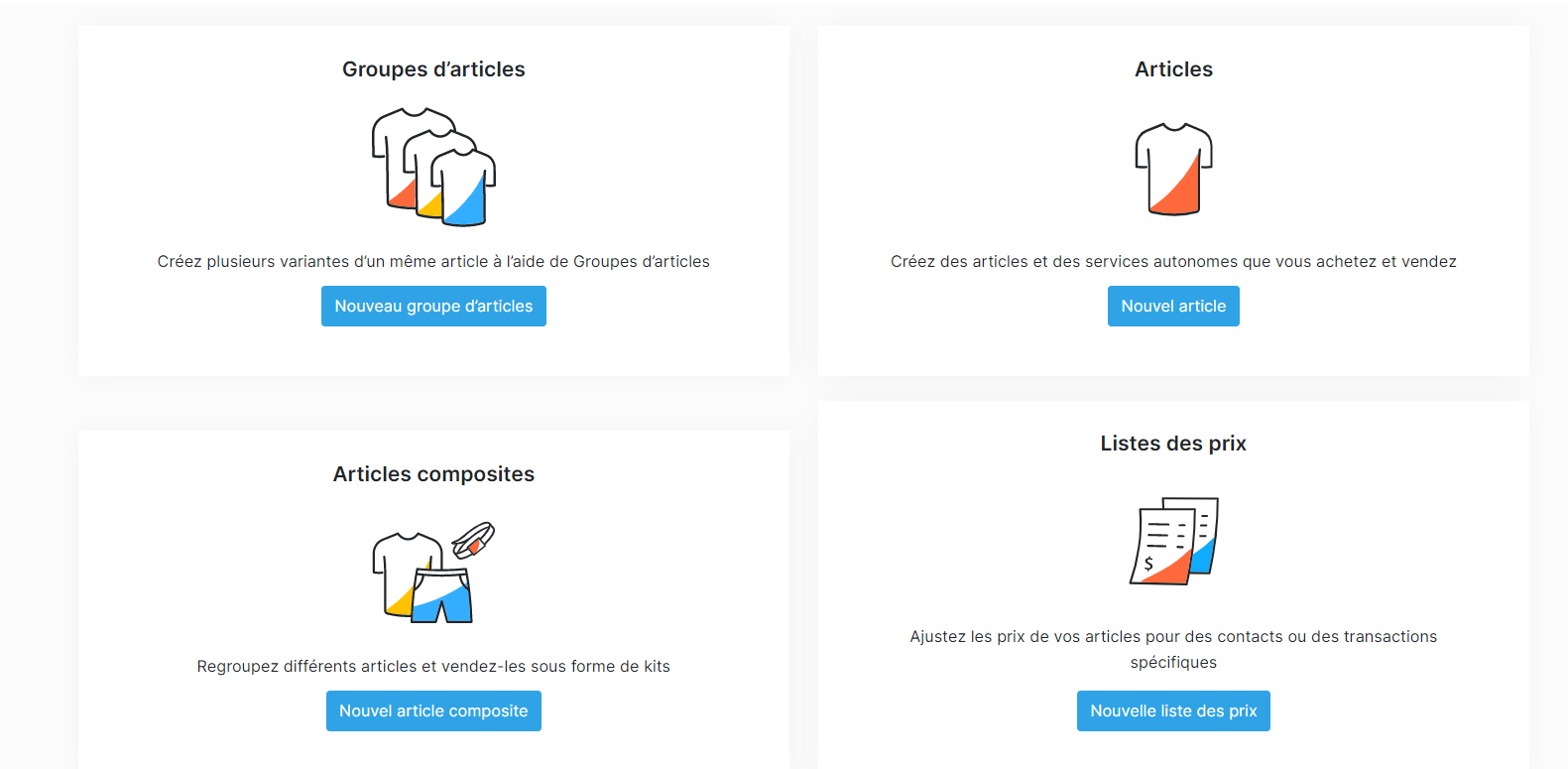
Zoho Inventory vous permet d'ajouter trois types de produits
Les produits individuels
Comme son nom l'indique, vous pouvez ajouter un type de produit ou de service à l'inventaire. Par exemple, shampoing.
Les produits en groupe
Un groupe d'articles dans Zoho Inventory, contient des variations du même article de base. Ce sont des articles similaires, sauf qu'au moment de créer un article, vous pouvez facilement en créer plusieurs. Par exemple : un t-shirt de différentes tailles et couleurs.
Les produits composites
Un produit composite dans Zoho Inventory est un produit unique qui est composé de deux ou plusieurs articles et/ou services. En utilisant des articles composites, vous pouvez créer des collections et les vendre à des tarifs personnalisés, ainsi qu'effectuer des assemblages de base pour créer des produits finis. Par exemple : shampoing, savon, gel douche, nettoyant pour le visage, lotion pour le corps au parfum fraise.
Créer les produits individuels
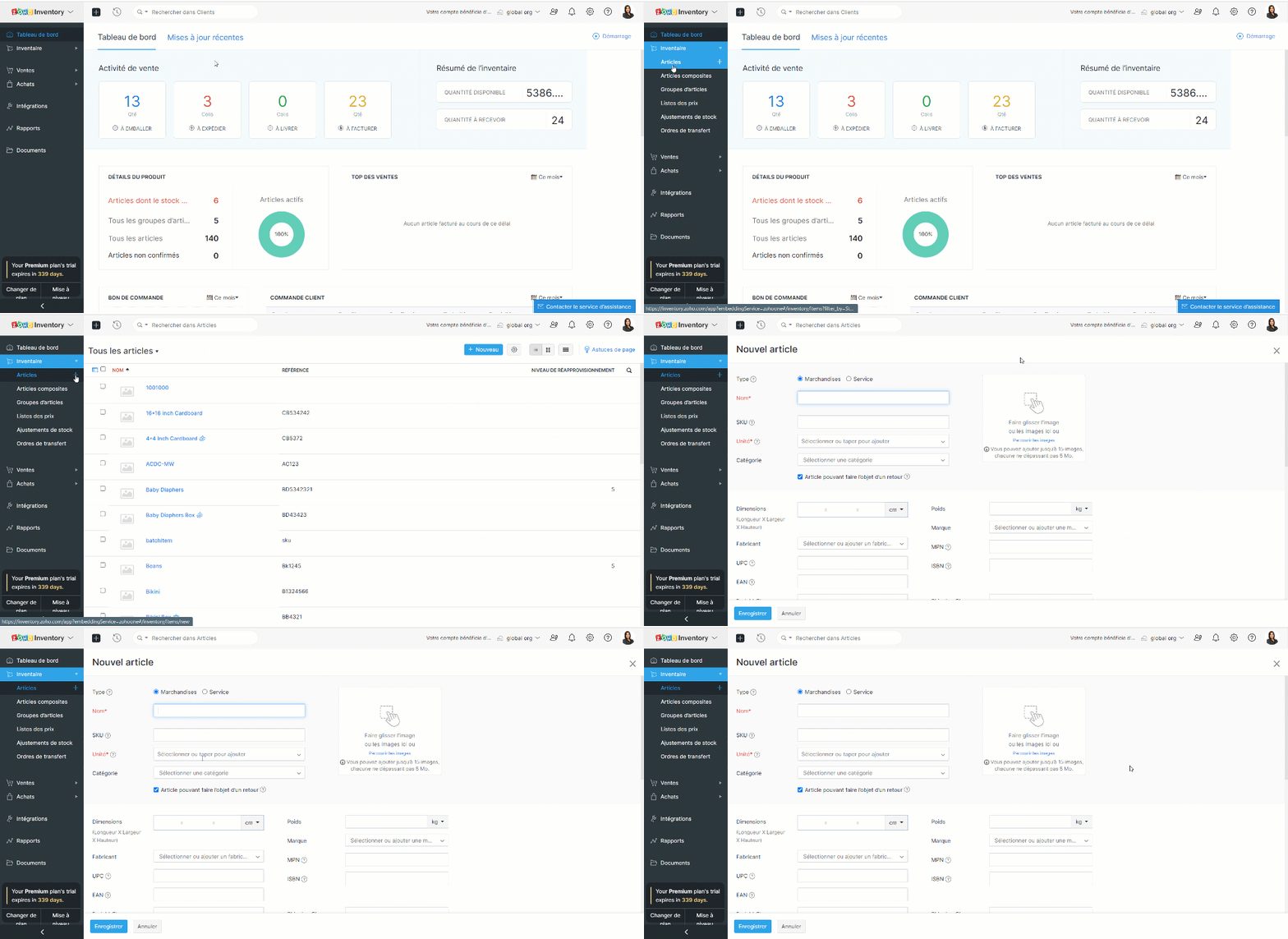
- Dans le panneau à gauche, allez dans le module "Articles" sous "Inventaire".
- Ici vous pouvez ajouter les détails de produit comme le nom, SKU, l'image, la taille, le poids et la catégorie.
- Pour créer les catégories, accédez à Paramètres >> Préférences >> Articles >> Personnalisation de champs.
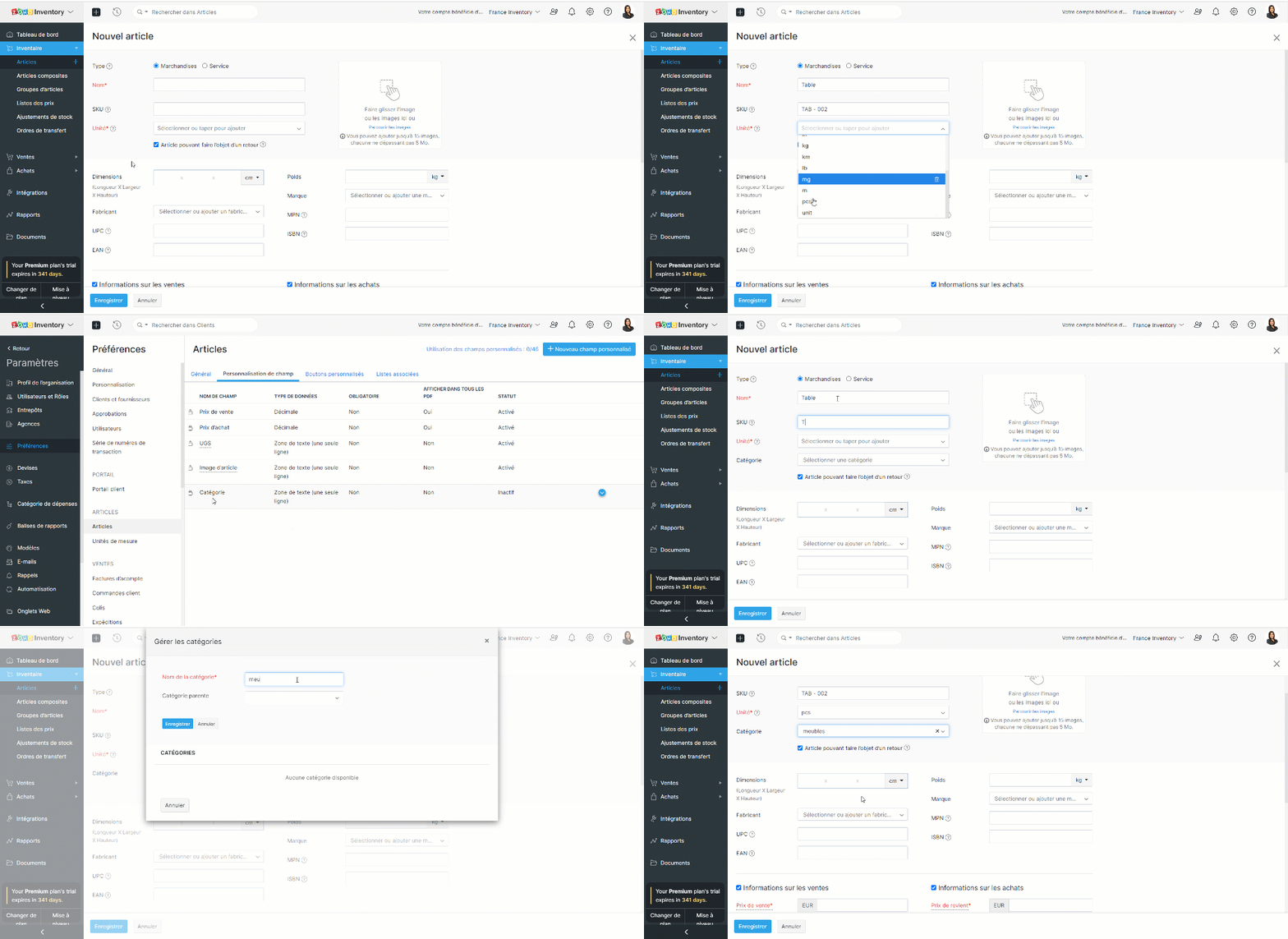
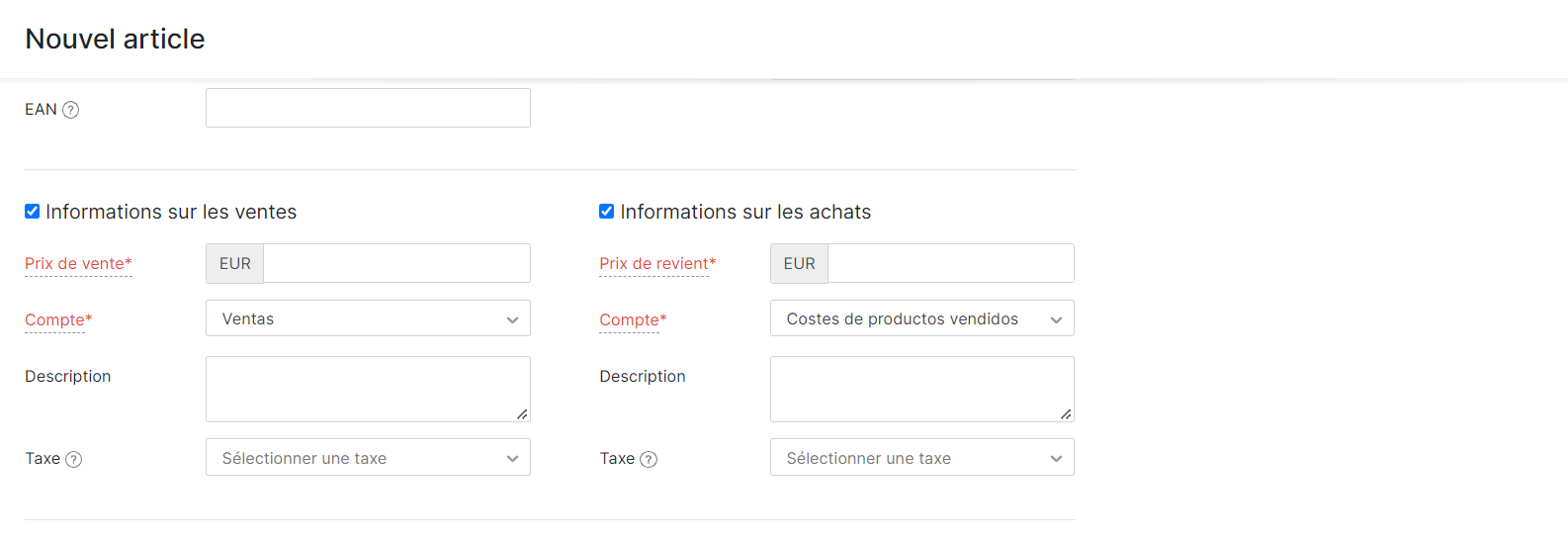
- Également, vous pouvez saisir les détails des ventes et des achats.
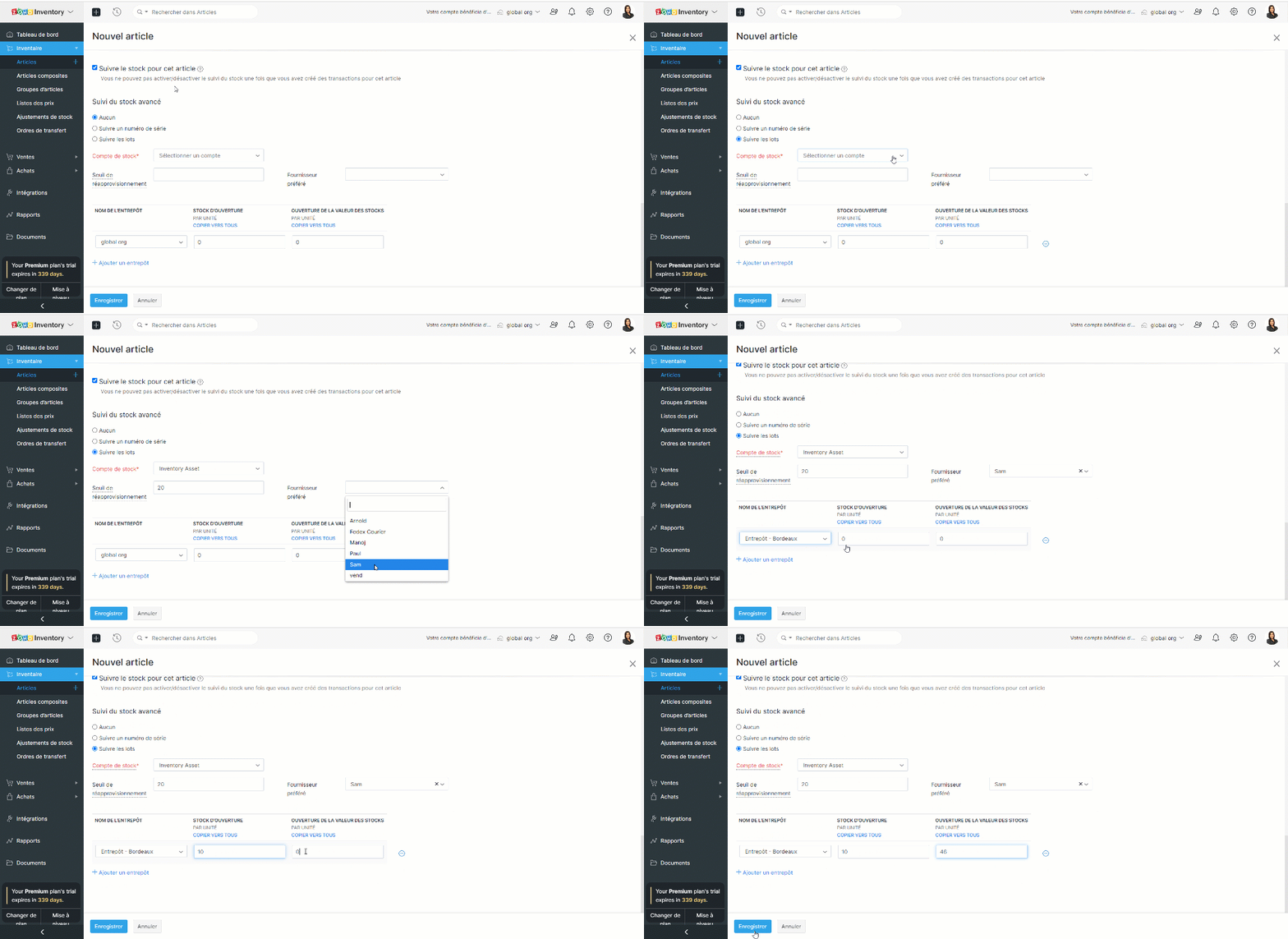
- Détails du suivi des stocks - l'activation de cette section dans Zoho Inventory vous permet de suivre un produit. Vous ne pouvez pas désactiver le suivi des stocks une fois que vous avez enregistré des transactions pour un article.
- Lorsque vous avez activé l'option "Suivi de stock avancé" pour votre organisation, choisissez si vous souhaitez suivre vos articles par numéro de série ou par numéro de lot. Si vous ne voulez suivre ni l'un ni l'autre, choisissez "Aucun".
- Définissez le point de re-commande et ajoutez un fournisseur privilégié de votre choix pour cet article.
- Saisissez les détails de l'entrepôt pour savoir où le produit doit être réapprovisionné.
Conseil : Le champ SKU est l'un des identifiants uniques d'un produit. Vous pouvez y stocker les informations relatives au code-barres de votre produit, afin de pouvoir le scanner et le récupérer lors de la création de transactions.
Créer les produits en groupe
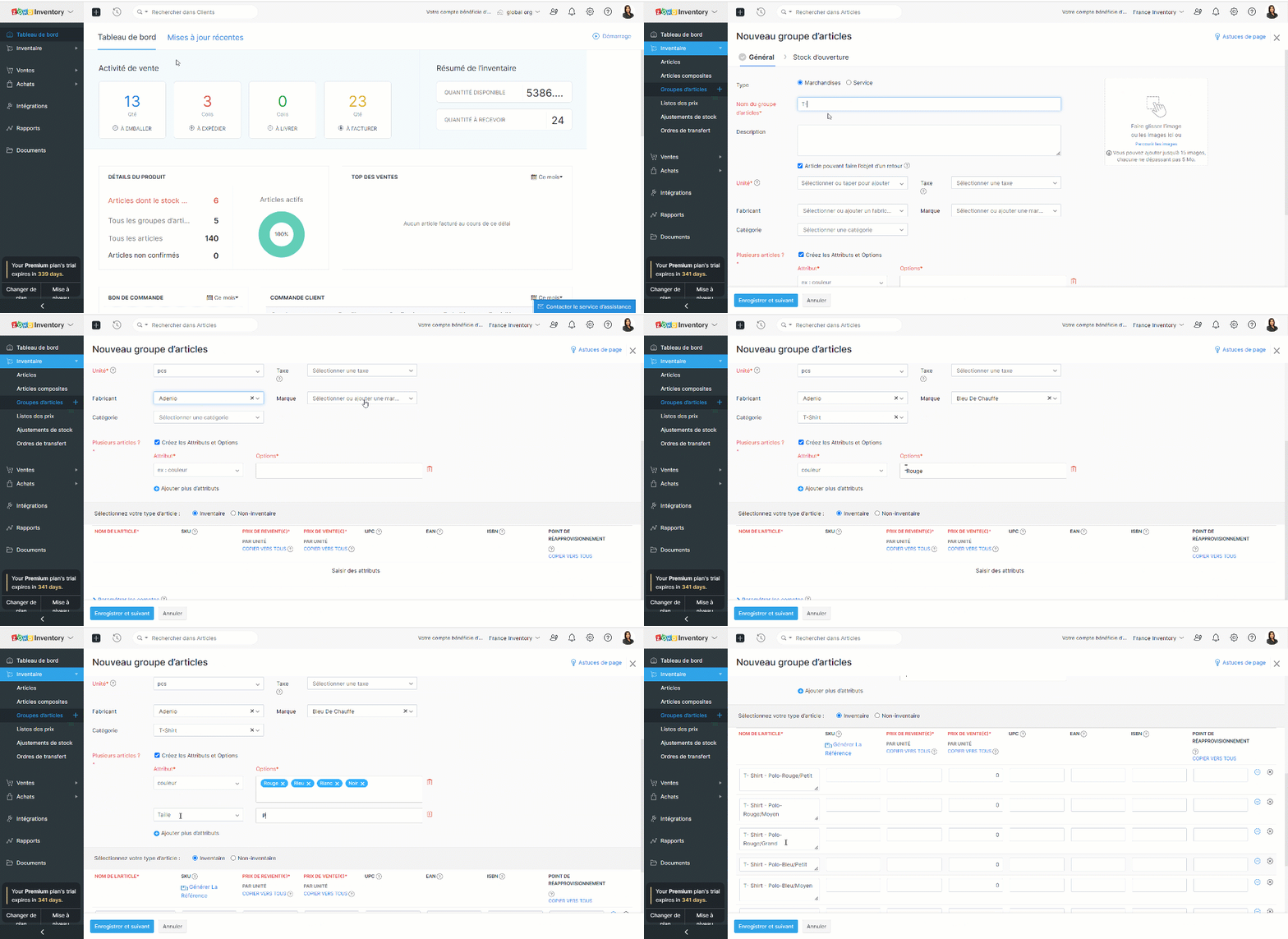
- Depuis le panneau à gauche, allez dans le module "Groupes d'articles" sous "Inventaire".
- Comme indiqué ci-dessus, saisissez les détails comme le nom du groupe d'articles, l'unité, la taxe, la marque et la catégorie.
- Ajoutez les attributs et les options pour ce groupe d'articles. Sur la base du nom et des attributs du groupe d'articles, une combinaison de noms de variantes sera générée automatiquement.
- Les attributs sont des propriétés utilisées pour décrire un élément. Par exemple, un T-shirt peut être décrit par sa couleur, sa taille et sa marque. De même, il peut y avoir de nombreuses variantes de ce type. Zoho Inventory génère toutes les combinaisons de variantes basées sur les attributs et options donnés.
Génerer SKU pour un groupe d'articles
Certains groupes d'articles peuvent avoir de nombreuses variantes et la saisie de la SKU pour chacune d'entre elles risque de prendre beaucoup de temps. Vous pouvez plutôt créer un modèle de SKU avec les attributs de votre choix et l'appliquer à toutes les variantes du groupe. Cela vous permettra de gagner du temps en évitant la saisie manuelle et de créer des SKU significatifs pour vos articles.
- Vous pouvez configurer le SKU selon les produits.
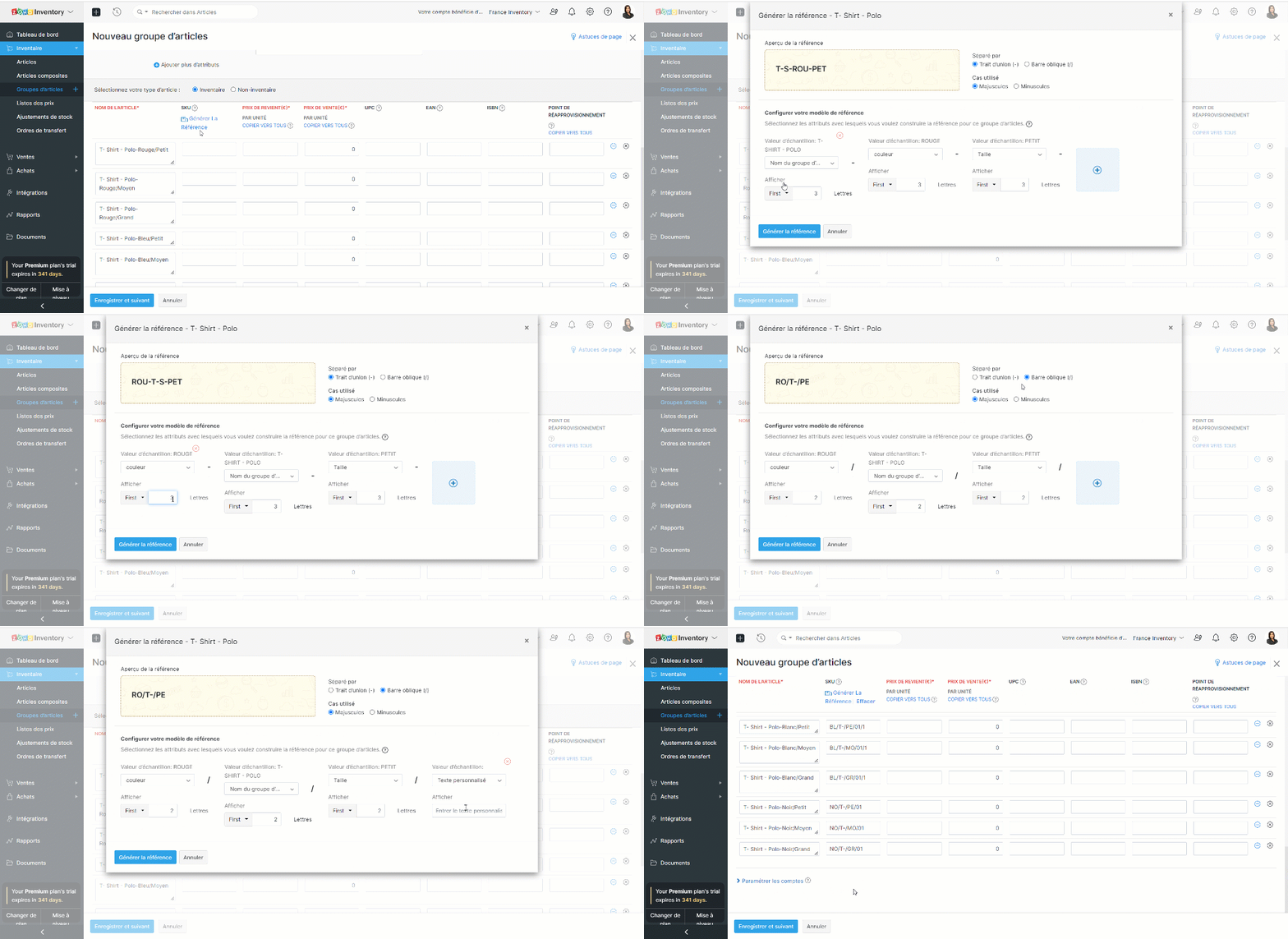
- Vous pouvez également ajouter des textes personnalisés à la SKU. Cliquez sur le menu déroulant "Valeur de l'échantillon" et sélectionnez l'option "Texte personnalisé". Saisissez le texte dans le champs ci-dessous. Visualisez les modifications que vous apportez à la structure de la SKU dans le champ "Aperçu de la SKU". Ce champs est en mode lecture seule. Vous ne pouvez pas modifier directement ce texte.

Créer les produits composites
- Pour activer cette fonctionnalité, allez à Paramètres >> Préférences >> Articles >> Articles composites.
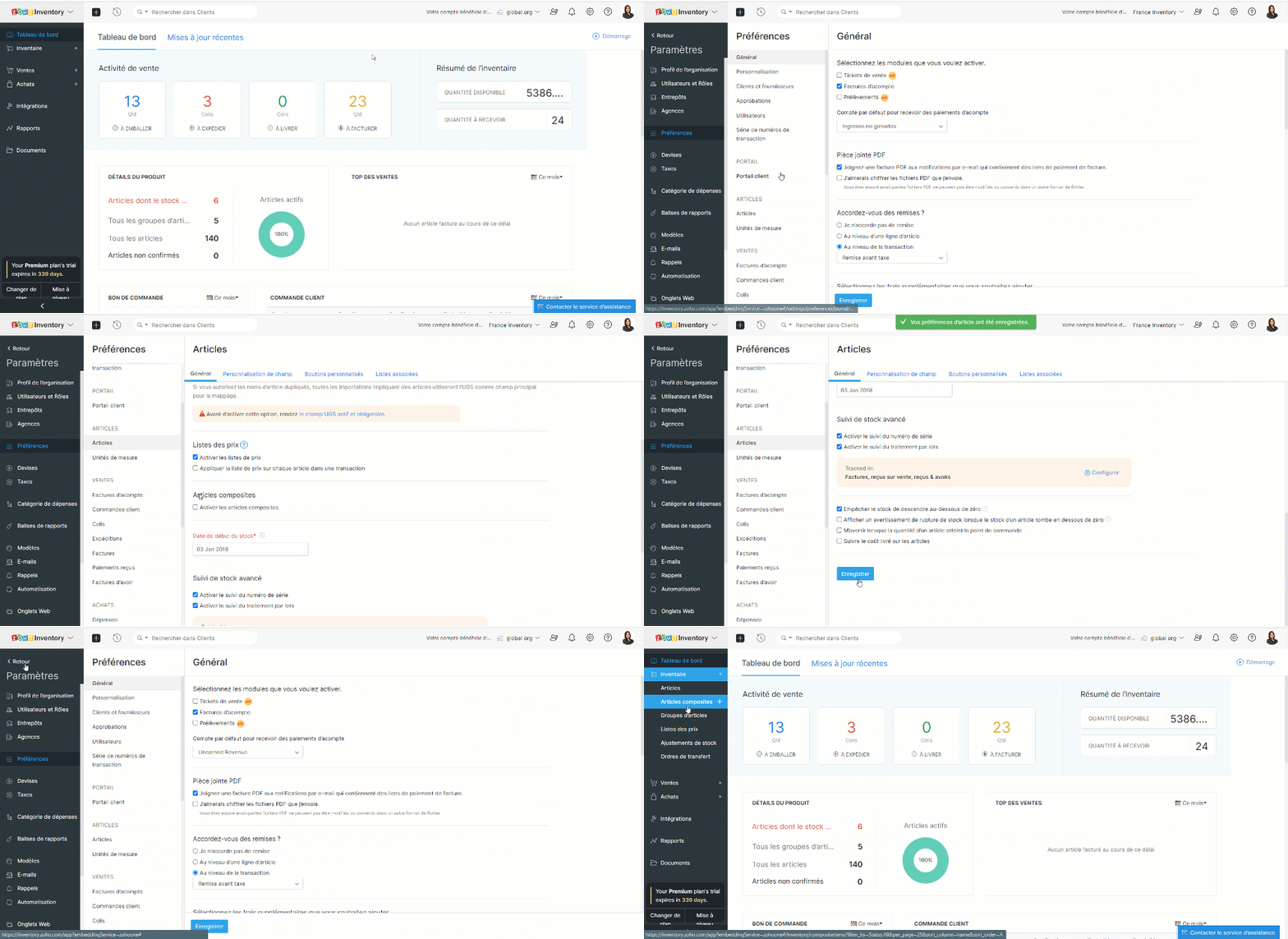
- Depuis le panneau à gauche, allez dans le module "Articles composites" sous "Inventaire".
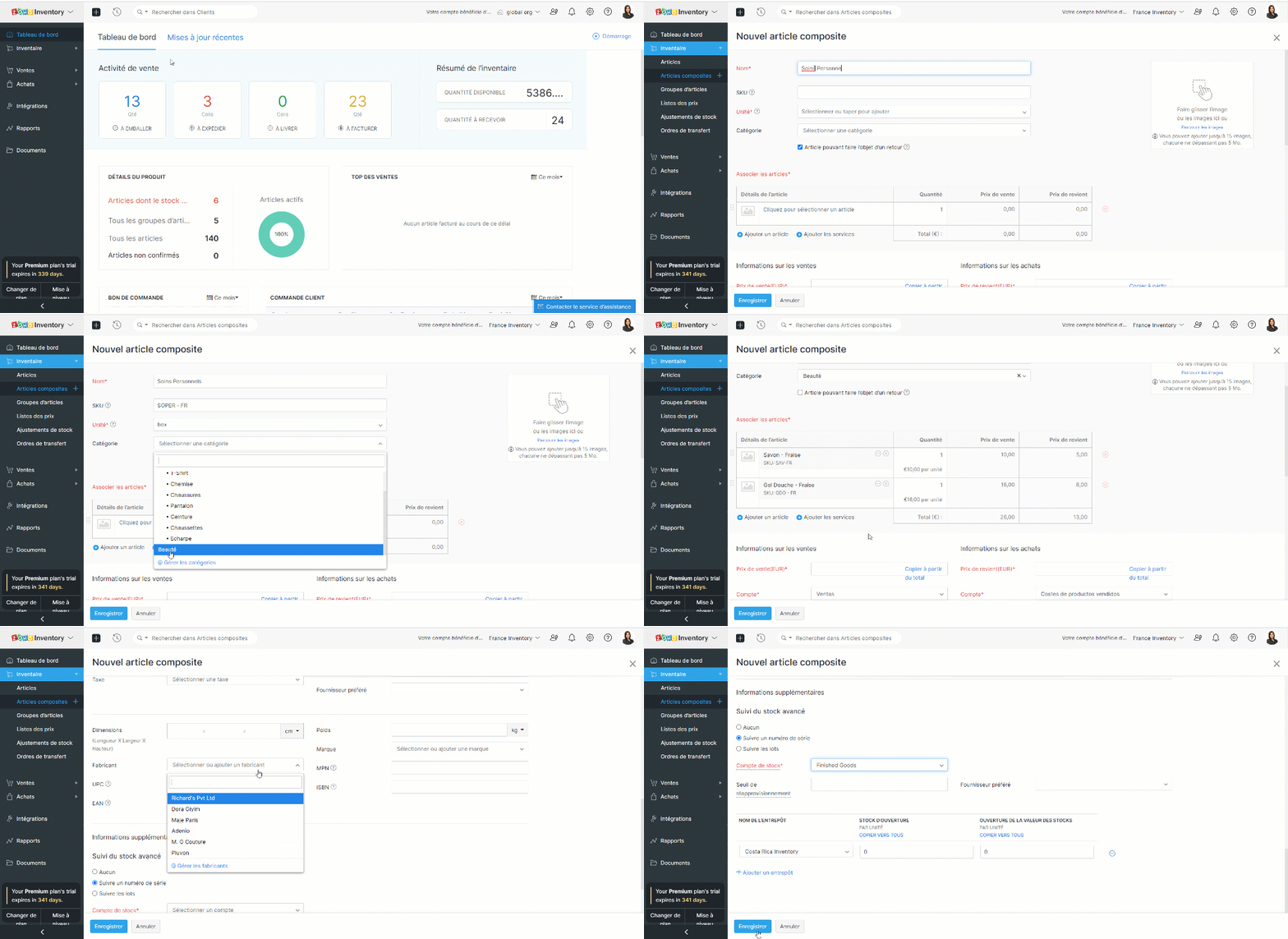
- Comme pour les articles individuels, saisissez le nom, le SKU, l'unité et la catégorie.
- Associez les produits ou services qui composent le produit composite et configurez sa quantité. Un produit d'un composite existant peut faire partie d'un nouveau produit composite.
- Saisissez les autres détails demandés tels que les informations sur les ventes et les achats.
- Activez "Suivi du stock avancé", saisissez les détails entrepôts et enregistrez.
Bon à savoir
- La définition d'un niveau de réapprovisionnement vous aide à réapprovisionner les articles avant qu'ils ne soient épuisés.
- Le stock d'ouverture désigne la quantité que vous avez en main avant de commencer à suivre l'inventaire de l'article.
- Vous pouvez également ajouter des numéros de série aux articles composites.
- Le champ SKU servira d'identifiant unique pour un article. Vous pouvez y stocker les informations relatives au code-barres de votre article, afin de pouvoir le scanner et le récupérer lors de la création de transactions.
Merci
L'équipe Zoho France
Topic Participants
Kinjal Lodaya
Lauren - BocoBoco
Sticky Posts
Collaboration sans faille avec Zoho One
Bonjour à tous, Dans cet article nous allons voir comment Zoho One permet une collaboration à différents niveaux . La façon dont nous travaillons évolue. À mesure que les entreprises se mondialisent, la plupart des activités sont menées en équipe.
Recent Topics
Zoho Projects Android app: Integration with Microsoft Intune
Hello everyone! We’re excited to announce that Zoho Projects now integrates with Microsoft Intune, enabling enhanced security and enterprise app management. We have now added support for Microsoft Intune Mobile Application Management (MAM) policies throughCant't update custom field when custom field is external lookup in Zoho Books
Hello I use that : po = zoho.books.updateRecord("purchaseorders",XXXX,purchaseorder_id,updateCustomFieldseMap,"el_books_connection"); c_f_Map2 = Map(); c_f_Map2.put("label","EL ORDER ID"); c_f_Map2.put("value",el_order_id); c_f_List.add(c_f_Map2); updateCustomFieldseMapWrapping up 2025 on a high note: CRM Release Highlights of the year
Dear Customers, 2025 was an eventful year for us at Zoho CRM. We’ve had releases of all sizes and impact, and we are excited to look back, break it down, and rediscover them with you! Before we rewind—we’d like to take a minute and sincerely thank youAbout Zoneminder (CCTV) and Zoho People
Hi team I would like to implement a CCTV service for our branches, with the aim of passively detecting both the entry and exit of personnel enrolled in Zoho Peeple, but my question is: It is possible to integrate Zoho People with Zoneminder, I understandIntroducing the Zoho Projects Learning Space
Every product has its learning curve, and sometimes having a guided path makes the learning experience smoother. With that goal, we introduce a dedicated learning space for Zoho Projects, a platform where you can explore lessons, learn at your own pace,Create CRM Deal from Books Quote and Auto Update Deal Stage
I want to set up an automation where, whenever a Quote is created in Zoho Books, a Deal is automatically created in Zoho CRM with the Quote amount, customer details, and some custom fields from Zoho Books. Additionally, when the Sales Order is convertedHow to show branch instead of org name on invoice template?
Not sure why invoices are showing the org name not the branch name? I can insert the branch name using the ${ORGANIZATION.BRANCHNAME} placeholder, but then it isn't bold text anymore. Any other ideas?Admin asked me for Backend Details when I wanted to verify my ZeptoMail Account
Please provide the backend details where you will be adding the SMTP/API information of ZeptoMail Who knows what this means?Unable to remove the “Automatically Assigned” territory from existing records
Hello Zoho Community Team, We are currently using Territory Management in Zoho CRM and have encountered an issue with automatically assigned territories on Account records. Once any account is created the territory is assigned automatically, the AutomaticallyKaizen #223 - File Manager in CRM Widget Using ZRC Methods
Hello, CRM Wizards! Here is what we are improving this week with Kaizen. we will explore the new ZRC (Zoho Request Client) introduced in Widget SDK v1.5, and learn how to use it to build a Related List Widget that integrates with Zoho WorkDrive. It helpsSet connection link name from variable in invokeurl
Hi, guys. How to set in parameter "connection" a variable, instead of a string. connectionLinkName = manager.get('connectionLinkName').toString(); response = invokeurl [ url :"https://www.googleapis.com/calendar/v3/freeBusy" type :POST parameters:requestParams.toString()Possible to connect Zoho CRM's Sandbox with Zoho Creator's Sandbox?
We are making some big changes on our CRM so we are testing it out in CRM's Sandbox. We also have a Zoho Creator app that we need to test. Is it possible to connect Zoho CRM's Sandbox to Zoho Creator's Sandbox so that I can perform those tests?I Need Help Verifying Ownership of My Zoho Help Desk on Google Search Console
I added my Zoho desk portal to Google Search Console, but since i do not have access to the html code of my theme, i could not verify ownership of my portal on Google search console. I want you to help me place the html code given to me from Google searchTimeline Tracker
Hi Team, I am currently using Zoho Creator – Blueprint Workflows, and I would like to know if there is a way to track a timeline of the approval process within a Blueprint. Specifically, I am looking for details such as: Who submitted the record Who clickedPrimary / Other Billing Contacts
If you add an additional contact to a Zoho Billing Customer record, and then mark this new contact as the primary contact, will both the new primary and old primary still receive notifications? Can you stop notifications from going to the additional contactsMissing Import Options
Hello, do I miss something or is there no space import option inside of this application? In ClickUp, you can import from every common application. We don't want to go through every page and export them one by one. That wastes time. We want to centralizeCRM x WorkDrive: File storage for new CRM signups is now powered by WorkDrive
Availability Editions: All DCs: All Release plan: Released for new signups in all DCs. It will be enabled for existing users in a phased manner in the upcoming months. Help documentation: Documents in Zoho CRM Manage folders in Documents tab Manage filesIs it possible to enforce a single default task for all users in a Zoho Projects ?
In Zoho Projects, the Tasks module provides multiple views, including List, Gantt, and Kanban. Additionally, users can create and switch to their own custom views. During project review meetings, this flexibility creates confusion because different users[Free Webinar] Zoho Creator webinars - Learning Table and Creator Tech Connect Series in 2026
Hello everyone, Wishing you all a wonderful new year! May 2026 and the years ahead bring more opportunities, growth, and learning your way 🙂 We’re excited to kick off the 2026 edition of the Learning Table Series and Creator Tech Connect Series ! LearningReply and react to comments
Hi everyone! We're excited to bring to you a couple of new features that'll make your sprint process simpler. A cloud application brings with it an array of social media features that can be efficiently used in your organizational setup. As an agile scrumRestrict Users access to login into CRM?
I’m wanting my employees to be able to utilize the Zoho CRM Lookup field within Zoho Forms. For them to use lookup field in Zoho Forms it is my understanding that they need to be licensed for Forms and the CRM. However, I don’t want them to be able toModule Customisation - Lookup function not available
Good evening, Within my business, I can have multiple customers, who have multiple mobile assets. When I set these assets up, I enter information such as vehicle registration, Vehicle identification number (VIN), Unit number, YOM, in addition to others.zoho click, and nord VPN
Unfortunately, we've been having problems with Zoho Click, where essentially the line cuts off after about a minute's worth of conversation every time we are on VPN. Is there a way we can change this within the settings so it does not cut the line offZoho Calender
a) does the clanender in zoho project allow you to see the name of the event in the celnder view, it currently says either "Task (1) or "Milestoen (1)" b) Alternatively does the calender in Zoho project integrate with zoho calender?Matching ZOHO Payments in Banking
Our company has recently integrated ZOHO Payments into our system. This seemed really convenient at first because our customers could pay their account balance by clicking on a link imbedded in the emailed invoice. Unfortunately, we can't figure out howTeam Gamification
Would love to motivate, engage and encourage our team with our social media posts. Would like to include Gamification features of Social Media in Zoho Social or Marketing Automation. And also bring in Social Advocacy tools/tracking/management to these,Power up your Kiosk Studio with Real-Time Data Capture, Client Scripts & More!
Hello Everyone, We’re thrilled to announce a powerful set of enhancements to Kiosk Studio in Zoho CRM. These new updates give you more flexibility, faster record handling, and real-time data capture, making your Kiosk flows smarter and more efficientNew Enhancements to Zoho CRM and Zoho Creator Integration
Hello Everyone, We’ve rolled out enhancements to the Zoho Creator and Zoho CRM integration to align with recent updates made to the Zoho Creator platform. With enhancements to both the UI and functionality, This update also tightens access control byWork Type - Limitation
Hello, I'm setting up work types and have noticed, a limitation on the parts area to 10 lines. Can this be increased to 20 or greater? In addition to this, when I attempt to add the work type to a work order, the correct labour hours doesn't flow through.Emails sent through Bigin are not posting in IMAP Sent folder
I have set up my email to work from within Bigin using IMAP. I am using IMAP so I can sync my email across multiple devices - phone / laptop / desktop / iPad / etc. I want all my emails to populate my email client (outlook & iphone email) whether orTurning the page for Zoho SalesIQ: 2025 to 2026
As we wrap up 2025, we would like to take a moment to reflect on what we set out to achieve this year, what we’ve delivered, and where we’re headed next. What we focused on in 2025 This year was all about strengthening the core of engagement and AI, makingStage-probability mapping feature in custom module
Hi, I'm building a custom module for manage projects. I would like to implement the stage-probability feature that Potentials has. Is this possible?Temporary Outage in Zoho Cliq Affecting US Users – July 23, 2025
We experienced a service disruption in Zoho Cliq that impacted core functionality for users in the US region. The issue occurred between Jul 23, 2025, 06:54:00 PM IST and 07:13:13 PM IST, lasting approximately 19 minutes. To restore service stability,Why Sharing Rules do Not support relative date comparison???
I am creating a Sharing Rule and simply want to share where "Last Day of Coverage" (Date field) is Greater than TODAY (Starting Tomorrow). However, sharing rules don't have the option to compare a date field to a relative date (like today), only to StaticZoho Cliq not working on airplanes
Hi, My team and I have been having this constant issue of cliq not working when connected to an airplane's wifi. Is there a reason for this? We have tried on different Airlines and it doesn't work on any of them. We need assistance here since we are constantlyProblem with Workdrive folders
I'm having a problem a problem accessing files in a Zoho work drive folder when using the Zoho writer app. The problem folder appears grayed out in the Zoho work drive window in both the online and writer application. However I can open the folder inMulti-currency and Products
One of the main reasons I have gone down the Zoho route is because I need multi-currency support. However, I find that products can only be priced in the home currency, We sell to the US and UK. However, we maintain different price lists for each.Create an Eye-Catching Announcement Widget for Your Help Center
Hello Everyone! In this week’s edition, let’s explore how to keep your customers updated with exciting news in the Help Center. See how ZylkerMobile wowed their customers by bringing updates right to their portal. ZylkerMobile, the renowned brand forSend Whatsapp with API including custom placeholders
Is is possible to initiate a session on whatsapp IM channel with a template that includes params (placeholders) that are passed on the API call? This is very usefull to send a Utility message for a transactional notification including an order numberCustomer Management: #6 Common Mistakes in Customer Handling
Managing customers doesn't usually fall apart overnight. More often, slight gaps in the process slowly become bigger problems. Incidents like missed follow-ups, billing confusion, and unhappy customers will lead to revenue loss. Many businesses don'tNext Page