Zoho Inventory - Les premiers pas de la configuration
Zoho Inventory - Les premiers pas de la configuration


Le contrôle des stocks permet une visibilité de tous les produits qu'une entreprise possède à un moment donné. Le contrôle des stocks comprend la gestion des nouveaux stocks et ceux vendus. Lorsqu'une entreprise a une vue d'ensemble plus détaillée, elle est en mesure de répondre à la demande des clients plus efficacement et de réduire les coûts associés à la détention de stocks. C'est à dire le contrôle des stocks, la gestion des commandes, des chaînes de distribution et la valeur des stocks.
Dans cet article, nous allons découvrir quelques-unes des configurations de base de Zoho Inventory qui vous permettront de gérer le stock de votre entreprise depuis n'importe où.

Tableau de bord

Le tableau de bord vous donne une image précise des ventes et du rapport de stock de votre entreprise, notamment les commandes que vous avez générées, les articles les plus vendus, le stock acheté auprès de votre fournisseur pour la période sélectionnée et plus encore.
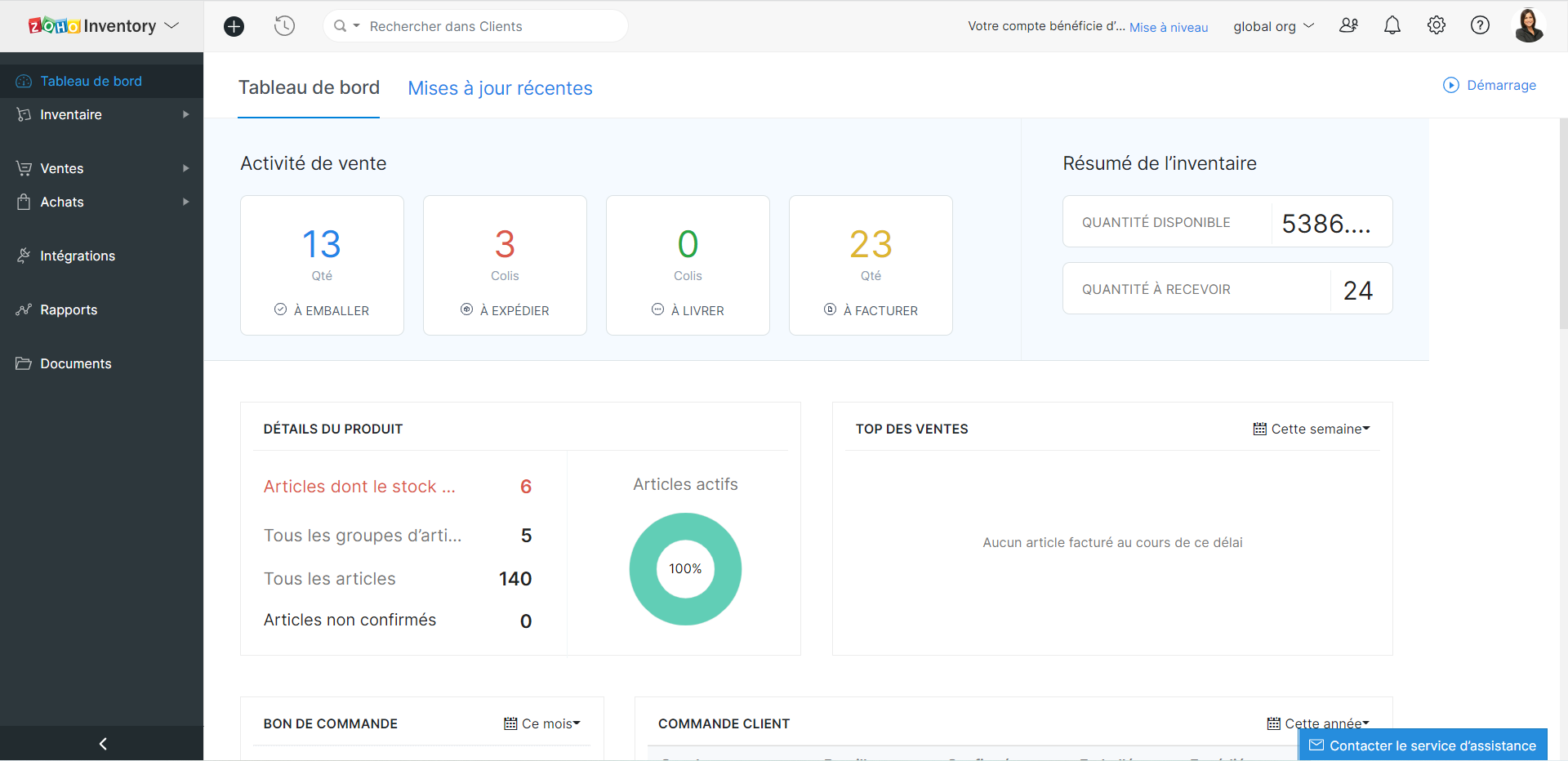

Astuces - Lorsque vous avez intégré Zoho Inventory avec Zoho Books, le tableau de bord de Zoho Inventory inclura également les données de Zoho Books.

Profil de l'organisation

Les informations sur l'organisation sont automatiquement enregistrées lorsque vous faites partie de l'écosystème Zoho One. Néanmoins, pour toute modification ou ajout, vous pouvez le faire depuis l'onglet "Profil de l'organisation" sous l'onglet "Paramètres".

Utilisateurs et rôles

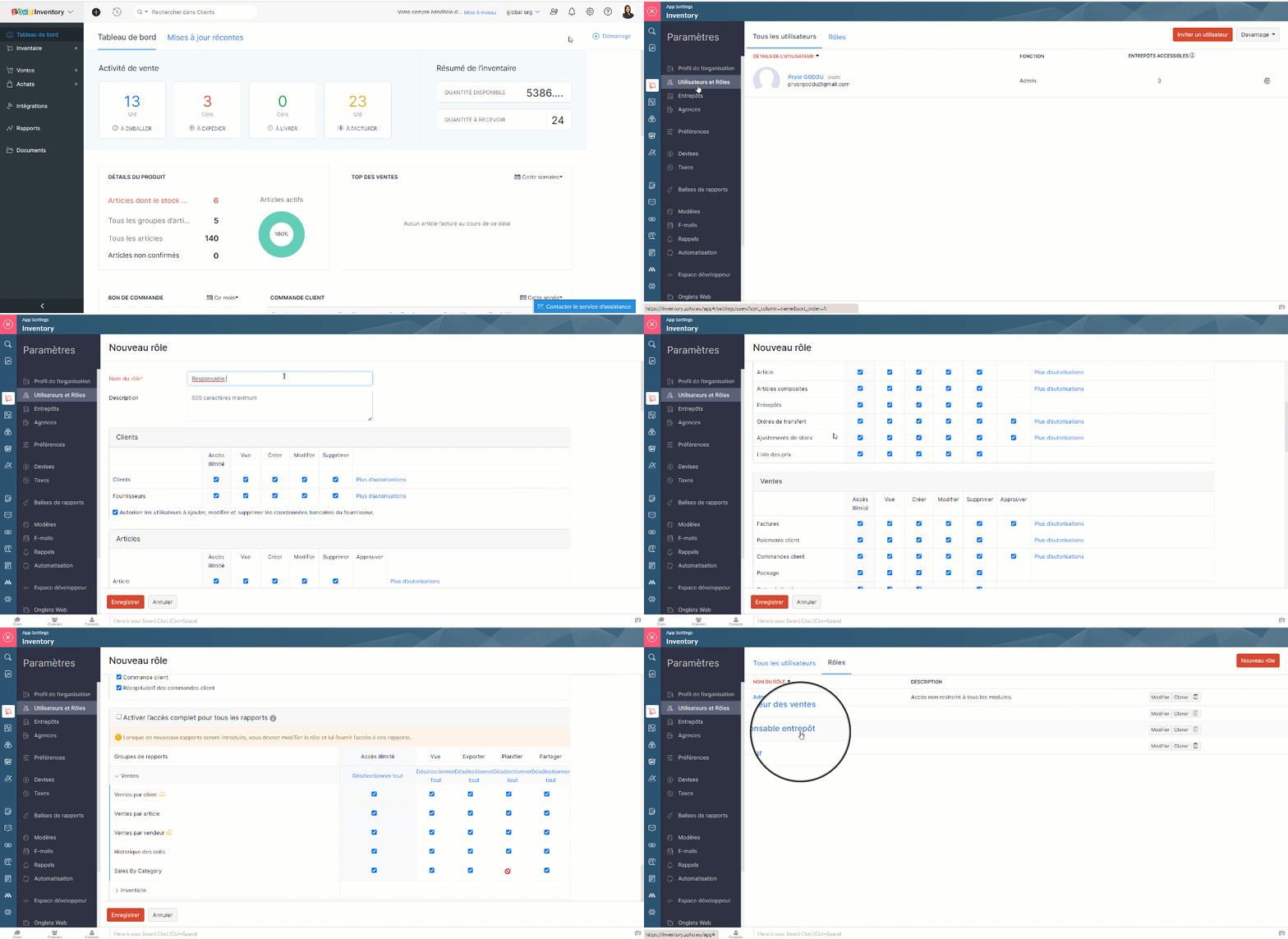
Les utilisateurs peuvent accéder aux modules en fonction de leur rôle. Par défaut, Zoho Inventory vous propose le rôle d'administrateur. Les autres rôles peuvent être créés en définissant les niveaux d'accès et les permissions dans Zoho Inventory.

Créer des rôles d'utilisateur personnalisés

  • Paramètres >> Utilisateurs et Rôles >> Rôles >> Nouveau rôle
  • Saisisez le nom du rôle, configurez les permissions et enregistrez
Ajouter les utilisateurs

  • Paramètres >> Utilisateurs et Rôles >> Tous les utilisateurs >> Inviter un utilisateur
  • Saisissez les détails demandés, enregistrez.
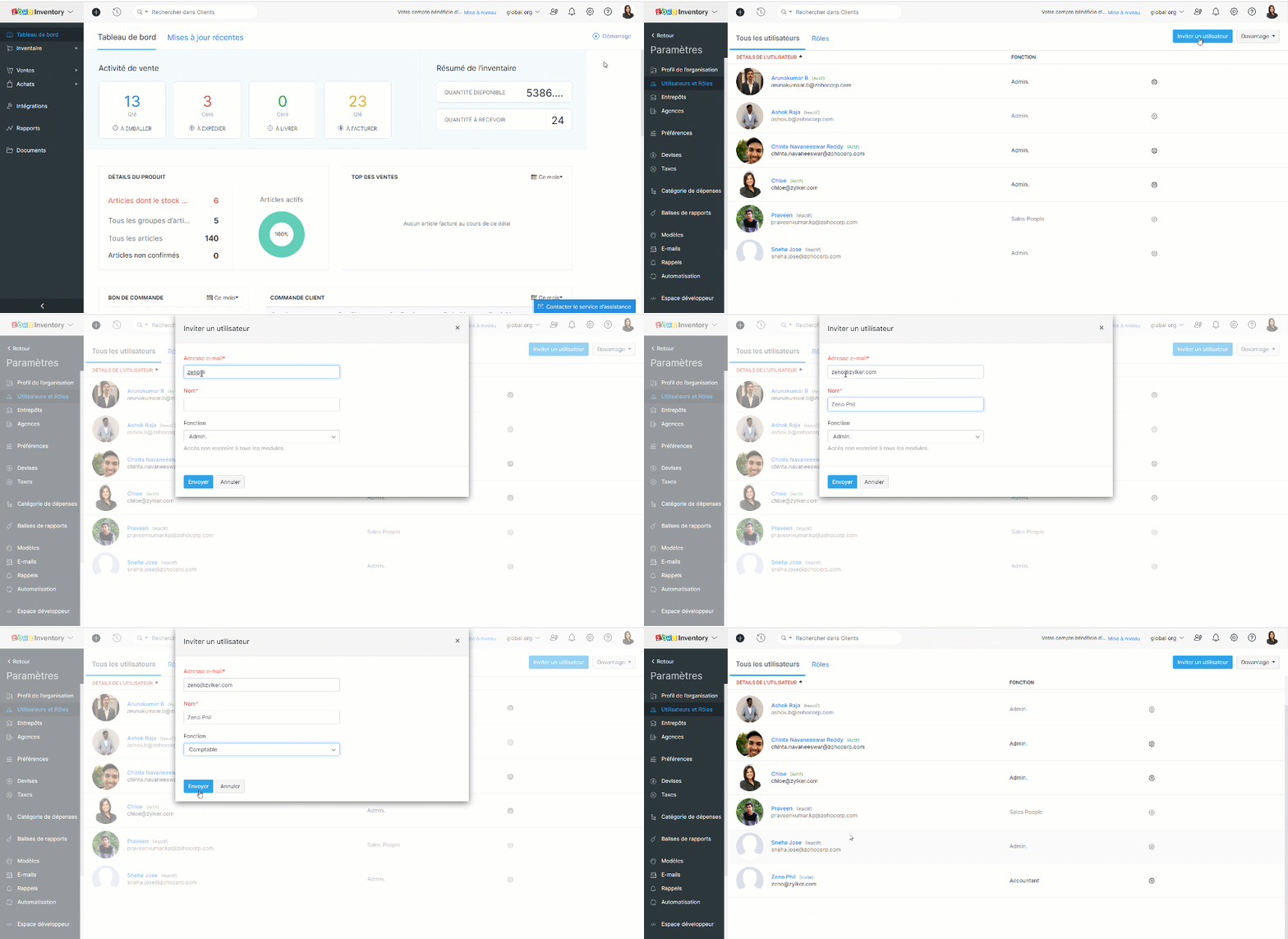
Une invitation est envoyée par e-mail et lorsque l'utilisateur clique sur le lien "Join Account", il peut accéder au portail Zoho Inventory de votre organisation.

Devises

Traitez-vous avec des clients et des fournisseurs de plusieurs pays ? Il est désormais facile de gérer toutes les devises. Il vous suffit de les ajouter ainsi queet les taux de change à votre compte Zoho Inventory.

Devise de base

Il s'agit de votre devise de fonctionnement par rapport à laquelle les taux de change sont proposés dans un pays donné. C'est vous qui la définissez lorsque vous créez votre organisation. La devise de base sera appliquée aux prix de vos articles, à vos transactions (pour autant que le contact ait la même devise) et à vos rapports.
Bon à savoir 
Vous ne pouvez pas supprimer votre devise de base à tout moment. Cependant, vous pouvez la changer s'il n'y a pas de transactions dans votre compte Zoho Inventory. Dès que vous commencez à effectuer des transactions, la devise de base est appliquée de façon permanente à votre organisation.

Ajouter une nouvelle devise

  • Zoho Inventory >> Paramètres >> Devises >> + Nouvelle devise
  • Choisissez la devise, saisissez la symbole, le nom, décimales et enregistrez.
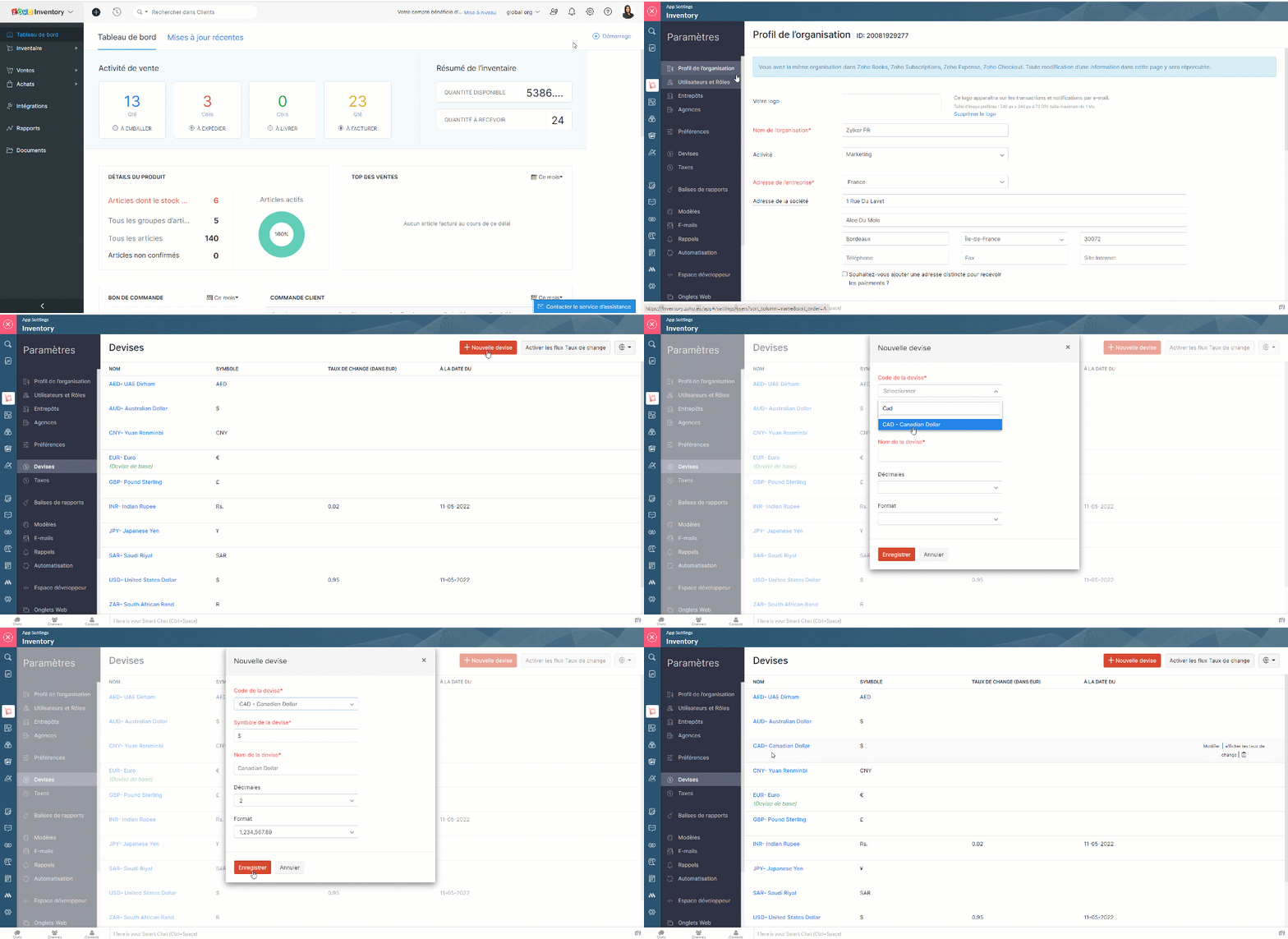
Associer des devises à un contact

Lorsque vous ajoutez un client ou un fournisseur à vos contacts, vous disposez d'un champ de devise dans lequel vous pouvez associer le contact à une devise spécifique. Dans le cas d'un client ou d'un vendeur du même pays que vous, la devise qui lui est associée sera votre devise de base. Par contre, si le client ou le vendeur est d'un autre pays, vous pouvez associer leur devise respective. Elle sera appliquée aux transactions que vous effectuez avec eux.

Activer le taux de change automatique

  • Paramètres >> Devises >> Activer les taux de change
  • Une fenêtre pop-up s'affichera, cliquez sur "OK" et vous avez activé les champs de taux de change.
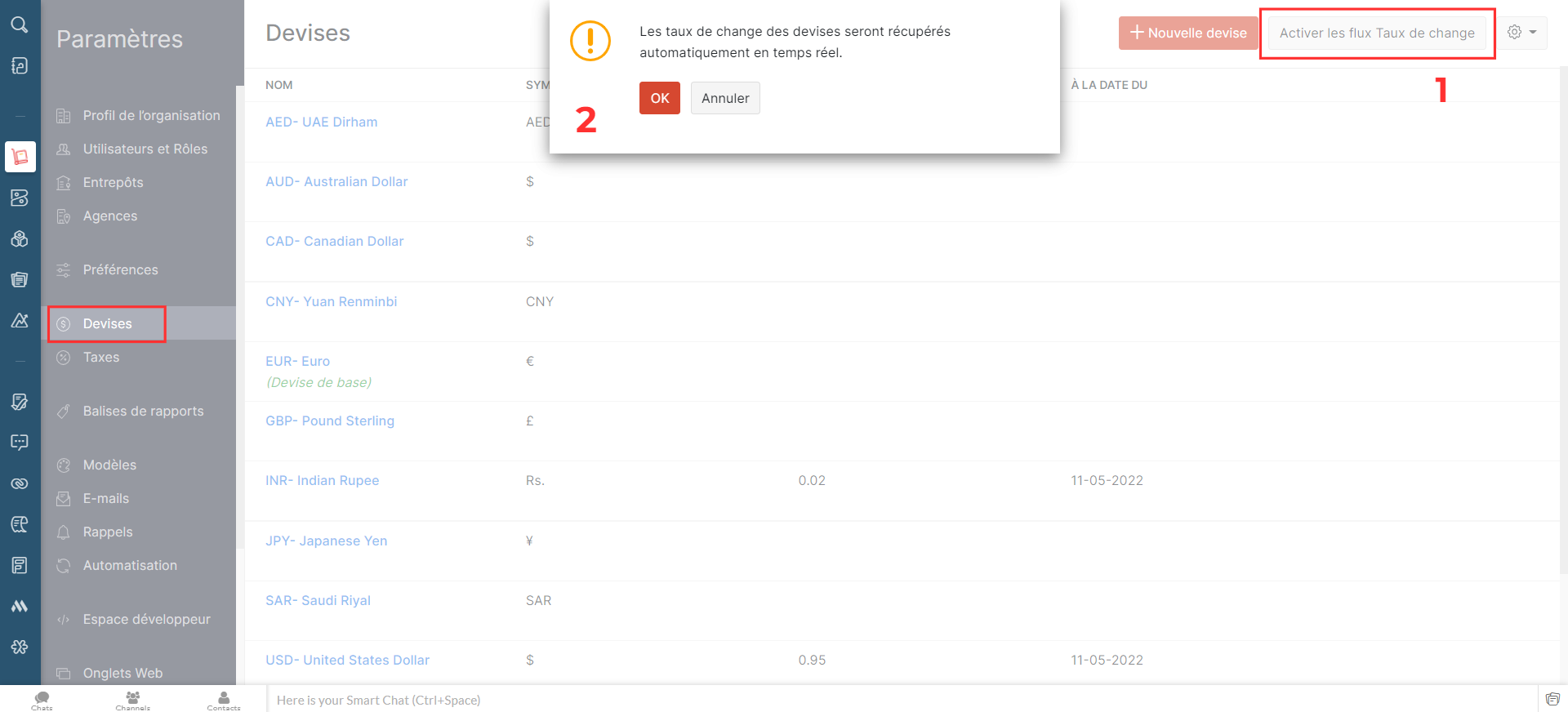

Ajouter les taux de change de façon manuelle

Pour ajouter le taux de change,
  • Passez sur la devise pour laquelle vous souhaitez ajouter le taux de change.
  • A droite, cliquez sur "afficher les taux de change"
  • Sélectionnez "Ajouter un taux de change"
  • Saisissez les détails demandés, enregistrez
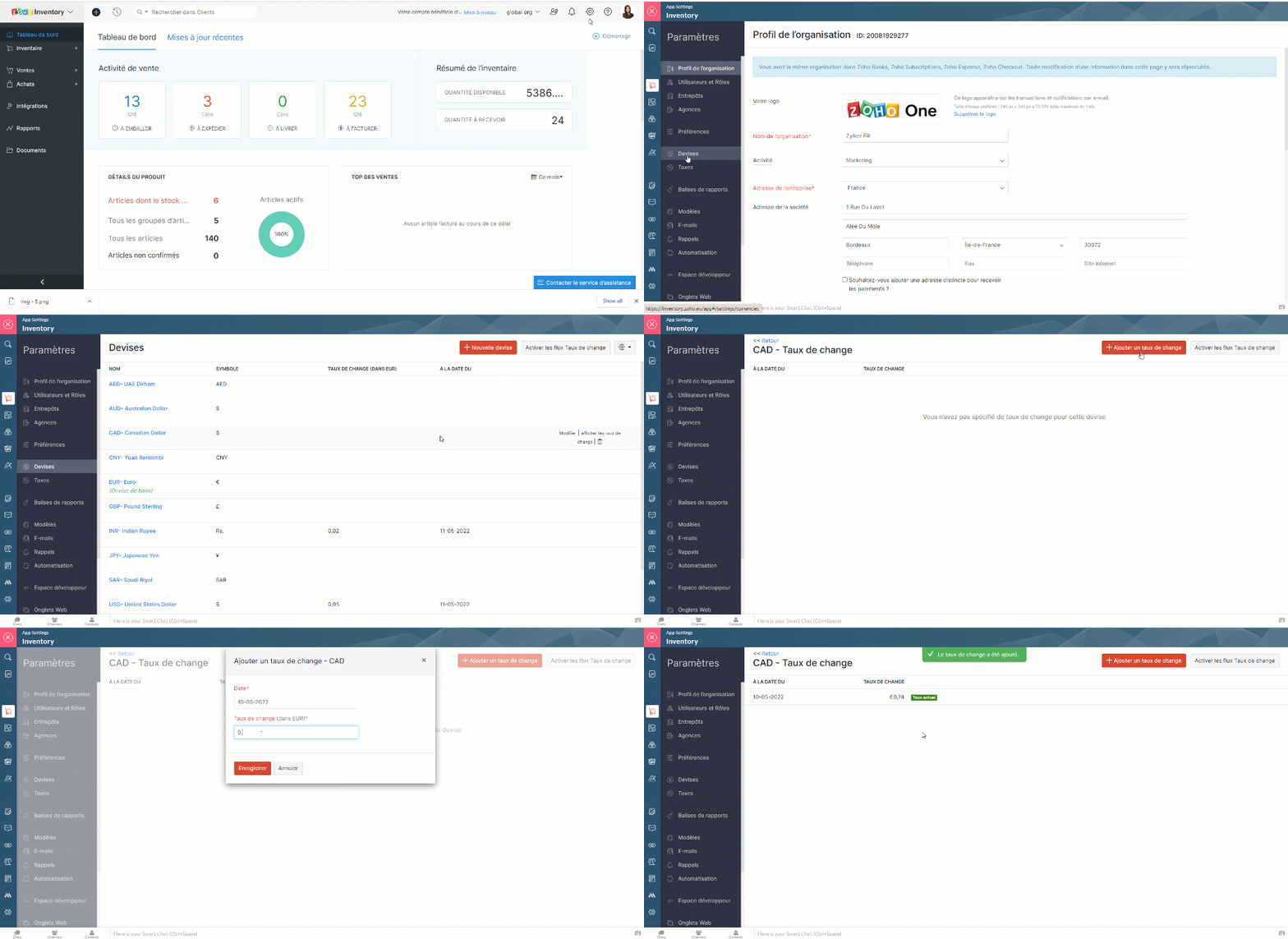

  • Cela peut donner un bon aperçu des fluctuations des taux de change. Vous pouvez également supprimer un taux existant à partir de cette page.

Entrepôts

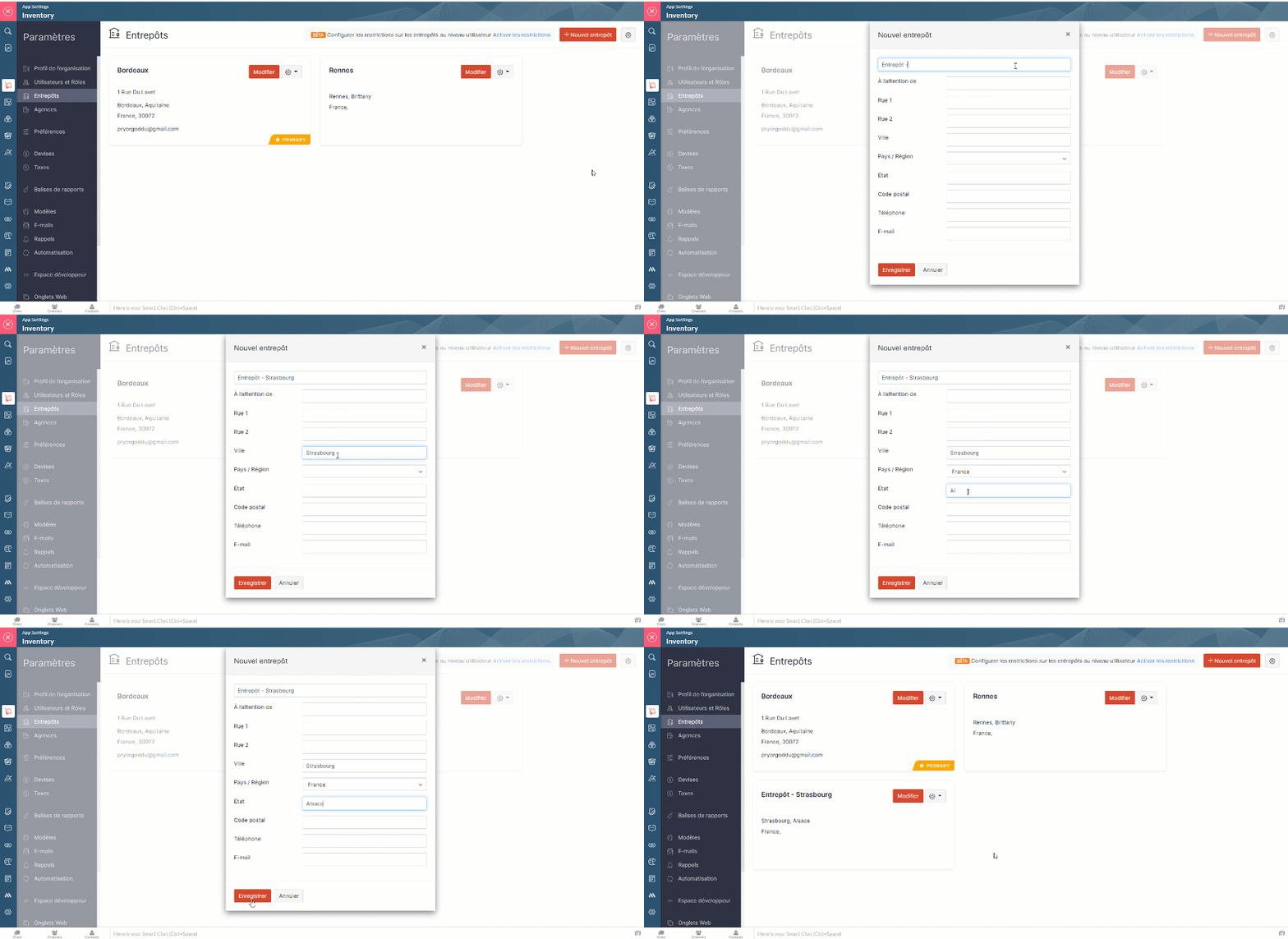
Zoho Inventory vous permet d'ajouter plusieurs entrepôts. Lors de la création de commandes, vous pouvez choisir l'entrepôt de/vers lequel vous voulez expédier (ventes) ou recevoir (achat) le stock. Vous pouvez également transférer des stocks entre vos différents entrepôts.

Gérer les multi-entrepôts

  • Zoho Inventory >> Paramètres >> Entrepôts >>Activer l'entrepôt multiple
  • Cette section, vous permet d'ajouter les nouveaux entrepôts, de modifier les informations attribuer sous chaque entrepôts, de supprimer celui qui est inactif et de modifier son statut (actif ou inactif).
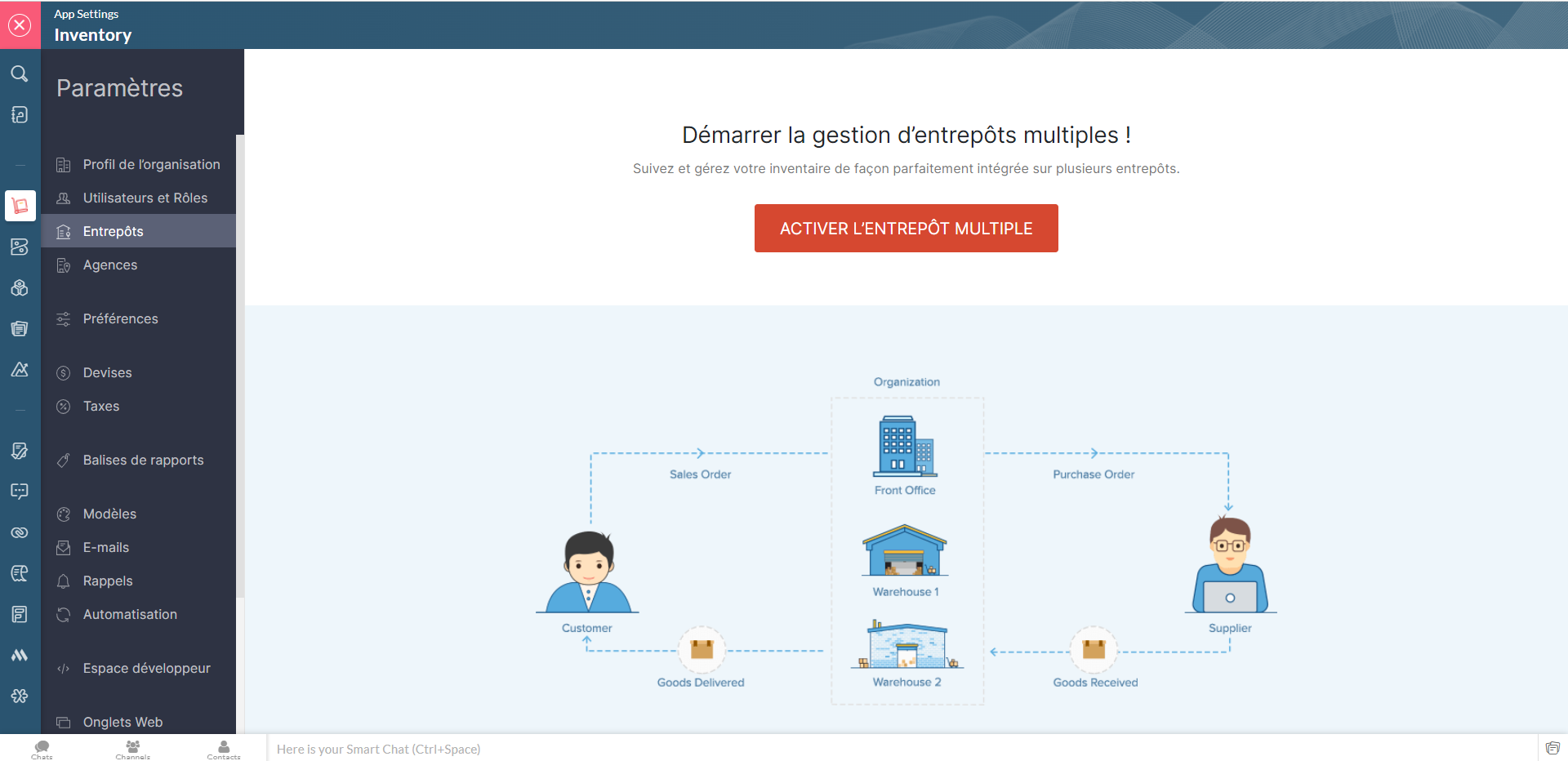

Limitations des entrepôts

Lorsque vous activez la gestion multi-entrepôts dans Zoho Inventory, tous les entrepôts seront initialement accessibles aux utilisateurs. Pour limiter leurs droits d'accès, vous pouvez mettre en place des limitations et associer les utilisateurs à des entrepôts spécifiques, afin qu'ils ne puissent voir que les détails de ces entrepôts.

Activer les droits d'accès

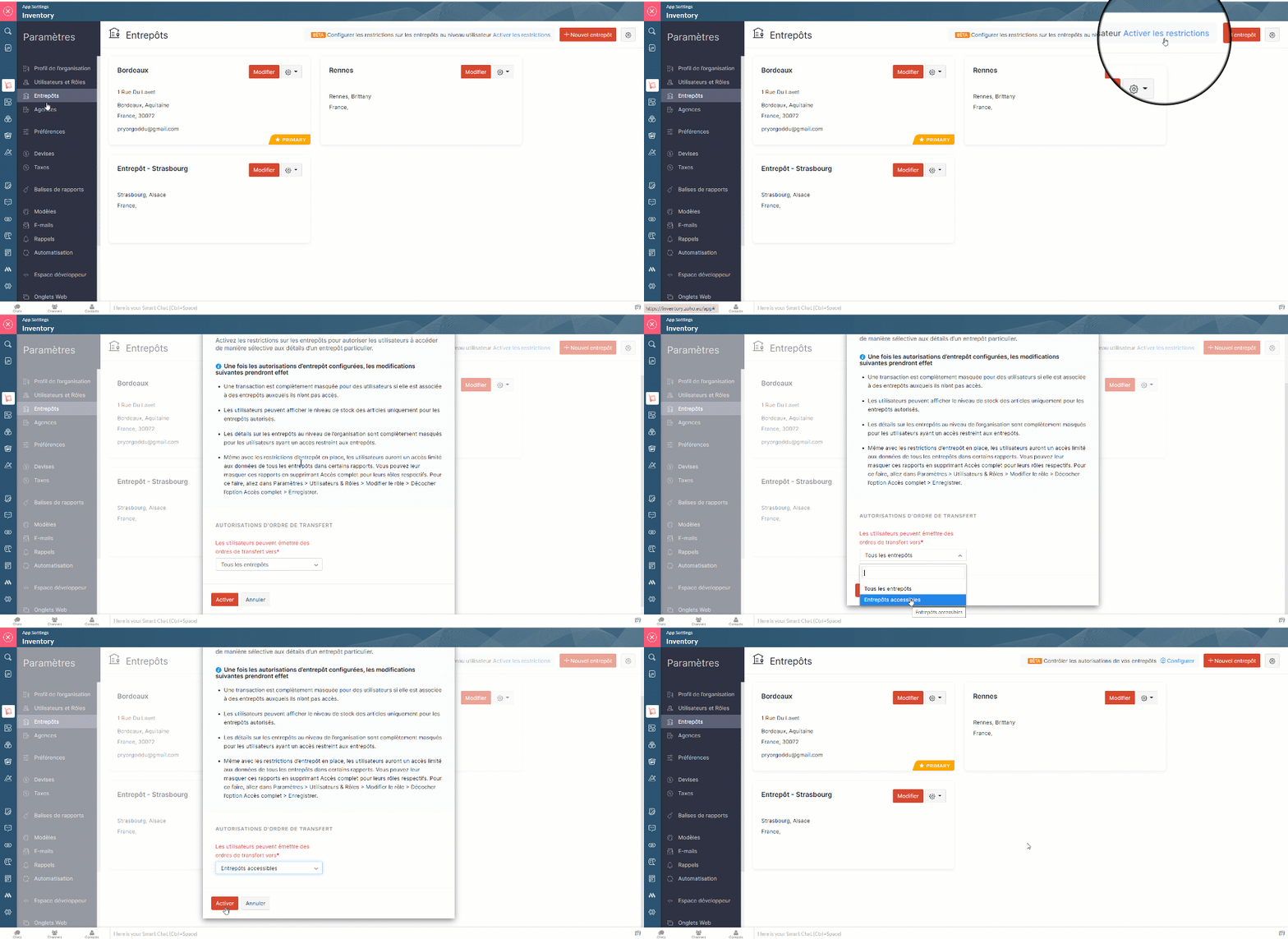
  • Paramètres >> Entrepôts >> Activer l'entrepôt multiple >> Activer les limites. Seuls les utilisateurs avec l'accès administrateur peuvent activer cette fonction.
  • A partir de la fenêtre pop-up qui s'affiche, choisissez si les utilisateurs peuvent émettre des ordres de transfert vers tous les entrepôts ou seulement vers ceux qui sont autorisés.
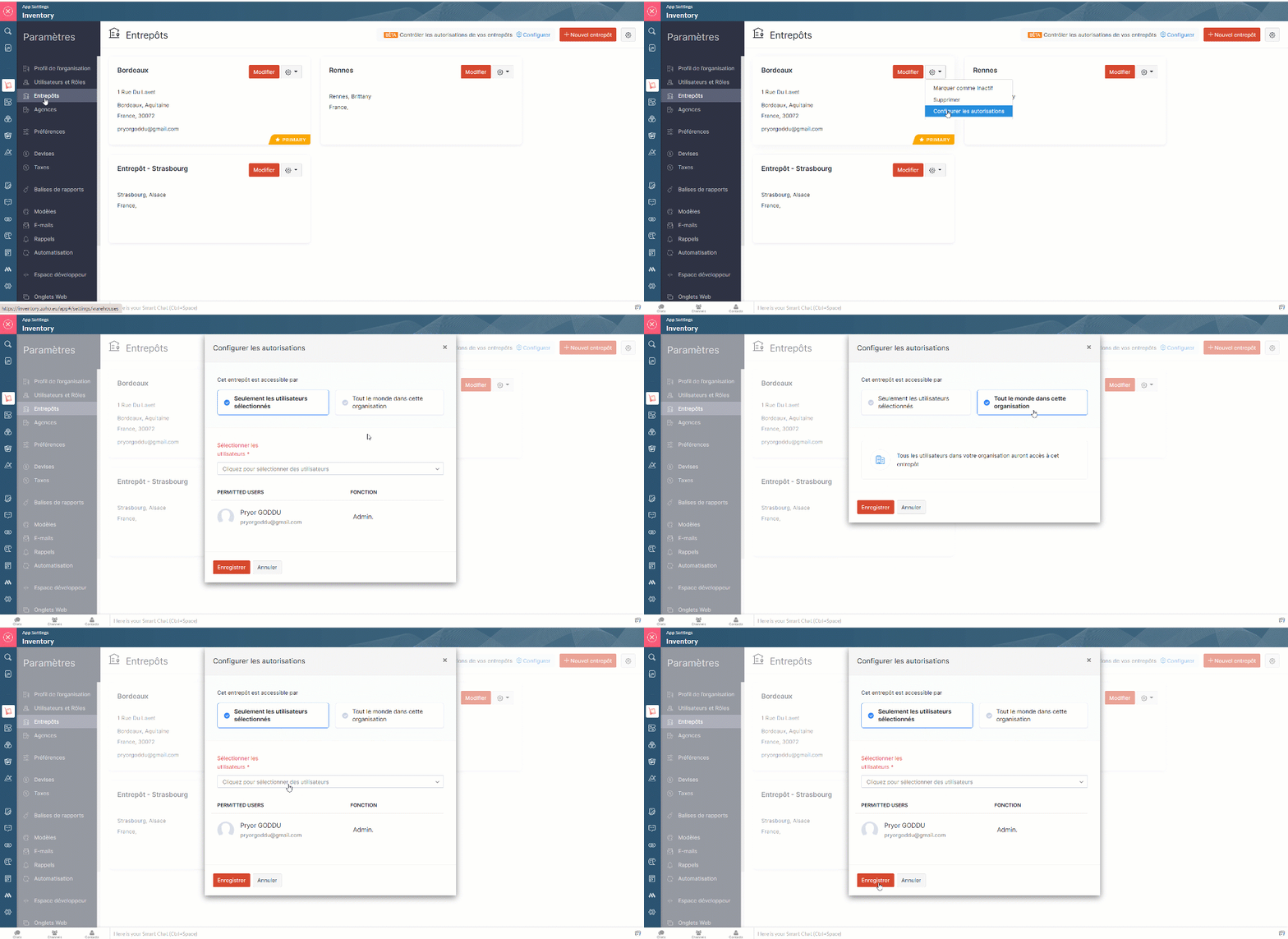
  • Allez sur "Configurer les autorisations" depuis l'onglet "Paramètres" à partir d'entrepôt particulier.
  • Dans la fenêtre pop-up, sélectionnez l'option "Seulement les utilisateurs sélectionnés" et depuis la liste déroulante attribuez les utilisateurs auxquels vous souhaitez donner accès à cet entrepôt précis.
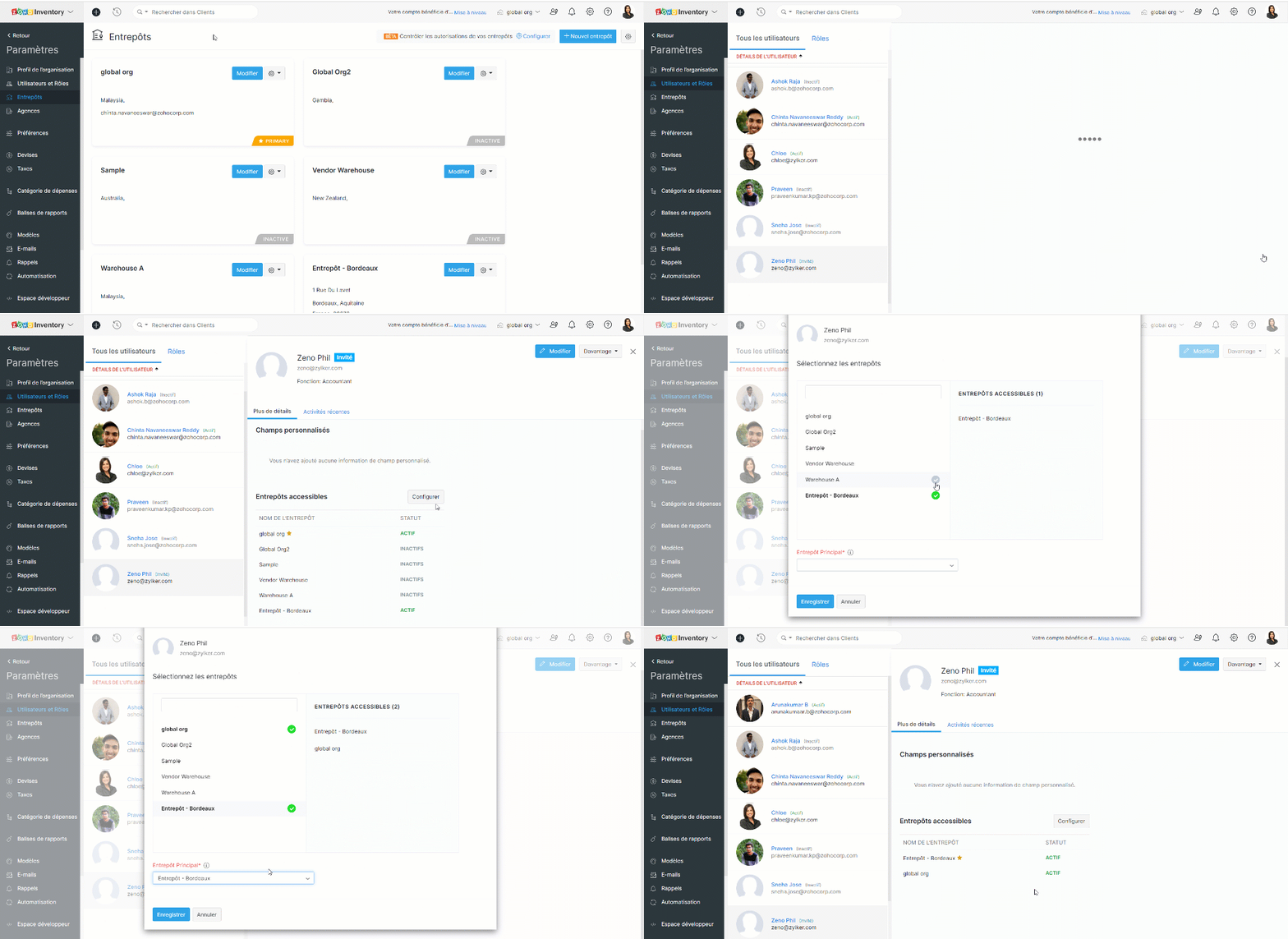
  • Vous pouvez également attribuer les entrepôts depuis la section de "Utilisateurs et Rôles".
Lorsque vous avez configuré les autorisations, les changements ci-dessous sont effectifs :
  • Le tableau de bord et les rapports restent non modifiés pour les utilisateurs ayant accès à tous les entrepôts, tandis que, les utilisateurs restreints peuvent uniquement voir les informations sur les ventes et les achats dans le tableau de bord et les rapports des entrepôts autorisés.
  • Les utilisateurs peuvent visualiser les transactions dans la page de liste si celle-ci inclut au moins un entrepôt autorisé. Cependant, ils ne peuvent pas ouvrir une transaction s'ils n'ont pas accès à tous les entrepôts de la liste.
  • Les utilisateurs à accès limité ne peuvent pas voir les détails du stock global dans la page de la liste des articles.
  • Les organisations qui ont des limitations d'entrepôt activées sont indiquées par une icône de verrou à côté de leur nom d'organisation.
  • Les utilisateurs non admins ayant les droits de créer/modifier des entrepôts peuvent :
    • Créer des entrepôts et y attribuer des utilisateurs autorisés.
    • Modifier la liste des utilisateurs autorisés pour les entrepôts auxquels ils ont accès.

L'équipe Zoho France

    • Sticky Posts

    • Collaboration sans faille avec Zoho One

      Bonjour à tous, Dans cet article nous allons voir comment Zoho One permet une collaboration à différents niveaux .       La façon dont nous travaillons évolue. À mesure que les entreprises se mondialisent, la plupart des activités sont menées en équipe.
      • Recent Topics

      • Ticket Stages Report

        From data to decisions: A deep dive into ticketing system reports Ticket stages refer to the series of transitions from the moment a support ticket is created until it is closed. It moves through various stages based on the actions taken at each preceding
      • 【参加無料】今年最後のZoho ユーザー交流会|東京・大阪・名古屋で開催! 活用事例&ユーザー同士の情報交換

        ユーザーの皆さま、こんにちは。コミュニティチームの中野です。 11月に東京、大阪、名古屋の3都市でZoho ユーザー交流会を開催します! 毎回ご好評いただいている本イベントでは、実際の Zohoユーザーによるリアルな活用事例の共有や 参加者同士でノウハウを交換し合うグループワークを予定しています。 「他社の活用を参考にしたい」「Zoho をもっと使いこなしたい」方にぴったりの場です。 初参加の方もぜひお気軽にご参加ください! ーーーーーーーーーーーーーーーーーーーーーーーーーーーーーーーーーーーーー
      • Slow Performance on desk.zoho.com. 11/3/2025

        I’m not seeing any active service alerts for desk.zoho.com, but everyone on our account is currently experiencing very slow load times when opening or navigating tickets. We’ve already tried the standard troubleshooting steps — clearing cache and cookies,
      • Enhance Sign CRM integration

        Hello all, I'm working on a custom Deluge script to enhance the integration between Zoho CRM and Sign by using a writer merge template for additional flexibility. I want to replicate the post-sign document integration that exists between CRM and Sign
      • March 15, 2023: Zoho Docs is discontinued

        As of today (March 15, 2023) Zoho Docs is discontinued for all users. We would like to thank our customers for trusting us for so many years! Going forward, we're confident you'll enjoy using Zoho WorkDrive for all your advanced file management and collaboration
      • Create View to See Tickets Closed within the last 3 days

        I'm trying to create a view in Zoho Desk that shows me "recently closed ticket," which I will define as tickets closed in the last 3 days. I want this view to update so that whenever I click to view it is recalculates and shows me tickets closed within
      • Canvas View in Zoho Recruit

        Is it possible or would it be possible to have the new 'Canvas View' in Zoho Recruit?
      • Allow Multiple usage units to items while adding them to sales/purchase transactions

        The usage unit of items added in zoho books are static right now and can not be changed. But certain items are received or sold in multiple usage units. One example is fabric. It can be bought in Meters, inches, kgs or other units. Another example would
      • Will I Get a Refund If I Downgrade Zoho Mail?

        Hello, We upgraded an email account for our new employee. However, the employee left after one month, and now I've reduced the number of Zoho Mail users from 7 to 6. Can we get a refund for the remaining portion of our annual payment?
      • Introducing Profile Summary: Faster Candidate Insights with Zia

        We’re excited to launch Profile Summary, a powerful new feature in Zoho Recruit that transforms how you review candidate profiles. What used to take minutes of resume scanning can now be assessed in seconds—thanks to Zia. A Quick Example Say you’re hiring
      • How to copy value from a single line field into a picklist field within a module's subform?

        Hello there, I have a single line field in a module's subform. I would like the value in the field to automatically update a picklist field within the same subform (both have items with the same names). Is this possible via function? Unfortunately, workflows
      • Send Whatsapp message from Whatsapp template with custom variables

        Hi, I'm trying to do some basic integration for sending WhatsApp messages from Zoho CRM using Zoho Desk whatsapp templates. When creating new whatsapp template in Zoho Desk we can choose ticket related fields as variables but it's not clear how to use
      • Recurring Events Not Appearing in "My Events" and therefore not syncing with Google Apps

        We use the Google Sync functionality for our events, and it appears to have been working fine except: I've created a set of recurring events that I noticed were missing from my Google Apps calendar. Upon further research, it appears this is occurring
      • Dissociate account from contact

        Hello, When I make the call through the API to "Dissociate account from contact" using, /api/v1/contacts/**integer**/accounts/**integer**/dissociate I get this response back, 422Unprocessable Entity (WebDAV) (RFC 4918) { "errorCode": "INVALID_DATA", "message":
      • Zoho Desk and Zoho People Integration - is it possible in order to alert whether an agent is available

        Hi, We use Zoho People for our employees to log absence (Paid Time Off etc). I was wondering if it was possible that this information can be shared in to Zoho Desk, so that when allocating a ticket to an agent, if they are on leave there is an onscreen
      • Add Save button to Expense form

        A save button would be very helpful on the expense form. Currently there is a Save and Close button. When we want to itemize an expense, this option would be very helpful. For example, if we have a hotel expense that also has room service, which is a
      • Change Currency symbol

        I would like to change the way our currency displays when printed on quotes, invoices and purchase orders. Currently, we have Australian Dollars AUD as our Home Currency. The only two symbol choices available for this currency are "AU $" or "AUD". I would
      • Call transcrition working for ringcentral?

        I don't see anything about what telephony providers can be used. The Zoho support person A said that RingCentral isn't supported. Zoho support person B said that it works, just make sure the call recording link works. Excellent instructions here: Call
      • How to Send Email from within a custom module (with or without an email template)

        It is possible to send an email from the Deals module. However, I can't find a way to send an email from any of our custom modules. I have tried adding an email field to the modules (even though we don't really want one or need it there). That doesn't
      • All new Address Field in Zoho CRM: maintain structured and accurate address inputs

        The address field will be available exclusively for IN DC users. We'll keep you updated on the DC-specific rollout soon. It's currently available for all new sign-ups and for existing Zoho CRM orgs which are in the Professional edition. Managing addresses
      • Zoho Inventory - Managing Items With Multiple Suppliers

        Hi community, I'm working on a project at the moment for a car parts wholesale business. Each Item (part) has its own original manufacturer part number (sometimes more than one part number for the same item). When purchasing parts from 3rd party suppliers,
      • Empowered Custom Views: Cross-Module Criteria Now Supported in Zoho CRM

        Hello everyone, We’re excited to introduce cross-module criteria support in custom views! Custom views provide personalized perspectives on your data and that you can save for future use. You can share these views with all users or specific individuals
      • Zoho Creator customer portal limitation | Zoho One

        I'm asking you all for any feedback as to the logic or reasoning behind drastically limiting portal users when Zoho already meters based on number of records. I'm a single-seat, Zoho One Enterprise license holder. If my portal users are going to add records, wouldn't that increase revenue for Zoho as that is how Creator is monetized? Why limit my customer portal to only THREE external users when more users would equate to more records being entered into the database?!? (See help ticket reply below.)
      • Super Admin Logging in as another User

        How can a Super Admin login as another user. For example, I have a sales rep that is having issues with their Accounts and I want to view their Zoho Account with out having to do a GTM and sharing screens. Moderation Update (8th Aug 2025): We are working
      • Bug tracking

        Hi, does anyone know how to track errors during picking or packing? This way I can keep track and see how to improve and prevent errors in this area.
      • Retainer invoice in Zoho Finance modlue

        Hello, Is there a way of creating retainer invoices in the Zoho Finance module? If not can I request this is considered for future updates please.
      • Is it really true that I can't set the default 'deposit to' account in 2025?

        I've been using Books for 7 years and the default account has never been a problem. I usually manually reconcile invoices and have never had a thought about which account. It has always been my account. However, I recently noticed that for the past 4
      • How do I see the total leads during a certain period?

        I understand I can get the count of leads and potentials but the total number of leads in a certain period should be equal to Leads+potentials because when we convert a lead it gets moved to potentials and no longer exists there. is there a way i could
      • Unable to Add Asset to Work Order Due to Different Contact and Company

        Hello Zoho Team, I’m facing an issue in our environment related to asset linking in Work Orders. Here’s the situation: When our engineers go for field activities, they initially create the Work Order using the salesperson’s contact details. After completing
      • Where is the Global Search field?

        I am looking for an alternative to SF.com. Zoho CRM seems to be work fine, and be customizable in terms of the fields and reports. But there's one big thing missing and it's going to prevent us from using it: there's no global search box at the top of
      • API 500 Error

        Hello amazing ZOHO Projects Community, I get this message. How can we solve this? { "error": { "status_code": "500", "method": "GET", "instance": "/api/v3/portal/2010147XXXX/projects/2679160000003XXXX/timesheet", "title": "INTERNAL_SERVER_ERROR", "error_type":
      • In place field editing for candidates

        Wondering about any insight/best practices for efficiently updating candidate records while reviewing them in a Job Opening pipeline. We can do in-field editing (e.g. update job title or City) only when we have the full candidate record open, however
      • Audio/video quality issues with Zoho Meeting – Any roadmap for improvement?

        Hi Zoho Team, We’ve been using Zoho Meeting for both internal and external meetings, and unfortunately, the experience has been consistently poor. The video and audio quality are so unreliable that it often renders meetings ineffective—especially with
      • Default tax type for mileage?

        Where we are, mileage includes a government tax. Is there any way to set a default tax for the Personal Car Mileage category of expense? (Or any other way?)
      • Analytics Portal

        I have the "standard plan" and want to explore the portal option; I activated the 15-day trial but do not see the pricing for the add-on. How can I get the price under "Upgrade add-ons." Thanks Rudy
      • The Social Wall: October 2025

        Hello everyone, As we head toward the end of the year, we’re bringing you a few updates to help give your social media efforts a strong finish. This month, we’re rolling out new enhancements across both the web and mobile app. Post Preview Have you ever
      • Show price book list price

        When using price books, once you add products to the price book in the Products related list you can display the Unit price which is the default list price; however, there is no option to show the price book list price. To see the price book list price
      • Zoho CRM - Scheduled Reports Which Contain Chart

        Hi Zoho CRM Team, I'm requesting that the Report Export and Scheduling feature be enhanced to include a chart, if one has been created on a report. At the moment I have a report which shows Sales This Week by Deal Owner and a pie chart at the top of the
      • Cliq File Upload

        While uploading large file like 500MB, it takes time, that fines. But if you resize window or move window in other screen, that uploading disappears. After upload complete & sent it will be visible
      • Resizing a Record Template Background Inage

        Hi everyone, I have an issue which I can't seem to resolve: Basically, I'm designing a record template in certificate form. I've specified A5 landscape. I've set my background image the same dimensions with total pixels at 443,520. Whatever I try, when
      • Next Page