【Zoho CRM】キャンバス機能のアップデート

【Zoho CRM】キャンバス機能のアップデート

ユーザーの皆さま、こんにちは。コミュニティチームの藤澤です。
今回はZoho CRM アップデート情報」の中からキャンバス機能のアップデートをご紹介します。

新たに追加された「可変式ボックス」では、データの表示方法を柔軟にカスタマイズ可能です。画面サイズやデバイスに応じてレイアウトが自動調整されるため、より快適なユーザー体験が実現します。

【目次】

  1. 可変式ボックスとは

  2. 主要機能の詳細

  3. より高度な可変式ツール


    1.可変式ボックスとは 

可変式ボックスをレイアウトに組み込むことで、高いカスタマイズ性と柔軟なデザインが可能になり、データの視覚化やユーザーインタラクションがより効果的に行うことができます。以下が可変式ボックスが備える主要な機能の概要です。
  • レスポンシブ対応:さまざまな画面サイズに柔軟に適応
  • 柔軟な配置調整:アイテムのサイズ変更や整列が自在

  • 中央揃え:縦・横方向の中央配置に対応

  • 均等な間隔:要素間のスペースをバランスよく調整

  • 行・列レイアウト:要素を縦横どちらにも簡単に配置可能

 2. 主要機能の詳細

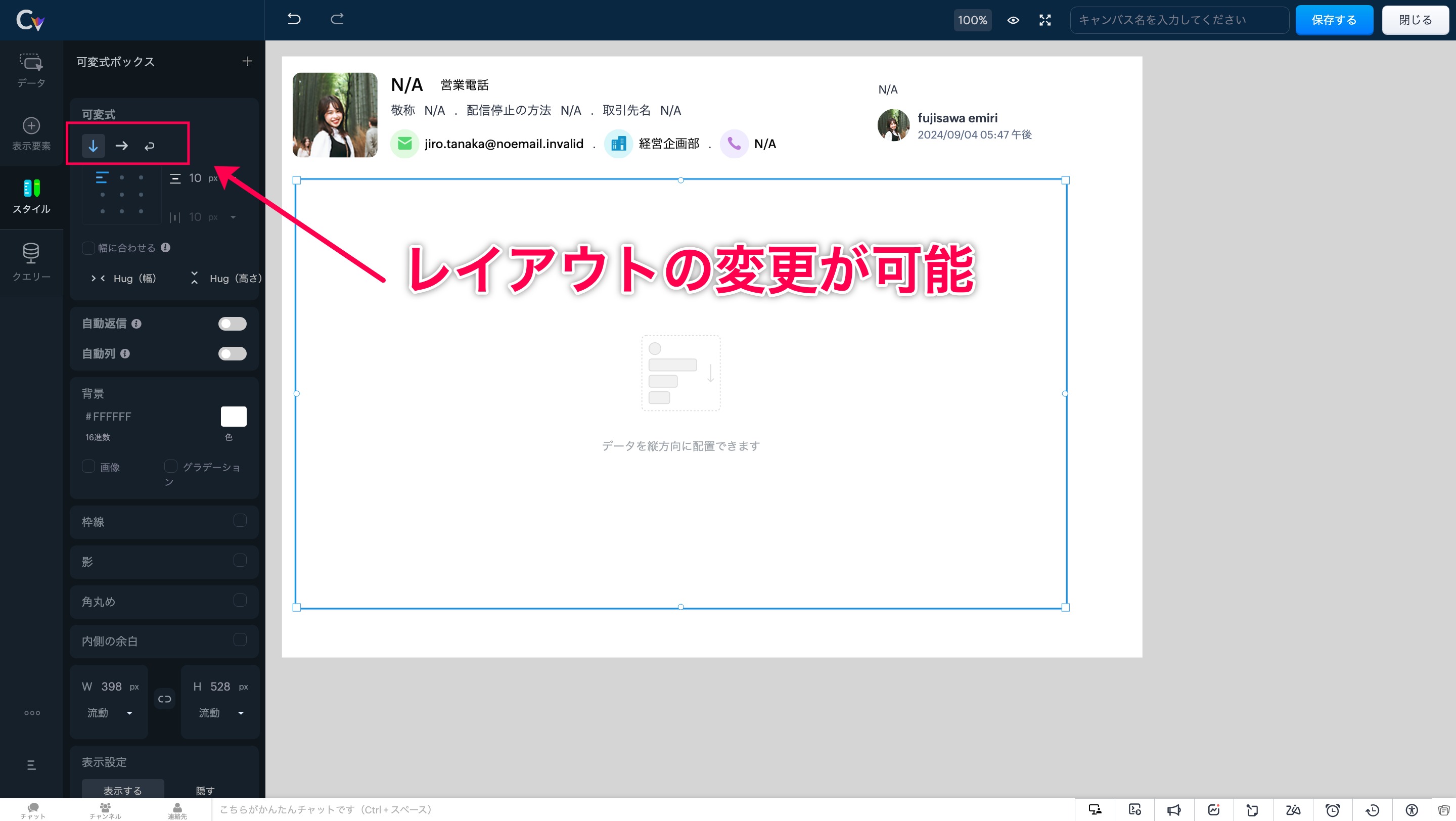
レイアウト変更

可変ボックスでキャンバスのレイアウトを作成する際は、以下の3つから要件に応じてタイプを選択できます。

①縦 ②横 ③折り返し

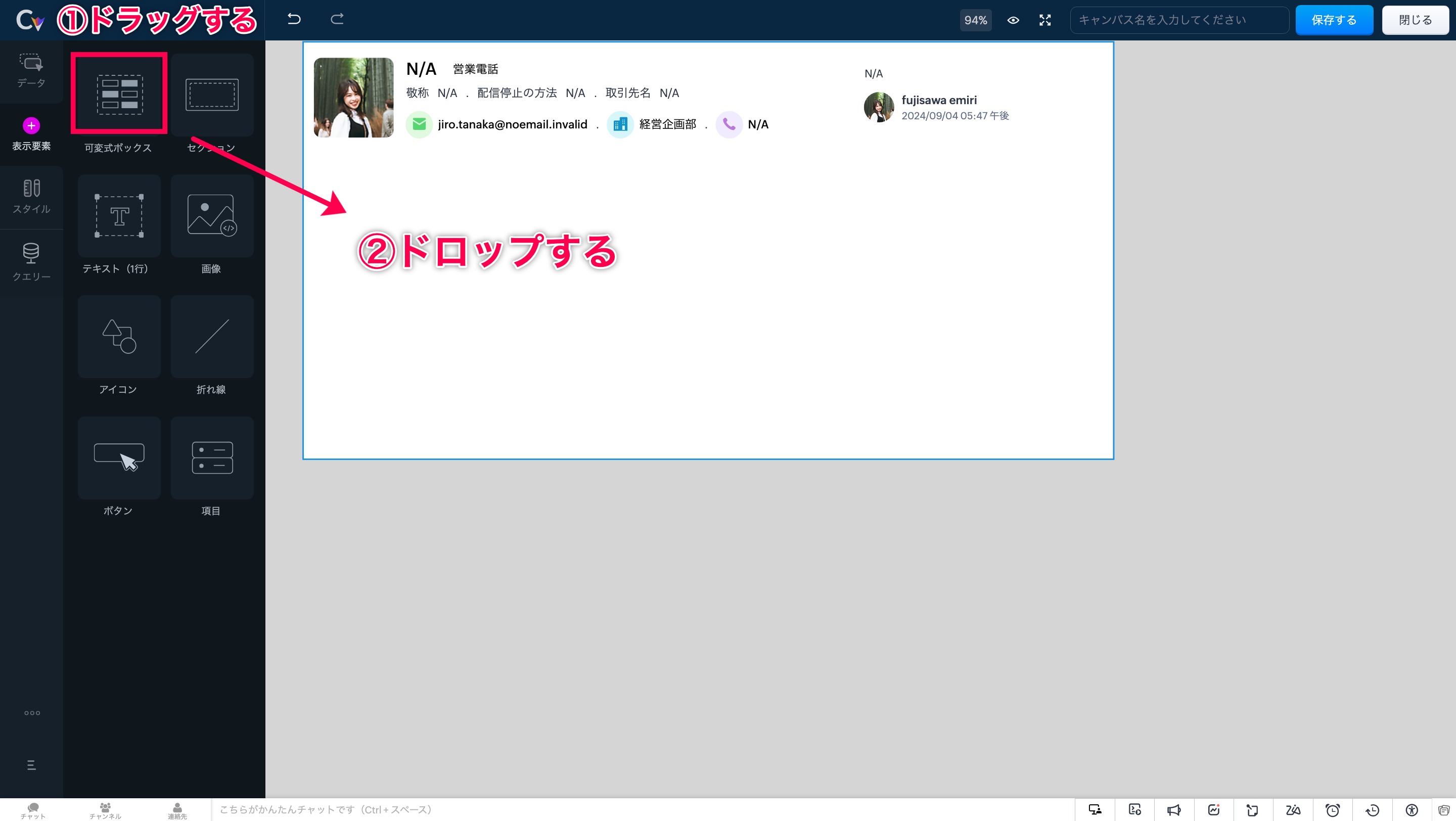
手順ですが、まずは画面左側の「表示形式」を開きます。次に「可変式ボックス」の選択肢が表示されます。

「可変式ボックス」エリアをドラッグ&ドロップすることで、任意の場所にボックスを設置できます。


可変式ボックスの中をクリックすると、画面左に「スタイル」の選択肢が表示されます。「スタイル」をクリックして開くと、3パターンのレイアウト(縦・横・折り返し)からいずれかを選択できます。


自動調整

このツールを使うと、ボックスのサイズが内部要素に応じて自動的に調整され、最適なレイアウトが維持されます。

自動調整 適応前
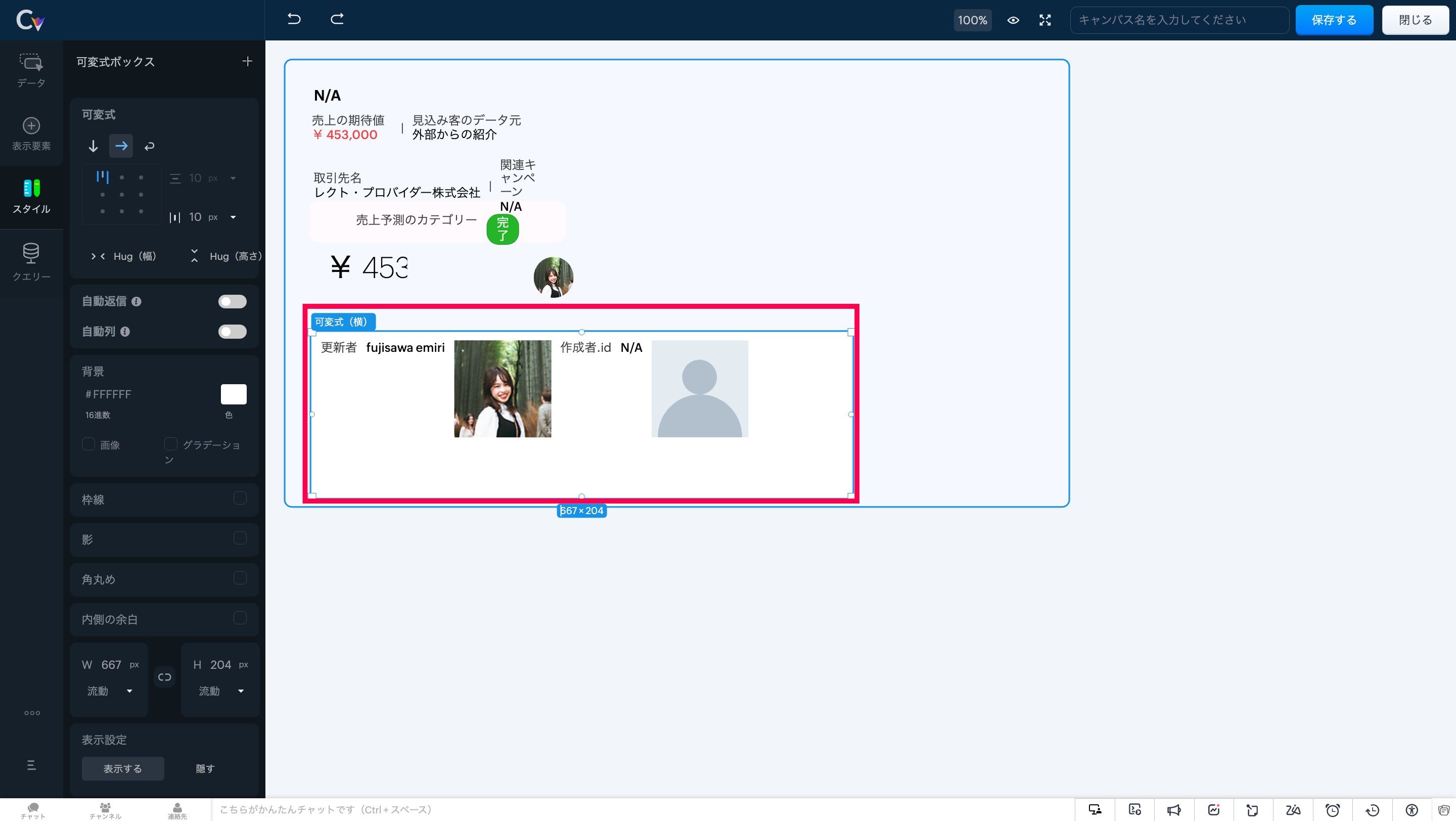

自動調整 適応後

画面左にある「自動返信」 にカーソルを合わせ、設定をオンにしてください。
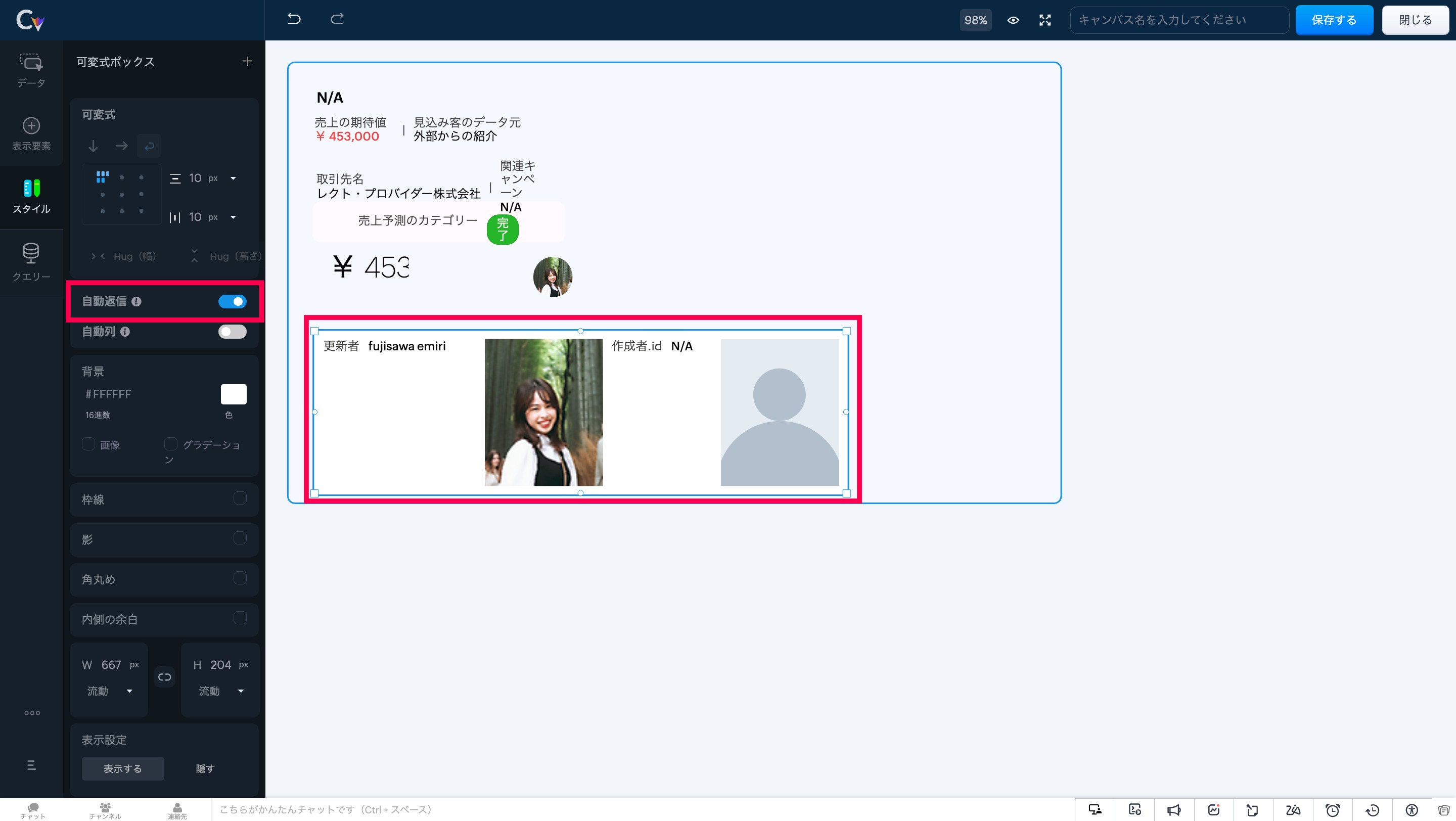


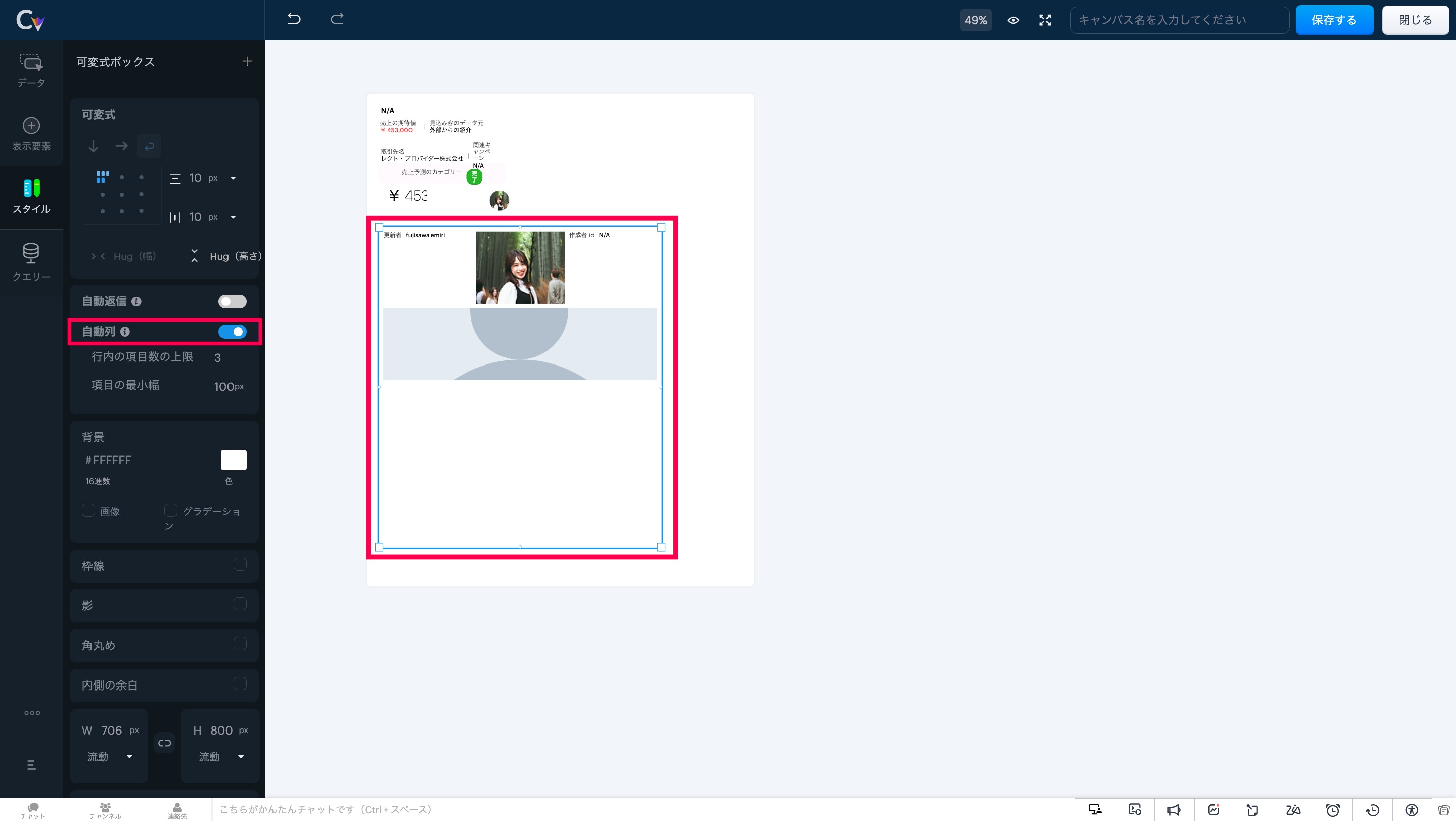
自動段組み

このツールを使用すると、可変式ボックスは列数に応じてアイテムを自動で配置し、重複を防ぎます。


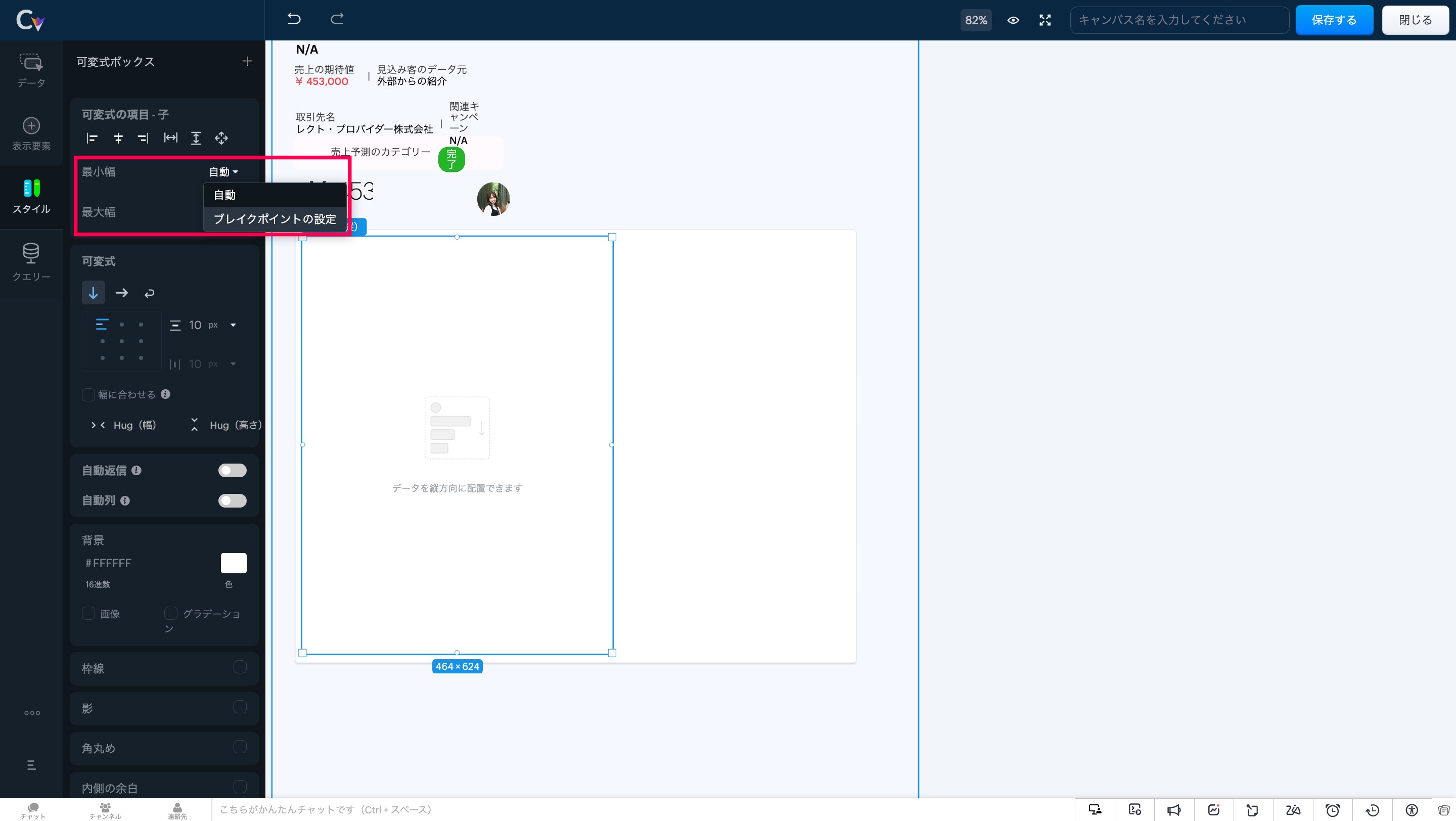
アイテムの最小幅と最大幅の調整

要素のスケーリングを制御することで、レイアウト内の重要な情報が表示領域に最適に収まり、ユーザーが常に必要な情報にアクセスできる状態を維持します。


注意事項:可変式ボックスでは、「自動調整」と「自動段組み」の両オプションを同時に有効にすることはできません。両方を選択しようとすると、一方の設定が自動的に無効化されます。


 3. より高度な可変式ツール   

以下の可変式ツールを使用して、CRM画面のレイアウトと表示を柔軟に制御することができます
  • アイテムの配置:要素を正確に整列し、統一感のあるプロフェッショナルなレイアウトを実現。
  • アイテム間の余白調整:フレックスアイテム間に均等な間隔を追加し、視認性と一貫性を向上。

  • アイテムハグ:コンテンツサイズに応じて要素を自動で拡縮し、スペース効率を最適化。

  • 子アイテム:可変式ボックス内の要素の動作を制御し、柔軟なレイアウト調整を可能に。

  • 最大幅:縦方向のボックス幅に合わせて要素を拡張し、シームレスなデザインを実現。

  • 可変式に変換:複数の要素をワンクリックで可変式ボックスに変換し、構築の手間を軽減。

  • セクション/可変式への置き換え:デザインを崩さず、セクションと可変式ボックスの相互変換が可能。


いかがでしょうか。キャンバス機能を利用中のユーザーさんはぜひ試してみてください!

https://zurl.co/jKTM

……………………………………………………………………………………………………………………

++Zoho オンラインフォーラムに投稿された情報を、いち早くGETしませんか?++

Zoho Japan Community フォーラムの右側「フォローする」ボタンをクリックいただくと、最新の新着投稿やコメントをメールでお送りします。興味のあるサブフォーラムの投稿のみ通知を受け取ることも可能です。

※フォーラムトップから興味のあるサブフォーラムを選択し、「フォローする」をクリックしてください。

コミュニティのイベント情報も当フォーラムでお知らせ予定ですので、ぜひフォローをお願いします!  


        • Recent Topics

        • Zoho CRM Quotes – Subform and PDF/Writer Limitations

          Hello, I am encountering the following limitations in Zoho CRM Quotes: Custom product images cannot be uploaded in the subform – the image upload field cannot be added; only the file upload field is available. File upload placeholders cannot be used in
        • Apple Messages for Business in Omnichannel communications?

          Hello, Apple launched "Apple Messages for Business" but Zoho CRM or Zoho Desk don't appear in the list of possible integrators. Zoho already promotes https://www.zoho.com/crm/omnichannel.html Omni Channel integration, but Apple Messages does not yet appear.
        • Possible to Turn Off Automatic Notifications for Approvals?

          Hello, This is another question regarding the approval process. First a bit of background: Each of our accounts is assigned a rank based on potential sales. In Zoho, the account rank field is a drop-down with the 5 rank levels and is located on the account
        • Enable Free External Collaboration on Notecards in Zoho Notebook

          Hi Zoho Notebook Team, I would like to suggest a feature enhancement regarding external collaboration in Zoho Notebook. Currently, we can share notes with external users, and they are able to view the content without any issue. However, when these external
        • Will be possible to create a merge mail template for products?

          Hi, we would need to create a mail merge template for products (native) module. Will be possibile? or do you have a smart solutions to merge products data with a mail merge? thanks Chris
        • Maximum incoming email (attachment size) limit

          I see that the maximum size of received emails can now be set to 20MB, however I'd still like to see it be larger. It's embarrassing when a client sends me an email with a large attachment and I can't receive it. 50, even 100 MB seems reasonable these
        • [Free Webinar] Learning Table Series - Multi-currency management in Zoho Creator

          Hello everyone, We’re excited to invite you to another edition of the Learning Table Series webinar. As you may already know, we've moved to a purpose-based approach in the Learning Table Series this year. Each session now focuses on how a Zoho Creator
        • LESS_THAN_MIN_OCCURANCE - code 2945

          Hi I'm trying to post a customer record to creator API and getting this error message. So cryptic. Can someone please help? Thanks Varun
        • Ranking by group in report

          Dears, I am new to Zoho Analytics and I would like to ask you guys help to creating a ranking column. Report type: Pivot Matter: I want to create a ranking column on the right of Percentage. This ranking is group by column Type, and ranking by Final Score/Percent.
        • How do I add a project template to a pre-existing project?

          Help....How do I add a project template to a pre-existing project? Right now I have to delete the old project, make a new one and add the project template at the time of creating the new project.
        • How to add line breaks in zoho.cliq.postToUser(...) message?

          In a CRM function using Deluge I'm sending this message and attempting to add some line breaks but they are ignored. Is there another way to add these breaks? My message: message: New urgent task\nDescription \nThis is a fake description.\n A new line?
        • Passing the image/file uploaded in form to openai api

          I'm trying to use the OpenAI's new vision feature where we can send image through Api. What I want is the user to upload an image in the form and send this image to OpenAI. But I can't access this image properly in deluge script. There are also some constraints
        • Users may not pick the fields to be shown as columns in the Choose Account window when creating a new Deal record

          Hi there, by talking with other users I found out that I, as an Admin, am the only one who can pick fields to be shown as columns in the Choose Account window when creating a new Deal record. In fact, if other users click on the "Add Column" symbol on
        • {Action Required} Re-authenticate your Google Accounts to Continue Data Sync

          Hello Users! To align with Google’s latest updates on how apps access files in Google Drive, we’ve enhanced our integration to comply with the updated security and privacy standards, ensuring safer and more reliable access to your data. With this update,
        • Why is the ability Customize Calls module so limited?

          Why can't I add additional sections? why can't I add other field types than the very limited subset that zoho allows? Why can I only add fields to the outbound/inbound call sections and not to the Call Information section?
        • Report Template - How to remove page break after each record?

          Hi, We have report template for a list report. It looks good at screen. But when printing, it creates a page break after each record. How to remove the it? So we can print multiple records in same page. Please look at the attached screenshots. Report Template Report Print Preview
        • Calendar report with order options and more quick view templates

          I think many of us regularly work with calendar-style reports. It would be great to be able to customize the quick view with new templates and have options to sort the entries for each day of the calendar by different criteria. I think this is an interesting
        • Sender Email Configuration Error.

          Hello Team, Hope you are all doing well. We are in the process of creating the Zoho FSM environment in the UAE. When we try to add the sender email address “techsupportuae@stryker.com”, we receive the error message: “Error occurred while sending mail
        • Not receiving New Ticket Emails

          Hello! The company I work for uses the Zoho ticketing system, however, I've noticed I'm not receiving email notifications when new tickets are published. I have admin rights to see these tickets on Zoho Desk and respond to them, but am not receiving the
        • Shall we play a game?

          Presenting the very first game created using ZOHO Creator: Tic-Tac-Toe (or noughts and crosses) I made this to challenge myself and employ some of the new features of ZOHO Creator. I must admit that the code is very literal and not too elegant. There are plans to improve on the machine AI and streamline the code over time. Currently the code makes extensive use of functions for the machine "AI" - there are 12 of these.   The machine AI can be tricked, so to counteract that I made it exceedingly arrogant
        • Career site URL - Suggestion to modify URL of non-english job posting

          Hi, I would like to suggest making a few modification to career sites that are not in english. Currently, the URL are a mix of different languages and are very long. It makes for very unprofessional looking URLs... Here is an example of one of our URL
        • CRM notes

          I want to be able to add notes to a task that do not necessarily get rolled up into an account or contact.   For example, I tasks to work on a Court Order for John Doe divorce account.  There might be lots of updates (in the form of notes) that employees
        • Confluence export to zoho learn

          Hello Is there any known way to export Confluence spaces to zoho learn ?
        • Zoho People API, Inactive users

          Hi, I would like to export using the Zoho People API using Fetch Leave Records API V2 | Zoho People API. However it only pulls active user's leaves. I want all users, active and former employees records.
        • Unified Notes View For Seamless Collaboration

          To facilitate better coordination among different departments and team members, the notes added to a record can now be accessed in all its associated records. With this, team members, from customer service representatives to field technicians, can easily
        • Empty folders are now appearing in the sidebar...

          ...and the folder list is now auto-collapsed by default with no way to change. Neither of these recent updates are useful or user-friendly. ==================== Powered by Haiku https://www.haiku.co.uk ====================
        • Client Script | Update - Client Script Support For Custom Buttons

          Hello everyone! We are excited to announce one of the most requested features - Client Script support for Custom Buttons. This enhancement lets you run custom logic on button actions, giving you greater flexibility and control over your user interactions.
        • Zoho CRM for Everyone's NextGen UI Gets an Upgrade

          Hello Everyone We've made improvements to Zoho CRM for Everyone's Nextgen UI. These changes are the result of valuable feedback from you where we’ve focused on improving usability, providing wider screen space, and making navigation smoother so everything
        • Create custom rollup summary fields in Zoho CRM

          Hello everyone, In Zoho CRM, rollup summary fields have been essential tools for summarizing data across related records and enabling users to gain quick insights without having to jump across modules. Previously, only predefined summary functions were
        • Monthly Webinar - Getting Started with Zoho LandingPage

          Are you building your first landing page and want a little guidance? Join our monthly Getting Started with Zoho LandingPage webinar and learn how landing pages fit into your marketing strategy, drive lead generation, and improve conversions. Here’s what
        • View all email threads directly from record's History and Interactions

          Greetings all, We've introduced the ability to view complete email thread conversations directly from records' History and Interactions sections, along with email delivery status and sentiment insights on the Interactions page—which makes it easier for
        • Marketing Tip #22: Check website and navigation for broken links

          Do you inspect your online store frequently? If not, here's your reminder to do it now. Broken links frustrate customers and make your store feel unreliable. Whether it’s a missing product page, an outdated menu item, social media accounts, or a broken
        • Is there a way to show contact emails in the Account?

          I know I can see the emails I have sent and received on a Contact detail view, but I want to be able to see all the emails that have been sent and received between all an Accounts Contacts on the Account Detail view. That way when I see the Account detail
        • All new Address Field in Zoho CRM: maintain structured and accurate address inputs

          The address field will be available exclusively for IN DC users. We'll keep you updated on the DC-specific rollout soon. It's currently available for all new sign-ups and for existing Zoho CRM orgs which are in the Professional edition. Latest update
        • Custom function return type

          Hi, How do I create a custom deluge function in Zoho CRM that returns a string? e.g. Setup->Workflow->Custom Functions->Configure->Write own During create or edit of the function I don't see a way to change the default 'void' to anything else. Adding
        • push notification to Cliq when user is @mentioned in CRM notes

          push notification to Cliq when user is @mentioned in CRM notes. Currently users that is @mentioned gets an email to be notified. User/s that is @mentioned should get a Cliq notification.
        • How to make entries for restaurant sales in Zoho Books?

          Hello, I'm new to Zoho Books. I need to understand how to record our restaurant sales in Zoho Books. We can't raise invoices for each bill from the daily sales report generated by our POS (duplicated effort). We need a means of entering cumulative sales
        • Creating Restaurant Inventory Management on Zoho

          Hi,  We run a small cloud kitchen and are interested to use Zoho for Inventory and Composite Item tracking for our food served and supplied procured to make food items.  Our model is basically like subway where the customer can choose breads, veggies,
        • Allow Admin to Configure Report > More Options Button

          As an Admin, I want to configure the options of the Report > More Options button to improve UX and reduce Developer overhead. See attached screenshot. Original question posted here: https://help.zoho.com/portal/en/community/topic/modify-standard-rep
        • Sending emails via Books

          Anyone else getting similar problems recently ??..... Hi, Your message to the following recipient was not delivered. Please find the details below.  Bounce Details: Bounced Address : someone@google.com Bounce Reason : other ; Status : 5.0.0 (undefined status) ; Daignostic-Code : smtp;542 someone@google.com Rejected ; Bounced Time : Sep 05, 2017 06:37 PM BST Regards, Zoho Team The email addresses were fine only a few days ago but are now being rejected ?
        • Next Page