Tip#67: 3 easy ways to add drop-down options
Tip#67: 3 easy ways to add drop-down options


Adding drop-down fields to a form makes it easier to select a value from a predefined list of values. There are 3 easy ways to add the drop-down options to fields.
 
To add a drop-down field to a form, navigate to  and select   Orchestration   from the menu. Choose the Orchestration in which you would like to add the dropdown field. You'll land in Step 1: Create Form. Drag and drop the Drop-down field from the New Fields tray onto the right panel.
 
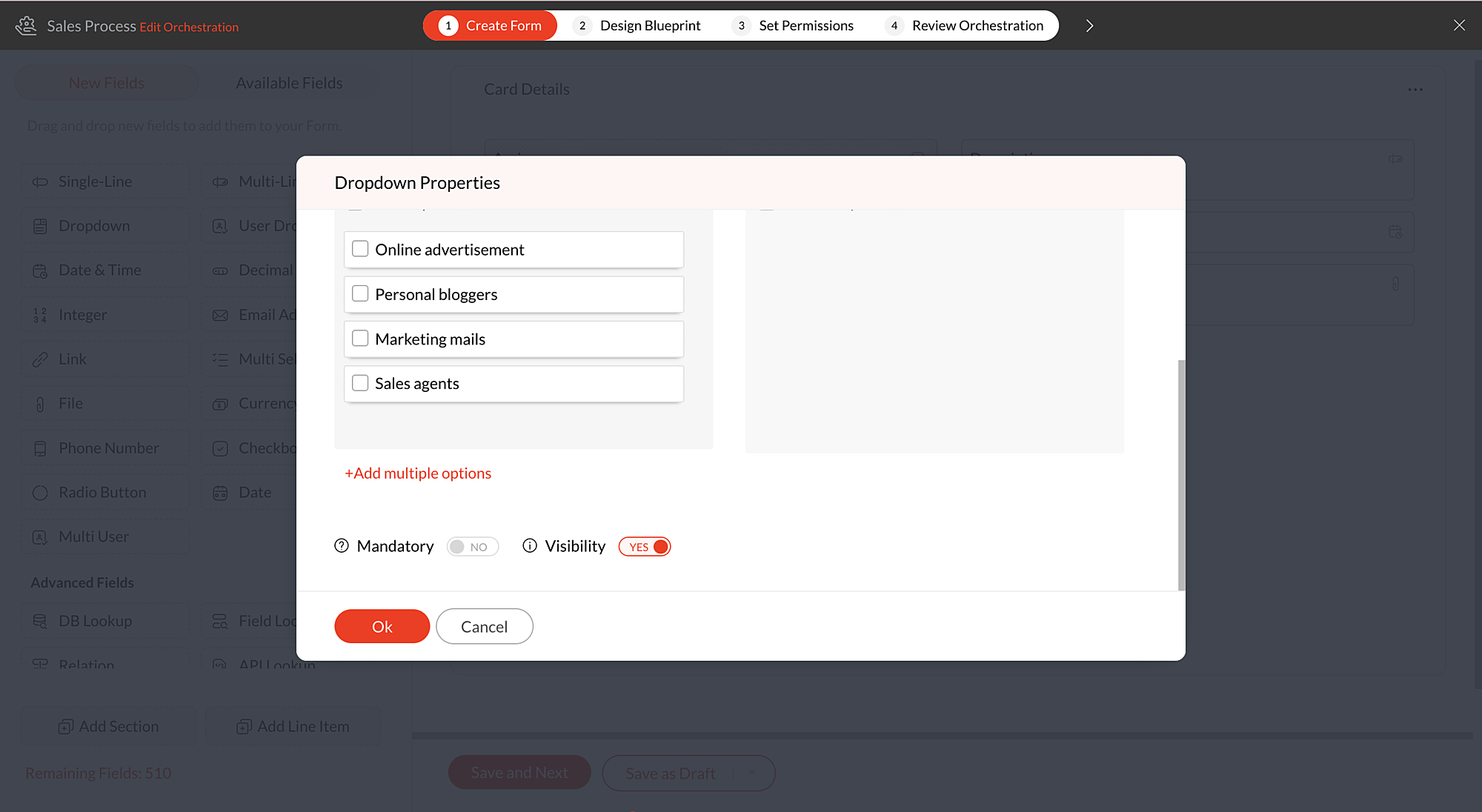
You'll now be in Drop-down Properties pop-up. Scroll down and click  +Add multiple options to view the below options:
  • Quick options
  • Import from file
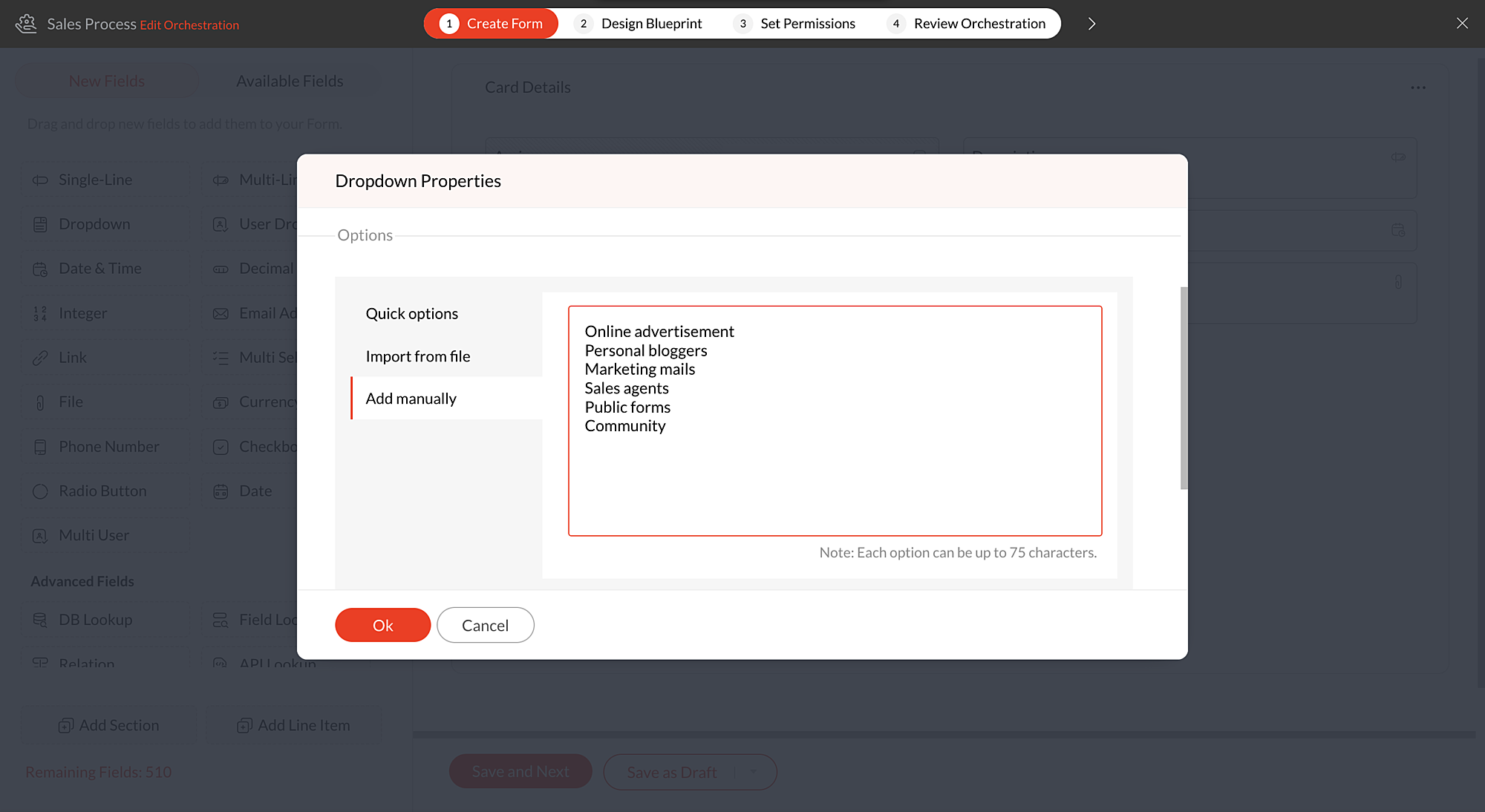
  • Add manually

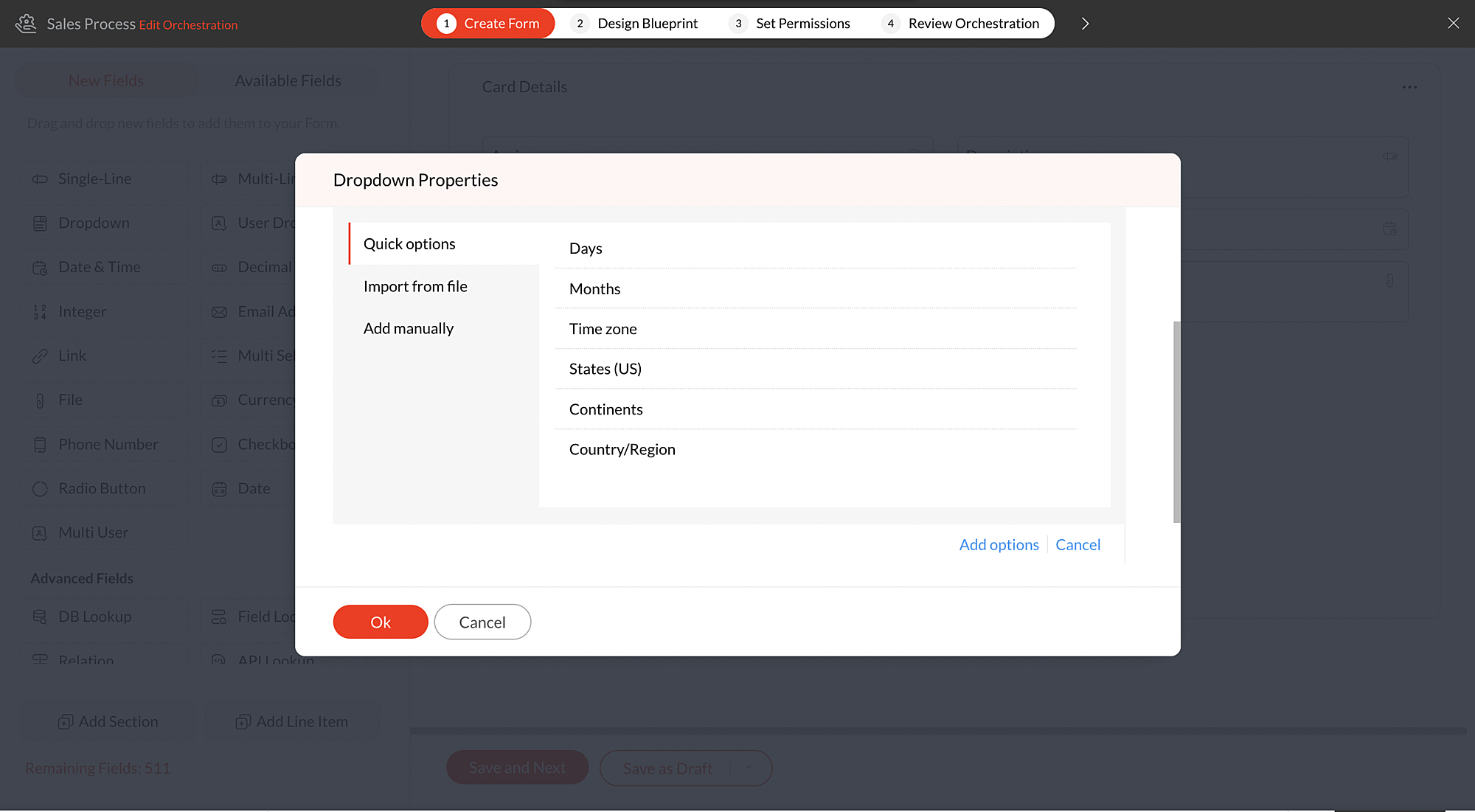
Quick options 

There are a certain set of default dropdown options available in Qntrl. Using these default choices like Days, Months, Time zone, States (US), Continents, and Countries, you can quickly add the required options to the dropdown fields.
 
For instance, if you would like to add drop-down options as Countries, click +Add Multiple options and choose Countries, under Quick options. Select the Countries that need to be listed and click Add options.

All the countries selected by the user will be added to the drop-down list. After adding the default options, you can also add more options manually if required by clicking the + icon under Options in the Drop-down Properties pop-up.

Import from file 

You can also import a .txt or .csv file to populate the drop-down list.The options must be typed line by line, and the file must be less than 2 MB in size.
 
For example, you have maintained a list of local hub offices  of your organization in a file and you would like them to be added as drop-down options in a form. You can simply import the file containing the list and update the drop-down.
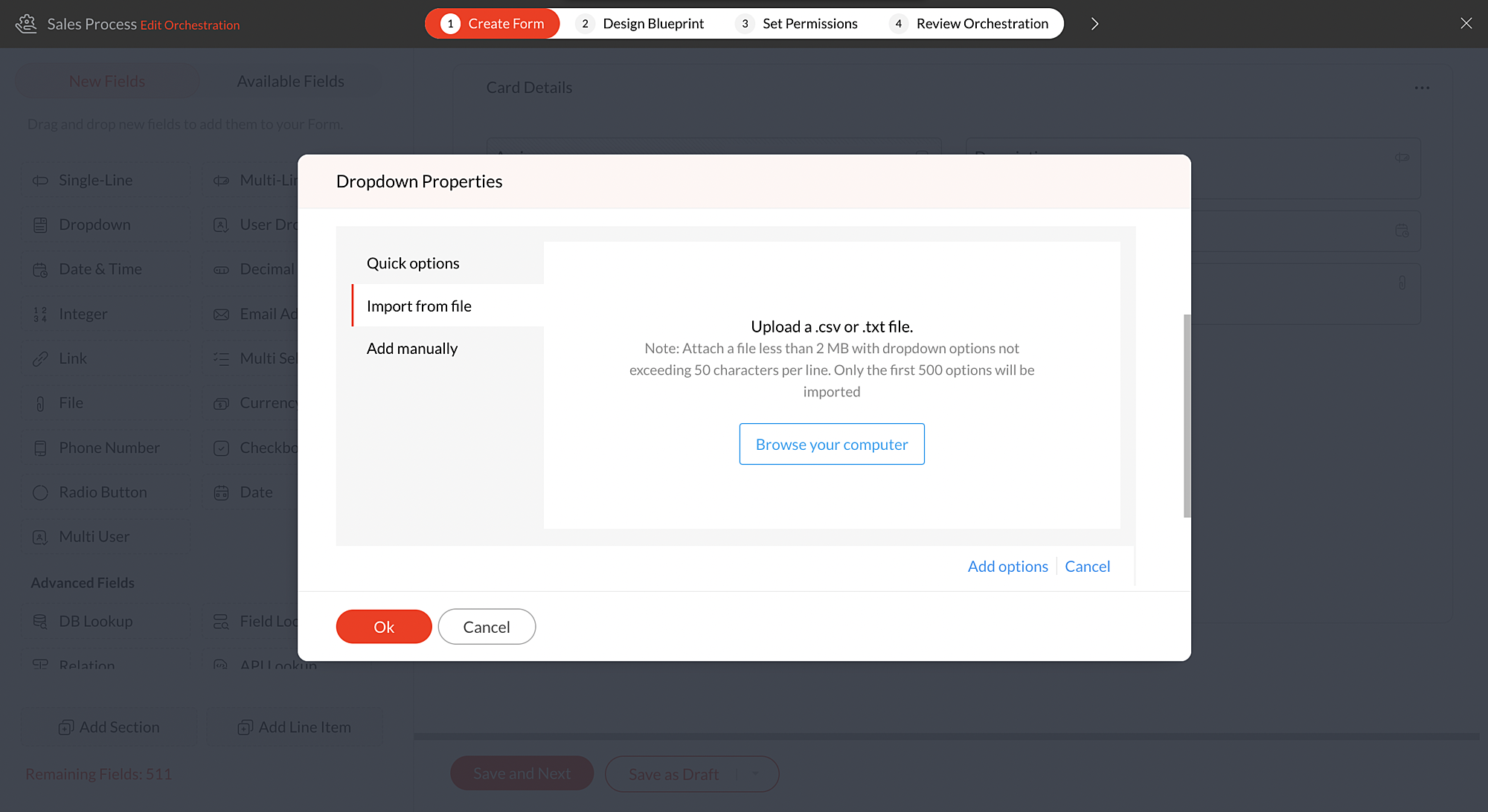


Note: You can add up to 500 options in the drop-down. To add more than 500 options, please drop an email to support@qntrl.com

Add manually  

With this option, you can write all the options at once instead of adding them one by one.
 
List down all the options to be added in drop-down one by one and click Add options and they will be added to the drop-down.
 
For instance, if you have more number of drop-down options to be added to the field, clicking the green tick after adding each option will be time-consuming. In such cases, you can write the options one by one and add them all at once.


Know more about drop-down fields from this help document.
 
We hope this update is helpful to you. If you have any questions or suggestions, please leave a comment below or email us at support@qntrl.com.


                          Help resources:   Qntrl KB |   Tutorials |   Short Help Videos |   How-to videos


      • Sticky Posts

      • Tip #21: Increase user engagement using dynamic email content and attachments in Orchestly

        Businesses often send out bulk emails like weekly newsletters, monthly event updates, promotional emails, surveys, beta access emails, product reviews, seasonal greetings, and so on. Even as the gist of these emails remain constant for all recipients, personalizations capture the audience’s attention and help brands connect with them.   Orchestly’s email templates allows you to draft and send dynamic emails with personalized content and attachments to internal and external users. Email templates
      • Qntrl's 2023 year in review

        This year has been all about analyzing our customer feedback and building a resilient and solution-driven product from it. As a result of this work, we're happy to announce that a whole new version of Qntrl is getting ready for release soon. This new
      • Tip #61: 5 different ways to create Cards in Qntrl

        Qntrl supports an array of features that covers everything required for business orchestration, from process automation to business advancement. Cards, being the elemental feature of Qntrl, record all the details of a particular task from the beginning
      • Tip #17: Stay informed of significant business impact using Orchestly

        With remote working becoming the new norm, leaders across sectors need to stay updated of their business performance in the market to aid business decisions. Instead of awaiting virtual meetings from sales and finance heads to put forth the business status, organization leaders can themselves dig into the system to keep an eye on their revenue generating customers or set up notifications to monitor major updates.   Orchestly recognizes such requirements and provides adaptable solutions for all business
      • Onboard faster with Orchestly's Tutorials

        We are actively rolling out new learning materials to assist our customers onboard at ease and automate their processes effortlessly. On that front, we recently launched Tutorials for Orchestly.   Tutorial is a step-by-step guide to help users familiarize the concepts of Orchestly and automate simple processes right from scratch. We’ve documented 3 such business processes viz. Order Manufacturing, Product Implementation, and Change Management.   We're looking forward to document more customer-centric

        • Recent Topics

        • Archiving Contacts

          How do I archive a list of contacts, or individual contacts?
        • Filtering in Help Center

          Hi, our ticket system is based on a set of structured status categories. The customer must be able to filter by these status. How can we add "Status" as filter to the help center. In the same moment we do not need filters e.g. as "channel". How can we
        • On Edit Validation Blueprint

          Hello, I have a notes field and a signature field. When the Approve button is clicked, the Signature field will appear and must be filled in. When the Reject button is clicked, the Notes field will appear and must be filled in. Question: Blueprint will
        • Google Fonts Integration in Pagesense Popup Editor

          Hello Zoho Pagesense Team, We hope you're doing well. We’d like to submit a feature request to enhance Zoho Pagesense’s popup editor with Google Fonts support. Current Limitation: Currently, Pagesense offers a limited set of default fonts. Google Fonts
        • Increase Round Robin Scheduler Frequency in Zoho Desk

          Dear Zoho Desk Team, We hope this message finds you well. We would like to request an enhancement to the Round Robin Scheduler in Zoho Desk to better address ticket assignment efficiency. Current Behavior At present, the Round Robin Scheduler operates
        • Feature Request – Conditional Visitor Information Request in Zoho SalesIQ

          We would like to request the ability to conditionally ask for visitor details based on the communication channel used in Zoho SalesIQ. Specifically: When a visitor initiates a conversation through the live chat widget on the website, we want to continue
        • Can multiple agents be assigned to one ticket on purpose?

          Is it possible to assign one ticket to two or more agents at a time? I would like the option to have multiple people working on one ticket so that the same ticket is viewable for those agents on their list of pending tickets. Is something like this currently
        • Where is the settings option in zoho writer?

          hi, my zoho writer on windows has menu fonts too large. where do i find the settings to change this option? my screen resolution is correct and other apps/softwares in windows have no issues. regards
        • When Does WorkDrive integrate with Books?

          When Does WorkDrive integrate with Books?
        • CRM gets location smart with the all new Map View: visualize records, locate records within any radius, and more

          Hello all, We've introduced a new way to work with location data in Zoho CRM: the Map View. Instead of scrolling through endless lists, your records now appear as pins on a map. Built on top of the all-new address field and powered by Mappls (MapMyIndia),
        • Can we add zoho sign to a custom module?

          i understand out of the box it works with 8 modules. is it possible to add it to a custom module?
        • Synching changes to Stripe when changes are made in Zoho Billing

          We have a situation where we have merged customers in Zoho BIlling and then found out later that the payment in Stripe was not updated and still associated with the old customer record. The card gets updated and billed, but that payment is still associated
        • Zoho Sign Not Delivering

          I have sent several contracts out via Zoho Sign.   They do not seem to be getting delivered.  I had one person receive it, but the others have not.   I had one person tell me they sent it back to me and never got it and doesn't show as signed.  I've sent
        • Update latitude & longitude address field API

          How do I update the coordinates of an address field from a widget? I can't modify the latitude and longitude of the address field. I think the problem is how I'm writing formdata variable. zoho_init.then(function (data) { var queryParams = ZOHO.CREATOR.UTIL.getQueryParams();
        • Bank Feeds Breaking Constantly

          Hey Everyone, I have already reached out to support about this issue but I am wondering if anyone else is having the same issue. My bank feeds keep breaking within days of me fixing them by updating the credentials. Its been happening for a while and
        • Automatic Matching from Bank Statements / Feeds

          Is it possible to have transactions from a feed or bank statement automatically match when certain criteria are met? My use case, which is pretty broadly applicable, is e-commerce transactions for merchant services accounts (clearing accounts). In these
        • Zoho Payroll's USA and KSA editions are available in Zoho One!

          Greetings! We’re excited to share that Zoho Payroll, currently available only in India and the UAE, is now introducing the KSA (Kingdom of Saudi Arabia) edition and the USA (United States of America) edition, and these editions are now available in Zoho
        • Outlook/Hotmail Blocking Zoho SMTP IPs (S3150)

          We are currently facing a serious deliverability issue with Zoho SMTP while sending transactional OTP emails for our production application. Emails sent to Outlook / Hotmail addresses are being rejected with the following error: 550 - 5.7.1 Unfortunately,
        • Tip #63- Exploring Technician Console: Elevate to Admin Mode (Windows & Mac)- 'Insider Insights'

          Hello Zoho Assist Community! Ever been in a remote support session where you couldn’t complete a task because you didn’t have admin privileges? Maybe installing software, accessing secure system areas, or rebooting into Safe Mode just didn’t work because
        • Prevent accidental duplicate entry of Customer Ordersome

          Zoho Support has confirmed that Zoho currently does not have any method (using Deluge, flow or any other method) to alert a user when a sales order has been entered twice using the same customer reference number (i.e. a duplicate). Most ERP platforms
        • Zoho Mail - Email Reminder template (default)

          Zoho Mail Users, Does anybody here use the email reminder template? I'm asking Zoho to allow and add us to select which one of our many templates will be our default. It allows us to operate more efficiently. It's a Checkbox. If you feel this can benefit
        • Windows Desktop App - request to add minimization/startup options

          Support Team, Can you submit the following request to your development team? Here is what would be optimal in my opinion from UX perspective: 1) In the "Application Menu", add a menu item to Exit the app, as well as an alt-key shortcut for these menus
        • Zoho CRM Quotes – Subform and PDF/Writer Limitations

          Hello, I am encountering the following limitations in Zoho CRM Quotes: Custom product images cannot be uploaded in the subform – the image upload field cannot be added; only the file upload field is available. File upload placeholders cannot be used in
        • Canva Integration

          Hello! As many marketing departments are streamlining their teams, many have begun utilizing Canva for all design mockups and approvals prior to its integration into Marketing automation software. While Zoho Social has this integration already accomplished,
        • Announcement integration between Zoho People and Zoho Connect

          As we're using these 2 products, there're areas of overlapping especially in the Announcement. When there's a new announcement in Zoho People, can it push to the company wall in Zoho Connect?
        • Does Zoho Mail Have Popout windows?

          I recently switched my work email over to Zoho and everything I read said that you can popout the draft email as you're writing, however, all the pictures or info I've seen show the typical popout arrow in the top right, which I can not for the life of
        • Can I reorder how the staff are displayed on the booking page?

          As the title suggests, can I change this? Either reorder manually reoreded to my preference, or automatically (a-z, z-a etc.)
        • FSM integration with Books

          Hi, I have spent a few months working with FSM and have come across a critical gap in the functionality, which I find almost shocking....either that, or I am an idiot. The lack of bi-directional sync between Books and FSM on Sales Orders/ Work Orders
        • Bulk upload image option in Zoho Commerce

          I dont know if I am not looking into it properly but is there no option to bulk upload images along with the products? Like after you upload the products, I will have to upload images one by one again? Can someone help me out here? And what should I enter
        • Enhancement to ICR’s field prompting: Preferred data extraction using advanced field prompting

          Dear Customers, We hope you’re well A quick background Intelligent Character Recognition (ICR) comes as part of Zia’s optical recognition capability called Zia Vision. When we introduced it last April, the data extraction was training-based and was applicable
        • Filter Records in CRM API

          Hi Team, I’m currently working on a task to retrieve expired deals from the CRM. By “expired deals,” I mean deals where the closing date has already passed and the stage is not “Closed Won” or “Closed Lost” (i.e., all other stages). I tried using both
        • Subheaders for Sections in forms

          Currently, every form section has a field name, which one can choose to show/hide to the end user. It would be great if there was an option to show a SUB-HEADER in addition to a header. It would be useful for explaining to the end user what the section
        • Custom view inconsistencies

          Why is "is not" missing from criteria, along with other comparison operators ??? It makes it almost impossible to build required custom views, I don't want "void" invoices listed & why on earth would "Void" invoices be showing when the criteria includes
        • CRM x WorkDrive: We're rolling out the WorkDrive-powered file storage experience for existing users

          Release plan: Gradual rollout to customers without file storage add-ons, in this order: 1. Standalone CRM 2. CRM Plus and Zoho One DCs: All | Editions: All Available now for: - Standalone CRM accounts in Free and Standard editions without file storage
        • Promote a layout to standard so I can delete one layout

          Similar to this and many other topics: https://help.zoho.com/portal/en/community/topic/set-layout-as-standard The problem, every model has a standard layout, which is what we use most of the time... But as the business grows and evolves we may have to
        • Adding VENDOR SKU to PURCHASE ORDERS

          how can we add the Vendor SKU when issuing a Purchase Order , so the PO shows the Supplier SKU and our own Internal SKU , which is what we want to receive into the system .
        • Can Zia summarize fields?

          A great use case of AI for me would be summarizing company descriptions. We often get long winded descriptions from databases or scraping websites, then reduce them to a couple of sentences stating what a company actually does. Is there any way within
        • Zoho Recruit Community Meet-up - India (Venues Finalised)

          Zoho Recruit Community Meet-up - India (Venues Finalised) Namaste, India. 🙏🏼 The Zoho Recruit team is hitting the road—and we're absolutely excited behind the scenes. Join us for the Zoho Recruit India Meet-up 2026, a morning designed to make your recruiting
        • [Webinar] Solving business challenges: Secure, real-time, and external collaboration

          Hi Zoho Writer users, We are excited to announce Zoho Writer's webinar for March 2026: Solving business challenges: Secure, real-time, and external collaboration. Zoho Writer supports real-time collaboration by allowing teams to work together in documents.
        • Table dimensions

          I try changing the dimensions of the table on my computer but it doesn't change. Do I have to be a premium member or does it only work on the app?
        • Next Page