Accounting on the Go Series-28: Effortless Automation- Converting Quotes to Invoices with Ease
Hello Zoho Books Users!
At Zoho Books, we take automation seriously, striving to simplify your daily tasks and reduce manual work wherever possible. Today, let’s talk about one such nifty time saving feature: automatic conversion of Quotes to Invoices.
Imagine running a busy landscaping business, providing services like lawn care, garden design, and tree trimming for homes and businesses. Every day, you receive plenty of requests for Quotes. To keep up with demand, it's crucial to work efficiently. However, not every Quote gets accepted, and managing the conversion from accepted Quotes to Invoice can become a time-consuming task. That's where Zoho Books steps in, making things easier. When a customer accepts a Quote, Zoho Books automatically converts it into an Invoice, saving it as a draft for you to check. Once the job is done, just hit send to deliver the Invoice to your customers.
Imagine running a busy landscaping business, providing services like lawn care, garden design, and tree trimming for homes and businesses. Every day, you receive plenty of requests for Quotes. To keep up with demand, it's crucial to work efficiently. However, not every Quote gets accepted, and managing the conversion from accepted Quotes to Invoice can become a time-consuming task. That's where Zoho Books steps in, making things easier. When a customer accepts a Quote, Zoho Books automatically converts it into an Invoice, saving it as a draft for you to check. Once the job is done, just hit send to deliver the Invoice to your customers.
How it works in the Zoho Books iOS app
➤ Open the Zoho Books iOS app.
➤ Tap on “More” and scroll down to “Settings”.
➤ Under “Module Preferences”, select “Quotes”.
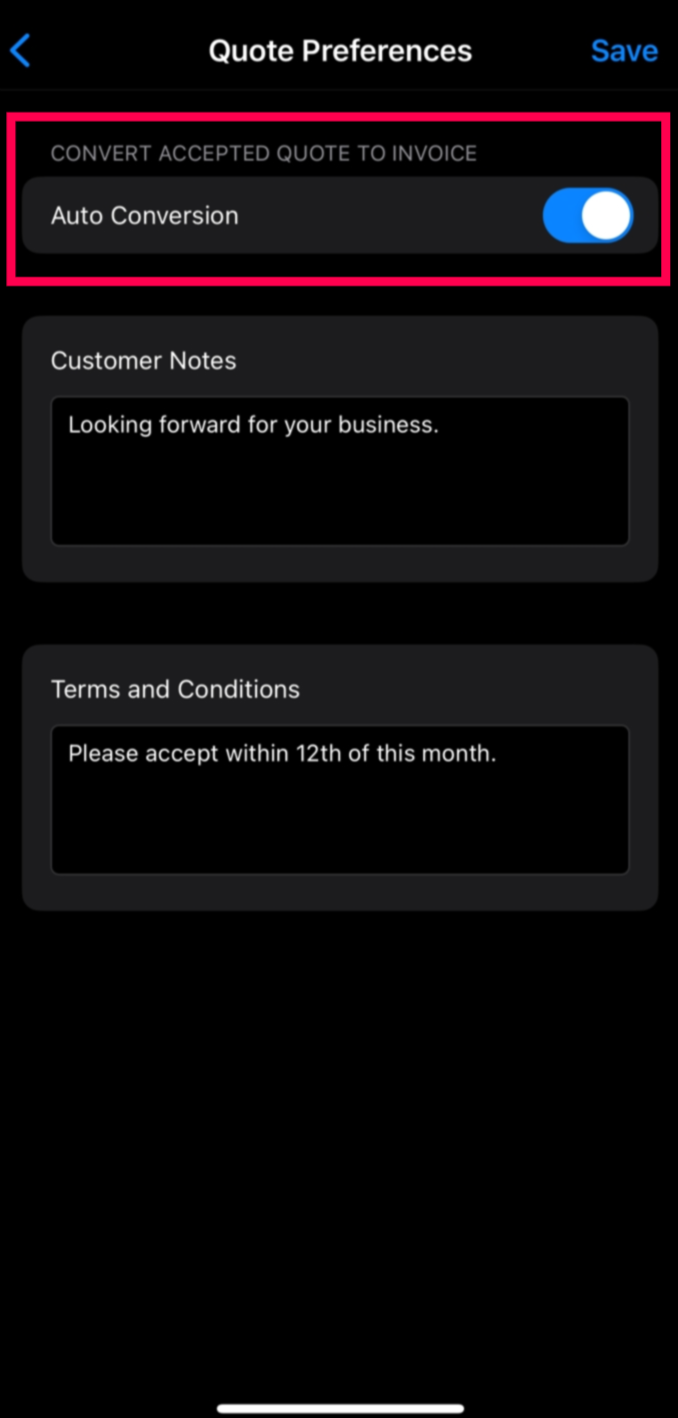
➤ Enable the toggle for “Auto Conversion”.
➤ Once enabled, any accepted Estimate will automatically trigger the creation of an Invoice.
➤ Additionally, you can log in to the web app and set your preferences to convert and send the Invoices directly, streamlining your payment process automatically.
How it works in the Zoho Books Android app
➤ Open the Zoho Books Android app.
➤ Navigate to the left side panel and go to “Settings”.
➤ Now, click on Preference and select “Quotes”.
➤ Tick the preference for “Covert to Invoice”.
➤ Once enabled, any accepted Estimate will automatically trigger the creation of an Invoice.
➤ Additionally, you can log in to the web app and set your preferences to convert and send the Invoices directly, streamlining your payment process automatically.

By automating the conversion of estimates into invoices, Zoho Books empowers you to work more efficiently and effectively, allowing you to focus on important tasks and delighting your clients. You can get the Zoho Books mobile app from this link or simply scan the QR code below:

Stay tuned for more tips and insights on how to leverage Zoho Books' automation features to streamline your business operations!
Regards,
Tanisha Choudhury
Zoho Books