Add Claude in Zoho Cliq
Add Claude in Zoho Cliq


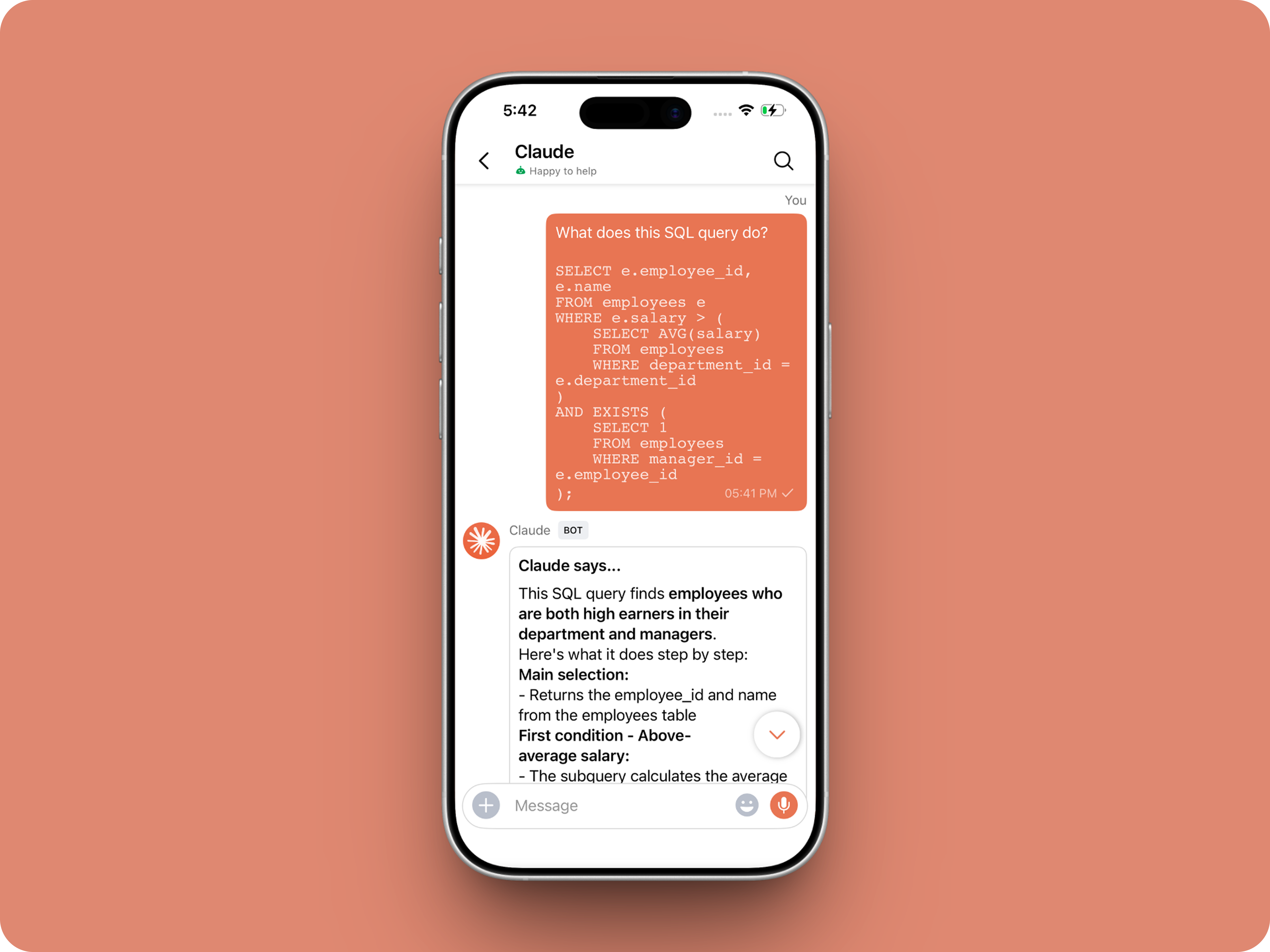
Let’s add a real AI assistant powered by Claude to your workspace this week, that your team can chat with, ask questions, and act on conversations to run AI actions on.

This guide walks you through exactly how to do it, step by step, with all the code you'll need.
Just copy, paste, replace the placeholders and you'll be good to go.


By the end of this guide, you’ll have:

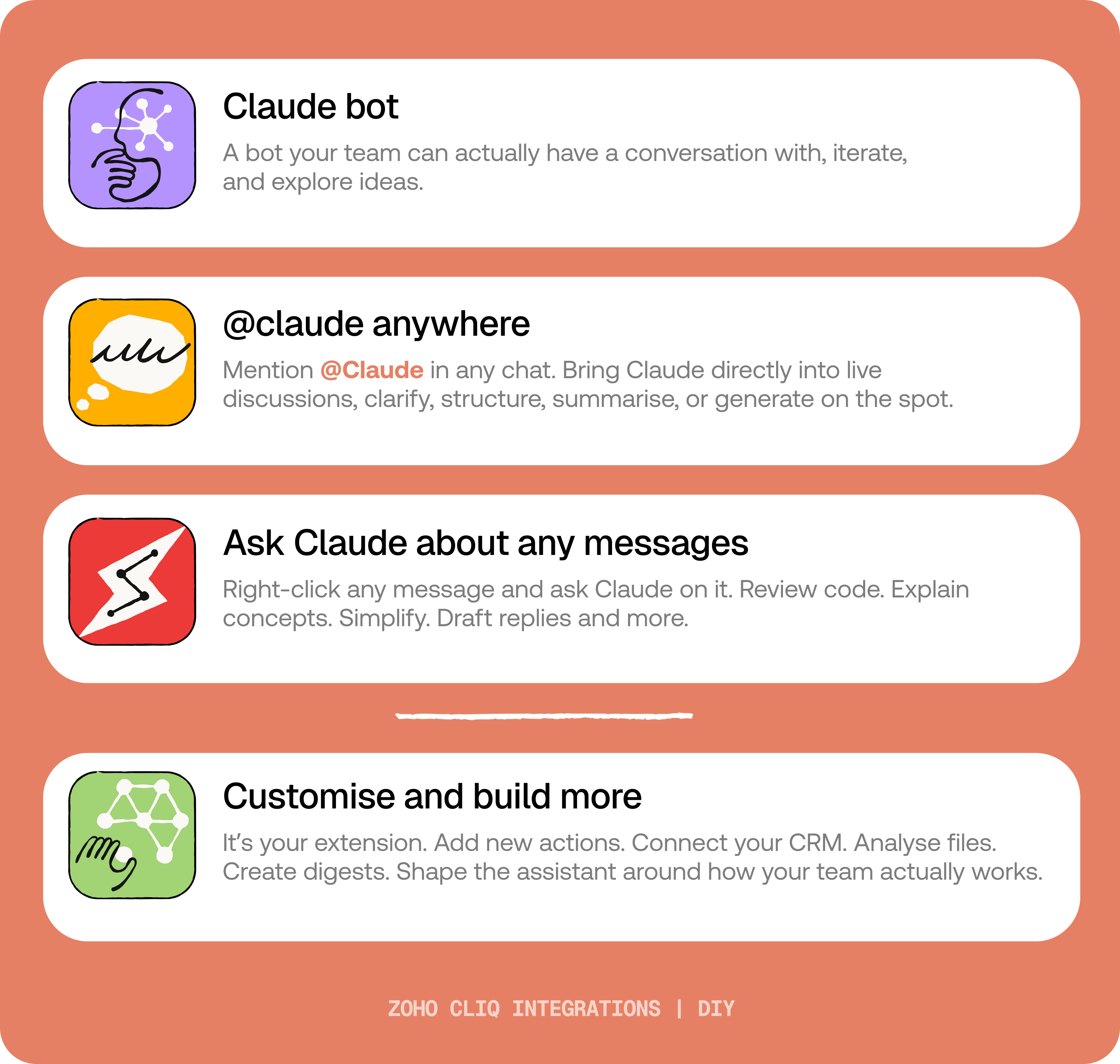
  1. A Claude bot inside Zoho Cliq to have real back-and-forth conversations.
  2. The ability to @mention Claude in any channel and reply to a message and ask Claude to act on it.
  3. A message action to act on messages in Cliq by Claude. Additionally, pre-built actions to review code, generate mind maps, draft a reply for the selected message, or explain it like you’re new.
IdeaBefore you start:
1. A Zoho Cliq account with Developer access.
2. An Anthropic API key
3. Basic comfort with Deluge (optional — all code is provided
😉)

A. How to get an Anthropic API key?
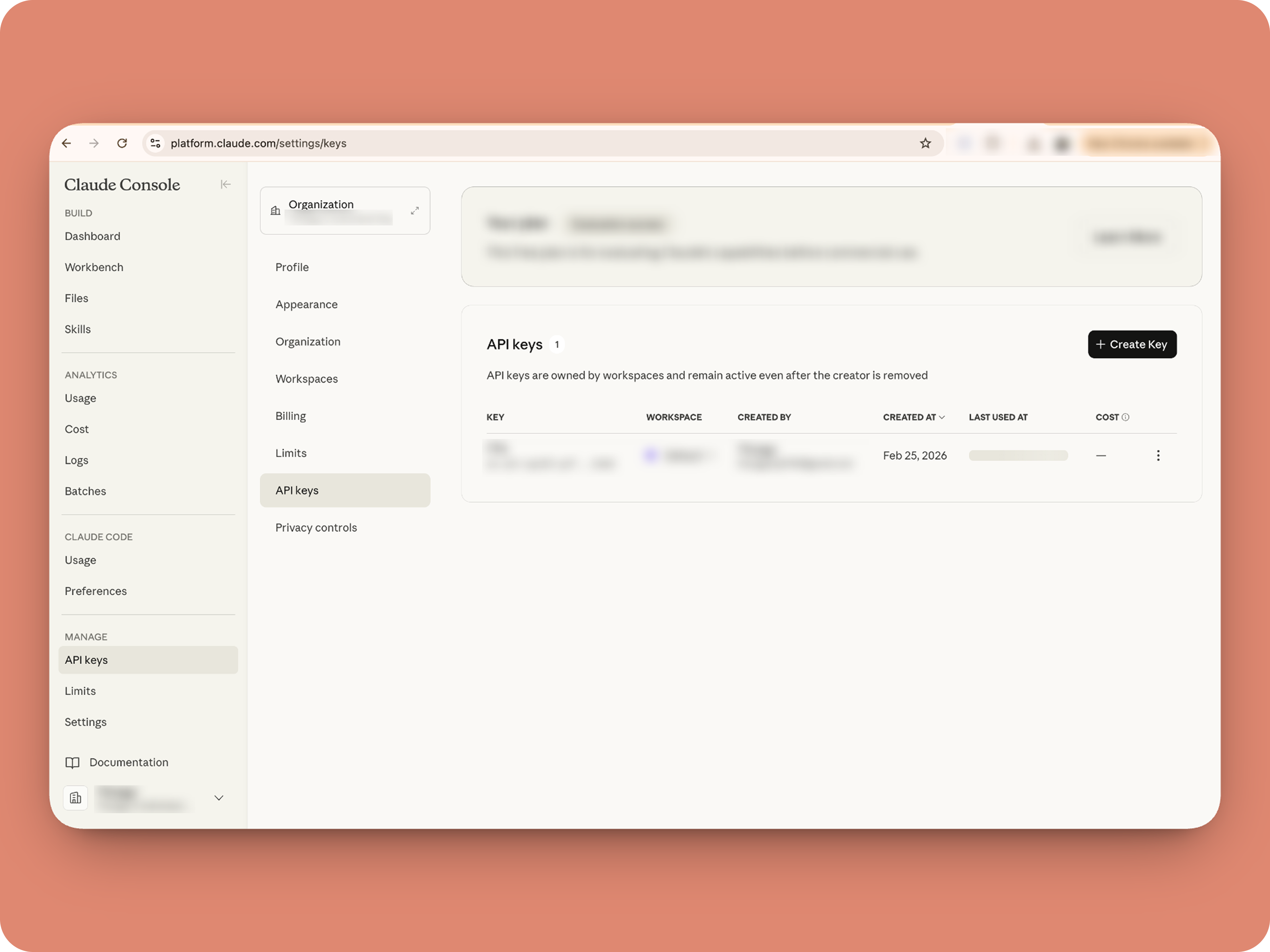


1. To get an Anthropic API key, sign up at the Anthropic Console (console.anthropic.com).
2. Navigate to the API Keys tab, and click Create Key. 
3. You must add credits via the Billing section to activate the key. Copy the key immediately, as it cannot be viewed again.

Alert
Note: In this guide, the API key is pasted directly into the code for simplicity. But never, ever share your API key to others and double-check before sharing screenshots or code.

B. Create a Connection 

Claude needs permission to: Read chat messages and Fetch attachments (like PDFs) when prompted, for that let's create a connection for it.  ⓘ Learn more about connections

1. Go to the Connections module (in Bots & Tools) → Create Connection
2. Add a Connection name, for eg. "readmessageandfile"
3. Select:
ZohoCliq.Attachments.READ
ZohoCliq.Messages.READ
4. Create
Click Create, then authorize the connection. Copy the connection name, you'll paste it into the handlers in the next steps.

How to start

Go to Zoho Cliq → Settings → Bots & Tools 

Claude Bot:
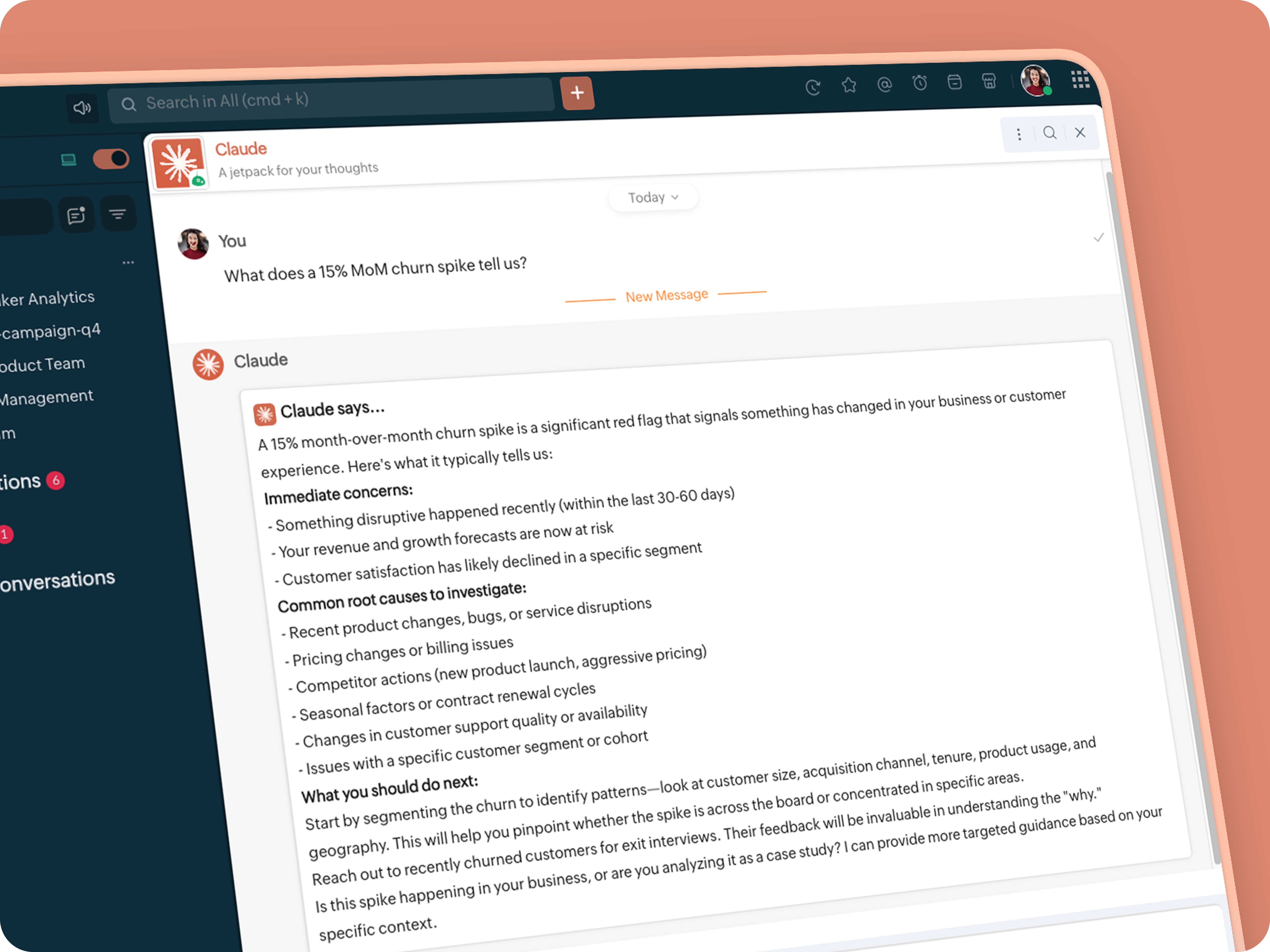


  • Go to Bots → Create Bot.

  • Name it Claude and give it any description of choice.

  • First, let's create a Message handler to handle the conversations first.

  • Click edit code and copy paste the below code in it (follow along the comments to understand what each part does)

Idea

One API endpoint. That's all.


Both the bot and the message action use the same single Anthropic endpoint: POST /v1/messages. The only thing that changes between them is the system prompt and what you put in the messages array. Once you understand that, the rest is just assembly.
Explore API docs →


Message Handler:
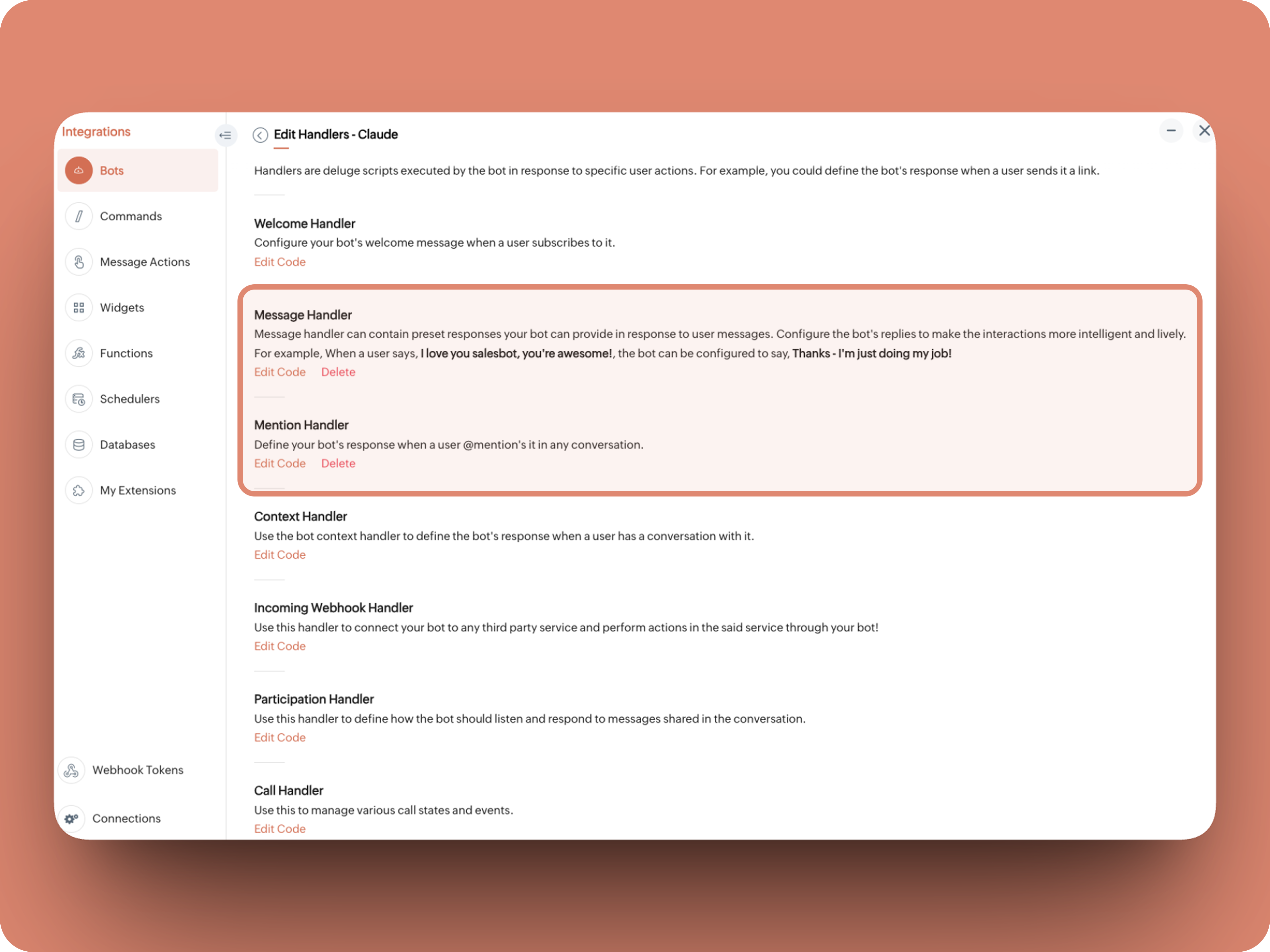


What does this do: Fetches last 10 (customizable - but keep message limit small ( around 10–15 to avoid token overuse)) chat messages for additional context and enables natural chat conversations 


  1. info environment;
  2. botUniqueName = "BOT-UNIQUE-NAME";
  3. // Replace with your bot unique name
  4. cliqBaseUrl = environment.get("base_url");
  5. fetchRecentMessages = invokeurl
  6. [
  7. url :cliqBaseUrl + "/api/v2/chats/" + chat.get("id") + "/messages?limit=10"
  8. type :GET
  9. connection:"CONNECTION-NAME"
  10. //Read below how to create a connection, and paste here:
  11. ];
  12. info fetchRecentMessages;
  13. contentList = list();
  14. contentList.add({"role":"user","content":"Act as a conversational assistant. Reply to the message below in a friendly, informative, and well-organized way.\n\nGuidelines:\n- Respond only to the message provided.\n- Do not use memory or external context.\n- Be warm but professional.\n- Be clear and structured (use short paragraphs or bullet points if helpful).\n- Provide helpful details or clarification where useful.\n- If something is unclear, ask a polite follow-up question.\n- If action is needed, suggest a simple next step.\n- Do not include meta commentary.\n- Output only the reply.\n\n\nSTRICTLY USE * FOR BOLD, AND NEVER ** FOR BOLD MARKDOWN."});
  15. allMessages = fetchRecentMessages.get("data");
  16. for each  data in allMessages
  17. {
  18. type = data.get("type");
  19. if(type == "card" || type == "text")
  20. {
  21. getMessage = data.get("content").get("text").replaceAll("\n"," ");
  22. senderID = data.get("sender").get("id");
  23. if(senderID.startsWith("b-"))
  24. {
  25. contentList.add({"role":"assistant","content":getMessage});
  26. }
  27. else
  28. {
  29. contentList.add({"role":"user","content":getMessage});
  30. }
  31. }
  32. }
  33. info contentList;
  34. // Set up API headers
  35. apiHeaders = Map();
  36. apiHeaders.put("anthropic-version","2023-06-01");
  37. apiHeaders.put("Content-type","application/json");
  38. apiHeaders.put("X-Api-Key","INSERT-API-KEY-HERE");
  39. // Don't forget your API key!
  40. model = "claude-sonnet-4-5-20250929";
  41. requestPayload = {"max_tokens":1024,"messages":contentList,"model":model};
  42. // Make API call to Claude
  43. claudeApiResponse = invokeurl
  44. [
  45. url :"https://api.anthropic.com/v1/messages"
  46. type :POST
  47. parameters:requestPayload + ""
  48. headers:apiHeaders
  49. detailed:true
  50. ];
  51. info claudeApiResponse;
  52. if(claudeApiResponse.get("responseCode") == 200)
  53. {
  54. responseBody = claudeApiResponse.get("responseText");
  55. parsedResponse = responseBody.toMap();
  56. claudeMessage = parsedResponse.get("content").get(0).get("text").replaceAll("\n\n","\n").remove("---").remove("#");
  57. if(claudeMessage.length() > 4000)
  58. {
  59. claudeMessage = claudeMessage.subString(0,4000) + "...";
  60. }
  61. info "Claude's Response: " + claudeMessage;
  62. }
  63. else
  64. {
  65. responseBody = claudeApiResponse.get("responseText");
  66. parsedResponse = responseBody.toMap();
  67. claudeMessage = "*" + parsedResponse.get("error").get("type") + "* \n" + parsedResponse.get("error").get("message");
  68. info "API Error: " + claudeApiResponse;
  69. }
  70. responseContent = {"text":claudeMessage,"card":{"title":"Claude says...","icon":"https://uxwing.com/wp-content/themes/uxwing/download/brands-and-social-media/claude-ai-icon.png"}};
  71. info responseContent;
  72. info zoho.cliq.postToBot(botUniqueName,responseContent);
  73. return Map();


⚙️ Replace These Placeholders

BOT-UNIQUE-NAME (ⓘ How to find it?)
CONNECTION-NAME
INSERT-API-KEY-HERE
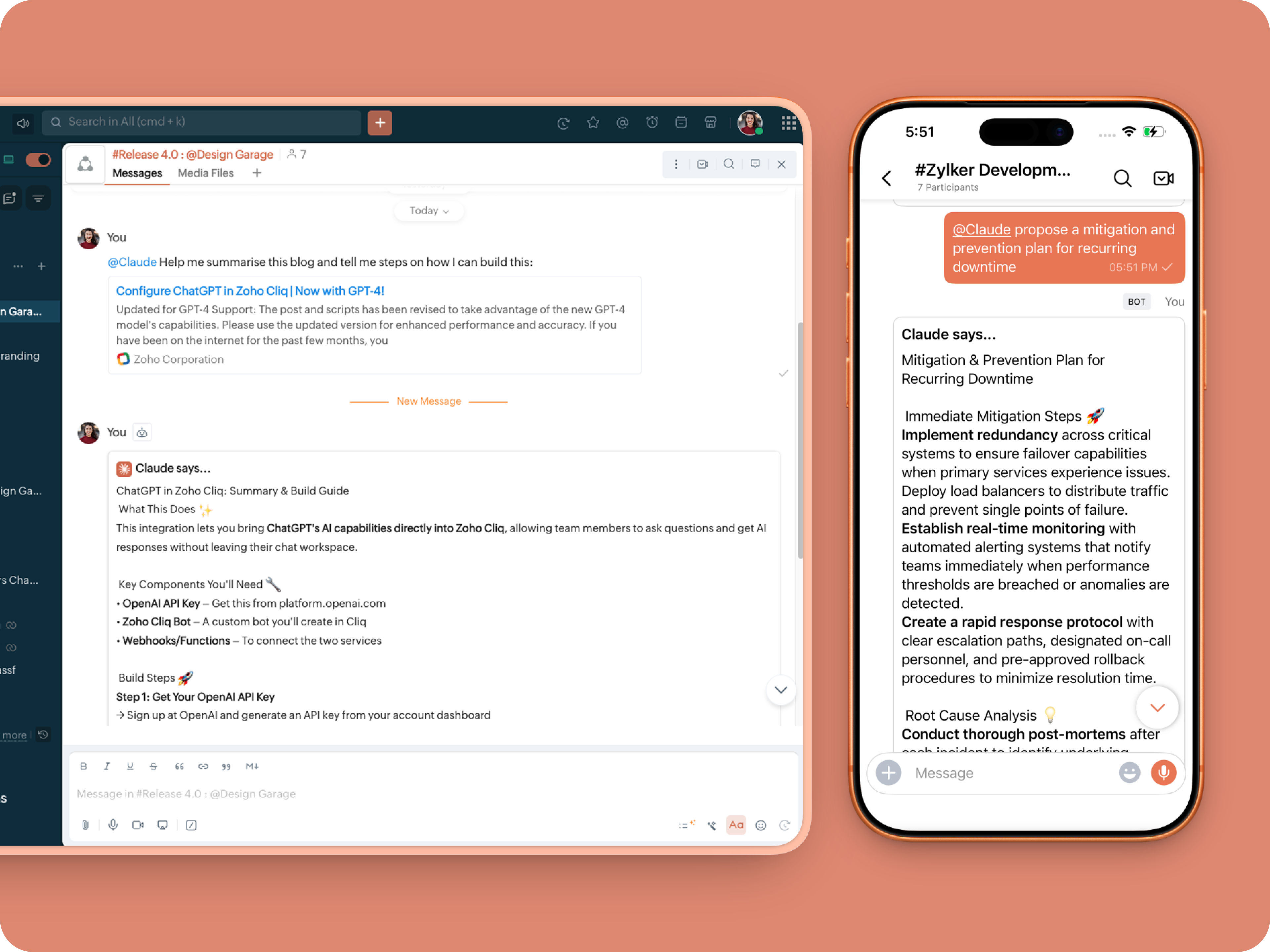


Mention Handler:


What does this do: This is to allow Claude to be @mentioned in any chat.
  1. userMessageText = "";
  2. fileAction = false;
  3. repliedMessage = false;
  4. if(message_details.get("message").containKey("replied_message"))
  5. {
  6. repliedMessage = true;
  7. replyMessageID = message_details.get("message").get("replied_message").get("id");
  8. messageType = message_details.get("message").get("replied_message").get("type");
  9. if(messageType == "text" || messageType == "card")
  10. {
  11. userMessageText = message_details.get("message").get("replied_message").get("text");
  12. }
  13. else
  14. {
  15. fileType = message_details.get("message").get("replied_message").get("file").get("type");
  16. if(fileType != "application/pdf")
  17. {
  18. return {"type":"banner","text":"Only PDF files are supported for this action","status":"failure"};
  19. }
  20. else
  21. {
  22. fileAction = true;
  23. }
  24. }
  25. }
  26. promptInstruction = "\"### Instructions ⓘ \nProvide a human-digestible, highly organized response (300-500 characters). Break down your output into bite-sized paragraphs and use bolding to guide the reader's eye. *Strictly avoid tables.* Use plenty of white space and only ### headings for a clean look. \n\n ### Formatting Protocol • \n - Bold: *text* \n - Italic: _text_ \n - Strike: ~text~ \n - Underline: __underline__ \n - Headers: ### Title \n - Quote: \"quote\" \n - Blockquote: > text \n - Bullets: Use • or → for lists \n - Emojis: Use ✨, 🚀, or 💡 to highlight key takeaways \n - Separator: --- \n\n ### and replace ** to *";
  27. userPrompt = "";
  28. if(message.trim().length() > 0)
  29. {
  30. userPrompt = "Action: " + message + "\n\n\n" + userMessageText + "\n\n\n" + promptInstruction;
  31. }
  32. else
  33. {
  34. userPrompt = "Action: " + userMessageText + "\n\n\n" + promptInstruction;
  35. }
  36. // Set up API headers
  37. apiHeaders = Map();
  38. apiHeaders.put("anthropic-version","2023-06-01");
  39. apiHeaders.put("Content-type","application/json");
  40. apiHeaders.put("ENTER-APIKEY-HERE");
  41. // Don't forget your API key!
  42. // Check if message is text-only or contains a file
  43. if(!fileAction)
  44. {
  45. // Handle text-only message
  46. requestPayload = {"max_tokens":1024,"messages":{{"content":userPrompt,"role":"user"}},"model":"claude-sonnet-4-5-20250929"};
  47. }
  48. else
  49. {
  50. // Handle message with file attachment
  51. uploadedFile = invokeurl
  52. [
  53. url :message_details.get("message").get("replied_message").get("file").get("url")
  54. type :GET
  55. connection:"ENTER-CONNECTION-NAME"
  56. ];
  57. info uploadedFile;
  58. // uploadedFile = message.get("content").get("file").get("name");
  59. base64EncodedFile = zoho.encryption.base64Encode(uploadedFile);
  60. if(message_details.get("message").get("replied_message").containKey("comment"))
  61. {
  62. comment = message_details.get("message").get("replied_message").get("comment");
  63. userPrompt = userPrompt + "\n" + comment;
  64. }
  65. else
  66. {
  67. userPrompt = userPrompt;
  68. }
  69. mediaType = "application/pdf";
  70. requestPayload = {"max_tokens":1024,"messages":{{"role":"user","content":{{"type":"document","source":{"type":"base64","media_type":mediaType,"data":base64EncodedFile}},{"type":"text","text":userPrompt}}}},"model":"claude-sonnet-4-5-20250929"};
  71. }
  72. info requestPayload;
  73. // Make API call to Claude
  74. claudeApiResponse = invokeurl
  75. [
  76. url :"https://api.anthropic.com/v1/messages"
  77. type :POST
  78. parameters:requestPayload + ""
  79. headers:apiHeaders
  80. detailed:true
  81. ];
  82. info claudeApiResponse;
  83. // Extract the actual text response
  84. if(claudeApiResponse.get("responseCode") == 200)
  85. {
  86. responseBody = claudeApiResponse.get("responseText");
  87. parsedResponse = responseBody.toMap();
  88. claudeMessage = parsedResponse.get("content").get(0).get("text").replaceAll("\n\n","\n").remove("---").remove("#");
  89. if(claudeMessage.length() > 4000)
  90. {
  91. claudeMessage = claudeMessage.subString(0,4000) + "...";
  92. }
  93. info "Claude's Response: " + claudeMessage;
  94. }
  95. else
  96. {
  97. responseBody = claudeApiResponse.get("responseText");
  98. parsedResponse = responseBody.toMap();
  99. claudeMessage = "*" + parsedResponse.get("error").get("type") + "* \n" + parsedResponse.get("error").get("message");
  100. info "API Error: " + claudeApiResponse;
  101. }
  102. responseContent = {"text":claudeMessage,"card":{"title":"Claude says...","icon":"https://uxwing.com/wp-content/themes/uxwing/download/brands-and-social-media/claude-ai-icon.png"}};
  103. info responseContent;
  104. if(repliedMessage)
  105. {
  106. responseContent.put("reply_to",replyMessageID);
  107. }
  108. info zoho.cliq.postToChat(chat.get("id"),responseContent);
  109. return Map();


Message Action
What does it do: Allow Claude to act on any message or file.

Quoteⓘ For files, we've extended this to only PDF file formats for now to keep implementation predictable and to avoid unsupported file formats

What we're adding:
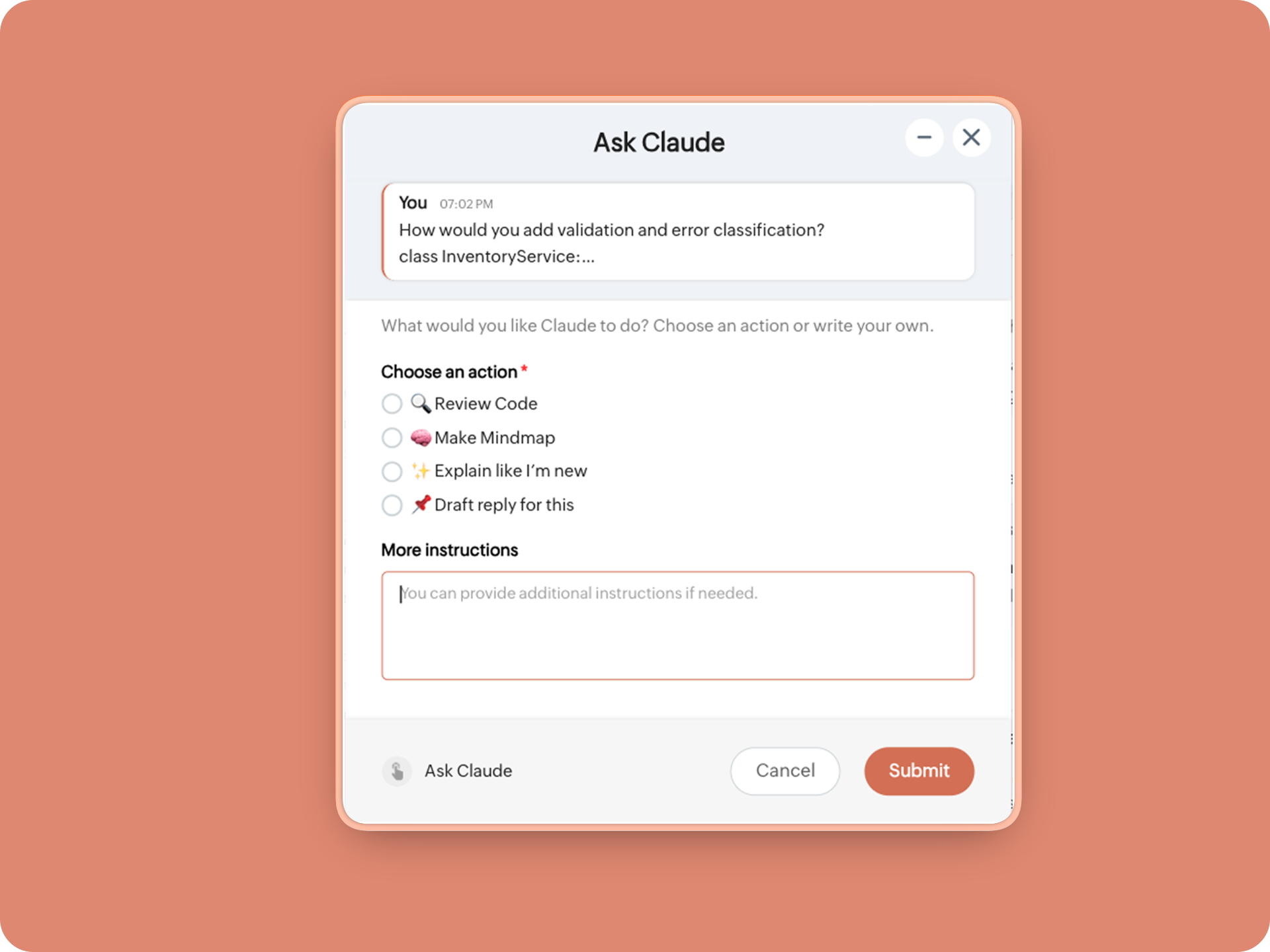
1. When executed on any message, a form opens to prompt:

A. 🔍 Review code
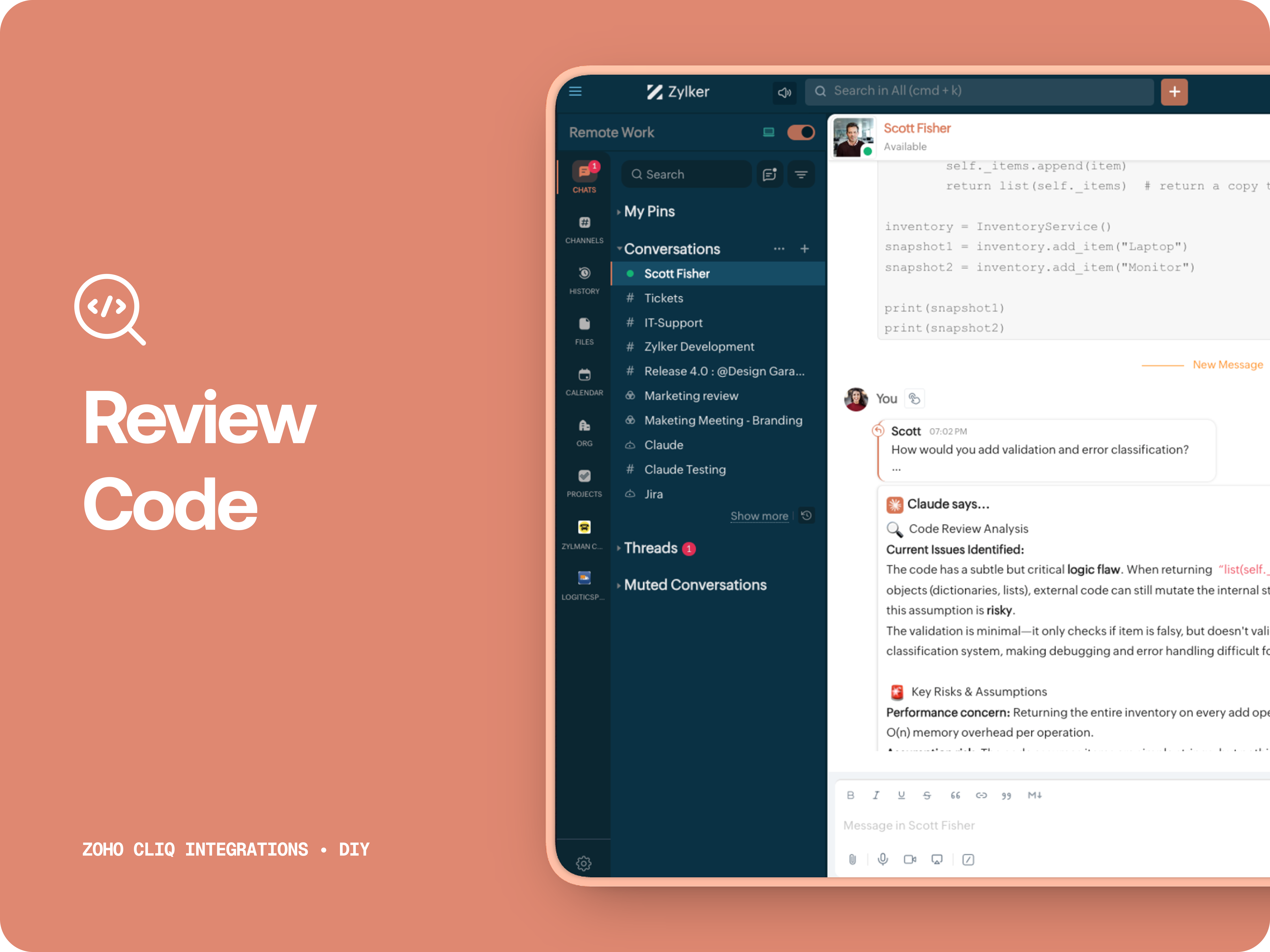
Claude acts like a senior engineer who finds bugs, lists risks, suggest improvements, provides corrected code.


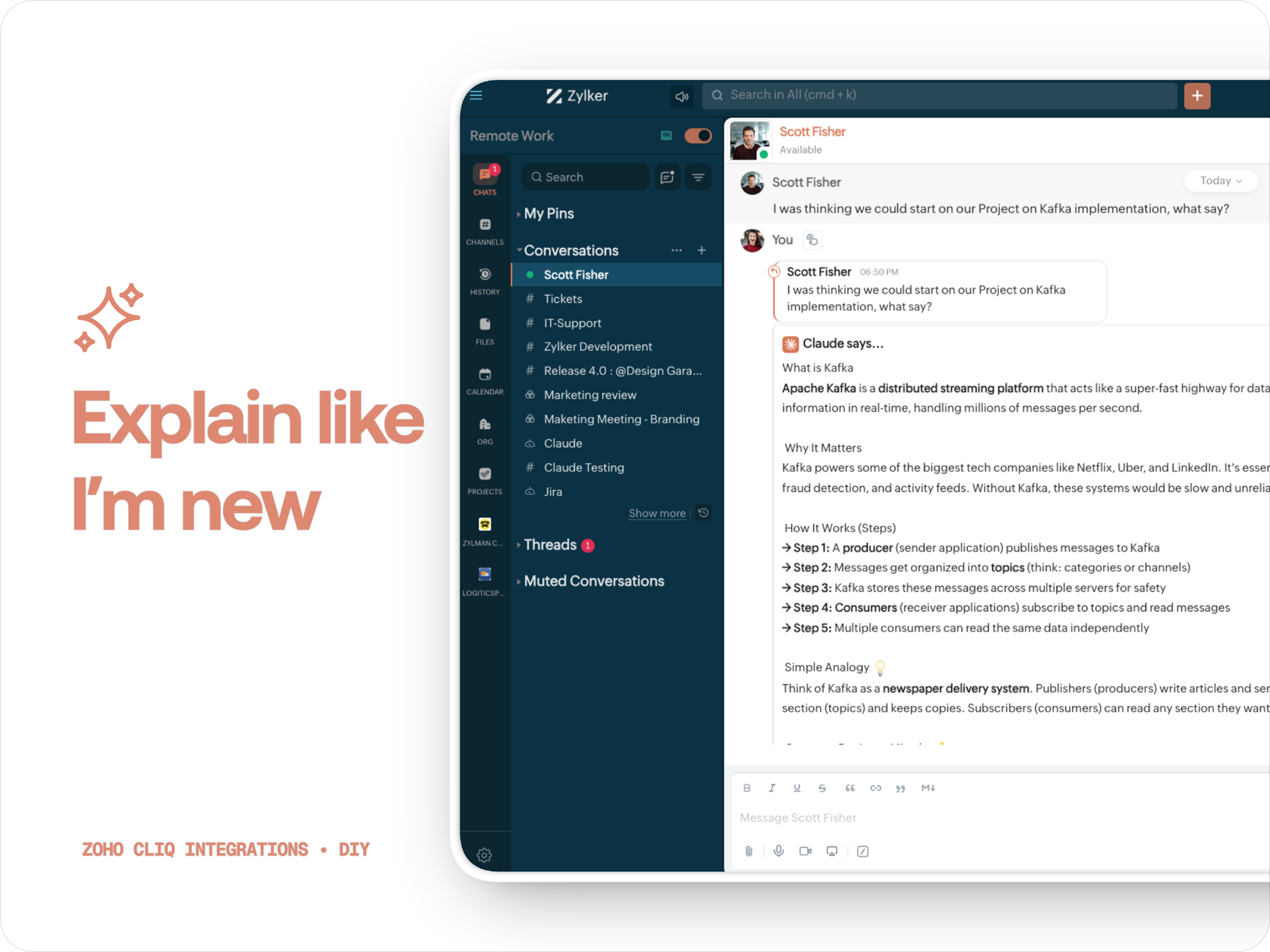
B. ✨ Explain like I'm new
Claude teaches you what it is, why it matters, how it works, an analogy or common mistakes for any concept.

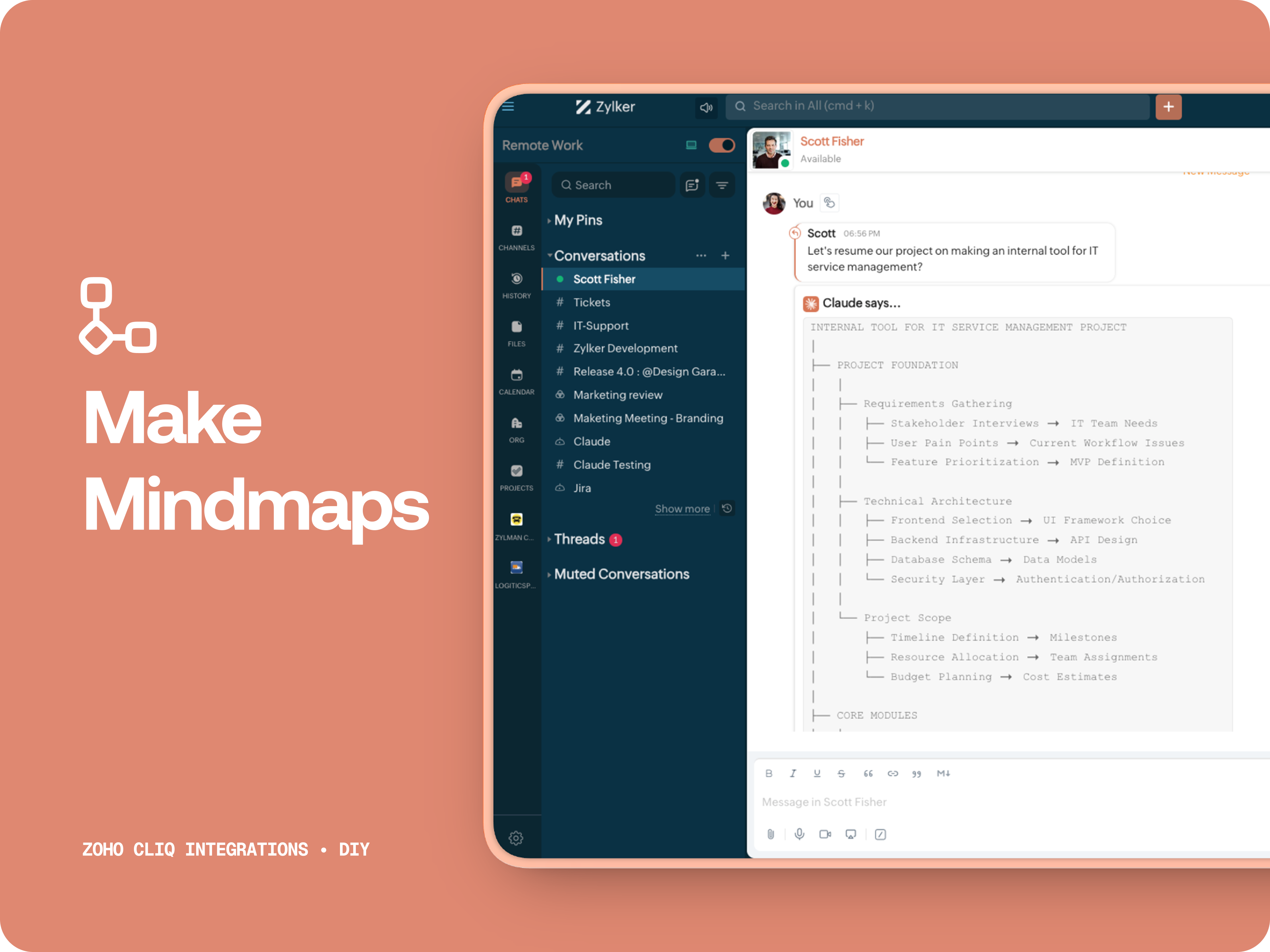
C. 🧠 Make Mindmap

Converts content into a structured ASCII flow chart for explaining system designs, feature breakdowns or general product thinking.

D. 📌 Draft a reply
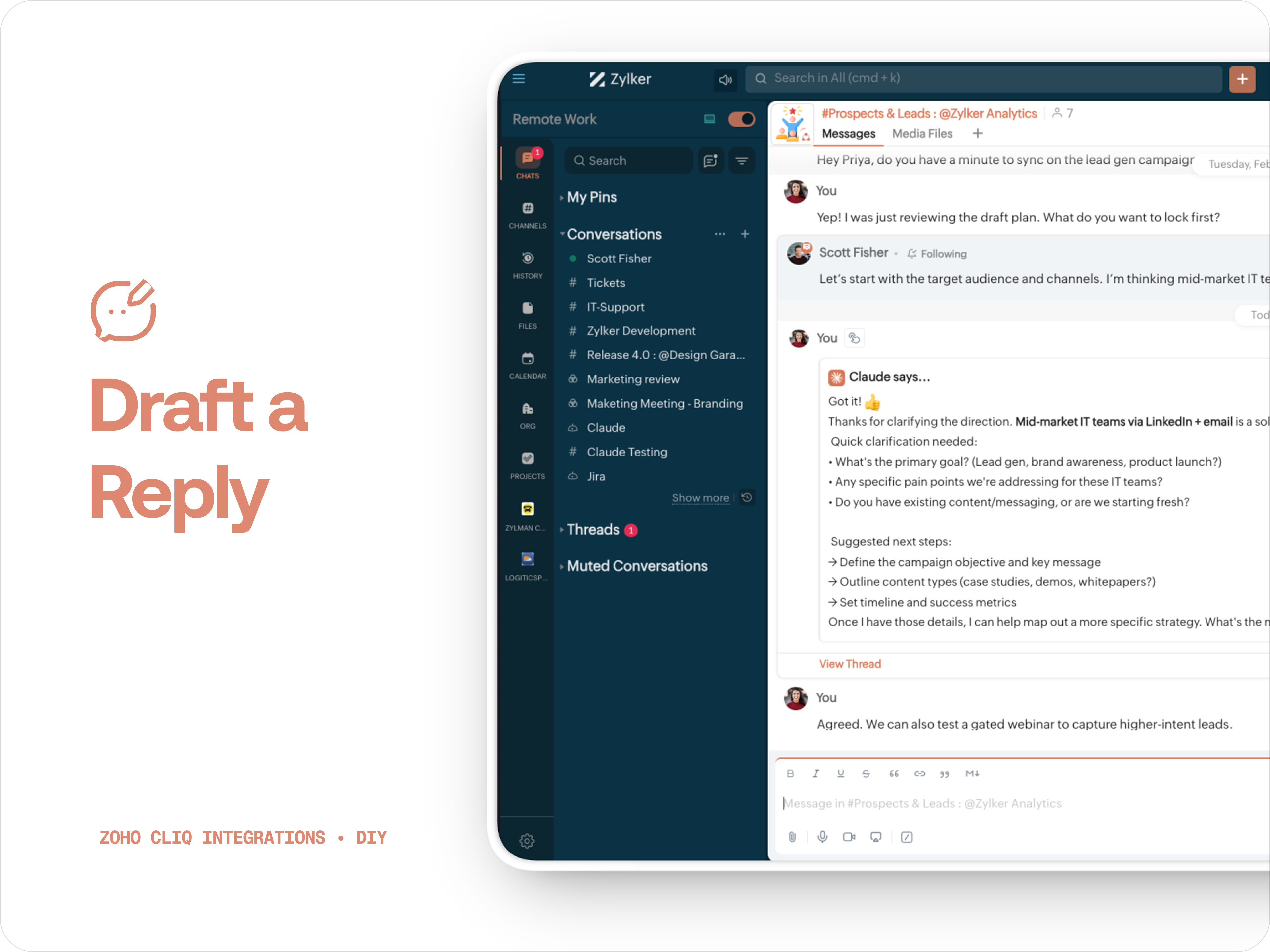
Give professional, concise business replies to address, asks clarifications, suggests next steps in a human tone. 


How to create:

1. Create a
Message Action, name it Ask Claude and give any description of your choice.
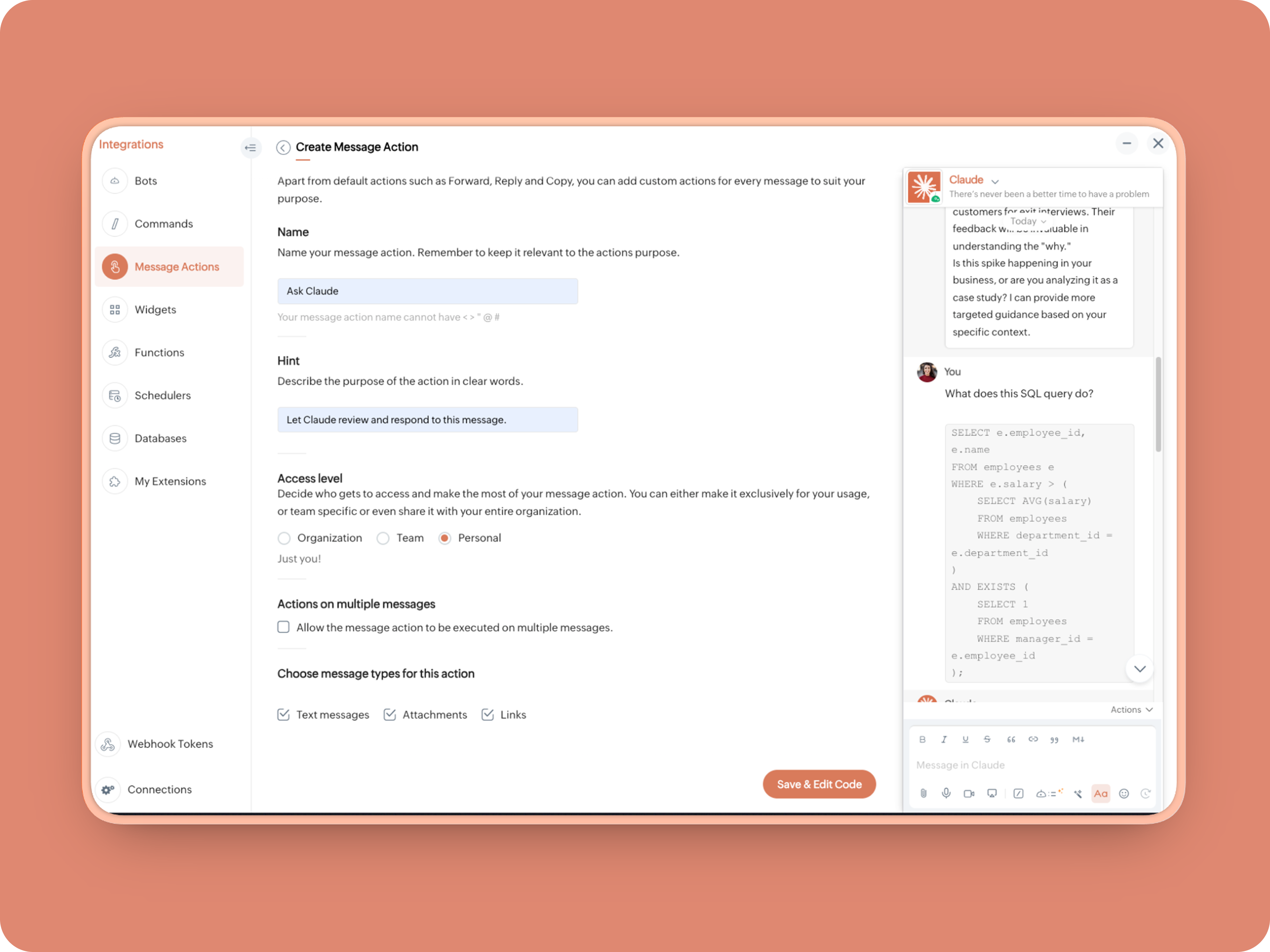


2. Message properties:  Text messages, Attachments, Links
3. Enter code as instructed below:
(Copy the function name and replace it in Line. 14)
  1. info message;
  2. returnForm = false;
  3. if(message.get("type") == "file")
  4. {
  5. fileType = message.get("content").get("file").get("type");
  6. if(fileType != "application/pdf")
  7. {
  8. return {"type":"banner","text":"Only PDF files are supported for this action","status":"failure"};
  9. }
  10. }
  11. inputs = list();
  12. inputs.add({"label":"Choose an action","name":"action","mandatory":true,"type":"radio","options":{{"value":"reviewcode","label":"🔍 Review Code"},{"value":"explainthis","label":"🧠 Make Mindmap"},{"value":"ExplainlikeImnew","label":"✨ Explain like I’m new"},{"value":"Draftreplyforthis","label":"📌 Draft reply for this"}}});
  13. inputs.add({"label":"More instructions","name":"additionalInstructions","placeholder":"You can provide additional instructions if needed.","min_length":"0","max_length":"500","mandatory":false,"type":"textarea"});
  14. return {"type":"form","title":"Ask Claude","hint":"What would you like Claude to do? Choose an action or write your own.","name":"INSERT-FUNCTION-NAME","button_label":"Submit","inputs":inputs,"action":{"type":"invoke.function","name":"INSERT-FUNCTION-NAME"}};
Next, let's create a function and then link it up to the built-Message action to open the form:


Form Function:


1.Go to Functions → Name your function (Eg. askclaude) and add description
2. Select Form function
3. Create
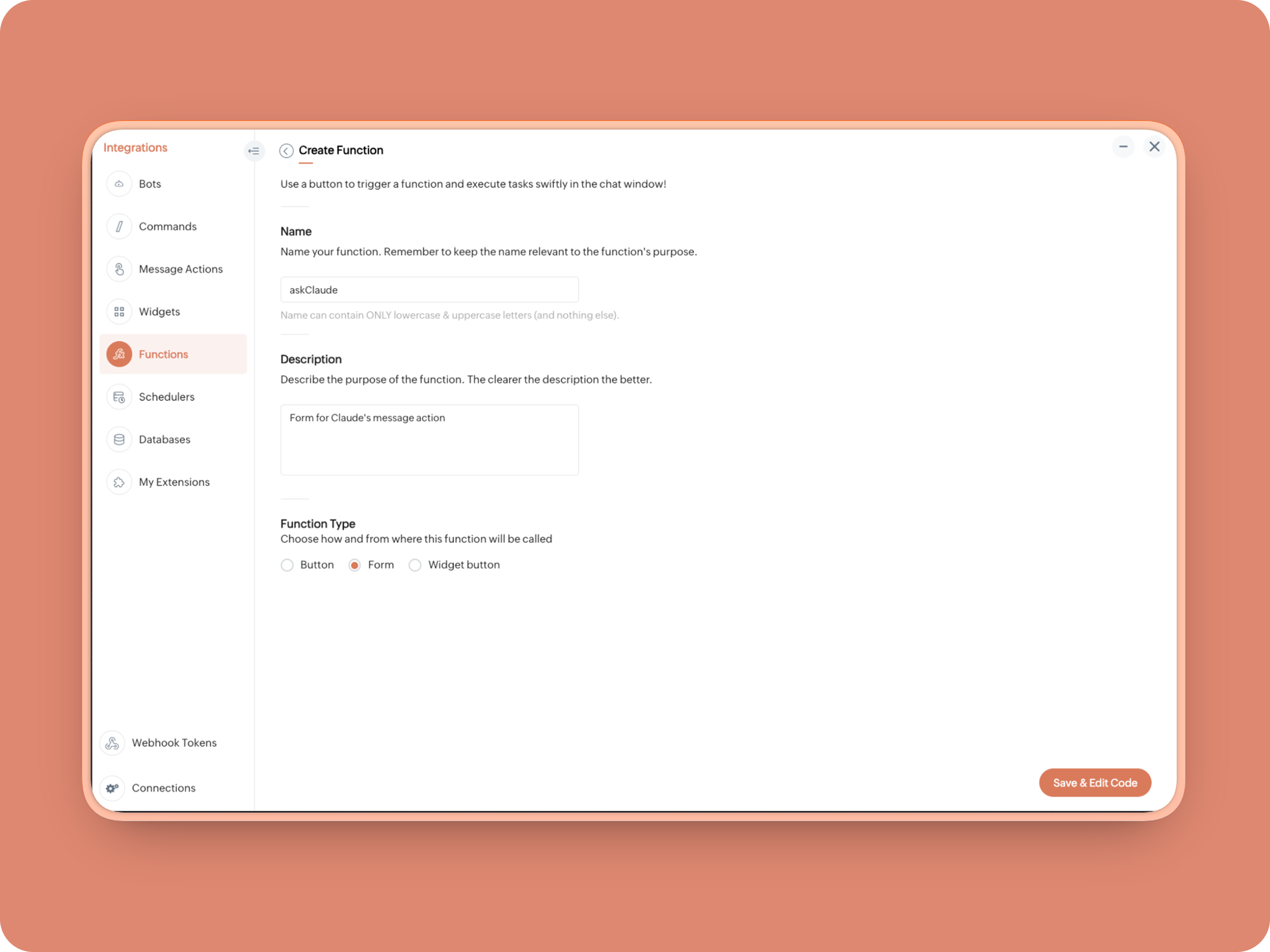


Once created, in the Form Submit Handler, paste this code:
  1. info form;
  2. info message;
  3. // Set up API headers
  4. apiHeaders = Map();
  5. apiHeaders.put("anthropic-version","2023-06-01");
  6. apiHeaders.put("Content-type","application/json");
  7. apiHeaders.put("ENTER-APIKEY-HERE");
  8. // Don't forget your API key!
  9. actionType = form.get("values").get("action").get("value");
  10. promptInstruction = "\"### Instructions ⓘ \nProvide a human-digestible, highly organized response (250-300 characters). Break down your output into bite-sized paragraphs and use bolding to guide the reader's eye. *Strictly avoid tables.* Use plenty of white space and only ### headings for a clean look. \n\n ### Formatting Protocol • \n - Bold: *text* \n - Italic: _text_ \n - Strike: ~text~ \n - Underline: __underline__ \n - Headers: ### Title \n - Quote: \"quote\" \n - Blockquote: > text \n - Bullets: Use • or → for lists \n - Emojis: Use ✨, 🚀, or 💡 to highlight key takeaways \n - Separator: --- \n\n ### and replace all ** to *";
  11. if(actionType == "reviewcode")
  12. {
  13. userPrompt = "🔍 You are a senior engineer. \nReview this code: \n• List bugs or logical errors \n• Note assumptions and risks \n• Suggest improvements \n• Provide corrected code \n• Explain why your version is better\n\n\n" + promptInstruction;
  14. }
  15. else if(actionType == "explainthis")
  16. {
  17. userPrompt = "🧠 You are a systems thinker. \n•Convert the input into a visual flow chart using plain text. \n•Strict Output Rules \n•Output ONLY inside a triple backtick code block \n•Do NOT use Mermaid \n•Do NOT write paragraphs \n•Do NOT explain anything \n•Do NOT use bullet lists outside structure \n•Use ASCII connectors to form a real flow chart \n•Use arrows (→, ↓, ↳, ├──, └──) to show relationships \n•Maintain clear hierarchy and spacing \n•One single root at the top \n•Logical directional flow (top → down) \n•Structure Requirements \n•Root node at top \n•First-level branches below \n•Subpoints indented \n•Cross-links if relevant \n•Clean spacing \n•No duplicated nodes \n•Required Format Example \n•MAIN IDEA \n•Branch 1 -> Subpoint -> Subpoint \n•Branch 2 -> Subpoint ->Subpoint \n•Branch 3 -> Subpoint -> Subpoint\n\n\n" + promptInstruction;
  18. }
  19. else if(actionType == "ExplainlikeImnew")
  20. {
  21. userPrompt = "✨ You are a teacher for beginners. \nExplain: \n• What it is \n• Why it matters \n• How it works (steps) \n• A simple analogy \n• One common beginner mistake\n\n\n" + promptInstruction;
  22. }
  23. else if(actionType == "Draftreplyforthis")
  24. {
  25. userPrompt = "📌 You are a professional responder. \nReply to this message: \n• Directly address main point \n• Ask for clarification if needed \n• Suggest next steps \n• Keep it concise and clear \n• Make sure message in a buisness casual tone, consise, human written.\n\n\n" + promptInstruction;
  26. }
  27. if(form.get("values").get("additionalInstructions").length() > 0)
  28. {
  29. userPrompt = userPrompt + "\n" + form.get("values").get("additionalInstructions");
  30. }
  31. // Check if message is text-only or contains a file
  32. if(message.get("type") == "text" || message.get("type") == "card")
  33. {
  34. // Handle text-only message
  35. userMessageText = message.get("text");
  36. requestPayload = {"max_tokens":1024,"messages":{{"content":userPrompt + "\n\n" + userMessageText,"role":"user"}},"model":"claude-sonnet-4-5-20250929"};
  37. }
  38. else
  39. {
  40. // Handle message with file attachment
  41. uploadedFile = invokeurl
  42. [
  43. url :"https://cliq.zoho" + environment.get("tld") + "/api/v2/files/" + message.get("content").get("file").get("id")
  44. type :GET
  45. connection:"ENTER-CONNECTION-NAME"
  46. ];
  47. info uploadedFile;
  48. base64EncodedFile = zoho.encryption.base64Encode(uploadedFile);
  49. if(message.get("content").containKey("comment"))
  50. {
  51. comment = message.get("content").get("comment");
  52. userPrompt = userPrompt + "\n" + comment;
  53. }
  54. else
  55. {
  56. userPrompt = userPrompt;
  57. }
  58. mediaType = message.get("content").get("file").get("type");
  59. mediaType = "application/pdf";
  60. requestPayload = {"max_tokens":1024,"messages":{{"role":"user","content":{{"type":"document","source":{"type":"base64","media_type":mediaType,"data":base64EncodedFile}},{"type":"text","text":userPrompt}}}},"model":"claude-sonnet-4-5-20250929"};
  61. }
  62. info requestPayload;
  63. // Make API call to Claude
  64. claudeApiResponse = invokeurl
  65. [
  66. url :"https://api.anthropic.com/v1/messages"
  67. type :POST
  68. parameters:requestPayload + ""
  69. headers:apiHeaders
  70. detailed:true
  71. ];
  72. // info claudeApiResponse;
  73. // Extract the actual text response
  74. if(claudeApiResponse.get("responseCode") == 200)
  75. {
  76. responseBody = claudeApiResponse.get("responseText");
  77. parsedResponse = responseBody.toMap();
  78. claudeMessage = parsedResponse.get("content").get(0).get("text").replaceAll("\n\n","\n").remove("---").remove("#");
  79. if(claudeMessage.length() > 4000)
  80. {
  81. claudeMessage = claudeMessage.subString(0,4000) + "...";
  82. }
  83. info "Claude's Response: " + claudeMessage;
  84. }
  85. else
  86. {
  87. responseBody = claudeApiResponse.get("responseText");
  88. parsedResponse = responseBody.toMap();
  89. claudeMessage = "*" + parsedResponse.get("error").get("type") + "* \n" + parsedResponse.get("error").get("message");
  90. info "API Error: " + claudeApiResponse;
  91. }
  92. responseContent = {"text":claudeMessage,"card":{"title":"Claude says...","icon":"https://uxwing.com/wp-content/themes/uxwing/download/brands-and-social-media/claude-ai-icon.png"},"reply_to":message.get("id")};
  93. info responseContent;
  94. info zoho.cliq.postToChat(chat.get("id"),responseContent);
  95. return Map();

When triggered: Opens a form → User selects an action → Adds additional instructions → Submits → Claude processes the selected message


And that's it. You're Claude integration is ready to be used. 


What's Next:

What you built today is just the foundation.

Shape it around how your team actually works. Extend it to turn discussions into action items, review PRs before they’re merged, generate standup updates, extract tasks automatically, or create knowledge snippets from resolved threads.

Start with one real pain point. Solve it well. Then layer more intelligence on top.

The structure is already there. The possibilities are yours.

🔗 Explore Zoho Cliq: Developer Platform
🔗 Explore Anthropic API Docs

Questions? Comments below. 
Looking forward how you'll build and go make it your own. 🚀

      • Sticky Posts

      • Automating Real-Time Zoho Bookings Alerts in Zoho Cliq

        Enable your teams to respond in seconds by bridging the gap between booking confirmation and team notification. No sticky notes, no calendar nudges and no follow-up frenzies. For businesses that rely on scheduled appointments, real-time visibility is
      • Cliq Bots - Post message to a bot using the command line!

        If you had read our post on how to post a message to a channel in a simple one-line command, then this sure is a piece of cake for you guys! For those of you, who are reading this for the first time, don't worry! Just read on. This post is all about how
      • Add Claude in Zoho Cliq

        Let’s add a real AI assistant powered by Claude to your workspace this week, that your team can chat with, ask questions, and act on conversations to run AI actions on. This guide walks you through exactly how to do it, step by step, with all the code
      • Automate attendance tracking with Zoho Cliq Developer Platform

        I wish remote work were permanently mandated so we could join work calls from a movie theatre or even while skydiving! But wait, it's time to wake up! The alarm has snoozed twice, and your team has already logged on for the day. Keeping tabs on attendance
      • Customer payment alerts in Zoho Cliq

        For businesses that depend on cash flow, payment updates are essential for operational decision-making and go beyond simple accounting entries. The sales team needs to be notified when invoices are cleared so that upcoming orders can be released. In contrast,

        • Recent Topics

        • Collapsible Sections & Section Navigation Needed

          The flexibility of Zoho CRM has expanded greatly in the last few years, to the point that a leads module is now permissible to contain up to 350 fields. We don't use that many, but we are using 168 fields which are broken apart into 18 different sections.
        • Create custom rollup summary fields in Zoho CRM

          Hello everyone, In Zoho CRM, rollup summary fields have been essential tools for summarizing data across related records and enabling users to gain quick insights without having to jump across modules. Previously, only predefined summary functions were
        • Inventory batch details

          Hi there, I'm trying to get the batch details of an item, here's what I've done so far. I've sent cUrl request to the below endpoint and I get a successful response. Within in the response I find the "warehouses" property which correctly lists all the
        • How do I edit the Calendar Invite notifications for Interviews in Recruit?

          I'm setting up the Zoho Recruit Interview Calendar system but there's some notifications I don't have any control over. I've turned off all Workflows and Automations related to the Calendar Scheduling and it seems that it's the notification that is sent
        • Unable to send emails from iPhone and iPad

          Curious, all of a sudden I'm unable to send emails from iPhone and iPad. I keeps asking for my password again and again. No problems from my MacBook Pro.
        • Journal Entries Do Not Show Multiple Entries to the Same Account

          Another basic accounting function that Books ... Accountants sometimes write journal entries, debiting and/or crediting the same account in the same entry. This is due to the need to record specific activity in an account when we pull reports especially
        • Create static subforms in Zoho CRM: streamline data entry with pre-defined values

          Last modified on (9 July, 2025): This feature was available in early access and is currently being rolled out to customers in phases. Currently available for users in the the AU, CA, and SA DCs. It will be enabled for the remaining DCs in the next couple
        • Partial customer Refund via customer Credit Card used to pay invoice

          How can we process a partial refund through the same credit card that a customer used to pay the initial invoice? - In other words, say a customer was sent an invoice for $1200.00 and they paid it through Zoho with our online credit processor, PayFlow
        • Partial refunds

          I am trying to process refund for a one item invoice, however the refund is partial: i am getting this error while creating credit note, can anyone share some wisdom about this
        • How in the heck do i record a (partial) refund???

          I have a client. wrote an invoice for 3 services totalling $520. He paid it online (we use zoho to authorize.net) We went out and couldn't do one of the services I didn't see a way to initiate a refund through zoho books, so i did a $250 refund through authorize.net. Tried to edit the payment on zoho books, but it won't let me b/c "this payment was made on line" When i try to edit the invoice i get a popup about it no longer matching the payment. What do I do??? And why is it so hard to do something
        • Action Required: Update your Zoho Projects – Zoho Analytics integration

          Dear Zoho Projects integration users, We would like to inform you about an upcoming update to the Zoho Projects–Zoho Analytics integration. Read the full migration announcement here. As shared in the announcement, we are updating the integration to support
        • Mirror Component in Zoho CRM: Access real-time related data without leaving your record

          Hi everyone, This feature is now available for the JP, CA, SA, UAE, and AU DCs. We're excited to bring to you Zoho CRM's mirror component, which presents relevant data on a record's details page and keeps everything users need in one place without having
        • Workflows fail silently in Zoho CRM and there is no native way to know

          Workflow automation is honestly one of the biggest reasons my clients choose Zoho. But there is one problem I keep running into across almost every implementation. When a workflow fails, nobody finds out. Email alerts hit daily limits and just stop. Custom
        • Office365(outlook emails) Zoho CRM integration

          Hi guys We're looking to buy Zoho CRM and are currently trialling. I'm working from a MacBook fyi. I've so spent 3 hours on live chat today with Zoho as we couldn't get the two to integrate properly, even with the plug in installed but finally managed
        • When adding subform records, how do I access member fields of a name field

          I have the following code (runs when a record is added to a form) if (input.P_liza != null) { input_deal = input.P_liza; rec = form_mapping[deal_name == input_deal]; id = input.N_mero_de_documento_de_Identificaci_n_Alfanum_rico; contact = -----redacted------.get_crm_contact_by_id(id);
        • Making "All Day Events" not default

          When I go to schedule an event, the All Day checkbox is ticked by default. Generally, I don't plan all day events, so is there a way to make that not checked by default? I couldn't find a setting for this...
        • Create custom field in multiple modules

          I am trying to create some custom fields that will be in both leads and contacts module without having to create them separately and then mapping them. How is that performed? it is too time-consuming to create 20+ fields and then do the same thing in a different module when they carry the same info. The idea is that when we get a lead from web site, there are items that we capture and once that lead is a client and moved to Contacts, that info should come over. So trying to find an easy way to create
        • Allow 2 logos for Branding, one for Light Mode and one for Dark Mode?

          Our logo has a lot of black text on it. If we leave the background transparent, per recommendation of Zoho, when a user is viewing a file and turns on dark mode, our logo is not really visible and looks really weird. It would be really great if we could
        • Compensation | Salary Packages - Hourly Wage Needed

          The US Bureau of Labor Statistics says 55.7% of all workers in the US are paid by the hour. I don't know how that compares to the rest of the world, but I would think that this alone would justify the need for having an hourly-based salary package option.
        • In Desk KB article, how do include an image in a numbered list without using a number or bullet?

          We need to include images in our KBA steps as a numbered list. Here I have numbered steps. I want the image no numbering or bullet. Open Purchase Order Entry. Select the mail icon: Select the Save button. I see your own articles have images in number
        • Video Interview features

          I tested the video interview feature. It's supported only on desktop version of chrome/firefox. Most of the times, the candidates are available on their cellphone. Need to have this for mobile devices too.
        • POS and payments

          Have i missed the point can i not use zoho POS as a payment terminal back into stripe like we can in Books?
        • Delugeサーバーページ(HTML)での関数の使用方法

          Zoho Creator、Deluge並びに初心者です。 題名の通りDelugeサーバーページ(HTML)で関数が使用する方法を教えて頂きたいです。 ざっくりと説明します。 現在、1週間だけカレンダーを表示するページをelugeサーバーページ(HTML)内で作っております。 カレンダー内のボタンには翌週や先週を表示するボタンを追加しようとしています。 それらのボタンを押下した際、現在の日時に±7日をしてページを表示しなおす処理が走るようにさせたいです。 ボタンが押下されたとき、用意していた関数でその処理を実行する想定です。
        • Automatically remove commas

          Team, Please be consistent in Zoho Books. In Payments, you have commas here: But when we copy and paste the amount in the Payments Made field, it does not accept it because the default setting is no commas. Please have Zoho Books remove commas autom
        • Why does my salesiq dashboard doesn't look like the one on the admin guide?

          https://help.zoho.com/portal/en/kb/salesiq-2-0/for-administrators/setup-brand/articles/setting-up-the-website-channel#Launcher
        • ENDPOINT ZOHO CREATOR

          I created a function to perform the action of POST, GET and PUT in order to use it outside our portal and create more dynamic forms using a cloud server. Params = “qAvhbBBJJsQysd45DdkvTR34A” Curl = “https://www.zohoapis.com/creator/custom/admin2844/vallesalud_julaje_private?publickey=”;
        • MCP > Creator connection failing with Claude

          I'm trying to get claude to access any of my Zoho Creator apps and it keeps failing. I have enabled all tools for creator and ensured in claude settings that everything is authorised. Here is what claude says : Unfortunately, the error messages I'm receiving
        • Gantt Chart - Multiple Projects

          Hello, I have about 6 projects set up in Zoho and I am looking to see if it is possible to see all my projects on one gantt chart? Thanks Alex
        • milestone dependencies

          It would be exceptionally useful to be able to assign dependencies on milestone/tasks. For example, if within a project I have three milestones for creating three ads for publication, but each ad also requires the logo to be finished by the graphic designer (a separate milestone), it would be useful to have the start dates of the later items dependent on another prerequisite component. That way, not only would I not have to enter the logo creation as a separate task for each of the three milestones,
        • Need Easy Way to Update Item Prices in Bulk

          Hello Everyone, In Zoho Books, updating selling prices is taking too much time. Right now we have to either edit items one by one or do Excel export/import. It will be very useful if Zoho gives a simple option to: Select multiple items and update prices
        • Upgraded sentiment analysis model for more accurate detection

          Hello everyone! Sentiment Analysis in Zia is being upgraded to a newer model to improve how customer sentiment is detected and interpreted. This transition is aimed at getting better contextual understanding across all supported channels. As part of this
        • Notebook Al

          Why was our organisation's Notebook AI disabled, even though our admin said it wasn't done on their side?
        • Dashboard Filtering with 2 query tables using one filter field

          Hi There, I have been using user filters on the dashboard and for the most part they are fine. However I have one issue I would like to see if there is a fix for it. I have a main query that most of my widgets use. Then I have a second query for another widget. The dashboard uses the field "brand" in the main query for the filter.  The second query uses the main_query.brand field alongside fields from a second table. I have set the widget to use main_query.brand as a filter, but when the dashboard
        • How to get static reports via Desk API

          Hello, we are hoping to use the Desk API to automatically export the default static reports in Zoho Desk, or reconstruct them via other API calls. What's the best way to do this? For example, if I want to recreate the Response Time static report via the
        • What's New in Zoho POS - April 2026

          Hello everyone, Welcome to Zoho POS’s monthly update, where we share our latest feature updates, enhancements, events, and more. Let’s take a look at how April went. Access and manage other web applications in Zoho POS with Web Tabs You can now access
        • Issue with adding “Roblox” as an answer option in Zoho SurveyО

          Hello Zoho Support Team, I’m experiencing an issue while editing a survey in Zoho Survey. For some reason, I’m unable to add “Roblox” as an answer option. The same issue occurs with any answer option that contains this exact combination of letters, regardless
        • How to import MBOX to Gmail?

          In order to import or restore MBOX file backup Gmail account you can go for Advik MBOX to Gmail Import utility. This utility will import MBOX to Gmail or G Suite account without any configuration. This tool is considered as the most easiest and simplest process to perform email migration. Key Feature of this tool Import MBOX to Gmail in Bulk Maintain folder struture Retain Key elements Single Panel Interface 100% accuracy rate Download source : http://www.adviksoft.com/mbox/gmail.html
        • Free webinar! Accelerate deals with Zoho Sign for Zoho CRM and Bigin by Zoho CRM

          Hello, Paperwork shouldn’t slow you down. Whether you’re growing a small business or running a large enterprise, manual approvals and slow document turnaround can cost you time and revenue. With Zoho Sign for Zoho CRM and Bigin by Zoho CRM, you can take
        • Automatically set the default VAT percentage on a quote

          Every time I create a quote, I have to manually adjust the VAT and activate the checkbox for 21%. But all of our quotes include 21% VAT. So now occasionally, it happens that the checkbox is forgotten, and the customer receives an incorrect quote (without
        • Don't understand INVALID_REQUEST_METHOD when I try to post up an attachment

          When I make the POST request (using python requests.post() for files): https://www.zohoapis.com/crm/v8/Calls/***************01/Attachments I get this response: r:{ "code": "INVALID_REQUEST_METHOD", "details": {}, "message": "The http request method type
        • Next Page