Add Text Direction Control in Zoho Show
Dear Zoho Show Team,
We hope you are doing well. We would like to request an enhancement in Zoho Show that allows users to set the text direction (right-to-left or left-to-right) for text boxes, similar to what is available in Google Slides and Microsoft PowerPoint.

Use Case:
Currently, Zoho Show lacks a dedicated option to define text direction within text boxes. While RTL languages like Hebrew and Arabic are supported, the absence of a proper text direction setting creates issues when combining RTL text with punctuation or mixed-language content.
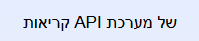
A key issue arises when special characters (such as punctuation marks) are placed incorrectly due to the lack of explicit text direction settings. For example, instead of displaying "!שלום", the system may incorrectly render it as "שלום!", disrupting readability.
The same thing happens when using RTL language with LTR language on the same time:
We get:
Instead of:

Requested Feature:
We request the addition of a “Text Direction” button that:
-
Allows users to toggle text boxes between left-to-right (LTR) and right-to-left (RTL) direction.
-
Ensures proper placement of punctuation and symbols in RTL text.
-
Functions independently of text alignment settings (left, center, right).

Benefits:
✅ Improved RTL support – Ensures correct formatting of RTL text, especially when mixed with LTR content.
✅ Better readability – Eliminates incorrect punctuation placement, enhancing clarity.
✅ Enhanced user experience – Provides functionality that aligns with industry standards like Google Slides and PowerPoint.
This feature is crucial for users working with RTL languages, and we believe it would greatly enhance Zoho Show’s usability.
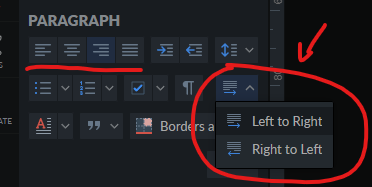
By the way - this is already available in zoho writer:
Thank you for considering our request. We appreciate your ongoing efforts to improve Zoho products.
Best regards,
Ram