All new Address Field in Zoho CRM: maintain structured and accurate address inputs

All new Address Field in Zoho CRM: maintain structured and accurate address inputs


Notes
Availability Update:
  1. 29 September 2025:
    It's currently available for all new sign-ups and for existing Zoho CRM orgs which are in the Professional edition exclusively for IN DC users.
  2. 2 March 2026:
    Available to users in all DCs except US and EU DC.
  3. 24 March 2026:
    Available to all editions except a few Zoho One editions in the US and EU DC.


Info
Latest update on 11th November 2025:
Our developers are working on a few aspects/use cases for release of the new address fields in the other DCs. We will update the post when we have a rollout plan for this.
Client Script support for the new Address field is underway. Will update the post once available.


Managing addresses in Zoho CRM just became simpler and more effective. With the new custom address field type, you no longer need multiple separate fields or ambiguous text entries. You can now easily capture and manage address data comprehensively in a single, structured, and user-friendly field.


Why the new address field?

Until now, there was no single, collective way to capture a complete address in Zoho CRM. If you were the admin of a sales team and got the task of collecting client addresses, you had two options:
  1. You could create separate fields—one for street, one for city, one for state, one for country, and so on. But if you wanted states to change based on the country selected, you'd have to enter all the country and state values yourself manually and then set up dependency rules.
  2. Or you could create a single multiline text field for the whole address. That avoided the setup work, but it came at the cost of functionality; you couldn't filter by country or state, and you couldn't use the data for quick reporting or territory-based analysis.
Either way, it was a lot of manual work, and neither method gave you a quick, consolidated way to both read and act on the address information.

The new address field eliminates all of this headache by enabling you to capture all the necessary components in one structured field while still being able to view, filter, and report on them individually.
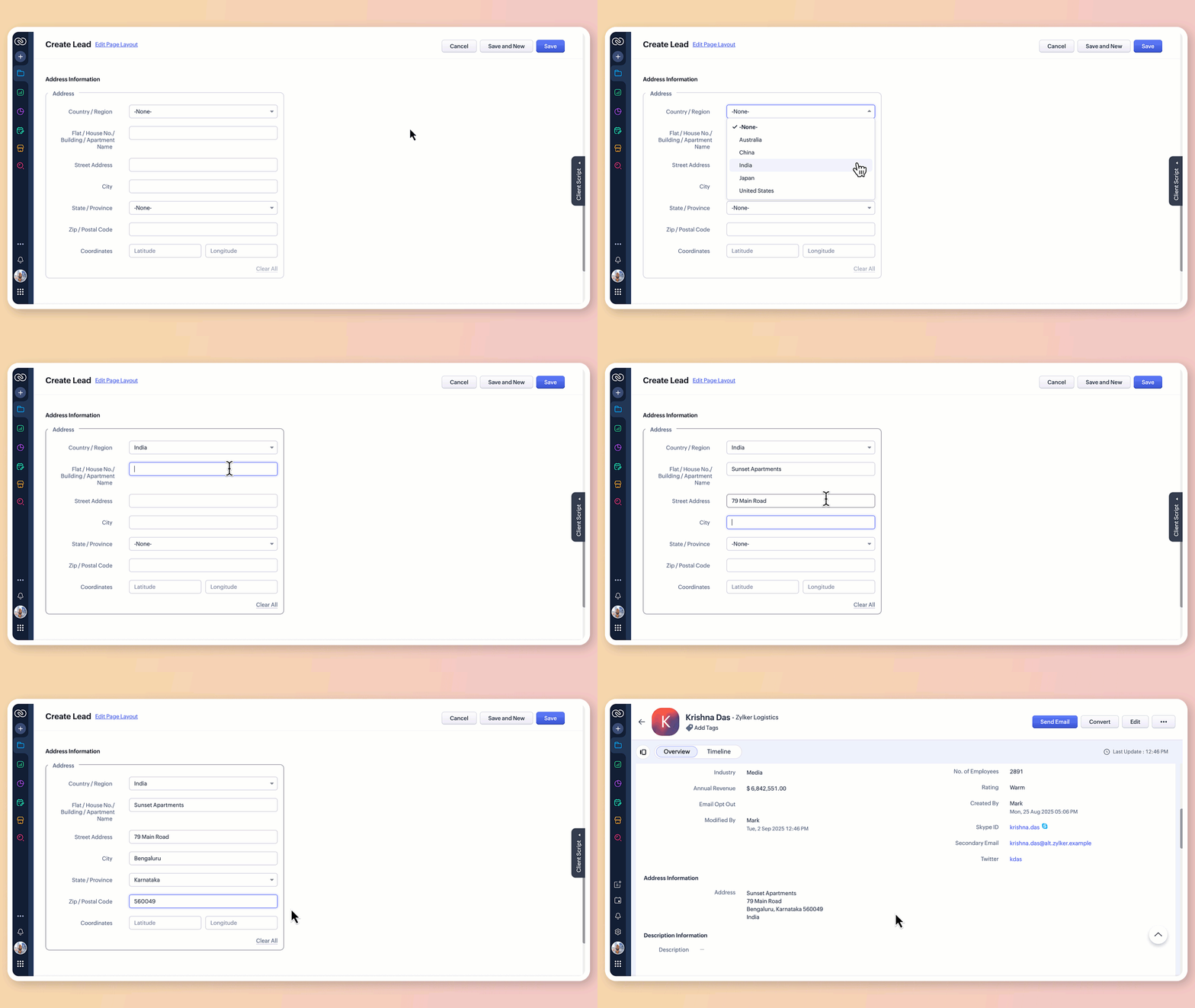

What does the new address field offer?

1. Structured address input

The all-new address field breaks down location details into clearly defined components:

  • Country/region

  • Flat/house number/building/apartment name

  • Street address

  • City

  • State/province

  • Zip/postal code

  • Precise geographic coordinates in latitude and longitude
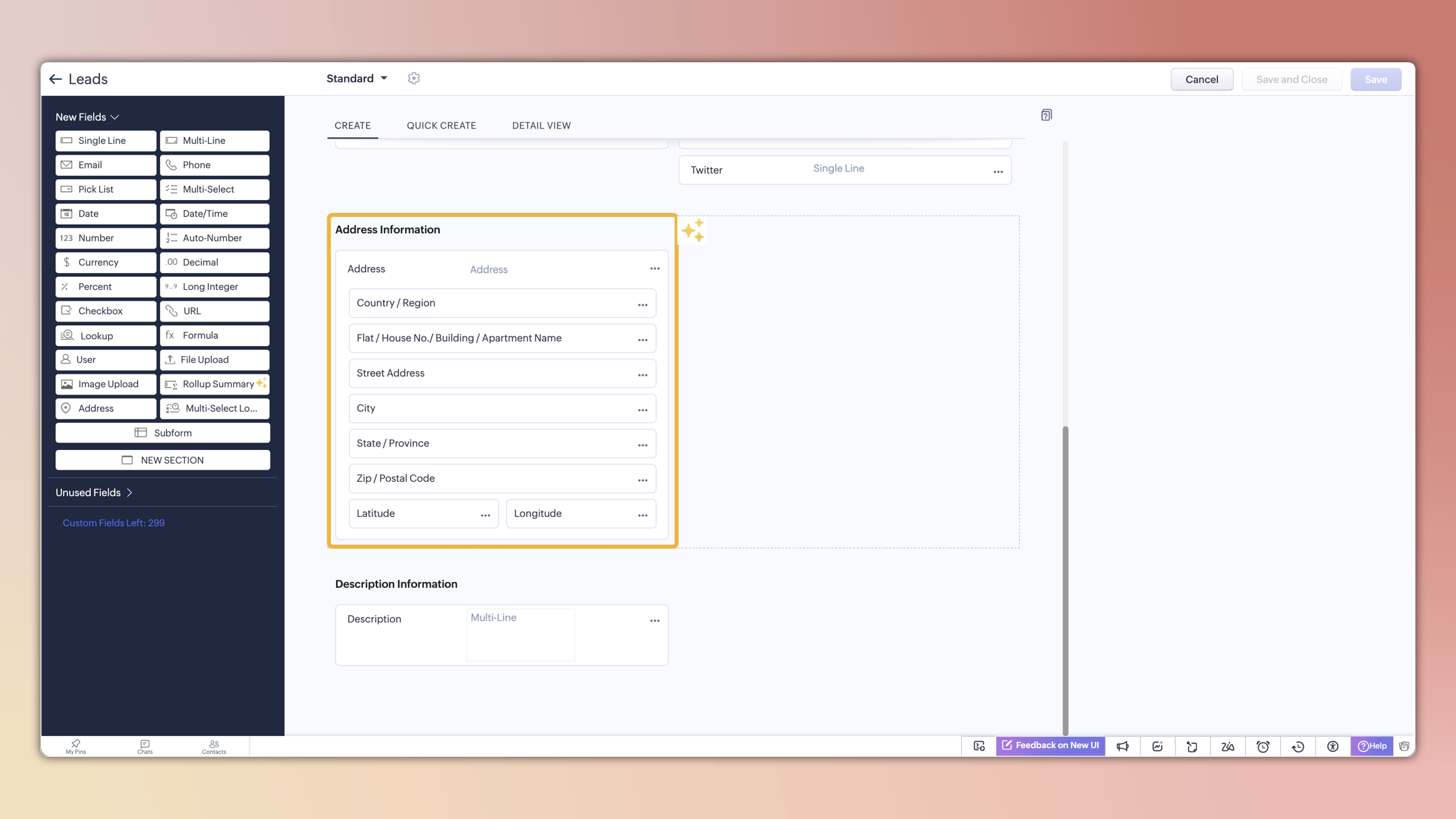

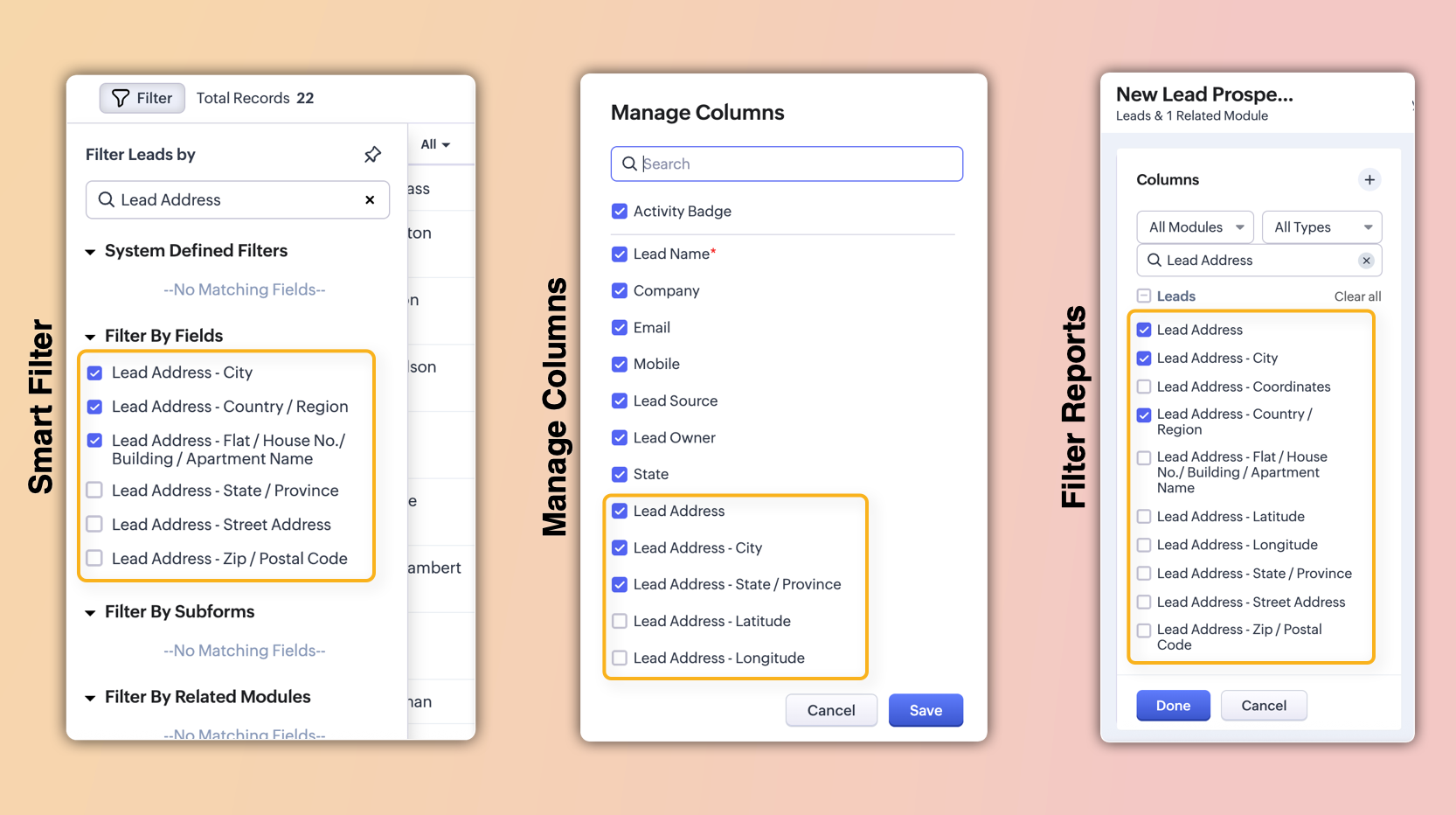
These sub-fields will also be individually available for viewing, filtering, and applying criteria. This enables users to configure, search, and report on address data with greater precision and flexibility.

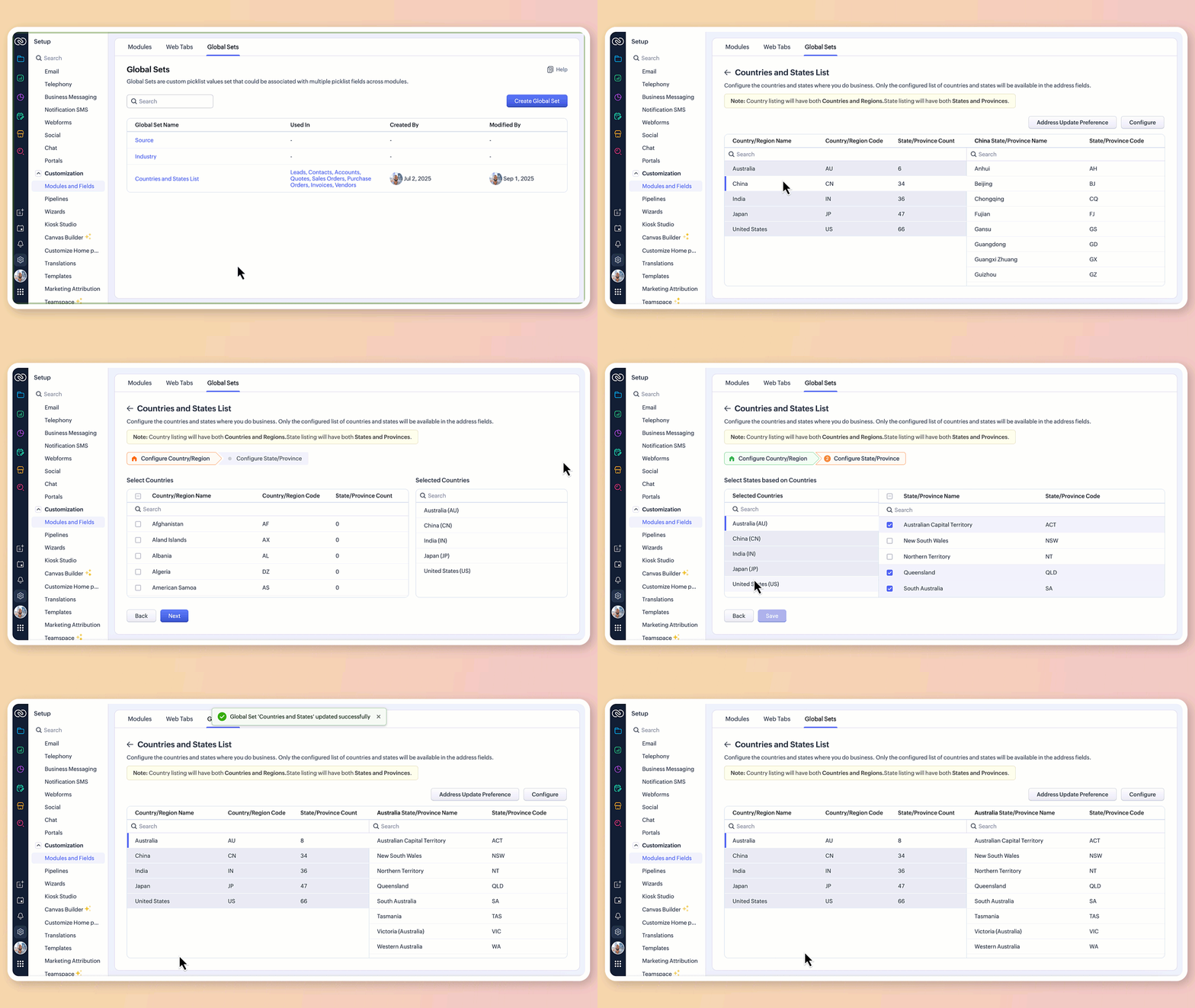
2. Global sets for countries and states

The new address field comes pre-loaded with standardized lists of countries and their respective states/provinces.

  • Selecting a country instantly filters the available states, so you don't have to set up dependencies manually or type them in.
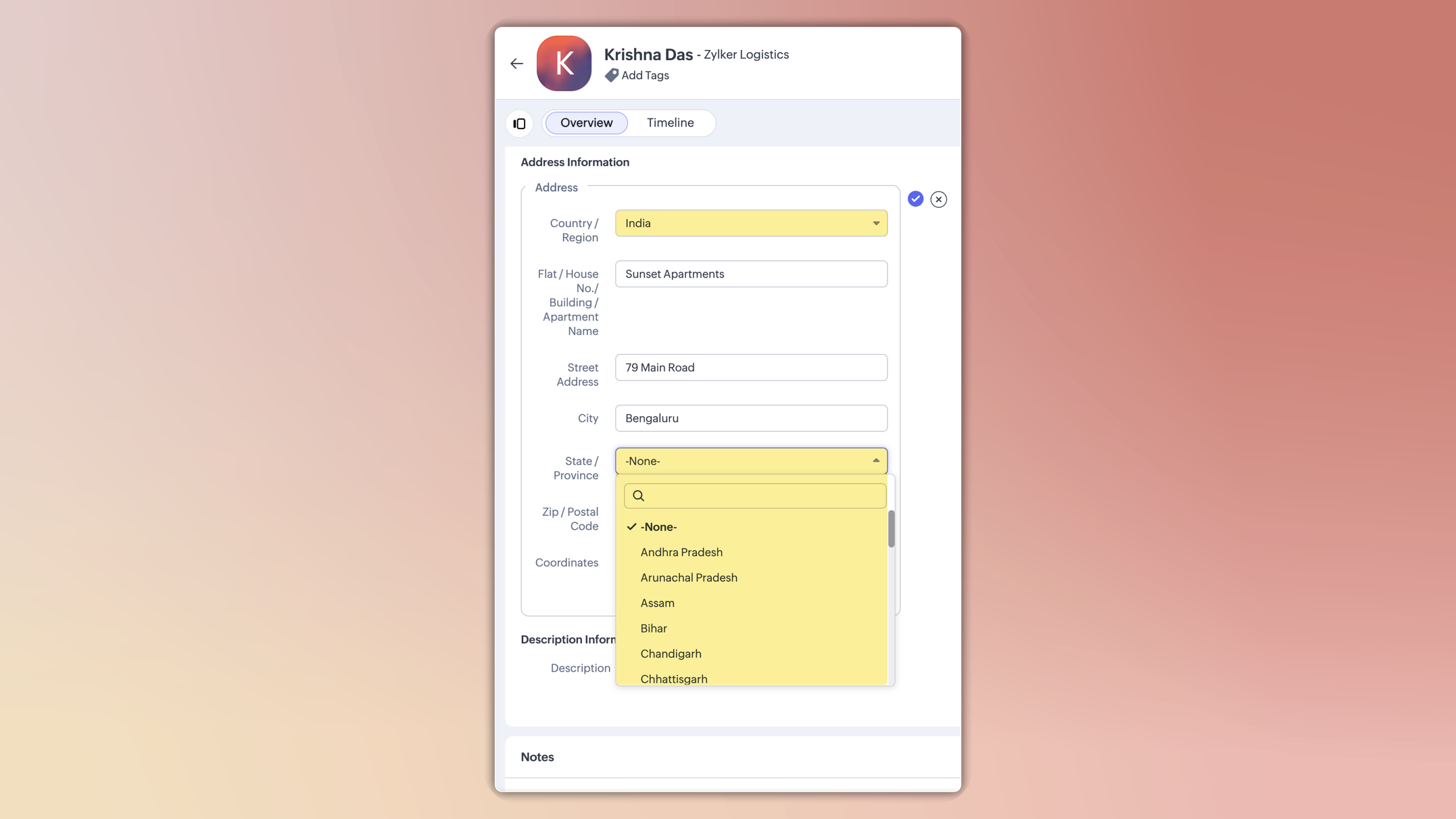

  • This ensures consistent spelling, eliminates typos, and keeps reporting clean.

  • You can also customize these lists in the Global Sets page by adding or removing values based on your business needs.

3.Maintain accuracy with address update preferences

To avoid mismatched or invalid country and state data, you can now set address update preferences in your org.

  • Choose to allow only configured country and state values in records, irrespective of the update source.

  • Choose how invalid entries are handled:
    You can either skip the country/state update alone and proceed with the record creation or update, or stop the entire record creation or update altogether if an invalid value is detected.


Info

Feature availability and limits

  • Editions supported: Professional, Enterprise, and Ultimate

  • Modules supported: All modules except user modules, linking modules, and Tasks, Calls, and Meetings modules

  • Limits: Up to two custom address fields per module

Alert

Points to be noted:

  • For new signups: The system-defined address fields will be available in the new address format for: Leads, Contacts, Accounts, Vendors, Quotes, Invoices, Sales Orders, and Purchase Orders modules.Additionally, admins can configure custom address fields for these modules if required.

  • Existing orgs: Admins can incorporate the new address field into their modules manually by adding it via the layout editor. The address field will be available as a custom field in the field tray.

  • Address field is not supported in Webforms, Field updates in Automation and Process management, Zia Enrichment. (The support for the same is in progress and will be updated shortly.)

Please share your feedback in the comments below.

Thanks,

Nizamuddin


        • Recent Topics

        • Mise à jour de Zoho Books – France

          Chers clients, Merci pour votre patience et votre soutien continu. Avec les évolutions réglementaires à venir en France nous introduisons de nouvelles fonctionnalités dans Zoho Books pour les clients français. Ces mises à jour ont été conçues pour répondre
        • [Important update] : Shopify migrating from REST API to GraphQL API

          Dear Shopify integrated users, As part of enhancements, Shopify has deprecated the REST API access and all the integrated apps must comply with the new GraphQL API. Fore more details, visit : https://shopify.dev/docs/api/admin-rest/latest/resources/order#resource-object
        • Feature request - export as video

          Export presentation as video. I think that it would be super useful for many users. Thanks
        • Export as MP4 or GIF

          Hi, Just wondering if there's a way to export/convert a presentation to an MP4 video file or even a GIF. One use case would be to use the animation functionality to create social media graphics/charts/gifs/videos. Thanks for a great tool... Rgds Jon
        • Stage Transition Rules prevent moving deals to other pipelines

          I have rules in place when moving deals to lost or win to ensure some particular fields are updated to ensure accuracy. However these rules are preventing me from moving deals to other pipelines. I'm having to delete the rules, move deals, then set rules
        • Can't send email using template. Email address has been blocked error.

          Hi. I'm setting up a new Zoho CRM account and doing our first customizations. While testing the email templates to use during blueprint transitions, I always get this error: "Sorry! Email address has been blocked." Any ideas? Thanks. Bruno
        • unify organisation management

          As I am exploring different Zoho products (such as Workplace, CRM, Books, Contracts, Projects), I am noticing that there is no unified and streamlined organisation management. You can define different parameters for the same organisation (e.g. base currency)
        • Cannot Send Outgoing Mails on TeamInbox Reason:554 5.1.8

          Hello, I am receiving this error when trying to send emails from TeamInbox: Error while processing the request! Unable to send message;Reason:554 5.1.8 Email Could not be delivered for policy reasons. Does anyone know how I can solve this issue? Thank
        • Bring more clarity to your blueprints with color-coded transitions

          As your hiring processes evolve, blueprints naturally become more detailed. When multiple transitions connect different stages, it can take extra effort to identify approvals, rejections, reviews, and other actions at a glance. With this enhancement,
        • MARKED AS SOLVED BUT ISN'T SOLVED - Unable to Send Outgoing Messages in Android Cliq App

          Every time when an outgoing message in the android cliq app is sent it will look like it successfully sent, but when you check the message it just has an error exclamation point icon next it and has option to resend or delete the message. When the resend
        • Canvas and calendar

          Is it possible to have a canvas view that shows say a contacts details with the meetings calendar on the same page?
        • Free webinar: Zoho Sign in Q2 2026 - A quick walkthrough

          Hi there, The second quarter of 2026 has flown by, and the Zoho Sign team has been hard at work releasing features to enhance how you send, sign, and manage documents. Join us for our upcoming webinar, where we'll discuss what's new and what's to come.
        • Zoho Marketing Automation WhatsApp Campaign Import Sync for Zoho Analytics

          WhatsApp is a critical channel in modern marketing, yet WhatsApp Campaign metrics from Zoho Marketing Automation currently cannot be natively imported into Zoho Analytics via the default advanced analytics connector. Integrating this into the standard
        • 【Zoho CRM】アップデートのお知らせ:ミラー要素

          ユーザーの皆さま、こんにちは。コミュニティグループの中野です。 Zoho CRMに新しいフィールド機能「ミラーの要素」が追加されましたのでご紹介します。 これにより、別タブにある項目の値をリアルタイムで表示できるようになりました。 目次 1. ミラーの要素とは 2. ミラーの要素とルックアップ項目の連動項目の比較 ― どちらをいつ使うべきか 3. 適用範囲と制限事項 1. ミラーの要素とは これまで、別タブにある項目の値を引っ張ってくるには、カスタム関数やワークフローを使った値の更新が必要でした。
        • Generate payment links to collect your payments from Android

          Hello everyone! We're happy to announce that users can now generate payment links from their Bigin mobile app to collect payments from customers. This will help them manage their payments more efficiently, as payment records are linked to the pipeline
        • Introducing the Image Slider field: Multiple images, one clean carousel

          Hey everyone, Some context is best communicated visually. When you are offering a service, a written description rarely does enough work on its own. People want to see what they are signing up for before they book or pay. When you are selling a product
        • Online PDF Editor

          Hello Team, There is a small glitch i found when i was using your online software called "PDF Editor", There is a menu bar on right side comes when we click on 3 dots for any pdf, but that entire menu has no options to choose, that is totally blank, please
        • How to migrate emails from Amazon Work Mail?

          Hi, I've an account with Amazon Work Mail, I'd like to migrate emails from Amazon Work Mail to Zoho Mail. Can you guide me? Regards, Mahendran
        • IP Address List > Sigma

          We have developed a ZohoCRM extension that utilizes API calls to our server from Deluge scripts and Widgets. Our API server has IP restrictions in place. To ensure successful communication, we require a list of IP addresses utilized by Zoho's platform
        • steps and options to change Domain DNS/Nameservers settings

          Please share the options or steps to change  Domain DNS/Nameservers settings 
        • Zoho Contacts *Web Interface Does Not Load* (Tested in Firefox, Safari)

          The error shown in the console is: The resource from “https://static.zohocdn.com/zmail/zm/newContactsChange11/js/main.js” was blocked due to MIME type (“application/json”) mismatch (X-Content-Type-Options: nosniff). This should be fairly self-explanatory,
        • Product sorting in Zoho Commerce - how can I influence standard behaviour?

          Hello Zoho, I want to sort my products by e.g. name, SKU (Ascending / Descending) or by another attribute. I could neither find any solution in the settings, nor an entry in this help. Can you advice how this would work? Seems the standard sorting is
        • Journey vs Campaign Confusions

          Hi there! I hope you're all doing great! I'm new to the Zoho MA and I'm confused between Journey and Campaigns. I'm not sure if these two work together or not. I hope you can enlighten me. What I'm trying to do is setting up a Newsletter. 1. We have a
        • Survey questions inside email template

          We have a Net Promoter Score survey.  It is 3 questions only. When the deal is closed we need to send an email to a customer asking them these 3 questions. Currently, the only option I can find is to give a customer a link to survey. What we need is to
        • No DINAR (Serbia) in currency list

          There is no Serbian Dinar listed in the currency list. Dinar is available in Books, Inventory, CRM, FSM. Please make it available in Desk as well. Without it, the integration with other apps is not possible.
        • #18 Money in the Bank Doesn't Mean Your Books Are Upto Date

          Many businesses have experienced this. A customer transfers the payment. You check your bank account and see the money has arrived. A week later, while reviewing outstanding invoices, you realize the same invoice is still marked "Unpaid." The payment
        • "Print" option of GET Expense Report API not working

          Hello! I have been trying to use the "print" option of the GET Expense Report API but it seems the option does not alter the output. Is there an issue with the API or am I using it wrong? Here's my request code, in Deluge: response = invokeurl [ url :"https://www.zohoapis.com/expense/v1/expensereports/"
        • Enhance form structure with the Heading field

          Hello form builders, A form without structure creates cognitive load. When respondents can see where one section ends and where another begins, they move through the form with less friction and more confidence. This is the reason we have introduced Heading
        • Canva Integration

          Hello! As many marketing departments are streamlining their teams, many have begun utilizing Canva for all design mockups and approvals prior to its integration into Marketing automation software. While Zoho Social has this integration already accomplished,
        • Zoho Books - Feature Request - Improve Online Payment Badges

          Hi Finanace Suite Team, I use Stripe to facilitate online payments and I often have customers who don't notice the online payment option on the invoice. The below example shows how a stripe payment link appears on the invoice. In this example you can
        • Allow customers to choose meeting venue and meeting duration on booking page

          My business primarily involves one-to-one meetings with my clients. Given the hybrid-work world we now find ourselves in, these meetings can take several forms (which I think of as the meeting "venue"): In-person Zoom Phone call I currently handle these
        • Improved configuration experience for Zia AI features

          Hello everyone, Zia, the AI assistant built in to Zoho Creator, powers a range of capabilities—from generating forms and suggesting fields to writing Deluge scripts and running AI agents—that help you build applications faster. Until now, configuring
        • Cdata - Looker Studio Community Connector Error to Zoho CRM

          Hi! Has anyone encountered the error message below when trying to connect to Zoho CRM from Looker Studio, and found a solution? I opened a ticket wih CData but didn't hear back.
        • Can I add Conditional merge tags on my Templates?

          Hi I was wondering if I can use Conditional Mail Merge tags inside my Email templates/Quotes etc within the CRM? In spanish and in our business we use gender and academic degree salutations , ie: Dr., Dra., Sr., Srta., so the beginning of an email / letter
        • Zoho CRM v2.1 deprecation or sunset plans ?

          Hi Team Wanted to know if there is any plan to deprecate v2.1 CRM apis https://www.zoho.com/crm/developer/docs/api/v2.1/ and if yes by when
        • i cant able to transfer data

          i cant able to transfer all data in folders (multiple data) from ONEDRIVE Microsoft to the ZOHO work drive. Each time I can only send 1 file. like 1 photo, 1 audio. It's not very useful for me. Please give me a solution to upload multiple files at a
        • How many Zoho Sales IQ do I need?

          Hello, We are a SME currently moving from Hubspot to Zoho. We are already using Zoho books and CRM, I am wondering how many ZohoSalesIQ account do I need? We mostly need to track our website users, no need for chatbot or anything. I am thinking to buy
        • Email Password Reset - Vishal & shaik Vali Babu

          Hi Team, The below-mentioned employees are unable to log in to their Gmail due to a password error. Kindly look into this on priority vishal.r@jumbotail.com shaik.babu@jumbotail.com
        • Where can I find the best mail backup tool for Windows?

          Later this evening I found Mail Backup Tool in google. Actually I was looking for a solution to download/save emails to my local drive. As I had plenty of important data stored in my email account. So i was not in a mood to take this thing lightly. This made me curious to found any software which can help me to backup my data to hard drive. Then I found the above application which was like a gem. A complete email backup solution for Zoho Mail, Gmail, Yahoo Mail, Office 365 and more than 40+ email
        • Zoho Desk data sync shows repeated “temporary error” after successful syncs

          Hi everyone, we are currently using Zoho Analytics with a data synchronization from Zoho Desk. In the synchronization history, I can see a repeating pattern: the sync runs successfully, but shortly after that, another sync entry fails with the message:
        • Next Page