Automating Attendance Tracking with Zoho Cliq Developer Platform

Automating Attendance Tracking with Zoho Cliq Developer Platform

I wish remote work were permanently mandated so we could join work calls from a movie theatre or even while skydiving! But wait, it's time to wake up! The alarm has snoozed twice, and your team has already logged on for the day.


Keeping tabs on attendance shouldn't feel like guiding a flock of rebellious sheep. Hence, let's automate check-in and check-out notifications using the Zoho Cliq Platform Schedulers and the Zoho People API, eliminating the guesswork in attendance management and reducing the risk of errors associated with manual monitoring.

How does this solution benefit a business?

  1. Real-time reminders reduce instances of ghost check-ins and ensure accurate recording of everyone's logged hours.
  2. Essential for attendance tracking, payroll accuracy, compliance with labour laws, and audits.
  3. The entire team stays informed, fostering a cohesive workflow that eliminates the need for micromanagement.      
Pre-requisites:  

Before beginning to script the code below, we must create a connection in Cliq with Zoho People. Once a connection is created and connected, you can use it in Deluge integration tasks and invoke URL scripts to access data from the required service.

Create a Zoho People default connection with any unique name with the scopes - ZohoPeople.Attendance.ALL , ZohoPeople.forms.ALL and ZohoPeople.leave.ALL

ⓘ Document for reference : Connections in Cliq 


How to obtain or locate the channel unique name in Cliq?

  • Navigate to the top right corner of the channel and locate the three dots. Click it.

  • In the menu that appears, select "Channel info" and a pop-up will open, displaying detailed channel information.

Hover over the "Connectors" section and click it. Under "API Parameters," you will find the Channel ID and unique name.
We need to create two schedulers, specifically one for check-in and another for check-out.
  1. After a successful login in Cliq, hover to the top right corner and click your profile. Post clicking, navigate to Bots & Tools > Schedulers.
  2. On the right, click the "Create Scheduler" button.
  3. To learn more about schedulers and their purposes, refer to the Introduction to Schedulers.
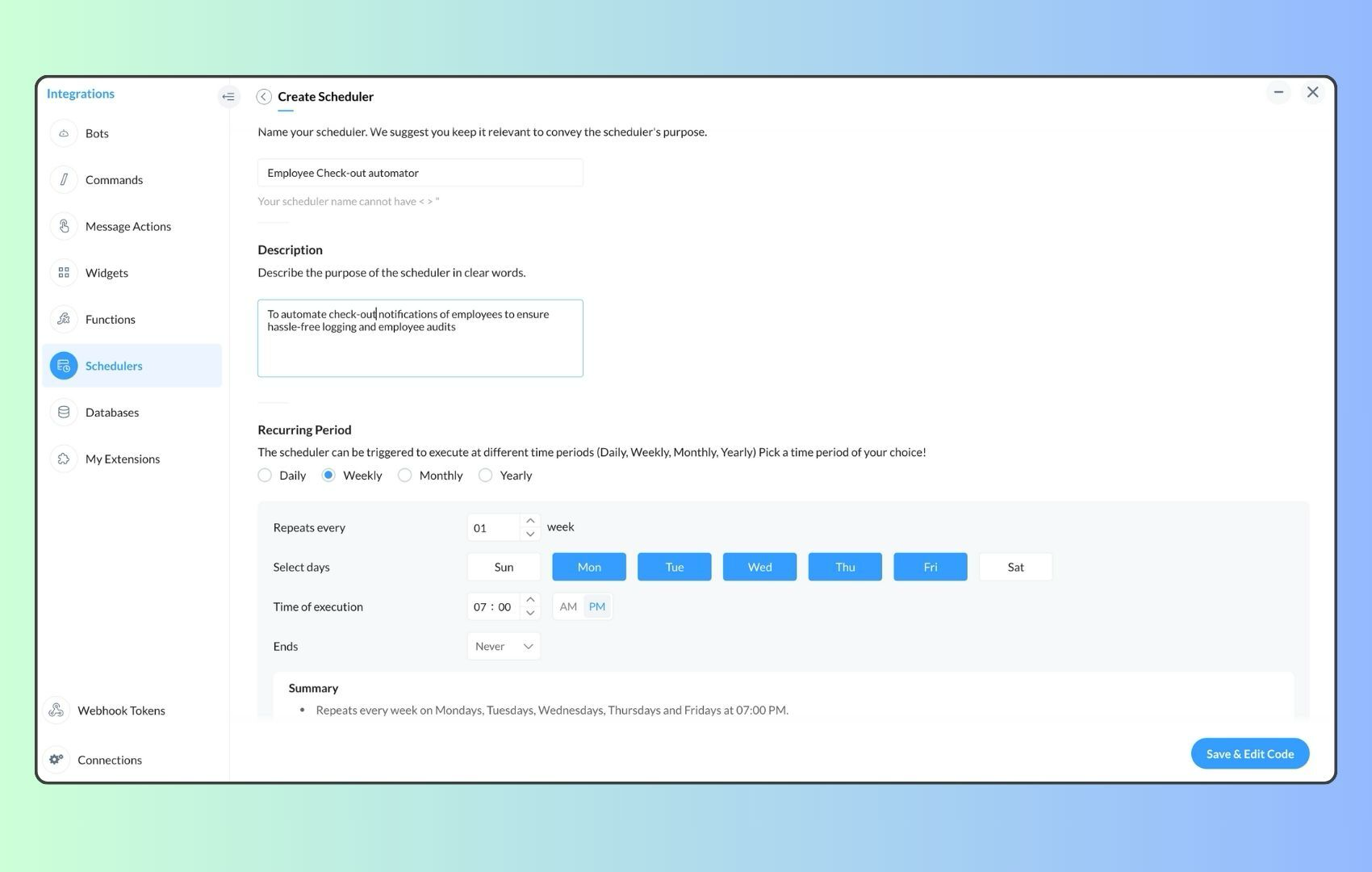
  4. Create a scheduler using your preferred name. Specify the following details: the scheduler name and a description.  

  1. For the recurring period, choose the type "Weekly." Select Monday through Friday and set the time of execution to 11 AM or any other time that aligns with your company's check-in time, or customise the recurring period based on your specific use case.
  2. Finally, click "Save & edit code" and paste the following code.
  1. currentDate = zoho.currentdate;
  2. currentDateString = currentDate.toString("dd-MMM-yyyy");
  3. fromIndex = 1;
  4. toIndex = 200;
  5. // Get all active users
  6. users = zoho.people.getRecords("employee",fromIndex,toIndex,{},"{CONNECTION_LINK_NAME}");
  7. usersList = List();
  8. usersList.addAll(users);
  9. iterations = {1,2,3,4,5,6,7,8,9,10,11,12,13,14,15,16,17,18,19,20,21,22,23,24,25};
  10. // Get All Employees ( 4000 MAX )
  11. if(users.size() == 200)
  12. {
  13. for each  iteration in iterations
  14. {
  15. fromIndex = fromIndex + toIndex;
  16. toIndex = toIndex + 200;
  17. users = zoho.people.getRecords("employee",fromIndex,toIndex,{},"{CONNECTION_LINK_NAME}");
  18. if(users.size() > 0 && users.size() == 200)
  19. {
  20. usersList.addAll(users);
  21. }
  22. else if(users.size() > 0 && users.size() < 200)
  23. {
  24. usersList.addAll(users);
  25. break;
  26. }
  27. else
  28. {
  29. break;
  30. }
  31. }
  32. }
  33.  
  34. // Get all the employees checkedin from the morning.
  35. getAttendenceEntries = invokeurl
  36. [
  37. url :"https://people.zoho.com/api/attendance/fetchLatestAttEntries?duration=240"
  38. type :GET
  39. connection:"{CONNECTION_LINK_NAME}"
  40. ];
  41. latestAttendanceRecords = getAttendenceEntries.get("response").get("result");
  42. checkedInUsers = List();
  43. for each  userRecord in latestAttendanceRecords
  44. {
  45. checkedInEmployeeEmail = userRecord.get("emailId");
  46. checkedInUsers.add(checkedInEmployeeEmail);
  47. }
  48.  
  49. // Get all the employees who applied for leave both approved and pending ( Remove PENDING to exclude only the leave approved employees )
  50. leaveApprovedEmployees = invokeurl
  51. [
  52. url :"https://people.zoho.com/api/v2/leavetracker/leaves/records?from=" + currentDateString + "&to=" + currentDateString + "&dateFormat=dd-MMM-yyyy&approvalStatus=[APPROVED,PENDING]"
  53. type :GET
  54. connection:"{CONNECTION_LINK_NAME}"
  55. ];
  56. info  leaveApprovedEmployees;
  57. leaveApprovedEmployeesList = List();
  58. for each  member in leaveApprovedEmployees.get("records")
  59. {
  60. leaveApprovedEmployeesList.add(member.get("EmployeeId"));
  61. }
  62. info leaveApprovedEmployeesList;
  63.  
  64.  
  65. // Add the users to yet to checkin list if they are not checked from the morning and not applied for leave
  66. usersYetToCheckIn = list();
  67. for each  user in usersList
  68. {
  69. employeeEmail = user.get("EmailID");
  70. employeeId = user.get("EmployeeID");
  71.     employeeStatus = user.get("Employeestatus");
  72. if(!checkedInUsers.contains(employeeEmail) && !leaveApprovedEmployeesList.contains(employeeId) && employeeStatus.equals("Active"))
  73. {
  74. usersYetToCheckIn.add(employeeEmail);
  75. }
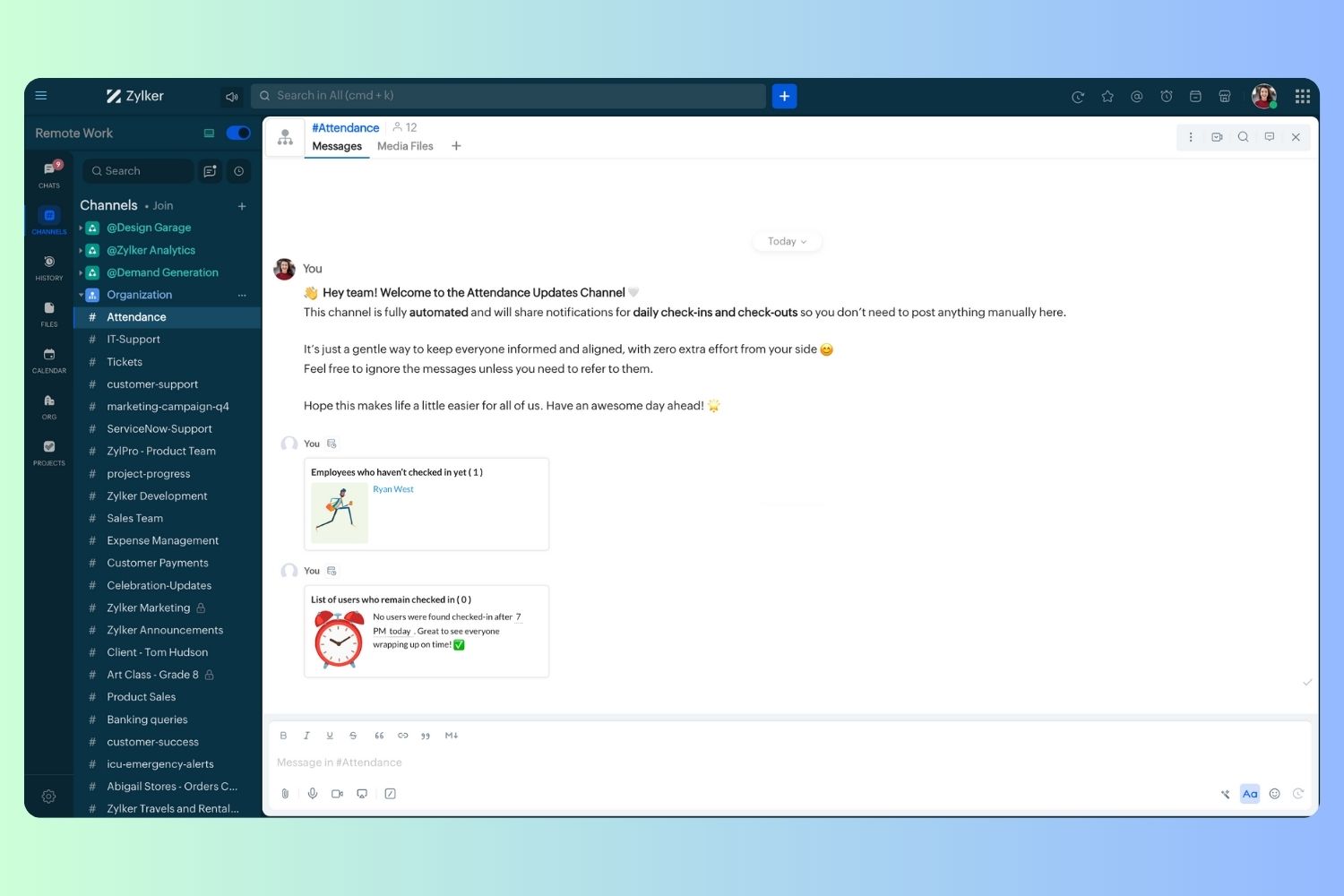
  76. }
  77.  
  78. // Mention the list of users in the channel.
  79. if(usersYetToCheckIn.size() == 0)
  80. {
  81. info "No users were found yet to checked-in at 11 PM today. Great to see everyone wrapping in on time! ✅";
  82. }
  83. else
  84. {
  85. usersYetToCheckInString = "";
  86. for each  user in usersYetToCheckIn
  87. {
  88. usersYetToCheckInString = usersYetToCheckInString + "[" + user + "](mail:" + user + ") \n";
  89. }
  90. usersYetToCheckInString = usersYetToCheckInString.subString(0,usersYetToCheckInString.length() - 2);
  91. response = Map();
  92. card = Map();
  93. card.put("title","Employees who haven’t checked in yet ( " + usersYetToCheckIn.size() + " )");
  94. card.put("thumbnail","https://i.pinimg.com/originals/85/e9/f3/85e9f3f5ac31fc5aab586e208297f43d.gif");
  95. card.put("theme","modern-inline");
  96. response.put("card",card);
  97. response.put("text",usersYetToCheckInString);
  98. info zoho.cliq.postToChannel("{CHANNEL_UNIQUE_NAME}",response);
  99. }

  1. Now, let's follow the same steps and create a scheduler for checkout reminders. Under the recurring period, choose the type as "Weekly." Select Monday through Friday and set the time of execution to 7 PM or any other time that aligns with your company's checkout time, or customise the recurring period based on your specific use case.
  2. Click "Save & edit code" and paste the following code.
  1. attendanceResponse = invokeurl
  2. [
  3. url :"https://people.zoho.com/api/attendance/fetchLatestAttEntries?duration=600"
  4. type :GET
  5. connection:"{CONNECTION_LINK_NAME}"
  6. ];
  7. info attendanceResponse;
  8. todayDate = zoho.currenttime.toString("YYYY-MM-dd");
  9. latestAttendanceRecords = attendanceResponse.get("response").get("result");
  10. usersWithoutCheckout = list();
  11. if(latestAttendanceRecords.size() > 0)
  12. {
  13. for each  userRecord in latestAttendanceRecords
  14. {
  15. userEmail = userRecord.get("emailId");
  16. dailyEntries = userRecord.get("entries");
  17. for each  dailyEntry in dailyEntries
  18. {
  19. if(dailyEntry.containsKey(todayDate))
  20. {
  21. todayEntryDetails = dailyEntry.get(todayDate);
  22. attendanceLogs = todayEntryDetails.get("attEntries");
  23. for each  logEntry in attendanceLogs
  24. {
  25. if(!logEntry.containsKey("checkOutTime"))
  26. {
  27. usersWithoutCheckout.add("{@" + userEmail + "}");
  28. }
  29. }
  30. }
  31. }
  32. }
  33. }
  34. usersWithoutCheckoutString = usersWithoutCheckout.toString("\n");
  35. if(usersWithoutCheckoutString.trim().length() == 0){
  36. usersWithoutCheckoutString = "No users were found checked-in after 7 PM today. Great to see everyone wrapping up on time! ✅";
  37. }
  38. response = Map();
  39. card = Map();
  40. card.put("title","List of users who remain checked in ( " + usersWithoutCheckout.size() + " )");
  41. card.put("thumbnail","https://media.tenor.com/Hd8nLZZTPRYAAAAi/alarm-clock-alarm.gif");
  42. card.put("theme","modern-inline");
  43. response.put("card",card);
  44. response.put("text",usersWithoutCheckoutString);
  45. info zoho.cliq.postToChannel("{CHANNEL_UNIQUE_NAME}",response);

Wrapping up and checking out for the day, hopefully

Whether you're from HR, tired of chasing attendance logs, or an enthusiastic team lead trying to increase your team's visibility and adjust workload accordingly, Cliq Platform's schedulers are essential and ensure that accurate tracking is consistent and compliance is maintained. Additionally, this would be scalable to handle organizations of any size.

If attendance tracking is a binge-watchable series, what plot twist would these reminders add to your team's script? Let us know in the comments below!


      • Sticky Posts

      • Cliq Bots - Post message to a bot using the command line!

        If you had read our post on how to post a message to a channel in a simple one-line command, then this sure is a piece of cake for you guys! For those of you, who are reading this for the first time, don't worry! Just read on. This post is all about how
      • Add Claude in Zoho Cliq

        Let’s add a real AI assistant powered by Claude to your workspace this week, that your team can chat with, ask questions, and act on conversations to run AI actions on. This guide walks you through exactly how to do it, step by step, with all the code
      • Automating Employee Birthday Notifications in Zoho Cliq

        Have you ever missed a birthday and felt like the office Grinch? Fear not, the Cliq Developer Platform has got your back! With Zoho Cliq's Schedulers, you can be the office party-cipant who never forgets a single cake, balloon, or awkward rendition of
      • Automate attendance tracking with Zoho Cliq Developer Platform

        I wish remote work were permanently mandated so we could join work calls from a movie theatre or even while skydiving! But wait, it's time to wake up! The alarm has snoozed twice, and your team has already logged on for the day. Keeping tabs on attendance
      • Customer payment alerts in Zoho Cliq

        For businesses that depend on cash flow, payment updates are essential for operational decision-making and go beyond simple accounting entries. The sales team needs to be notified when invoices are cleared so that upcoming orders can be released. In contrast,

        • Recent Topics

        • Changing settings for auto logoff

          I've noticed that when I haven't used Cliq for a while, I have to re-enter my password. That is really clumsy, especially if you have a complicated password. Because it won't be filled in automatically. Is there a way to change that behaviour? We are
        • Track Marketing Automation Campaigns in Zoho CRM

          Hello, I've been searching but haven't found the exact answer to this question. I am looking to track Marketing Automation email campaigns and activities inside of Zoho CRM. Use Case: Action: Prospect Submits A Lead Form Outcomes: Prospect created in
        • Uplifted homepage experience

          Editions: All editions. Availability update: 17th February 2026: All editions in the CA and SA DC | JP DC (Free, Standard and Professional editions) 23 February 2026: JP (All Editions) | AU, CN (Free, Standard, Professional editions) 27 February 2026:
        • Validation rule for Date field

          The condition settings for a Date field are are absolutlly usless. Conditions can only be set for a specific date, which is logically ineffective in most cases. When setting a condition for a Date field, users usually need to compare the value relative
        • Easily map shift data fields during user imports

          Greetings all, You can now include all your shift-related data for your users without any hassle during user imports. With this enhancement, the Map Import Fields to Zoho CRM option includes all shift-related fields: Current Shift, Next Shift, and Shift
        • Adding new data to the sheet with most recent data being added to top row.

          I am using a form that I built from within sheets.  When the form is submitted, is it possible to have the data entered in (for example) row 2 (since row 1 is the heading) instead of being added into the next available row which should be hundreds of
        • How do you arrange order in which the speakers are listed in a session once they have been selected?

          Probably another simple thing I've missed but I can't find how to arrange the order in which the speakers are listed in a session once they have been selected. We usually want the speakers listed alphabetically by last name, but sometimes not. Once the
        • Request to Remove LinkedIn Verification from My Emai

          I would like to submit a complaint regarding my Zoho Mail account. I previously used this email address to verify a LinkedIn account, but that LinkedIn account has now been closed. I need to remove or cancel the verification associated with the closed
        • Product Updates in Zoho Workplace applications | February 2026

          Hello Workplace Community, Let’s take a look at the new features and enhancements that went live across all Workplace applications for the month of February. Zoho Mail Organize Personal Notes with Collections You can now create collections under My Personal
        • Introducing note actions and dynamic visibility in Kiosk Studio

          Hello all, We are introducing enhancements to Kiosk Studio that will improve the product scope and meet your custom needs more precisely. What's new? Add notes as Actions: You can add notes to CRM records as kiosk Actions, as well as insert merge fields
        • How can we clear a signature field with deluge?

          I would like to clear a signature field in the Edit -> On Load. I have tried input.signature = ""; input.signature = null; clear input.signature; None of the above is working. is there any other way I am missing?
        • Please can the open tasks be shown in each customer account at the top.

          Hi there This has happened before, where the open tasks are no longer visible at the top of the page for each customer in the CRM. They have gone missing previously and were reinstated when I asked so I think it's just after an update that this feature
        • Regarding the Recipient Email change

          I was not being able to change the Recipient email. Kindly resolve the problem
        • Request to Customize Module Bar Placement in New Zoho CRM UI

          Hello Support and Zoho Community, I've been exploring the new UI of Zoho CRM "For Everyone" and have noticed a potential concern for my users. We are accustomed to having the module names displayed across the top, which made navigation more intuitive
        • kanban view for client portal

          Are kanban views an option for client portals? Access to Kanban views in the client portals would solve some mobile-compliant issues I have with the UI. Kanban functions very nicely on mobile and would be a super asset for my clients and vendors as they
        • 【Zoho CRM】サンドボックスのアップデート:メール送信トレイ機能の追加

          ユーザーの皆さま、こんにちは。コミュニティチームの藤澤です。 CRMのサンドボックス(テスト環境)にメールの送信トレイ機能が追加されました。 本番環境でメール配信の前に、サンドボックスで送信される全てのメールを確認・検証できます。ワークフロー、承認プロセス、一括送信など、あらゆる送信パターンに対応しています。 「メールの送信トレイ」機能を使うと、顧客へ送信する前にメールの内容を事前確認できます。項目の欠落や書式の乱れなど、あらゆる問題をサンドボックス内でチェックできるため、本番環境でのトラブルを未然に防ぐことに役立ちます。
        • Whatsapp Limitation Questions

          Good day, I would like to find out about the functionality or possibility of all the below points within the Zoho/WhatsApp integration. Will WhatsApp buttons ever be possible in the future? Will WhatsApp Re-directs to different users be possible based
        • Whatsapp BOT with CRM

          Hello, how do you use Whatsapp integrations in zoho CRM?
        • Force mandatory entry on one of two fields on Contacts

          We are finding our users aren't always entering a phone number or email address of a contact. We would like to make these fields mandatory but realize they won't always have both pieces of information, but should at least have one. Is there a way to make
        • Removing To or CC Addresses from Desk Ticket

          I was hoping i could find a way to remove unnecessary email addresses from tickets submitted via email. For example, a customer may email the support address AND others who are in the helpdesk notification group, in either the TO or CC address. This results
        • Enhancing Zia's service with better contextual responses and article generation

          Hello everyone, We are enhancing Zia's Generative AI service to make your support experience smarter. Here's how: Increased accuracy with Qwen One of the key challenges in AI is delivering responses that are both contextually accurate and empathetic while
        • How can I prevent having recepients from being added as contacts in Zoho Desk?

          How can I prevent having recepients from being automatically added as contacts in Zoho Desk? There's no option to disable this.
        • Agent Concern

          would like to ask the difference between an agent and a light agent. can a light agent close a ticket. thank you.
        • Train Zoho Answer Bot Based on Customer

          Hi all, Is it currently possible to mark Help Centre articles to a specific customer, and restrict the answer bot to only use relevant information if it is either marked as "General", or tagged for the specific customer in question? We currently have
        • Candidate Assessments, no workflows.

          I have an issue where I would like to trigger a workflow based on a candidate assessment being completed. Sometimes a returning candidate will complete a second assessment, on completion the status of the candidate will be updated to "Unqualified" if
        • Non-depreciating fixed asset

          Hi! There are non-depreciable fixed assets (e.g. land). It would be very useful to be able to create a new type of fixed asset (within the fixed assets module) with a ‘No depreciation’ depreciation method. There is always the option of recording land
        • Ability to translate Zoho CRM Kiosks

          Hi team, Is support for translating kiosk text and screen names in the Zoho CRM translation tool planned on the roadmap? Thanks,
        • How to use filters on all products page? Or even a category page?

          Hello, I am trying to create some filters so users can use filters to find products they are looking for. So what i am trying is to create a filter according to price lets say. So if i define it this way i am expecting to see this filter option on category
        • audio and video comments in tasks in zoho projects

          Hi, is it planned to have the ability to post audio and video comments? the whatsapp wechat format of communicating is a reality... tools like zoho project would facilitate a lot teamwork by facilitating the way in which we can give feedback in audio and video rather than only text. thx!
        • Zoho Projects app update: Voice notes for Tasks and Bugs module

          Hello everyone! In the latest version(v3.9.37) of the Zoho Projects Android app update, we have introduced voice notes for the Tasks and Bugs module. The voice notes can be added as an attachment or can be transcribed into text. Recording and attaching
        • Boas práticas de desenvolvimento em Deluge

          O Deluge (Data Enriched Language for the Universal Grid Environment) é a linguagem de script utilizada em diversas aplicações do ecossistema Zoho, como Zoho Creator, Zoho CRM, Zoho Books e Zoho Flow. Ela foi projetada para permitir automações rápidas
        • Zoho Books | Product updates | February 2026

          Hello users, We’ve rolled out new features and enhancements in Zoho Books. From Advanced Reporting Tags to the ability to mark projects as completed, explore the latest updates designed to improve your bookkeeping experience. Introducing Advanced Reporting
        • Send emails directly via Cases module

          Greetings all, The ability to send emails from the Cases module, which users have been eagerly anticipating, is now available, just like in the other modules. In Zoho CRM, Cases is a module specifically designed for managing support tickets. If your organization
        • Seeking a WhatsApp Business App (not API) Zoho CRM integration

          We have a business need to integrated WhatsApp Business App (not API) into Zoho CRM to centrally manage communications between our Sales team and Leads & Contact. Is there a reputable integration available for this scenario of ours? Core features we would
        • Zoho Sign 2025–2026: What's new and what's next

          Hello! Every year at Zoho Sign, we work hard to make document signing and agreement execution easy for all users. This year we sat down with our head of product, Mr. Subramanian Thayumanasamy, to discuss what we delivered in 2025 and our goals for 2026.
        • Error AS101 when adding new email alias

          Hi, I am trying to add apple@(mydomain).com The error AS101 is shown while I try to add the alias.
        • Intergrating multi location Square account with Zoho Books

          Hi, I have one Square account but has multiple locations. I would like to integrate that account and show aggregated sales in zoho books. How can I do that? thanks.
        • Is there a way to configure dark mode for Campaigns emails that go out to customers?

          I've found a lot of information on how to configure dark mode for my (The user) personal Zoho workspace and email, but is there any way to edit dark mode settings on emails that we send out to customers via campaigns?  We sent out a test email the other
        • Can I hide empty Contact fields from view?

          Some contacts have a lot of empty fields, others are mostly filled. Is there a way I can hide/show empty fields without changing the actual Layout? I would like to de-clutter my view, and also be able to add information later as I am able. I would be
        • CRM x WorkDrive: We're rolling out the WorkDrive-powered file storage experience for existing users

          Release plan: Gradual rollout to customers without file storage add-ons, in this order: 1. Standalone CRM 2. CRM Plus and Zoho One DCs: All | Editions: All Available now for: - Standalone CRM accounts in Free and Standard editions without file storage
        • Next Page