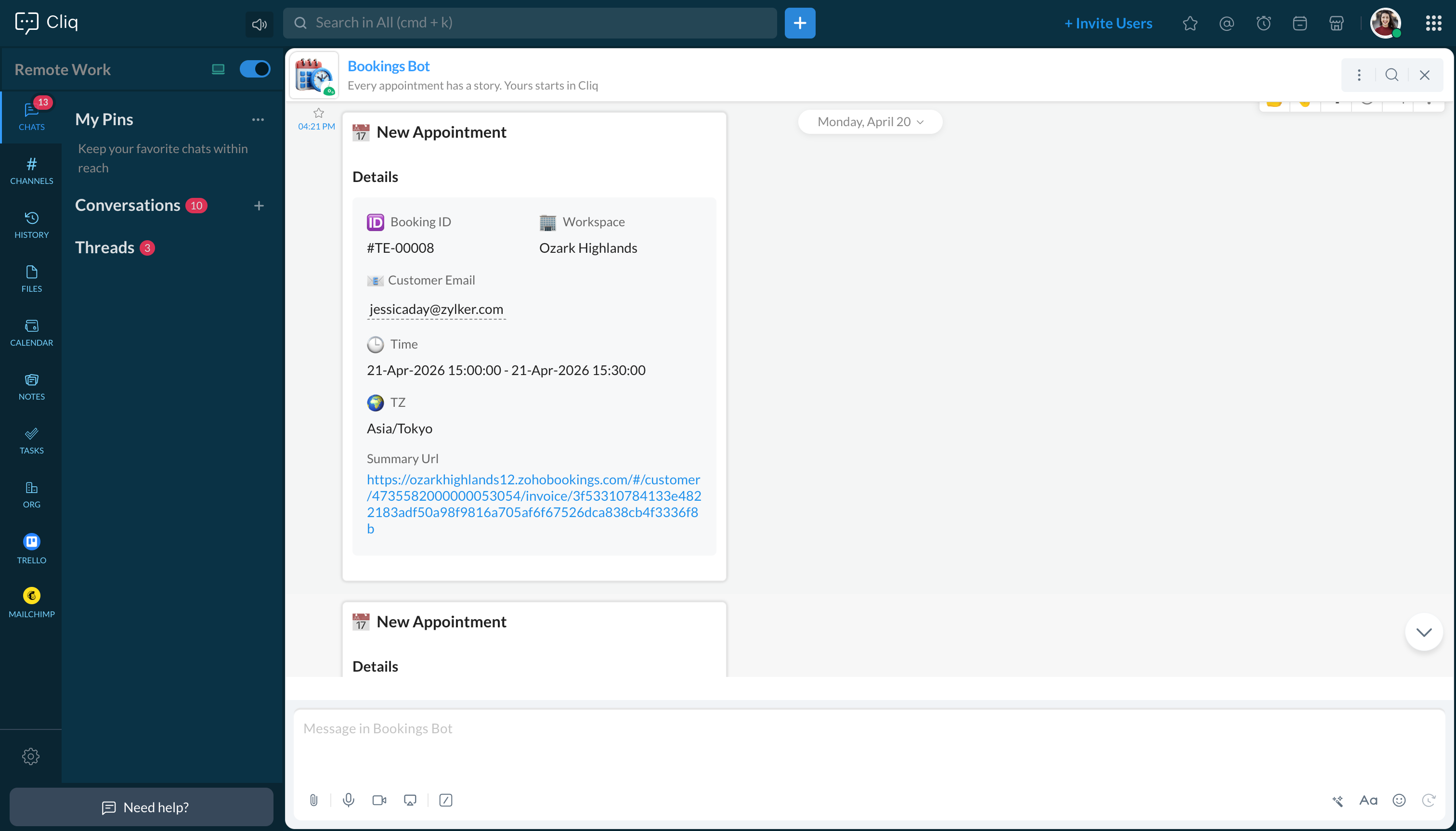
Enable your teams to respond in seconds by bridging the gap between booking confirmation and team notification. No sticky notes, no calendar nudges and no follow-up frenzies. For businesses that rely on scheduled appointments, real-time visibility is a crucial operational need.

Timely automated communication is essential for managing important appointments and bookings. Let's integrate Zoho Bookings with Zoho Cliq via the Cliq developer platform's bots and workflows, ensuring that every appointment confirmation is automated and reaches Cliq chats promptly.

Business Benefits

  1. Operational Efficiency: This custom solution eliminates the need for manual dashboard monitoring. Booking updates are automatically communicated to Cliq as they occur.
  2. Enhanced Customer Experience: Faster internal awareness leads to expedited confirmations, better-prepared staff, and a more seamless appointment experience.
  3. Centralized Communication: All booking activities are consolidated in the same Cliq channel your team uses daily, minimizing context switching and preventing information silos.
  4. Enterprise-Ready, No Additional Cost: Built entirely on the Zoho Cliq Developer platform, this custom solution requires no third-party middleware. It operates within your existing Zoho subscription framework.

Step 1: Create a bot 

  1. Go to the top-right corner of your profile and click on it.
  2. Select "Bots and Tools" from the dropdown menu.
  3. To create a new bot, click on "Create Bot" under the "Bots" section.
  4. Enter a name and description for your bot and ensure that channel configuration settings are enabled during setup.
  5. Finally, save the bot.

Step 2: Retrieve the bot webhook URL 

  1. Webhook tokens are listed in the Bots & Tools section along with other internal tools.
  2. When you access the webhook tokens module, you'll need to authenticate using two-factor authentication (2FA), verify your identity, and then click "Continue."
  3. After authenticating, you can create, edit, and manage your webhook tokens as needed.
  4. Generate a webhook token and retrieve the bot's webhook URL as instructed.
ⓘ Learn more about webhook tokens in Zoho Cliq.


Step 3: Generate Cliq bot incoming url  

To create the bot's incoming URL, combine the bot's endpoint with the webhook token.
  1. Navigate to the newly created bot and click on it. A pane will appear showing the bot's URL details.
  2. Copy your bot's incoming endpoint from this window and append your token to it:
  1. https://cliq.zoho.com/api/v2/bots/<yourbotname>/incoming?zapikey=<webhooktoken>
Keep this URL handy, as you will need to paste it into the Zoho Bookings workflow later.

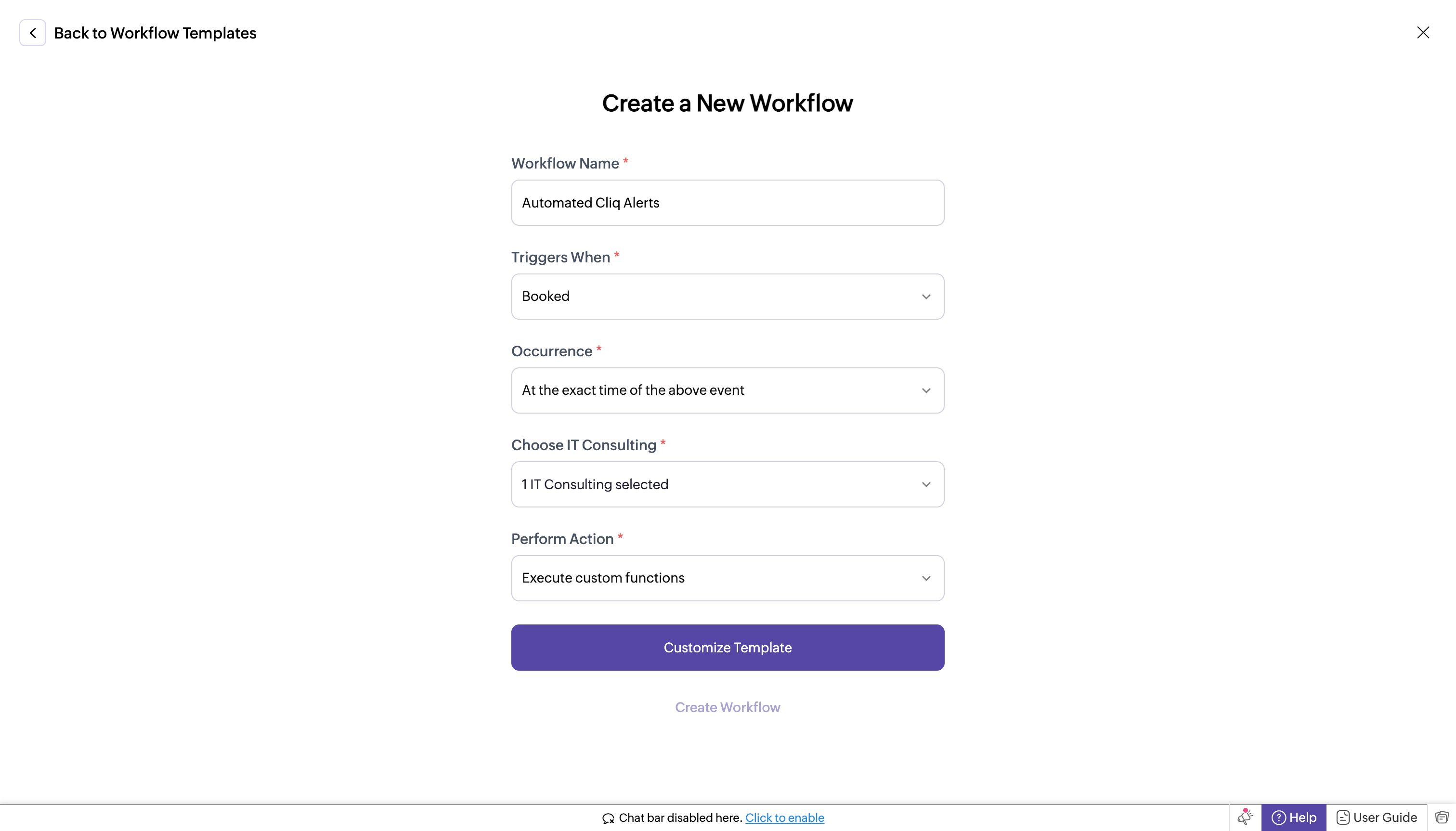
Step 4 : Creating a workflow in Zoho Bookings 
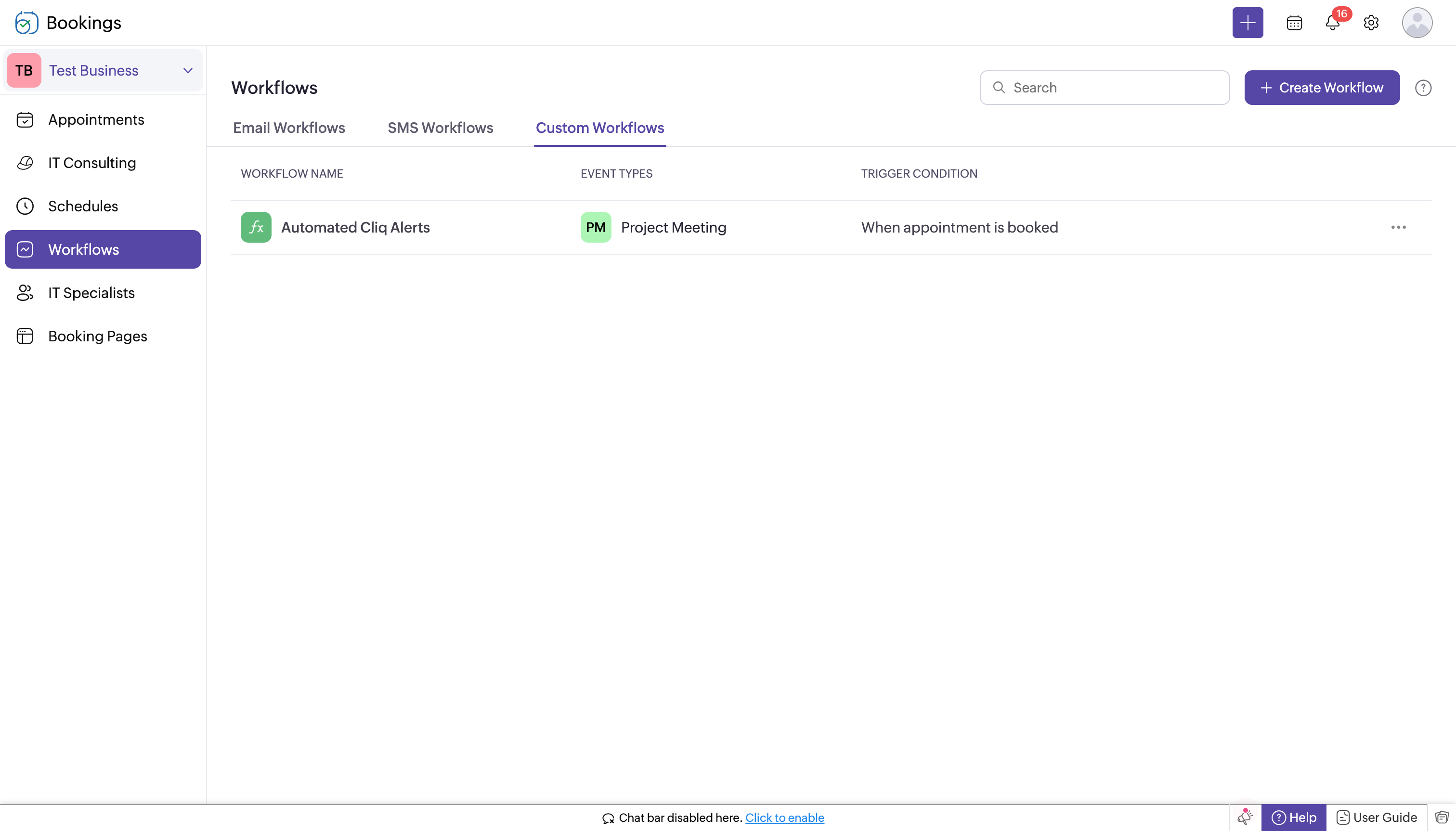

  1. Log in to Zoho Bookings.
  2. In the left panel, navigate to one of the following options:
    1. Workflows → Custom Workflows → Create New Workflow
    2. or Workflows → Create Workflow → Create New Workflow.
  3. If you chose Workflows → Custom Workflows → Create New Workflow, complete the following fields:
    1. Workflow Name: Enter a name for your workflow.
    2. Trigger When: Select "Booked."
    3. Occurrence: Choose "Immediately."
    4. Choose Service (e.g., IT Consulting): Select your Service.
    5. Perform Action: Select "Execute Custom Functions."
    6. Customize Template: Paste the following code. 
  4. In the template editor, paste the code, replacing "<bot incoming url>" with the full URL you created in the previous step. 
    1. bookingInfoMap = Map();
    2. bookingInfoMap.put("BookingInfo",bookingInfo);
    3. cliqWebhookTrigger = invokeurl
    4. [
    5. url : "<bot incoming url>"
    6. type :POST
    7. parameters:{"Book Details":bookingInfo} + ""
    8. headers:{"content-type":"application/json"}
    9. ];
    10. info cliqWebhookTrigger;
  5. Click Create Workflow. With this setup, whenever a new appointment is booked, it will trigger a notification to your Cliq bot's incoming handler.
Step 6 : Setting up bot incoming webhook handler   

  1. Head back to Cliq, locate the bot you created under the "Bots and Tools" section, and access its incoming webhook handler.
  2. The incoming webhook handler is designed to allow third-party services, such as Zoho Bookings, to post messages directly to your bot.
  3. Copy and paste the below code, then click "Save".
Note: You can customize the message format using the Message Builder.

Pre-requisites before scripting:
  1. Create a Zoho Cliq Default Connection:

    Before you begin scripting the code below, you need to create a connection in Zoho Cliq. Once the connection is established, you can use it in Deluge integration tasks and invoke URL scripts to access data from the required service.

    Use a unique name for the connection with the scope set to ZohoCliq.Reminders.All.

    Note: Refer to the document on Connections in Cliq for more information.

  2. Post Alerts to a Channel:

    To post an alert to a channel, you'll need the unique names of both the channel and the bot. This is necessary as we will use the zoho.cliq.postToChannelAsBot Deluge task in the code below. Follow these steps to retrieve these names:

    How to Obtain the Channel Unique Name in Cliq?:

    • Navigate to the top right corner of your preferred channel and click on the three dots.
    • In the menu that appears, select "Channel info." A pop-up will display detailed information about the channel.
    • Hover over the "Connectors" section and click on it.
    • Under "API Parameters," you will find the channel unique name.

    How to Obtain the Bot Unique Name in Cliq?

    • Go to "Bots & Tools," and under the bots section, select your preferred bot.
    • Copy the API endpoint URL. The bot's unique name is located between "bots/" and the next slash ("/").

    Example:

    In this example, the bot's unique name is crmupdatesincliq.

  3. Retrieve the Bot Chat ID:
    • Open Zoho Cliq and navigate to your bot in the chat window.
    • Click on the bot to open the conversation.
    • Check the URL in your browser; the bot chat ID is the alphanumeric string that appears after "chats/".

    Example:

    In this example, the bot chat ID is CT_9874563201845670134_10005673821-B7.

After creating the connection, retrieving the channel unique name, bot unique name, and bot chat ID, keep this information handy for use in the code below.

Script
  1. response = Map();
  2. info params;
  3. info headers;
  4. info body;
  5. bookingDetails = body.get("Book Details");
  6. info bookingDetails;
  7. bookingID = bookingDetails.get("booking_id");
  8. workspaceName = bookingDetails.get("workspace_name");
  9. customerEmail = bookingDetails.get("customer_email");
  10. startTime = bookingDetails.get("start_time");
  11. endTime = bookingDetails.get("end_time");
  12. timeZone = bookingDetails.get("time_zone");
  13. summaryUrl = bookingDetails.get("summary_url");
  14. responseMsgCard = {"text":"### 📅 New Appointment","card":{"theme":"modern-inline"},"slides":{{"type":"label","title":"Details","buttons": [
  15. {"label": "Open Summary","action": {"type": "open.url","data": {"web":summaryUrl}}}],"data":{{"🆔 Booking ID":bookingID},{"🏢 Workspace":workspaceName},{"📧Customer Email":customerEmail},{"🕒 Time":startTime + " - " + endTime},{"🌍 TZ":timeZone}}}}};
  16. info zoho.cliq.postToBot("<bot unique name>",responseMsgCard);
  17. //Post to your Bot
  18. info zoho.cliq.postToChannelAsBot("<Channel unique name>","<bot unique name>",responseMsgCard);
  19. //It will send to channel with bot permission.
  20. //--------------------------------- To set reminder -------------------------------//
  21. eventTimeZone = bookingDetails.get("time_zone");
  22. info eventTimeZone;
  23. userTimeZone = user.get("timezone");
  24. dateTimeObj = bookingDetails.get("start_time").toTime("dd-MMM-yyyy HH:mm:ss",eventTimeZone).toString("dd-MM-yyyy HH:mm:ss");
  25. info dateTimeObj;
  26. info dateTimeObj.toTime("dd-MM-yyyy HH:mm:ss",user.get("timezone")).subMinutes(60);
  27. datetime_30min_sub = dateTimeObj.toTime("dd-MM-yyyy HH:mm:ss",userTimeZone).subMinutes(30).toString("dd-MMM-yyyy HH:mm:ss",userTimeZone);
  28. datetime_60min_sub = dateTimeObj.toTime("dd-MM-yyyy HH:mm:ss",userTimeZone).subMinutes(60).toString("dd-MMM-yyyy HH:mm:ss",userTimeZone);
  29. info datetime_60min_sub+"datetime_60min_sub";
  30. info datetime_30min_sub+"datetime_30min_sub";
  31. secondsVal_60sec_before = datetime_60min_sub.unixEpoch(userTimeZone);
  32. secondsVal_30sec_before = datetime_30min_sub.unixEpoch(userTimeZone);
  33. info secondsVal_60sec_before;
  34. info secondsVal_30sec_before;
  35. reminderTimes = list();
  36. reminderTimes.add(secondsVal_60sec_before);
  37. reminderTimes.add(secondsVal_30sec_before);
  38. for each  reminderTime in reminderTimes
  39. {
  40. param = Map();
  41. content = "Zoho Bookings Reminder : " + bookingID;
  42. param.put("content",content);
  43. param.put("time",reminderTime);
  44. chatidsList = list();
  45. chatidsList.add("<Bot chat id>");
  46. param.put("chat_ids",chatidsList);
  47. createReminder = invokeurl
  48. [
  49. url :"https://cliq.zoho.com/api/v2/reminders"
  50. type :POST
  51. parameters:param + ""
  52. connection:"<your connection name>"
  53. ];
  54. info createReminder;
  55. }
  56. return response;


Team responsiveness and operational clarity are critical, and automated booking alerts create a measurable impact. Businesses managing a scalable client base and operating on appointments cannot afford delays in information. Every booking that goes unnoticed is a missed chance to respond and deliver.

This custom solution brings real-time Zoho booking data into the Cliq communication layer, effectively filling the gap, letting teams stay coordinated, respond faster, and deliver a consistently better experience to every customer.

If you have any further questions or need support, please reach out to support@zohocliq.com, and we'll be happy to assist you.

      • Sticky Posts

      • Add Claude in Zoho Cliq

        Let’s add a real AI assistant powered by Claude to your workspace this week, that your team can chat with, ask questions, and act on conversations to run AI actions on. This guide walks you through exactly how to do it, step by step, with all the code
      • Automating Employee Birthday Notifications in Zoho Cliq

        Have you ever missed a birthday and felt like the office Grinch? Fear not, the Cliq Developer Platform has got your back! With Zoho Cliq's Schedulers, you can be the office party-cipant who never forgets a single cake, balloon, or awkward rendition of
      • Zoho Cliq REST APIs v3 : A complete guide to what's changed and why 

        APIs are not just consumed by a developer with numerous automations and a series of open browser tabs. They are parsed by LLMs, fed into agent pipelines, and auto-completed by AI coding assistants that have zero tolerance for inconsistency. A verb tucked
      • Cliq Bots - Post message to a bot using the command line!

        If you had read our post on how to post a message to a channel in a simple one-line command, then this sure is a piece of cake for you guys! For those of you, who are reading this for the first time, don't worry! Just read on. This post is all about how
      • Automating Real-Time Zoho Bookings Alerts in Zoho Cliq

        Enable your teams to respond in seconds by bridging the gap between booking confirmation and team notification. No sticky notes, no calendar nudges and no follow-up frenzies. For businesses that rely on scheduled appointments, real-time visibility is

        • Recent Topics

        • WhatsApp Business Message Pricing Update: Effective October 1, 2026

          Hi everyone, Starting October 1, 2026, Meta is updating how WhatsApp Business messages are charged. This guide explains the new per-message pricing model, how message categories work, and what changes for service messages specifically. How Meta charges
        • Cannot login to Zoho Mail on Mobile App

          Hi, I am the super administrator for our company's email account. I just created 4 new email accounts, and my users have downloaded the zoho mail app. However they are unable to login to their email on the app. It kept saying "User does not exist". Please help! Thank you.
        • Zoho Projects - Linking CRM Deals to Projects via API without sending customer contact email invitation to project portal

          We are using the Zoho CRM and Zoho Projects APIs to automatically create a project in Zoho Projects and then associate that project with the relevant Deal in Zoho CRM. The API process is working in that the project is created successfully and appears
        • In ZOHO Books, it appears that there is a maximum of 200 Shipping addresses.

          I am using ZOHO Books and what you call a shipping address, we use as a Service address. I have a couple of customers that have Many Many service addresses, I am starting to get an error saying too many shipping addresses. Additionally, is there a way
        • Notice to Zoho Community Members: Updated Zoho Community Guidelines

          Hello everyone, We have updated the Zoho Community Guidelines to keep the exchanges original, relevant, and meaningful. The major focus of this update is on AI use, and on sharing apps, extensions or other software in the community. This community works
        • How to add a fee based on payment method

          I currently accept both ACH payments and credit card. I want to add a 3% fee to a number of my subscription plans if the customer chooses to use a credit card (and not ACH/checking). How do I do this? Is there an in-built feature, or would i have to create
        • How to charge Convenience fee OR payment gateway charges to the end client who is paying the invoice?

          Hello, I am creating this topic after having discussions with various sets of users and have understood that with people moving more and more to digital payments, it is important for the client to enable the "Convenience fee" kind of scenario. I have
        • Can't copy and paste from email in Zoho email client

          I don't know what happened, but I have lost the ability to cut and paste information from an email.
        • Hide Inactive Social Sign-In Providers from Login Screen

          Hello Zoho Team, We hope you are doing well. Currently, Zoho One allows admins to configure security policies and enable or disable Social Sign-In options for third-party providers such as Apple, Google, Microsoft, LinkedIn, Yahoo, Twitter, Facebook,
        • How does Zoho handle the daylight savings time change in Alberta?

          Alberta has just made the decision to get rid of daylight savings. This means that as of November 1, 2026 we remain on UTC-6 year-round. We have timing errors in meetings scheduled after that For example, we scheduled meetings in late November at 9:00
        • Shared Mailbox in iOS app

          Hi, On the desktop I am using a Shared mailbox for our company's general mailbox that somebody else should be able to view. In the iOS app however I can't find it? Old sources on the internet says this isn't possible but that can't be right? Somebody
        • Issues with Zoho Insights and email template web links

          Is anyone else out there having the same issue we're experiencing? When we send out an email template, Zoho insights is converting the URLs from the URL we insert in to the template in to one of the form https://mailer1.zohoinsights.com/ocgeturl/2d6f.327230a?l=0ed7f050-5b31-11eb-a1a...
        • UCP: Why We Killed the Multi-Portal Mess and Simplified Customer Self-Service

          Let's talk about the multi-portal mess nobody wants to admit that it exists. Your customer needs an invoice from one app, wants a ticket update from another, and has a project waiting in a third, each behind its own login, its own UI, its own "was it
        • Object-level edit permissions

          Hi, we are currently running into a limitation with permissions inside larger workspaces. Our use case is a central Analytics workspace that contains many tables, Query Tables, reports and dashboards used by different teams. We would like to allow certain
        • inventory removal at packing list or shipment.

          currently our system is set to remove inventory at invoice. This is creating an inventory nightmare? Is it possible to change the settings to remove the item from inventory at either the packing slip stage or shipping the item.
        • Item description is not displayed

          I added the item description while importing the new item through the bulk item Excel sheet, and the import was completed successfully. However, I cannot see the description in the item details under Inventory. Could anyone please advise how to make the
        • Shared inbox unable to see replies

          Hi we are a small company me and someone else, we have a shared inbox for our sale@ and contact@ however we have this issue where by if i reply to an email or the other person reply to the email, it does not show it to them and therefore we end up replying
        • Record Payment - Auto Populate Amount as payments are selected

          When recording payments you have the option of clicking on "Pay in Full" next to the bill which automatically adds the total at the bottom of the page next to "Amount used for payments" but this should also auto populate / update the total at the top
        • Can't set conditional layout rule on lookup field in Zoho CRM

          Namaskaram Zoho CRM team, Usually any fields of module except mandatory fields can be hide using conditional layout rules. But that can't be set on lookup fields event that is not a mandatory fields. Many users are in need of that. Crafted with ❤️ Zoho
        • [Request] Pivot filter date option : from set date to relative value ie from 01Jan to LastMonth

          I don't think I can currently do this... but it's worth asking if it's possible. My use case is concerning annual leave which is calculated from the beginning of the calendar year (01Jan) then each month I want to have details of leave taken etc... In
        • Need to be able to apply layout rules to 'Multi Pick List'

          Currently, we are unable to apply layout rules to fields that are 'Multi Pick List'. This means we have to instead use checkbox fields, but they are inefficient. For example, we use the Multi Pick List to list our products. However, we're unable to apply
        • Announcing the new SKILL.md for Zoho CRM and the updated OAS repository!

          We are introducing a new zoho-crm skill to make working with Zoho CRM Developer tools (like APIs, functions, widgets, client scripts, queries etc) easier and faster, with the help of AI in your preferred AI harness like Claude Code, Codex, Cursor, VSCode
        • My "trigger" panel disappear from my workflow ...

          Hello, I want to add a trigger to an email sequence, but the "trigger" panel has disappeared when I want to modify ...I used a predefined template to create this sequence, is that because of that? Thank you. I have attached a screenshot to you
        • Workflow Automation Not Triggering

          My Zoho CRM workflow sometimes doesn’t trigger when a record is updated, even though the workflow criteria appear to be met. What should I check to find out why the workflow is being skipped?
        • AI Calling

          Hi, does anyone have experience or any thoughts on AI Calling. Getting AI to make calls on behalf of your company. We are looking into it, but are finding it difficult to get info and providers that can assist.
        • Zoho Sheet as KB Document

          It would be nice if Zia Agents could take Zoho Sheets as part of the knowledge base. The use case here is that it's infinitely easier for humans to maintain a spreadsheet table than any .md / TAML / JSON document. For situations where humans are responsible
        • Ask the Experts: Five-hour live Q&A session with Zoho WorkDrive product experts

          Have questions about WorkDrive 5.0? Let’s talk! We recently launched Zoho WorkDrive 5.0, packed with powerful updates to help your team work smarter, stay secure, and get more value from your business content. From content-centric workflows and AI-powered
        • Automating CRM backup storage?

          Hi there, We've recently set up automatic backups for our Zoho CRM account. We were hoping that the backup functionality would not require any manual work on our end, but it seems that we are always required to download the backups ourselves, store them,
        • Zoho Community Digest - September 2026 | Part 3

          Hi everyone, and welcome back! Zoho CRM launches PRM for partner management, Bigin builds this year's Apple AI updates into the app, and Snapchat is now a connected channel in Zoho Social. There are also three notices worth reading, including WhatsApp
        • ERROR: This user is not allowed to add in Zoho. Please contact support-as@zohocorp.com for further details

          I can add new user for mail, i received message error about; This user is not allowed to add in Zoho. Please contact support-as@zohocorp.com for further details Try creating user name; instagram@eficaztecnologia.com.br
        • Support for Custom Fonts in Zoho Recruit Career Site and Candidate Portal

          Dear Zoho Recruit Team, I hope you're doing well. We would like to request the ability to use custom fonts in the Zoho Recruit Career Site and Candidate Portal. Currently only the default fonts (Roboto, Lato, and Montserrat) are available. While these
        • Ability to filter services and parts based on a field in the Work Order

          Hell FSM team, We have a customer with 2 value streams using Zoho FSM. Each value stream uses different products, at different price point. Currently, all of the products are accessible when creating a work order and modifying a service appointment, which
        • SubTotaks for Item Headers in Estimates

          Hi, Apparently, one can add Item Headers in Estimates in Zoho Books. Is this feature like an Estimate section with a SubTotals for each Item Header/Section? Or is the Item Header just a Title and cannot be SubTotalized? Thank You
        • Sync of products and orders between Zoho Inventory, Zoho Books and Shopify

          Good Day I migrated from QuickBooks to Zoho Books and Zoho Inventory at the beginning of this year. The migration team assisted with importing my data, but I am currently experiencing multiple issues affecting syncing between Shopify and Zoho. 1. SKU
        • Best practices for importing phone numbers

          I've recently found a problem with my phone provider, integrated with Zoho CRM, where a phone number that starts with 00 instead of + won't work. The problem has no solution: they tell me to replace all 00 with + I've always preferred using 00 instead
        • Copy + Paste in Notes: Text color and text background are not retained

          I've recently started using Zoho Notebook as an Evernote replacement. When copying and pasting text within Zoho Notes, I notice that the formatting of the text (text color and background color) is not retained when pasting. Only the attributes "Bold"
        • Add Comprehensive Accessibility Features to Zoho Writer

          Hello Zoho Writer Team, We hope you are doing well. We would like to submit a feature request to enhance Zoho Writer with a full set of accessibility tools, similar to the accessibility options already available in the Zoho Desk agent interface. 🚧 Current
        • MAKING ENTRY TIME MORE USER FRIENDLY AND FASTER O PREVENT TAB TIME

          I AM CURIOUS TO KNOW IF WE CAN MAKE IT MORE USER FRIENDLY WHILE MAKING BILLS , I MAJORLY USE OVER DESKTOP SO I AM SUGGESTING TO REMOVE TAB TIME WHILE ENTERING BILL OR MAKING INVOICE DIRECT JUMP TO ONLY REGULAR PARTS OF THE BILL . YOURS RAKESH 782866
        • Email Forwarding to Zoho Desk Failing After Migration from Gmail to Outlook (Microsoft)

          We recently migrated from Gmail to Microsoft Outlook. Since the migration date, emails sent by our customers are no longer being received by Zoho Desk. I tried setting up the email forwarding rules in Outlook similar to what we had in Gmail, but it still
        • Shopify B2B Integration: Option to Match Customers by Company Name

          It would be great if the Shopify integration could include Company Name as a customer matching option. At the moment customers can only be matched by: Email Name Email and Name Phone For businesses using Shopify B2B, the company is often the customer
        • Next Page