Automation Series: Auto-assign Task Followers

Automation Series: Auto-assign Task Followers

As task progresses, several users are required to stay aware of the updates to plan their upcoming work items efficiently. Manually adding users as followers for an active task might create additional overhead. With this automation, followers can be added automatically when users are selected in a User Picklist field while creating the task. This ensures the followers are informed of task updates as they happen.

Consider an interior design firm managing a property renovation. Each design task is assigned to a lead designer, but the procurement coordinator needs visibility into the design task even though they are not active contributors. By doing so, the coordinator can plan the raw material collection before proceeding with upcoming procurement tasks.

When the task owner adds relevant members to the User Picklist field, the Workflow Rule triggers and executes the associated Custom Function. This custom function adds the users from the Picklist as followers automatically.

To configure this flow in your Zoho Projects portal,

      1. Navigate to the upper-right corner of the page and click  → Customization → Layouts and Fields → Tasks.
      2. Click on the required layout and drag-and-drop fields to create the following custom field:
  1. Task Collaborators - User Picklist field to select the users who will be added as followers to the task.


      3. Click Save.
      4. Navigate to  → Developer Space → Connections.
      5. Click Create Connection, choose Zoho Projects as the service, and add the following scopes:
  1. ZohoProjects.tasks.CREATE
  2. ZohoProjects.tasks.READ
  3. ZohoProjects.tasks.UPDATE


      6. Navigate to Custom Functions under Developer Space.
      7. Click the Tasks tab in the top panel.
      8. Create a new custom function and add the following Deluge script.
Notes
Ensure that the portal URL aligns with your data centre. If not, the function may not execute as expected.
  1. //Scopes : ZohoProjects.tasks.CREATE, ZohoProjects.tasks.READ, ZohoProjects.tasks.UPDATE
  2. projectsV3APIEndPoint = "https://projectsapi.zoho.in/api/v3";
  3. userPicklistAPIName = "task_cf_0001";
  4. //Replace the userpicklist API name here
  5. getTaskDetails = invokeurl
  6. [
  7. url :projectsV3APIEndPoint + "/portal/" + portalId + "/projects/" + projectId + "/tasks/" + taskId
  8. type :GET
  9. connection:"taskfollowers"
  10. ];
  11. if(getTaskDetails.containsKey(userPicklistAPIName))
  12. {
  13. followers = List();
  14. for each members in getTaskDetails.get(userPicklistAPIName)
  15. {
  16. followers.add({"zpuid":members.get("zpuid")});
  17. }
  18. if(followers.size() > 0)
  19. {
  20. params = Map();
  21. params.put("followers",followers);
  22. addFollower = invokeurl
  23. [
  24. url :projectsV3APIEndPoint + "/portal/" + portalId + "/projects/" + projectId + "/tasks/" + taskId + "/followers"
  25. type :POST
  26. parameters:params.toString()
  27. connection:"taskfollowers"
  28. ];
  29. }
  30. }
  31. return "success";
Info
Line 2: Replace the domain in the endpoint URL to match your data centre.
Line 3: Replace "task_cf_0001" with the API name of your User Picklist field.
Lines 9 and 27: Replace "taskfollowers" with your Zoho Projects connection name.
      9. Add the following arguments during configuration.


      10. Click Save.
      11. Navigate to  → Automation → Workflow Rules.
      12. Click the Tasks tab in the top panel and click New Workflow Rule.
      13. Select Based on User Action as the execution condition and execute the rule when a Task is Updated. Select Task Collaborators custom field from the dropdown.
      14. Click +Add Action and select Associate Custom Function. Select the custom function created previously.


      15. Click Save Rule.
      16. Toggle the Workflow Rule Status on to enable it.
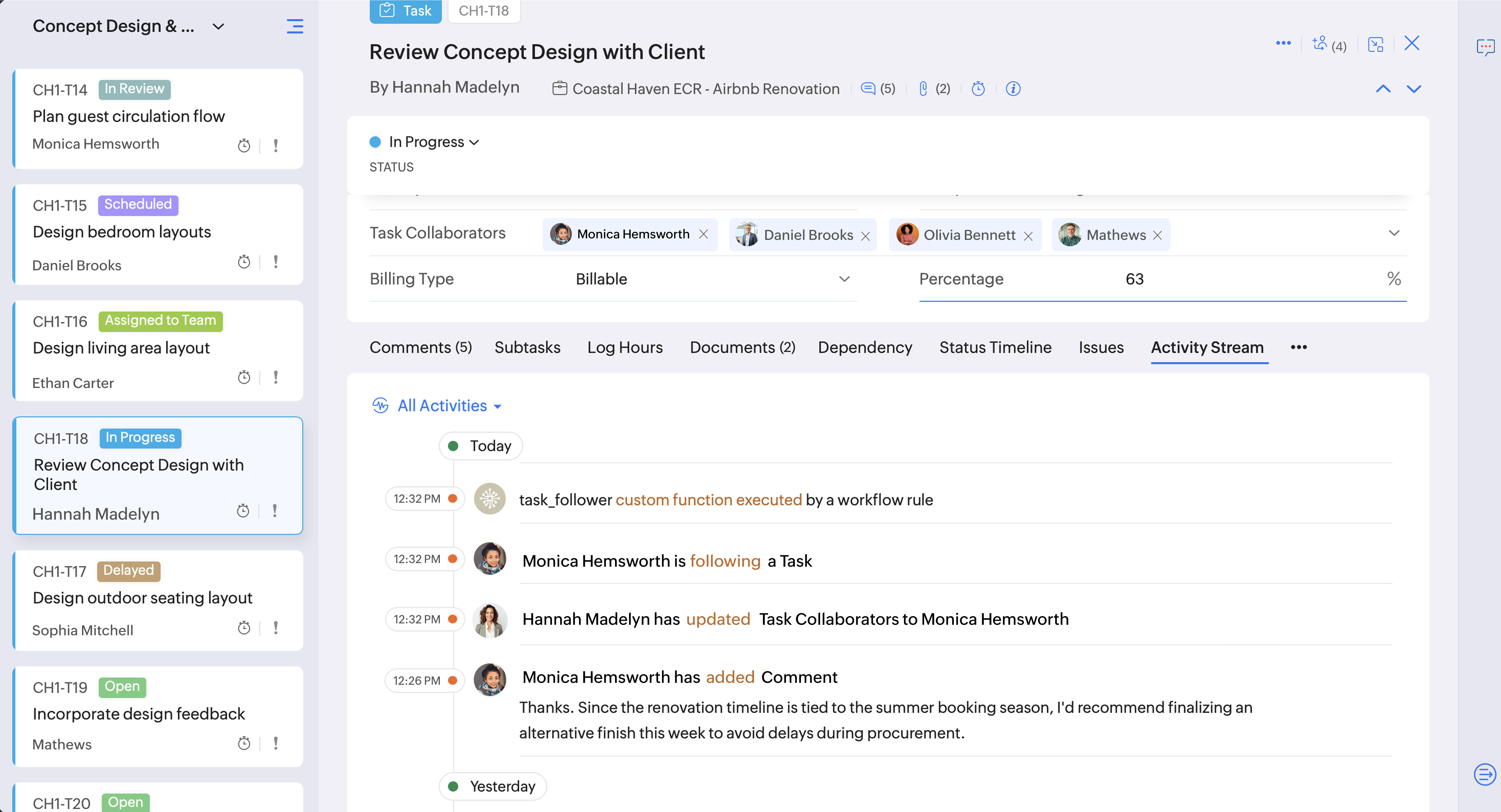


With this automation, users selected in the User Picklist field are automatically added as followers to the task, keeping followers informed without manual follow-ups.

If you have any questions, feel free to drop a comment below or reach out to us at support@zohoprojects.com.


      • Sticky Posts

      • DYK 14: Create Tasks with AI

        Did you know AI can suggest tasks within your Zoho Projects portal? Breaking a project into clear, actionable work items takes time and manual effort. Especially when the same team handles both planning and execution. AI task suggestions in Zoho Projects
      • Introducing CodeX Scripts for Custom Modules

        When a project involves processes beyond the usual modules such as tasks and issues, teams often create Custom Modules to keep information organized in a way that fits their workflow. Once those records become part of the process, there may also be specific
      • Create Custom Module Using AI in Zoho Projects

        Every team has its own way of managing work. While standard modules support common project management needs, many business processes require their own structure, fields, and terminology. With AI-powered Custom Modules in Zoho Projects, users can create
      • Collaborate Visually with Whiteboard in Zoho Projects

        Whiteboard in Zoho Projects allows you to collaborate visually by creating diagrams, annotating designs, and sketching project workflows using shapes, text, and images within project modules. Team members can work simultaneously, improving productivity
      • Create Flexible Layouts with Layout Rules

        In a project, when a work moves from planning to execution, the information teams need can change at every stage. A project can need one set of details, a phase can need another, and a custom process may require an entirely different set of information.

        • Recent Topics

        • Notes - Reaction Buttons

          Using the native notes option within CRM is fine, it works and the RTF features are great, however, would it be possible - if there isnt already something in place, where we can add a reactions button, similar to teams/whatsapp to show that its been read
        • Notes Acknowledgement

          It would be great to have emojis that can be used for Notes. Emojis such as Thumbs Up to let someone know you agree with them or a emoji for thanks. It's a simple way to acknowledge that you read someone's note. Moderation update: Emoji reactions for
        • Address limits per customer by edition

          I’m on the Standard edition and have reached a limit of 30 addresses under a single customer. Before I move to an annual Professional subscription, I need to confirm the following: What is the maximum number of addresses allowed under one contact, and
        • Is it possible to log text messages from iphone into Zoho CRM

          My team is more and more utilizing text messaging to communicate with clients. Does Zoho have a solution for logging these text messages when clicking "Send Text Message" from the Zoho app. Much like when you call, you get prompted to log a call, can
        • Project Finances: Fully Accessible within Projects

          Project finances and work items are now on the same screen and it transforms the way you run your project. Managing your project finances is now much easier and in the same screen as your work items. Access quotes, invoices, bills, sales orders, and purchase
        • zoho stream web notifications

          since im locked out of IMAP and cant use my mail app that lets my team collaborate and chat below emails, im trying out the zoho version of this... zoho streams. On the bottom of an email in the zoho mail web app, i "comment" and mention another user.
        • UI / UX Improvements

          Please consider changing the Dependency Details window from a column-based layout to a list-based layout, or allowing users to choose their preferred layout. The current column-based view uses screen space inefficiently and makes navigation difficult,
        • Zoho CRM and Desk sandboxes for testing native integration

          Hello team, We are evaluating the native integration between Zoho CRM and Zoho Desk, We have sandbox instances of both products and want to test the integration there, without any effect on our production CRM or production Desk data. While setting up
        • Function #24: Automatically display deal name from Zoho CRM on quotes in Zoho Books

          Deals allow businesses to organize and visualize their sales pipeline. This provides a clear overview of all potential opportunities and helps in making informed decisions. Zoho CRM empowers you to create deals or potentials for your clients and monitor
        • Introducing Zoho Key Service, a simpler way to access LLMs without API keys

          Available in the Professional, Enterprise, and Ultimate editions in the US, IN, AU, JP, and CA DCs. Hello everyone, We are excited to bring Zoho Key Service (ZKS) in Zoho CRM, a simpler way for organizations to access and use third party LLMs. You can
        • Zoho Books | Product updates | August 2026

          Hello users, July has been an exciting month for Zoho Books! This month, we're excited to introduce HTML PDF Templates, Placeholders as Pills, expanded approval workflows for Sales Returns and Journals, and significant compliance updates across the India,
        • Auto-Sync Field of Lookup Values When Parent Record Changes

          Hi Zoho Team, Currently, when you use a "Field of Lookup" in Zoho CRM, the value is captured as a snapshot at the time the lookup is set. If the parent record is later updated, the Field of Lookup value on the child record does NOT update and stays stale.
        • How to Repair Corrupted Video Files?

          Repairing corrupted video files can be done using free media players, command-line utilities, or specialized video repair software depending on the severity of the corruption. Here are the most effective methods to fix unplayable videos: Method 1: Use
        • [Request] Pivot filter date option : from set date to relative value ie from 01Jan to LastMonth

          I don't think I can currently do this... but it's worth asking if it's possible. My use case is concerning annual leave which is calculated from the beginning of the calendar year (01Jan) then each month I want to have details of leave taken etc... In
        • Customer Statement Showing Incorrect Negative Balance Due to Unused Advance

          Dear Zoho Support Team, We are facing an issue with the Customer Statement in Zoho Invoice related to customer advances/mobilization advances. The issue is that when a customer has made an advance payment that has not yet been fully utilized against invoices,
        • Mois de la sensibilisation à la cybersécurité 2026 : faites de la sécurité un réflexe avec Zoho

          Imaginez : vos systèmes informatiques répondent aux normes de sécurité en vigueur et votre entreprise est assurée contre les cyberattaques. Pourtant, un matin, tout bascule. Vos données sont chiffrées et un message glaçant s’affiche à l’écran : « Si vous
        • Specifying time increments on a Date/Time field

          Hi all, Im using a Date/Time field in my CRM module. At the moment the increments are 30 minutes. How can I change these to be 15 minutes? Thanks
        • Read, View, Access, or Open an OST File Without Outlook

          Have you at any time needed to open an old OST file only to find that Microsoft Outlook is not installed on your computer? It is very annoying, particularly in the case where the file includes important emails, attachments, contacts, or calendar items.
        • What's new in Zoho Workplace | August 2026

          Hello Zoho Workplace community! Here's a roundup of all the new features and announcements that went live across Zoho Workplace applications in August. Zoho Mail Zoho Mail is now available in AWS Marketplace! AWS Marketplace users can access and subscribe
        • Read, View or Open MBOX File without Any Email Clients

          Since email messages are stored in a single file by MBOX files, they are useful for keeping email data in one location. Many email programmes, such as Thunderbird and other mail clients, support this format. However, if you have an old MBOX file and the
        • What's new in Zoho Social - Q3 recap

          Hello everyone, We've rolled out a bunch of exciting updates in Q3, and we're thrilled to walk you through them. Here's a quick look at everything we released in July, August, and September to help you experiment with content, automate engagement workflows,
        • The Social Wall: September 2026

          Hello everyone! This month, we’re bringing Snapchat to Zoho Social. You can now connect your Snapchat account and manage your content alongside your other social channels. Whether you want to reach a wider audience through Spotlights or share quick updates
        • How to Convert Apple Mac Mail to PST for Outlook for Free?

          Apple Mail is a widely used email program among Mac users, but what do you do if you want to transfer your emails to Microsoft Outlook? In such a situation—for example, when you are moving from a Mac to a Windows computer or when you need to use Outlook
        • Turning off the recorded welcome in Zoho Webinar

          Is there a way to turn off the recorded voice that comes up at the beginning of every webinar session? It devalues the experience for attendees from feedback, interrupting their connection with our brand and delaying webinar start unnecessarily.
        • Option to Disable Knowledge Base Section in Feedback Widget Popup Hello Zoho Desk Team

          Hello Zoho Desk Team, How are you? We are actively using Zoho Desk and would like to make more use of the Feedback Widget. One of the ways we implement it is through the popup option. At the moment, the popup always displays the Knowledge Base section,
        • Losing description after merging tickets

          Hello, We merge tickets when they are about the same topic from the same client. It happens sometimes. We recently noticed that after the merger only the description from the master ticket is left in a thread. And the slave-ticket description is erased.
        • Outgoing Mail Blocked – Suspicious Login Activity (Need Clarification and Solution)

          Hello, I’m currently facing an issue where my Zoho Mail account has been blocked due to “suspicious login activity,” and outgoing emails are restricted. Here are the details shown: Block type: Outgoing mail blocked Reason: Suspicious login activity A
        • Account Blocked due to Suspicious Activity.

          Hello, Trying to get access to my account, I have found this message above in the subject of this message. I am unable to log back to my account (see err. mess. below.) and thus cannot get rif of this following the Zoho procedure : I followed the step
        • Zoho Recruit mailserver get blocked by Microsoft!

          Hi, We have experienced this issue twice now, where Zoho Recruit outbound IP addresses are being blocked by Microsoft. We are confident that Microsoft is the blocking party, as all outbound emails to candidates with @hotmail.com, @live.com, and @outlook.com
        • Months of WooCommerce–Zoho Inventory sync failures and repeated support requests – has anyone experienced this?

          Months of WooCommerce–Zoho Inventory sync failures and repeated support requests – has anyone experienced this? I run a small retail business using WooCommerce and Zoho One. For months, I have been trying to resolve recurring synchronisation failures
        • Name autocomplete

          Hi, During searching emails the web tool does not always propose the auto-completion of the saved emails. As a result I either have to go to contacts and look up the exact email, or the exact full name including the middle name and any dots, which is
        • How to Manage Two GST Numbers / Two Companies in a Single Zoho Inventory Organization?

          Hi Team, We currently have two separate legal entities: A Proprietorship Firm with its own GSTIN A Private Limited Company with a different GSTIN However, operationally, both companies deal with the same products, and we would like to manage the physical
        • View Cannot Use UPC as Criteria

          When creating a new custom view, the UPC field is not available as a criterion for the view. This seems strange, because both ISBN and EAN are available in the dropdown. Because of this, I feel like the situation is possibly an oversight rather than by
        • How To Implement an Auto-Check-out Feature for Attendance?

          If an employee forgets to check out, the system should automatically check out the employee at 6:30 PM
        • Enhanced Zoho CRM and Office 365 calendar synchronization features!

          Dear customers, We're excited to share some significant improvements to our Office 365 calendar synchronization features, aimed at providing you with more control and a more personalized experience. What’s new Choose your Office 365 calendar: During the
        • What are the best practices for managing tax records and financial information for a small business?

          I’m interested in learning how other small business owners and accounting professionals organize their financial records and prepare for tax filing. With bookkeeping, expense tracking, income records, and tax documents all needing to stay accurate, having
        • How to add a fee based on payment method

          I currently accept both ACH payments and credit card. I want to add a 3% fee to a number of my subscription plans if the customer chooses to use a credit card (and not ACH/checking). How do I do this? Is there an in-built feature, or would i have to create
        • How to Open Google Takeout and Thunderbird MBOX Files?

          MBOX files are used by email clients and services, such as Google Takeout and Mozilla Thunderbird, to store email messages. It can, however, be difficult to open such files if you don't have an email programme that is compatible. Google Takeout enables
        • Convert MBOX to PDF Free on Mac and Windows

          MBOX files are widely used for storing email messages in email clients such as Thunderbird, Apple Mail, and other programs that support the MBOX format. Although this format is useful for handling emails, it can at times be inconvenient to access the
        • Cannot apply tags to multiple items at once

          It is very frustrating needing to apply tags to notes individually. Even worse that it takes multiple clicks to do it. Can there please be an update to: 1.) Allow us to apply tags to batches of notes in one go. 2.) Make it less clicks to add a tag 3.)
        • Next Page