Bulk user onboarding for Cliq Channels in a jiffy

Bulk user onboarding for Cliq Channels in a jiffy

As developers, we frequently switch between coding, debugging, and optimizing tasks. The last thing we want is to be burdened by manual user management. Adding users one by one to a channel is tedious and prone to errors, taking up more time than we could devote to actual development. 


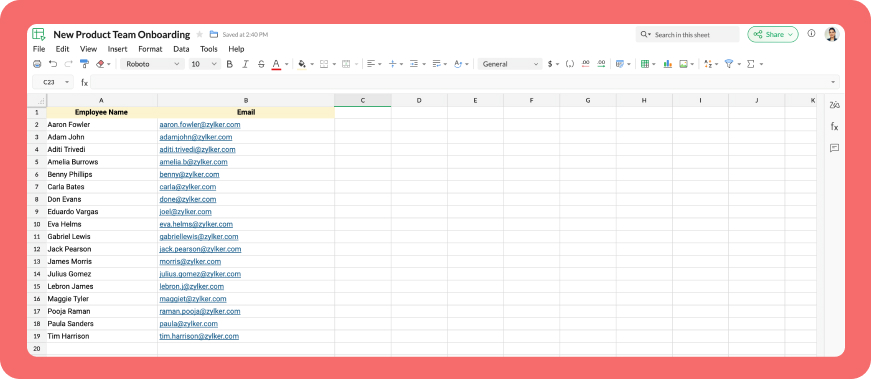
Let's explore how to create a custom workflow using Cliq's platform components to streamline the process of bulk-adding users to a channel via a Zoho Sheet or CSV file. This approach facilitates a smooth onboarding experience without the need for manual effort.

Pre-requisite :

Before beginning to script the code below, we must create a connection with Zoho Cliq. Once a connection is created and connected, you can use it in Deluge integration tasks and invoke URL scripts to access data from the required service.

Create a Zoho Oauth default connection with any unique name and the scopes -  ZohoCliq.Channels.All and ZohoSheet.dataApi.ALL

Refer to the below links to learn more :

Step 1  : Creation of slash command

  • After a successful login in Cliq, hover to the top right corner and click your profile. Post clicking, navigate to Bots & Tools > Commands.
  • At your right, click the button - Create Command.
  • To know more about slash commands and their purposes, refer to Introduction to slash commands.
  • Create a slash command using your preferred name. Specify the following details: the command name, a hint (to give users an idea of what the command is for), and the access level.
  • Finally, click "Save & edit code".

  1. inputs = List();
  2. inputs.add({"name":"channels","label":"Pick a channel","placeholder":"Choose a channel where you need to add members","max_selections":"1","multiple":false,"mandatory":true,"type":"native_select","data_source":"channels"});
  3. inputs.add({"name":"headername","label":"Header name","placeholder":"Email ID","hint":"In which the Email ID is present","min_length":"0","max_length":"25","mandatory":true,"type":"text"});
  4. inputs.add({"type":"radio","label":"Import type","name":"import_Type","hint":"Choose a type that you need to import users","options":[{"label":"CSV","value":"csv"},{"label":"Zoho sheet","value":"zohosheet"}],"trigger_on_change":"true"});
  5. return {"name":"addbulkuser","type":"form","title":"Add bulk users","hint":"To add maximum of upto 1000 users in a channel.","button_label":"Add Users","inputs":inputs,"action":{"type":"invoke.function","name":"addbulkusers"};

Step 2  : Scripting form function

  • We need to create a function for the form that manages submission responses, including the Zoho Sheet link or CSV file, the name of the column containing the email addresses, and the channel details where users should be added in bulk.
  • Hover to the top right corner and click your profile. After clicking, navigate to Bots & Tools > Functions.
  • To your right, click the Create Function button.
  • Name the function "addbulkusers," provide a description as desired, and select "form" as the function type. Then, click "Save and edit code," and paste the following code.
  1. emailIdList = list();
  2. successlist = list();
  3. failedlist = list();
  4. try 
  5. {
  6. info form;
  7. formValues = form.get("values");
  8. columnName = formValues.get("headername");
  9. headerName = formValues.get("headername");
  10. if(formValues.get("import_Type").get("value") == "zohosheet")
  11. {
  12. url = formValues.get("url");
  13. spreadSheetId = url.getPrefix("?").getSuffix("open/");
  14. sheetName = url.getSuffix("?").getPrefix("&").getSuffix("=");
  15. worksheetname = sheetName.replaceAll(" ","%20");
  16. columnName = columnName.replaceAll(" ","%20");
  17. allDatas = list();
  18. params = Map();
  19. params.put("column_names",columnName);
  20. params.put("method","worksheet.records.fetch");
  21. params.put("worksheet_id",sheetName + "#");
  22. sheetDetails = invokeurl
  23. [
  24. url :"https://sheet.zoho"+environment.get("tld")+"/api/v2/" + spreadSheetId
  25. type :GET
  26. parameters:params
  27. connection:"addbulkusers"
  28. ];
  29. info sheetDetails;
  30. if(sheetDetails.get("status") == "success" && sheetDetails.get("records").size() <= 1000)
  31. {
  32. allDatas.addAll(sheetDetails.get("records"));
  33. }
  34. else if(sheetDetails.get("status") == "success" && sheetDetails.get("records").size() > 1000)
  35. {
  36. return {"type":"form_error","text":"I can only able to add 1000 user. Kindly try passing with 1000 records in the sheet!!!"};
  37. }
  38. else
  39. {
  40. return {"type":"form_error","text":"I can't find any email ids. Kindly re-check the column name and header row!!!"};
  41. }
  42. info "allData: " + allDatas.size();
  43. if(allDatas.size() > 1000)
  44. {
  45. return {"type":"form_error","text":"I can only able to add 1000 user. Kindly try passing with 1000 records in the sheet!!!"};
  46. }
  47. for each  data in allDatas
  48. {
  49. if(data.get(formValues.get("headername")) == null)
  50. {
  51. return {"type":"form_error","text":"I can't find any email ids. Kindly re-check the column name and header row!!!"};
  52. }
  53. emailIdList.add(data.get(formValues.get("headername")));
  54. if(emailIdList.size() == 100)
  55. {
  56. channelID = formValues.get("channels").get("id");
  57. params = {"email_ids":emailIdList};
  58. info "Params: " + params;
  59. addUsers = invokeurl
  60. [
  61. url :environment.get("base_url") + "/api/v2/channels/" + channelID + "/members"
  62. type :POST
  63. parameters:params.toString()
  64. detailed:true
  65. connection:"addbulkusers"
  66. ];
  67. info "Adduser: " + addUsers;
  68. if(addUsers.get("responseCode") == "204")
  69. {
  70. successlist.addAll(emailIdList);
  71. }
  72. else
  73. {
  74. failedlist.addAll(emailIdList);
  75. }
  76. info "100: " + emailIdList.size();
  77. emailIdList = list();
  78. }
  79. }
  80. if(emailIdList.size() > 0)
  81. {
  82. channelID = formValues.get("channels").get("id");
  83. params = {"email_ids":emailIdList};
  84. info "Params: " + params;
  85. addUsers = invokeurl
  86. [
  87. url :environment.get("base_url") + "/api/v2/channels/" + channelID + "/members"
  88. type :POST
  89. parameters:params.toString()
  90. detailed:true
  91. connection:"addbulkusers"
  92. ];
  93. info "Adduser: " + addUsers;
  94. if(addUsers.get("responseCode") == "204")
  95. {
  96. successlist.addAll(emailIdList);
  97. }
  98. else
  99. {
  100. failedlist.addAll(emailIdList);
  101. }
  102. info "Email id: " + emailIdList;
  103. }
  104. info "Successlist: " + successlist;
  105. info "Failedlist: " + failedlist;
  106. if(successlist.size() > 0 && failedlist.size() > 0)
  107. {
  108. postMessage = {"text":"Successfully added " + successlist.size() + " member(s) and failed for " + failedlist.size() + " Member(s)"};
  109. }
  110. else if(successlist.size() > 0 && !failedlist.size() > 0)
  111. {
  112. postMessage = {"text":"Successfully added " + successlist.size() + " member(s)"};
  113. }
  114. else if(!successlist.size() > 0 && failedlist.size() > 0)
  115. {
  116. postMessage = {"text":"Adding members in channel failed for " + failedlist.size() + " member(s)"};
  117. }
  118. info zoho.cliq.postToChat(chat.get("id"),postMessage);
  119. }
  120. else
  121. {
  122. csvFile = formValues.get("csvFile");
  123. csvFile = csvFile.getfilecontent();
  124. allDatas = csvFile.toList("\n");
  125. i = 0;
  126. indexValue = 0;
  127. indexBoolean = false;
  128. for each  data in allDatas
  129. {
  130. if(i == 0)
  131. {
  132. headers = data.toList(",");
  133. for each  header in headers
  134. {
  135. info header;
  136. if(headerName == header)
  137. {
  138. indexBoolean = true;
  139. indexValue = headers.indexOf(headerName);
  140. }
  141. }
  142. if(indexBoolean == false)
  143. {
  144. return {"type":"form_error","text":"I can't find any email ids. Kindly re-check the column name and header row!!!"};
  145. }
  146. }
  147. else 
  148.             {
  149. emailIdList.add(data.get(indexValue));
  150.             }
  151. i = i + 1;
  152. if(emailIdList.size() == 100)
  153. {
  154. channelID = formValues.get("channels").get("id");
  155. params = {"email_ids":emailIdList};
  156. info "Params: " + params;
  157. addUsers = invokeurl
  158. [
  159. url :environment.get("base_url") + "/api/v2/channels/" + channelID + "/members"
  160. type :POST
  161. parameters:params.toString()
  162. detailed:true
  163. connection:"addbulkusers"
  164. ];
  165. info "Adduser: " + addUsers;
  166. if(addUsers.get("responseCode") == "204")
  167. {
  168. successlist.addAll(emailIdList);
  169. }
  170. else
  171. {
  172. failedlist.addAll(emailIdList);
  173. }
  174. info "100: " + emailIdList.size();
  175. emailIdList = list();
  176. }
  177. }
  178. if(emailIdList.size() > 0)
  179. {
  180. channelID = formValues.get("channels").get("id");
  181. params = {"email_ids":emailIdList};
  182. info "Params: " + params;
  183. addUsers = invokeurl
  184. [
  185. url :environment.get("base_url") + "/api/v2/channels/" + channelID + "/members"
  186. type :POST
  187. parameters:params.toString()
  188. detailed:true
  189. connection:"addbulkusers"
  190. ];
  191. info "Adduser: " + addUsers;
  192. if(addUsers.get("responseCode") == "204")
  193. {
  194. successlist.addAll(emailIdList);
  195. }
  196. else
  197. {
  198. failedlist.addAll(emailIdList);
  199. }
  200. }
  201. info "Successlist: " + successlist;
  202. info "Failedlist: " + failedlist;
  203. if(successlist.size() > 0 && failedlist.size() > 0)
  204. {
  205. postMessage = {"text":"Successfully added " + successlist.size() + " member(s) and failed for " + failedlist.size() + " Member(s)"};
  206. }
  207. else if(successlist.size() > 0 && !failedlist.size() > 0)
  208. {
  209. postMessage = {"text":"Successfully added " + successlist.size() + " member(s)"};
  210. }
  211. else if(!successlist.size() > 0 && failedlist.size() > 0)
  212. {
  213. postMessage = {"text":"Adding members in channel failed for " + failedlist.size() + " member(s)"};
  214. }
  215. info zoho.cliq.postToChat(chat.get("id"),postMessage);
  216. }
  217. }
  218. catch (e)
  219. {
  220. info e;
  221. return {"type":"form_error","text":"I can't find any email ids. Kindly re-check the column name and header row!!!"};
  222. }
  223. return Map();

Step 3  : Configuring form change handler

  • After copying and pasting the code into the form submission handler, navigate to the form change handler for the created form function.
  • You can find this in the top left corner of the editor, where you will see an arrow next to the form submission handler. Clicking on this arrow will display the form change handler in a dropdown menu.
  • Click it to edit the code in the form change handler, which is necessary for real-time modifications to a form's structure or behaviour based on user input in a specific field. 
  1. targetName = target.get("name");
  2. info targetName;
  3. inputValues = form.get("values");
  4. info inputValues;
  5. actions = list();
  6. if(targetName.containsIgnoreCase("import_Type"))
  7. {
  8. fieldValue = inputValues.get("import_Type").get("value");
  9. info fieldValue;
  10. if(fieldValue == "csv")
  11. {
  12. actions.add({"type":"add_after","name":"import_Type","input":{"label":"CSV File","name":"csvFile","placeholder":"Please upload a zCSV File","mandatory":true,"type":"file"}});
  13. actions.add({"type":"remove","name":"url"});
  14. }
  15. else if(fieldValue == "zohosheet")
  16. {
  17. actions.add({"type":"add_after","name":"import_Type","input":{"name":"url","label":"Enter the sheet url","placeholder":"https://sheet.zoho.com/sheet/open/6xhgb324f142e91d845e5b4b472f7422379c9","min_length":"0","max_length":"400","mandatory":true,"type":"text","format":"url"}});
  18. actions.add({"type":"remove","name":"csvFile"});
  19. }
  20. }
  21. return {"type":"form_modification","actions":actions};
Business use cases:

  • HR onboarding: Seamlessly add new employees to internal communication channels.
  • Event management: Quickly invite attendees to event-specific channels.
  • Education platforms: Enroll students in course groups in one go.
  • Community building: Grow large communities by importing member lists effortlessly.

Bottom line

Bulk user addition in Cliq channels through Zoho Sheet or CSV files allows us to eliminate tedious tasks, reduce errors, and manage large-scale data effortlessly. Is onboarding consuming too much of your valuable development time? If so, it might be time to shake things up with a customized workflow!

We're here to help, so don't hesitate to reach out to support@zohocliq.com with any questions or if you need assistance in crafting even more tailored workflows.


      • Sticky Posts

      • Cliq Bots - Post message to a bot using the command line!

        If you had read our post on how to post a message to a channel in a simple one-line command, then this sure is a piece of cake for you guys! For those of you, who are reading this for the first time, don't worry! Just read on. This post is all about how
      • Add Claude in Zoho Cliq

        Let’s add a real AI assistant powered by Claude to your workspace this week, that your team can chat with, ask questions, and act on conversations to run AI actions on. This guide walks you through exactly how to do it, step by step, with all the code
      • Automating Employee Birthday Notifications in Zoho Cliq

        Have you ever missed a birthday and felt like the office Grinch? Fear not, the Cliq Developer Platform has got your back! With Zoho Cliq's Schedulers, you can be the office party-cipant who never forgets a single cake, balloon, or awkward rendition of
      • Automate attendance tracking with Zoho Cliq Developer Platform

        I wish remote work were permanently mandated so we could join work calls from a movie theatre or even while skydiving! But wait, it's time to wake up! The alarm has snoozed twice, and your team has already logged on for the day. Keeping tabs on attendance
      • Customer payment alerts in Zoho Cliq

        For businesses that depend on cash flow, payment updates are essential for operational decision-making and go beyond simple accounting entries. The sales team needs to be notified when invoices are cleared so that upcoming orders can be released. In contrast,

        • Recent Topics

        • Apple Messages for Business in Omnichannel communications?

          Hello, Apple launched "Apple Messages for Business" but Zoho CRM or Zoho Desk don't appear in the list of possible integrators. Zoho already promotes https://www.zoho.com/crm/omnichannel.html Omni Channel integration, but Apple Messages does not yet appear.
        • Possible to Turn Off Automatic Notifications for Approvals?

          Hello, This is another question regarding the approval process. First a bit of background: Each of our accounts is assigned a rank based on potential sales. In Zoho, the account rank field is a drop-down with the 5 rank levels and is located on the account
        • Will be possible to create a merge mail template for products?

          Hi, we would need to create a mail merge template for products (native) module. Will be possibile? or do you have a smart solutions to merge products data with a mail merge? thanks Chris
        • Maximum incoming email (attachment size) limit

          I see that the maximum size of received emails can now be set to 20MB, however I'd still like to see it be larger. It's embarrassing when a client sends me an email with a large attachment and I can't receive it. 50, even 100 MB seems reasonable these
        • [Free Webinar] Learning Table Series - Multi-currency management in Zoho Creator

          Hello everyone, We’re excited to invite you to another edition of the Learning Table Series webinar. As you may already know, we've moved to a purpose-based approach in the Learning Table Series this year. Each session now focuses on how a Zoho Creator
        • Outlook/Hotmail Blocking Zoho SMTP IPs (S3150)

          We are currently facing a serious deliverability issue with Zoho SMTP while sending transactional OTP emails for our production application. Emails sent to Outlook / Hotmail addresses are being rejected with the following error: 550 - 5.7.1 Unfortunately,
        • Outlook is blocking incoming mail

          Outlook is blocking all emails sent from the Zoho server. ERROR CODE :550 - 5.7.1 Unfortunately, messages from [136.143.169.51] weren't sent. Please contact your Internet service provider since part of their network is on our block list (S3150). It looks
        • LESS_THAN_MIN_OCCURANCE - code 2945

          Hi I'm trying to post a customer record to creator API and getting this error message. So cryptic. Can someone please help? Thanks Varun
        • Ranking by group in report

          Dears, I am new to Zoho Analytics and I would like to ask you guys help to creating a ranking column. Report type: Pivot Matter: I want to create a ranking column on the right of Percentage. This ranking is group by column Type, and ranking by Final Score/Percent.
        • How do I add a project template to a pre-existing project?

          Help....How do I add a project template to a pre-existing project? Right now I have to delete the old project, make a new one and add the project template at the time of creating the new project.
        • How to add line breaks in zoho.cliq.postToUser(...) message?

          In a CRM function using Deluge I'm sending this message and attempting to add some line breaks but they are ignored. Is there another way to add these breaks? My message: message: New urgent task\nDescription \nThis is a fake description.\n A new line?
        • Passing the image/file uploaded in form to openai api

          I'm trying to use the OpenAI's new vision feature where we can send image through Api. What I want is the user to upload an image in the form and send this image to OpenAI. But I can't access this image properly in deluge script. There are also some constraints
        • Users may not pick the fields to be shown as columns in the Choose Account window when creating a new Deal record

          Hi there, by talking with other users I found out that I, as an Admin, am the only one who can pick fields to be shown as columns in the Choose Account window when creating a new Deal record. In fact, if other users click on the "Add Column" symbol on
        • {Action Required} Re-authenticate your Google Accounts to Continue Data Sync

          Hello Users! To align with Google’s latest updates on how apps access files in Google Drive, we’ve enhanced our integration to comply with the updated security and privacy standards, ensuring safer and more reliable access to your data. With this update,
        • Why is the ability Customize Calls module so limited?

          Why can't I add additional sections? why can't I add other field types than the very limited subset that zoho allows? Why can I only add fields to the outbound/inbound call sections and not to the Call Information section?
        • Report Template - How to remove page break after each record?

          Hi, We have report template for a list report. It looks good at screen. But when printing, it creates a page break after each record. How to remove the it? So we can print multiple records in same page. Please look at the attached screenshots. Report Template Report Print Preview
        • Calendar report with order options and more quick view templates

          I think many of us regularly work with calendar-style reports. It would be great to be able to customize the quick view with new templates and have options to sort the entries for each day of the calendar by different criteria. I think this is an interesting
        • Sender Email Configuration Error.

          Hello Team, Hope you are all doing well. We are in the process of creating the Zoho FSM environment in the UAE. When we try to add the sender email address “techsupportuae@stryker.com”, we receive the error message: “Error occurred while sending mail
        • Shall we play a game?

          Presenting the very first game created using ZOHO Creator: Tic-Tac-Toe (or noughts and crosses) I made this to challenge myself and employ some of the new features of ZOHO Creator. I must admit that the code is very literal and not too elegant. There are plans to improve on the machine AI and streamline the code over time. Currently the code makes extensive use of functions for the machine "AI" - there are 12 of these.   The machine AI can be tricked, so to counteract that I made it exceedingly arrogant
        • CRM notes

          I want to be able to add notes to a task that do not necessarily get rolled up into an account or contact.   For example, I tasks to work on a Court Order for John Doe divorce account.  There might be lots of updates (in the form of notes) that employees
        • Confluence export to zoho learn

          Hello Is there any known way to export Confluence spaces to zoho learn ?
        • Zoho People API, Inactive users

          Hi, I would like to export using the Zoho People API using Fetch Leave Records API V2 | Zoho People API. However it only pulls active user's leaves. I want all users, active and former employees records.
        • Empty folders are now appearing in the sidebar...

          ...and the folder list is now auto-collapsed by default with no way to change. Neither of these recent updates are useful or user-friendly. ==================== Powered by Haiku https://www.haiku.co.uk ====================
        • Client Script | Update - Client Script Support For Custom Buttons

          Hello everyone! We are excited to announce one of the most requested features - Client Script support for Custom Buttons. This enhancement lets you run custom logic on button actions, giving you greater flexibility and control over your user interactions.
        • Zoho CRM for Everyone's NextGen UI Gets an Upgrade

          Hello Everyone We've made improvements to Zoho CRM for Everyone's Nextgen UI. These changes are the result of valuable feedback from you where we’ve focused on improving usability, providing wider screen space, and making navigation smoother so everything
        • Create custom rollup summary fields in Zoho CRM

          Hello everyone, In Zoho CRM, rollup summary fields have been essential tools for summarizing data across related records and enabling users to gain quick insights without having to jump across modules. Previously, only predefined summary functions were
        • Monthly Webinar - Getting Started with Zoho LandingPage

          Are you building your first landing page and want a little guidance? Join our monthly Getting Started with Zoho LandingPage webinar and learn how landing pages fit into your marketing strategy, drive lead generation, and improve conversions. Here’s what
        • View all email threads directly from record's History and Interactions

          Greetings all, We've introduced the ability to view complete email thread conversations directly from records' History and Interactions sections, along with email delivery status and sentiment insights on the Interactions page—which makes it easier for
        • Marketing Tip #22: Check website and navigation for broken links

          Do you inspect your online store frequently? If not, here's your reminder to do it now. Broken links frustrate customers and make your store feel unreliable. Whether it’s a missing product page, an outdated menu item, social media accounts, or a broken
        • Is there a way to show contact emails in the Account?

          I know I can see the emails I have sent and received on a Contact detail view, but I want to be able to see all the emails that have been sent and received between all an Accounts Contacts on the Account Detail view. That way when I see the Account detail
        • Custom function return type

          Hi, How do I create a custom deluge function in Zoho CRM that returns a string? e.g. Setup->Workflow->Custom Functions->Configure->Write own During create or edit of the function I don't see a way to change the default 'void' to anything else. Adding
        • push notification to Cliq when user is @mentioned in CRM notes

          push notification to Cliq when user is @mentioned in CRM notes. Currently users that is @mentioned gets an email to be notified. User/s that is @mentioned should get a Cliq notification.
        • How to make entries for restaurant sales in Zoho Books?

          Hello, I'm new to Zoho Books. I need to understand how to record our restaurant sales in Zoho Books. We can't raise invoices for each bill from the daily sales report generated by our POS (duplicated effort). We need a means of entering cumulative sales
        • Creating Restaurant Inventory Management on Zoho

          Hi,  We run a small cloud kitchen and are interested to use Zoho for Inventory and Composite Item tracking for our food served and supplied procured to make food items.  Our model is basically like subway where the customer can choose breads, veggies,
        • Sending emails via Books

          Anyone else getting similar problems recently ??..... Hi, Your message to the following recipient was not delivered. Please find the details below.  Bounce Details: Bounced Address : someone@google.com Bounce Reason : other ; Status : 5.0.0 (undefined status) ; Daignostic-Code : smtp;542 someone@google.com Rejected ; Bounced Time : Sep 05, 2017 06:37 PM BST Regards, Zoho Team The email addresses were fine only a few days ago but are now being rejected ?
        • Integrate with WooCommerce using Wordpress Plugin

          We’re thrilled to announce a powerful update to the Zoho Marketing Automation WordPress plugin with WooCommerce integration! This enhancement enables new possibilities for businesses running online stores using WooCommerce, empowering them to merge seamless
        • How do I sync multiple Google calendars?

          I'm brand new to Zoho and I figured out how to sync my business Google calendar but I would also like to sync my personal Google calendar. How can I do this so that, at the very least, when I have personal engagements like doctor's appointments, I can
        • Zoho Subscriptions -- Zoho Commerce integration

          Is there integration between Zoho Subscriptions and Zoho Commerce? I would like to create subscription plans in Zoho Subscritpions and list them for on my Zoho Commerce store.
        • Domain already exists

          Hi, I tried to add my domain creativecolumnist.com but its showing as Domain already exist. Please release if it has already been associated with Zoho, I am the real owner of that domain.
        • Select forwarding

          For Zoho mail online on PC in web browser: I had forwarding enabled in section "Mail accounts / Forwards", and I also have some filters that send emails from some unwanted senders to Archive. But it doesn't work as intended, it forwards everything (obviously
        • Next Page
