Upcoming Enhancements To The Zoho Projects to Zoho CRM Integration
Hello, Enterprise Support Community!
We're excited to announce an upcoming enhancement to our Zoho Projects integration for Zoho CRM, to allow for Projects to be added directly to a Teamspace and be accessed from the Modules list, rather than from individual linked records, such as Accounts or Contacts. Rather than having to access an associated record in CRM, browse to the Zoho Projects Related List contained within it, click on the linked record to open the related Project, and then access the Tasks or details from within Projects, you will now be able to access and collaborate all directly from inside of CRM.
With these changes, it will make working on tasks with details in both CRM and Projects easier, by facilitating the following:
- Access project work from their shared Teamspace
- Collaborate on tasks without switching between multiple views
- Keep project execution aligned with CRM records and team activities
- Organize both internal and customer-related initiatives within the same workspace
What types of projects will be supported with this change?
Projects added to a Teamspace can fall into two categories.
1. Client Projects
Client projects are projects that are already associated with CRM Accounts or Contacts.
Within a Teamspace:
- Existing client projects can be brought into the space
- Teams can monitor project progress directly from their workspace.
- The project continues to remain associated with the related CRM records.
This helps teams working with key customers track ongoing implementation or delivery projects without repeatedly navigating to individual records.
2. Internal Projects
Internal projects are projects that are not associated with any external client or CRM record. They are created purely for collaboration among CRM users within the team. These projects are typically used to plan and track internal initiatives such as feature development, documentation updates, campaign planning, or operational improvements.
By creating these internal projects within the Teamspace, the team can coordinate training, documentation, and process improvements while working alongside their CRM data.
How Projects work inside a Teamspace
Projects can be added to a Teamspace in two ways, either by creating a New Project, or by associating an Existing Project, through the Create Record
Once added, the project appears in the Teamspace navigation panel. Projects can be placed inside any folder within the Teamspace, alongside modules or other projects.
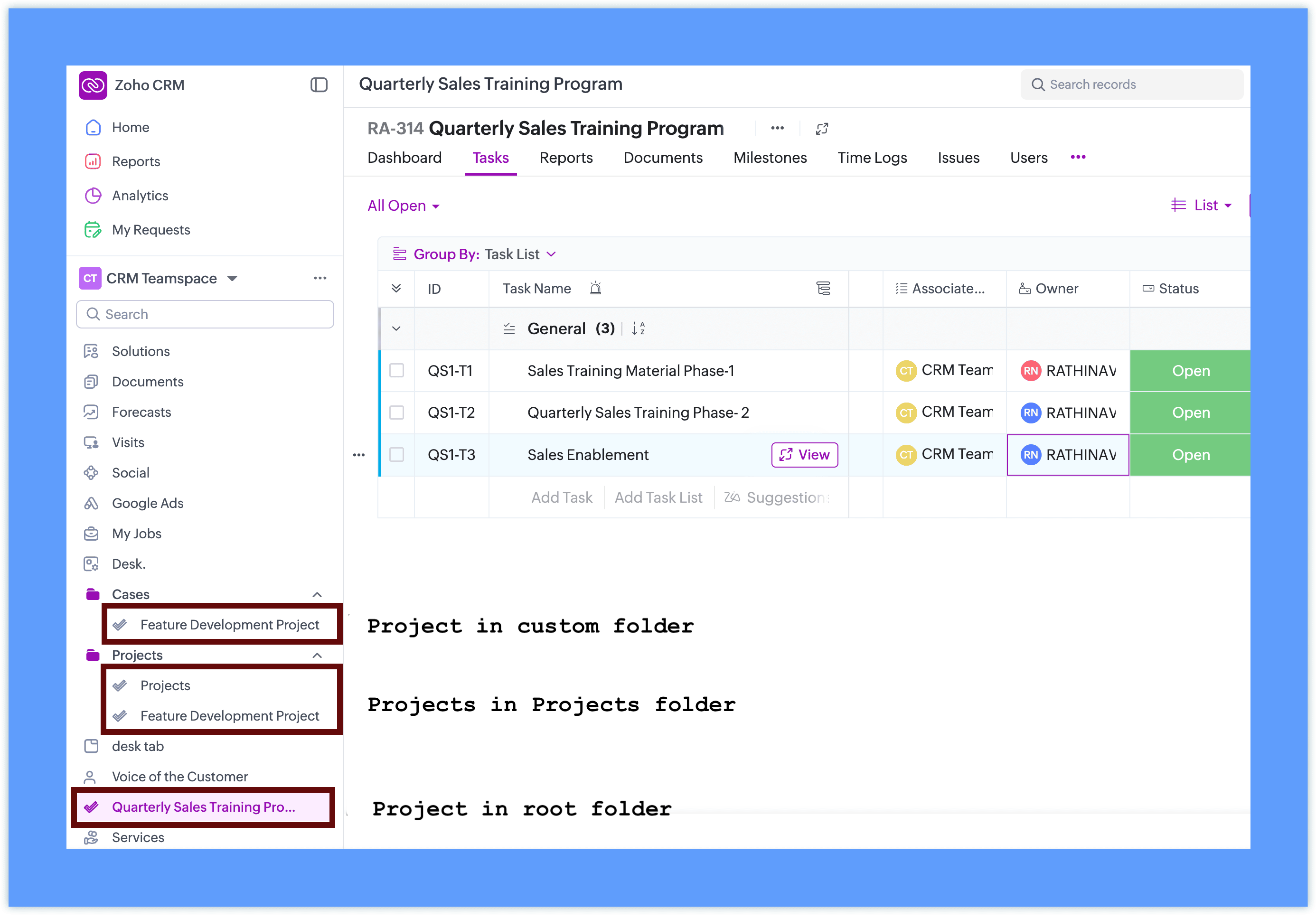
When creating a new Project or editing an existing one, the project interface is displayed within the Teamspace using the Zoho Projects view
This allows teams to work with familiar project capabilities while accessing them directly from their workspace inside CRM.
Project behavior inside CRM
Projects added to Teamspaces continue to follow the existing Zoho Projects behavior.
- Projects remain managed through Zoho Projects
- CRM displays the project interface inside the Teamspace
- Client projects retain their association with CRM records
- Internal projects can be created without selecting a client
Access and collaboration
To add projects to a Teamspace, integration with Zoho Projects is required. If it is not already configured, you can set it up directly from the Teamspace in a single step.
For detailed instructions on the complete setup and how Zoho Projects works, refer to the Zoho Projects integration help documentation. If Zoho Projects is available for the CRM account:
- Users can create or associate projects within the Teamspace.
- Project visibility follows Zoho Projects user access permissions.
- Team members can collaborate on tasks and monitor project progress directly from the Teamspace.
Additional Notes:
- User Access: Project user access depends on the number of available user licenses in Zoho Projects. If the license limit has been reached, Teamspace users will be added as inactive users in Zoho Projects. These users can be activated later once additional licenses are available through subscription.
- Updated Project UI: The Create Project and Associate Project interfaces accessed from the Accounts or Contacts related list have also been updated to align with the new Teamspace project UI. This ensures a consistent project creation and association experience across CRM.
Availability:
This feature is available across all paid editions of Zoho CRM and will be rolled out to customer accounts in all DCs in a phased manner.
Please don't hesitate to reach out if you have any questions, by submitting an email to your Enterprise Support Email address, and we'll be happy to help address any questions or issues that you are experiencing.