Enhancing Data Accuracy: Bot Filtering & Apple Mail Privacy Protection Compliance

Enhancing Data Accuracy: Bot Filtering & Apple Mail Privacy Protection Compliance

Dear Marketers,


The wait is over! We’re thrilled to share that the enhanced bot filtering feature is now live in Zoho Marketing Automation. Thank you for your patience as we refined this tool to deliver deeper insights into your campaign performance.


Here's a quick overview of what bot filtering means:


What are bot opens/clicks? 

Bot opens/clicks are actions performed by automated software, not humans. These programs often scan emails for security threats like viruses or malicious links. As a result, they can inflate your engagement metrics by showing multiple opens/clicks from a single contact, even if no one actually interacted with the email.


Why bot filtering matters 

Bot-generated activity can distort your campaign performance metrics. Our bot filtering feature helps you eliminate this noise, providing a more accurate picture of your audience's engagement.


Key features of bot filtering

Based on your feedback and our technical improvements, here’s how the feature has evolved:

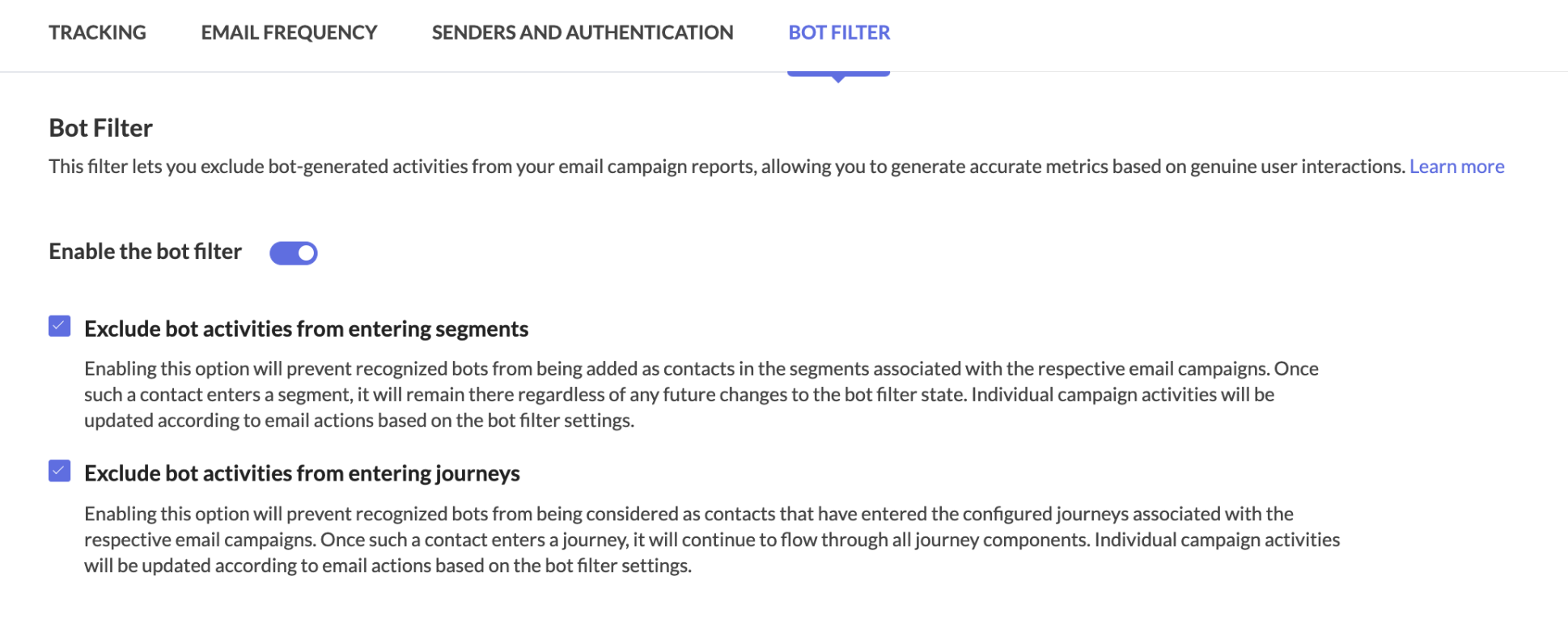
  • Easy toggle: Enable or disable bot filtering with a simple switch in Settings > Marketing Channels> Email. Bot filtering will be enabled by default to ensure your reports prioritize reliable, human-generated engagement from the start.

  • Transparency: A visual indicator in your reports shows whether bot filtering is active, ensuring full transparency in your data analysis.

  • Reporting: Whether you enable or disable the filter, your dashboard will display two distinct metrics:

    • Reliable opens/clicks (verified engagement by individuals)

    • Bot opens/clicks (automated activity)
      This dual view offers a clearer picture of your campaign’s true performance and highlights potential discrepancies.

    • Apple MPP tracking: We’ve added visibility into Apple Mail Privacy Protection (MPP) activity. Reports now include a dedicated metric for Apple MPP opens, allowing you to analyze how privacy-focused auto-opens impact your data.


Apple Mail Privacy Protection (MPP)

Apple Mail offers users the option to enable Mail Privacy Protection (MPP), a feature designed to enhance privacy by preventing email senders from accurately tracking email opens. This feature is not enabled by default, but once activated, Apple Mail pre-loads tracking pixels—regardless of whether the recipient actually opens the email.

As a result, all emails received in Apple Mail appear as opened, leading to inflated and unreliable open rates. Since tracking pixels are triggered automatically, distinguishing between genuine user engagement and automated activity becomes challenging.

How Does Zoho Marketing Automation Address This?  

To counteract the impact of MPP, Zoho Marketing Automation provides dedicated metrics (MPP Opens) to show open rate. Using intelligent data modeling, our system delivers reliable engagement metrics, helping you assess the effectiveness of your campaigns despite Apple’s privacy changes.

Here's how to enable the bot filtering option in Zoho Marketing Automation.

Step 1: Bot filtering option
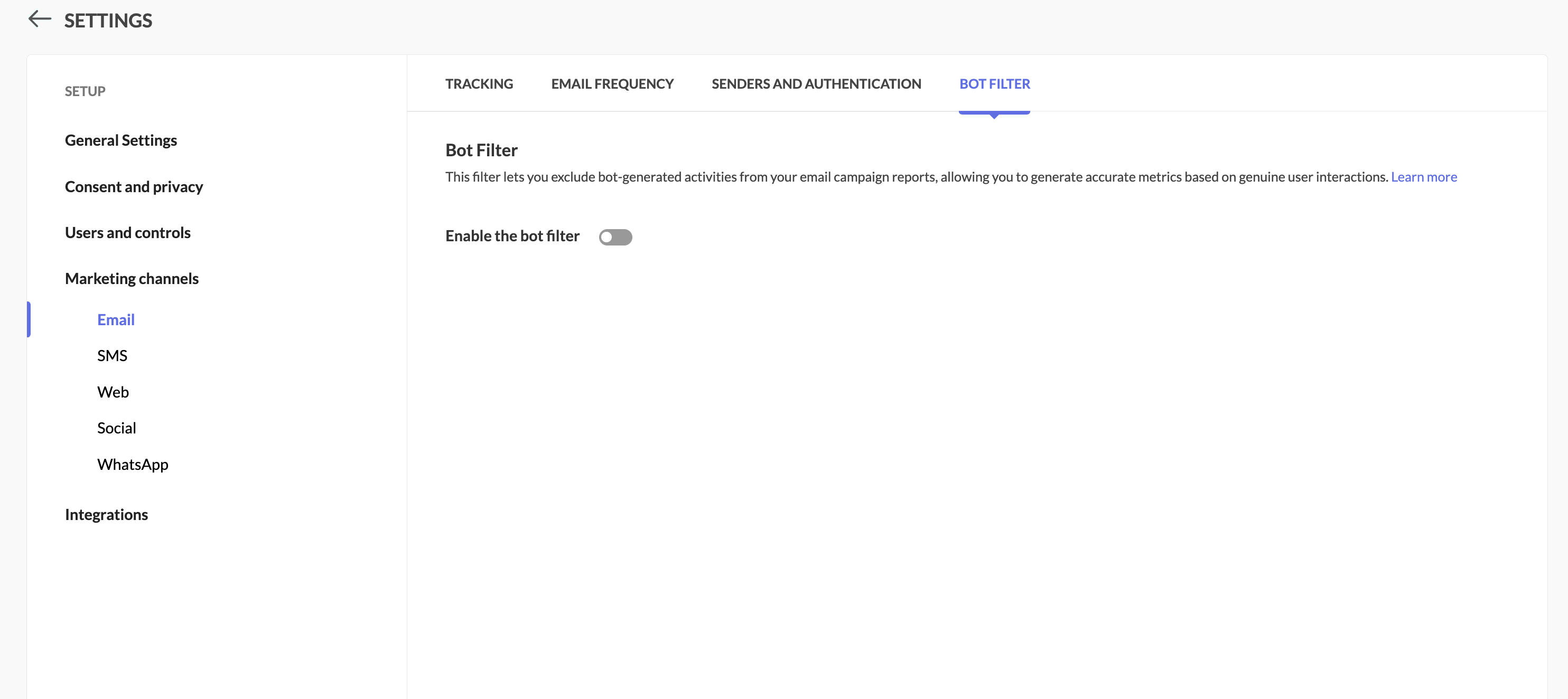
Locate the Bot Filter link under Settings > Marketing Channels.


Step 2: Toggle the bot filtering option

In the Bot Filter setting, you can see that bot filtering capability has been enabled for you by default.
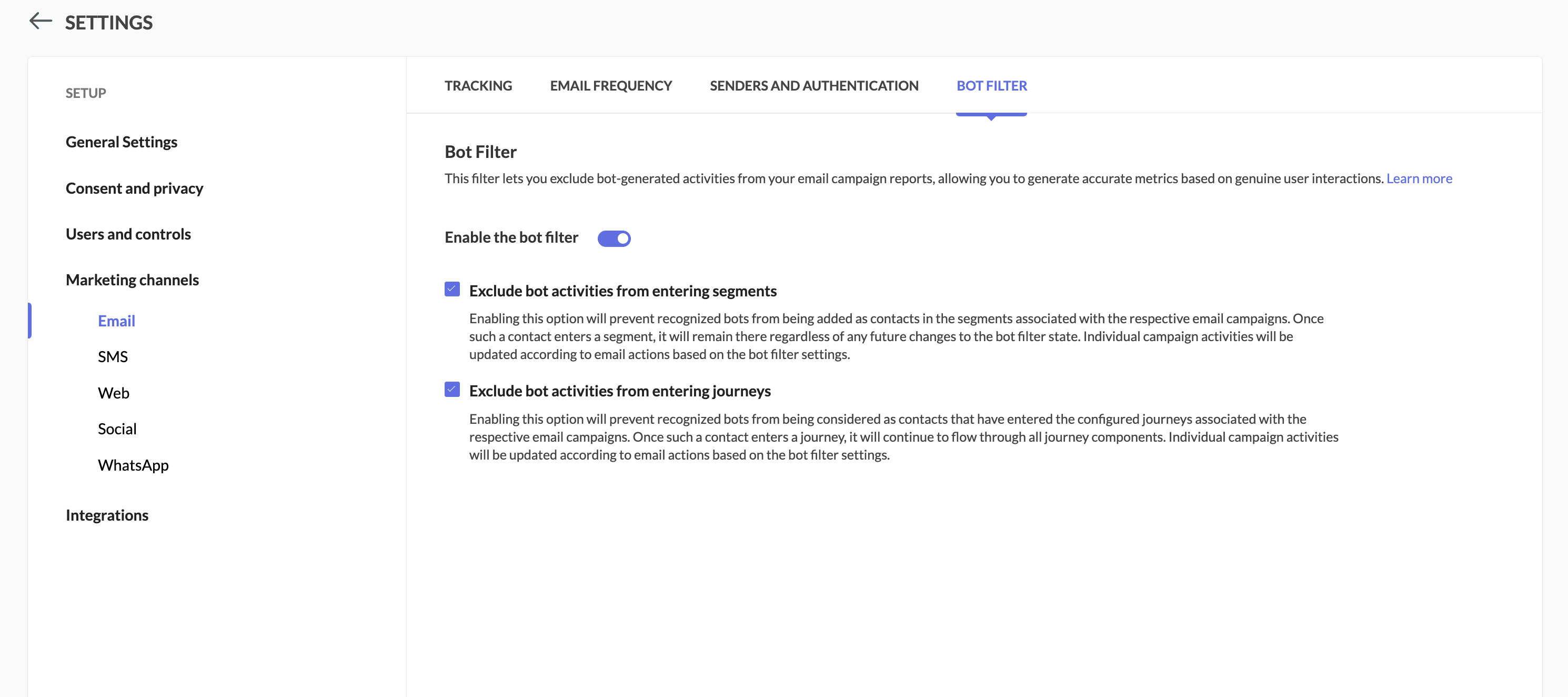


Step 3: Enable/disable the option

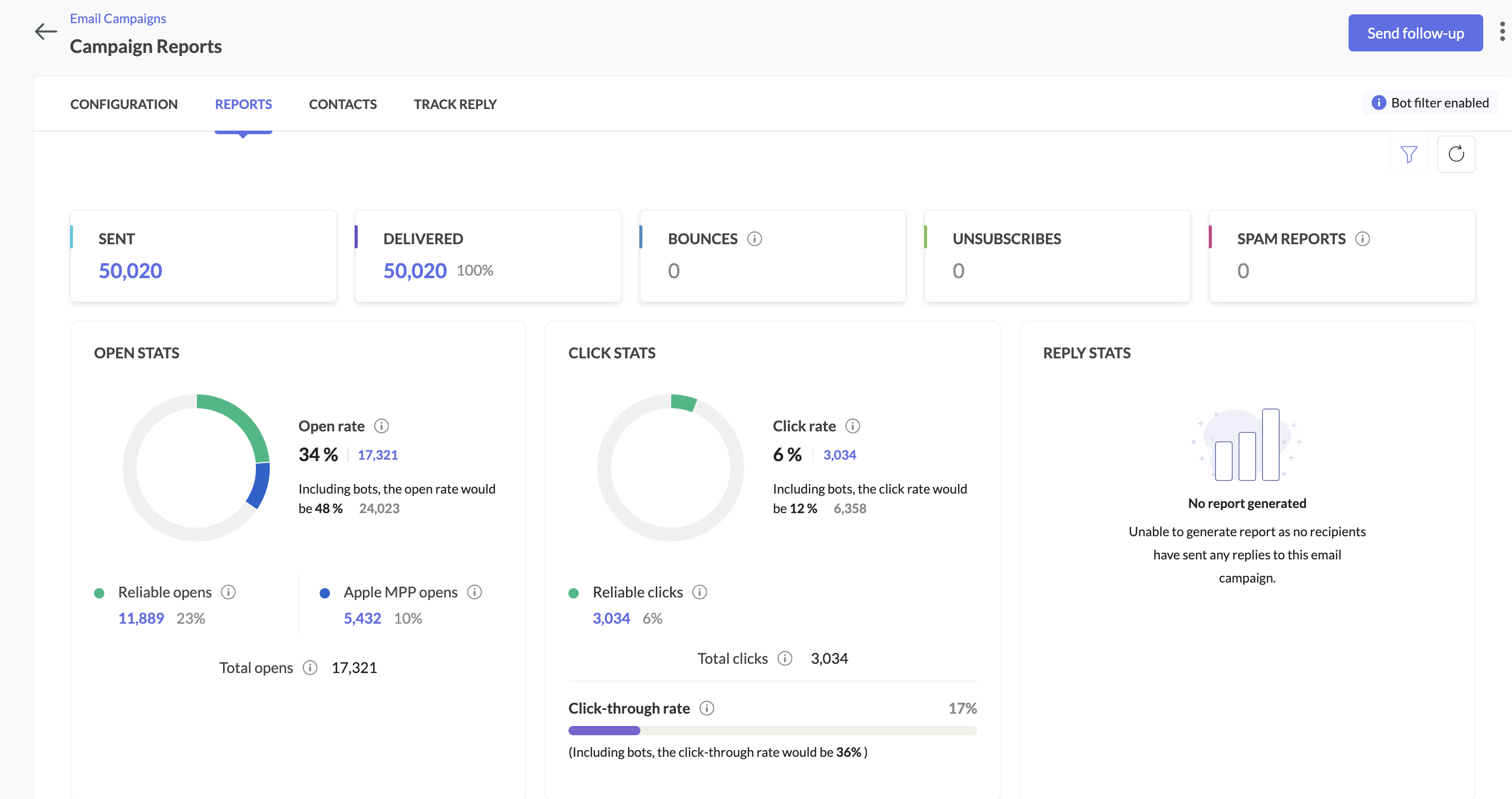
  • Filter enabled: Your primary reports will focus on human engagement, while bot activity is shown separately along with primary reports.

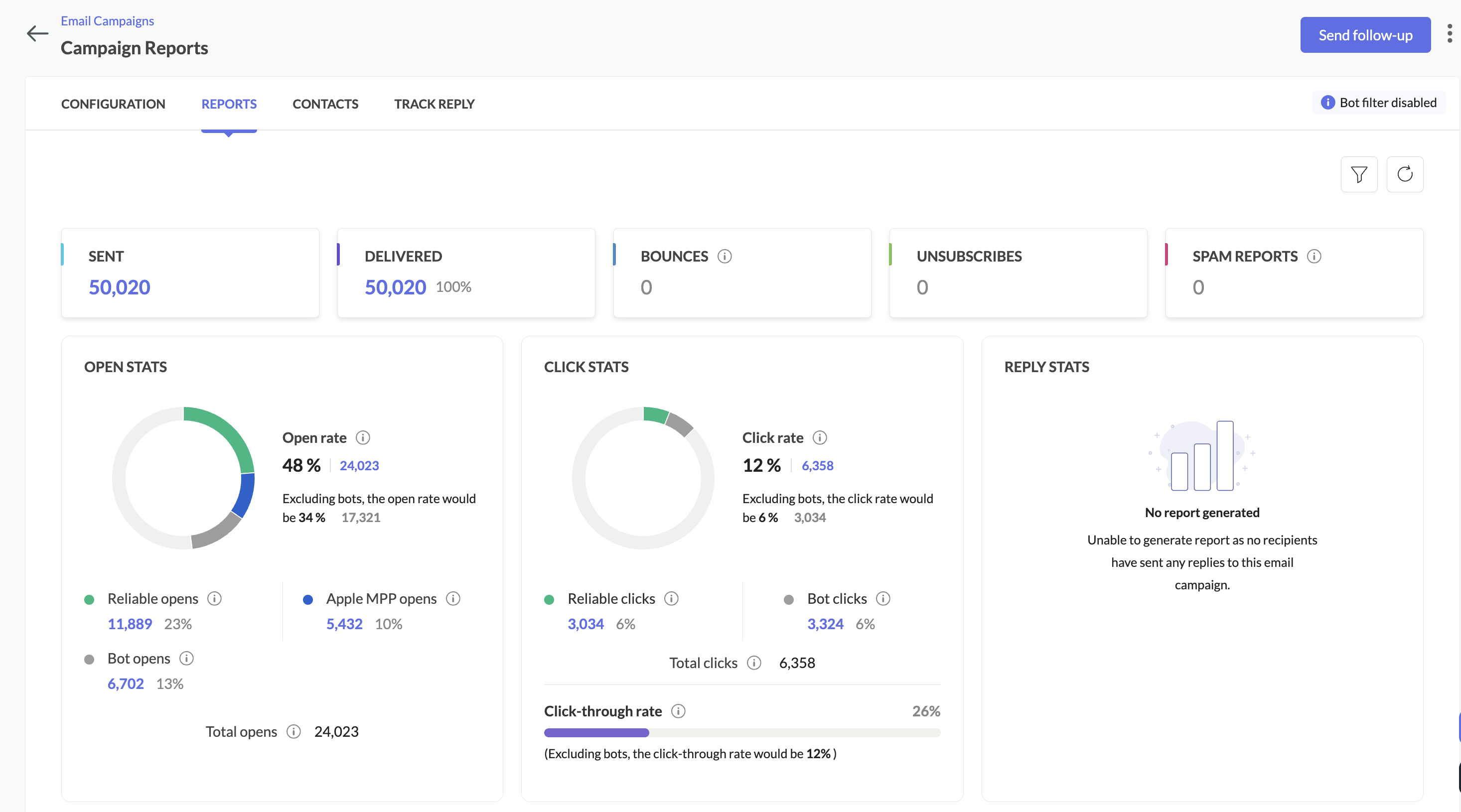
  • Filter disabled: Similar to the option above, all opens/clicks (human + bot) will be shown in main reports, with bot metrics still visible for comparison.

Here's how you can see it in the campaign reports:
When the bot filter setting is disabled


When the bot filter setting is enabled


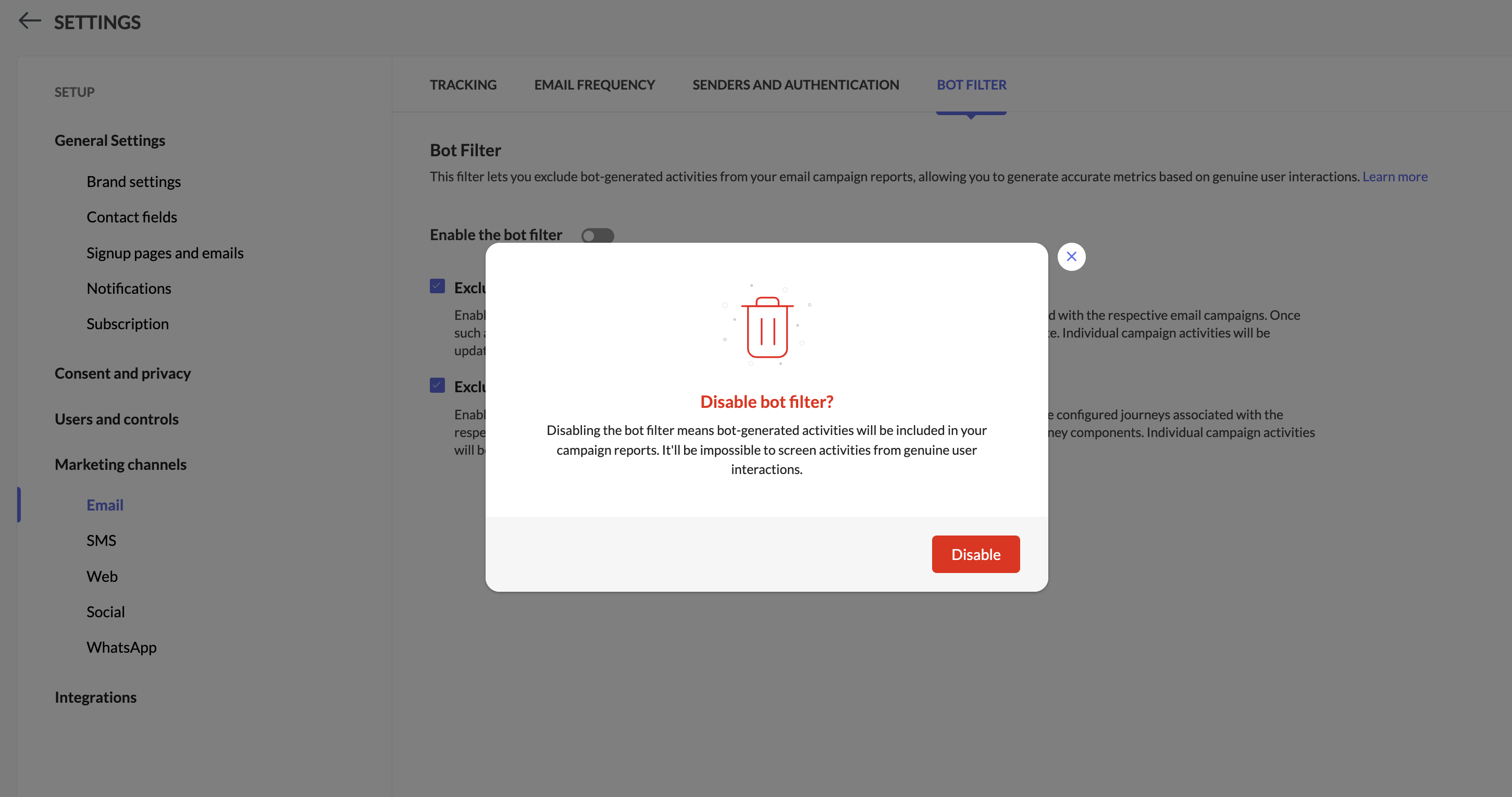
Step 4: Pop-up confirmation to disable bot filtering

You'll see a pop-up while disabling bot filtering.


Info
Notes:

  • While disabling bot filter, users will be prompted whether to allow bots to enter segments or workflows based on which follow-up actions will be triggered.
 

  1. The Apple MPP opens will be part of segments and workflows by default.

  2. Campaigns executed from 6th Feb 2025 will be shown the new reports along with reliable opens, Unreliable opens, and bot opens. Existing campaign reports won't be impacted by this change.

  3. We have introduced new filters within the contacts section in the campaigns report to analyze both reliable opens and bot opens.

  4. Bot engagement metrics will be available now while exporting campaign reports.

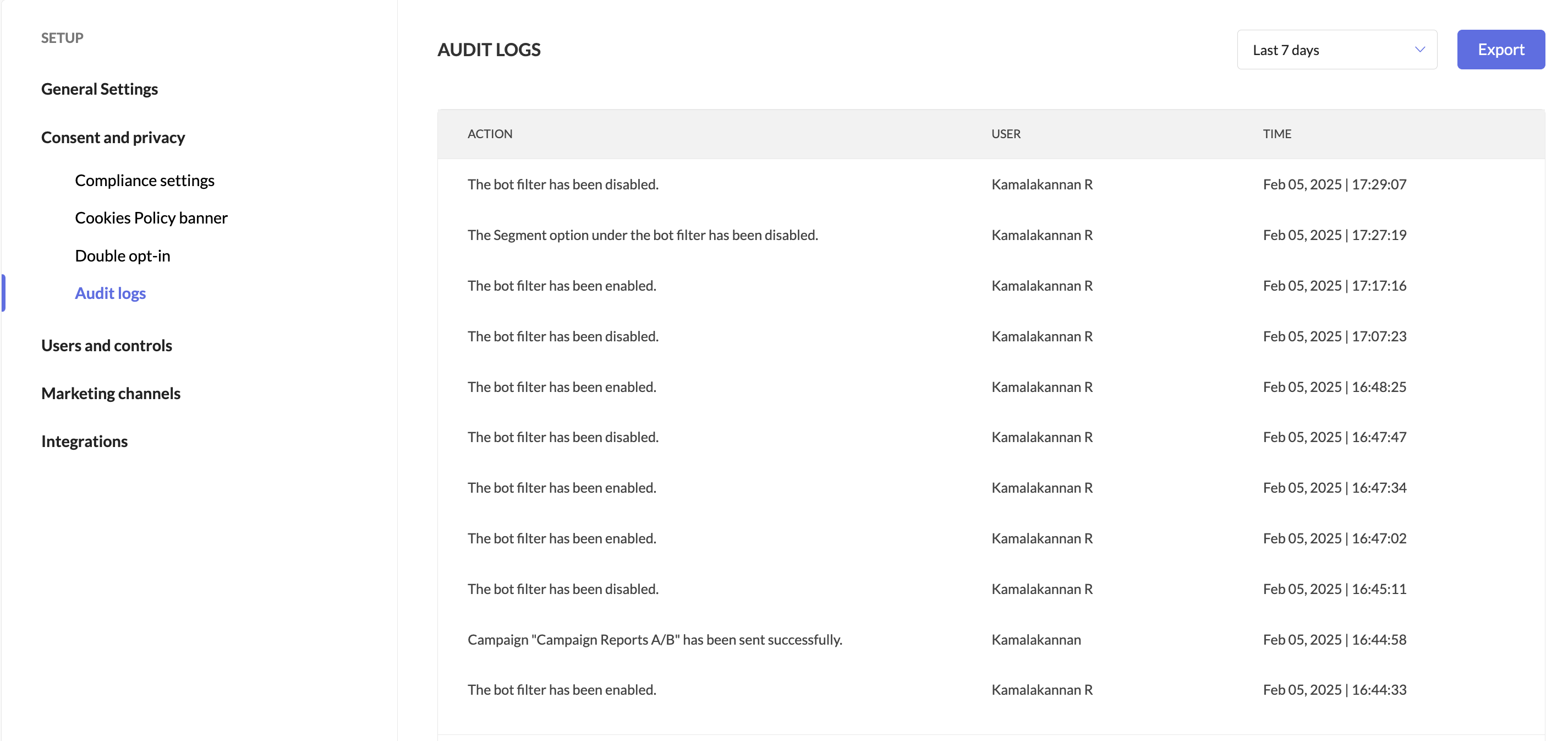
  5. Users can track when the bot filter was enabled or disabled by accessing Audit Logs.


We're here to help

We’re confident this balanced approach will help you optimize campaigns with greater precision. Give it a try, and let us know how it works for you!


Happy marketing!

Best regards,
Zoho Marketing Automation

      • Sticky Posts

      • Marketer’s Space - Automating CRM Actions with Journeys – Part 2

        Hello marketers! Welcome back to another post in Marketer’s Space. In our previous post, we explored how CRM actions in Journeys help marketing and sales teams work together by nurturing CRM leads and pushing only engaged prospects back to sales. If you
      • Introducing automation and utility conversations in WhatsApp marketing

        We’re excited to announce the addition of two new features to our WhatsApp integration: Automation and Utility conversations. These enhancements will allow you to streamline your marketing efforts and engage with your customers more effectively by automating
      • Tip of the week 02 - The art of 'seeing' your leads

        What's the last page that your lead visited before signing up for your brand? What was the page that first convinced your lead to explore more about you? Where are your leads coming in from? Well, these are some perennial questions today's marketers live upon. And, knowing the answers to these questions is crucial, considering the vitality of leads in every business. In the journey of finding lead opportunities, it's important to understand that every detail about a lead is useful. While the channels
      • Zoho Marketing Automation Update: Topics, Contacts, and List Management

        At Zoho Marketing Automation, our highest priority is making it easier for you to use our product to accomplish your business goals. With that in mind, we are updating three of our pivotal features: Topic, Contacts, and List Management.   These existing
      • Important: Zoho MarketingHub is now Zoho Marketing Automation

        Hello Everyone,   We hope you all are doing well. We'd like to notify you that we have rebranded Zoho MarketingHub to Zoho Marketing Automation. We'll discontinue using the term "MarketingHub" from May 26, 2021. However, there will be no changes in the

        • Recent Topics

        • What is Workqueue and how to hide it?

          Hi, My CRM suddenly have this "Workqueue", may I ask how to set the permission of this tab?
        • Customer/Vendor Number In Display Name & Case Sensitivity

          Hello, amongst the 60 + million people in the country, occasionally we end of up with 2 different customers with the same name. This results in staff entering a sale on the wrong customers name because the system will pick up 2 names, if the name is searched,
        • Introducing Notebook Pro Plus: The Best of Notebook Pro and Notebook AI

          Great news, everyone! We’re excited to introduce Notebook Pro Plus, our newest subscription plan that brings together the complete Notebook Pro experience and the power of Notebook AI under one subscription. If you’ve been looking for a plan that offers
        • Calendar Attachments in iOS Mail App

          It appears that viewing or accessing attachments to a calendar event is not possible in the iOS mail app. Is this correct? The ability to view calendar attachments in the mobile app is vital for me. Is this just a setting I'm missing somewhere?
        • What's New in Zoho Analytics - July 2026

          Hello Users, Q3 begins with exciting enhancements in Zoho Analytics, introducing new capabilities across analytics, integrations, and developer tools. Every release is designed to empower you to do more with your data. Explore the latest updates, including
        • Introducing reply template and review automation in Zoho Apptics

          App reviews are public. Every unanswered one-star review, every delayed response, every inconsistent reply is visible to users actively evaluating your product. Most teams already know this, yet review management still happens manually. The same responses
        • Sales orders with back ordered PO

          Hmmmmmm !!!! OK - please tell me how to overcome this ..... Sales order | create back order PO ... Sales order is auto marked "On hold" ... Try edit sales order to change shipping date... Almost there, but... Sales orders that have been shipped or on hold cannot be updated.So is NOT shipped ... back ordered PO Received... Try edit sales order to change shipping date... Almost there, but... Sales orders that have been shipped or on hold cannot be updated.SO is NOT shipped ... PO is received ... Enter
        • Zoho Desk Community Module Reporting

          I can't seem to find any reporting for the community module in Zoho Desk. Am I missing something or are there just no reports available?
        • Zoho HTML editor is removing MSO (Outlook) specific code.

          The ability to add in custom HTML is great. We are using MJML to generate our wonderfully cross platform and responsive email code that works on Act-On, Salesforce, Hubspot, Active Campaign, and lead liaison. The way it supports MSO (Outlook) is it included
        • Any ZOHO builds for the Promotional Product space? Specifically PromoStandards, ESP integrations?

          I know a few companies in the Promotoianl product space using Zoho CRM only.  Is there anyone on here who has experience in this type of unique build dealing with PromoStandards and or ESP APIs. 
        • Building a per-contact activity timeline (form submissions, account rollups, emails/proposals) — best approach?

          Hello, We're a B2B market research/consulting firm that recently migrated our CRM/forms/marketing stack from HubSpot to Zoho One (CRM + Forms + Campaigns + SalesIQ). Current setup: - Zoho Forms integrated with CRM: contact-style forms create Leads. -
        • BCC Drop Box Centralisation

          Hi Team, For the last few years, I have had a question related to the Zoho CRM BCC Dropbox feature. Although BCC Dropbox is very useful for tracking customer email communication, I have always wondered why its configuration is managed at the individual
        • 【受付開始】Zoholics Japan 2026 開催のご案内

          Zoho が年に一度開催するユーザー向けイベント「Zoholics」。 今年は 「AI-Powered DX with Zoho」 をテーマに、2026年9月25日(金)に 東京駅直結の会場とオンラインのハイブリッド形式で開催します。 今すぐ申し込む AIの活用が加速する今、業務効率化やDX推進に取り組む企業にとって、 「どのようにAIを業務へ取り入れ、成果につなげるか」が重要なテーマとなっています。 Zoholicsでは、Zohoの最新AI機能や製品アップデートに加え、実際の活用事例や業務改善のヒントをご紹介します。
        • Fix Spellcheck please!

          Right now, spell check in Notebook is worse than useless. The problem is that it doesn't do spell check only, it also flags what it considers poor grammar and, most idiotically, EVERY SINGLE contraction! This is obviously ridiculous and means that 90%
        • You do not have sufficient permissions to perform this operation. Contact your administrator.

          When I attempt to log a call I initiate the +New Call and Start Calling and I click Answered Call in the popup dialog box that follows. Any attempt to save or close this dialog box results in "You do not have sufficient permissions to perform this operation. Contact your administrator." The only way I can get the popup to disappear is to refresh the page and it will go away. I have found others reporting this issue when they attempt to run reports.  Any suggestions? Thank you in advance for taking
        • #24 Your Early Warning System for Late Payment

          In the last post, we found out who owes you money. This one adds the single most important detail that changes everything: for how long. Because an unpaid invoice isn't a fixed thing sitting quietly in a drawer. It ages, and as it ages, it changes character.
        • Transform your line of items into line items: ICR can now record your table values as subform values

          Enhancement in Zoho CRM Dear Customers, We hope you're well! Zia Vision’s ICR capability can now recognize, extract, and store tabulated values in your subforms. An ideal example is a university application form. It has printed fields and handwritten
        • Zoho CRM Layout Rules: Nine New Actions, Profile-Based Execution, and Interactive Preview

          Hello everyone, Availability: This feature is now available for customers in the JP and SA DCs. It is planned to be released for other customers in soon. We’re excited to announce powerful new enhancements to Layout Rules in Zoho CRM - a feature built
        • CRM's import feature has been revamped

          Hello folks, We've refreshed the import feature. You can now manage large, complex imports, particularly those with related data, more easily, with fewer steps and fewer errors. This has been released for all users in all DCs. Here are the details: We've
        • Zoho Inventory - Backorder Report

          I am requesting a backorder report in Zoho Inventory to show all backorders by Sales Order and/or Customer, including the quantity of each line item ordered and quantity fulfilled. This is important for businesses who operate a lean business model and
        • The Urgent Need for Native Brazilian Payment Integrations: PIX and Direct Bank Connections

          Hello Zoho Team, I am writing to emphasize a critical functionality gap for Zoho Books in the Brazilian market: the lack of modern, native payment gateway integrations. The current options are insufficient. The Mercado Pago integration, for instance,
        • Groups and Moderation

          Hi, I have set up a Group in my organisation but am having trouble with moderation. The members are a mix of addresses within the organisation and external emails addresses. The issue is how to set moderation to be off whenever any of the members sends
        • [Webinar] Conversational AI: The new paradigm for agentic analytics

          From hard coding to powerful agents, data and analytics is undergoing a tectonic shift, and conversational agents are at the forefront of this transformation. This goes beyond democratizing business intelligence; it's about accelerating the path from
        • Action Required: Allowlist New IP Ranges for the EU Data Center

          Update: The deadline to allowlist the new IP ranges has been extended from July 24, 2026 to August 8, 2026. All dates in this post have been revised accordingly. Dear Users, We are adding new IP ranges for the Zoho Analytics EU data center (https://analytics.zoho.eu)
        • Caso de Éxito: Cómo Tea Projects agilizó los procesos de auditoría con Zoho Creator

          "Zoho Creator nos ha ayudado a tomar decisiones en tiempo real porque nos permite ver el estado de las producciones mientras se están ejecutando." Miguel Herráez, Gerente en Tea Projects Sobre Tea Projects Tea Projects es una empresa especializada en
        • Is it possible to @mention personal LinkedIn profiles?

          So far, it seems that I can only mention companies and organisations. Am I doing it wrong or is this currently impossible?
        • Tagging on Zoho Social

          Looks like I'm beating a dead horse as I searched the thread and saw multiple requests for this over the last couple of years, but never saw that it had come to be... Can we (or can we not) tag people, pages, businesses, etc across ALL the social media
        • Host meetings with Zoho Sprints

          Meetings are essential for any project management companies. Agile project management meetings are mostly conducted for sprint planning, daily stand-up, sprint review, sprint retrospective and general meetings that include ad-hoc discussions, backlog
        • How to update task start date when project start date changes?

          Hi there, When the start date of a project changes, it's important to update the start dates of the tasks associated with that project to reflect the new timeline. Is there a way to shift the start date of all project tasks when the start date of a project
        • How do i split a shipping cost across multiple items from different vendors?

          Just started using zoho. Any1 knows? Thx
        • Business Day Logic Update: More Accurate Scheduling for Your Workflows

          Hello everyone, We’re improving how business-day calculations work in workflows, especially when triggers happen on weekends. This update ensures that offsets like +0, +1, and +2 business days behave exactly as intended, giving you clearer and more predictable
        • Zoho Booking Workspace Language Problem

          I have facing an issue regarding Zoho Booking workspace , I am trying to change the language of the workspace but I didn't find any clue how to update/change the language . Can anyone have any solution for this .
        • Pricelists

          So we have them in books but I cannot find them in commerce?
        • Zoho Workshops in Frankfurt a.M. | 07. & 08. Oktober 2026

          Liebe deutschsprachige Zoho Community! Die Zoho Workshops kehren diesen Oktober zurück nach Deutschland Wenn Sie das gesamte Potenzial des Zoho-Ökosystems voll ausschöpfen und aus erster Hand die neuesten Entwicklungen im Bereich der agentenbasierten
        • Introducing multiple hiring pipelines in Zoho Recruit

          Every organization hires differently. A software engineering role may require multiple technical interviews, a sales role might focus on practical assessments, while a healthcare position could involve license verification and compliance checks. Yet until
        • Announcing new features in Trident for Windows (v.1.43.5.0)

          Hello Community! This release includes a collection of enhancements and feature updates aimed at making your email and collaboration experience smoother. Let’s dive into what’s new! Zoho Desk email notifications as Smart Mail. Zoho Desk Smart Mail is
        • 'Pinned' notes feature of a pipeline record

          Hi team, Could you please implement a feature which will allow users to pin different notes so that they will appear at the very top of the notes tab in a pipeline record. Sometimes we have a wide range of notes on a record which means more important
        • How to migrate shared mailbox from O365

          Hi, i am planning a migration from Microsoft Online. Unfortunately I did not find any options in the inbuild migration tool to have a shared mailbox as migration target. How can I migrate shared mailaboxes (including calendars) to Zoho Mail? regards
        • Manage booking pages from your Android phone

          Hello everyone! We are happy to announce that users can now add and manage booking pages from their Bigin Android app. It is a multi-step form that users can create for purposes like booking appointments, scheduling calls or meetings, conducting webinars,
        • Latest update in Zoho Webinar | On-demand webinars

          Hello everyone,We’re excited to introduce our new on-demand webinar feature, you can now provide pre-recorded sessions that your audience can access immediately, no need to wait for scheduled sessions. Benefits of On-demand webinars : Scheduling flexibility
        • Next Page