Expanding sales, marketing, and support capabilities in Zoho CRM Plus 3.0
Hey everyone,
It's been more than 10 years since we launched Zoho CRM Plus back in 2014. This is quite a milestone, and we've come a long way in empowering you with everything you need to offer an exceptional customer experience.
On that note, we expanded our platform's marketing capabilities even further by offering early access to various marketing apps such as, Marketing Automation, Webinars, PageSense, and Backstage. You also have Cliq to collaborate effectively with your team, and brand assets to manage your marketing resources as a part of Zoho CRM Plus 3.0.
Zoho CRM Plus includes the following:

Let's explore what's new with this update in detail.
Manage all marketing activities with a centralized Brand Studio
With the inclusion of Brand Studio in Zoho CRM Plus, managing all marketing projects and their associated activities is simplified. You can create and plan all your marketing activities, such as email campaigns, social media posts, events, SMS and WhatsApp campaigns, and so on, in one central place.
You can get a complete timeline of all the activities planned based on the launch date; manage to-do lists, resources, budgets, and expenses; initiate discussions; and view all important metrics all within Brand Studio.
Before launching any marketing activity, it's important for marketers to have a solid plan and goal in place. To facilitate that, Zoho CRM Plus lets you start planning your marketing activities and save them as drafts in Brand Studio. This helps you plan and visualize your marketing calendar and manage your resources by allocating the right set of tasks to your team. Once everything is set, you can mark your project as ready, making it easy for everyone on your team to manage their activities effectively.

Leverage the power of AI when creating Marketing Projects
Zia integrates with OpenAI to help create Marketing Projects by suggesting campaign activities based on your objective, duration, the types of marketing channels, and the target audience.
You can also add detailed descriptions regarding your goal, which helps Zia come up with suggestions more suited to your business process. You also have the option to edit the suggestions or regenerate them until you are satisfied.

Visualize your marketing campaign schedule with a unified marketing calendar
Brand Studio in Zoho CRM Plus lets you manage various marketing projects and the associated marketing activities in a single place. So, how do you track the activities that you have planned for a month?
That's where the unified marketing calendar comes into play. It offers a centralized calendar view of all your marketing activities categorized by quarter, week, and month. Marketing projects and activities are displayed using color codes specific to each project.
For each marketing activity, you can view its type, owner, and status at a glance. You can also drill down and view a specific type of activity, for example, social media posts scheduled in January 2025.
Furthermore, the unified marketing calendar lets you customize a calendar view based on your requirements and share it with your team to help everyone stay on the same page.

Collaborate with your teams via Cliq
For any marketer, it's pretty rare to spend a day without attending a meeting or a call to collaborate with stakeholders. To foster effective collaboration with your team, Zoho CRM Plus enables you to communicate via chat or calls through Zoho Cliq.
Send direct messages, create groups and channels, and initiate or schedule meetings. You can also invite stakeholders who aren't part of your Zoho CRM Plus account, which makes it easier to keep clients updated and ensure all departments in your business are on the same page.
More than 1,000 extensions are also available, which means you can integrate Cliq with various Zoho and third-party applications to personalize the experience based on your business requirements.

Empower your marketing campaigns with landing pages
Your brand's marketing campaigns have the capacity to cause a spike in interest and attract the right audience. But you also need to be able to help the audience take the next step to purchase your product, sign up for a newsletter, or register for a webinar. That's where a landing page becomes a powerful tool.
Zoho CRM Plus comes loaded with capabilities to carry out any marketing campaigns across various channels. With LandingPage now part of Zoho CRM Plus, we're giving you a best-in-class, easy-to-use, drag-and-drop builder that enables you to create engaging landing pages for all your marketing goals. You can also optimize them, personalize them for your audience, and track important metrics to stay on top of their performance.

Craft personalized WhatsApp campaigns
WhatsApp has more than two billion users worldwide, making it one of the most popular messaging apps available. The introduction of WhatsApp for Business paved the way for brands to reach out to prospects and customers and offer a personalized experience. You can include text, images, videos, documents, voice notes, emojis, URLs, and a lot more to engage with your audience.
Marketing Automation in Zoho CRM Plus lets you connect your WhatsApp business account and start sending messages to your contacts. You can start by configuring the recipient and sender information, draft a personalized message template, and send it right away or schedule it for a specific date and time. Various in-depth analytics are also available to help you understand the performance of your campaign. You can also automate various actions that can be carried out with the help of Journeys and personalize the experience further for your audience.

Plan your event and expos from A to Z
Events and expos are one of the best ways for brands to meet and engage with prospects or existing customers face-to-face. There's a lot that goes into setting up an expo: identifying the goal, creating a budget, finding a venue, managing ticket sales, and so on. All these tasks can be overwhelming, and that's why Backstage in Zoho CRM Plus comes with everything you need to manage expos.
Backstage lets you seamlessly manage exhibitor requests; set up floor plans for booths; send automated emails to speakers, sponsors, exhibitors; and a lot more. You also get powerful lead generation tools that let you scan and track the audience at the booth, engage with them, and eventually convert them into customers. Everything you need to manage your events is part of Backstage in Zoho CRM Plus.

Manage important metrics in one place
Zoho CRM Plus has various modules, each consisting of numerous dashboards to help users view important metrics, gather insights, and keep tabs on what's important. With modules such as CRM, Projects, Social, Analytics, and more in CRM Plus, it can be overwhelming to get a complete picture of all of the important metrics at a glance. To simplify this, we've introduced a unified dashboard in CRM Plus—a centralized space where you can create, manage, and view all your critical dashboards in one place. It enables you to access important metrics and data from various modules quickly and to keep everything organized and within easy reach.
Users can add dashboards from CRM, Desk, Social, Analytics, SalesIQ, Projects, and PageSense to the unified dashboard or create one fresh if required.

Decipher insights with Zia (AI assistant)
It's essential to analyze the performance of your brand's marketing activities to get a complete picture of what works and what doesn't. Zoho CRM Plus offers various ways to track the performance of your campaigns, such as monitoring your website activity, social media interactions, and various dashboards from CRM to help track the complete ROI. You can also use Analytics in Zoho CRM Plus to view in-depth reports and dashboards and integrate with various Zoho and third-party applications.
When there are numerous dashboards and reports to sift through and find what you are looking for, it can become quite cumbersome to track, identify, and understand crucial metrics or analyze trends. Zia (AI assistant) can help you understand the data by offering actionable insights.
Zia processes the information at hand—the various reports and dashboards—and generates textual and visual narratives of what the data represents. So, for every report or dashboard, Zia can help explain and visualize the data to help you make informed decisions.
Get a unified view of team performance
User 360 solves the problem of switching between multiple applications and reports to understand how teams are performing. Key work and productivity metrics across sales, service, and marketing such as open or overdue tickets, response time, and so on are brought into a single, unified view within CRM Plus. This gives managers and admins all the data they need to evaluate team performance and make informed decisions without having to manually put bits of information together from various applications.

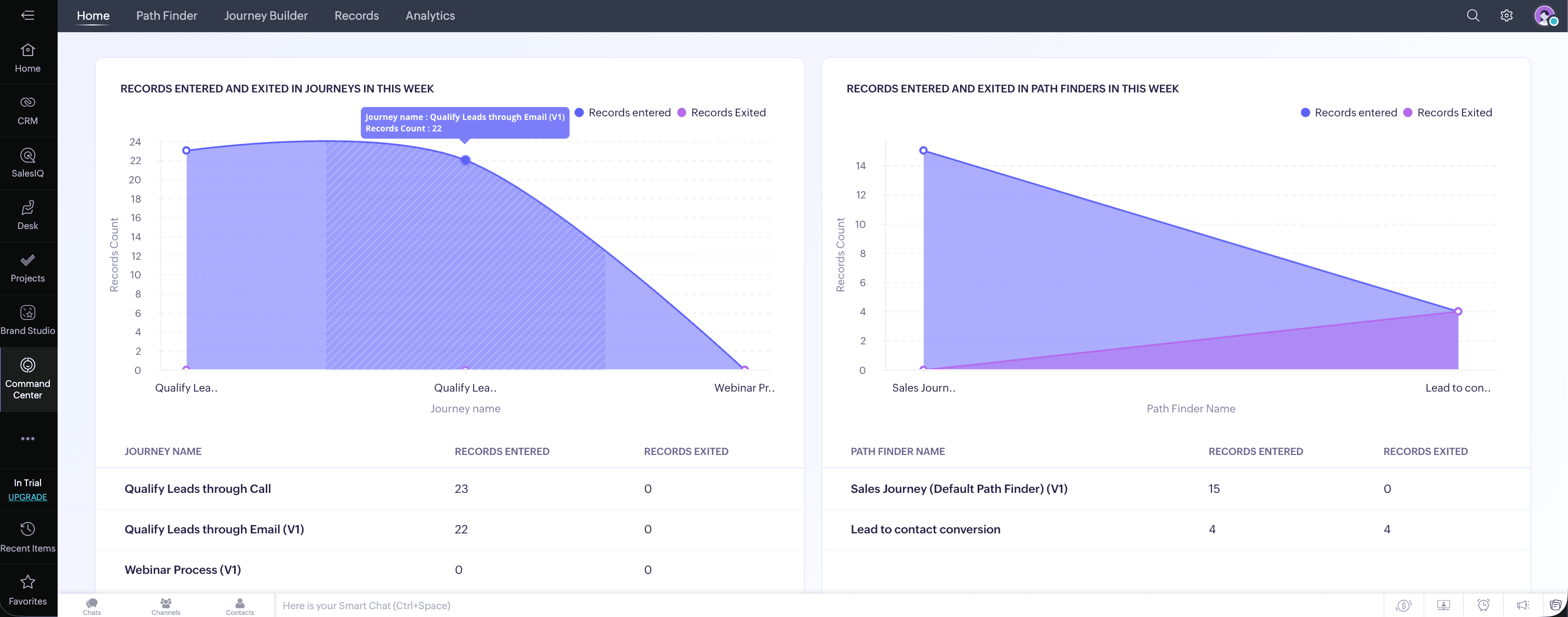
Navigating the Customer journey through Command Center
The prospect-to-customer journey has evolved drastically over the years, from a simple walk into a store to a complex, multi-touchpoint experience spanning social media, websites, demos, webinars, and more. For businesses, tracking how customers progress through these touchpoints and delivering consistent, personalized experiences remains a significant challenge. CommandCenter was built to address this, helping you understand the paths customers naturally take and guiding them forward with timely, relevant engagements at every stage. In Zoho CRM Plus, CommandCenter is now further strengthened with signals from across modules like CRM, Desk, SalesIQ, Backstage, Webinar, and Survey, alongside a revamped UI and the ability to create custom signals from your own or third-party apps.
Transition to CRM Plus 3.0
In order to gain access to the latest features, applications, and enhancements in Zoho CRM Plus 3.0, your existing account will transition in phases. You will receive an email with details on how the upgrade will be carried out for your account.
Once you've upgraded to Zoho CRM Plus 3.0, you will be able to access all the marketing applications within the suite immediately.
We anticipate that you will have an effortless transition. For any questions or assistance, please reach out to our support team at support@zohocrmplus.com.
Please refer to the full features list in the Zoho CRM Plus 3.0 version here.
Regards,
The Zoho CRM Plus Team