Solution of the Week: Financial Reports with Impactful Visuals

Solution of the Week: Financial Reports with Impactful Visuals

Finance reporting is a critical part of understanding an organization’s financial health. With Zoho Analytics, you can easily create dynamic reports such as Balance Sheets, Budget Statements, and Profit and Loss Statements.

Now, with the release of Zoho Analytics 6.0, the platform offers even more advanced tools to optimize the financial report view. While Zoho Analytics has always enabled comprehensive financial reporting (through its integration connectors for Zoho Books, QuickBooks, Xero), the latest version enhances this with powerful visual features like Data Bars, which provide clearer insights into performance trends.

This document outlines how these reports can be generated using simple drag-and-drop functionality and customizable features in Zoho Analytics.

Creating a Balance Sheet Using Finance Data

Generating a Balance Sheet in pivot using Zoho Analytics allows you to visualize your organization’s financial position in a comprehensive and structured way.

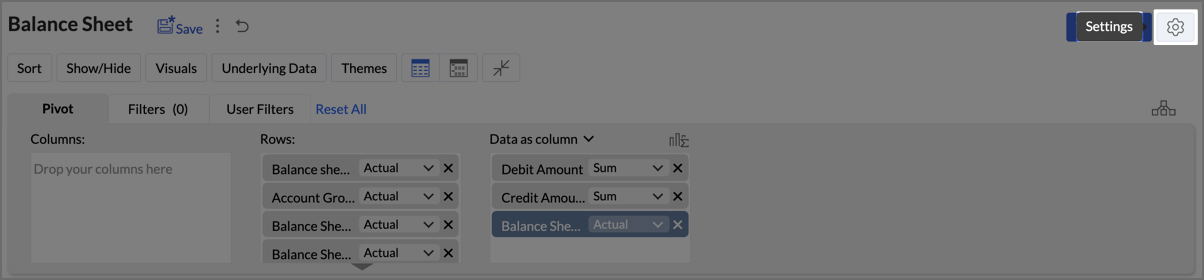
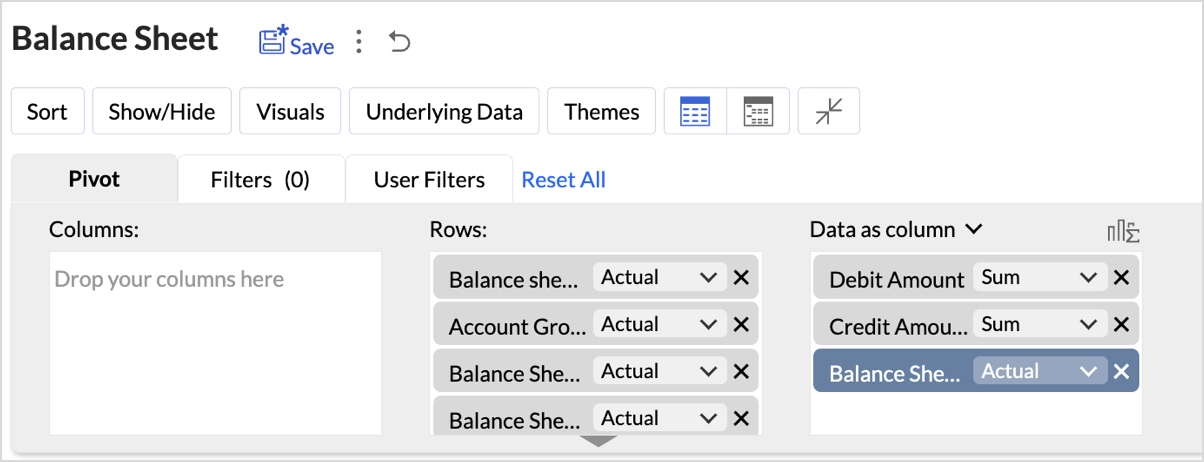
  1. Drag and Drop the Data: Start by selecting the Balance sheet base type, Account group, Balance Sheet Account Type, and Balance Sheet Account Name from the Accounts table and drop them into the Rows shelf. Drag and drop the Credit Amount, Debit Amount, and Balance Sheet Total from the Accrual Transactions table into the Data shelf.


  2. Layout Adjustments:
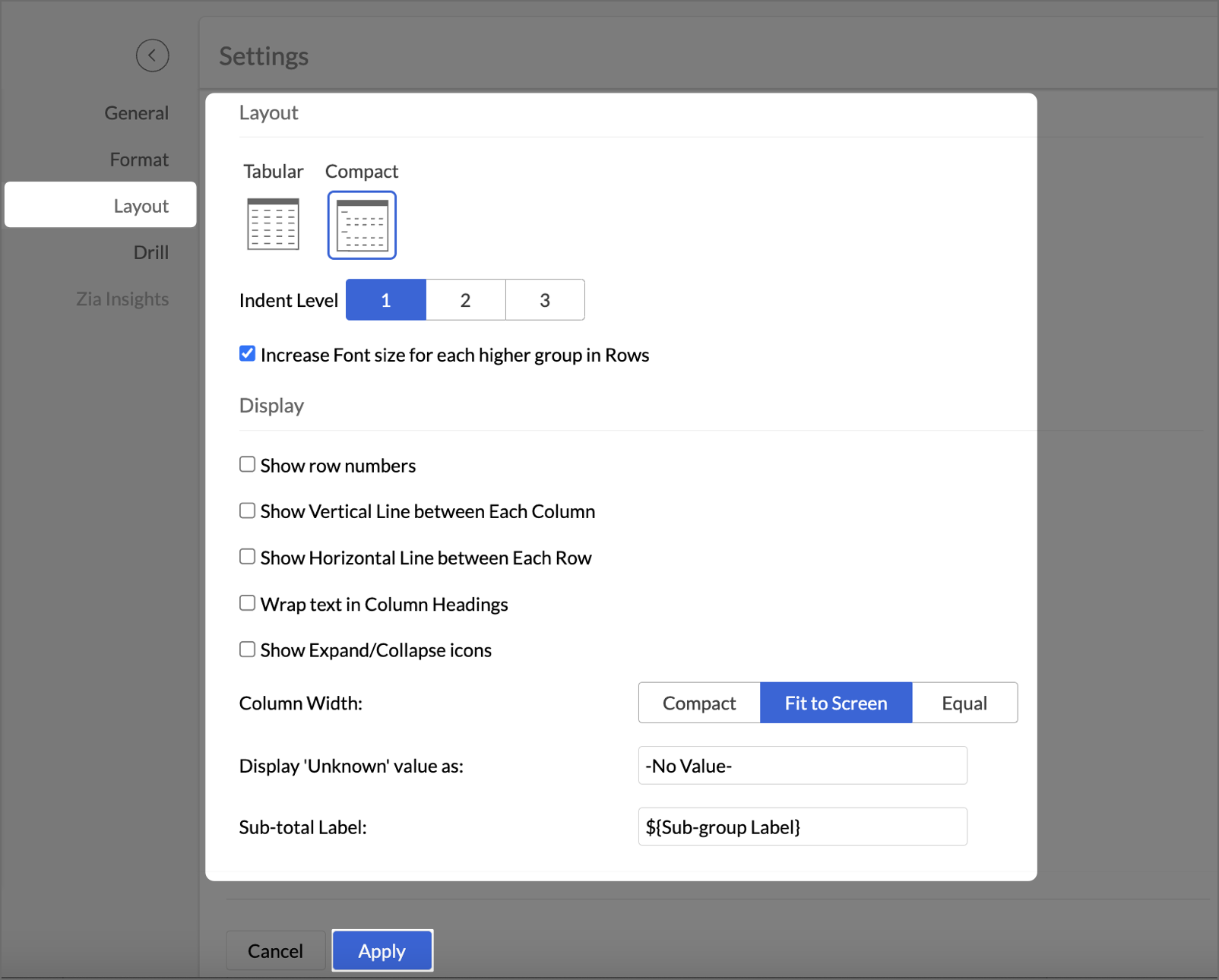
    1. Navigate to Settings > Layout.


    2. Change the Layout to Compact.
    3. Check Increase Font Size for each higher group in Rows.
    4. Uncheck Show row numbers.
    5. Uncheck Show vertical lines between them.
    6. Set Column Width to Fit to Screen.


  3. After making layout adjustments, click Apply to finalize the formatting.
  4. Go to Visuals and select Data Bars With Data to improve the presentation of financial data, making it easier to interpret key insights visually.
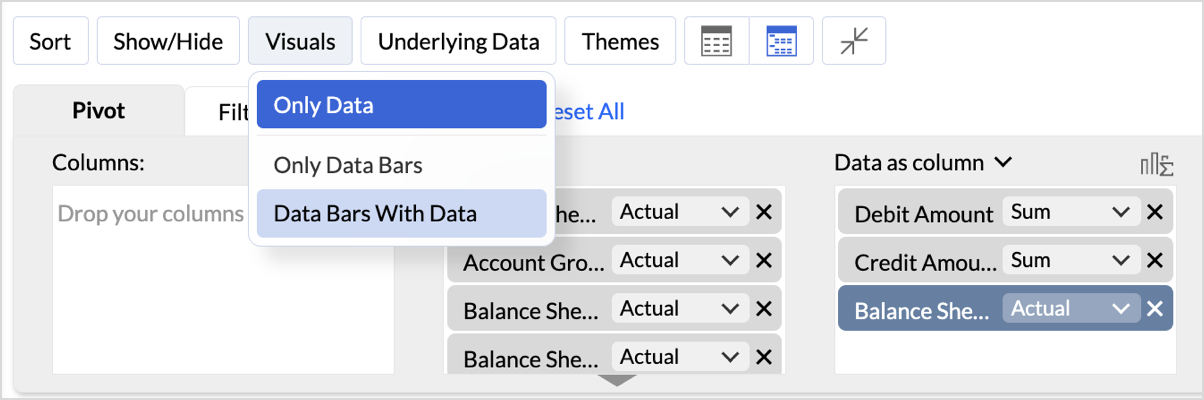

By following these steps, you will generate a clear and structured Balance Sheet that highlights your organization's assets, liabilities, and equity.


Key Features of the Balance Sheet Report

  1. Increased Font Size for Key Categories
    Emphasizes important financial categories like Assets, Equity, and Liabilities, improving readability and focus.
  2. Compact Layout
    Ensures a clear, organized display of financial data, enabling efficient consumption of the report.
  3. Line Removal for Clean Aesthetics
    Removal of vertical and horizontal lines results in a cleaner visual presentation, improving the user experience.
  4. Data Bars for Quick Insights
    Visual data bars provide a quick snapshot of financial status, allowing users to identify key trends at a glance.
  5. Timeline Filter for Flexibility
    Filters allow users to view financial data across different periods, making it easier to analyze financial trends over time.


In Zoho Analytics, utilizing the Timeline Filter allows users to transform static financial data into a time-based, dynamic report. The formulas used in creating this filter enable detailed insights into financial performance over a selected period. Below, we explain the key aggregate formulas and how they enable users to achieve greater flexibility and customization, going beyond the typical app potential.

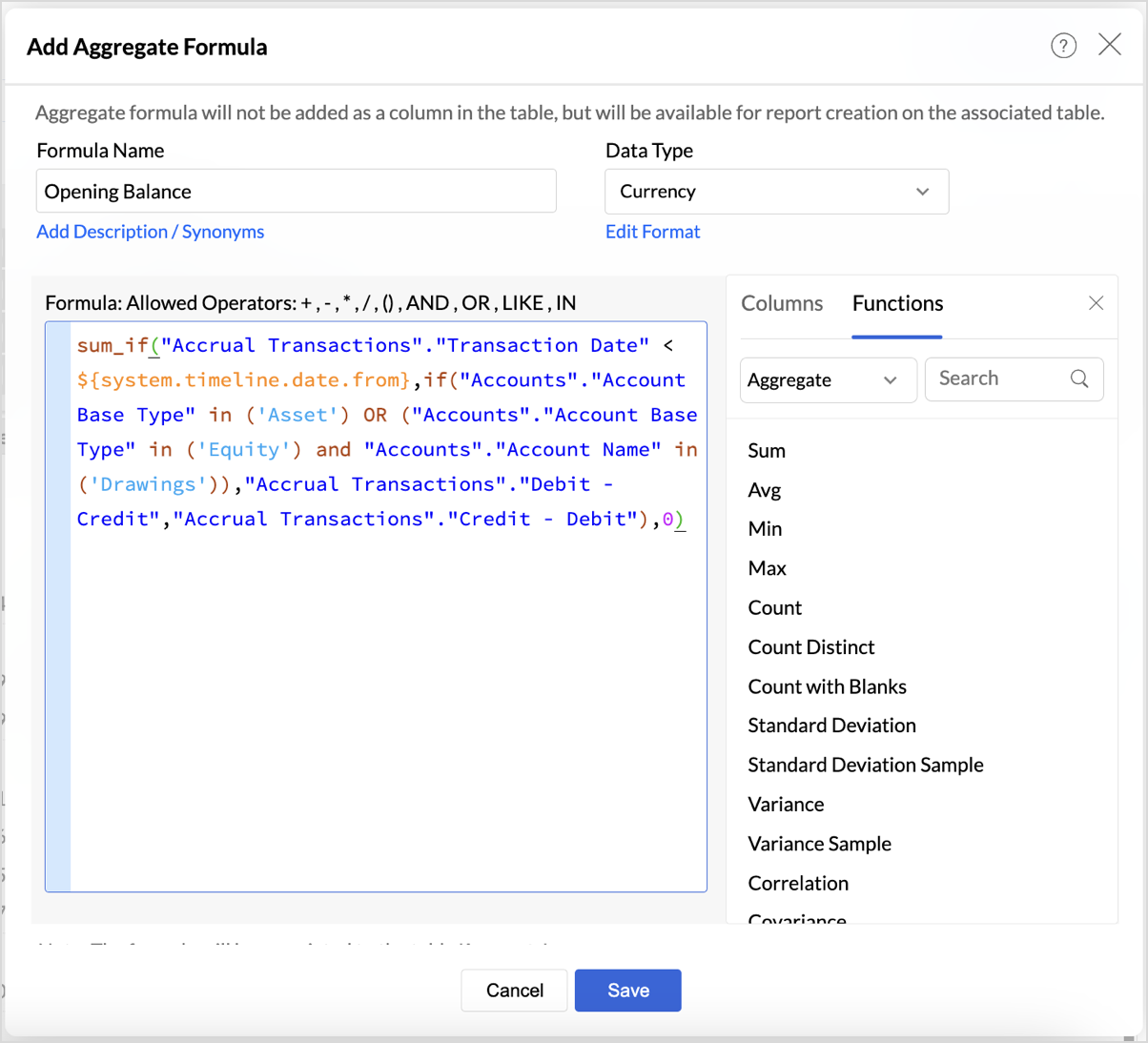
  • Opening Balance Formula
    sum_if("Accrual Transactions"."Transaction Date" < ${system.timeline.date.from},if("Accounts"."Account Base Type" in ('Asset') OR ("Accounts"."Account Base Type" in ('Equity') and "Accounts"."Account Name" in ('Drawings')),"Accrual Transactions"."Debit - Credit","Accrual Transactions"."Credit - Debit"),0)

This formula calculates the Opening Balance for a selected period by summing transactions that occurred before the specified date (timeline.date.from).
This approach allows users to view the Opening Balance as of a given date, making it highly flexible for periods that differ across user's datasets.


if("Accounts"."Account Base Type" in ('Asset') OR ("Accounts"."Account Base Type" in ('Equity') and "Accounts"."Account Name" in ('Drawings')),"Accrual Transactions"."Debit - Credit","Accrual Transactions"."Credit - Debit")

This part of the formula can be customized based on the unique financial structure you follow.

  • Period Balance Formula
    sum_if("Accrual Transactions"."Transaction Date" > ${system.timeline.date.from} and "Accrual Transactions"."Transaction Date" <= ${system.timeline.date.to},if("Accounts"."Account Base Type" in ('Asset') OR ("Accounts"."Account Base Type" in ('Equity') and "Accounts"."Account Name" in ('Drawings')),"Accrual Transactions"."Debit - Credit","Accrual Transactions"."Credit - Debit"),0)
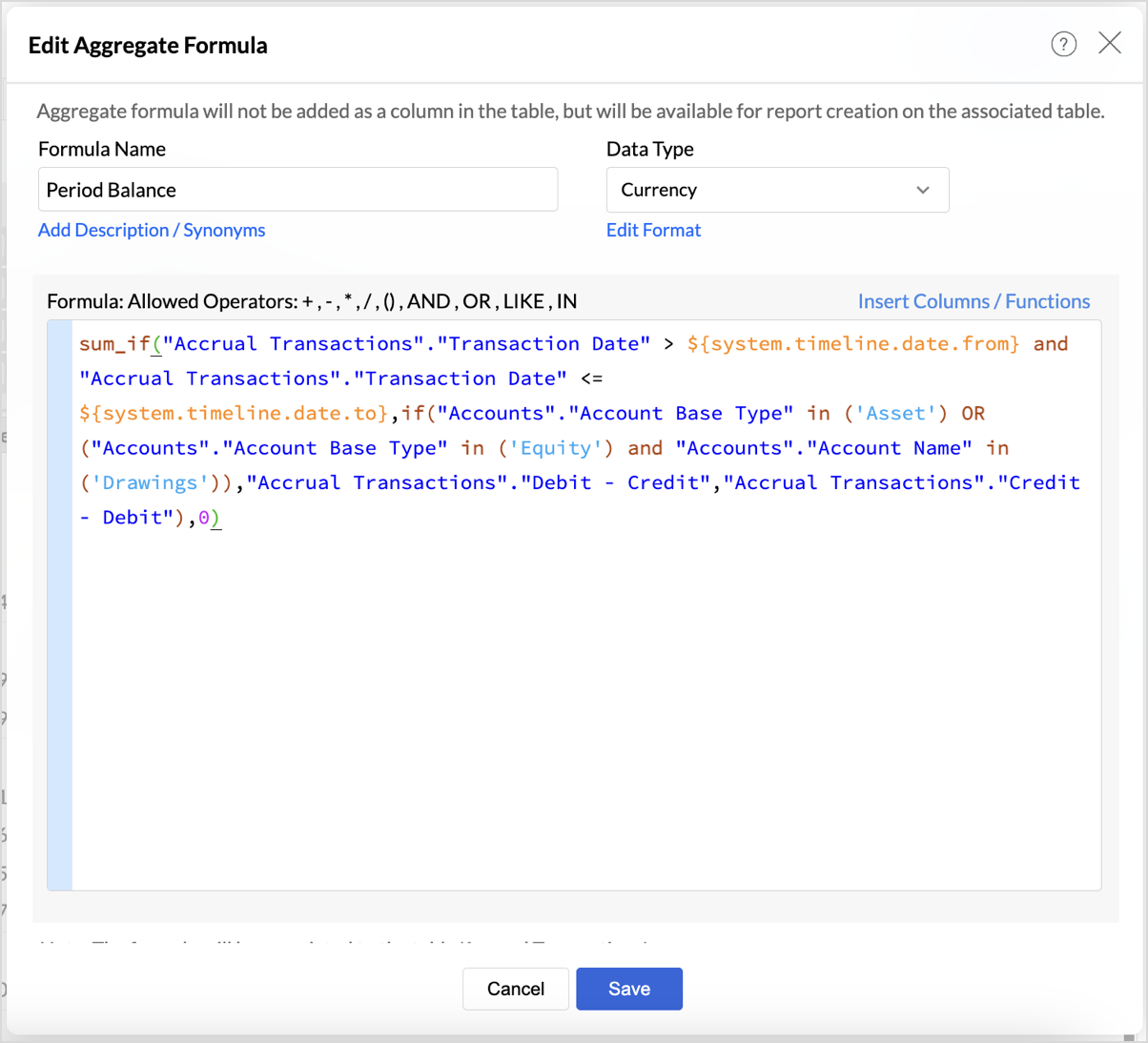
The Period Balance formula calculates the net balance of transactions within a specific time range, defined by the timeline filter. The formula sums transactions between the start date (timeline.date.from) and the end date (timeline.date.to). This provides users with a snapshot of their financial activity for any custom date range they select.


  • Closing Balance
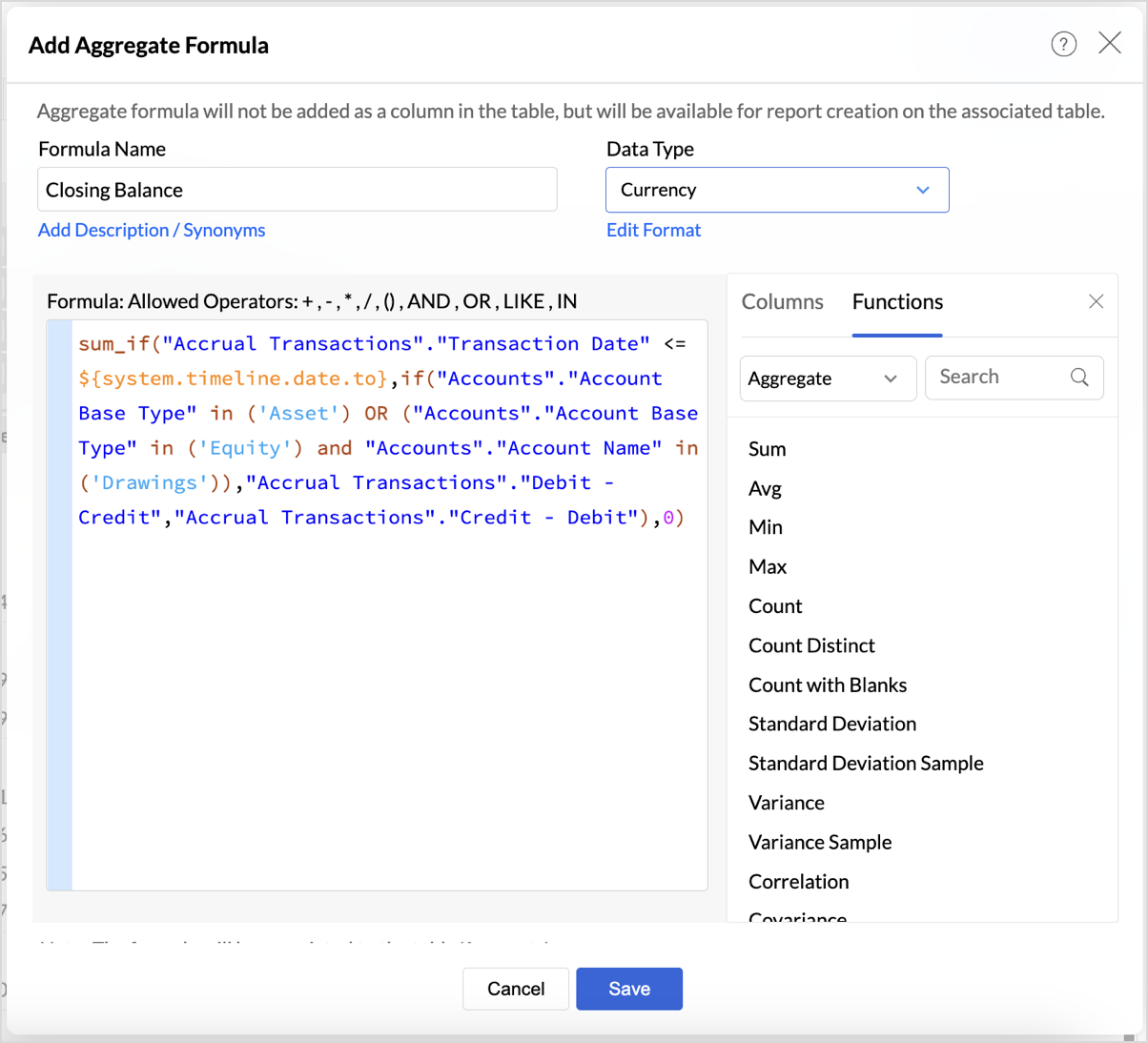
    sum_if("Accrual Transactions"."Transaction Date" <= ${system.timeline.date.to},if("Accounts"."Account Base Type" in ('Asset') OR ("Accounts"."Account Base Type" in ('Equity') and "Accounts"."Account Name" in ('Drawings')),"Accrual Transactions"."Debit - Credit","Accrual Transactions"."Credit - Debit"),0)

The Closing Balance formula calculates the final balance as of a selected date (timeline.date.to). It works by summing all transactions up until the specified date, following the same account type distinctions used in the previous formulas.

This formula is essential for determining the financial standing of an organization at the end of a reporting period, such as the end of a quarter or year.

Follow the below steps to create opening and closing balances with timeline filters:

  1. Drag and drop the created aggregate formulas into the data shelf.
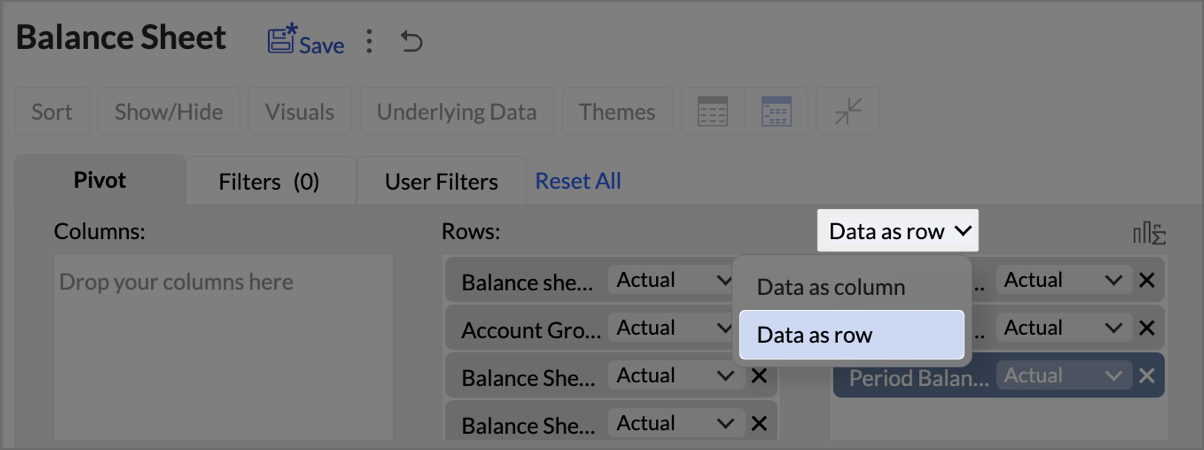
  2. Select Data as row from the drop-down.


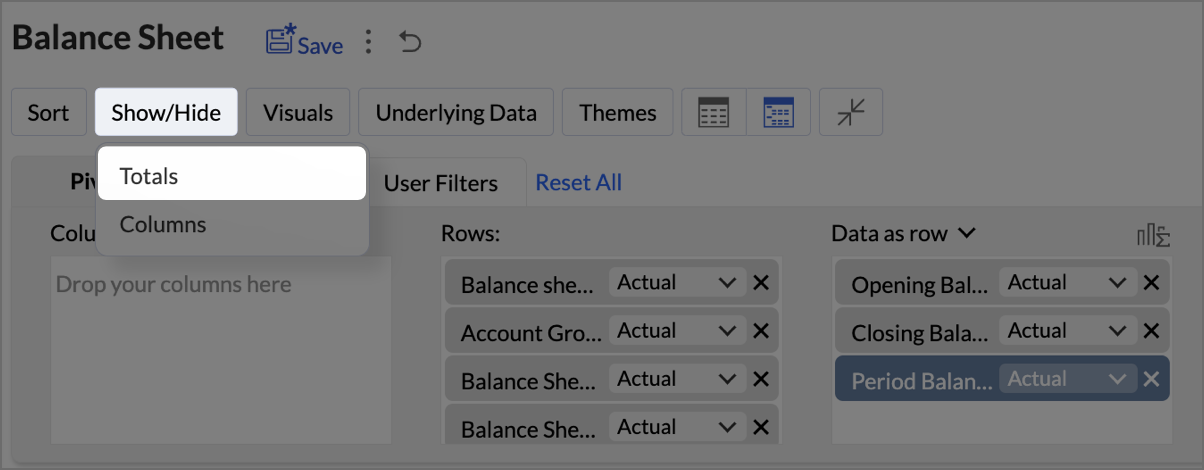
  3. Click on Show/Hide, then select Totals.


  4. Click on Columns drop-down, then set the Opening Balance as Top.
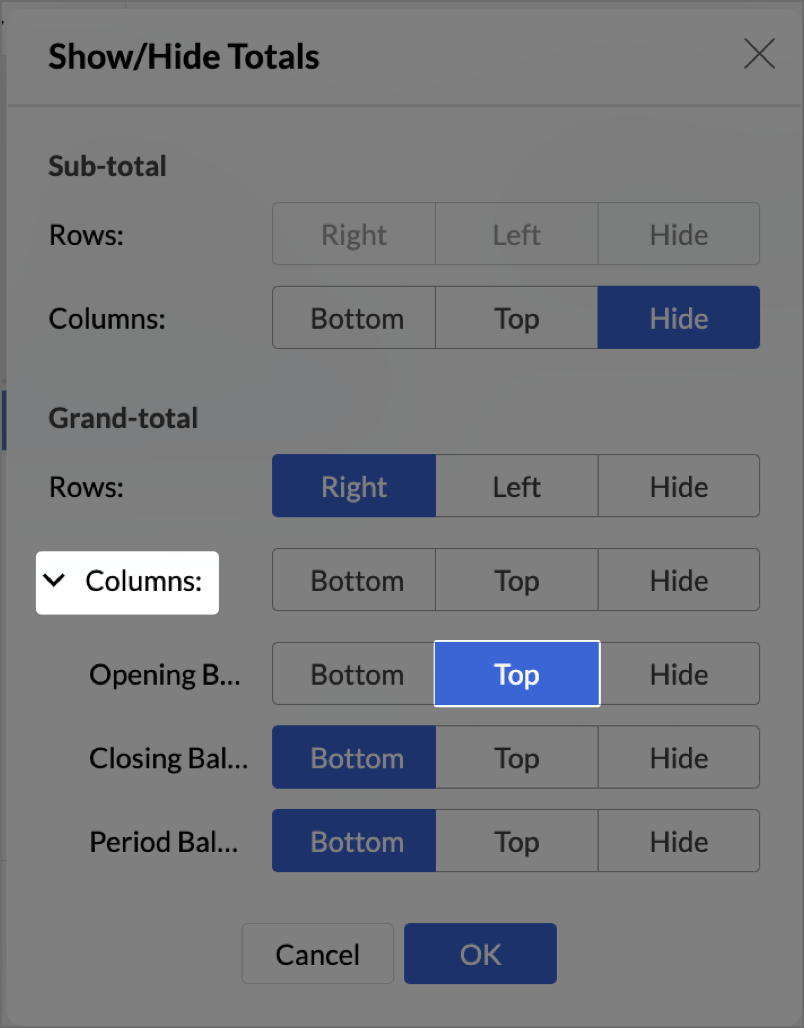


  5. Navigate to Settings > Layout and set Column Width as Equal. Provide Width value as required in px.
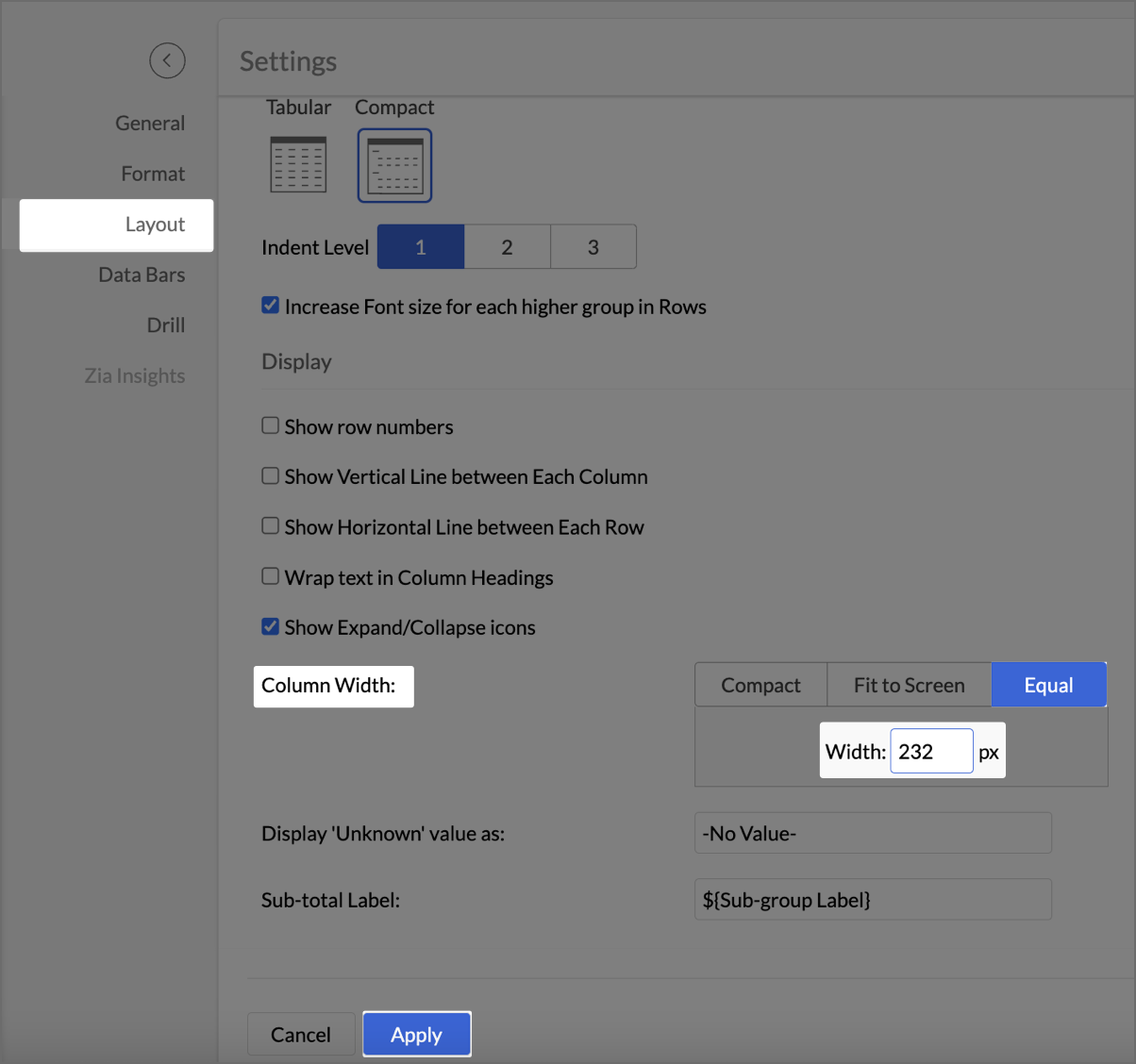


  6. Click Apply.
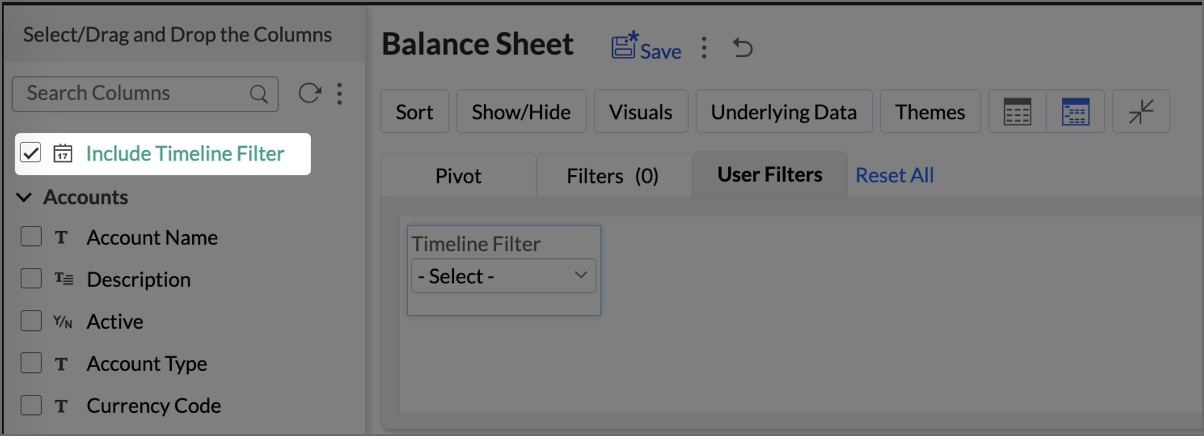
  7. Check Include Timeline Filter.


    The Timeline Filter is now enabled, and users can apply time-based filters to their data.

By utilizing these timeline-based formulas, Zoho Analytics allows users to move beyond static, historical reporting and into dynamic financial analysis. With the Timeline Filter, users can interact with their data in a more flexible way, selecting custom periods to analyze financial trends over time.
Click here to access the sample workspace.

Creating a Budget Statement

A Budget Statement helps compare actual financial performance against projected budgets, identifying variances and areas of concern. This visually enhanced report is designed to help businesses quickly assess deviations between expected and real expenditures, allowing for better budget management and financial decision-making.

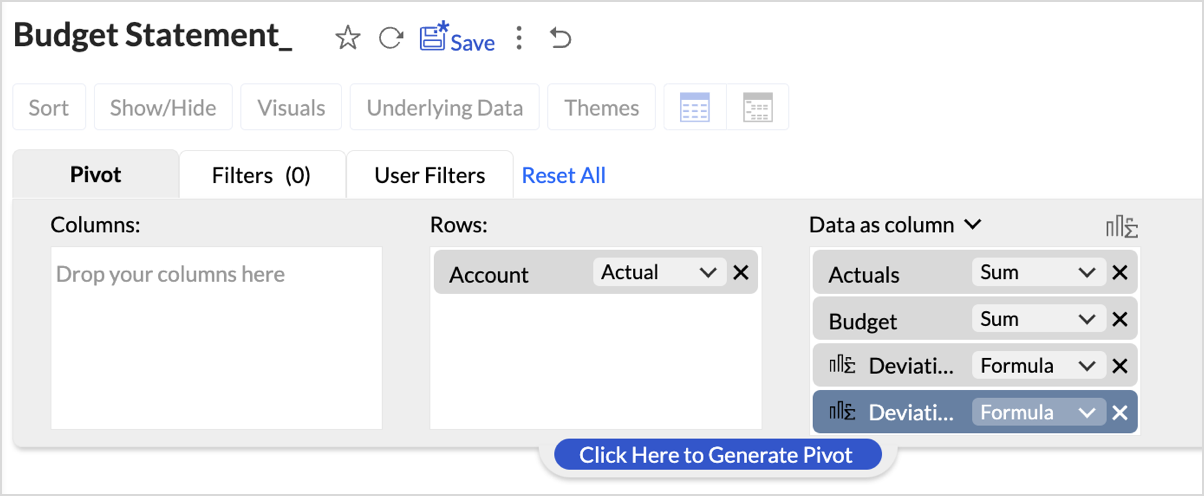
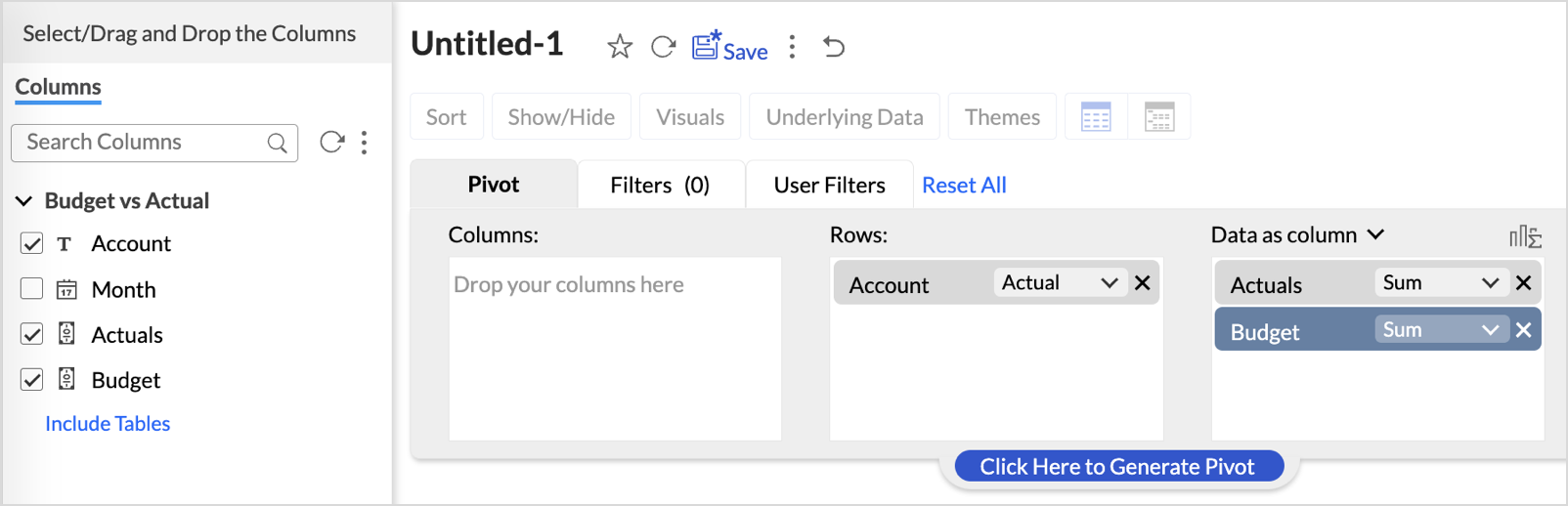
  1. Drag and drop Account into the Row shelf, and Actuals and Budget into the Data shelf from the Budget vs Actual table.


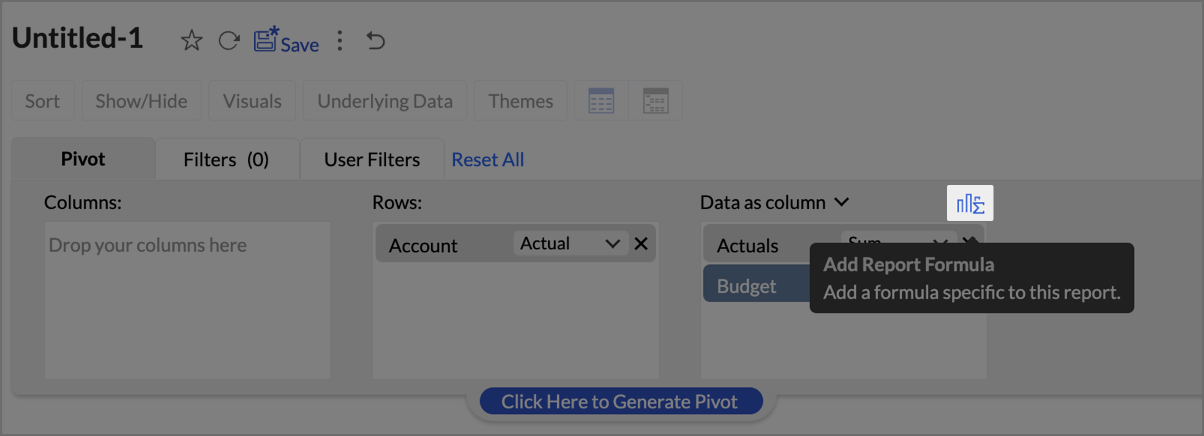
  2. Add Report Formula:
    1. Click Add Report Formula to create custom calculations.


    2. Name the formula column appropriately (e.g., “Deviation”).
    3. Set Data Type as Decimal Number
    4. Create a formula to calculate the difference between actuals and budget as shown in the image.
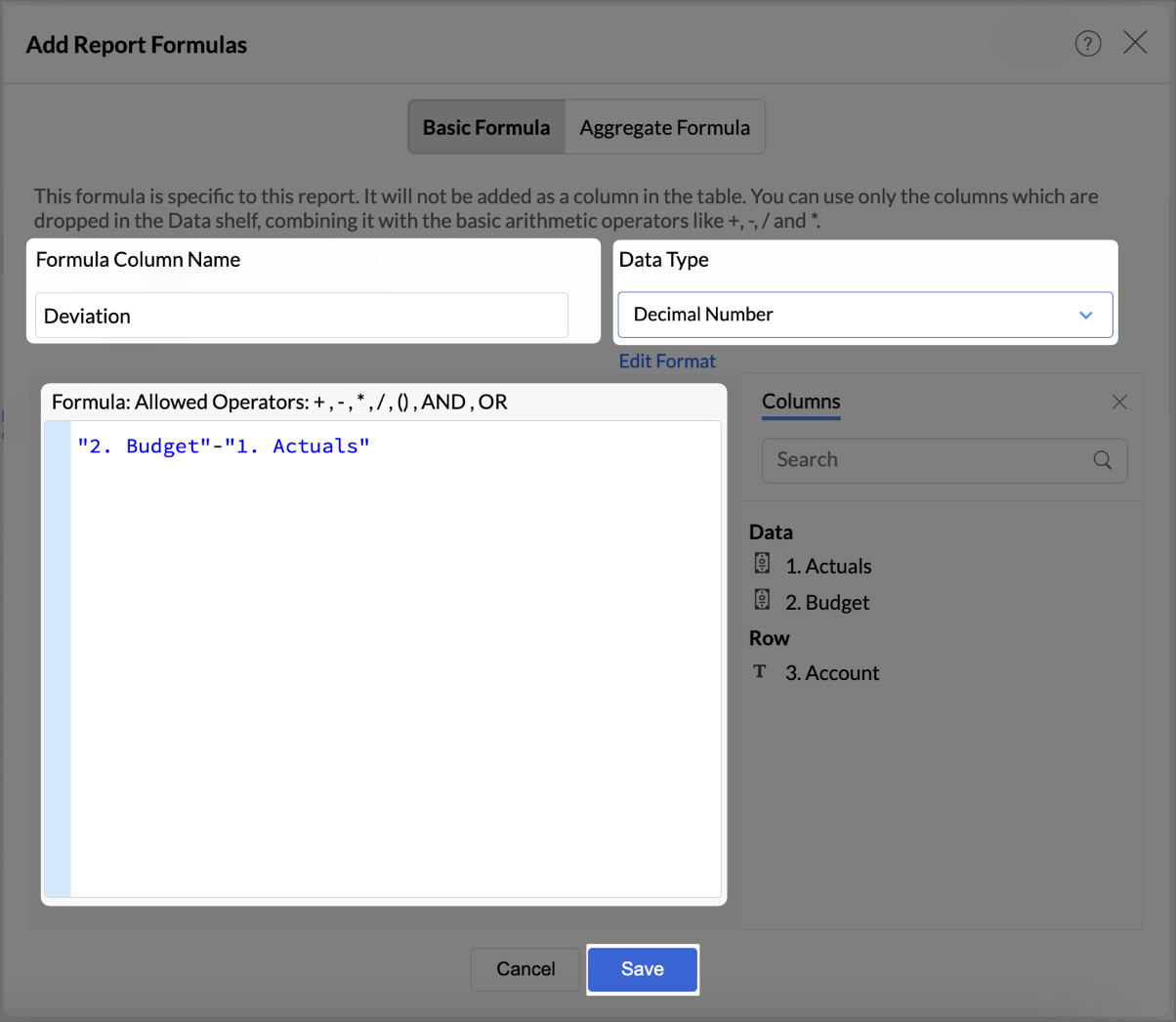


    5. Click Save.
    6. By following the same steps mentioned above, create one more formula to calculate the percentage difference between actuals and budget as shown in the image.
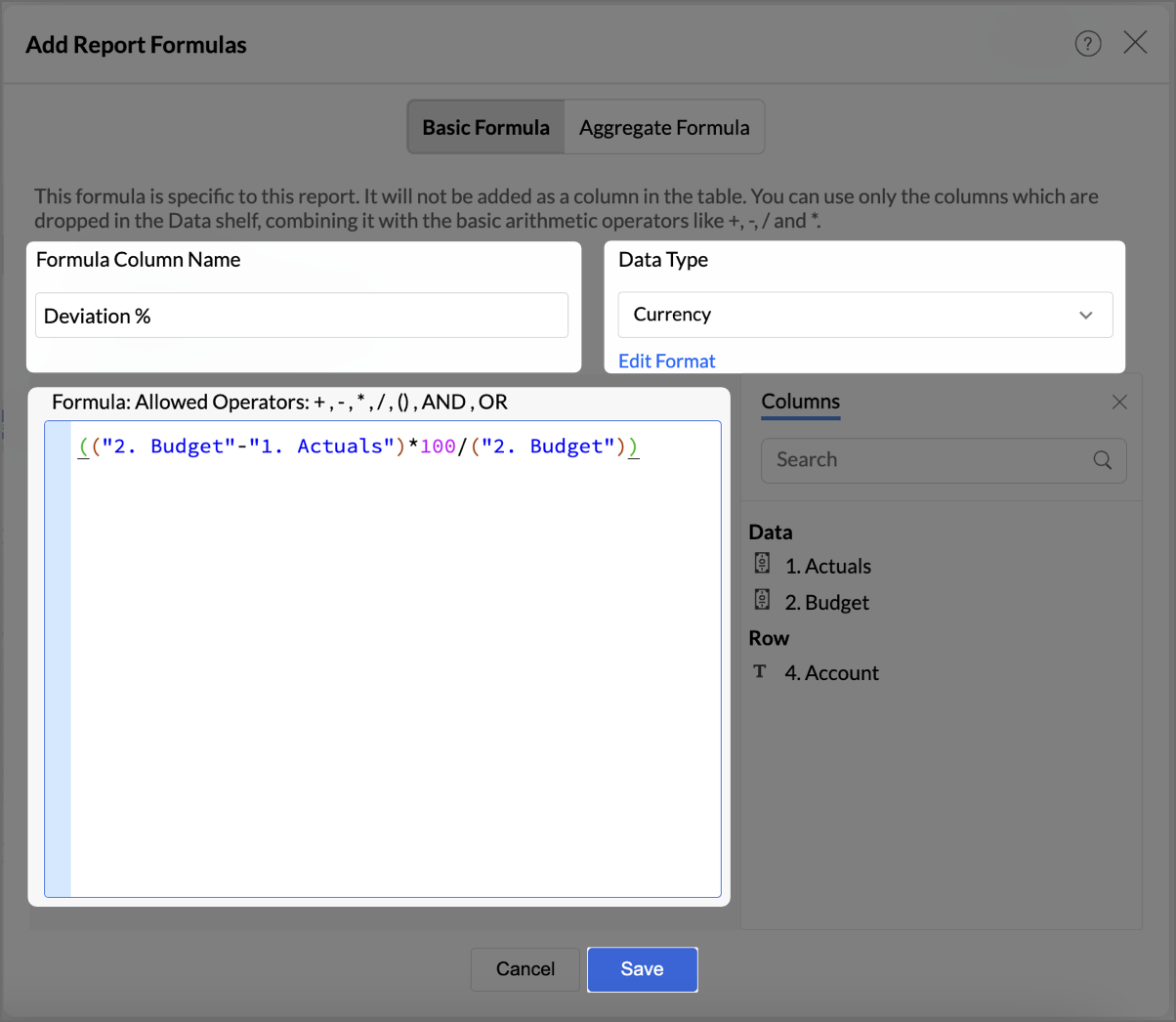


    7. Click Save.


      The created formulas will appear in your data shelf and columns, reflecting in the report.
  3. Go to Visuals and choose Data Bars With Data for a more intuitive understanding of budget performance.

By following these steps, you will have a detailed Budget Statement that compares actual spending to the budget, highlighting deviations.


Report Structure and Visuals

  1. Account Breakdown
    The report is organized by account categories, such as Bank Fees, Cost of Goods Sold, and more, showing both Budgeted and Actual amounts for each category.
  2. Key Columns
    The report includes the following key columns:
    • Total Budget - Displays the budget allocated for each account.
    • Total Actuals - Shows the actual amount spent or earned for each account.
    • Variance (Deviation) - Represents the difference between the budgeted amount and the actuals.
    • Variance Percentage (Deviation %) - This column shows the percentage difference between the budgeted and actual amounts, highlighting under- or over-expenditure.
  3. Data Bars for Clarity
    • Green Bars indicate favorable performance (within or under budget).
    • Red Bars highlight overspending or budget deviations (e.g., Office Expenses or Rent).

Key Features of the Budget Statement Report

  1. Visual Representation of Deviations
    Data bars visually indicate how spending aligns or deviates from the budget, enabling quick identification of problem areas.
  2. Concise Overview of Financial Performance
    The report provides a clear overview of actual versus budgeted performance, allowing decision-makers to assess financial health efficiently.
  3. Enhanced Usability with Percent Deviations
    Percentage-based deviation columns allow users to understand the scale of over- or under-performance relative to the budget, making it easy to identify areas that are significantly off track.
Click here to access the sample workspace.

Creating Profit and Loss report

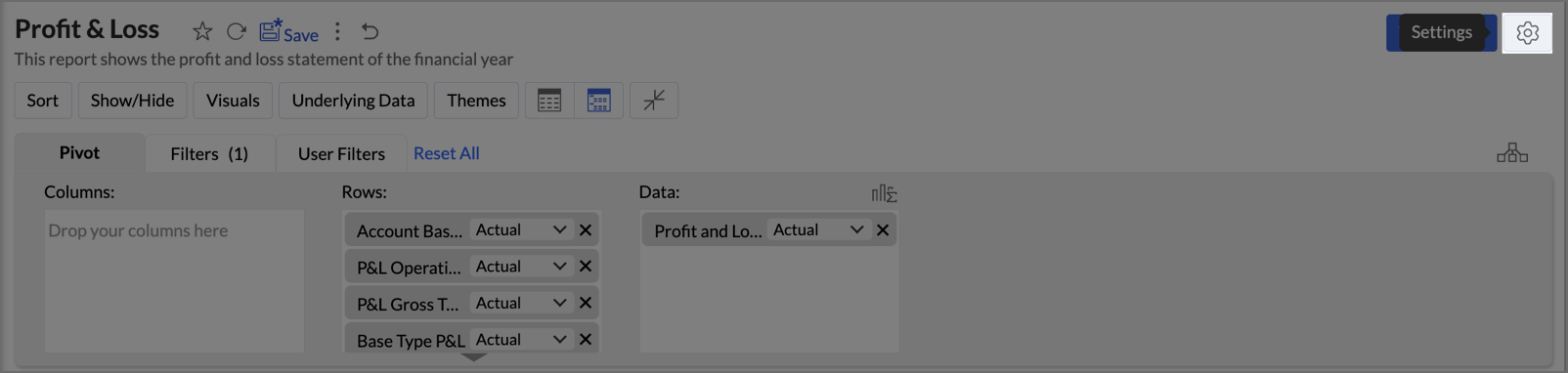
A Profit and Loss (P&L) report in Zoho Analytics helps businesses assess their revenue, expenses, and profitability over a specific period. By following these steps, you can create a detailed and visually engaging P&L report.

  1. Drag and drop Account base type, P&L Operating Profit Type, P&L Gross Type, Base type P&L, and Account Name into the Columns shelf from the Accounts table and Profit and Loss Balance into the Rows from Data shelf from the Accrual Transactions table.
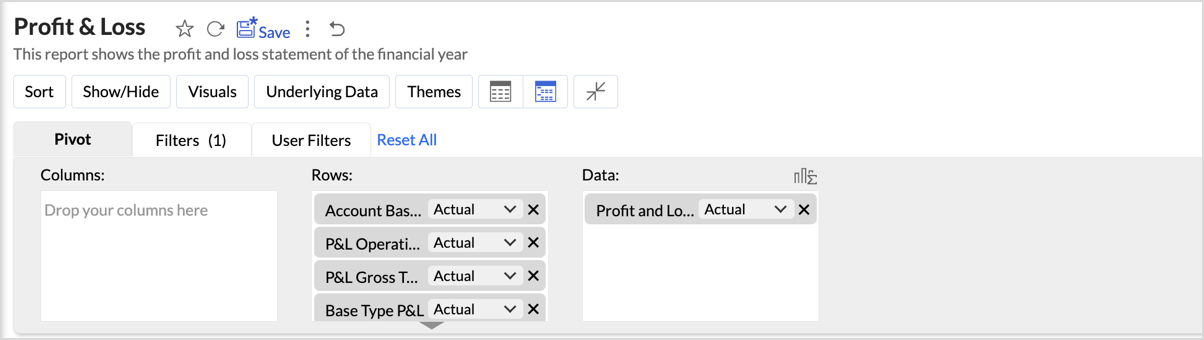


  2. Layout Adjustments:
    1. Navigate to Settings > Layout.


    2. Change the layout to Compact.
    3. Set Indent Level to 3.
    4. Check Increase Font Size for each higher group in Rows to make key categories more visible.
    5. Uncheck Show row numbers for a cleaner report.
    6. Uncheck Show Vertical Line between Each Column to streamline the visual presentation.
    7. Set Column Width to Equal and specify the width as required in px.
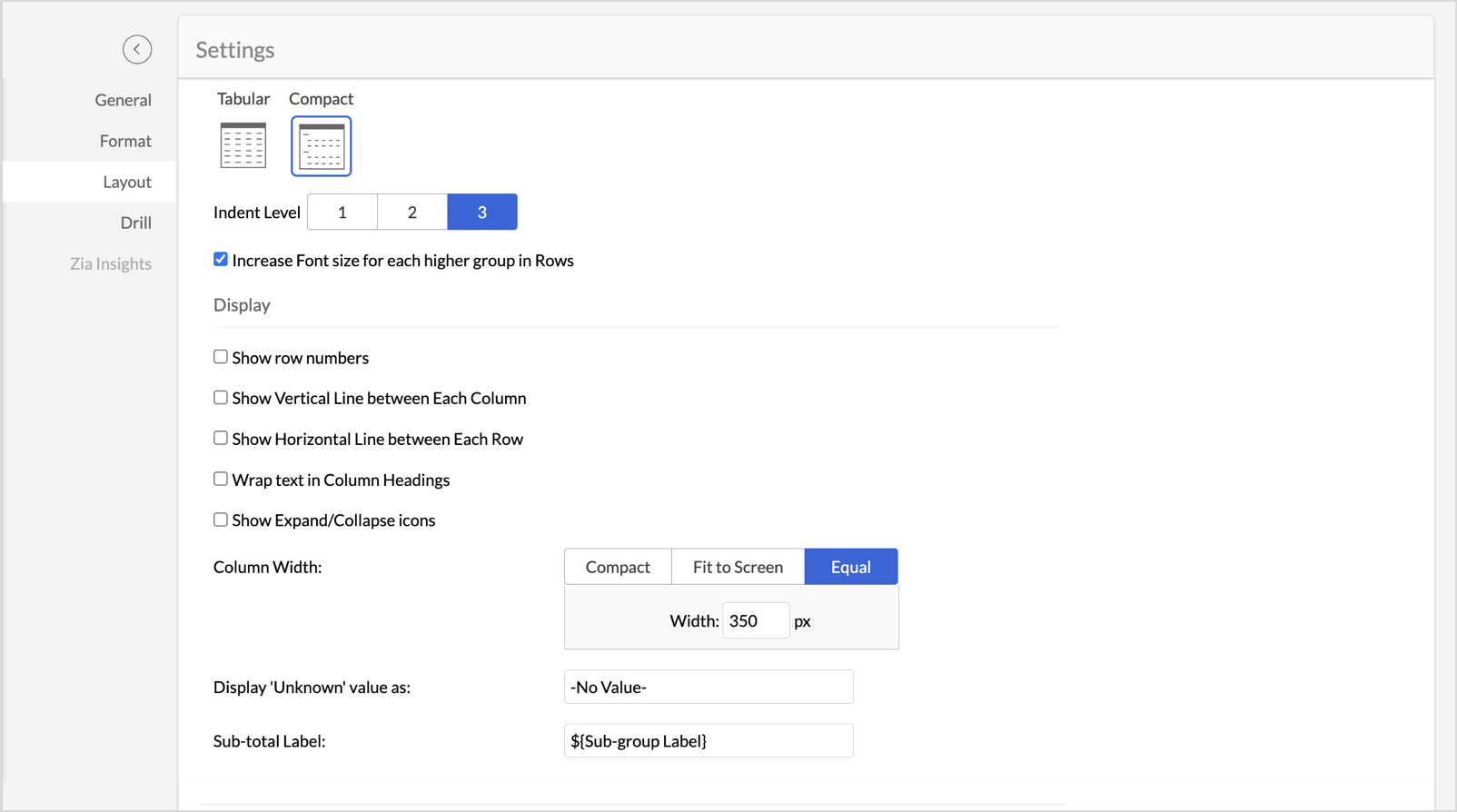


  3. Once the layout adjustments are made, click Apply to lock in the formatting.
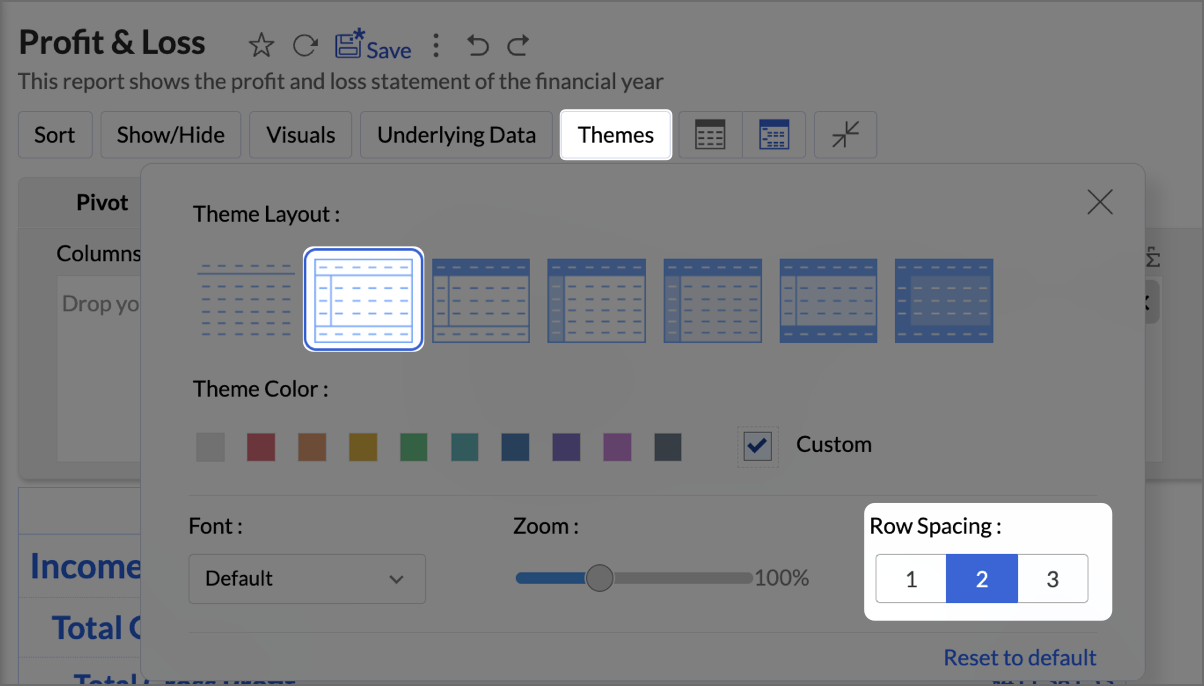
  4. Click Themes, and select the second theme. Set Row Spacing as 2.


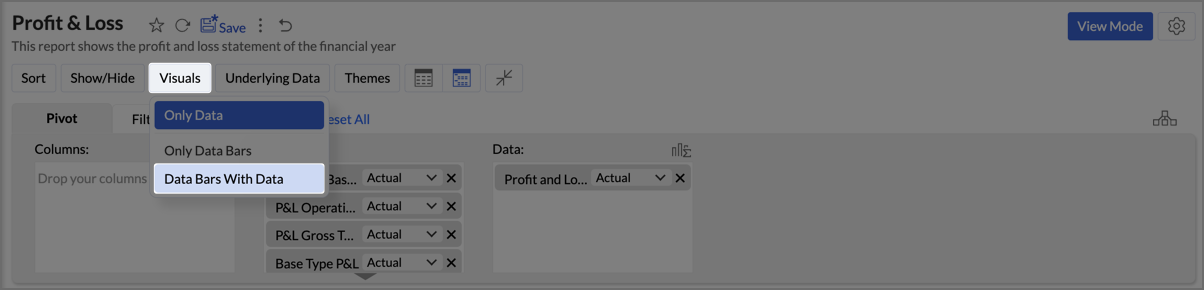
  5. Navigate to Visuals and select Data Bars With Data to provide a quick and clear visual representation.

By following the above steps, you will create aProfit and Loss report which provides a concise and structured view of your business’s financial performance, making it easy to track profitability over time and identify key financial trends.


Click here to access the sample workspace.

Zoho Analytics provides an intuitive and customizable platform for generating comprehensive Balance Sheets, Budget Statements, and Profit & Loss reports. With its drag-and-drop functionality and powerful visual tools, Zoho Analytics transforms finance reporting into a data-driven process that improves decision-making, forecasting, and resource management.

Start leveraging Zoho Analytics today to create reports that provide actionable insights, helping your organization thrive financially!


      • Sticky Posts

      • Tip of the Week - Spot Risky Sales with Conditional Formatting

        In Zoho Analytics, small tweaks can lead to big insights. One such feature is Conditional formatting based on other columns, your key to instantly spotting where sales success is overshadowed by product returns. Our tip this week shows you how to apply

        • Recent Topics

        • This will be long, Please bear with me - Next Gen Layout - Search

          In general, I think that Zoho are going in the right direction with the Next Gen UI. The latest update brings some nice improvements and all-in-all from a user's perspective I think the improvements are generally very good. However, there are some areas
        • Selecting all notes in a notebook

          In Windows11, I select a notebook and I get a list of notes, but only 30 notes. If I scroll down to the end, I get an additional 30 notes (and at the top it now shows 60 notes). I can keep doing this to eventually see all my notes but this is a real pain.
        • Update latitude & longitude address field API

          How do I update the coordinates of an address field from a widget? I can't modify the latitude and longitude of the address field. I think the problem is how I'm writing formdata variable. zoho_init.then(function (data) { var queryParams = ZOHO.CREATOR.UTIL.getQueryParams();
        • Filter Records in CRM API

          Hi Team, I’m currently working on a task to retrieve expired deals from the CRM. By “expired deals,” I mean deals where the closing date has already passed and the stage is not “Closed Won” or “Closed Lost” (i.e., all other stages). I tried using both
        • User Name in Zoho Cliq Not Updating Across Apps?

          We updated the name of a user in Zoho. (From Sue to Taylor) Her name has not been updated in Cliq on all apps. When in Zoho One, if I go to Cliq directly, it is correct, but if I am in another app, and the Cliq bar pops up on the bottom, it will be the
        • Ability to Use Both AND and OR When Creating Rules (Advanced Conditions)

          I'd like to be able to use more complicated logic when setting up rules. E.g. in Zoho Mail, I can choose "Advanced conditions (AND/OR) to create a rule that can be applied to multiple subject lines from the same sender. But in Zoho TeamInbox, I will have
        • Attaching files to emails within CRM Deals.

          Hello, We have recently started using the extension "Workdrive for CRM" (Related List) to view/store our documents for each Deal, instead of using Attachments. Overall it feels like a better way to go but the user experience is not so great when it comes
        • Why I can't map Account Name from lead module to Account module?

          When I qualify a lead in the bluerprint, I use automated conversion in Blueprint to automatically create Contact, Account and Deal. the Deal record and contact record has been successfully created automatically as I expect, but I can't see any account
        • Pause(1);

          I'm using scheduler to invoke an interaction via http post with an external service. The schedule code uses a for-each loop that runs so fast my external application's log files get messed-up (they are named by date-time stamp). What I'm suggesting is
        • Release Notes | February 2026

          We have rolled out another set of enhancements in Vertical Studio during February 2026, bringing improvements to Canvas customization, reporting capabilities, and data access controls. Here is a summary of what was released during February 2026: Canvas
        • Agentic Engineering with Zoho: The Next Evolution of Intelligent Systems

          The concept of Agentic Engineering is reshaping how modern systems are designed. It introduces a new layer to the way we think about artificial intelligence and system architecture. For years, most software systems have operated in a reactive way — responding
        • Engenharia Agêntica e as soluções da Zoho

          O conceito de engenharia agêntica impacta diretamente como os sistemas são projetos. Este tema inseri mais uma camada a nossa idéia de inteligência artificial. Antes o desenvolvimento de sistemas operavam de forma reativa e dependente de comandos diretos,
        • Beyond Task Lists #1 Effective project and task customization with CodeX

          Dear users, Beyond Task Lists is a series of articles aimed at showcasing the various customization capabilities of Zoho Projects. We'll discuss real life project management scenarios, use cases, and requirements that needs combining multiple features.
        • Is Zoho Sites still actively being developed?

          Hello, Is Zoho Sites still actively being developed as part of the Zoho ecosystem? I noticed that the What's New page (https://www.zoho.com/sites/whats-new.html) does not show any updates since Q1 2025. We were considering migrating our website from Squarespace
        • Set expiration date on document and send reminder

          We have many company documents( for example business registration), work VISA documents. It will be nice if we can set a expiry date and set reminders ( for example 90 days, 60 days, 30 days etc.,) Does Zoho workdrive provide that option?
        • Depositing funds to account

          Hello, I have been using Quickbooks for many years but am considering moving to Zoho Books so I am currently running through various workflows and am working on the Invoicing aspect. In QB, the process is to create an invoice, receive payment and then
        • Debit opening balances of vendors

          Dear colleagues: I am looking at the trial balance as on 31st March 2024, and punching opening balances (1st April 2024) in Zoho Books. Vendors have credit balances, by its nature, but some of our vendors have debit balances as well (e.g., we have paid
        • Zoho Books emails suddenly going to Spam since 11 Nov 2025 (Gmail + now Outlook) — anyone else?

          Hi everyone, We migrated to Zoho Books in July 2025 and everything worked fine until 11 Nov 2025. Since then, Zoho Books system emails are landing in customers’ Spam (first Gmail, and now we’re seeing Outlook/Office 365 also starting to spam them). Impacted
        • Tasks in hours rather than days.

          Hi there, I was wondering whether or not its possible to create a workflow task that has a timer based on hours rather than days? I'm looking to create a workflow task which, when a request field is changed, creates a task for the support desk to call the customer within an hour. However, the workflow task due dates only seem to work in days. Is this possible? Thanks
        • Client Portal ZOHO ONE

          Dear Zoho one is fantastic option for companies but it seems to me that it is still an aggregation of aps let me explain I have zoho books with client portal so client access their invoice then I have zoho project with client portal so they can access their project but not their invoice without another URL another LOGIN Are you planning in creating a beautiful UI portal for client so we can control access to client in one location to multiple aps at least unify project and invoice aps that would
        • The Social Wall: February 2026

          Hello everyone, This month, we’re bringing you a mix of exciting toolkit enhancements and a few improvements across the web and iOS app, all designed to make your social media management simpler and smoother. File converter Images come in different formats,
        • Zoho Mail and SalesInbox doesn't link to CRM record using Reply-To

          Hi, I've just set up SalesInbox, with the intention of using it for sales enquiries (instead of Desk, which I have been using until now). I've noticed that, unlike Desk, SalesInbox only uses the 'From' email address to attempt to link to a CRM contact
        • Service line items

          Hello Latha, Could you please let me know the maximum number of service line items that can be added to a single work order? Thanks, Chethiya.
        • Subforms and automation

          If a user updates a field how do we create an automation etc. We have a field for returned parts and i want to get an email when that field is ticked. How please as Zoho tells me no automation on subforms. The Reason- Why having waited for ever for FSM
        • Poor Search Results on Zoho CRM

          The search on Zoho CRM is quite poor. Salesforce has now published a new search, when will get this on Zoho? https://help.salesforce.com/s/articleView?id=data.c360_a_hybridsearch_index.htm&type=5
        • How to use filters on all products page? Or even a category page?

          Hello, I am trying to create some filters so users can use filters to find products they are looking for. So what i am trying is to create a filter according to price lets say. So if i define it this way i am expecting to see this filter option on category
        • Capture Last check-in date & days since

          I have two custom fields on my Account form, these are "Date of Last Check-In" and "Days Since Last Contact" Using a custom function how can I pull the date from the last check-in and display it in the field "Date of Last Check-In"? and then also display the number of days since last check-in in the "Days SInce Last Contact" field? I tried following a couple of examples but got myself into a bit of a muddle!
        • Pasted Images not being embedded in custom mail

          Hi, I'm making a custom report by email based on commentaries. I have the email ready, all working great except for images that are being pasted in the commentaries. Zoho deals with them as temp images and so it requires authentication to view them, something
        • AI Bot and Advanced Automation for WhatsApp

          Most small businesses "live" on WhatsApp, and while Bigin’s current integration is helpful, users need more automation to keep up with volume. We are requesting features based on our customer Feedbacks AI Bot: For auto-replying to FAQs. Keyword Triggers:
        • Bigin, more powerful than ever on iOS 26, iPadOS 26, macOS Tahoe, and watchOS 26.

          Hot on the heels of Apple’s latest OS updates, we’ve rolled out several enhancements and features designed to help you get the most from your Apple devices. Enjoy a refined user experience with smoother navigation and a more content-focused Liquid Glass
        • Select CRM Custom Module in Zoho Creator

          I have a custom module added in Zoho CRM that I would like to link in Zoho creator.  When I add the Zoho CRM field it does not show the new module.  Is this possible?  Do i need to change something in CRM to make it accesible in Creator?
        • Zoho CRM Quotes – Subform and PDF/Writer Limitations

          Hello, I am encountering the following limitations in Zoho CRM Quotes: Custom product images cannot be uploaded in the subform – the image upload field cannot be added; only the file upload field is available. File upload placeholders cannot be used in
        • Introducing Workqueue: your all-in-one view to manage daily work

          Hello all, We’re excited to introduce a major productivity boost to your CRM experience: Workqueue, a dynamic, all-in-one workspace that brings every important sales activity, approval, and follow-up right to your fingertips. What is Workqueue? Sales
        • Archiving Contacts

          How do I archive a list of contacts, or individual contacts?
        • Every time an event is updated, all participants receive an update email. How can I deactivate this?

          Every time an event is updated in Zoho CRM (e.g. change description, link to Lead) every participant of this meeting gets an update email. Another customer noticed this problem years ago in the Japanese community: https://help.zoho.com/portal/ja/community/topic/any-time-an-event-is-updated-on-zohocrm-calendar-it-sends-multiple-invites-to-the-participants-how-do-i-stop-that-from-happening
        • 3/18 オンライン勉強会のお知らせ Zoho ワークアウト (無料)

          ユーザーの皆さま、こんにちは。コミュニティチームの中野です。 3月開催のZoho ワークアウトの開催が決定しましたのでご案内します。 今回はZoomにて、オンライン開催します。 ▶︎参加登録はこちら(無料) https://us02web.zoom.us/meeting/register/BoNTN7zYR8OvOPGShqBY0A ━━━━━━━━━━━━━━━━━━━━━━━━ Zoho ワークアウトとは? Zoho ユーザー同士で交流しながら、サービスに関する疑問や不明点の解消を目指すイベントです。
        • Zoho Sheet for Desktop

          Does Zoho plans to develop a Desktop version of Sheet that installs on the computer like was done with Writer?
        • Conversion Rate – Won Deals over Assigned Prospects

          Hello, I would like assistance configuring a KPI in Zoho Analytics titled: Objective of the calculation: Number of Won Deals divided by Total number of assigned prospects (not only converted prospects). Important clarification: The denominator must include
        • Perfomance Management - Zoho People

          Hi team, I am looking for performance management data such as KRA, goals, feedback, appraisals, etc., in Zoho Analytics. However, I am unable to find these metrics while editing the setup. Could you please confirm whether these fields are available in
        • Feature Request – Conditional Visitor Information Request in Zoho SalesIQ

          We would like to request the ability to conditionally ask for visitor details based on the communication channel used in Zoho SalesIQ. Specifically: When a visitor initiates a conversation through the live chat widget on the website, we want to continue
        • Next Page