Font Breakage | Zoho Mail Desktop Lite for Mac
Dear Zoho Mail and Workplace Community,
With the latest update of macOS Sequoia and macOS Tahoe, there has been font breakages in the email preview of Zoho Mail Desktop Lite application for Mac.
This breakage is due to the corruption of the System fonts in the Font Book.
Follow the steps given below to fix the same:
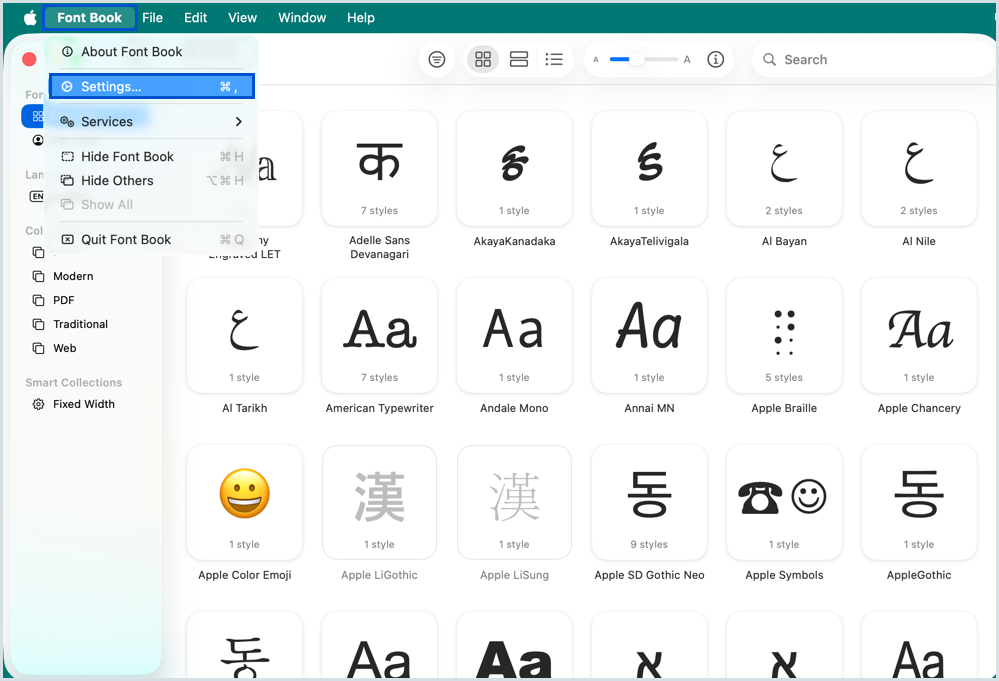
- Open the Font Book in your system
- Navigate to Font Book > Settings from the top menu bar
- Go to Advanced Settings
- Click on Reset Fonts
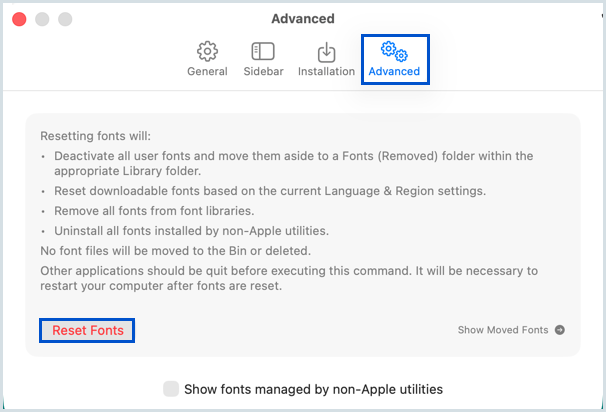
Once you reset the fonts, reboot your system. The changes will be applied and the font breakage in Zoho Mail Desktop Lite application will be fixed.

Resetting the fonts will remove/ uninstall the custom fonts and revert the fonts to the factory settings.