Introducing Forms: Streamline data collection with Bigin's new form builder.

Introducing Forms: Streamline data collection with Bigin's new form builder.

Hello everyone,

Bigin's web forms just got a makeover!

We are excited to introduce Forms: an online form builder designed to meet all your data collection need. This revamp was inspired by your feedback, resulting in an upgraded and versatile version of web forms.
 
So, what has changed?

Forms for Pipelines and Contacts
So far Web forms in Bigin were limited to only the Contacts module which limited their scope to contact forms, registration forms, newsletter subscription forms etc. 
 
With this revamp, you can build forms using fields from the Pipelines, Contacts, and Companies modules. You can create records from the data collected, and add them automatically to any Team Pipeline, Contacts module, and Companies module. This makes Forms more than a tool just for contact collection. Now, it is a tool for lead generation, customer support, feedback collection, and much more.

 
Share forms with your customers
Web forms were limited to embedding code snippet on a website and this limited their adoption to customers with websites and a basic knowledge of coding.
 
With this revamp, we are introducing two additional sharing options:
  • Share as a Link - You will get a shareable URL unique to each form and you can directly share it with your customers via email or any other ways.
  • Share as a QR code - A QR code unique to each form will be generated in this method. Users can download it, print and paste it anyplace. For instance you can paste these QR codes at an event venue to simplify registrations – attendees simply has to scan the code on their device and fill it out.
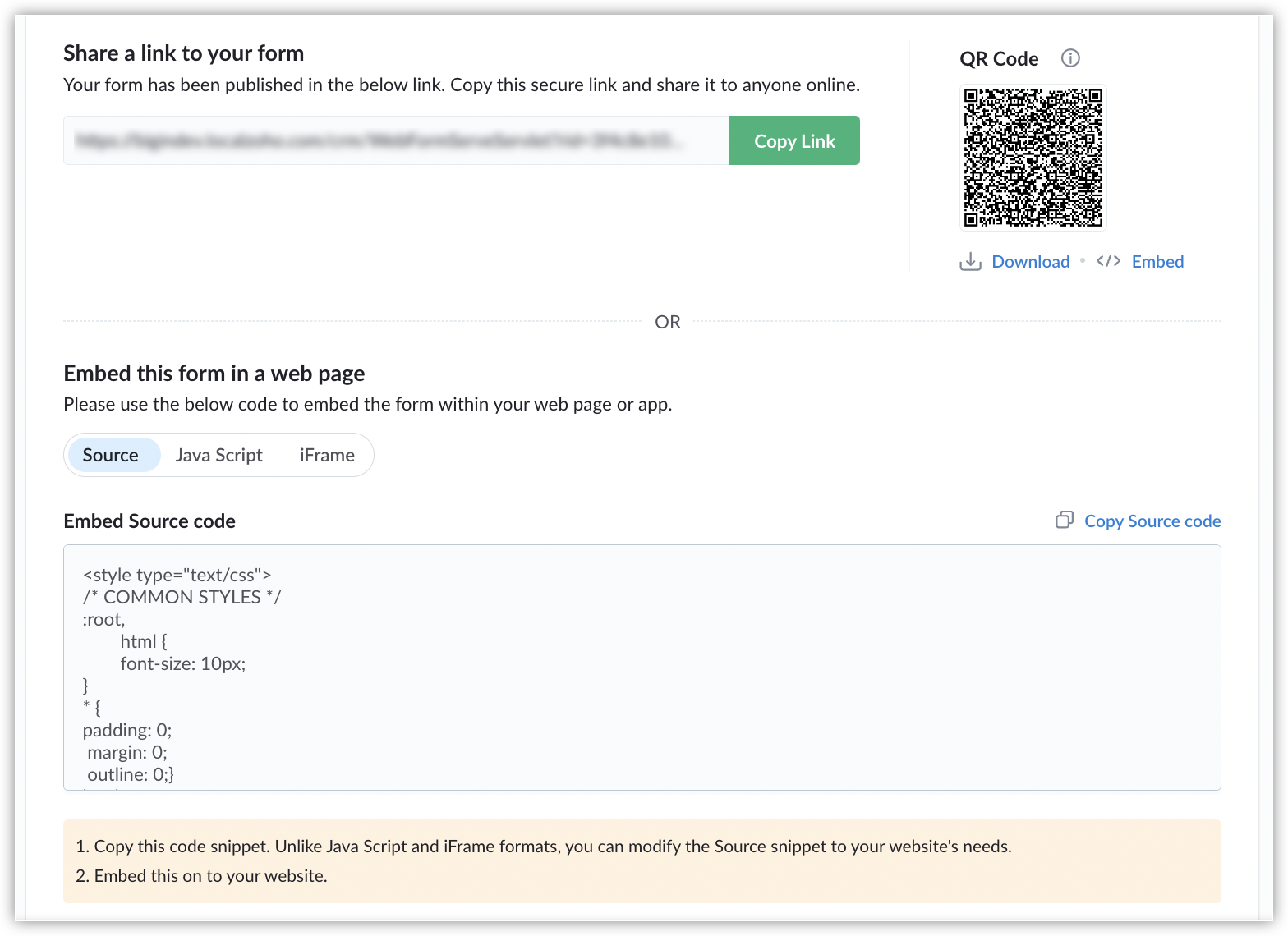
And, that brings us to the name change. With these sharing options, our forms are no longer limited to just websites and that is why we have renamed them as Forms from Web Forms.
 
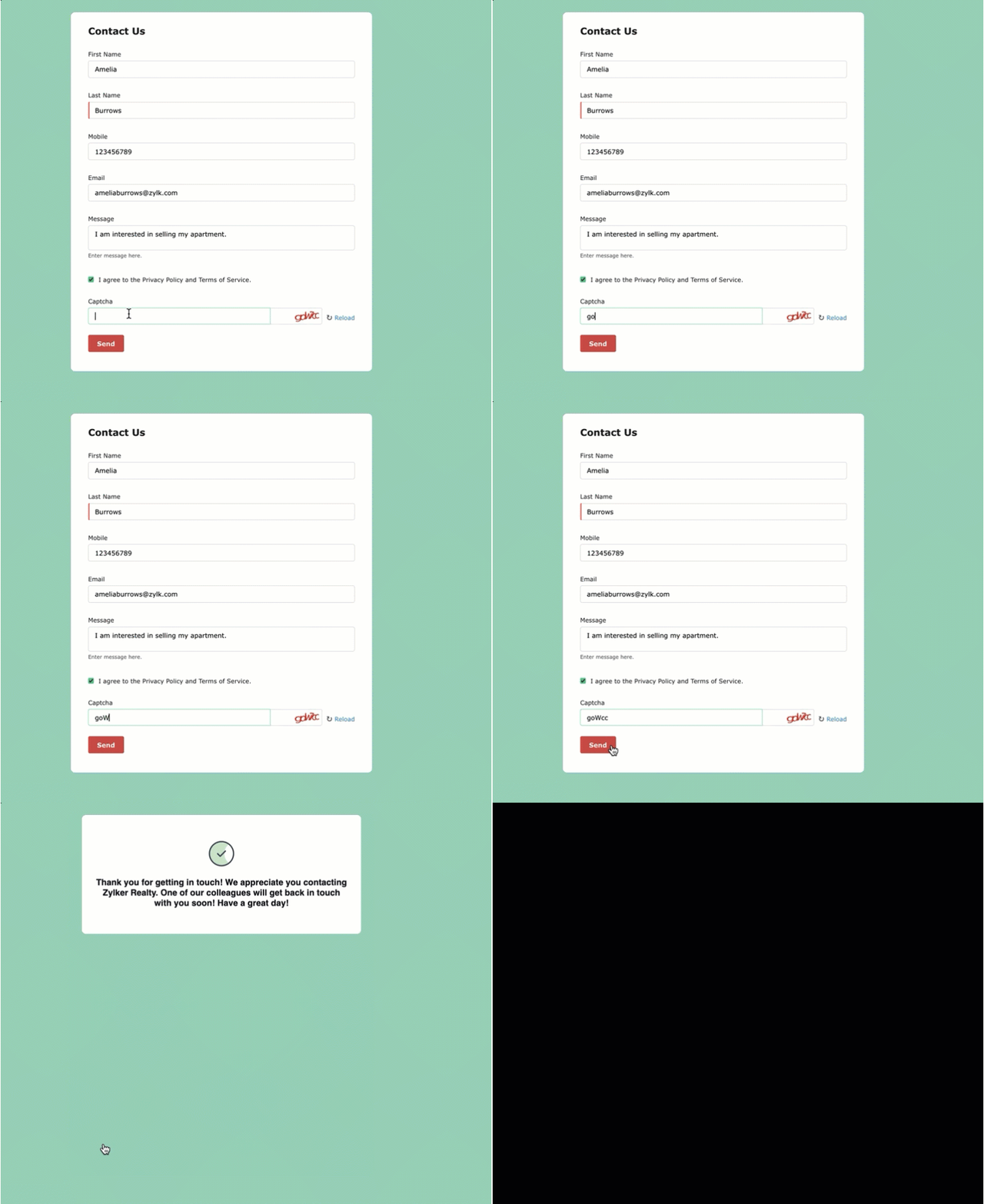
Thank you Message
With the older version, users had to redirect website visitors to a landing page after they submitted a form. Now, they have the option to display a Thank You message to customers upon form submission. 
 
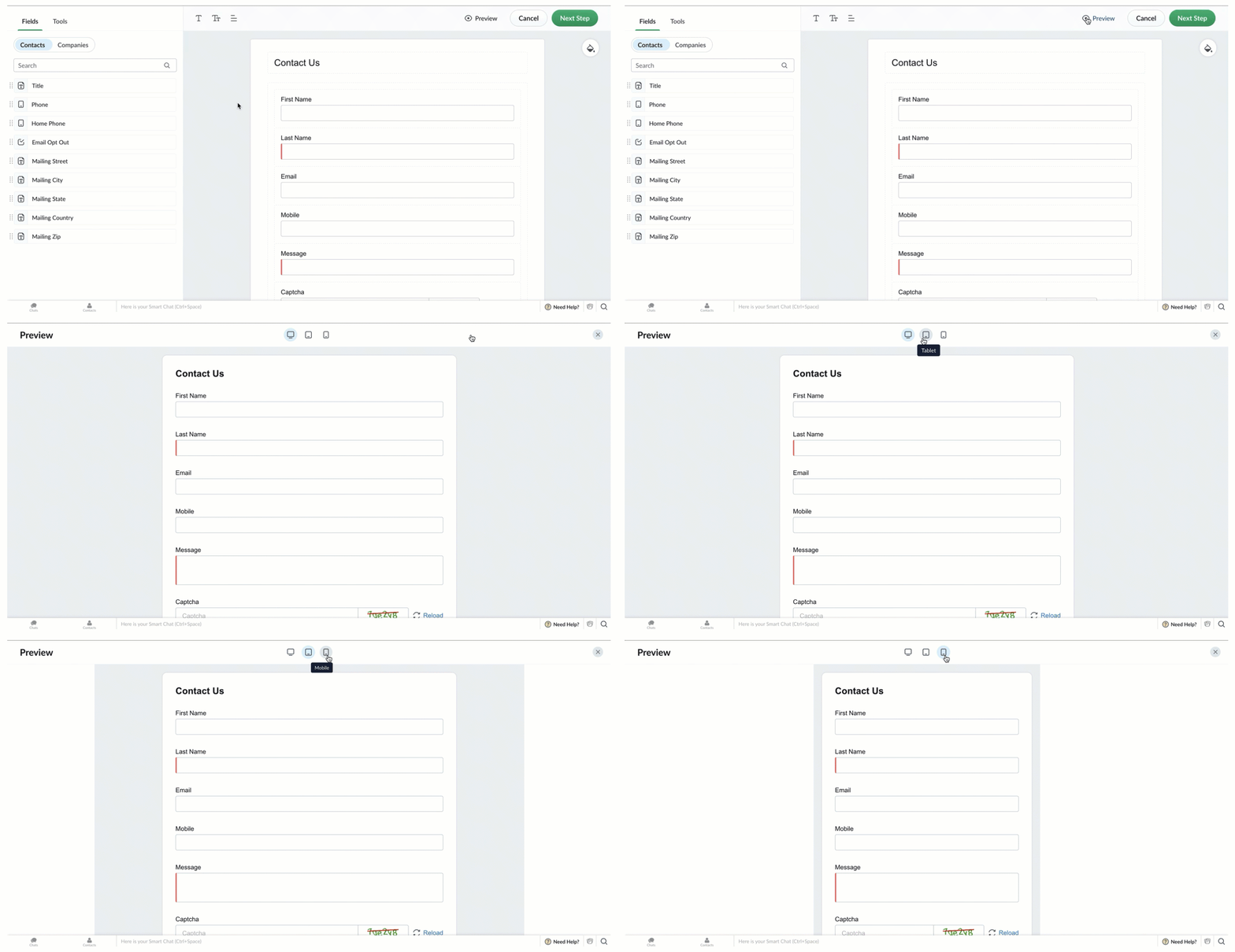
Preview forms across devices
Switch between the Desktop, Tablet, and Mobile icons to see how the form will appear on different devices.

Mobile-friendly forms
We know our web forms were outdated and had glitches when opened in mobile browsers and with this revamp, our forms open seamlessly in mobile browsers. 
 
What happens to your existing web forms?
Your existing web forms will continue to work seamlessly and when you edit your existing web forms, you can use the new enhancements listed above.
 
Refer to our help document on Forms for detailed instructions for configuring forms for your business.
 
Forms Availability: Free Plan: 1 | Express Plan: 3 | Premier Plan: 5
Additional forms can be purchased as add-ons.
 
What's next?
We have more enhancements planned for Forms, such as support for Google reCAPTCHA, customizable form URLs, and an option to display your company logo in the form header. We don't have a release date for these enhancements to share, but rest assured our team is working hard to roll them out soon.
 
We also have new features and enhancements planned for Bigin. Watch this space for more information. As always, we love hearing your feedback, so please try the new form builder and let us know how it goes in the comments!
 
Thank you,
Aayisha
Bigin User Education


        • Recent Topics

        • Is there an API to "File a Ticket" in Desk

          Hi, Is there an API to "File a Ticket" in Desk to zoho projects?
        • Zoho Desk View Open Tickets and Open Shared Tickets

          Hi, I would like to create a custom view so that an agent can view all the open tickets he has access to, including the shared tickets created by a different department. Currently my team has to swich between two views (Open Tickets and Shared Open Tickets).
        • Keyboard UX for Assemblies

          The new Assembly module has a counter-intuitive behavior that ought to be corrected. When an Assembly is ready to be entered, there are two options given, the blue-highlighted "Assemble" and the gray "Save as Draft". This correctly implies that the normal
        • Mapping a new Ticket in Zoho Desk to an Account or Deal in Zoho CRM manually

          Is there any way for me to map an existing ticket in Zoho desk to an account or Deal within Zoho CRM? Sometimes people use different email to put in a ticket than the one that we have in the CRM, but it's still the same person. We would like to be able
        • Cliq iOS can't see shared screen

          Hello, I had this morning a video call with a colleague. She is using Cliq Desktop MacOS and wanted to share her screen with me. I'm on iPad. I noticed, while she shared her screen, I could only see her video, but not the shared screen... Does Cliq iOS is able to display shared screen, or is it somewhere else to be found ? Regards
        • Zoho Desk API - Influence which layout is used

          Hello, how can the ticket layout be changed using the API? I would like to choose the layout directly when creating the ticket. If this is not possible, my question would be how can I change it afterwards? Best regards, Sven
        • How to Move Behavior, Acquisition, Polls & Forms Data from Zoho PageSense to Zoho Analytics?

          Hi Zoho Community, I'm looking for a way to transfer data from Zoho PageSense to Zoho Analytics, specifically: Behavioral data (clicks, scrolls, heatmaps, etc.) Acquisition data (traffic sources, campaigns, etc.) Polls and forms data As far as I can tell:
        • Why can't I see images uploaded by other users in the Library for Campaigns

          We are several users of zoho Campaign. I have uploaded visuals of our company, but my team members can't see them.
        • zoho sheet stuck

          I Need help. ZOHO sheets stuck on the loading screen. I've already deleted the system cache and cookies of my browser (google chrome) but it's still not opening. 
        • Turn off Knowlege Base Follow options and Follower lists

          Is there a way to hide or turn off the option in the Knowledge Base for users to follow specific departments/categories/sections/articles? If not, is there a way to turn off the public list of followers for each of those things? Otherwise, customer names
        • Future Orders - Due Date

          Hi In my role, I can receive tickets where the work required is requested months in advance. Using a Future Orders option, which I believe was setup under the On Hold status type, hides the Due Date, in all views/ticket etc. Whilst I understand the reasoning
        • Tip of the Week #78 – Cut response time with multichannel shared inboxes

          If you’ve ever felt your team juggling between multiple email accounts, social pages, and chat apps just to reply to customers, you’re not alone. Managing conversations in multiple channels can quickly turn messy. Important messages across inboxes, replies
        • Need a way to run a client script longet than 10 seconds

          By The Grace of G-D. Hi, Currently, Client Scripts are Timing out at 10 seconds. We have complex logics that needs more time. Can you add a feature request to increase the timeout?
        • FSM - Associating and selecting Contacts based on Service Addresses

          Hi FSM team, I've come across an FSM limitation I wanted to share for improvement. I'm currently configuring FSM for a client who provides heating system install and maintenance services. The are often sub contracted by building management companies to
        • Exciting Updates to the Kiosk Studio Feature in Zoho CRM!

          Hello Everyone, We are here again with a series of new enhancements to Kiosk Studio, designed to elevate your experience and bring even greater efficiency to your business processes. These updates build upon our ongoing commitment to making Kiosk a powerful
        • FSM Improvement Idea - Show an Import button when there is no data

          I am setting up FSM for a client and I noticed that there is no option to import data, see screenshot below. Even when you click Create Contact there is only an option to Import from Zoho Invoice. It is only after you add at lease 1 record that the Import
        • Duplicate customers being created in Desk

          Hi I've trying to work out why I've getting duplicated customers being created in my desk. I have an external booking system that generates an email when I get a customer booking a job. A booking email gets sent to Desk where I manage the booking and
        • Unable to Send Different Email Templates for Different Documents in Zoho Sign

          Hello Zoho Community, I am facing a limitation with Zoho Sign regarding email notifications sent to customers when a document is sent for signing. Currently, whenever I send any template/document for signing, the email notification that goes to the customer
        • Timeline Tracking Support for records updates via module import and bulk write api

          Note: This update is currently available in Early Access and will soon be rolled out across all data centers (DCs) and for all editions of Zoho CRM. The update will be available to all users within your organization, regardless of their profiles or roles.
        • How to change position button transtition of Blueprint?

          Hi Everyone, Look at my screenshoot, it is possible move the reject button to the right? I couldn't find that setting in the blueprint. Thank you.
        • Record history and ticket interaction tab in contacts and accounts

          Hello everyone! We have improved the History tab to help users trace updates in the interaction activity logs of the Contacts and Accounts detail pages in the Customer Module. This enhancement make it easier to get clear details about who made each update,
        • UI Improvement - Ability to Collapse Flow

          The UI for Flow is generally pretty good. However, when multiple decision trees are used, the layout can get pretty convoluted and hard-to-follow (see one of my Flows below): In these cases, even the auto-arrange fails to make this something that a normal
        • Tasks Statuses

          Hi, The task status "Completed" is a final status which closes the task. We need to have a status "Cancelled". However, when the status is set to "Cancelled", the task prompt still has a blue button to Close Task. When the customer clicks that and closes
        • Add Lookup Field in Tasks Module

          Hello, I have a need to add a Lookup field in addition to the ones that are already there in the Tasks module. I've seen this thread and so understand that the reason lookup fields may not be part of it is that there are already links to the tables (
        • Create New Tasks Layout in CRM

          I am able to do this in Leads, Contacts, Meetings, Calls - every other module, but cannot create a new layout in tasks. I have the appropriate access but it's simply not appearing as an option. Only "Standard" option shows. Please help!
        • Whatsapp Connection Status still "Pending" after migration

          Hello, I migrated my WhatsApp API to Zoho from another provider a day ago. So far the connection status is still “Pending”. There is a problem? How long does it usually take?
        • Meet Canvas' Grid component: Your easiest way to build responsive record templates

          Visual design can be exciting—until you're knee-deep in the details. Whether it's aligning text boxes to prevent overlaps, fixing negative space, or simply making sure the right data stands out, just ironing out inconsistencies takes a lot of moving parts.
        • Multi file upload

          Hi, I just wonder if one could upload multiple files in one shot, say between one and three files, without adding multiple File Upload fields? Thanks, Alalbany
        • Using IMAP configuration for shared email inboxes

          Our customer service team utilizes shared email boxes to allow multiple people to view and handle incoming customer requests. For example, the customer sends an email to info@xxxx.com and multiple people can view it and handle the request. How can I configure
        • Auto-Invite Users to Portals in Zoho CRM based on Conditions

          Hello Everyone, You can now automate portal invitations in Zoho CRM with the new Auto-Invite users feature in Portal management. No more manually enabling portal access one by one. With this enhancement, you can automatically send invites for users to
        • Zoho CRM for Everyone's NextGen UI Gets an Upgrade

          Hello Everyone We've made improvements to Zoho CRM for Everyone's Nextgen UI. These changes are the result of valuable feedback from you where we’ve focused on improving usability, providing wider screen space, and making navigation smoother so everything
        • Auto-sync field of lookup value

          This feature has been requested many times in the discussion Field of Lookup Announcement and this post aims to track it separately. At the moment the value of a 'field of lookup' is a snapshot but once the parent lookup field is updated the values diverge.
        • Zoho Recruit Subscription

          Hello Zoho Recruit Team, Good day! I would like to inquire about your recruitment subscription plans and would also like to verify the current subscription our company is enrolled in under Zoho Recruit. Thank you, and I look forward to your response.
        • Keyboard shortcut M key

          I'm trying to customize my keyboard shortcuts and assign the "m" key. But it says the key is already assigned. I've looked through all my shortcuts and can't see any assigned "m". When I select an email and press the M key, nothing happens. What is the
        • Is it possible to create a meeting in Zoho Crm which automatically creates a Google Meet link?

          We are using Google's own "Zoho CRM for Google" integration and also Zoho's "Google Apps Sync" tools, but none of them provide us with the ability to create a meeting in Zoho CRM that then adds a Google Meet link into the meeting. Is this something that
        • Ensure Consistent Service Delivery with Comprehensive Job Sheets

          We are elated to announce that one of the most requested features is now live: Job Sheets. They are customizable, reusable forms that serve as a checklist for the services that technicians need to carry out and as a tool for data collection. While on
        • Automatic Portal invite

          We have numerous customers we move through a blueprint in deals, when they get to a certain point we need to give them portal access, how can this be done through deluge or a workflow? Latest Update (December 2025): The option to automate portal invitations
        • Marketer's Space: Why mobile optimization deserves a place in your email strategy

          Hello Marketers, Welcome back to Marketer's Space! Today, we'll talk about the importance of creating mobile-friendly email designs. While mobile phones were once used only to make phone calls, today they're used for almost everything, including texting,
        • Enhancements in Canvas

          Dear All, Greetings! Canvas lets you design the record details page to suit your brand or business preferences. We are glad to introduce the following enhancements to uplift your design experience. Reusable Components Style Presets Let's go! Reusable
        • Introducing Dark Mode / Light Mode : A New Look For Your CRM

          Hello Users, We are excited to announce a highly anticipated feature - the launch of Day, Night and Auto Mode implementation in Zoho CRM's NextGen user interface! This feature is designed to provide a visually appealing and comfortable experience for
        • Next Page