Introducing group by, aggregation, and repeating regions in mail merge templates

Introducing group by, aggregation, and repeating regions in mail merge templates

Display data exactly the way you want and highlight key insights with Zoho Writer's enhanced merge templates.

We've supercharged Zoho Writer's merge templates with the capability to dynamically group, aggregate, and repeat data as blocks. You can now fetch data from any data source, including Zoho CRM, Bigin, and Creator, and present them in an easily understandable form in just a few clicks.

Here's how you can enhance data presentation using group by, aggregation, repeating regions, and data transformation.

Let's understand these new capabilities and how to use them in detail. To make this easier, let's take a look at how Zylker Automobiles, an imaginary car manufacturer, uses the new group and loop options to easily present their data in different ways.

1. Visualize data with group by for easy and quick understanding.

Business case: Generate a master pricelist with the state-wise price of all car models.
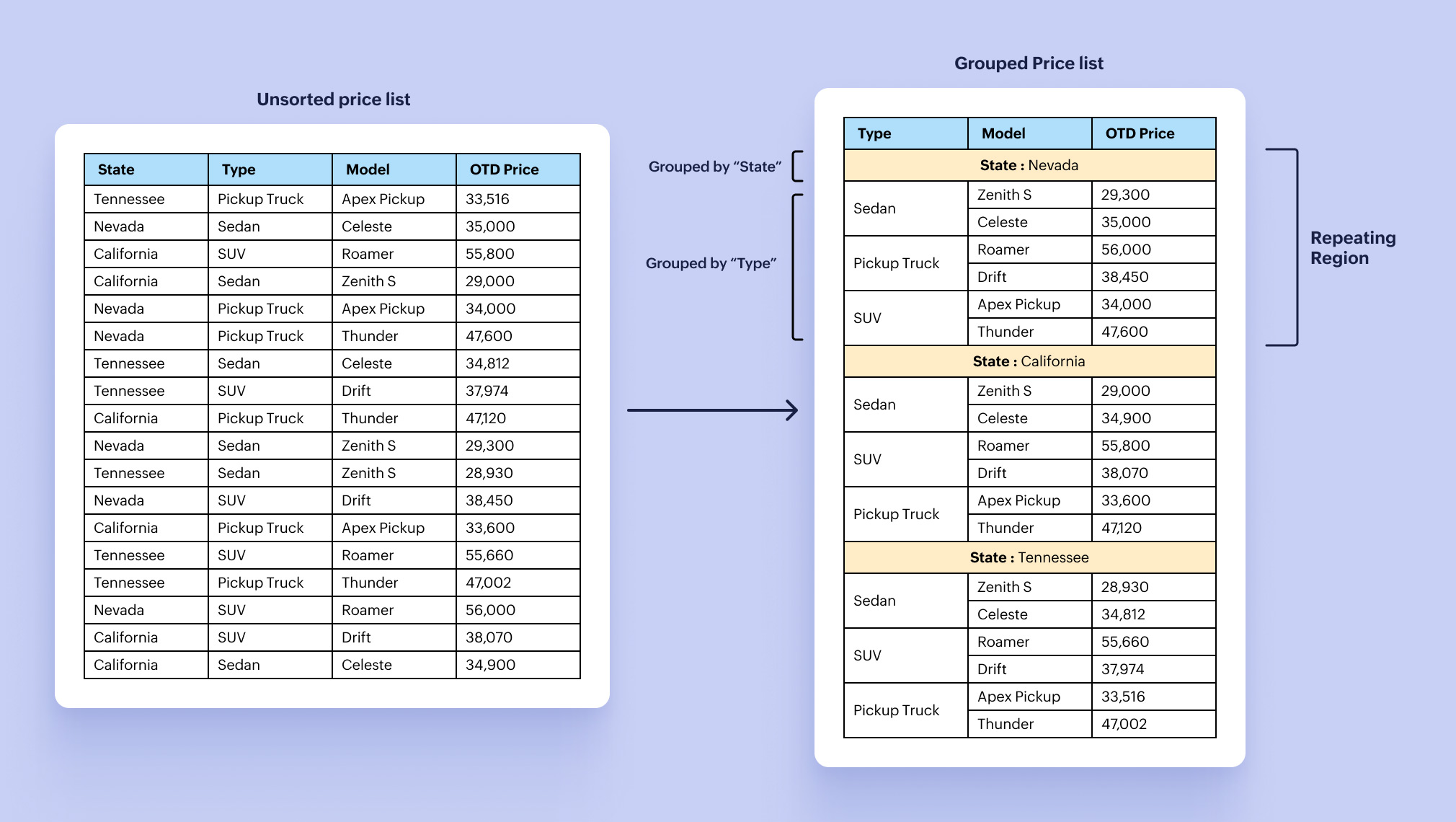


Zylker Automobiles' sales admin uses group by and repeating regions to display the price list for all car models separately for each state whenever the prices of their cars are changed.

Group by helps you to group data based on a specific field or value. With repeating regions, you can configure the layout/table/row only once and dynamically expand it based on the volume of data, instead of manually expanding it. Click here for the detailed steps to use the group by function.

Watch this video to learn how to use the group by, aggregation, and data transformation capabilities in your mail merge templates.

2. Summarize data to highlight key aspects and insights.

Business case: Generate the monthly revenue report with country-wide and region-specific revenue summaries and breakdowns.
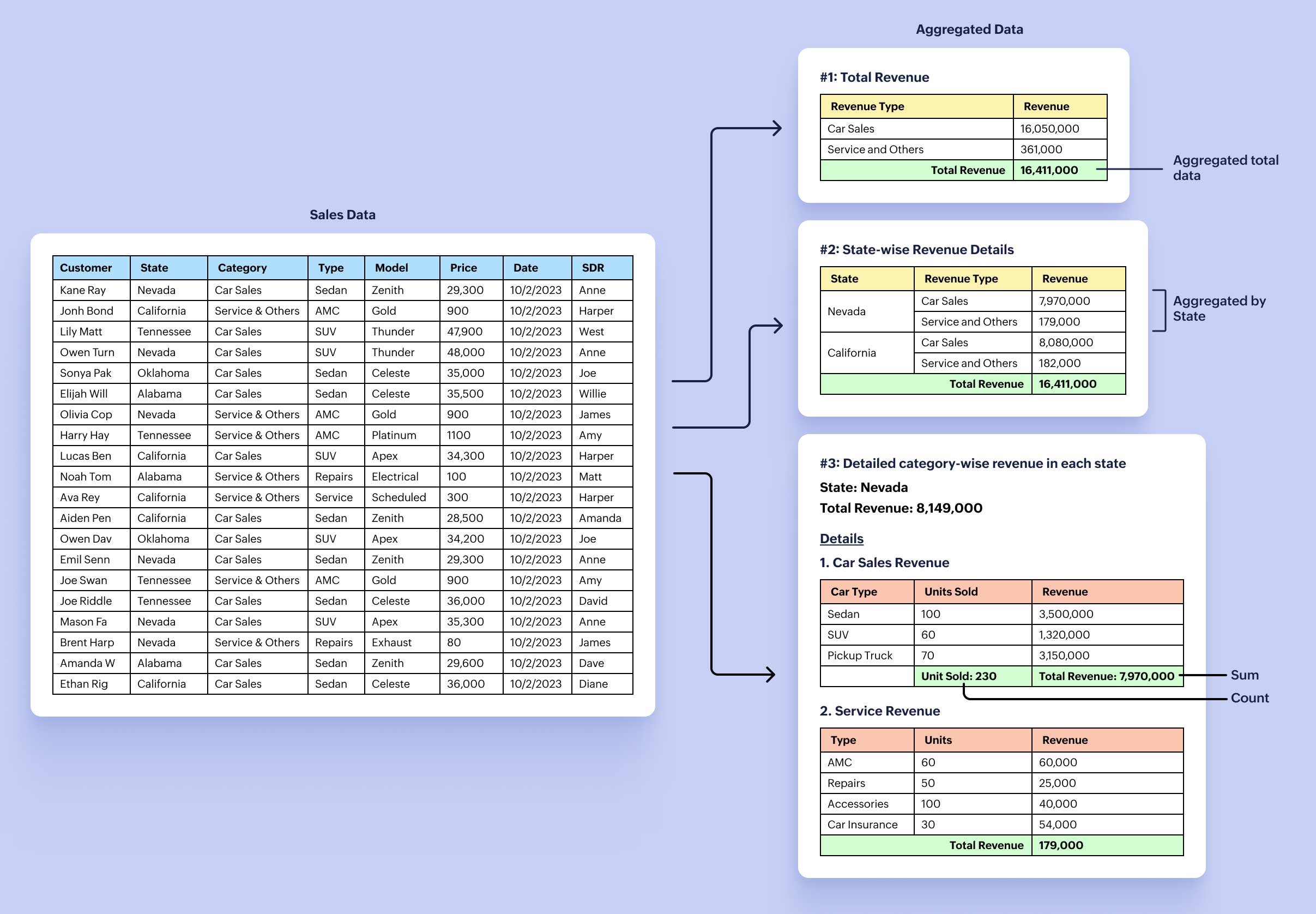

You can use the aggregation functions to summarize a large chunk of data to glean important insights like maximum, minimum, count, average, and sum.

Zylker Automobiles' sales admin combines the power of the built-in group by, aggregation, and repeating regions to highlight the:

  • Total revenue generated in a month.
  • State-wise total revenue with a breakdown of revenue from each category.
  • Granular, item-wise breakdown of revenue for each category for every state.

Click here to learn how to use the aggregation functions.

3. Transform data to create and populate sub-forms.

Business case: Generate and save the detailed revenue report of each state as a separate file in a specific folder.
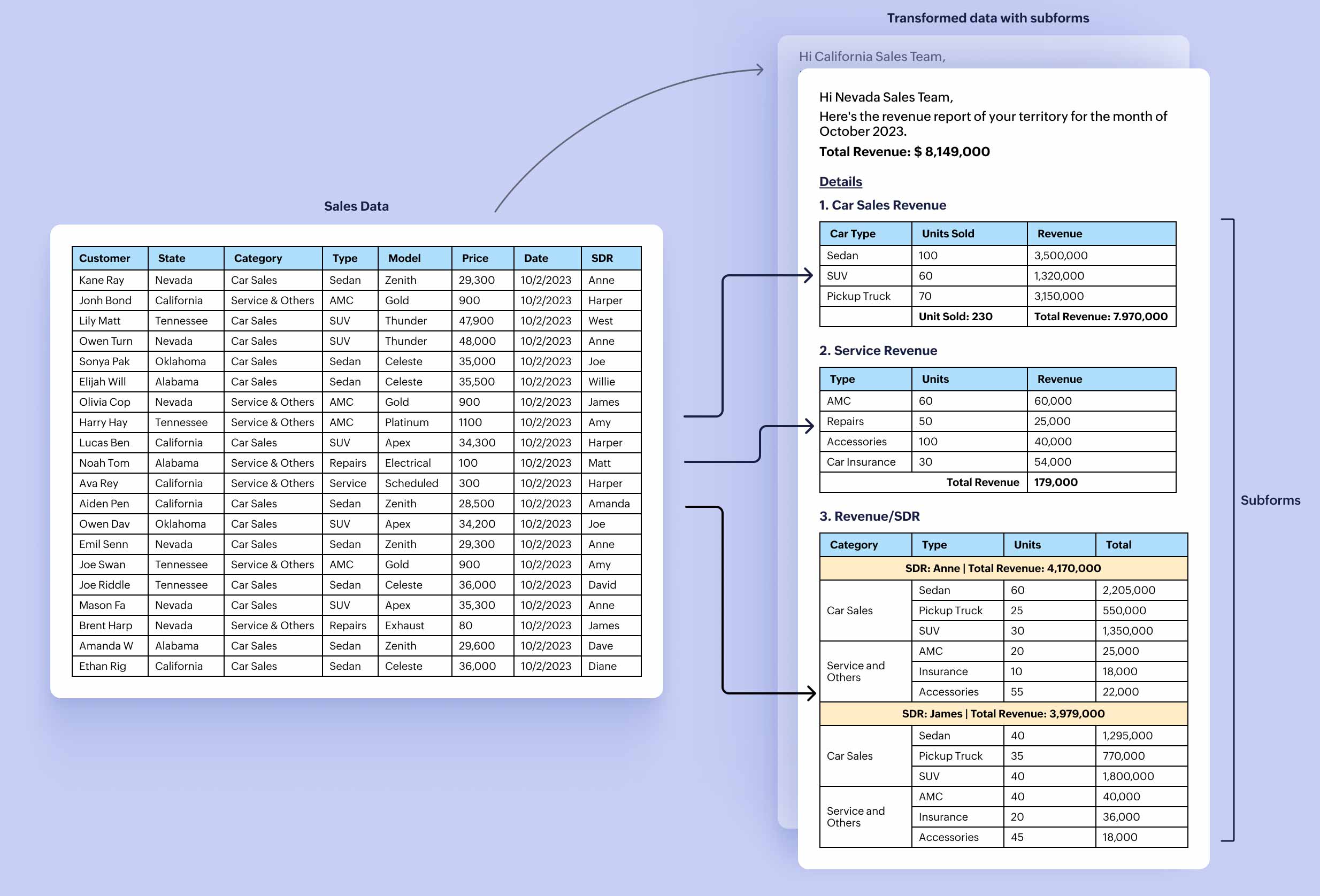


Zylker Automobiles uses data transformation to map the desired fields in the data source as main and sub-form fields. This allows them to extract and process the raw, unordered transactional data to generate the revenue report for each state separately. Click here to know how to use the Transform Data Source option.

4. Format data with the new number-formatting options.

Business case: Send an email to each SDR at the beginning of every month with their total revenue from the previous month in words, along with a summary of their performance.
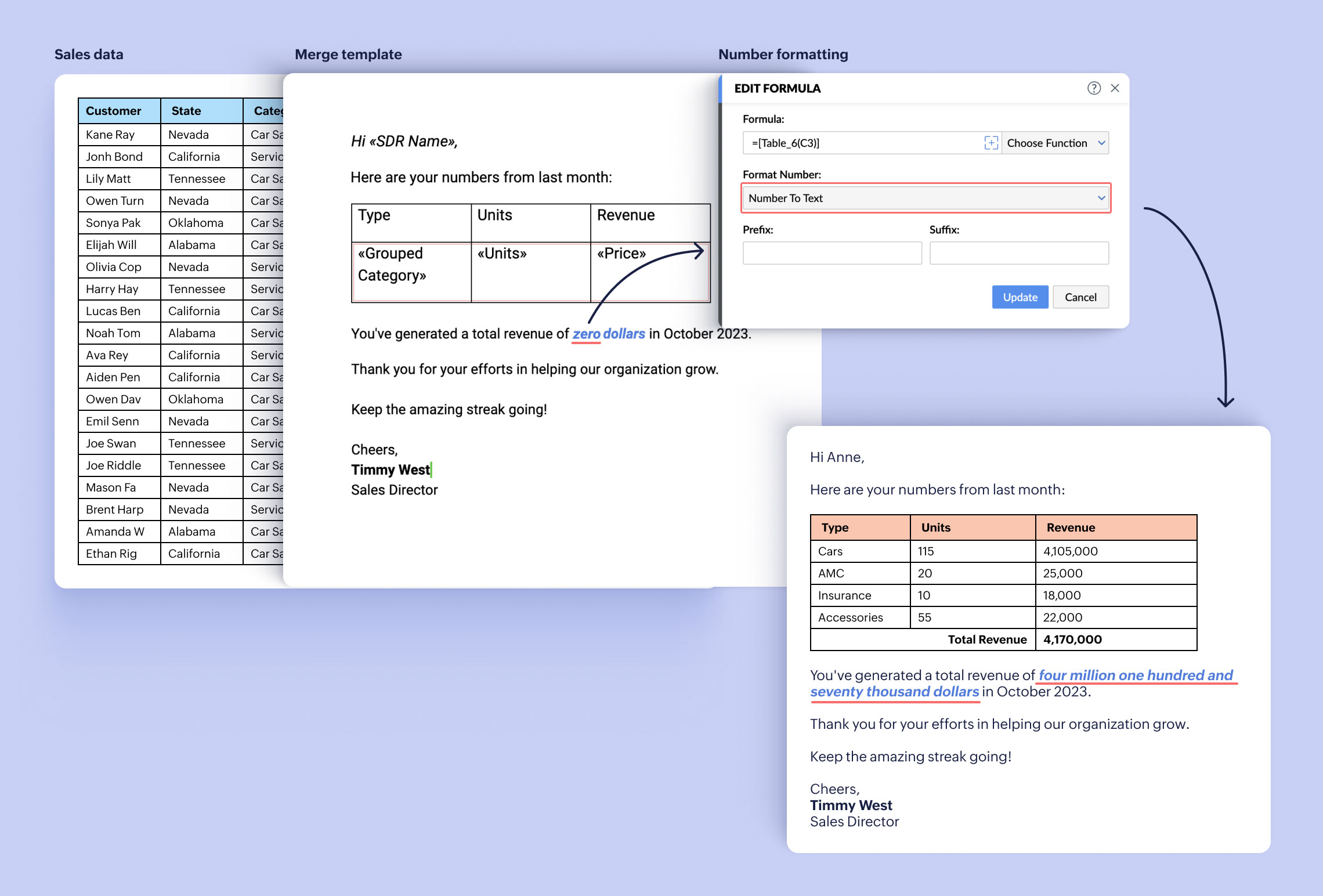


Zoho Writer has added new formatting options exclusively for numbers. With these, you can now convert a number to text, ordinal number, ordinal text, and ordinal year.

The Zylker Automobiles sales admin uses the new Number to Text formatting option to convert and display numbers as texts in email that they send to their SDR every month.

Try the group by and aggregation functions in Writer's mail merge templates, and let us know your feedback. You can also watch this video to understand how to use these features to elevate your documents.

If you need any assistance or have any questions in configuring the group by, aggregation, or data transformation operations, please write to us at support@zohowriter.com or add a comment below.

Happy merging and data visualizing!


      • Sticky Posts

      • Easily perform calculations using dates with the new DATEDIF function

        Hey Zoho Writer users! We've enhanced Zoho Writer's formula capabilities with the new DATEDIF function. This allows you to calculate the difference between dates in days, months, and years. Function syntax: =DATEDIF(start_date, end_date, unit) Inputs:
      • Zoho Writer's WordPress extensions

        Hey Zoho Writer users! Say goodbye to all your WordPress content publishing woes with Zoho Writer's WordPress extensions. Publish content with all your formatting and images, republish content when you update a document, and more—from a single window
      • Date-based conditions and filters

        Configure conditions with date  Hi everyone! We are excited to announce that you can now compare and filter data with date-based conditions. This update lets you compare date fields in a document to a reference date and display a text or value if the
      • Introducing group by, aggregation, and repeating regions in mail merge templates

        Display data exactly the way you want and highlight key insights with Zoho Writer's enhanced merge templates. We've supercharged Zoho Writer's merge templates with the capability to dynamically group, aggregate, and repeat data as blocks. You can now
      • Say hello to an improved way to merge documents!

        Automating all your documents from start to finish is now easier than ever with Writer's new merge tools.   If you haven't seen it yet, you can read the main announcement here. Here is the full list of the features we've rolled out: 1. Dynamic Table Headers

        • Recent Topics

        • CRM Portal Lookup Linkage and Related Fields

          hi, if someone can give me the right path, would be greatly appreciated. we want to do a customer portal for our partners who we issue work orders for our customers, the linkage via lookup fields Partner -> Work Order -> Customer in our portal, the primary
        • HOW TO: Searching a thread (email body/text) with a custom function, allowing filtering and specific actions

          We are still trialing out Zoho at this time, but have found a major expected feature to be missing - the ability to search within the text of an email for automation/workflows. NOTE: You need to create a connection for zohodesk under settings -> Developer
        • Cold emails not allowed?

          I planned to use Zoho Mail to send businesses some cold emails to offer my freelance writing services, but I noticed that the anti-spam policy is very strict -- no commercial emails whatsoever without prior permission from the recipient? I would be very
        • Zoho Team Inbox - roadmap

          Hi, would be good to understand the Teaminbox roadmap, in particular: 1. API / Zoho Deluge connections. We have a process where the each email needs to be either tagged or assigned daily. It would be great if we could automate a 5pm alert for any exemptions
        • Leave Time - Past Dates by Pay Period

          Under Settings | Leave Policy | [policy name] | Restrictions, one can set a number of days that an employee can go back to apply leave. This is very good and very needed. However, in most organizations, the real deadline isn't X number of days from the
        • Link webform to a job opening

          I have a webfrm embeded on my website and everytime a candidates fill the form, their candidate status is to new. Is it possible that it links to a specific job opening instead of me having to assing it manually ? Thanks
        • New in WorkDrive: Organize your storage using Data Templates

          Organizations generate huge volumes of data day in and out. From financial reports, client details, and resumes to promotional images, product videos, and more. The list is endless. When you have so much data to manage, you need to classify your documents and structure them in a way that makes them more accessible.  This is exactly what WorkDrive's Data Templates lets you do! You can create Data Templates, add meta data as custom fields, and associate those fields with files and folders based on
        • Need Native Support for docx files in Zoho Writer

          Absolutely love Zoho Writer, but often need to share files by email with people who are in the Office ecosystem. Downloading a file as docx, then sending it by email, getting the comments back, converting it to Zoho format, editing it, then converting
        • Mirror Component in Zoho CRM: Access real-time related data without leaving your record

          Hi everyone, This feature is now available for the JP, CA, SA, UAE, and AU DCs. We're excited to bring to you Zoho CRM's mirror component, which presents relevant data on a record's details page and keeps everything users need in one place without having
        • Associate records via the Multi-select lookup RELATED LIST via API

          In the REST API, is there a way to associate records for a multi-select lookup related list other than via the linking module? There are two methods for the lookup: 1. via insert records API 2. via the linking module ...as described in https://help.zoho.com/portal/en/community/topic/kaizen-125-manipulating-multi-select-lookup-fields-mxn-using-zoho-crm-apis
        • What's New - May 2026 | Zoho Backstage

          Another month, another round of improvements in Zoho Backstage. We’ve been busy refining existing experiences and introducing new capabilities to help you plan, manage, and deliver successful events with less effort. Here’s a quick look at everything
        • Product sorting in Zoho Commerce - how can I influence standard behaviour?

          Hello Zoho, I want to sort my products by e.g. name, SKU (Ascending / Descending) or by another attribute. I could neither find any solution in the settings, nor an entry in this help. Can you advice how this would work? Seems the standard sorting is
        • Dynamically prefill ticket fields

          Hello, I am using Zoho Desk to collect tickets of our clients about orders they placed on our website. I would like to be able to prefill two tickets fields dynamically, in this case a readonly field for the order id, and a hidden field for the seller
        • Price Managment

          I have been in discussions with Zoho for some time and not getting what I need. Maybe someone can help explain the logic behind this for me as I fail to understand. When creating an item, you input a sales rate and purchase rate. These rates are just
        • Workflow Assistance in Zoho CRM

          Our client's sales team visits customers on-site and currently fills a physical paper form to capture customer details, and then separately re-enters the same data into Zoho CRM via the mobile app — resulting in double data entry. We want the salesperson
        • Integration problem between zoho crm and zoho forms for an update in zcrm, with two mapped custom fields

          Hello everyone, I need to correct an existing integration between Zoho CRM and Zoho Forms: the use case is that a user needs to send an email to a contact, who will click on a button in this email, redirecting to a Zoho Forms. The contact can update or
        • Delivery Note without services

          Hi all, It there a possibility to create a delivery note from an invoice without the listed services "idem type: service"? Thank you in advance, Michel
        • Automation Series: Auto-assign Task Followers

          As task progresses, several users are required to stay aware of the updates to plan their upcoming work items efficiently. Manually adding users as followers for an active task might create additional overhead. With this automation, followers can be added
        • Send Email Directly to Channel

          Hi, We are coming from Slack. In Slack each channel has a unique Email address that you can send emails too. I currently forward a specific type of email from my Gmail InBox directly do this channel for Verification Codes so my team doesn't have to ask
        • Terms & Conditions

          I have defined Terms & Conditions in the invoice setting and have set %TermsAndCondition% where I want it to appear but nothing shows up in that area. Is this something we have to define per invoice or can we have a global variable?
        • Billing Status Update

          Hello Latha, I’m working on a new automation (deluge) to fulfill one of our requirements. In this automation, there is a step to update the Work Order billing status from “Not Yet Invoiced” to “Non-Billable.” I tried to find the API information relevant
        • Export to pdf. Images not showing

          My report contains a column with images. When I export it as a list, the images do not show in the PDF document. I have published the report but the images are still not visible. What should I do so that the photos appear in the export?
        • Zoho CRM Kiosk question – Passing Screen Fields to a Function

          I am building a Kiosk in Zoho CRM to create new Supplier (Vendors) records. Current setup: Screen 1 contains user input fields: Supplier Name (Vendor_Name) First Name (First_Name) I created a Deluge function: createSupplier(vendor_name, first_name) The
        • パスワード

          ログインするためのパスワード取得したい。
        • Associate Zoho Project with Deal that is in a specific stage?

          Hi there, When a deal hits a certain stage, I'd like to associate it with an pre-exisiting zoho project? I am using blueprints. Using a custom function and deluge, how could I do this? I was thinking that the easiest option would be the modify the pre-made
        • [Product Update] Locations module migration in Zoho Books integration with Zoho Analytics

          Dear Customers, As Zoho Books are starting to support an advance version of the Branches/Warehouses module called the Locations module, users who choose to migrate to the Locations module in Zoho Books will also be migrated in Zoho Analytics-Zoho Books
        • Canvases Auto-Skewing/Adding Scroll Bars When They Were Not There Prior

          Is anyone else noticing rendering issues in their canvases today? It seems to be mainly icons which now have scroll bars added which makes them all look off, though some fields seemed to revert to squished length as well. Were the icons replaced with
        • New UI for Writer - Disappointed

          I've been enjoying Zoho Writer as a new user for about 6 months, and I really like it. One of my favorite things about it is the menu bar, which you can hide or leave out while still seeing most of your page because it is off to the left. I think this
        • Client Script Button in Related List become invalid

          Hi, I am the admin of our organization. And I setup a client script button in related list to raise payment refund request While this button become non selectable recently. I believe there is something wrong from zoho as this button had run for a year.
        • SMTP outgoing problem

          Hello I have a website where the SMTP email is connected through Zoho Mail SMTP. Today I am no longer receiving emails from the website. Joomla shows that the email was sent successfully, but I do not receive it.
        • Fiscal year setting

          Hi, I am looking into using Zoho Books. I cannot understand the organisation fiscal year setting. Our fiscal year runs from 1 April to 31 March. In the organisation profile, I need to set Fiscal Year to “April to March” and Start Date to “2” for the period
        • Issue with payments on invoices

          Hello, I’m having the following issue. When I create an invoice and try to apply a partial payment in a single transaction, the system does not allow it — it only allows full payment. Is this the expected behavior, or am I missing some configuration?
        • auto add as member the contact owner

          is there a way that i can make a zoho flow that will add the owner of the contact as a member of the chat after the round robin assignment?
        • Welcome to Zoho CommunitySpaces

          Hello everyone, This is your space to ask questions, share ideas, and connect with others building and growing their own communities. For those new here, Zoho CommunitySpaces is a platform for building and managing online communities—from discussion spaces
        • Announcing new features in Trident for Windows (v.1.20.4.0)

          Hello Community, Trident for Windows is here with some new features to elevate your work experience. Let's take a quick look at what's new. Export emails. You can now export emails in the .eml file format as compressed zipped files to create a secure
        • Announcing new features in Trident for Windows (v1.14.5.0)

          Hello Community, Trident for Windows is here with new features to elevate your workplace productivity. Let's take a quick look at what's new. Add and edit contacts Previously, you could view all of your personal and organizational contacts in Trident.
        • Announcing Trident desktop app for Zoho Mail & Zoho Workplace users

          Hello Community, I hope you are doing well and staying safe. As you know, our Mail & workplace teams have been constantly working on adding more value to our offerings to ensure you and your organization continue enjoying your Zoho experience. As part
        • Quick way to add a field in Chat Window

          I want to add Company Field in chat window to lessen the irrelevant users in sending chat and set them in mind that we are dealing with companies. I request that it will be as easy as possible like just ticking it then typing the label then connecting
        • Please Remove the Confirmation Popup

          Currently, every time a recruiter changes the status of a candidate in Zoho Recruit, a popup confirmation appears that requires clicking “OK, Got it” before proceeding. This creates unnecessary friction in the workflow, especially for users handling high
        • Team Module Issues?

          We are testing Team Licenses for use by our Customer Service staff. I created a Teamspace called CSR and only assigned two users to this space: Administrator (me) and “Team License Test.” Team License Test is assigned to the Team User profile, with a
        • Next Page