Introducing the locking option for CRM records
Last modified on 06/04/2023: Record locking option in CRM is now available for all Zoho CRM users in all DCs. Note that it was an early access feature available only upon request.
Hello All,
Hope you're doing well!
We're thrilled to introduce our latest enhancement to CRM—record locking.
Certain business scenarios demand that records in your organization's modules be safe from editing or deletion once they reach a certain stage in your sales process or satisfy specific conditions.
For example, if a deal has reached the final stage—"closed won" or "closed lost"—then perhaps it shouldn't be further edited or deleted.
Alternatively, let's say a record is in its proposal or review stage. During such a stage, the details of the record need to be verified, and even though a sales rep may be the record's owner, you can't allow them to update the record while the review is ongoing.
There might also be situations where the record doesn't match certain criteria, but the user dealing with the record might want to lock the record to avoid changes. For example, when a sales rep is in touch with a prospect, they may want to temporarily lock the record while prospecting is in progress to prevent other reps from adding incorrect information to the record.
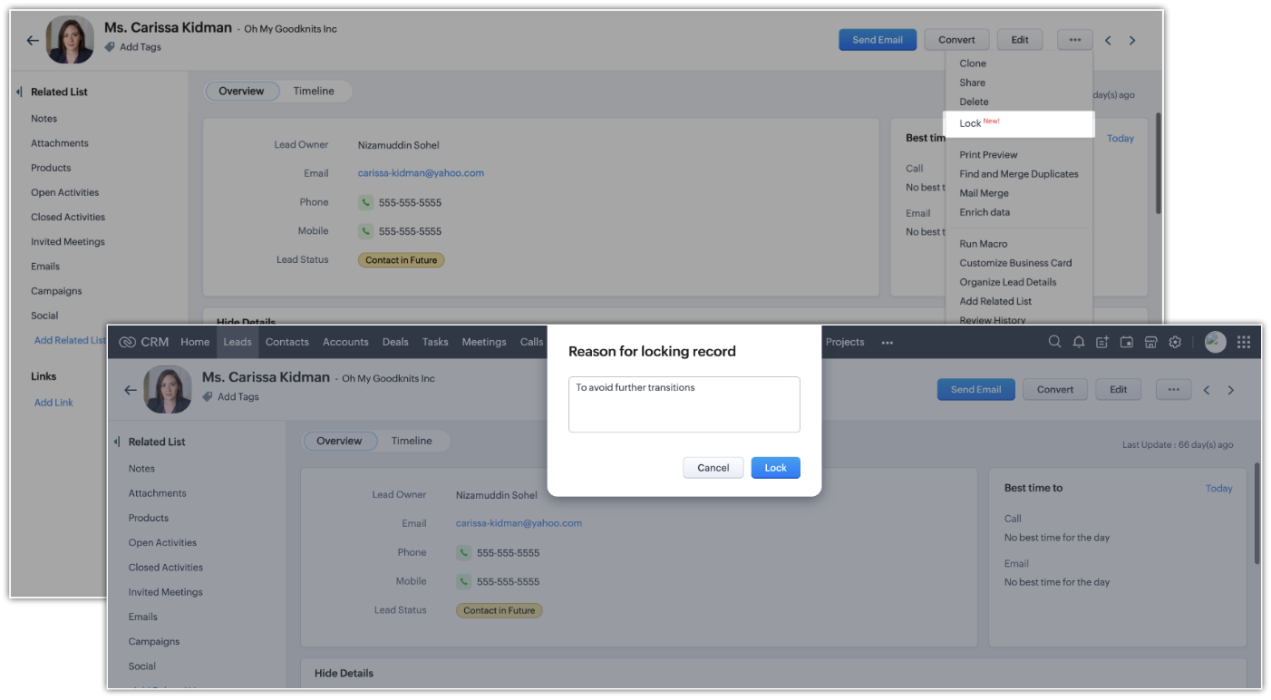
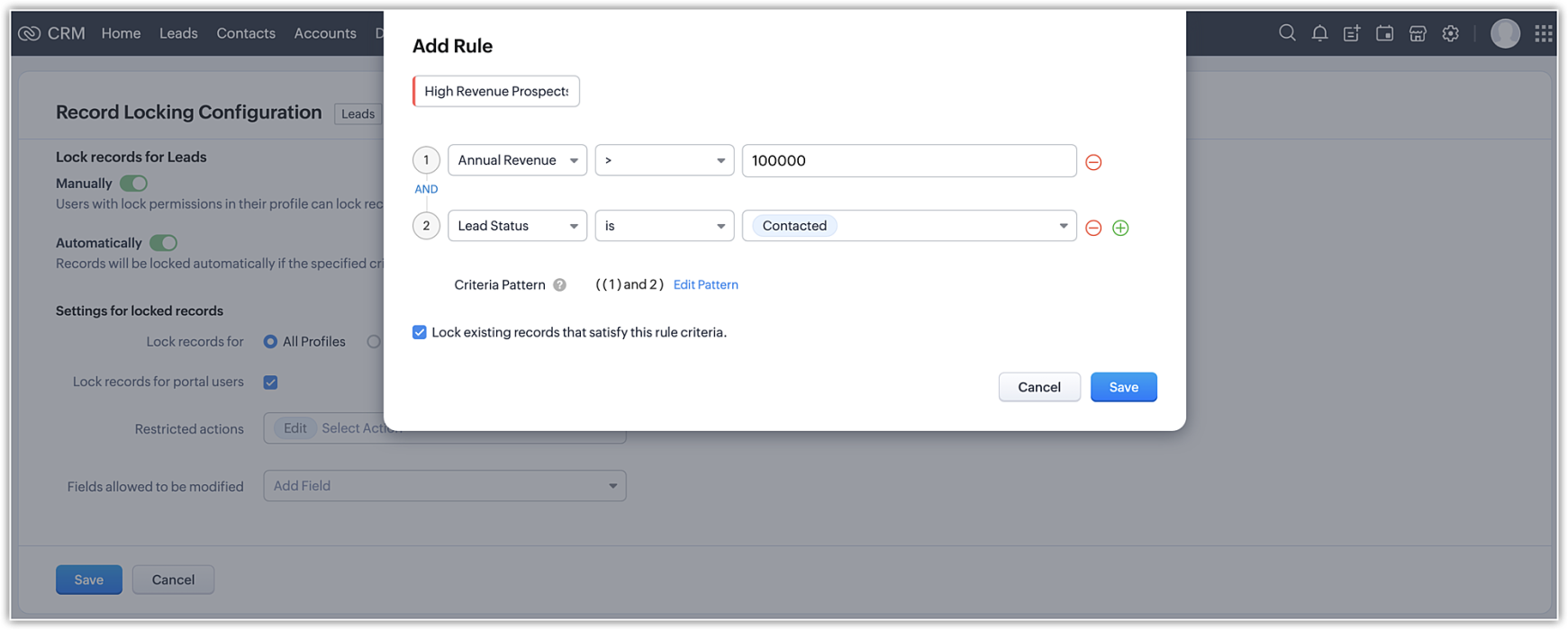
Zoho CRM's record-locking feature enables you to lock records manually or automatically when certain conditions are met.
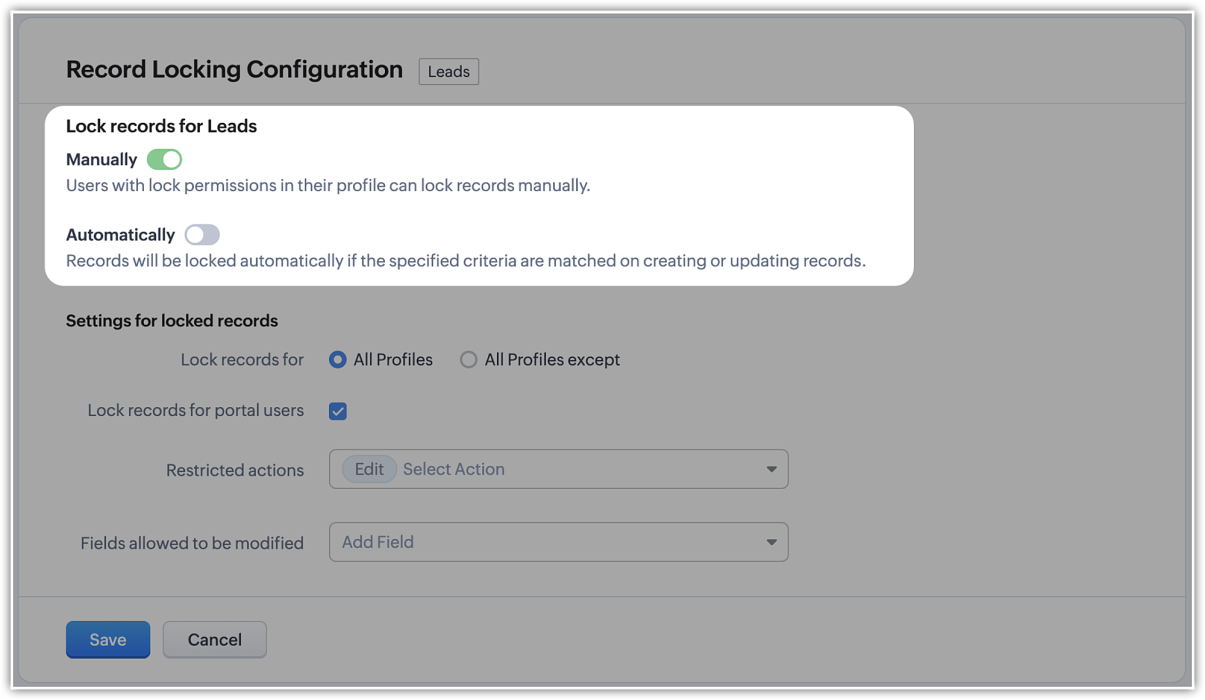
NOTE (added on 02/03/23): The locking configuration must be set up separately for each module. You can navigate to the specific module in Modules and Fields under Customization in your setup page, and you will find the Record Locking Configuration tab.
Record locking configurations
Now that we've established why locking records can be useful or necessary, let's take a quick look at the different configuration options available:
Now that we've established why locking records can be useful or necessary, let's take a quick look at the different configuration options available:
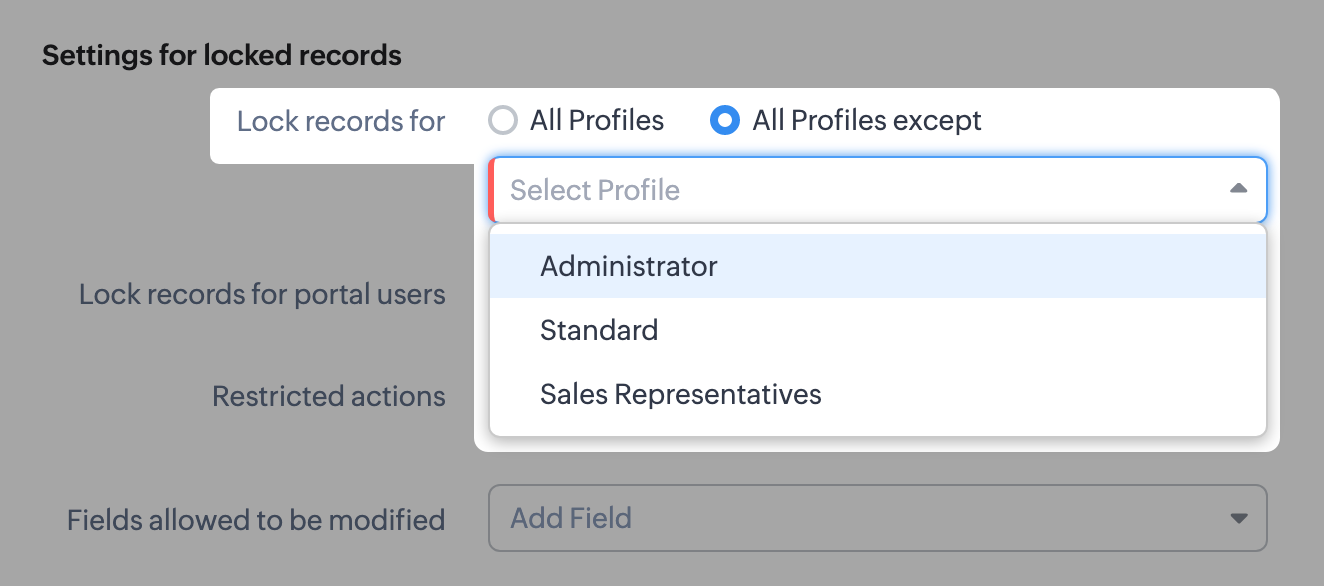
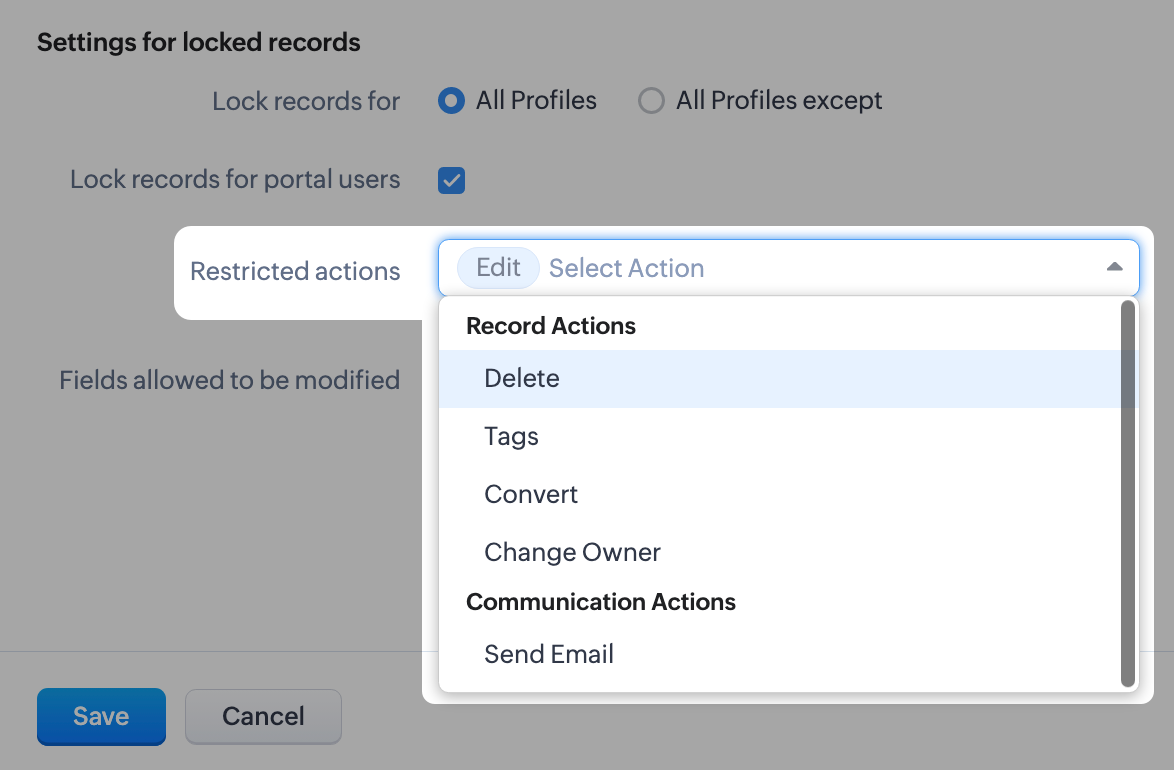
- There might be scenarios where, say, you want members of the accounts team to be able to edit quotes, but not other profiles. You can simply lock the records for all profiles except those belonging to members of the accounts team, any other set of exceptions using the multi-select menu. Additionally, you can also choose to lock records for all profiles.
- You can lock the records that are accessible to your portal users.
- For locked records, the edit action is disabled by default, but you can restrict other types of native actions, as well as custom buttons.
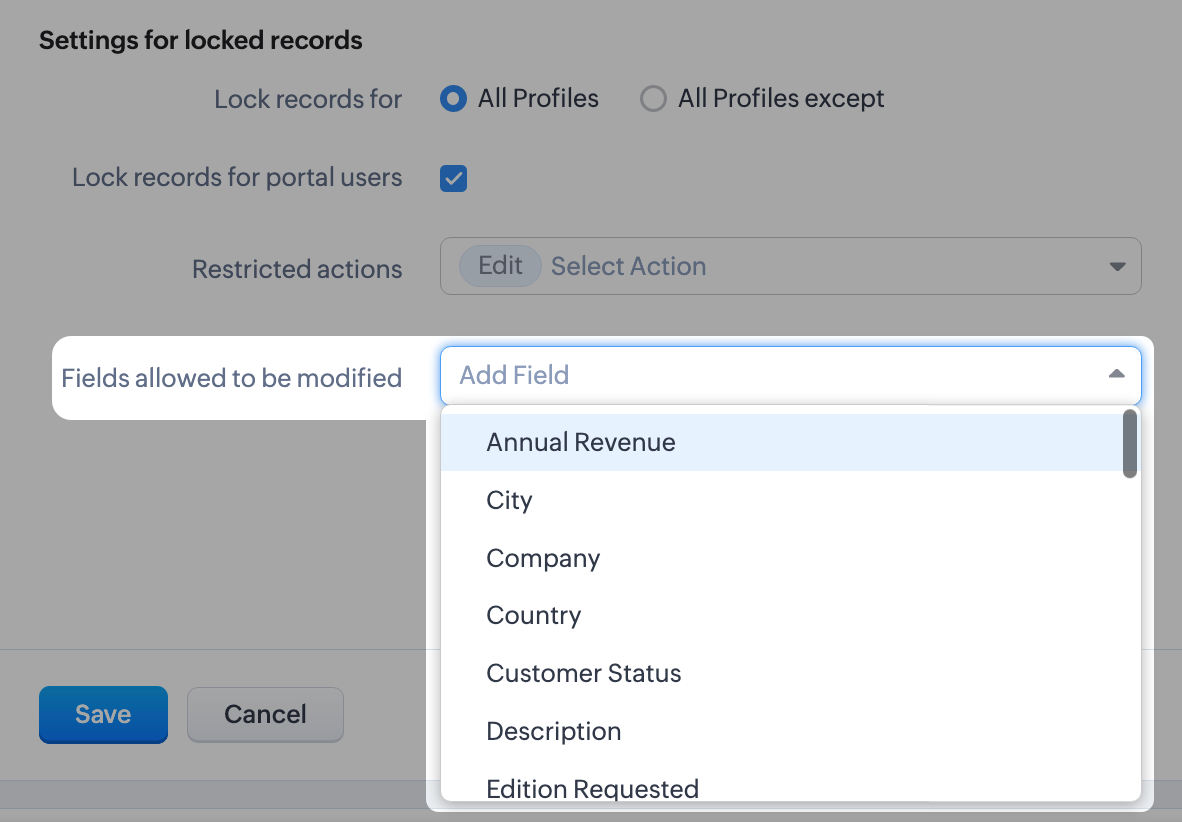
- Even when a record is locked, you can configure certain fields which don't affect your business process to remain editable. For example, you might want the Description or comment fields to remain editable. You can leave a maximum of 15 fields unlocked.
What happens when a record is locked?
Once a record is locked, you will see the lock icon on the record image and in the UI of the record detail page itself. Only fields you've enabled will be available to edit.
Once a record is locked, you will see the lock icon on the record image and in the UI of the record detail page itself. Only fields you've enabled will be available to edit.
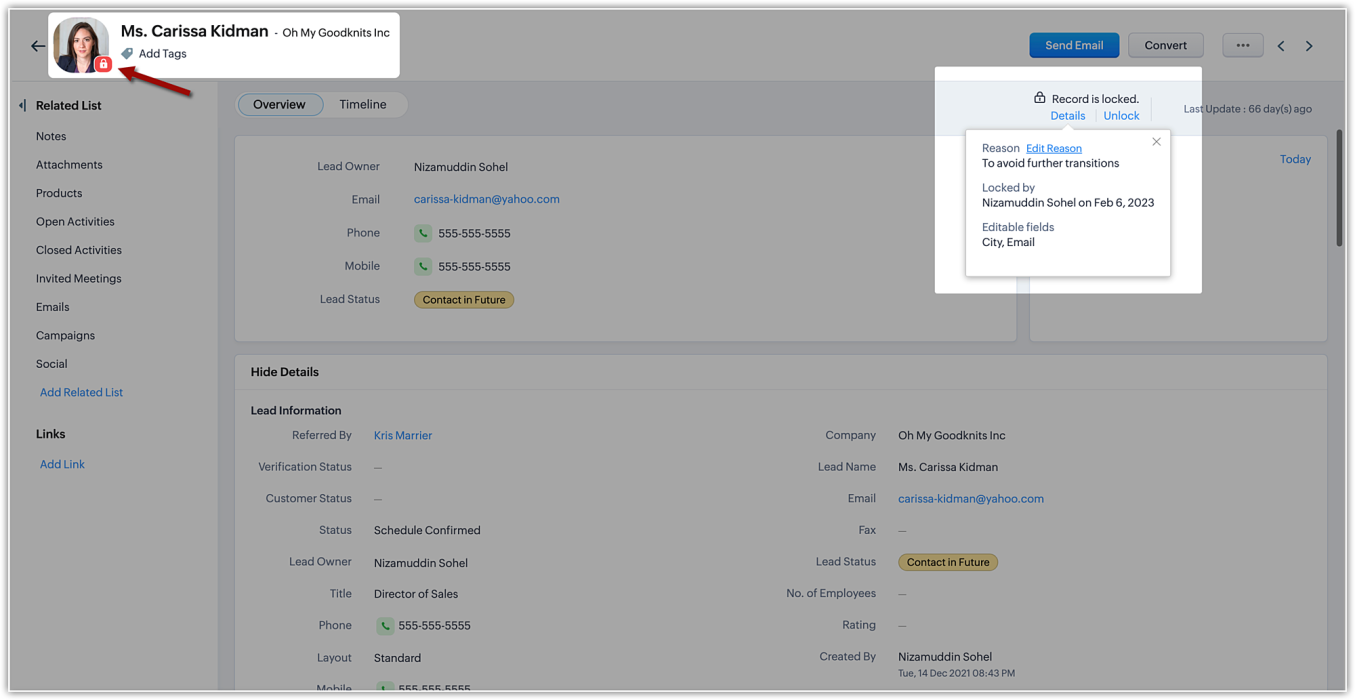
The details of the locking, such as the reason (i.e., the locking condition), locking date, and the fields available for edit will be shown on the details button available on the record detail page.
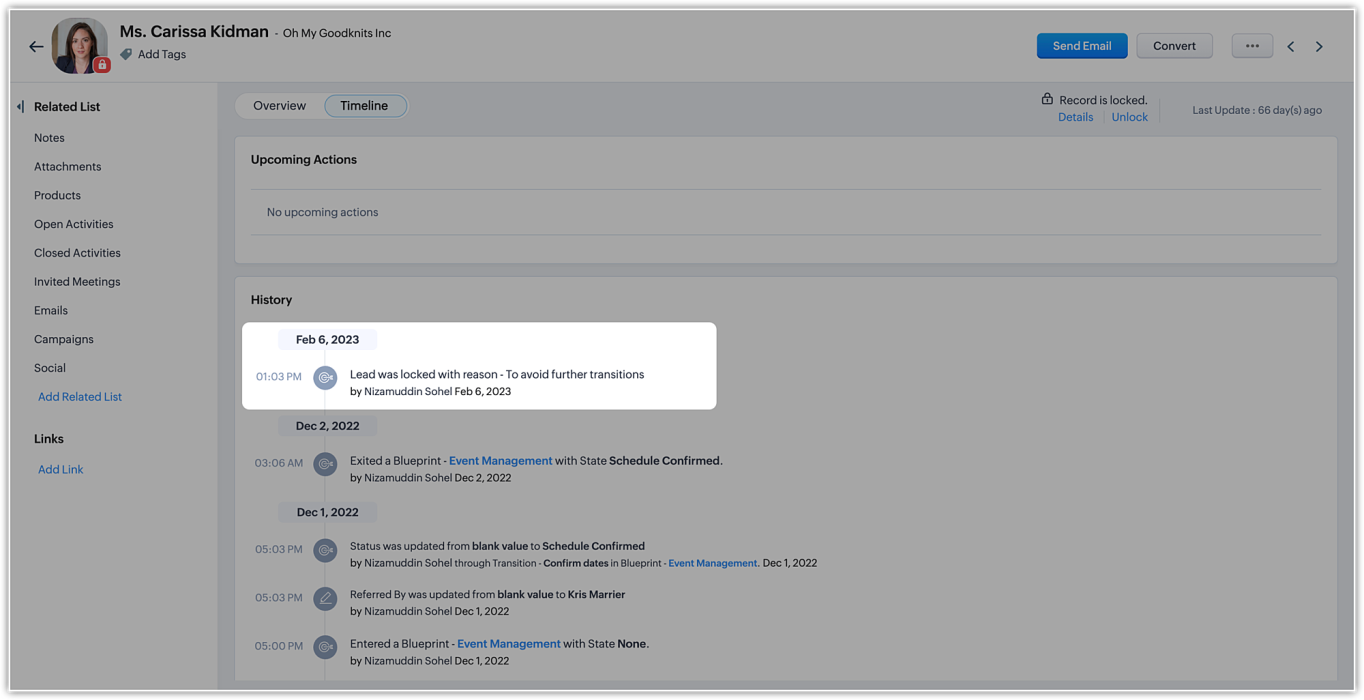
In the record's timeline, you can also see timestamped details like when the record was locked and the condition that was followed.
On the record list view, locked records are indicated by a lock icon.
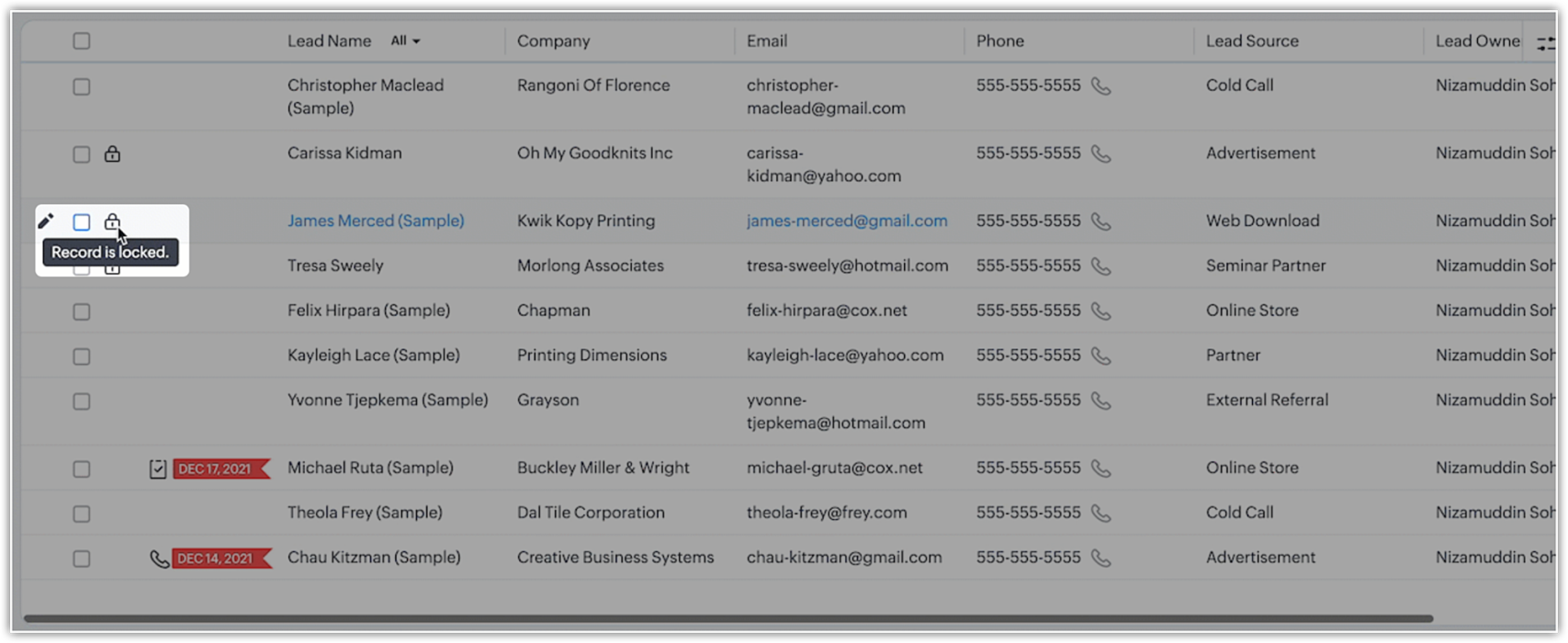
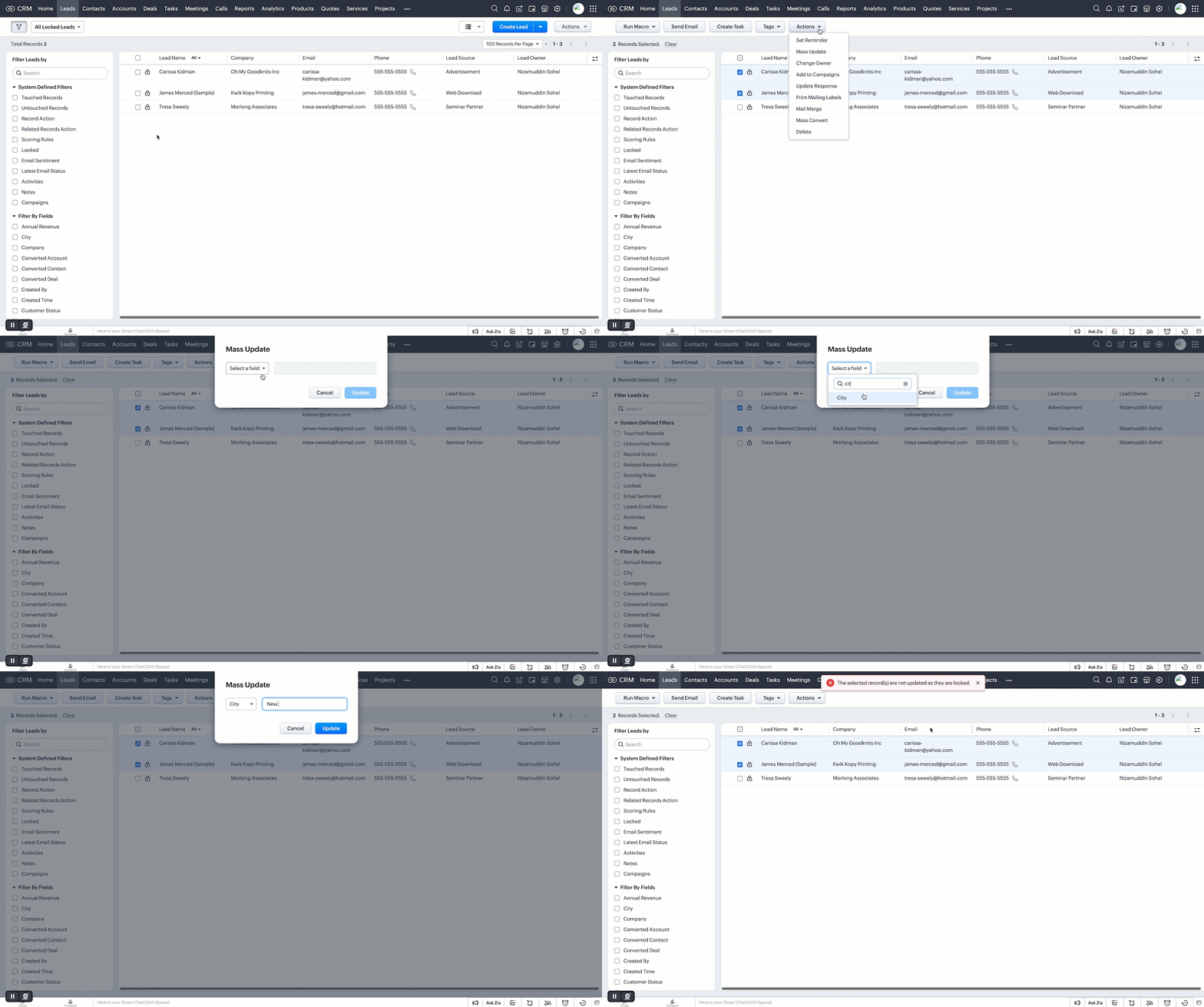
Additionally, you can filter records in the list view based on the pre-defined filter option, as well as based on the system-defined custom view.
Who can unlock records and how is it done?
If a user locks a record manually, they can unlock it themselves. Admins can unlock records, too. On the other hand, automatically locked records will be unlocked only when they're no longer subject to the lock conditions or criteria.
However, deleting a rule or locking configuration will automatically unlock all records the rule or condition had previously locked.
Additional notes
- Set up to five rules per module. Each rule will have a name that is displayed on the record detail page when a record is locked.
- System actions like automation and integration syncs will still be performed on locked records, even when a user who is excluded from locking triggers those processes.
- Locked records are still displayed in list views. However, bulk actions done from list views are not allowed if the respective action is restricted under the record locking configuration.
- Record locking configuration is available for enterprise and ultimate editions of Zoho CRM. If an user downgrades from enterprise edition, locking configurations will be ineffective and all records will be unlocked.
Locked status can not be regained upon upgrading back.
That's all for this exciting new enhancement. Read more about the record locking configurations and its usage in our help doc.
Thanks and have a good one!
Note:
- Manual locking/unlocking of records is not available for the mobile app as yet.
- Auto-locking of records will get reflected on the mobile app, and locked records cannot be updated from mobile app also.
- The locking configuration must be set up separately for each module.
Topic Participants
Saishree T K
Lane Von Pinkston
Jordan Talmor
Amit
Piyush Goyal
Sticky Posts
Announcing Early Access to "Zoho CRM for Everyone" — A new and exciting update to Zoho CRM
Update : Zoho CRM For Everyone's Nextgen Interface gets an upgrade! Hello everyone, We’ve updated the Zoho CRM for Everyone Nextgen interface based on your feedback. The UI is now simpler with a unified sidebar, a more visible global search and features[Early Access] Voice of the Customer (VoC) for Zoho CRM
Happy new year, everyone! We have an exciting addition to our suite of features and would like to introduce you to VoC (Voice of the Customer) for Zoho CRM, powered by Zia. 2023 is definitely the best time to be a customer with rapid innovations and advancementsAdding calls as a channel in Voice of the Customer
Dear All, We hope you're well! It's been almost a year since we opened Zoho CRM's Voice of the Customer solution up for early access. We are grateful for the reception and support you have been showing us with regards to its adoption and feedback. Since
Recent Topics
cannot login from outlook on mobile
Hi there, I tried to set up my email accounts on my iphone using outlook, but it always return email address and password error. Please find the attachment for the screenshot. I am pretty sure that I typed in the correct email address and password and the imap has been enabled from zoho admin account. I can configure the email address on iphone default mail service as well as outlook on pc, the problem only occurs on the outlook app on mobile. I do need to use this app instead of the iphone defaultElevate your CX delivery using CommandCenter 2.0: Simplified builder; seamless orchestration
Most businesses want to create memorable customer experiences—but they often find it hard to keep them smooth, especially as they grow. To achieve a state of flow across their processes, teams often stitch together a series of automations using WorkflowMessages not displayed from personal LinkedIn profile
Hello. I connected both our company profile and my personal profile to Zoho social. I do see all messages from our company page but none from my private page. not even the profile is being added on top to to switch between company or private profile,"Performed changes in the query is not allowed due to following reason" when adding columns or reordering data
I'm trying to make changes to a query but every time i try to save it i get this error message. I'm not touching the data it's flagging. All I've tried to do is reorder a couple of fields and add a new one. Why won't it let me do this? It's a core queryOnboard new users easily with native screen recording in Zoho Projects Plus
Communication involving both visual and audio elements tends to capture more interest among the audience. Whenever we onboard new employees to the organization, the task of engaging them in the induction sessions, and keeping the spark going in theirRequest to Add Support for PDF Templates and More Flexibility in Email Editor
Hi Zoho Campaigns Team, I hope you're doing well. I wanted to share some feedback and request a few improvements in the Email Template feature of Zoho Campaigns. Right now, we can create email templates using the HTML editor, which is helpful. But we’reCan you stop Custom View Cadences from un-enrolling leads?
I'm testing Cadences for lead nurture. I have set un-enroll properties to trigger on email bounce/unsubscribe, and do NOT have a view criteria un-enroll trigger. However, help documents say that emails are automatically un-enrolled from a Cadence whenZoho Desk Android and iOS app update: Agent detail overview
Hello everyone! We’ve introduced agent detail overview on the Zoho Desk Android and iOS app update. With this feature, you can get a complete view of agent’s tickets, response times, logged hours (for both tickets and activities), customer happiness ratingsBlog Widget: Show recent blog posts on my homepage
Hey there I am using the Zoho Sites Blog feature. On my homepage, on the bottom I'd like to have a featured content section where I show some of my blog posts (selected, most recent, filtered by category and so on...). It would be nice to have a blogHow to iterate through excel data using zoho rpa
I wanted to iterate or loop through excel data ( datatable). How can i do thatZoho Commerce
Hi, I have zoho one and use Zoho Books. I am very interested in Zoho Commerce , especially with how all is integrated but have a question. I do not want my store to show prices for customers that are not log in. Is there a way to hide the prices if notMass (Pull back) (Close WOs) (Close APs)
Hi develop team. Just idea because Zoho FSM is great but its too manual. we have a lot of task to do every day and the system needs to have more features to automatic our tasks. I need to close several WOs, APs and Pull Back per day. Please we need massCustomising Zohidesk portal default widgets
Hello, I'm wondering how could I customise the default widgets such as "popular topics", "popular articles" using CSS or to make the tiles at the bottom match the ones that I made in the picture attached. I have made some custom widgets and edited themIf there’s a batch at the end, the ‘mark as inactive’ function doesn’t work.
when my batch has a date to batch end and I "mark as inactive" he batch does not obey the status and reactivates the batch.Seamless multilingual messaging and tone control in Zia IM Composer
Hello everyone! Managing customer conversations across multiple languages can be time-consuming. Using Zia in the Instant Messaging (IM) Composer helps you overcome this by providing tools to translate content, adjust your tone, and refine your messagesAdvanced Deluge help needed with custom function and COQL limits
I have a scheduled function that takes a snapshot of specific metrics and saves them to a custom module. However I'm struggling with the limits of COQL. I attach my full code, but an example of the issues I'm having is that it's erroring with a 'LimitTip of the Week - Conditional Formatting Chart
Conditional formatting allows you to highlight your data series based on a pattern or a trend in your data. This makes it easy for you to identify when your data reaches certain values or when it deviates from the trend. Zoho Analytics allows you toZoho Learn - AI Translate
Hi Learn team, I had a situation today where I was providing training to a client team and I had written articles into their Zoho Learn to support their learning. I realised that one of the team members was a non-native English speaker and they were strugglingPower of Automation :: Auto-Sync Custom Date Field Between Related Tasks via Blueprint Transition
Hello Everyone, A custom function is a software code that can be used to automate a process and this allows you to automate a notification, call a webhook, or perform logic immediately after a workflow rule is triggered. This feature helps to automateIntroducing auto-upgrade in Zoho LandingPage
Hi everyone, We’re excited to share an upcoming update to help you get the most out of your landing pages — the auto-upgrade option, launching on October 22, 2025. Your landing pages are designed to bring in leads, and we want to make sure you never missWorkdrive comment links stopped working.
I have marked a PDF file with 95 comments, they have worked for a while. When i clicked on them they brought me to the correct page and showed me the outline that i had drew on the plans. The comments included the page number of the outline, but now itHow to Bulk-Update Sales Orders in CRM
Hi - I need to bulk update existing sales orders with dates from our ERP of when the sales orders were created. I made a date field on the Sales Order module where I want to insert that data. I can't Mass Update because I am not updating the fields toZoho ToDo in Cliq
Our organization utilizes Zoho ToDo in the Zoho Mail Desktop app. Is there a way for these to show up in Cliq Desktop app as well?【Zoho CRM】サンドボックス機能のアップデート:カスタムビューが利用可能になりました。
ユーザーの皆さま、こんにちは。コミュニティチームの中野です。 今回は「Zoho CRM アップデート情報」の中から、サンドボックス機能のアップデートをご紹介します。 目次 1. カスタムビューとは 2. 今回の機能アップデートについて 1. カスタムビューとは カスタムビューは、ユーザーが設定した条件に基づいてデータをフィルタリング・整理し、 重要な情報へ効率的にアクセスできるようにする機能です。 「過去15日間の見込み客」や「受注間近の商談」、「特定の優先度レベルが設定された案件」など 条件を指定してわずか数クリックで設定できます。Changing an agents email address
How do you change an agent's email address? I keep getting a red circle even though I am an admin. And on one of my agents he has two email addresses? How is that possible?Zoho CRM - Potentials Tab
Hi! When I create a Deal (Potentials tab) the header looks like this: After a refresh on the page it looks like this: What should I do so that it is displayed like in the second pic without refresh? Also I have a user that as of recently, cannot see thisUnable to create embed code for resource of workdrive using API
Hello Team, I am trying to create embed code for a resource using workdrive api in powershell, however facing some issues with injecting data in body. Followed Doc: https://workdrive.zoho.com/apidocs/v1/filefoldersharing/shareeveryone Please help, belowFeature Request - Insert URL Links in Folders
I would love to see the ability to create simple URL links with titles in WorkDrive. or perhaps a WorkDrive extension to allow it. Example use case: A team is working on a project and there is project folder in WordDrive. The team uses LucidChart to createnot able to convert pdf to jpg and other forms and vice versa.
i want to change my pdf to jpg, word, etc and some times jpg to pdf. i don't know how to do in this.Enable / show scroll bar when Mega Menu is opened
Hey there I am using the mega menu add-on and experience a "flicker" whenever the mega menu opens. The reason is, that the scrollbar, which has a width of a few pixels, stops showing when the mega menu opens. As the scrollbar disappears the whole pageReports: Custom Search Function Fields
Hi Zoho, Hope you'll add this into your roadmap. Issue: For the past 2yrs our global team been complaining and was brought to our attention recently that it's a time consuming process looking/scrolling down. Use-case: This form is a service report withZoho Inventory - Composite Items - Assembly - Single Line Item Quantity of One
Hi Zoho Inventory Team, Please consider relaxing the system rules which prevent an assembly items from consisting of a single line item and outputting a quantity of 1. A client I'm currently working with sells cosmetics and offers testers of their productsHow can I transfer data from Production to Development environment?
Hi, I am using Creator V6 and would like to bring all the data in production to the Development and Testing environments? Is there an easy way of doing that or I have to export and import each table?New portal SAML authentication error: User not found
Dears, Has anyone else been experiencing this lately? I am creating a new portal authenticated by SAML (Entra ID). I followed the same process as I did with other portals, but any new portal created after this always encounters this error. I’ve been reportingDevis et facture multi page
Bonjour, je suis sur Zoho invoice et je rencontre un problème sur mes devis et factures lorsqu'ils dépassent 1 page. je me retrouve souvent avec des lignes coupées ou le sous total page 1 et le total page 2. j'aimerai savoir s'il existe une possibilitéHelp with Filtering Records, HTML Pages, and Automatic File Uploads in Zoho Creator
Hi Zoho Creator Community, I’m building a Zoho Creator application and need guidance on a few features I’ve been struggling with. I want to implement them safely and efficiently, and I’d appreciate any examples, tips, or best practices. I want users toConvert invoice from zoho to xml with all details
How to convert an Invoice to XML format with all detailsFeature Suggestion for Zoho Websites – Inspired by Squarespace Systems
Dear Zoho Team, I’m a Zoho user and also a Squarespace Platinum Circle member, and I recently noticed the launch of Zoho Websites in India. I wanted to share some ideas for features that could enhance the platform for professional users and agencies.Custom View - Sort by Custom Field
I created a custom field for our Engineering team to know which tickets to work first by numbering them. I created a custom view to general data which includes the Engineering Priority. However, I cannot sort the Engineering Priority column ascendingZoho Indeed Intergation not pulling candidate details
We have recently integrated zoho with indeed. Prior to this our candidates came into the candidates tab via the zoho.resumes email address from indeed and it pulled through the candidates mobile number, and majority of the time a postcode. However sinceNext Page