Kaizen 208 - Answering your Questions | Functions, AI and Extensions

Kaizen 208 - Answering your Questions | Functions, AI and Extensions


Hello Developers!

Welcome back to a fresh week of Kaizen!

We are grateful for your active participation in sharing feedback and queries for our 200th milestone. This week, we will answer the queries related to Functions and Extensions in Zoho CRM.

1. Default value in parameter, also instant return must capable to do in deluge and also capable to use closure in deluge function.

Based on the query, we are assuming that by default value, the user is referring to using
placeholder values during testing or debugging. In Deluge, such defaults are provided at the browser level. 


For instant returns and closure, we need a few more details to give you the right guidance. We recommend reaching out to our support team with additional context so they can assist you further.

2. Please provide asynchronous script support or at least an option to increase the timeout limit for heavy processes.
Please increase the file size limit for invokeUrl tasks or introduce a more robust file streaming capability.

Based on overall runtime statistics, most functions complete within 5 minutes of runtime. Assuming your requirement involves longer-running processes, we recommend using Circuits or Schedules to handle such cases effectively.

Regarding file size limits for invokeUrl tasks, we assume your use case requires
handling larger payloads. In this case, we need more details to evaluate and provide a suitable solution, so we recommend reaching out to Zoho CRM Support.

3. I will be happy if I will can search on the Function list if some filed is exist on a function.
So if I change the API name I will be easy update the fields.

We understand that your use case is about quickly identifying functions that reference a particular field, especially when API names are updated. At the moment, this support is not directly available.

We are working on a feature revamp that will allow you to assign tags to functions for quicker access. For example, you’ll be able to tag functions with relevant keywords and then create custom views based on those keywords to easily locate them.

We have planned to roll out the feature revamp by early 2026.

4. I would love to hear more about Zoho CRM and its connection/setup/integration with AI and some use cases on how to currently improve business processes within the Deals Pipelines, and Sales.

We understand your interest in learning more about how Zoho CRM can connect with AI to improve business processes. Refer to this Smart Prompt help document to configure Zia and Open AI within Zoho CRM. 

We have also recently introduced several AI-driven capabilities in Zoho CRM to help you work smarter and faster. These include workflow creation to automate routine tasks, record summaries for quick insights, image-to-canvas to seamlessly convert visuals into Canvas, and AI-assisted email creation for more effective communication.

Check out Zia’s Next Best Experience help page to understand how to effectively use Zia to enhance your business processes with real-time use cases. 

These features are being rolled out across all data centers in a phased manner.

5. Bulk Data Enrichment: Script-based enrichment from services like Clearbit or internal ERPs.

As of now, bulk data enrichment is not natively supported in Zoho CRM. If you could share more details about your requirements with our support team, we will be glad to suggest a suitable workaround for your use case.

However, we offer a pre-built Clearbit extension that lets you quickly configure data enrichment without any need to write any scripts.

Install the Extension

1. Log in to your Zoho CRM account.

2. Navigate to Setup > Marketplace > All.

3. In the All Extensions tab, search for Clearbit Extension for Zoho CRM and click Install.

4. Agree to the terms and conditions, then click Install.


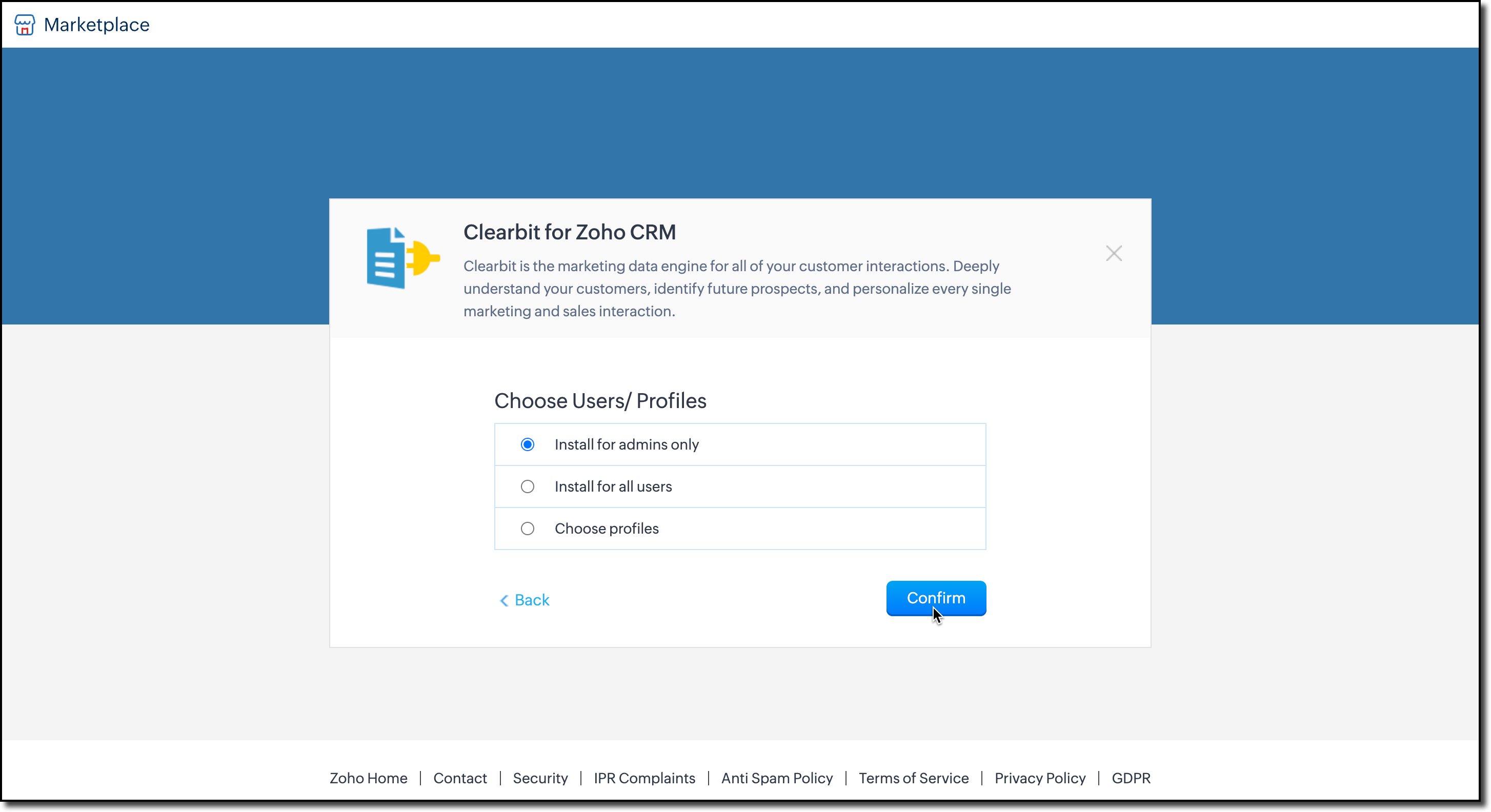
5. A pop-up will appear asking you to Choose Users/Profiles. Select who can enrich data, and click Confirm to install the extension.

6. You’ll then be prompted to enter your Clearbit account API key. This key allows Zoho CRM to fetch data from Clearbit and update your records. 

Enter the key and click Save.


7. Next, choose the modules where you want data enrichment. The extension currently supports Leads, Contacts, and Accounts.


You can change these configurations anytime by clicking Settings in the extension detail page.


You can also access the settings from Extensions list view as shown here. 


Enrich your Data

The extension pulls enriched data from Clearbit using the email address on the record. Once installed, a business card will automatically appear on the record’s detail view page.

Notes
Note: The email field is mandatory for data enrichment.


To update your CRM fields with Clearbit data:

1. Click Add to CRM at the top-right corner of the business card.

2. A field mapping iframe will open, where you can map Clearbit fields to your CRM fields.


3. After mapping, click Update to add the details to the record.  

We hope we answered your questions and you found this useful. For the queries we mentioned that we require more details and if we assumed it the other way around, please reach out to us at support@zohocrm.com.

We would be happy to connect and help you! 

Cheers!

--------------------------------------------------------------------------------------------------

Idea
Previous Post: Kaizen 207 - Advanced Queries using COQL API | Kaizen Directory: Home


        • Recent Topics

        • Tables improvement ideas / features

          Heya, I've been using Zoho Tables for a few months now and wanted to post some features that I think will be greatly beneficial for the tool: 1. Ability to delete a record in automation or move a record in automation. - Usecase: I move a record from one
        • Audio/video quality issues with Zoho Meeting – Any roadmap for improvement?

          Hi Zoho Team, We’ve been using Zoho Meeting for both internal and external meetings, and unfortunately, the experience has been consistently poor. The video and audio quality are so unreliable that it often renders meetings ineffective—especially with
        • Announcing offline payment modes for event tickets

          Hello everyone,   Collecting ticket payments from prospective attendees can be a tricky part of event planning. While Zoho Backstage has always allowed you to collect payments online as people buy tickets from your event microsite, we have now enabled
        • Zoho Books | Product updates | November 2025

          Hello users, We’ve rolled out new features and enhancements in Zoho Books. From translating email notification templates to the new transaction locking restrictions, explore the updates designed to enhance your bookkeeping experience. Making Tax Digital
        • What is going on with GMail extension.

          Suddenly, it is popping up and saying "Please wait while we work our magic... 10%" and it sits there. Yesterday I waited for an entire hour call and it never got further. Today, it's not resolved. Is there a fix I can do? I've tried all the typical
        • Gmail is ramping up its email sender policy from November 2025

          Hello marketers, As you may be aware, Gmail introduced a guideline for bulk senders starting February 2024. If not, here's a quick refresher straight from Google: After this policy was announced first in 2023 and soft-implemented in February 2024, we
        • Collapsible Sections & Section Navigation Needed

          The flexibility of Zoho CRM has expanded greatly in the last few years, to the point that a leads module is now permissible to contain up to 350 fields. We don't use that many, but we are using 168 fields which are broken apart into 18 different sections.
        • Gmail is ramping up its email sender policy as of November 2025

          Hello marketers, As you may be aware, Gmail introduced a guideline for bulk senders starting February 2024. If not, here's a quick refresher straight from Google: After this policy was announced first in 2023 and soft-implemented in February 2024, we
        • Good news! Calendar in Zoho CRM gets a face lift

          Dear Customers, We are delighted to unveil the revamped calendar UI in Zoho CRM. With a complete visual overhaul aligned with CRM for Everyone, the calendar now offers a more intuitive and flexible scheduling experience. What’s new? Distinguish activities
        • Deluge Error Code 1002 - "Resource does not exist."

          I am using the following script in a Custom Button on a Sales Return. Basically, the function takes the information in the sales return (plus the arguments that are entered by the user when the button is pushed) and creates a return shipping label via
        • Zoho Analytics Export API

          Hi Team, I’m working on some integration tasks and wanted to confirm if it’s possible to retrieve a Zoho Analytics table as JSON data using a Deluge script. I’ve already stored my custom data from multiple sources and combined it into a single source.
        • Enhance Sign CRM integration

          Hello all, I'm working on a custom Deluge script to enhance the integration between Zoho CRM and Sign by using a writer merge template for additional flexibility. I want to replicate the post-sign document integration that exists between CRM and Sign
        • Items Below Reorder Point Report?

          Is there a way to run a report of Items that are below the Reorder Point? I don't see this as a specific report, nor can I figure out how to customize any of the other stock reports to give me this information. Please tell me I'm missing something s
        • Item images

          Can we get an "On hover" expanded image for items please ?
        • Ability to Create and Manage YouTube Video Chapters in Zoho Social

          Hi Zoho Social Team, How are you? We would like to request an enhancement to Zoho Social that would allow users to create and manage YouTube video chapters directly within the platform. Currently, Zoho Social does not support manually adding chapters
        • What happens to my current site SEO if i opt for zoho creator?

          I have an existing website and I need to use Zoho creators for the rapid creation of my webpage creation. Currently, my IT team is creating the web pages, but I am concerned about the SEO of my current website if I shift to zoho will i loose it all?
        • Automatic Portal invite

          We have numerous customers we move through a blueprint in deals, when they get to a certain point we need to give them portal access, how can this be done through deluge or a workflow?
        • Preview Emails with Merge Fields before sending

          Hello, Are there plans to preview an email with merge fields before sending out? Currently, all you see in the preview are the merge field values, but before I send out the email I want to make sure the merge is working. Also, the saved emails only show
        • User Filter not selecting All Items

          We are encountering 2 issues when using the user filter. When users are trying to search using the filter option, the OK button is grayed out. Users have to unselect or make a change before it filters properly. 2. When filtering and the OK button works,
        • Support Nested JavaScript Variables in PageSense Pop-up Targeting

          Hello Zoho PageSense Team, I hope you're doing well. I’d like to request a feature enhancement for the PageSense pop-up targeting functionality. Current Limitation: Currently, PageSense pop-ups can be triggered using simple JavaScript variables. However,
        • Cannot Invert Axis for Rankings

          Hi there I want to be able to create a ranking graph in Analytics/BI, with 1 at the top of the Y axis, but I am unable to invert the axis. Super simple example in Excel below. Higher rankings need to be higher up on the graph to give the correct visual
        • How to copy value from a single line field into a picklist field within a module's subform?

          Hello there, I have a single line field in a module's subform. I would like the value in the field to automatically update a picklist field within the same subform (both have items with the same names). Is this possible via function? Unfortunately, workflows
        • Committed Stock and To Be Received Stock via API?

          Is it possible to retrieve Committed Stock and/or To Be Received Stock for an Item via the API? I want to use this information for calculating the amount of inventory needed to be purchased.
        • Creating Email template that attaches file uploaded in specific field.

          If there's a way to do this using Zoho CRM's built-in features, then this has eluded me! I'm looking to create a workflow that automatically sends an email upon execution, and that email includes an attachment uploaded in a specific field. Email templates
        • Marketer’s Space - Automate a Personalized Holiday Workflow with Zoho Campaigns

          Hello marketers, Welcome back to another post in Marketer’s Space! From Thanksgiving through Christmas, you have a flurry of opportunities to connect with your audience. In this post, we’ll see how you can plan an entire month-long automated workflow
        • Zoho Inventory Custom Field Update

          Hello All, In this post I am describing how can we Update the Custom Field Value in Zoho Inventory. // Get Org ID orgid = organization.get("organization_id"); // Field Value resvp = ifnull(item.get("purchase_rate"),null); // Record ID iid = item.get("item_id");
        • Sorting columns in Zoho Projects

          Hi, In project management best practice, sorting columns (ascending, descending) is an important tool. Sorting dates to see the order of tasks starting, sorting on priority or even on planned hours is a must for an efficient project control. Currently,
        • Zoho CRM - Calendar Cards View - Let Users Decide What Is Displayed On Calendar Entries

          Imagine planning your week of face-to-face meetings across three counties. You’re trying to group appointments by location to make the best use of your time, but Zoho CRM’s calendar doesn’t show where each meeting is happening. You’re left trying to remember
        • Explore the Redesigned Quotes Module in Zoho Billing

          Dear users, We’re excited to introduce a refreshed look for the Quotes details page in Zoho Billing! This update brings you a more efficient user interface experience without changing your existing workflow. We've enhanced layouts with organized tabs,
        • Updating custom fields in Zoho Projects

          Hi I am wondering if anyone has experience with custom fields in Zoho Projects. I am struggling to update the field using either deluge or the api endpoint. My code is: //custom_Map = map(); custom_Map = {"UDF_DOUBLE_1":"0.27"}; update_Map = map(); update_Map.put("custom_fields",custom_Map.toList());
        • Zoho Inventory - How to pay a supplier up front then receive multiple deliveries

          How do we manage situations where we pay a supplier up front, then the receive the products in increments? Example Workflow: Create Purchase Order > Receive Bill for full amount > Receive Items 2 or more deliveries. Currently, once a Bill is created against
        • Pin multiple columns and adjust column widths in CRM subforms

          Hello all, Subforms act as secondary forms or tables in which you can associate multiple line items to a primary record and thereby ensure more structured and comprehensive data organization. We've made some recent enhancements to subforms. Here's what's
        • How can I add or change the active customer in Zoho Projects?

          I'm trying to change the customer in an active Zoho project. Is it possible to add or change the customer?
        • Almacenamiento

          Hola, Quisiera saber como podría hacer para bajar el almacenamiento de 5gb a mis usuarios, en otras palabras los quiero ir limitando de la cuota real, y luego ir agregando poco a poco la cantidad hasta llegar a los 5gb que me dan en el plan free. 
        • What happens when someone clicks 'unsubscribe' in a zoho CRM email

          Hello, As per, i am going round in circles trying to find an answer to these 2 question. I have an email template that has an unsubscribe link in the footer in zoho CRM. First, what happens when someone clicks it - where does the contact get unsubscribed
        • Nimble enhancements to WhatsApp for Business integration in Zoho CRM: Enjoy context and clarity in business messaging

          Dear Customers, We hope you're well! WhatsApp for business is a renowned business messaging platform that takes your business closer to your customers; it gives your business the power of personalized outreach. Using the WhatsApp for Business integration
        • Zoho CRM - Scheduled Reports Which Contain Chart

          Hi Zoho CRM Team, I'm requesting that the Report Export and Scheduling feature be enhanced to include a chart, if one has been created on a report. At the moment I have a report which shows Sales This Week by Deal Owner and a pie chart at the top of the
        • Can I add Conditional merge tags on my Templates?

          Hi I was wondering if I can use Conditional Mail Merge tags inside my Email templates/Quotes etc within the CRM? In spanish and in our business we use gender and academic degree salutations , ie: Dr., Dra., Sr., Srta., so the beginning of an email / letter
        • Cadences

          I have just started using Cadences for follow-up up email pipeline. Is it just me or do you find the functionality very basic? For example, it will tell me (if I go looking for it) if someone has replied to a follow-up and been unenrolled; but it won't
        • Canvas View in Zoho Recruit

          Is it possible or would it be possible to have the new 'Canvas View' in Zoho Recruit?
        • Next Page