Client Script Support for List Page (Canvas)

Client Script Support for List Page (Canvas)

Hello everyone!

Welcome to another week of Kaizen. In today's post lets see how Client Script can be used in Canvas List Page to mask sensitive information from specific roles and add colors to Canvas List Page records based on custom criteria.This use case solves the question raised in this post.


In this Kaizen post,

  1. About Canvas List Page
  2. Supported Events for List Page(Canvas)
  3. Supported ZDKs for List Page(Canvas)
  4. Use Case
  5. Solution
  6. Summary
  7. Related Links


1. About Canvas List Page

The Canvas List Page provides ways to customize the record display in the module list. You can add record images, use custom buttons to represent fields, use specific font style or size for the field labels, change the alignment of field types and more. 

2. Supported Events for List Page(Canvas)

You can write Client Script for three different views of the Canvas List page.
  1. Custom List view
  2. Tile view
  3. Table view
You can trigger Client Script on your List Page (Canvas) using the following events.
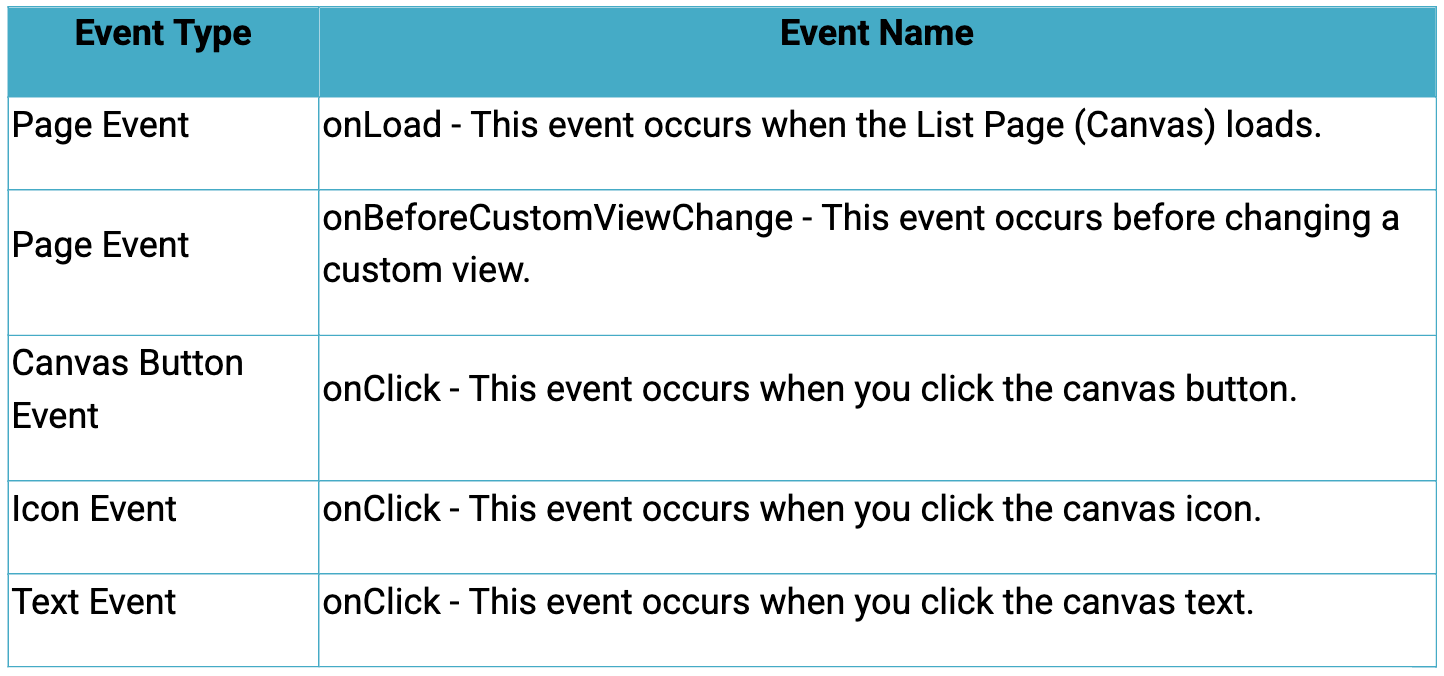

Click here to know more about the Events.

3. Supported ZDKs for List Page(Canvas)

Client Script enables you  to customize List Views using the following list of ZDKs and Client Script functions.

  1. freezeColumns(option) - You can freeze list view and disable modifying columns.
  2. maskField(field_name, (length,character,reverse)) - You can mask fields in the List View
  3. sortByField(field_name, option) - You can sort field in the List View
  4. getRecords() - You can get Records in the List View
  5. selectRecords(criteria) - You can select Records in the List view by criteria
  6. selectRecordsByID(ids) - You can select Records in the List view by record ID
  7. clearSelection() - You can clear selected Records in the List view
  8. style(style_config, criteria) - You can style Records in the List View.

4. Use Case

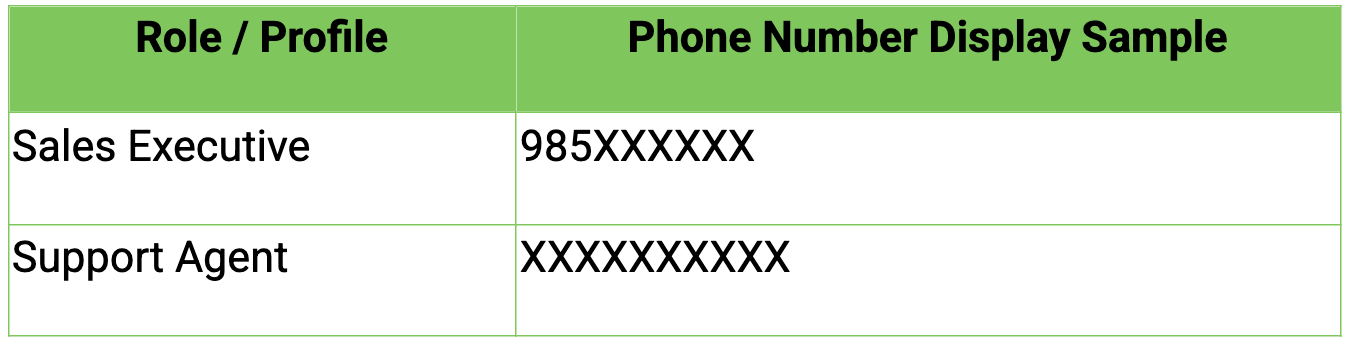
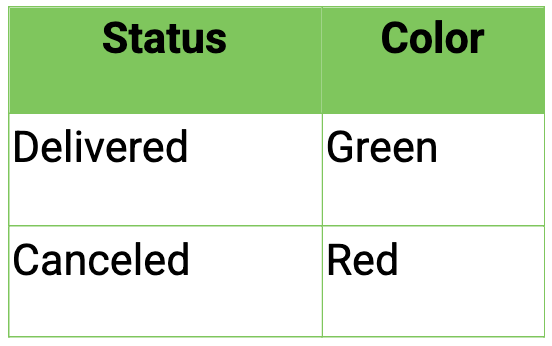
Zylker uses Zoho CRM to manage high-volume orders where customer phone numbers are sensitive data. The CRM Admin wants role-based phone number masking on the Orders List Page (Canvas). To improve visibility and speed, the Admin also wants color-coded order cards in the List View based on order status.

Role-Based Phone Number Visibility


Order Status Color Coding


5. Solution

  1. Go to Setup > Developer Space > Client Script. Click +New Script.
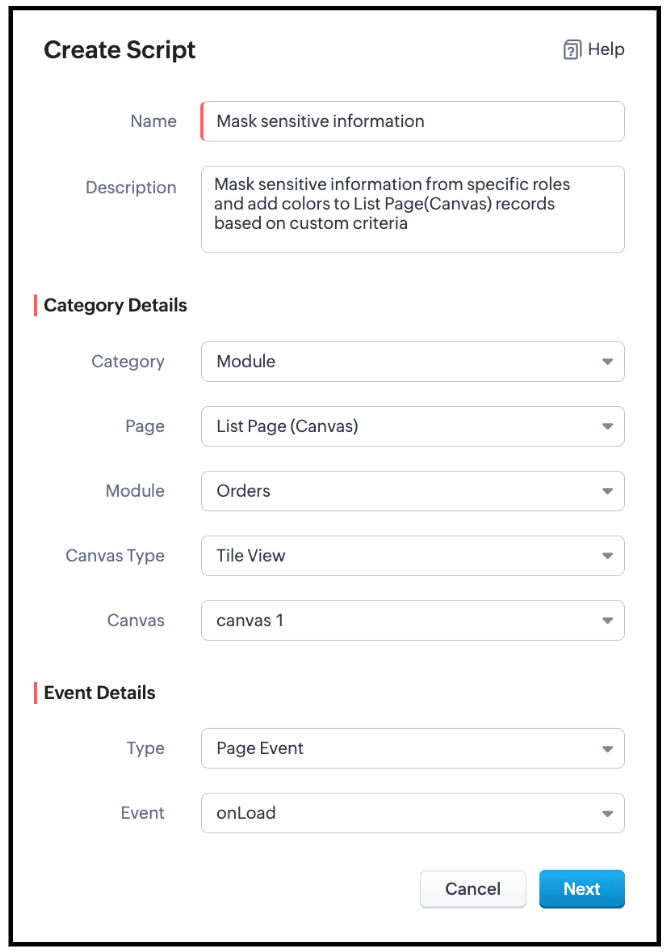
  2. Specify the details to create a script and click Next.


  3. Enter the following script and click Save.

  1. // Mask phone number based on user role
  2. if ($Crm.user.role.name === "Sales Executive") {

  3.     // Mask 7 digits for Sales Executive
  4.     ZDK.Page.getList().maskField("Phone_Number", {
  5.         length: 7,
  6.         character: "#",
  7.         reverse: true
  8.     });

  9. } else if ($Crm.user.role.name === "Support Agent") {

  10.     // Mask 10 digits for Support Agent
  11.     ZDK.Page.getList().maskField("Phone_Number", {
  12.         length: 10,
  13.         character: "#",
  14.         reverse: true
  15.     });
    }

  16. // Highlight cancelled orders in light red
  17. ZDK.Page.getList().style({
  18.         record: {
  19.             backgroundColor: "#FFD6D6"
  20.         }
  21.     },
  22.     "(Status:equals:Cancelled)"
  23. );

  24. // Highlight delivered orders in light green
  25. ZDK.Page.getList().style({
  26.         record: {
  27.             backgroundColor: "#D3F9D8"
  28.         }
  29.     },
  30.     "(Status:equals:Delivered)"
  31. );
  1. Use $Crm.user.role.name to retrieve the role of the currently logged-in user.
  2. When the role is Sales Executive, use ZDK.Page.getList().maskField() on the Phone_Number field to mask the first 7 digits, where 
    1. length defines how many characters should be hidden
    2. character: '#' specifies the masking symbol
    3. reverse: false ensures masking starts from the beginning, allowing partial visibility.
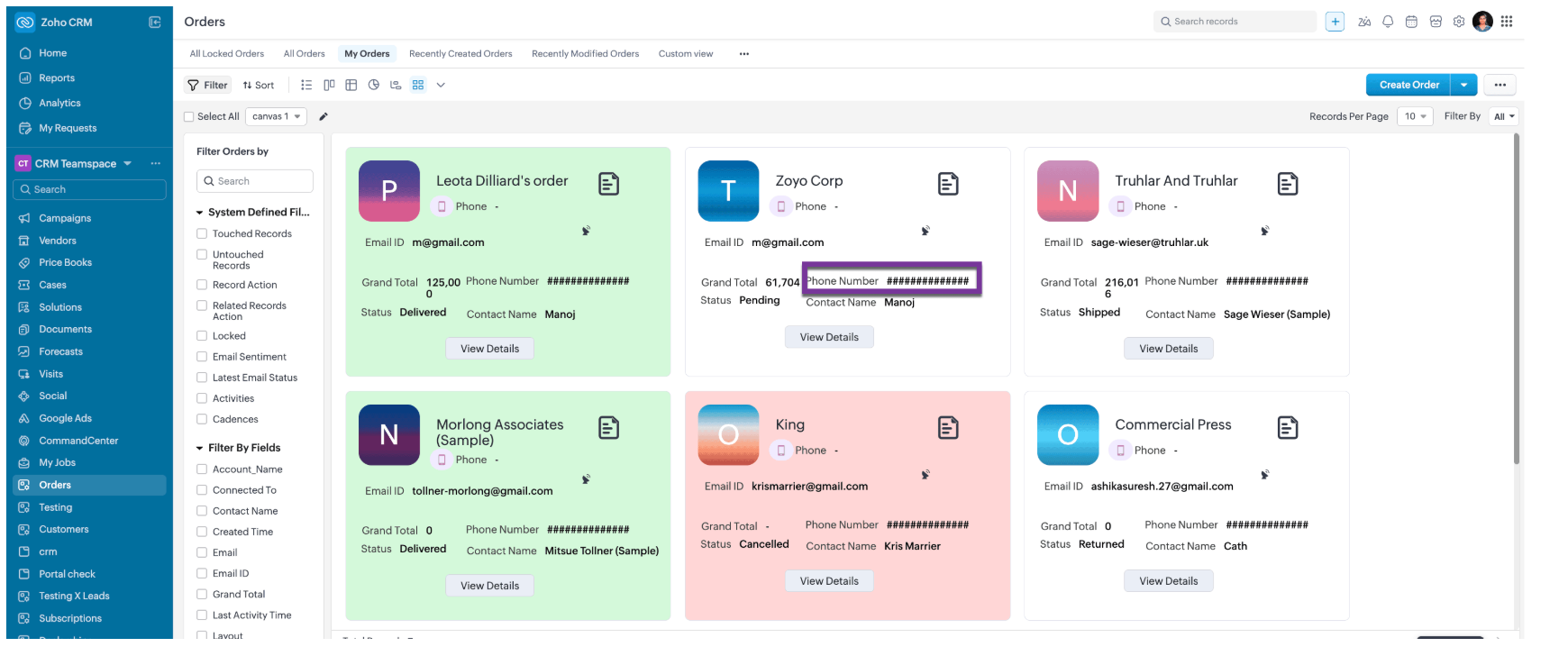
  3. When the role is Support Agent, use ZDK.Page.getList().maskField() on the Phone_Number field to mask all 10 digits, fully hiding the phone number using the same masking parameters.
  4. Use ZDK.Page.getList().style() to apply conditional styling to list records by configuring the record parameter to set the row backgroundColor.
  5. Apply the condition (Status:equals:Cancelled) to highlight cancelled records in light red, and (Status:equals:Delivered) to highlight delivered records in light green, enabling quick visual identification.

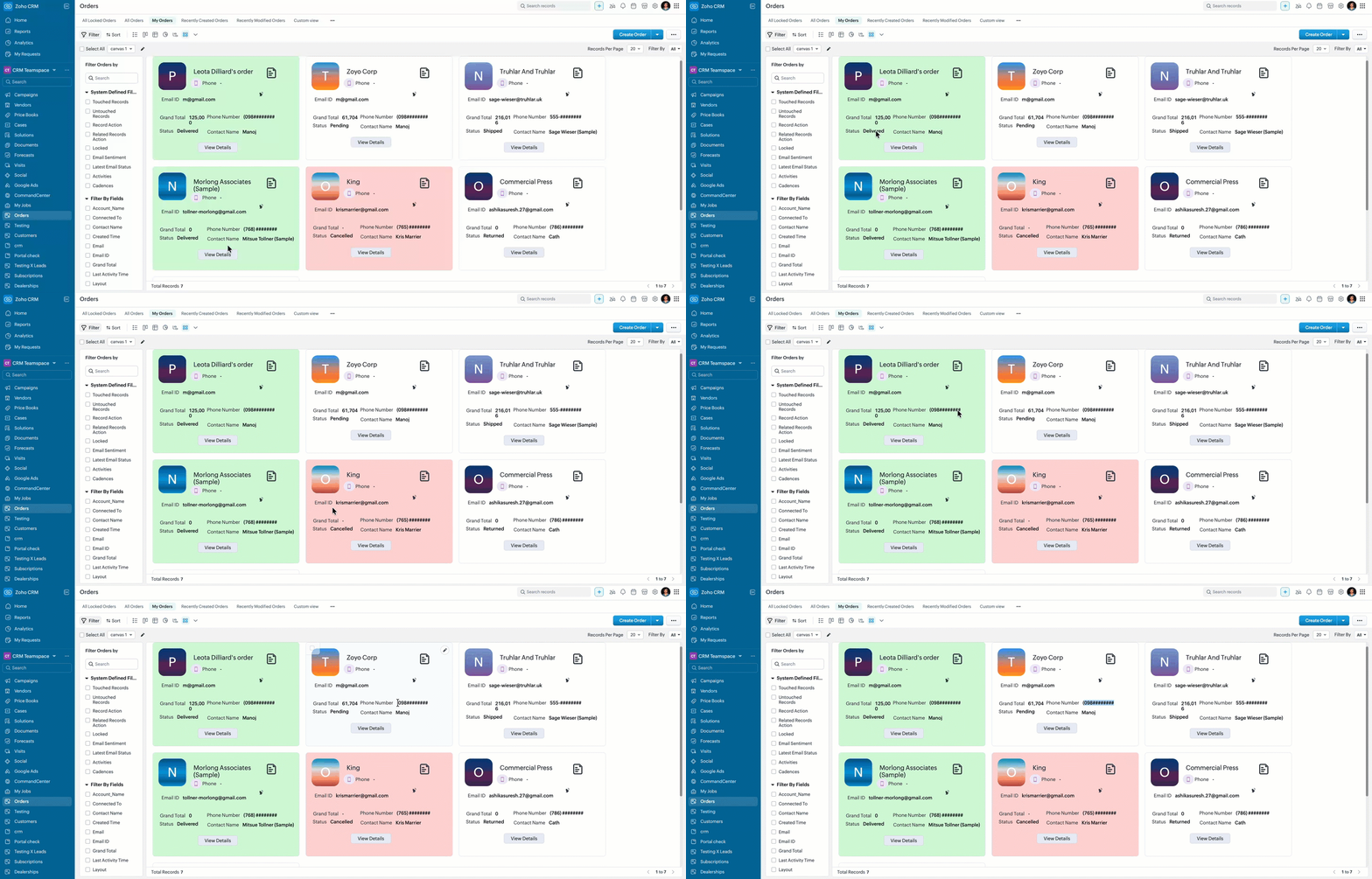
  6. Here is how the Client Script works for a "Sales Executive".


  7. Here is how the Client Script works for a "Support Agent".


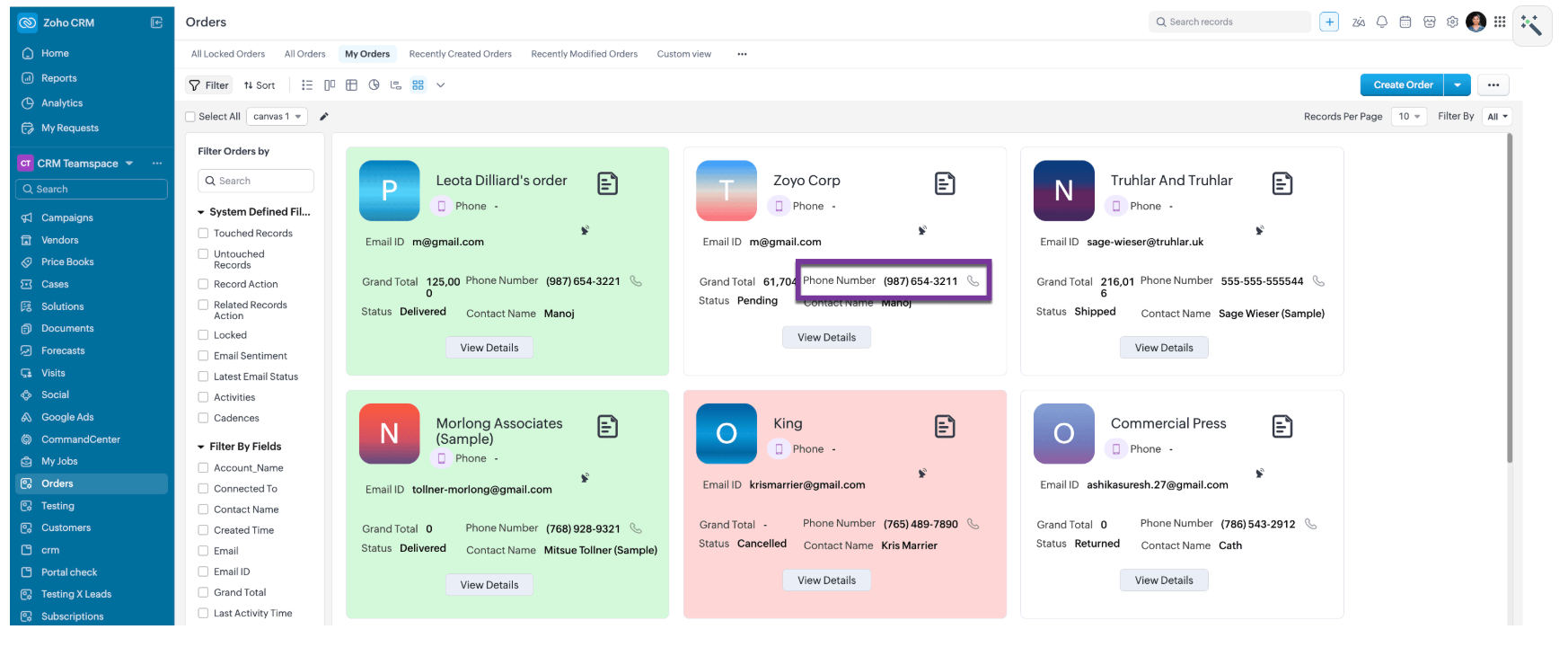
  8. Here is how the Client Script works for a for other roles like, Manager and Admin.


6. Summary

  1. Mask sensitive fields dynamically in List Page Canvas
  2. Apply role-based logic using current user context
  3. Improve list view readability with conditional record styling

7. Related Links

  1. List Page Canvas
  2. Client Script Overview
  3. ZDK Documentation
  4. Event dictionary
  5. Client Script related Kaizen posts


      • Sticky Posts

      • Kaizen #198: Using Client Script for Custom Validation in Blueprint

        Nearing 200th Kaizen Post – 1 More to the Big Two-Oh-Oh! Do you have any questions, suggestions, or topics you would like us to cover in future posts? Your insights and suggestions help us shape future content and make this series better for everyone.
      • Kaizen #226: Using ZRC in Client Script

        Hello everyone! Welcome to another week of Kaizen. In today's post, lets see what is ZRC (Zoho Request Client) and how we can use ZRC methods in Client Script to get inputs from a Salesperson and update the Lead status with a single button click. In this
      • Kaizen #222 - Client Script Support for Notes Related List

        Hello everyone! Welcome to another week of Kaizen. The final Kaizen post of the year 2025 is here! With the new Client Script support for the Notes Related List, you can validate, enrich, and manage notes across modules. In this post, we’ll explore how
      • Kaizen #217 - Actions APIs : Tasks

        Welcome to another week of Kaizen! In last week's post we discussed Email Notifications APIs which act as the link between your Workflow automations and you. We have discussed how Zylker Cloud Services uses Email Notifications API in their custom dashboard.
      • Kaizen #216 - Actions APIs : Email Notifications

        Welcome to another week of Kaizen! For the last three weeks, we have been discussing Zylker's workflows. We successfully updated a dormant workflow, built a new one from the ground up and more. But our work is not finished—these automated processes are

        • Recent Topics

        • Automatically Update Ticket Status in Zoho Desk Based on Actions in Zoho Projects

          Hi Zoho Desk Team, Hope you’re doing well. We’re using the Zoho Desk–Zoho Projects integration to manage tasks related to customer tickets, and it works well for linking and tracking progress. However, there are a few important automation capabilities
        • Announcing Kiosk 1.1 - Customize screen titles, configure new fields & actions, use values from your Kiosk to update fields, and more.

          Hello all We are back again with more enhancements to Kiosk. So what's new? Enhancements made to the Components Add titles for your Kiosk screens and adjust its width to suit your viewing preferences. Three new fields can be added to your screen: Percentage,
        • Please can the open tasks be shown in each customer account at the top.

          Hi there This has happened before, where the open tasks are no longer visible at the top of the page for each customer in the CRM. They have gone missing previously and were reinstated when I asked so I think it's just after an update that this feature
        • Sign Out

          Hello, I have a doubt with Permalink. I have a view created with critera to show only the records belonging to the user who has sign in. The problem is that the different users use the same computer and some times the user login keep signed, and when I send the permalink (by email) of the view, the users enter with other login signed. Moreover the permalink view doesn�t allow to do a log out. May I add something in the permalink to request always sign in? Sorry for my English. Many thanks! Regards
        • Customize Sign-out Button

          Are there some url parameters I can use to make a form button sign-out the user from the app? The sign-out link on the top right is small. Here's and example of the url for the top right sign-out: https://creator.zoho.com/logoutpage.jsp?sharedBy=niskypto&appID=212085000006568003&appLinkName=MYAPP&signOutUrl=niskypto/MYAPP/view-login/SOMEPAGE Note: In my account, the sign-out is set to redirect users to my website. Can I also override this with some url parameters? John M. Whitney
        • Announcing new features in Trident for Windows (v.1.39.4.0)

          Hello Community! Trident for Windows just received a major update, with a range of capabilities that focuses on strengthening communication and simplifying workflows. Let’s dive into what’s new! Upload email attachments to WorkDrive. Until now, you could
        • Notification of Interaction Assignment

          If a user is assigned an interaction, they should be notified via email. These are almost useless because if I assign an interaction for someone to respond to, they dont know that I assigned it to them without me telling them or them logging in and discovering
        • Introducing Automatic Field Addition (Text Tags) in Zoho Sign

          Hello, Today we are excited to announce the general availability of automatic field addition (text tags) feature in Zoho Sign. Now, you can now add text tags in the content of your documents and Zoho Sign will automatically add the corresponding fields when they are uploaded for the signing process. For example: when you add text tags to your sales orders, new employee contracts, and NDAs, Zoho Sign will add the corresponding fields when these documents are uploaded for the signing process. If you
        • Option to Automatically Publish Job Openings to the Career Website via API or Workflow

          Currently, when creating Job Openings using the Zoho Recruit API, the records are successfully inserted into the system. However, there is no way to automatically publish these Job Openings to the Career Website. In the Job Opening field data, there are
        • Zoho Recruit -> Exchange Online Relay

          HI! I have tried to connect Recruit to our MS 365 Exchange Online without any luck. I use this guide https://help.zoho.com/portal/en/kb/recruit/outreach/email-relay/articles/email-relay-zoho-recruit#Configuring_Email_Relay_Settings Do anyone have the
        • Introducing Built-in Telephony in Zoho Recruit

          We’re excited to introduce Built-in Telephony in Zoho Recruit, designed to make recruiter–candidate communication faster, simpler, and fully traceable. These capabilities help you reduce app switching, handle inbound calls efficiently, and keep every
        • Write-Off multiple invoices and tax calculation

          Good evening, I have many invoices which are long overdue and I do not expect them to be paid. I believe I should write them off. I did some tests and I have some questions:  - I cannot find a way to write off several invoices together. How can I do that,
        • Splitting Transactions in Zoho Books

          I have read in past forum posts that the ability to split bank transactions would likely be implemented - it's definitely a typical accounting program feature.  I'm new to Zoho and thought I'd found nirvana until I realized this feature doesn't seem to
        • Ability to assign Invoice Ownership through Deluge in FSM

          Hi, As part of our process, when a service appointment is completed, we automated the creation of the invoice based on a specific business logic using Deluge. When we do that, the "Owner" of the invoice in Zoho FSM is defaulted to the SuperAdmin. This
        • Power up your Kiosk Studio with Real-Time Data Capture, Client Scripts & More!

          Hello Everyone, We’re thrilled to announce a powerful set of enhancements to Kiosk Studio in Zoho CRM. These new updates give you more flexibility, faster record handling, and real-time data capture, making your Kiosk flows smarter and more efficient
        • Statement Aging On Cutomer Statement

          Hello, Is it possible to put aging on customer statements? Current 1-30days 31-60days 61-90days 91-120days Over 120 days. See attached image from another accounting package. Many customers pay off a statement and clear older invoices.
        • Adding Markdown text using Zoho Desk API into the Knowledge Base

          Hi Zoho Community members, We currently maintain the documentation of out company in its website. This documentation is written in markdown text format and we would like to add it in Zoho Knowledge Base. Do you know if there is REST API functionality
        • Enhancing Zia's service with better contextual responses and article generation

          Hello everyone, We are enhancing Zia's Generative AI service to make your support experience smarter. Here's how: Increased accuracy with Qwen One of the key challenges in AI is delivering responses that are both contextually accurate and empathetic while
        • Unveiling the next iteration of Ask Zia in Zoho CRM: An all-new chat interface, conversation history, actions, and much more

          Your CRM assistant just leveled up. Zoho CRM's Ask Zia functionality now offers a more conversational and context-aware experience to help you not just understand your data, but act on it—all from one chat window. With its redesigned interface and expanded
        • Response rate and time on social media

          Hello, I just want to know if it's possible to manage the response rate and response time from my social media on zoho social ? I don't see any statistical reports on the online scoreboard ? Thank you in advance for your response and sorry if the question has already been posted
        • Whatsapp BOT with CRM

          Hello, how do you use Whatsapp integrations in zoho CRM?
        • Ability to translate Zoho CRM Kiosks

          Hi team, Is support for translating kiosk text and screen names in the Zoho CRM translation tool planned on the roadmap? Thanks,
        • Create Receipt of a Donation (not a sale)

          We are a non-profit organization that receives general donations. How do I create a receipt of payment for the donor and categorize the payment as a Gift? I tried the method of creating an invoice; however that automatically created a "Sales" transaction
        • Whatsapp Limitation Questions

          Good day, I would like to find out about the functionality or possibility of all the below points within the Zoho/WhatsApp integration. Will WhatsApp buttons ever be possible in the future? Will WhatsApp Re-directs to different users be possible based
        • Removing To or CC Addresses from Desk Ticket

          I was hoping i could find a way to remove unnecessary email addresses from tickets submitted via email. For example, a customer may email the support address AND others who are in the helpdesk notification group, in either the TO or CC address. This results
        • Editing the list of Categories in the Categorize Manually section of Banking in Zoho Books

          Hi, I need to create two new Categories called Withdrawals and Deposits to categorize payments in a bank account. How do I edit the Categories list?
        • Can I write a check in Zoho Books with no associated bill?

          This currently does not seem possible, and I have a client that desperately needs this function if I am able to convert them with Quickbooks. Thank you in advance for your reply. 
        • Income not showing in direct bank feed

          Hi, I am trying to enter income without knowing or mentioning customer, as i am told, my client wants single or cash basis accounting but i seriously struggling......................
        • Books <-> CRM synchronisation with custom Fields

          Hello, We are synchronising Books Customers with CRM Accounts. In CRM Accounts I set up last year a "segments" multiselect field shown below In Books, I set up a custom multi-select field with the same value as in the CRM And set up the synchronisation inside Books. Want to synchronise the Books Segments with the CRM Segments, but the later doesn't exist, and another non-existing is there ?! First, I don't understand where the field Segmentation is coming from. Second, I set CRM Segmentation to sync
        • Internal Fillable Contract with Zoho Writer (Before Sending to Client)

          Hi everyone, I’m trying to automate the following process in Zoho CRM and would appreciate some guidance. Process: When a Deal moves to a specific stage, CRM triggers an automation. CRM sends a contract template to an internal team member so they can
        • [Free Webinar] Intelligent document processing with Zoho RPA

          Hello everyone! Greetings from the Zoho RPA team! We're excited to invite you to our upcoming webinar on intelligent document processing with Zoho RPA, where we'll introduce powerful new capabilities designed to make your automation journey smarter, faster,
        • 401 Unauthenticated Error – Zoho CRM to Google Sheets Integration

          Hi I'm building an Automation Function in Zoho CRM using Deluge that appends contact data from Zoho CRM into a Google Sheet whenever a new contact is created. WHAT I'VE DONE: I created a connection in Zoho CRM (Developer Hub → Connections) with the following
        • Enhancements for Currencies in Zoho CRM: Automatic exchange rate updates, options to update record exchange rates, and more

          The multi-currency feature helps you track currencies region-wise. This can apply to Sales, CTC, or any other currency-related data. You can record amounts in a customer’s local currency, while the CRM automatically converts them to your home currency
        • Export Invoices to XML file

          Namaste! ZOHO suite of Apps is awesome and we as Partner, would like to use and implement the app´s from the Financial suite like ZOHO Invoice, but, in Portugal, we can only use certified Invoice Software and for this reason, we need to develop/customize on top of ZOHO Invoice to create an XML file with specific information and after this, go to the government and certified the software. As soon as we have for example, ZOHO CRM integrated with ZOHO Invoice up and running, our business opportunities
        • Preview future shift rotation in Shift Schedule

          Hi, What if, instead of the current behavior, the Shift Rotation feature in Zoho People allowed users to preview future shift schedules before the scheduler execution? Currently, when a shift rotation is configured (for example, monthly rotation), the
        • Project Management Bulletin: March, 2026

          We are passionate about equipping our users with efficient solutions that help them run their businesses successfully. Our collective efforts over the past 2 years have culminated in the launch of Sprints 3.0— built with reliable features, impactful integrations,
        • Send emails directly via Cases module

          Greetings all, The ability to send emails from the Cases module, which users have been eagerly anticipating, is now available, just like in the other modules. In Zoho CRM, Cases is a module specifically designed for managing support tickets. If your organization
        • Webinar Alert: Supercharge landing pages with data insights | Zoho LandingPage

          Every visitor to your landing page leaves behind valuable data, but are you leveraging it to improve conversions? Join our expert-led Landing Page Analytics webinar to learn how to track, analyze, and optimize landing page performance with Zoho LandingPage’s
        • How can we clear a signature field with deluge?

          I would like to clear a signature field in the Edit -> On Load. I have tried input.signature = ""; input.signature = null; clear input.signature; None of the above is working. is there any other way I am missing?
        • Bulk Deletion of Zoho Projects Using Node.js and Zoho Projects API

          Zoho Projects currently does not provide a built-in option to delete multiple projects in bulk from the UI. When working with testing environments or large numbers of temporary projects, deleting them one by one becomes time-consuming. To address this,
        • Next Page