Kaizen #262 - Using Zoho CRM Skill to build Queries

Hello everyone!
Welcome back to another edition of the Kaizen series, where we uncover powerful ways to extend and customize Zoho CRM.
In the previous Kaizens, we explored how the zoho-crm skill can help developers work with Zoho CRM APIs, Client Scripts and COQL.
In this Kaizen, let's take this further and see how the skill can help us build Zoho CRM Queries using natural language.
Queries provide a flexible way to retrieve data from Zoho CRM and transform the response before using it in CRM features such as Canvas, Kiosk, and other custom UI components. A Query can use a CRM module, COQL, or other supported sources, and its response can also be modified using a serializer.
In this Kaizen, we will cover:
- About Zoho CRM Skill
- How the Skill Helps with Queries
- Business Scenario
- Requirement 1 - Retrieving CRM Data Using Queries
- Requirement 2 -Transforming Query Responses with Serializers
- Requirement 3 -Calculating Derived Values with Query Serializers
- Summary
- Related Links
1. About Zoho CRM Skill
The zoho-crm skill acts as an orchestration layer across different Zoho CRM developer capabilities, including REST APIs, Deluge Functions, Client Scripts, Widgets, COQL, Queries, and Connections.
The skill follows a five-step approach:
- Understand the requirement.
- Identify the appropriate CRM capability.
- Load the relevant references.
- Generate the solution.
For Queries, you can describe the data you need in natural language, and the skill can help determine the appropriate Query configuration, source, fields, criteria, sorting, and serializer logic.
For example, instead of manually determining how to configure a Query, you can provide a requirement such as:
"Fetch all upcoming events that are currently open for registration and sort them by event date."
The skill can then help build the corresponding Query.
Refer to Kaizen#258 : Getting Started with zoho-crm SKILL.md for more details.
2. How the Skill Helps with Queries
The zoho-crm skill simplifies Query development by helping you translate a natural-language requirement into the appropriate Query configuration. It can help with:
- Identifying the Query source - such as Module, COQL, or other supported data sources.
- Building the Query - defining the fields, criteria, sorting, and other required configurations.
- Configuring variables - identifying values that need to be passed dynamically to the Query.
- Defining the schema - structuring the Query response based on the required output.
- Creating serializers - transforming the Query response and performing calculations or deriving additional values.
- Following Zoho CRM Query guidelines - using the relevant Query and CRM references while generating the solution.
- Validating the implementation - helping identify missing fields, incorrect configurations, and potential edge cases.
- Associating Queries - help you understand how a Query should be associated with the appropriate CRM component based on the requirement.
This allows developers to focus on describing what data they need and how it should be processed, while the skill helps determine how to implement the Query.
The user needs to:
Verify the CRM setup → Create/configure the Query → Associate it with the required component → Test and validate the result

3. Business Scenario

Zylker Events, an event management company that conducts workshops, conferences, and training programs, uses a custom module called Programs to manage its events.
The event management team wants to use Queries to display useful event information in CRM. Let's consider three requirements using the same Programs module, with each requirement introducing an additional level of Query configuration and complexity.
4. Retrieving CRM Data Using Queries
Let's start with a straightforward requirement.
Requirement 1
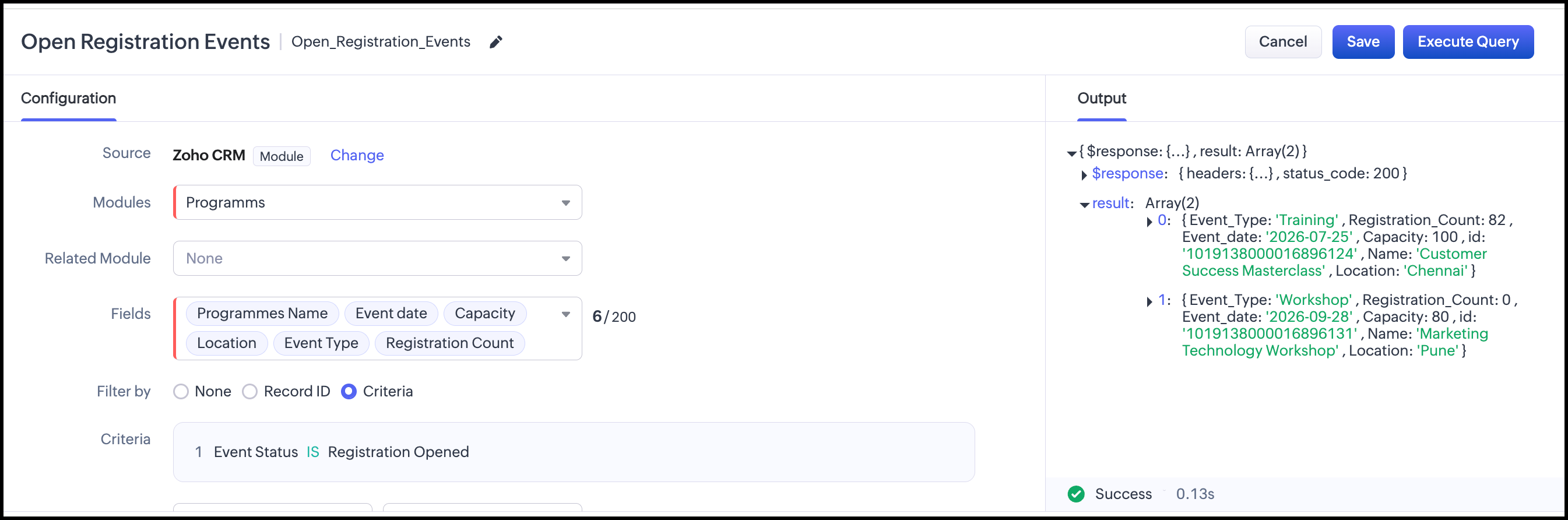
The event manager wants to see all upcoming events for which registration is currently open in a Kiosk.
The results should contain:
- Program Name
- Event Type
- Event Date
- Location
- Capacity
- Registration Count
The events should be displayed in ascending order of the Event Date.


Prompt
/zoho-crm
Create a Zoho CRM Query for the Programs custom module. Fetch events where Event Status is "Registration Opened".Return the following fields: Program Name, Event Type, Event Date, Location, Capacity, and Registration Count. Sort the results by Event Date in ascending order and associate with Kiosk.

The API names may differ, so we need to verify them against our API names as this is a custom module.
What did the skill do?
- Read the Query documentation: Reviewed Query sources, configuration, and Kiosk association guidance.
- Analyzed the requirement:
- Fetch Programs with Event Status = Registration Open.
- Sort by Event Date ascending.
- Retrieve the required programme and event fields.
- Use the Query in a Kiosk.
- Selected the Query source: Chose the Module source since the requirement involves retrieving and filtering records from a single CRM module.
- Configured the Query: Mapped the requirement to the module, criteria, sort order, and required fields.
- Considered Kiosk association: Identified that the Query should be associated with a Kiosk screen to display multiple Program records.
- Verified assumptions: Noted that the API names should be verified against the actual CRM setup before implementation.
5. Transforming Query Responses Using a Serializer
Now let's make the requirement slightly more useful.
Requirement 2
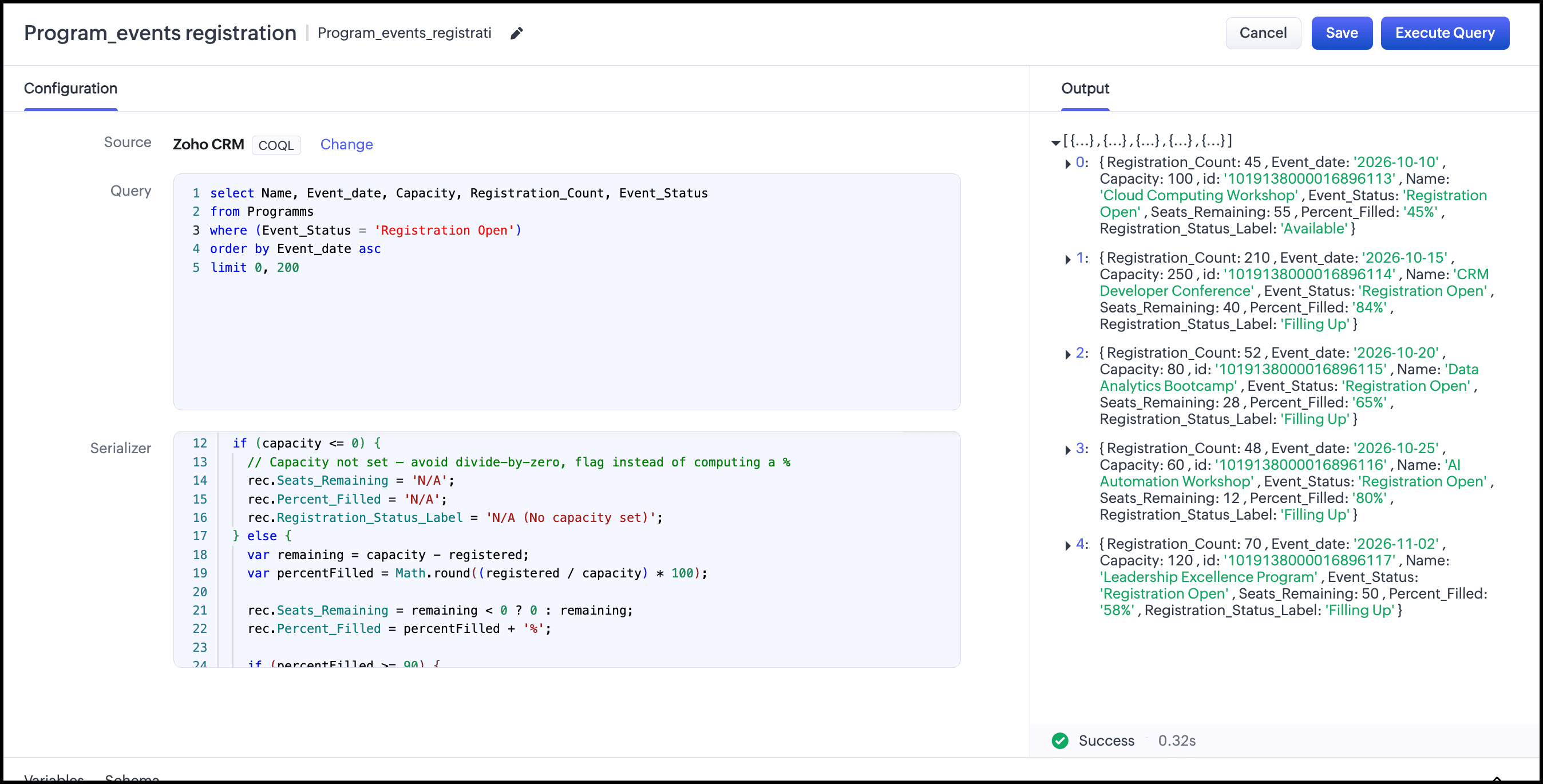
The event manager wants to know:
- How many seats are remaining?
- What percentage of the capacity has already been filled?
- Is the event nearly full?
Instead of storing these values as additional fields in CRM, we can calculate them when the Query executes.
Prompt
/zoho-crm
For the custom module "Programs", using Queries, help me understand the current registration status of events that are open for registration.
For each event, I want to know:
How many seats are remaining?
What percentage of the event capacity has been filled?
Is the event Nearly Full, Filling Up, or Available?
Also show the Program Name, Event Type, Event Date, Location, Capacity, and Registration Count.
Show the earliest events first.
What Did the Skill Do?
- Selected COQL as the Query source based on the filtering, sorting, and field requirements.
- Created the COQL query to fetch registration-open programs sorted by Event Date.
- Mapped the required fields such as Program Name, Event Type, Event Date, Location, Capacity, and Registration Count.
- Designed the serializer to calculate Remaining Capacity, Registration Percentage, and Registration Status.
- Handled edge cases, including zero capacity and division-by-zero errors.
- Defined the response schema to include both CRM and calculated fields.
- Identified API-name dependencies that must be verified in the target CRM.
- Considered Query association with components such as Canvas, Kiosk, or Custom Related List.
In short: The skill converted the requirement into a COQL Query → Serializer → Schema → Component association workflow.
6. Calculating Derived Values with Query Serializers
Let's take the same scenario one step further.
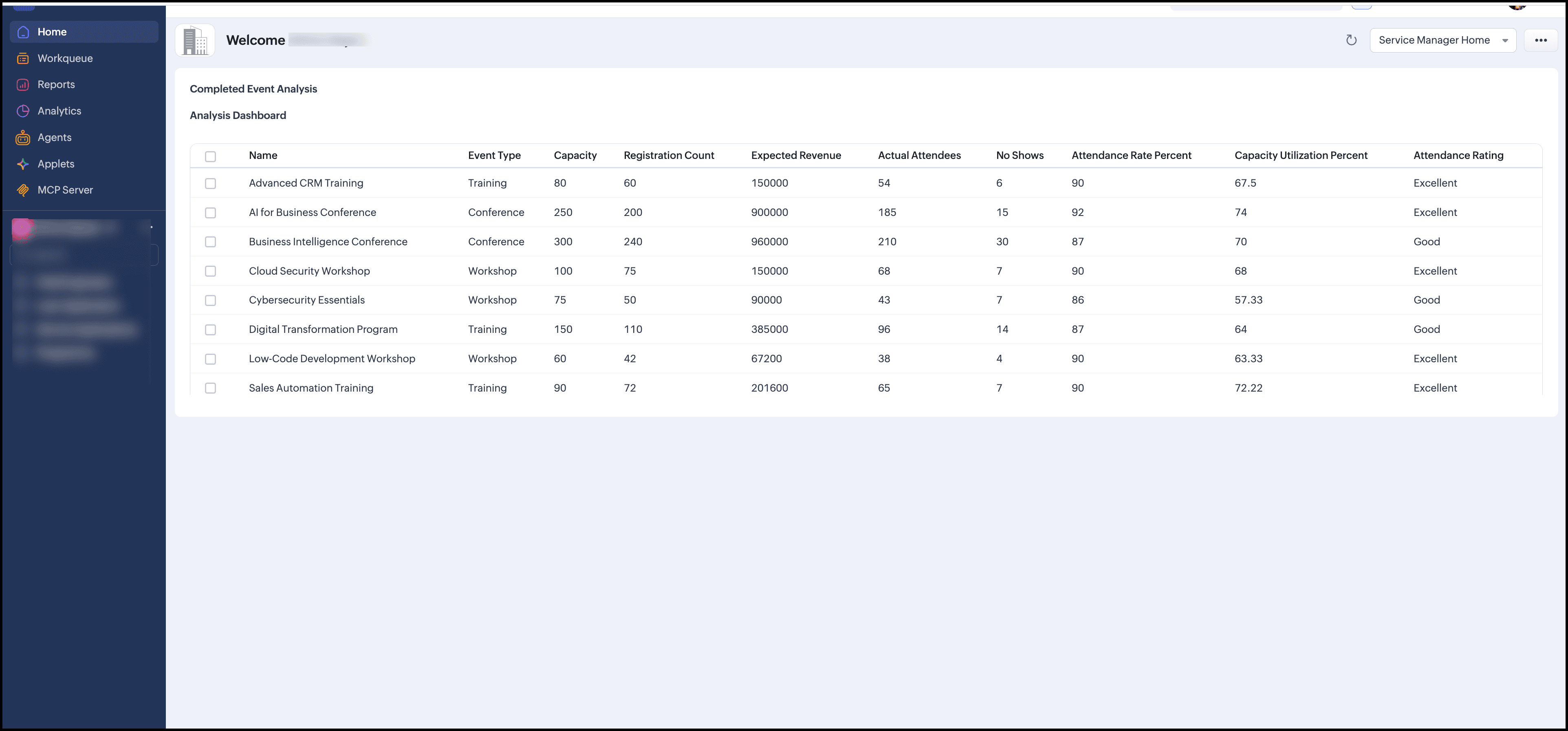
The event manager now wants to analyze events that have already been completed.
Requirement 3: Completed Event Analysis
For each completed event:
- Expected Revenue = Registration Count × Registration Fee
- Attendance Rate = Actual Attendees / Registration Count × 100
- Capacity Utilization = Actual Attendees / Capacity × 100
- No-show Count = Registration Count − Actual Attendees
- No-show Rate = No-show Count / Registration Count × 100
- Attendance Classification:
- Excellent: ≥ 90%
- Good: 70–89%
- Needs Attention: < 70%
Prompt
/zoho-crm
For the custom module "Programs", using Queries, help me understand how completed
events performed.
For each completed event, I want to know:
How much revenue was expected from registrations?
What percentage of registered participants attended?
What percentage of the event capacity was utilized?
How many registered participants did not attend?
Was the attendance Excellent, Good, or in Need of Attention?
Also show the Program Name, Event Type, Capacity, Registration Count and Actual Attendees.
What did the skill do?
The skill converted the requirement into a COQL-based Query with a Serializer and worked through the complete configuration.
- Loaded the relevant Query references for structure, sources, and serializers.
- Selected the Module source with Event_Status = Completed.
- Identified the required CRM fields such as Event Type, Event Date, Capacity, Registration Count, Registration Fee, and Actual Attendees.
- Designed the serializer to calculate Expected Revenue, Attendance Rate, Capacity Utilization, No-show Count, No-show Rate, and Attendance Performance.
- Added zero-value checks and error handling to prevent calculation errors.
- Defined the schema to expose both CRM and calculated fields.
- Prepared the implementation steps for Query creation, source, schema, serializer, and associating to Kiosk.
- Noted that API names must be verified against the actual CRM setup.
In short:Module Query → Filter → Retrieve data → Serializer calculates derived values → Schema exposes the results.

This is how it looks after implementing it through Kiosk:
7. Summary
In this Kaizen, we used a single Event Management scenario to explore three levels of Query development with the zoho-crm skill.
What the User Does
- Define the requirement: Specify the data, source/module, fields, filters, sorting, and target component.
- Provide the requirement to the AI coding agent: Give the requirement to an AI coding agent with the zoho-crm skill enabled. The skill analyzes it and suggests a Query implementation.
- Review the Query configuration: Verify the source, fields, criteria, sorting, variables, and other configuration.
- Review the serializer: If needed, provide the expected transformation logic and verify the serializer's filtering, formatting, renaming, or calculations.
- Verify CRM details: Confirm the actual module names, field API names, and field types in the target CRM organization.
- Configure the Query in Zoho CRM: Create and validate the Query using the reviewed source, schema, serializer, and other configuration.
- Associate the Query: Add the Query to the required component, such as a Kiosk, Canvas, or related list.
- Test and validate: Verify the data, filtering, sorting, serialized output, and displayed fields against the original requirement.
The zoho-crm skill simplifies this workflow by helping developers turn natural-language requirements into appropriate Query configurations and implementations.
Have an advanced scenario you’d like to see solved using the skill? Drop it in the comments or write to us at support@zohocrm.com.
Happy Querying!
Related Links
Kaizen #258 – Getting Started with zoho-crm SKILL.md - Introduction to the zoho-crm skill and how it works across Zoho CRM developer capabilities.
Kaizen #259 – Working with Zoho CRM APIs using the zoho-crm skill - Using the skill to work with Zoho CRM APIs.
Kaizen #260 – Using Zoho CRM Skill to generate Client Script - Using the skill to generate Client Scripts.
Zoho CRM Queries – Developer Documentation - Learn more about Query sources, variables, serializers, and schema management.
Topic Participants
Athira Rajan
Sticky Posts
Announcing the new SKILL.md for Zoho CRM and the updated OAS repository!
We are introducing a new zoho-crm skill to make working with Zoho CRM Developer tools (like APIs, functions, widgets, client scripts, queries etc) easier and faster, with the help of AI in your preferred AI harness like Claude Code, Codex, Cursor, VSCodeKaizen #261 : Using Zoho CRM Skill to generate complex COQL queries
Hello everyone, In the previous Kaizen posts, we introduced the zoho-crm SKILL.md and discussed how it can help you when you are working with Zoho CRM APIs and Client Script. In this Kaizen, we will focus on using the Zoho CRM `SKILL.md` with GitHub CopilotKaizen #256 - Build an Arrival Readiness Web Tab in Zoho CRM
Hi everyone! Welcome back to the Kaizen series! In the post, we discuss a use case in hospitality industry: how an Arrival Readiness web tab widget can be used to let reception staff identify and resolve issues before arrival of guests. Use case In theKaizen #198: Using Client Script for Custom Validation in Blueprint
Nearing 200th Kaizen Post – 1 More to the Big Two-Oh-Oh! Do you have any questions, suggestions, or topics you would like us to cover in future posts? Your insights and suggestions help us shape future content and make this series better for everyone.Kaizen #226: Using ZRC in Client Script
Hello everyone! Welcome to another week of Kaizen. In today's post, lets see what is ZRC (Zoho Request Client) and how we can use ZRC methods in Client Script to get inputs from a Salesperson and update the Lead status with a single button click. In this
Recent Topics
Trident Missing
No way you guys get so close to having trident complete for over a year then just kill it off. Wow just wowSheet co-edit: no live presence — also on Collaborate demo?
Two Sheet co-edit sessions open OK (same document_id, document.edit: true), but there’s no real-time collaboration: no cell highlights, Group Chat → Users stays empty. Writer co-edit works on the same Office Integrator setup. We see the same on the officialUnable to delete domains from Zoho Campaigns
This error occurs while deleting a domain "This domain cannot be deleted because we've found $1sender addresses associated to it." But I have no more sender addresses of this domain anymore. I can't delete the domain.Automating CRM backup storage?
Hi there, We've recently set up automatic backups for our Zoho CRM account. We were hoping that the backup functionality would not require any manual work on our end, but it seems that we are always required to download the backups ourselves, store them,Feature Request: Fully customizable record layouts in Zoho FSM (movable sections and custom subform tables)
Hi Zoho FSM Team and Community, We’d like to suggest a feature that we think would help many FSM users: full control over the layout of record detail pages, starting with the Work Order view. Current situation When you open a Work Order, its sectionsKB Articles from Zoho Learn - Import as .md
I love the concept of being able to use articles from Zoho Learn as knowledge base articles for Zia Agents. This will absolutely help with proper documentation and organization of company processes and SOPs. This was a great concept. However, even whenWhy don't Zia agents support file uploads?
I am trying to build a Zia Agent that allows uploading of a PDF file and uses the GLM5 model to process it and extract information. But agents.zoho.com has no way to enable file uploads on the agent. Additionally, GLM5 based agents keep outputting theirBuilding Toppings #10 - Using signals to build real-time notifications between Bigin and Zoho Desk
Hello Biginners! In our previous post, we covered Bigin Variables and Widgets. In this post, we'll explore another component: Signals. To show how Signals work, we will build a real-time use case integrating Bigin and Zoho Desk. It connects Zoho DeskCliq iOS can't see shared screen
Hello, I had this morning a video call with a colleague. She is using Cliq Desktop MacOS and wanted to share her screen with me. I'm on iPad. I noticed, while she shared her screen, I could only see her video, but not the shared screen... Does Cliq iOS is able to display shared screen, or is it somewhere else to be found ? Regards¡Gracias por acompañarnos en los Workshops de Zoho España!
Los pasados 3 y 4 de noviembre celebramos una nueva edición de los Workshops de Zoho España en el Hotel NH Las Ventas de Madrid. Dos jornadas de formación práctica, demostraciones en directo y encuentros con expertos de Zoho en las que compartimos conocimientos,Mass Update Option for Changing Work Order Owner
Hello FSM Team/Mr. Abid, We would like to inquire if there is an option to mass update or bulk change the Owner of Work Orders in Zoho FSM. Current Situation: At the moment, the Owner of a Work Order can only be changed individually, which becomes time-consumingNever miss a follow-up with personal reminder agent | Zoho Cliq AI Use Case #03
A task mentioned mid-conversation rarely survives the conversation. Someone asks you to follow up, you say you will, and by the time you remember, the message is three hundred lines back, buried under two meetings and a dozen other threads. Personal TaskCalendar won't load
I run into this problem about once a week, where I try to open my Zoho calendar in a web browser, and it just gets stuck, waiting forever to load (see attached screenshot). I'm usually using Edge or Duck-Duck-Go browser. Sometimes it loads just fine,Change 'default' project dashboard
Is it possible to change the default project dashboard for all projects? Both in layout and in what widgets are shown? We have a lot of (short-running) projects and I want to quickly see the tasks and milestones when I open a Project, but I don't want to change the layout for all my projects manually. Thanks, MennoMultiple subscription plan line items in Zoho Billing quotes
I run an IT company and sell a lot of licences. A client might have multiple subscription plans including software licences in different categories. A client might have Microsoft licences, antivirus licences, web hosting and maintenance package services.[ZohoDesk] Improve Status View with a new editeble kanban view
A kanban view with more information about the ticket and the contact who created the ticket would be valueble. I would like to edit the fields with the ones i like to see at one glance. Like in CRM where you can edit the canvas view, i would like to editLive connection to DS files in Zoho Creator / ChatGPT
As an idea, we are using ChatGPT to build with Zoho Creator (outside of Zia), which is works brilliantly to assist write deluge, provide test suggesitons etc. Currently we are uploading the DS files which are very point in time, it would be great to haveUnable to integrate Whatsapp Messaging into Zoho CRM - Business Messaging
Hello, I want to set up Business Messaging in our Zoho CRM and am struggling to set it up. I have logged into the account and our facebook business page, our business shows in the dropdown for WhatsApp Business Account but does not for WhatsApp BusinessFiles in Teamspaces: keep your team's documents where the work happens
Release Note: This feature is available for all accounts across all DCs Hello Everyone, A Teamspace is built around a specific team and a shared objective, and it holds the modules and projects that team works with every day. The document that team dependsScript to access a CBPX file from zoho crm
Hello everyone, I'm planning to write a script in Python or Java in Zoho CRM functions, to access a CBPX file. Is it possible to write this script in the dev console of Zoho? What are the best practices to do this ? Would you have references in the ZohoCalculate hours
Is there any chance that the the "formula" will have the ability to do calculation using the "time" field in the future? Our company has a form set up for tracking hours worked and we use 2 time fields currently. One for the clock-in time, and one for the clock-out time. It's great for keeping that record, but if there were a way to calculate the hours to show on the report would be awesome. Previously we had used JotForm and their calculator had that ability, but it seems that Zoho doesn't acceptIntroducing parent-child ticketing in Zoho Desk [Early access]
Hello Zoho Desk users! We have introduced the parent-child ticketing system to help customer service teams ensure efficient resolution of issues involving multiple, related tickets. You can now combine repetitive and interconnected tickets into parent-childZoho Books | Product Updates | November 2026
Hello users, As the year winds down, we've introduced several enhancements to make compliance, inventory management, and everyday bookkeeping easier in Zoho Books. This month's updates include an improved TDS experience, a new way to exchange transactionsZoho Writer workflows now support custom stages, parallel reviews, and external approvers
Hello everyone, Zoho Writer now lets you build your own approval chains. The pre-built workflows also get new review modes, completion criteria, and external approver support. What’s new Custom workflows: Design review and approval processes from scratch,Expanding sales, marketing, and support capabilities in Zoho CRM Plus 3.0
Hey everyone, It's been more than 10 years since we launched Zoho CRM Plus back in 2014. This is quite a milestone, and we've come a long way in empowering you with everything you need to offer an exceptional customer experience. On that note, we expandedErase function in Zoho PDF editor does not truly redact
Using the "erase" function in the Zoho PDF editor online does not redact the text underneath when opening the file in Adobe. When I used the erase function to whiteout the areas I didn't want to be seen, I opened the supposed redacted files in Adobe.Error creating an XML file
I am creating an xml as string in the function Employee.generatePartA_XML_String, and then I want to save it as a file to the field "Part_A_XML", but I get the response: {"code":3700,"message":"Unable to upload a file. Please check and try again."} HowThunderbird cannot authenticate Zoho on android
I keep getting a message from Thunderbird on Android that it could not authenticate for my account, dadashton@zoho.com., and to update my server settings. Now the settings are exactly the same for my other devices (1 Windows, 1 Mac and 2 Linux) Can anybodyMailchimp Integration
Hello, I am needing some help. Does anybody have a recommended source for information on the Zoho-Mailchimp integration. We are working on a system to import large amounts of records into Zoho that will sync into Mailchimp for us to run a mail campaign out of. Let me explain what the process we are trying to implement - any information or advice is appreciated. Import record data base into Zoho Leads module --> use Lead source to ID records that are part of this mail campaign Zoho Leads (specific[Free webinar] Zoho Creator meets AI with MCP | Creator Tech Connect (November 2026)
Hello everyone, We are excited to invite you to another edition of the Creator Tech Connect webinar. About Creator Tech Connect The Creator Tech Connect series is a free monthly webinar consisting of purely technical sessions, where we dive deep intoInvalid Client - Client ID passed does not exist
I tried connecting the Zoho campaign with the "Uncanny Automator". It shows an error " Invalid Client - Client ID passed does not exist". There is no option to add manual API. URL: https://accounts.zoho.eu/oauth/v2/auth?response_type=code&client_id=1000.MSFIUOA1G8YBK7IFRL9Z0NINM6DW9C&scope=ZohoCampaigns.contact.ALL&redirect_uri=https%3A%2F%2Fapi.automatorplugin.com%2Fv2%2Fzoho-campaigns&prompt=consent&access_type=offlineField of Lookup - 5 Field Association Limit.
This query relates to the post at: https://help.zoho.com/portal/en/community/topic/introducing-the-field-of-lookup-in-crm-public-early-access-2023 My simple (and common) scenario: I select an account / customer lookup and want their address pulled intoTask status - completed - other options
I have a dumb question I know i can make custom statuses for the tasks - but is there anyway to make additional "completed" statuses like for instance if i have a task "call back customer" and i leave a vm for them to call back marking it "completed -#20 I've Sent It and It's Wrong
Meera spots a mistake in an invoice just four minutes after sending it. She has billed a photoshoot at the half-day rate instead of the full-day rate. Her first thought is to delete the invoice and start again. But is deleting the right thing to do? ItZoho Forms API
Is there any way to get all form entry list using API? Looking forward to hear from youBNZ Bank Feeds No Longer Available
The BNZ (New Zealand) bank feeds are still failing and it's been months since they last worked! Uploading bank statements (CSV's) mean waiting to the end of the month when they become available. It is unacceptable to keep my clients waiting for paymentMCP is now easier to access and configure in Bigin
Greetings! We hope you're all doing well. We've previously introduced Zoho MCP for Bigin, which lets you connect Bigin with AI tools and interact with your Bigin data using natural language. Now we're making MCP easier to access and configure directlyLaunch agents from more custom button locations and attach files in Ask Zia
Hello all, Your agents now meet your team where the work happens. You can add agents to custom buttons in list views, create and edit pages, and related lists, so users launch them without leaving the page they’re on. What’s new Agents in more customPhone system to integrate with Zoho CRM
I am looking for phone software that would allow my agency to do the following within Zoho CRM: Make calls from zoho Track calls and notes Leave pre-recorded messages after reaching voicemail of lead Only 2 members, so need company who will allow justIntroducing PRM: Build, manage, and scale your partner ecosystem
Growing a partner ecosystem is a good problem to have. What starts as a handful of partners can quickly turn into a maze of spreadsheets, emails, and disconnected processes. More partners mean more opportunities, greater reach, and new ways to growNext Page