Mailbox delegation - A secure way to enable collaboration

Mailbox delegation - A secure way to enable collaboration

Admins often encounter scenarios where a user needs another team member to access and manage their mailbox during extended leave, role transitions, or while handling high email volumes.

In such situations, ensuring business continuity without sharing login credentials or compromising security is critical.

Before enabling access, admins should consider:

  • Sharing mailbox passwords creates serious security and compliance risks.

  • Emails may be missed or delayed if access is not provided promptly.

  • Delegates usually require specific permissions, not full account access.

  • Administrators need visibility into delegation mappings and access controls.

To address these needs, the Mailbox delegation feature in the Zoho Mail Admin Console allows users to securely access and manage emails on behalf of a mailbox owner within the organization.


When a mailbox is delegated:

  • The delegate can read, respond to, and manage emails.

  • No password sharing is required.

  • The delegate does not need to log in as the mailbox owner.

  • Admins can define the level of permissions granted.

Why use mailbox delegation?

Executive assistance & shared responsibility

Executives and key employees often require assistants or team members to manage their inbox. Mailbox delegation enables delegates to read, respond to, and organize emails on their behalf, without sharing passwords, ensuring secure and structured collaboration.

Team-based email handling

For departments handling high volumes of emails (such as support, sales, or operations), delegation allows multiple authorized users to manage a single mailbox efficiently. This ensures faster responses while maintaining clear access control and accountability.

Temporary coverage during absence

When an employee is on leave, traveling, or temporarily unavailable, delegation allows another user to manage their emails seamlessly. This prevents missed communications and ensures business continuity without compromising security.

Steps to enable mailbox delegation

To enable or disable mailbox delegation in an email policy:

  1. Log in to Zoho Mail Admin Console.

  2. Navigate to Mail Settings > Email policy > Policies.

  3. Choose the policy for which you want to enable/ disable Mailbox delegation access.

  4. Navigate to General > Mailbox delegation access.

  5. Turn On/ Off the toggle switch to enable/ disable the access.
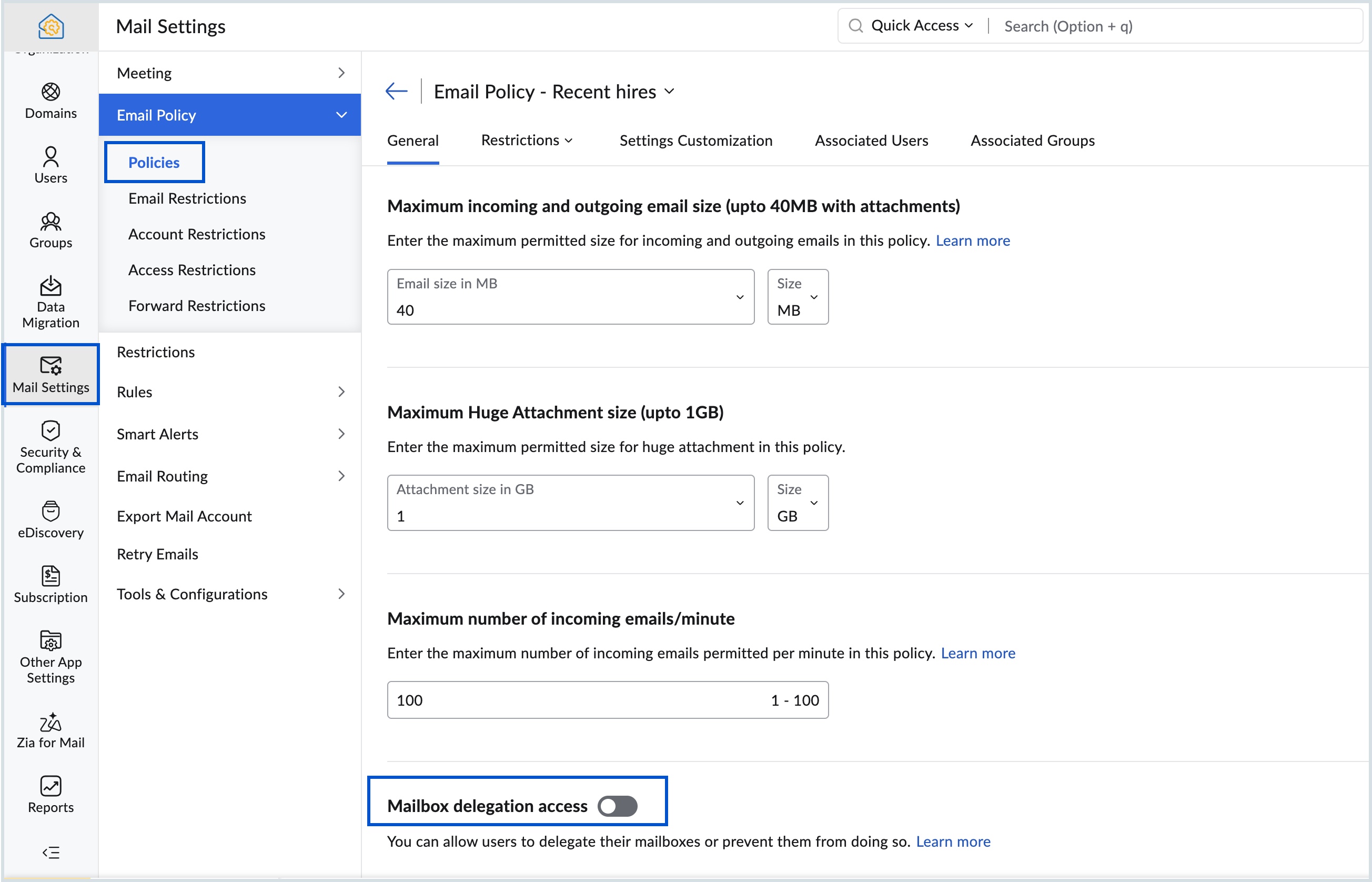

If you disable the mailbox delegation access, users will not be able to view the mailboxes delegated to them or delegate their own mailbox to others.

Know more about the steps to delegate a user's mailbox.


      • Sticky Posts

      • Domain Disclaimer: A standardized footer for your entire organization

        Every email sent from an organization represents its identity externally. Most teams require consistent line of text at the bottom of outgoing messages. It can be a confidentiality notice, a legal statement, a compliance requirement, or a uniform sign-off.
      • Catch-All Address: A safety net for misdirected emails

        Email is often the first point of contact with an organization. In many cases, a simple typo in a recipient's address can quietly turn into a missed message—a customer query never reaches support, a partner’s reply goes unnoticed, and the sender has no
      • Preferred Name and Email Formats: Bring consistency to user identity

        A user's display name and email address are often the first identifiers that colleagues, partners, and customers see. Maintaining a consistent format across the organization helps reinforce a professional identity and avoids the confusion that comes from
      • Deliver timely updates across your organization

        Keeping your organization informed goes beyond sending emails or sharing links. It requires ensuring that the right information reaches users at the right time, without being missed. Whether it's communicating policy changes, maintenance schedules, webinar/training
      • Organize your workforce efficiently with Locations in the Admin Console

        Keeping your organization structured becomes increasingly important as teams expand across different offices or regions. For administrators, having clear visibility into where users are based can simplify user management and improve operational clarity.

        • Recent Topics

        • Zoho One: books and inventory working together

          Hi, I was very pleased when I saw that in Zoho Inventory can now pull the orders from Woocommerce. They are now fed in Inventory as Sales order and with choosing convert invoice as Instant Invoice I am getting the exact data as they appear in Woocommerce.
        • Zoho Forms - Form Availability Redirect Option

          Hi Forms Team, It would be great if there was a redirect URL option on the Form Availability settings. For example, I would like to create a support form which is only available outside business hours and if the current data and time is not Mon-Fri 9-5
        • VAT and Taxes option not available

          Dear ZOHO Team , The VAT and Taxes options in my ZOHO books account not available,I tried to find how to enable or check the way to use this option but unfortunately couldn't find it anywhere ,I'm in UAE ,kindly let me know what to do to solve this issue
        • Syncing zoho books into zoho crm

          I was wondering how I can use zoho books in crm as I have been using them separately and would like to sync the two. Is this possible and if so, how? Thanks
        • Client requests I submit invoices using bill.com

          The title states it all. I have a reoccurring invoice setup for this client who has been manually paying by credit card. We are both experiencing merchant costs/fees. The use of bill.com's direct deposit is not far removed from Zoho's, only the client
        • Zoho Inventory Feature Roadmap Visible To All

          Hello, please consider making your feature roadmap visible to us users so that we know what to expect in future. This may appease current users who are seeking clarification on feature implementation dates, so that they can make an informed decision whether
        • Can't Remove Payment Gateway

          I am getting the error "Settings cannot be cleared as some of the transactions are still in progress." when trying to remove the PayGate payment gateway which I was unable to get working. I am now using paystack and I want to remove Paygate.
        • Improve Zoho Vault search

          Hello, we started using Zoho Vault and we really appreciate the app. At the moment, when searching passwords, the search query only targets the password name. I think having the query search among Name, User name, URL, Notes and Tag would be a better
        • New in WorkDrive: Personalize your file system with Labels

          Data is the driving force behind every decision made by businesses today. We at WorkDrive know every employee needs reliable access to their information and be able to locate the data they need at the right time.  Introducing Labels: organize your files in a way that's personal to you.  While WorkDrive's Data Templates feature focuses on adding structure to your organization's data, Labels help your team members classify files based on their preference. The Labels created will appear only to the
        • Custom Buttons & Links Now Supported in Portals

          We’ve just made portals in Zoho Recruit more powerful and customizable than ever! You can now bring the power of Custom Buttons and Links to your Candidate, Client, Vendor, and Custom Portals, enabling portal users to take direct action without recruiter
        • Integrate your Outlook/ Office 365 inbox with Zoho CRM via Graph API

          Hello folks, In addition to the existing IMAP and POP options, you can now integrate your Outlook/Office 365 inbox with Zoho CRM via Graph API. Why did we add this option? Microsoft Graph API offers a single endpoint to access data from across Microsoft’s
        • Work Type Section in Field Service Settings

          Hello Team, We are trying to understand how skills are managed in the system. During our review, we found an article mentioning a section called Work Type, which is used to manage skill assignment. According to the documentation, this section should be
        • Mirror Component in Zoho CRM: Access real-time related data without leaving your record

          Hi everyone, This feature is now available for the JP, CA, SA, UAE, and AU DCs. We're excited to bring to you Zoho CRM's mirror component, which presents relevant data on a record's details page and keeps everything users need in one place without having
        • Clone a Module??

          I am giong to repurpose the Vendors module but would like to have a separate but very similar module for another group of contacts called Buyers. I have already repurposed Contacts to Sellers. Is it possible to clone (make a duplicate) module of Vendors
        • Is there lead tracking in Bigin? There should be.

          Is there a way to track leads before they are ready to be added to Pipelines? I'm afraid we're going to lose opportunities. Example: We're sending out small batches of 25 emails to those we collected at tradeshows. They are all qualified leads. Out of
        • How to get static reports via Desk API

          Hello, we are hoping to use the Desk API to automatically export the default static reports in Zoho Desk, or reconstruct them via other API calls. What's the best way to do this? For example, if I want to recreate the Response Time static report via the
        • Product updates in Zoho Workplace applications | April 2026

          Hello Workplace Community, Let’s take a look at the new features and enhancements that went live across all Workplace applications for the month of April. Zoho Mail Enhance group member exports with additional data fields Customize your group member exports
        • Billing Status Update

          Hello Latha, I’m working on a new automation (deluge) to fulfill one of our requirements. In this automation, there is a step to update the Work Order billing status from “Not Yet Invoiced” to “Non-Billable.” I tried to find the API information relevant
        • Zoho Projects Coming to CRM Teamspaces

          Availability: The US DC Standard Edition is now available. It will be rolled out to customer accounts in all DCs in phased manner. Hello all, You are probably already familiar with Teamspaces, the dedicated workspaces where teams organize the CRM modules
        • Customise Lead Source and Sub Lead Source per webinar

          We have an integration between Zoho Meeting and Zoho CRM. New leads are imported into CRM but now they all have the source "Zoho Webinar". Can I change this source? Can I add a sub source? And can I customize these fields per webinar? (So different webinars
        • Zoho Projects Roadshows 2026 - APAC

          Dear Users, Building on the amazing response to our roadshows in 2025, we are excited to announce our next set of roadshows in the APAC region. To start with, our team of experts will conduct these events in Singapore and Manila. They will walk you through
        • how do i add more than one google my business location?

          they are connected to one account, but while connecting social channels it makes me pick one location. I have 3 and growing.
        • Notes - Reaction Buttons

          Using the native notes option within CRM is fine, it works and the RTF features are great, however, would it be possible - if there isnt already something in place, where we can add a reactions button, similar to teams/whatsapp to show that its been read
        • Zoho Analytics: Clarification on Email Schedule Limits in Basic Plan

          Hi Team, I have a question regarding the email scheduling limits in the Zoho Analytics Basic Plan. The plan shows that I can create 4 email schedules. However, I understand that schedule consumption is calculated based on recipients (i.e., 1 schedule
        • Zoho → ShipStation Integration – Sales Order–Driven Fulfilment Workflow

          Hello All, I’m reaching out to explore the best way to integrate a shipping tool into our inventory which will speed our process up. We are looking to integrate ShipStation into our existing order-to-fulfilment workflow, as we’re keen to standardise on
        • Updating Sales orders on hold

          Surely updating irrelevant fields such as shipping date should be allowed when sales orders are awaiting back orders? Maybe the PO is going to be late arriving so we have to change the shipment date of the Sales order ! Not even allowed through the api - {"code":36014,"message":"Sales orders that have been shipped or on hold cannot be updated."}
        • Custom button for list page

          Why is my 'List Page - Bulk Action Menu' button in the Packages module not autopopulating the List argument with selected record IDs?
        • Exclude Email or Domain From New Ticket Notification

          Hi, we utilize the new ticket notification feature in Zoho Desk. However, it would be great if there was a way to exclude certain email addresses or domains from receiving the automatic notification. This would be particularly helpful for automated alerts
        • Anyone have a working connection with CRM and shipstation via Flow

          Just wondering if anyone has successfully integrated shipstation and Zoho CRM.  I know there’s code to do it but am hoping to find out all the pitfalls before I jump on!! Scenario: SalesOrder gets created in CRM with multiple line items. I want this pushed to shipstation. On shipping via shipstation I want to push the tracking # back to CRM.  Many thanks in advance
        • ShipStation and Zoho Inventory

          Hello, I am looking to sync zoho inventory with shipstation ZOHO INVENTORY           SHIP STATION Sales Order  ==>  create ORDERS INVOICE  <==    Shipments What exactly does BETA mean on the Shipstation connector?  This is required for me to sign-on in the next month. Thanks in advance for your efforts
        • Connect to Shipstation's API

          Shipstation is a very big service, with lots of users, tons of order data.....and poor un-customizable reporting. This is perfect for Zoho analytics.  The Shipstation API is modern and efficient.  Today I think many people pay Zapier to get Shipstation data into Reports/CRM/Books - why not have  a direct connection?  -can pull in shipments via webhook or polling.  -also nice to pull in order data along with shipment data
        • What’s the Correct Integration Flow Between Zoho Inventory, ShipStation, and Multi-Channel Sales Platforms?

          Hi Zoho Community, I’m currently implementing Zoho One to manage all of my business processes, and I’d appreciate some guidance on the correct integration flow for the tools I’m using. Here’s my current setup: Zoho Inventory is my central system for managing
        • Remove Zoho Header from Portals

          I have a portal page with custom domain. But when I print directly from a webpage, the Zoho CRM header shows. It kind of kills the branding aspect. Is there a way to get rid of this?
        • Setting defaults for "Find and Merge Duplicate for..."

          To remove some of the extreme tedium from Zoho's poorly implemented merge function, I would like to set defaults.  Currently I am defaulted to match "ANY" when I would never do that, so I always have to click "ALL". Then it makes me click on several totally irrelevant drop boxes to turn off phone, mobile and other useless match criteria. Is there a way I can set: Match to default as "ALL" Firstname to default to "IS" Lastname to default to "IS" every other match field default to "-NONE-" This will
        • Let's bring Manufacturing Resource Planning (MRP), Material Requirement Planning (MRP), and Production Planning/Management module / feature in Zohobooks

          Let's bring Manufacturing Resource Planning (MRP), Material Requirement Planning (MRP), and Production Planning/Management module / feature in Zohobooks
        • CLIENT PORTAL (If clients can place orders directly on the portal)

          Zoho client portal is excellent. Everything is there except one thing. Client should be able to place orders directly on the portal. This would enhance the portal and end users will be extremely happy. This suggestion infact came from one of our client.
        • アナリティクスで商談中のパイプライン(ステージ)の件数比較

          アナリティクスで商談中のパイプライン(ステージ)の件数を前週と前々週で比較したい。前々週の件数が更新することで変動してしまう。対象方法をご教授ください。
        • How do I remove a data source from Zoho Analytics?

          I am unable to find a delte option on a datasource that i put in the system as an error. On teh web it refers to a setup icon but I do not see that on my interface?
        • Enhanced Sign-in UI and OTP-Based Password Reset for Portals

          As of 5th December, 2024, we are introducing enhanced sign-in interfaces and One-Time Password (OTP) based verification for password reset in an effort to improve security and stream the user journey across all portals. What's changing New Interface for
        • Trigger workflows from SLA escalations in Zoho Desk?

          Hey everyone, I’m currently working with SLA escalation rules in Zoho Desk and ran into a limitation that I’m hoping someone here has solved more elegantly. As far as I can tell, SLA escalations only support fairly limited actions (like changing the ticket
        • Next Page