Manage WhatsApp Conversations Across Zoho Services Using One Phone Number

Manage WhatsApp Conversations Across Zoho Services Using One Phone Number

If your teams use multiple Zoho services to handle different business functions, such as support, sales, or other Zoho tools, you might have asked this question:

Can we manage all WhatsApp conversations using the same business phone number across these services?

The answer is yes.  You can now use a single WhatsApp Business number and associate it across multiple Zoho services.


What changes when customers and teams use one WhatsApp number across services 

  1. Customers interact with one number, regardless of which team responds
  2. Teams across different Zoho products can work on the same conversation thread
  3. Agents can see the conversation timeline, even if it started in another service
This keeps the interaction continuous, instead of splitting it across multiple channels or numbers.

Note: While the timeline is visible across services, the full message content may not always be displayed.   

How a single WhatsApp number keeps conversations in sync across multiple Zoho services 
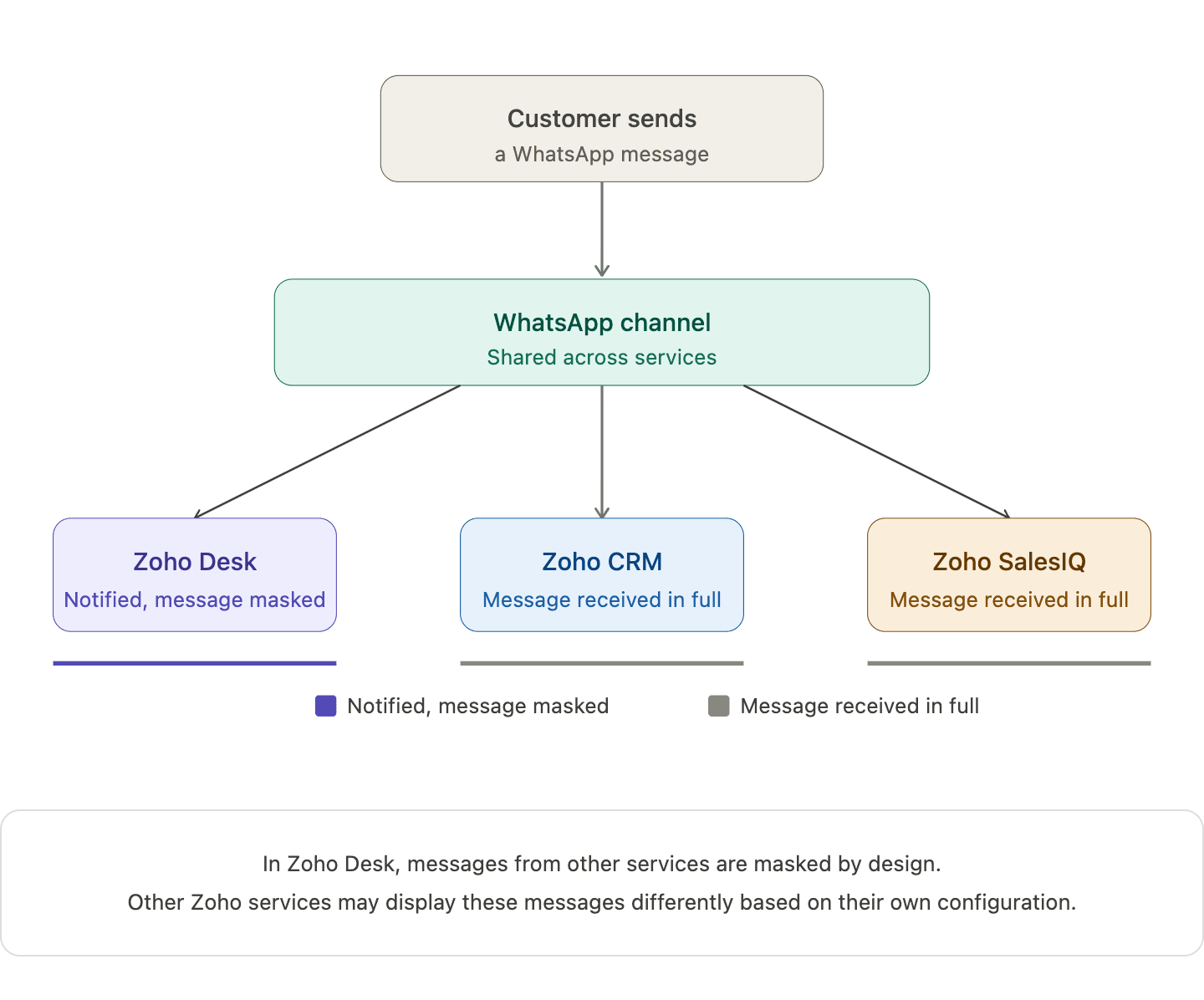
When you connect one WhatsApp number across multiple Zoho services, a single WhatsApp channel is created and shared across those services. Incoming messages appear in all connected services, and the underlying WhatsApp conversation continues as one unified thread.

When an agent replies from one service, that response is reflected in others as well. For example, in Zoho Desk, replies from other services appear in a masked format. This helps teams stay aware of the interaction without exposing the full message content.

What your team actually sees when different Zoho services handle the same conversation 

Action
What happens
Customer sends a WhatsApp message
Appears in all connected Zoho services
Agent replies from one service
Reply appears in Zoho Desk in masked form (Masked replies indicate that a response was sent from another service, without showing the full message content)
Another agent opens the conversation
The conversation timeline is visible, while message content may remain masked
Two agents attempt to handle the same conversation
The system shows a warning but does not block access
   
 Note:   In Zoho Desk, messages from other services are masked by design. Other Zoho services may display these messages differently based on their own configuration. 

How one Zoho service becomes the owner of the shared WhatsApp channel  


When a WhatsApp number is connected across multiple Zoho services, the first service where the number is configured becomes the parent service.

Other Zoho services that use the same number are automatically subscribed to this channel, allowing different teams to stay connected to the same conversation.

If the parent service is removed later, another subscribed service is automatically assigned as the new parent, without affecting ongoing conversations or message history.

What the parent service actually controls in this setup

The parent service is the Zoho service where the WhatsApp number is first configured. Once your WhatsApp number is shared across Zoho services, this parent service becomes the control point for automation.

This is where automation such as chatbots (including Guided Conversations), auto-replies, workflow-triggered messages, and outbound notifications are managed.

Other services can still participate in conversations, but they don’t control or trigger automation on that number.

How different types of automation behave across services   


Chatbots
  1. Bots run only from the parent service
  2. Customer messages trigger bot responses from that service
  3. Other services can see the interaction but cannot run their own bots
 
Auto-Replies 
  1. Only the parent service can send automatic replies
  2. Auto-replies configured in other services will not trigger
 
Workflow-Based Messages  
  1. Messages triggered by workflows (like ticket creation or lead updates) run only from the parent service
  2. Workflows in other services cannot send WhatsApp messages using the shared number
 
Notifications and Outbound Messages  
  1. Scheduled or event-based messages are sent only from the parent service
  2. Other services cannot use the same number for outbound automation


What changes when one service disconnects from the shared WhatsApp number 

When one Zoho service disconnects from the shared WhatsApp number, only that service is unsubscribed from the channel. Other subscribed services continue to receive incoming messages, and customer conversations remain active without any disruption.
Note: WhatsApp connectivity stops only if the number is removed from all connected services. 
 
The following Zoho bundles support shared WhatsApp numbers :
  1. Zoho One
  2. Zoho CRM Plus
  3. Other Zoho bundles with appropriate access
 
A few products, plans, or portals currently have restrictions:
  1. Standalone Zoho product licenses
  2. Portals upgraded from standalone plans
  3. Applications like Zoho Books, Inventory, Invoice, Subscriptions, Expense, Commerce, Checkout, and Payroll 
Note: The same WhatsApp number can still be connected the above-listed services, but each product maintains its own Channel and conversation history. 
   

What teams should align on before and after sharing a WhatsApp number 

Identify which service will act as the parent before setup. You can check this in Zoho Desk under the WhatsApp channel configuration, where the parent service is indicated.

Ensure agents understand what it means when another service has already picked up a conversation.

Define how conversations should move between support, sales, and other teams.

If your teams are already working across multiple Zoho services, this setup can simplify how conversations are handled day to day.

We're curious to know how others are approaching this. Are you already using a shared WhatsApp number across teams, or planning to try it out?
 

FAQ
Does this create multiple WhatsApp conversations for the same customer?
No. There is only one underlying WhatsApp conversation shared across the connected services.

Can two agents reply at the same time from different services?
The system shows a warning if another agent has already picked up the conversation, which helps reduce duplicate replies.
 
Why do replies appear as masked in other services?
Masked replies help other teams stay aware that a response was sent, without exposing the full message content across services.
 
Which service controls automation and bot behavior?
Automated features such as chatbots, auto-replies, and workflows are controlled by the parent service where the WhatsApp number was first configured.


      • Sticky Posts

      • Zoho Desk Partners with Microsoft's M365 Copilot for seamless customer service experiences

        Hello Zoho Desk users, We are happy to announce that Zoho Desk has partnered with Microsoft's M365 to empower customer service teams with enhanced capabilities and seamless experiences for agents. Microsoft announced their partnership during their keynote
      • WhatsApp pricing changes: Pay per message starting July 1, 2025

        Starting July 1, 2025, WhatsApp is shifting from conversation-based pricing to per-message billing. That means every business-initiated message you send will count. Not just the first one in a 24-hour window. Pricing updates on the WhatsApp Business Platform
      • Live Webinar - Work smarter with Zoho Desk and Zoho Workplace integration

        Hello customers! Zoho Desk and Zoho Workplace are coming together for a webinar on 14th May, 2024. Zoho Workplace is a suite of productivity apps for email, chat, docs, calls, and more at one single place. Zoho Desk is closely integrated with a few tools
      • Apple iOS 17 and iPadOS 17 updates for Zoho Desk users

        Hello Zoho Desk users! Apple recently announced the release of iOS 17 and iPad OS 17. These latest OS updates will help you stay productive and efficient, through interactive and seamless user experiences. Zoho Desk has incorporated the updates to help
      • Zoho Desk Cheat Sheet For The Year-End

        Check out these Zoho Desk best practices to end this year on a high and have a great one ahead! #1 Set Business (Holiday) Hours - If you have limited working hours, please make sure you restrict your business hours or set them as holidays for the coming days. Let your customers know when you will, and won't, be available. #2 Update the Annual Holiday List - Check the holidays for the new year and update the holiday schedule. Usually, holidays from the current year will be carried over for the next

        • Recent Topics

        • Adding a custom formula field from sub-forms

          I have used my 5 Aggregated Sum fields in the subform. I have another column I want to add a summary of. This can be in a separate section/field. The formula field won't pull in information from the sub-form. How do I pull information from the sub-form
        • Remove Zoho Header from Portals

          I have a portal page with custom domain. But when I print directly from a webpage, the Zoho CRM header shows. It kind of kills the branding aspect. Is there a way to get rid of this?
        • Creator List not showing

          I've edited a list in creator, but when I open it in the live version the list is completely different. Anyone know why this is happening? Edit Version: Live Version:
        • Please design a better spam filter

          Hi Team, While I love Zoho Mail for all the awesome features you have designed - this is the one you need to do a lot of work on - Spam Filter. Your spam categorization seems to be very inefficient - any email containing brand images or a tracking pixel
        • Host not reachable when sending

          For few partner that I send regular emails now got error and they don't receive emails Temporary failure fam-xxx.hr/185.xx.xx.xxx Host not reachable. Have more than 20 mails in https://mailadmin.zoho.eu/cpanel/home.do#mailSettings/retryEmail please
        • IP flagged as abusive

          I'm getting the error that 136.143.188.15 is listed as abusive. I've checked with mxtoolbox.com and it is indeed in the list
        • App passwords stop working

          Some of my app passwords appear to stop working after awhile. Seems to happen every 6 months or so. Just had to change one again for the second time in a year. Is this a bug or a feature? Or perhaps changes are being made on the back end on occasion that
        • Duplicate entries for contacts birthdays

          Good morning I have recently started to use my Zoho calendar and noticed that there are multiple birthday events showing for some of my contacts. I have checked my contacts and there were duplicates for some contacts which I have now rectified but the
        • Problem: New Email Consistently Failing to Sync/Display in Inbox

          Recently, I have noticed that my Zoho Email inbox does not indicate I've received a new email, until I go to *another* folder and then return to the inbox. Only then will new emails be displayed. This has happened 100% of the time, during the past few
        • Zoho IMAP Access to mail doesn't sync messages

          As stated in the topic - I have company account email address setup, and it has ( as in the picutre ) ActiveSync and Imap access enabled. However the messages does not show up while logged in in Zoho Mail however when I log in in thunderbird everything
        • Cliq iOS can't see shared screen

          Hello, I had this morning a video call with a colleague. She is using Cliq Desktop MacOS and wanted to share her screen with me. I'm on iPad. I noticed, while she shared her screen, I could only see her video, but not the shared screen... Does Cliq iOS is able to display shared screen, or is it somewhere else to be found ? Regards
        • Temps working custom view in Zoho Recruit

          How do you create a custom view of temps working for this week.  I have tried multiple combinations of job status, start date, end date etc but I am unable to find the correct combinations to show the temps I have working this week?? Any suggestions on how I can do this. 
        • Client Scripts similar to CRM?

          Hi, Is there any plans for Client Scripts to become a feature of Recruit? Feel this will be a great benefit to a number of users. Would be great for example in cases where a Client has banned / blacklisted a Candidate - so that if that candidate is associated
        • Announcing Zoho Sheet desktop app for macOS and Windows (Beta)

          Hello Sheet users, We know you’ve been waiting for this one. It has always been the top priority on our roadmap to provide a single native desktop app for macOS and Windows that works both online and offline. Today, we are excited to announce that the
        • Automated entries past the current month in a calendar report

          Hi all, I have an automation problem. I have a form which on successfull entry adds either 5 or 10 more of these entries with a slight change so our customers can see it throug a calendar report on the webiste. The entry put in manually shows up perfectly
        • Billing Status Update

          Hello Latha, I’m working on a new automation (deluge) to fulfill one of our requirements. In this automation, there is a step to update the Work Order billing status from “Not Yet Invoiced” to “Non-Billable.” I tried to find the API information relevant
        • What's New in Zoho POS - April 2026

          Hello everyone, Welcome to Zoho POS’s monthly update, where we share our latest feature updates, enhancements, events, and more. Let’s take a look at how April went. Access and manage other web applications in Zoho POS with Web Tabs You can now access
        • Many Zoho POS Issues

          Can not apply credits from a customers account as a form of payment. It shows that you can but there is a bug that does not execute the action. Reported many times. Can not view Sessions from Zoho POS WebView, throws a JQUERY error Workflows and actions
        • HOW I CAN GET BETA VERSION FOT TESTING

          HI. ZOHO I AM INTERESTED IN YOUR BETA SOFTWARE TO EXPERIENCE NEW FEATURES.
        • Multiple EAN code for product

          option to add multiple EAN code for product???
        • Issue adding/changing mobile number for OTP

          Hi Zoho Community, I’m trying to add or change my mobile number, but I keep getting this error: “We’re unable to send OTP to this mobile number. Please contact support-as@eu.zohocorp.com” Because of this, I can’t verify my number or continue the setup.
        • Zoho Payroll Canada does not work

          We submitted payroll within the required timelines. The money was withdrawn from our account and our employees have not been paid. Impossible to get a hold of someone at Zoho. I can’t believe the company operates like this. What a bloody disgrace. Shame
        • Enhance Appointment Buffers in Zoho Bookings

          There was previously a long-standing feature request related to enhancing the way appointment buffers work in Zoho Bookings, but it looks like the original post has been deleted. I am therefore adding a new request that Zoho Bookings adjust how appointment
        • Functionality based URL to find records due today or in the next week

          I need to construct a URL to filter a view to records where the evaluation is due soon (i.e. in the next 7 days). To me, that includes today, but Zoho has a different opinion. Zoho defines 39 as NEXT_7_DAYS but this gives unexpected results. https://creatorapp.zoho.eu/...#Report:My_Evaluations?Evaluation_due_by_op=39
        • Allow customers to choose meeting venue and meeting duration on booking page

          My business primarily involves one-to-one meetings with my clients. Given the hybrid-work world we now find ourselves in, these meetings can take several forms (which I think of as the meeting "venue"): In-person Zoom Phone call I currently handle these
        • Event Time Zone in meeting invites are confusing users

          When sending calendar invites to internal and external users, the first section "Event Time Zone" is confusing people and they are automatically declining events. Can this section please be removed??? It already shows the correct time zone next to the
        • Forwarding without verification

          Hi, I use Tripit to keep track of all my business travel. I've recently moved over to Zoho and wanted to set up a forwarding rule to send various travel confirmation emails automatically to plans@tripit.com Obviously this is an email address I don't control,
        • Filter by user in Pivot Chart

          I have a Pivot chart where the data should be filtered by user. The user enters the system and should see only the data that correspond to it. Can anyone help me?
        • All new Address Field in Zoho CRM: maintain structured and accurate address inputs

          Availability Update: 29 September 2025: It's currently available for all new sign-ups and for existing Zoho CRM orgs which are in the Professional edition exclusively for IN DC users. 2 March 2026: Available to users in all DCs except US and EU DC. 24
        • Whatsapp Limitation Questions

          Good day, I would like to find out about the functionality or possibility of all the below points within the Zoho/WhatsApp integration. Will WhatsApp buttons ever be possible in the future? Will WhatsApp Re-directs to different users be possible based
        • Internal mails on our company domain (managed by Zoho) do not get delivered

          Hi last week Thursday and Friday a colleague had sent me two emails which did not show up at all in my inbox, spam or anywhere else. What this a problem with Zoho mail in general or did this affect just us? From the forum is reads like many problems had
        • #2 The Tax Talk Nobody Wants to Have

          "We are also able to manage our GST invoices without worrying about compliance issues. With Zoho Invoice, we are happy, our tax consultant is happy, and so are our customers," rejoices Shivprateek Habib, Partner, Flutterboots Services LLP. That's usually
        • Bulk upload images and specifications to products

          Hi, Many users have asked this over the years and I am also asking the same. Is there any way in which we can bulk upload product (variant) images and product specifications. The current way to upload/select image for every variant is too cumbersome.
        • Workflows fail silently in Zoho CRM and there is no native way to know

          Workflow automation is honestly one of the biggest reasons my clients choose Zoho. But there is one problem I keep running into across almost every implementation. When a workflow fails, nobody finds out. Email alerts hit daily limits and just stop. Custom
        • Zoho Commerce and Third-party shipping (MachShip) API integration

          We are implementing a third-party shipping (MachShip) API integration for our Zoho Commerce store and have made significant progress. However, we need guidance on a specific technical challenge. Current Challenge: We need to get the customer input to
        • Is there a way to update bounce domain after verification process has started

          Hi Zeptomail Team, I've created a domain and we did not update the bounce domain to our custom record... the validation has already started and I am now unable to update the bounce domain. Is there any way to get this updated on the backend without deleting
        • Pre-orders at Zoho Commerce

          We plan to have regular producs that are avaliable for purchase now and we plan to have products that will be avaliable in 2-4 weeks. How we can take the pre-orders for these products? We need to take the money for the product now, but the delivery will
        • How to Customize the Member Portal Login Page?

          Hi everyone, I am currently using the default member portal login page for Zoho Commerce, but I feel it looks quite plain and doesn’t align well with my brand's style. I would like to make it more visually appealing, possibly by: Adding custom colors
        • Picklist values out-of-date in Campaigns

          Hi I use a CRM (Global) picklist set of values for my field "Connection Strength" (see screenshot 1). . I use Campaigns to follow-up and change the Connection Strength value depending on their stage. The picklist values that appear in the dropdown for
        • Refering cell from other sheet

          Hi, If we want to refer any cell in the same sheet its very easy, like suppose if I want to refer cell A2  in P7 I just need to type =A2 in P7, similarly how can I refer a cell present in different sheet ( I mean refer cell A2 from Sheet1 into Sheet2) Thanks
        • Next Page