Marketer's Space: Proven tips to improve open rates – Part II - Online Help | Zoho Campaigns

Marketer's Space: Proven tips to improve open rates – Part II - Online Help | Zoho Campaigns

Hello Marketers!

Welcome back to another post in Marketer's Space!

We're continuing from where we left off a fortnight ago. We ended the previous post discussing the subject line, and we'll continue from there. Let's dive right in.

Pre-header

Pre-header text accompanies the subject line. While the subject line tells your contacts what your campaigns are about, the pre-header text adds detail to it. We strongly recommend having it when you're creating campaigns.

The image below shows an email from Perplexity, wherein both the subject line and pre-header are present.



Here, the pre-header text drives home the point of why you need to use it. If you don't include it, you're missing out on important information you can display to your contacts even before they open your campaigns.

Here are some tips for crafting pre-header text:
  • Keep the length between five and 12 words, and 30 to 60 characters. Any longer than that, and the text tends to get truncated and your contacts can't read it fully. Adhering to this length is also essential for making your campaigns mobile-friendly and mobile-responsive.
  • Don't repeat what you've already mentioned in the subject line. You're wasting precious space by doing that.
  • Place the most important hook in the first few words of your pre-header to grab your contacts' attention.

 
Sender name, from address, and reply-to address 

Let's say Patricia is the owner of Zylker Labs, an AI-centric marketing agency. She's new to this business, so she isn't fully aware of the dos and don'ts in email marketing. Though she sent well-crafted email campaigns to her contacts, she was dismayed to find that even after waiting for a couple of months, she didn't receive a single reply from them.

Upon closer inspection, she discovered that the fault lied with the sender name, sender address, and the reply-to address she had used. She didn't provide a sender name, and her sender and reply-to address was no-reply@zylkerlabs.com.

Zoho Campaigns provides granular control over sender details like these to help you avoid such mishaps. When you're creating an email campaign, you can add sender details such as your Sender Name, Sender email address, and Reply-to Address.
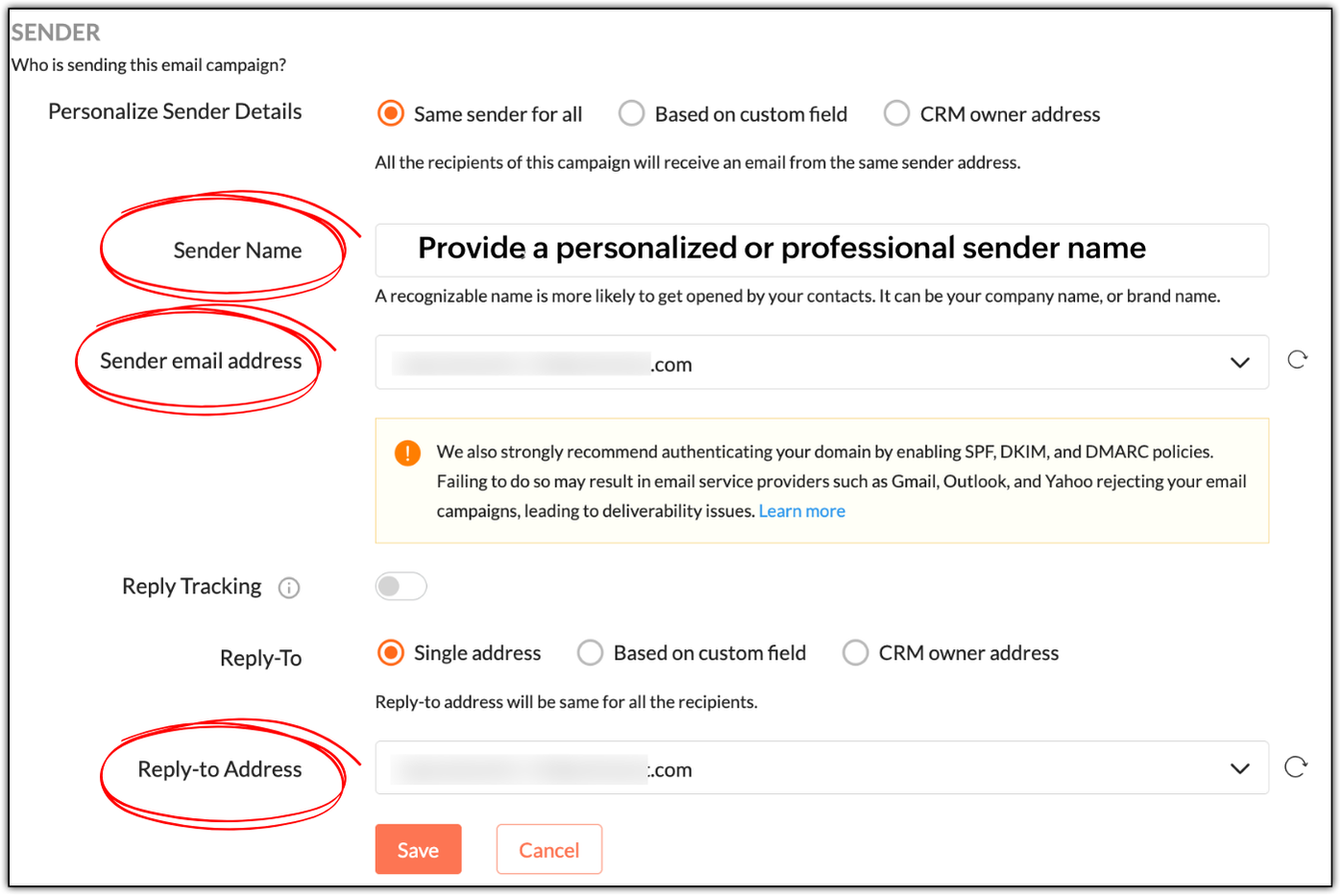


While "Sender Name" is not a mandatory field, it's best to specify a personalized or professional sender name, as it helps build trust. In Patricia's example, she can use:
  • Patricia as a personable variant
  • Patricia | Zylker Labs for a mixture of personableness and professionalism
  • Zylker Labs for a simple, professional sender name

Not having a sender name will put off your contacts; they won't be tempted to open your emails.

NotesNote: Zoho Campaigns automatically displays your sender address as the sender name if its left empty. 

If you use no-reply email addresses as your sender and reply-to addresses, you're telling your contacts not to communicate with you, which is a red flag. Instead use something like patricia@zylkerlabs.com, support@zylkerlabs.com, or help@zylkerlabs.com as your sender address. The same applies to your reply-to address, but if you wish to track the replies in a separate inbox, you can use a different address like mail-to@zylkerlabs.com or team@zylkerlabs.com.

Get consent

Let's say Julie has built a signup form using Zoho Campaigns and embedded it in her website (https://zylkerfashions.com) to attract customers. Many customers have signed up via the form to receive communications from her. Julie is excited and starts sending them campaigns. Soon, she realizes that half of these customers either marked her campaigns as spam, didn't reply, or unsubscribed—and that some campaigns didn't get delivered at all. Naturally, Julie is disappointed and frustrated, as she doesn't understand what went wrong.

Upon checking, Julie realizes that she didn't follow double opt-in to get consent from her customers. While you may assume that because people have signed up via your website, that means they're ready to receive campaigns—we strongly advise that you always confirm with them once.

Go to Settings > Manage Opt-in to enable double opt-in in Zoho Campaigns.


As soon as your contacts sign up via a signup form, Zoho Campaigns will automatically send a confirmation email that asks them to confirm their email address. Once they've confirmed, they'll be added as contacts in Zoho Campaigns. This is done to ensure that:
  • Your contacts are genuinely interested in receiving communications.
  • If they've specified an incorrect email during sign-up, the double opt-in email won't reach them, so they won't get added to Zoho Campaigns.
  • You can avoid unnecessary unsubscribes, spam, and abuse complaints.
  • Your mailing list remains clean, so you don't send campaigns to invalid email addresses, which can negatively affect your email deliverability.
 

Warm up your sender domain 

If you're starting out or haven't sent emails for quite some time, your sender domain is new or dormant—which means you have a cold domain.

Let's say you've imported 10,000 new contacts, and in your eagerness to start your marketing journey, you've sent campaigns to all of them at once—something called as an email blast. You should avoid this, because you can trigger the spam filters of email clients like Gmail, Yahoo, and Outlook, which not only leads to your campaigns being marked as spam, but also to rejection.

Sending from a cold domain affects your email deliverability negatively. Your domain can ultimately get blacklisted due to poor reputation, as well, which means you'll lose out on the opportunity to do business.

Hence, it's vital to warm up your domain by sending your campaigns in equal or incremental batches. For example, you can send 1,000 campaigns per day for 10 days or increase the number each day number from 1,000 to 1,250 to 1,500, and so on.

We've explored essential techniques to boost your email open rates, from crafting smarter pre-headers to warming up your sender domain for better deliverability. Apply these practices consistently to build trust and achieve long-term campaign success.

In two weeks' time, you'll be reading the final part of this series.

Happy marketing!

Kind regards,
Sai Prashanth
User Education
Zoho Campaigns


      • Sticky Posts

      • Marketer's Space: Proven tips to improve open rates – Part II

        Hello Marketers! Welcome back to another post in Marketer's Space! We're continuing from where we left off a fortnight ago. We ended the previous post discussing the subject line, and we'll continue from there. Let's dive right in. Pre-header Pre-header
      • Tip of the week 03 - Sending emails in batches

        Today's marketers not only want their email marketing to be efficient, but also smart. For an email campaign, you may think you have all the essential elements for lead conversion—a big mailing list, an attractive template design, and the most-engaging message content, but after hitting the ‘send’ button, you may not get the expected conversions. Wondering why? Here’s one of the major reasons. Many marketers miss out on sending the email campaign the right way. Did you know that you should not be
      • Tip of the week 04 - Know about your recipients' 'prime open time.'

        In today's market, the importance of customer behavior is astounding, with a vast amount of research and resources going into finding how customers make decisions. The process of persuading your customers to open your email and click on your call-to-action becomes easy when you understand the psychology behind their behavioral traits. Time to turn into a psychologist! Let's get to the basics—you want your emails to resonate well with your recipients. So, what's the primary thing involved here? It's
      • Zoho Campaigns Expert Diaries on SoundCloud, Spotify, Apple Podcasts, and YouTube

        Hi email champs,  As email marketers, we find great lessons in each other's works—be it the subject lines that worked good, the design that was received well, or the CTA that had the maximum clicks. Email marketing encompasses a wide variety of topics spanning everything from creation and design to development and deliverability.  Here's when we from the Zoho Campaigns team found the need to build an email marketing community comprising of seasoned marketers and email geeks who can help each other
      • Email Deliverability Tip #3: Seal the deal with the preheader

        In the last post, we learned about the subject line. Today we'll be learning about the preheader. A preheader is the short text that follows the subject line in an email. The preheader is designed to hint at what your email message is all about. A good preheader should act as a second subject line and convince your contacts to open the email. Now, let's learn the best way to craft a preheader. Your subject line and preheader should work together and accurately convey the gist of your email. Keep

        • Recent Topics

        • Zoho Books emails suddenly going to Spam since 11 Nov 2025 (Gmail + now Outlook) — anyone else?

          Hi everyone, We migrated to Zoho Books in July 2025 and everything worked fine until 11 Nov 2025. Since then, Zoho Books system emails are landing in customers’ Spam (first Gmail, and now we’re seeing Outlook/Office 365 also starting to spam them). Impacted
        • Client Portal ZOHO ONE

          Dear Zoho one is fantastic option for companies but it seems to me that it is still an aggregation of aps let me explain I have zoho books with client portal so client access their invoice then I have zoho project with client portal so they can access their project but not their invoice without another URL another LOGIN Are you planning in creating a beautiful UI portal for client so we can control access to client in one location to multiple aps at least unify project and invoice aps that would
        • The Social Wall: February 2026

          Hello everyone, This month, we’re bringing you a mix of exciting toolkit enhancements and a few improvements across the web and iOS app, all designed to make your social media management simpler and smoother. File converter Images come in different formats,
        • Zoho Mail and SalesInbox doesn't link to CRM record using Reply-To

          Hi, I've just set up SalesInbox, with the intention of using it for sales enquiries (instead of Desk, which I have been using until now). I've noticed that, unlike Desk, SalesInbox only uses the 'From' email address to attempt to link to a CRM contact
        • Service line items

          Hello Latha, Could you please let me know the maximum number of service line items that can be added to a single work order? Thanks, Chethiya.
        • Poor Search Results on Zoho CRM

          The search on Zoho CRM is quite poor. Salesforce has now published a new search, when will get this on Zoho? https://help.salesforce.com/s/articleView?id=data.c360_a_hybridsearch_index.htm&type=5
        • How to use filters on all products page? Or even a category page?

          Hello, I am trying to create some filters so users can use filters to find products they are looking for. So what i am trying is to create a filter according to price lets say. So if i define it this way i am expecting to see this filter option on category
        • Capture Last check-in date & days since

          I have two custom fields on my Account form, these are "Date of Last Check-In" and "Days Since Last Contact" Using a custom function how can I pull the date from the last check-in and display it in the field "Date of Last Check-In"? and then also display the number of days since last check-in in the "Days SInce Last Contact" field? I tried following a couple of examples but got myself into a bit of a muddle!
        • Pasted Images not being embedded in custom mail

          Hi, I'm making a custom report by email based on commentaries. I have the email ready, all working great except for images that are being pasted in the commentaries. Zoho deals with them as temp images and so it requires authentication to view them, something
        • Archiving Contacts

          How do I archive a list of contacts, or individual contacts?
        • Every time an event is updated, all participants receive an update email. How can I deactivate this?

          Every time an event is updated in Zoho CRM (e.g. change description, link to Lead) every participant of this meeting gets an update email. Another customer noticed this problem years ago in the Japanese community: https://help.zoho.com/portal/ja/community/topic/any-time-an-event-is-updated-on-zohocrm-calendar-it-sends-multiple-invites-to-the-participants-how-do-i-stop-that-from-happening
        • 3/18 オンライン勉強会のお知らせ Zoho ワークアウト (無料)

          ユーザーの皆さま、こんにちは。コミュニティチームの中野です。 3月開催のZoho ワークアウトの開催が決定しましたのでご案内します。 今回はZoomにて、オンライン開催します。 ▶︎参加登録はこちら(無料) https://us02web.zoom.us/meeting/register/BoNTN7zYR8OvOPGShqBY0A ━━━━━━━━━━━━━━━━━━━━━━━━ Zoho ワークアウトとは? Zoho ユーザー同士で交流しながら、サービスに関する疑問や不明点の解消を目指すイベントです。
        • Zoho Sheet for Desktop

          Does Zoho plans to develop a Desktop version of Sheet that installs on the computer like was done with Writer?
        • Conversion Rate – Won Deals over Assigned Prospects

          Hello, I would like assistance configuring a KPI in Zoho Analytics titled: Objective of the calculation: Number of Won Deals divided by Total number of assigned prospects (not only converted prospects). Important clarification: The denominator must include
        • Feature Request – Conditional Visitor Information Request in Zoho SalesIQ

          We would like to request the ability to conditionally ask for visitor details based on the communication channel used in Zoho SalesIQ. Specifically: When a visitor initiates a conversation through the live chat widget on the website, we want to continue
        • Apple Messages for Business in Omnichannel communications?

          Hello, Apple launched "Apple Messages for Business" but Zoho CRM or Zoho Desk don't appear in the list of possible integrators. Zoho already promotes https://www.zoho.com/crm/omnichannel.html Omni Channel integration, but Apple Messages does not yet appear.
        • Admin asked me for Backend Details when I wanted to verify my ZeptoMail Account

          Please provide the backend details where you will be adding the SMTP/API information of ZeptoMail Who knows what this means?
        • Cliq iOS can't see shared screen

          Hello, I had this morning a video call with a colleague. She is using Cliq Desktop MacOS and wanted to share her screen with me. I'm on iPad. I noticed, while she shared her screen, I could only see her video, but not the shared screen... Does Cliq iOS is able to display shared screen, or is it somewhere else to be found ? Regards
        • ZOHO.CRM.UI.Record.open not working properly

          I have a Zoho CRM Widget and in it I have a block where it will open the blocks Meeting like below block.addEventListener("click", () => { ZOHO.CRM.UI.Record.open({ Entity: "Events", RecordID: meeting.id }).catch(err => { console.error("Open record failed:",
        • 【Zoho CRM】通貨機能のアップデート:為替レートの自動更新やデータ更新オプションなど

          ユーザーの皆さま、こんにちは。コミュニティチームの藤澤です。 今回は「Zoho CRM アップデート情報」の中から通貨機能のアップデートをご紹介します。 CRMの複数通貨機能を使うと、地域ごとに通貨を管理し、顧客の現地通貨で記録したデータを自国通貨に自動換算して分析やレポートに活用できます。 従来は、為替レートを管理者が手動で定期更新する必要があり、各データには作成時点のレートが固定されるため、その後の市場変動は反映されませんでした。 本記事では、この問題を解消する「為替レートの自動更新」をはじめ、さまざまな新機能をご紹介します。
        • AI Bot and Advanced Automation for WhatsApp

          Most small businesses "live" on WhatsApp, and while Bigin’s current integration is helpful, users need more automation to keep up with volume. We are requesting features based on our customer Feedbacks AI Bot: For auto-replying to FAQs. Keyword Triggers:
        • Can we add zoho sign to a custom module?

          i understand out of the box it works with 8 modules. is it possible to add it to a custom module?
        • This domain is not allowed to add in Zoho. Please contact support-as@zohocorp.com for further details

        • Selected date present employees roster

          =CHOOSECOLS(FILTER(A2:E5;(INDEX(C2:E5;0;MATCH(VALUE(B8);INDEX(VALUE(C1:E1));0))<>"OFF")*(INDEX(C2:E5;0;MATCH(VALUE(B8);INDEX(VALUE(C1:E1));0))<>"EL"));1;2;2+MATCH(VALUE(B8);INDEX(VALUE(C1:E1));0)) This way sheet looks l
        • Credit Card Terminal for Zoho Books

          Hello, Instead of punching the credit card number manually for customer payment, do you have a third-party hardware credit card reader that works with Braintree? Thank You
        • Filtering in Help Center

          Hi, our ticket system is based on a set of structured status categories. The customer must be able to filter by these status. How can we add "Status" as filter to the help center. In the same moment we do not need filters e.g. as "channel". How can we
        • On Edit Validation Blueprint

          Hello, I have a notes field and a signature field. When the Approve button is clicked, the Signature field will appear and must be filled in. When the Reject button is clicked, the Notes field will appear and must be filled in. Question: Blueprint will
        • Google Fonts Integration in Pagesense Popup Editor

          Hello Zoho Pagesense Team, We hope you're doing well. We’d like to submit a feature request to enhance Zoho Pagesense’s popup editor with Google Fonts support. Current Limitation: Currently, Pagesense offers a limited set of default fonts. Google Fonts
        • Increase Round Robin Scheduler Frequency in Zoho Desk

          Dear Zoho Desk Team, We hope this message finds you well. We would like to request an enhancement to the Round Robin Scheduler in Zoho Desk to better address ticket assignment efficiency. Current Behavior At present, the Round Robin Scheduler operates
        • Can multiple agents be assigned to one ticket on purpose?

          Is it possible to assign one ticket to two or more agents at a time? I would like the option to have multiple people working on one ticket so that the same ticket is viewable for those agents on their list of pending tickets. Is something like this currently
        • Where is the settings option in zoho writer?

          hi, my zoho writer on windows has menu fonts too large. where do i find the settings to change this option? my screen resolution is correct and other apps/softwares in windows have no issues. regards
        • When Does WorkDrive integrate with Books?

          When Does WorkDrive integrate with Books?
        • CRM gets location smart with the all new Map View: visualize records, locate records within any radius, and more

          Hello all, We've introduced a new way to work with location data in Zoho CRM: the Map View. Instead of scrolling through endless lists, your records now appear as pins on a map. Built on top of the all-new address field and powered by Mappls (MapMyIndia),
        • Synching changes to Stripe when changes are made in Zoho Billing

          We have a situation where we have merged customers in Zoho BIlling and then found out later that the payment in Stripe was not updated and still associated with the old customer record. The card gets updated and billed, but that payment is still associated
        • Zoho Sign Not Delivering

          I have sent several contracts out via Zoho Sign.   They do not seem to be getting delivered.  I had one person receive it, but the others have not.   I had one person tell me they sent it back to me and never got it and doesn't show as signed.  I've sent
        • Bank Feeds Breaking Constantly

          Hey Everyone, I have already reached out to support about this issue but I am wondering if anyone else is having the same issue. My bank feeds keep breaking within days of me fixing them by updating the credentials. Its been happening for a while and
        • Automatic Matching from Bank Statements / Feeds

          Is it possible to have transactions from a feed or bank statement automatically match when certain criteria are met? My use case, which is pretty broadly applicable, is e-commerce transactions for merchant services accounts (clearing accounts). In these
        • Zoho Payroll's USA and KSA editions are available in Zoho One!

          Greetings! We’re excited to share that Zoho Payroll, currently available only in India and the UAE, is now introducing the KSA (Kingdom of Saudi Arabia) edition and the USA (United States of America) edition, and these editions are now available in Zoho
        • Outlook/Hotmail Blocking Zoho SMTP IPs (S3150)

          We are currently facing a serious deliverability issue with Zoho SMTP while sending transactional OTP emails for our production application. Emails sent to Outlook / Hotmail addresses are being rejected with the following error: 550 - 5.7.1 Unfortunately,
        • Tip #63- Exploring Technician Console: Elevate to Admin Mode (Windows & Mac)- 'Insider Insights'

          Hello Zoho Assist Community! Ever been in a remote support session where you couldn’t complete a task because you didn’t have admin privileges? Maybe installing software, accessing secure system areas, or rebooting into Safe Mode just didn’t work because
        • Next Page