Native QuickBooks integration for Zoho CRM: Connecting sales and finance

Native QuickBooks integration for Zoho CRM: Connecting sales and finance

Alert
Updated on July 7th, 2026:
You can now download Quotes, Invoices, and Purchase Orders as PDF files directly from Zoho CRM, eliminating the need to switch to QuickBooks. Learn more.

Greetings,

I hope all of you are doing well. We're excited to announce Zoho CRM's integration with QuickBooks Web, which is designed to synchronize your CRM data with your QuickBooks accounting records and bridge the gap between sales and finance.


This integration addresses a challenge many organizations face today: Every customer conversation—just like every closed deal—eventually finds its way into finance. But in many organizations, that journey isn't seamless.

Sales teams spend their days in Zoho CRM, moving deals forward and building relationships. Finance teams work out of accounting systems, where they track invoices, payments, and revenue. Data is forced to move in between these systems via spreadsheet imports, manual re-entry, or third-party connectors.

Over time, this disconnect leads to:

  • Duplicate records across sales and finance systems

  • Sync delays between CRM and accounting data

  • Limited visibility into invoice and payment status for sales teams

  • Increased time spent reconciling data instead of focusing on customers

Today, we're taking a meaningful step toward changing that.

With Zoho CRM's native integration with QuickBooks Online, sales and finance teams are no longer separated by systems and workarounds. This integration is built to connect both teams through a single, continuous flow, where customer data, financial records, and workflows move together.

What's new with the native Zoho CRM and QuickBooks integration

With this integration, we focused on making data sync and automation feel seamless between Zoho CRM and QuickBooks Online, while fully using CRM's native modules. The idea was simple: Everything should work where teams already spend their time.

We've built in flexible data synchronization so information stays consistent without extra effort. Core record modules like Contacts, Accounts, Vendors, and Products sync both ways, while key financial document modules like Estimates, Invoices, and Purchase Orders flow one way from QuickBooks into Zoho CRM. This keeps customer and product data aligned across both systems, without confusion about what lives where.

Another big priority for us was visibility. Sales teams can now view QuickBooks financial documents directly in Zoho CRM, with all relevant details clearly available on each CRM record's detail page. When necessary, a QuickBooks Record Link is also provided, which allows users to open and view the corresponding record directly in QuickBooks.


Also, because this is a native CRM integration, all synced fields are available across workflows, blueprints, reports, and notifications. That means teams can build automation around real financial events, like invoice status changes, estimate acceptance, or overdue payments, and manage sales and finance processes end to end—without ever leaving CRM.

Now that we've covered what the integration enables, let's take a quick look at how it works in practice.

Connect Zoho CRM with QuickBooks and configure your sync

Start by installing the QuickBooks integration from the Zoho CRM Marketplace and authorizing your QuickBooks account.

During installation:

  1. Go to Marketplace > Integrations > QuickBooks > Install.

  2. Authorize your QuickBooks account; if you have multiple QuickBooks companies, select the one you want to connect

  3. Choose the CRM modules you want to sync.


Next, configure how data flows between the two systems:

  1. Set the sync direction:

    1. Two-way sync: Contacts, Accounts, Vendors, Products

    2. One-way sync (QuickBooks > CRM): Estimates, Invoices, Purchase Orders

  2. Map fields between QuickBooks and Zoho CRM.

  3. Create new CRM fields directly from the mapping screen if required.


Outcome: Zoho CRM is connected to the right QuickBooks company, with full control over which data syncs and how it appears in CRM.

Create, track, and automate financial records from CRM

Once the integration is in place, sales teams can start working with QuickBooks data directly from Zoho CRM.

When a user clicks Create Estimate / Create Invoice / Create Purchase Order:

  • They're redirected to QuickBooks.

  • The record is created and saved in QuickBooks.

  • It automatically syncs back to Zoho CRM and appears as read-only (locked).


Any changes must be made directly in QuickBooks. For example, if you update the quote status in QuickBooks, the change will automatically be reflected in Zoho CRM.


Outcome: Zoho CRM becomes the central hub for sales operations and financial visibility, allowing teams to act on real-time data without switching systems.

What this means for sales teams

Sales teams no longer need to toggle between multiple systems to track post-deal activity.

From within Zoho CRM, they can now:

  • View the status of invoices and estimates in real time.

  • Create financial documents directly from CRM.

  • Trigger follow-ups automatically based on financial events.
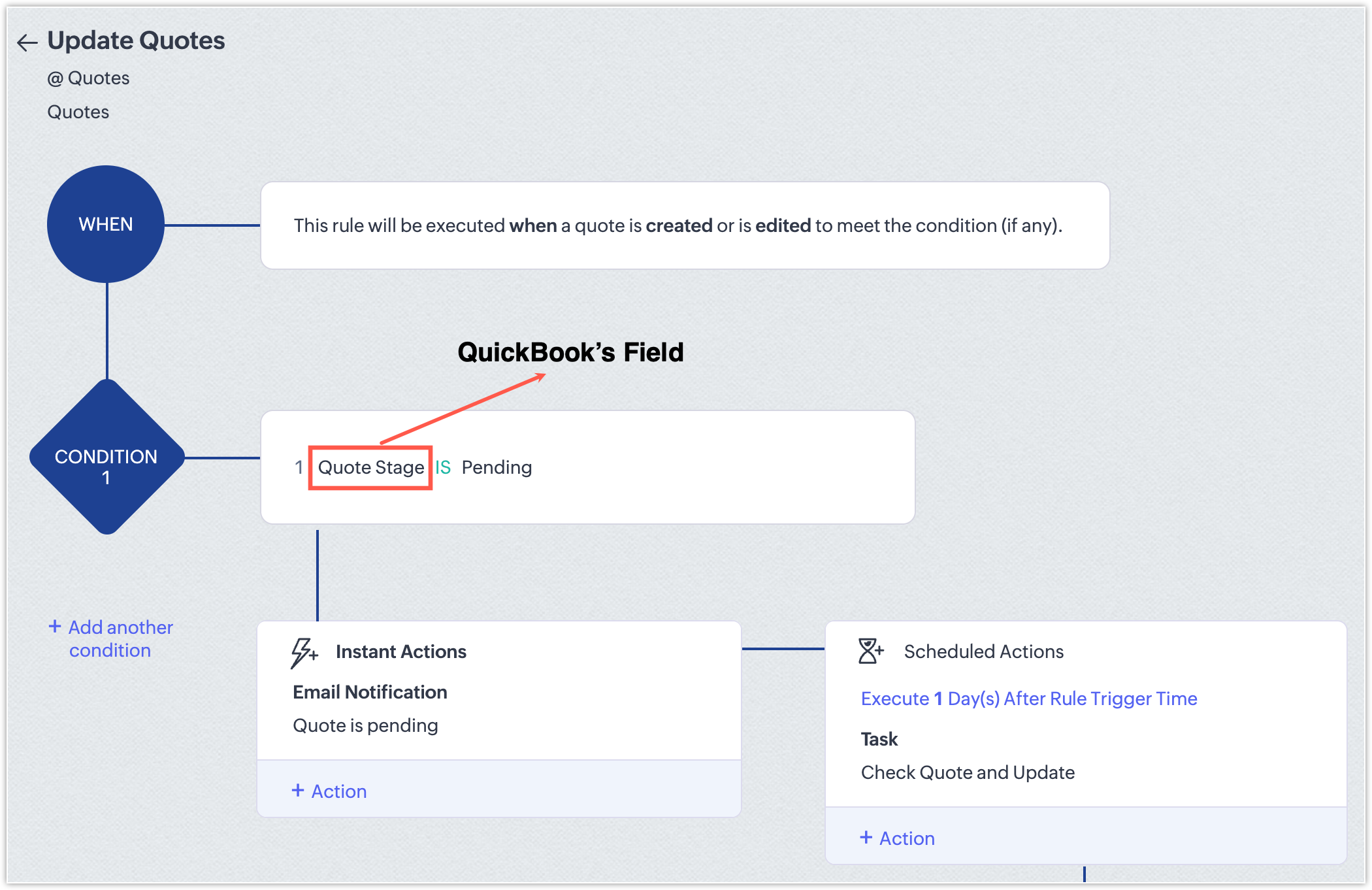
  • Generate reports that combine pipeline and billing information.

With this integration, CRM evolves beyond a simple pipeline tracker; it becomes a central hub for revenue operations that gives teams full visibility and control over sales and finance workflows.

NotesPoints to be noted
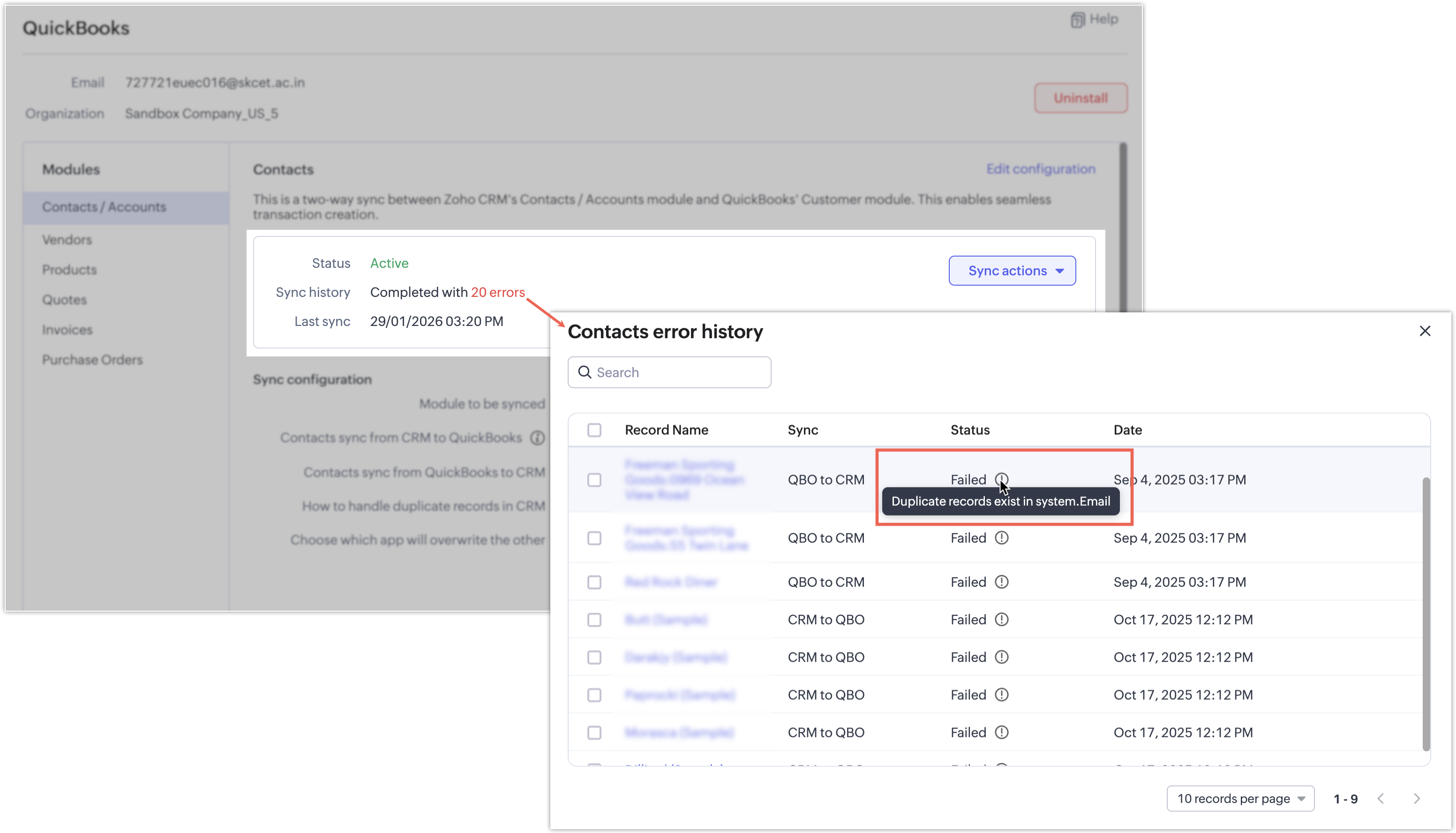
  • If a synchronization attempt fails, the record won't be synced and a clear error message will indicate the reason for the failure.
    Notes

InfoAvailability and pricing
  • Editions: Supported for Enterprise and above editions of Zoho CRM.

  • Pricing: The integration is currently available at no additional cost. Pricing may be introduced in the future.

That's all for this enhancement! We hope this integration helps you manage your sales and finance operations more efficiently. Please give it a try and share your feedback in the comments below.

Thanks and have a great day!

Nizamuddin

Alert
P.S: We're releasing this integration in a phased manner and it's currently available for users across the US, AU, CN, JP, and CA data centers.


        • Recent Topics

        • Tip #92 – Organize your support operations with Departments – ‘Insider Insights’

          Hello Zoho Assist Community! As a support team grows, so does the complexity. Different customers, different products, technicians spread across regions, and each group needing its own way of working. When everyone operates from a single shared space,
        • Support Plan: Recuring Issue

          Hi Zoho Team, Could you please look into this recurring alert and provide clarification on why this restriction is still in place? This issue has become a bottleneck in our workflow, significantly limiting our automation capabilities. We are unable to
        • Introducing Zoho Office Desktop

          Hi users, We are excited to announce Zoho Office Desktop, a single app to install, update, and open Zoho Writer, Sheet, Show, and PDF Editor on Windows and macOS. It includes: One home for every app: Choose the apps you want, and a guided installation
        • How Can You Find Broken Internal Links Without Checking Every Page Manually?

          Broken internal links are a common technical SEO issue. They can send visitors to missing pages, interrupt navigation, and make website maintenance more difficult. On a large website, checking every link manually is simply not practical. So, how can you
        • Zoho Writer for Android: Q2 2026 updates

          Hi users, We are excited to announce the Q2 2026 updates for Zoho Writer for Android. This includes: Formatting parity with the web app: Choose from multiple ordered and unordered list styles, adjust line spacing, apply your custom paragraph styles, change
        • Zeptomail in the blacklists

          Hello, I noticed some hard bounces while sending emails, and upon checking the details, I see that we have been added to the blacklists of certain spam lists: Bounce category: Policy failure Reason: ip-issues Message: 5.7.1 Service unavailable; client
        • ZohoBooks - "Account transactions" report doesn't have any "Desciptions"

          Hi, I'd like to push for this to be included in ZohoBooks: In a "account transactions" report all the numbers are right, but I'd really like to see the "Description" as part of this report, i.e. the line-item-description as I would see it in the bank statement. Essentially all you see is a list of numbers adding up to the total. It is very difficult to see if things are right without being able to see what exactly each transaction refers to. Going into each transaction one-by-one is not a workable
        • Zoho Projects | Q3 Updates

          Hello everyone, Here's a roundup of everything we released from July to September. We have added some new features as well as improved some of the existing ones. Project Financials Finance Integration Integrate your Project with Zoho Books, Zoho Invoice,
        • Meet your customers on Arattai, from inside Zoho CRM

          Hello everyone, Your customers reach you on the apps they already use. Zoho CRM now supports one more: our very own Arattai! When someone messages your Arattai Business number, the conversation arrives in the Messages module in CRM, right beside your
        • Running Balance

          Please add automatically Running balance in ledger view. Taking lot of time, every time to add manually
        • MAKING ENTRY TIME MORE USER FRIENDLY AND FASTER O PREVENT TAB TIME

          I AM CURIOUS TO KNOW IF WE CAN MAKE IT MORE USER FRIENDLY WHILE MAKING BILLS , I MAJORLY USE OVER DESKTOP SO I AM SUGGESTING TO REMOVE TAB TIME WHILE ENTERING BILL OR MAKING INVOICE DIRECT JUMP TO ONLY REGULAR PARTS OF THE BILL . YOURS RAKESH 782866
        • Unable to export reports despite enabled report export permissions

          Hi Zoho Community, We are unable to export reports in Zoho CRM. When attempting an export, we receive the following error: “Cannot Export Report — You do not have permission to export one or more modules used in this report. Please contact your administrator.”
        • Add Payment Information (like Bank details)

          I am using the Free plan of Zoho Books. I need to add the bank details/ UPI details on the invoice. How can I do that. I have added the details in the Bank Section.
        • Keep Sensitive Customer Data Private with Field Masking in Zoho CRM

          Hello CRM community, Customer records in your CRM are often accessible across multiple teams, but not every team needs visibility into every field. A non-sales team, for instance, has no real need to see a contact's mobile number, and a support agent
        • Generate a Zoho Sign link

          From time to time I get a response "I never received your you e-document for electronic signature" is there a way to generate a Zoho Sign link to share.
        • Notes - Reaction Buttons

          Using the native notes option within CRM is fine, it works and the RTF features are great, however, would it be possible - if there isnt already something in place, where we can add a reactions button, similar to teams/whatsapp to show that its been read
        • Generate a link for Zoho Sign we can copy and use in a separate email

          Please consider adding functionality that would all a user to copy a reminder link so that we can include it in a personalized email instead of sending a Zoho reminder. Or, allow us to customize the reminder email. Use Case: We have clients we need to
        • Need help with importing expenses

          I'm using the template downloaded from the application. When I try to import my expenses, I get the message: Duplicate entry in the Expense Date column. Ensure it contains unique values. None of the rows will import. There are duplicate dates, but they
        • #12 Bringing In A Second Pair Of Hands

          Meera's studio became a two-person business in month five. Adding the second person took ten minutes. Working out why Meera herself was showing up as Staff took considerably longer. The Usual Way To Do This Covered in our published General FAQ, with the
        • How can I add a Custom Field (or Customer_name) to a picklist?

          Our workflow is Shopify-->SO -->Picklist-->Package-->Shipment. We would like to have the Picklist template to include a custom field "Customer_Notes" (we have created this field already). This way we get alerted when a customer has notes on their account.
        • Header Line in Quote product rows

          I believe this is an essential feature that Zoho should provide us, when adding products we want the ability to add titles for our product, in quotes: The Solution/Category Title Product1 Product2..... and then it would show the sub-total of that title 
        • Widget Height were destroyed

          All widget heights in the Details Canvas view are broken. Moderation Update: This issue with widget heights in Client Script popups and flyouts has been resolved. Widgets should now display at their expected heights.
        • How to Fix the Corrupted Outlook 2019 .pst file on Windows safely?

          There are multiple reasons to get corrupted PST files (due to a power failure, system crash, or forced shutdown) and several other reasons. If You are using this ScanePST.EXE Microsoft inbuilt recovery tool, it only supports the minor corruption issue
        • GrassHopper VOIP Integration

          Does Zoho Plan to integrate with Grasshopper to allow the Telephony hookup in Zoho Desk?  If not, Can this be passed along for consideration 
        • 👍 Zoho CRM's Notes now gets Reactions and a new look

          Moderation update: Currently available in the following DC's CA, AU, CN, UAE, JP, SA - All Editions EU - Free, Standard and Professional Hello everyone, Notes help users capture important updates, collaborate with teammates, and maintain context for records.
        • Zoho Extensions 101: Building extensions for Zoho People

          Hello developers! Welcome to our new video series on building extensions for Zoho People! If you're new to extension development or looking for guidance on building extensions for Zoho People, you're in the right place. We've curated a series of videos
        • Add @Mention Notifications in Zoho Cliq for Zoho Project Mentions

          Hello Zoho Projects Team, We hope you are doing well. We would like to submit a feature request regarding "Projects Bot" Cliq bot notifications for @mentions inside Zoho Projects comments (Tasks and Issues). Current Behavior: At the moment, when someone
        • Can't connect to POP and SMTP over VPN

          I use Thunderbird to access Zoho Mail via POP and SMTP. I have configured an app-specific password for Thunderbird to use. Everything is properly configured and works correctly — until I enable my VPN. I'm using a paid commercial VPN service (Mullvad).
        • Outgoing Mail Blocked – Suspicious Login Activity (Need Clarification and Solution)

          Hello, I’m currently facing an issue where my Zoho Mail account has been blocked due to “suspicious login activity,” and outgoing emails are restricted. Here are the details shown: Block type: Outgoing mail blocked Reason: Suspicious login activity A
        • Online Payment Fees

          We don't take many online credit card payments so the merchant service provider (PayPal) charges us the 2.9% fee for processing the amount. I would like the ability for the fee to be automatically added to the total amount for "ease of payment". We'd
        • O SalesIQ aceita números do Whatsapp Business com coextistência?

          Tenho uma equipe com vários vendedores e cada um deles tem um celular corporativo usando o Whatsapp Business para se comunicar com os clientes. Estamos no plano Zoho One e esses mesmos vendedores também usam o SalesIQ para atender os leads que vem do
        • Merge Tickets Directly from Contact Page in Zoho Desk

          Dear Zoho Desk Support Team, We are writing to request a new feature that would allow users to easily merge tickets directly from the contact page in Zoho Desk. Currently, the only option to merge tickets is from the Tickets list view page, which can
        • Losing description after merging tickets

          Hello, We merge tickets when they are about the same topic from the same client. It happens sometimes. We recently noticed that after the merger only the description from the master ticket is left in a thread. And the slave-ticket description is erased.
        • Any update on much requested feature, to delete attachments without deleting the e-mail body?

          People have been requesting the ability to delete e-mail attachments without deleting the e-mail for more than ten years now. The latest I see is marked "Working On It" and a year ago it was supposedly being added, see here: https://help.zoho.com/portal/en/community/topic/is-there-a-way-to-delete-mail-attachments-without-deleting-the-text
        • Undo/redo when composing Mail

          Where is the undo/redo button when composing mail? I've new to Zoho, I've looked, I've searched and can't find it. What am I missing?
        • Mail menu bar items missing in Inbox and folders

          Last night some shortcuts such as Move to Folder, Archive, Delete, Mark as spam, and others, disappeared from my Mail menu bar, along with items in the vertical three dots extension such as Mark as read, Flag as, Mark as unread, etc. What I now have instead
        • ERROR CODE :554 - Your access to this mail system has been rejected due to poor reputation of a domain used in message transfer

          This message was created automatically by mail delivery software. A message that you sent could not be delivered to one or more of its recipients. This is a permanent error. *****, ERROR CODE :554 - Your access to this mail system has been rejected due
        • Sent items with shared folders

          Hello, this is in some way in between a problem and an idea.  When sharing folders (which is actually not any close to a shared mailbox...) the person which the folder has been shared with can access that folder and can send emails when delegation is
        • What's New in Zoho Inventory | July & August 2026

          Hello users, The July and August 2026 releases bring a range of new features and improvements across the product. From the Nigeria Edition and Super Admin enhancements to Sri Lanka IRD-compliant invoicing, Loyalty Program Management, and improvements
        • E-mail com problema

          Não estou recebendo e-mail desde Janeiro. Algo desconfigurou e eu não consigo resolver. Podem ajudar? Aguardo. Wagner Della Aversana Whats 55 11 985119899
        • Next Page