Native QuickBooks integration for Zoho CRM: Connecting sales and finance

Native QuickBooks integration for Zoho CRM: Connecting sales and finance

Alert
Updated on July 7th, 2026:
You can now download Quotes, Invoices, and Purchase Orders as PDF files directly from Zoho CRM, eliminating the need to switch to QuickBooks. Learn more.

Greetings,

I hope all of you are doing well. We're excited to announce Zoho CRM's integration with QuickBooks Web, which is designed to synchronize your CRM data with your QuickBooks accounting records and bridge the gap between sales and finance.


This integration addresses a challenge many organizations face today: Every customer conversation—just like every closed deal—eventually finds its way into finance. But in many organizations, that journey isn't seamless.

Sales teams spend their days in Zoho CRM, moving deals forward and building relationships. Finance teams work out of accounting systems, where they track invoices, payments, and revenue. Data is forced to move in between these systems via spreadsheet imports, manual re-entry, or third-party connectors.

Over time, this disconnect leads to:

  • Duplicate records across sales and finance systems

  • Sync delays between CRM and accounting data

  • Limited visibility into invoice and payment status for sales teams

  • Increased time spent reconciling data instead of focusing on customers

Today, we're taking a meaningful step toward changing that.

With Zoho CRM's native integration with QuickBooks Online, sales and finance teams are no longer separated by systems and workarounds. This integration is built to connect both teams through a single, continuous flow, where customer data, financial records, and workflows move together.

What's new with the native Zoho CRM and QuickBooks integration

With this integration, we focused on making data sync and automation feel seamless between Zoho CRM and QuickBooks Online, while fully using CRM's native modules. The idea was simple: Everything should work where teams already spend their time.

We've built in flexible data synchronization so information stays consistent without extra effort. Core record modules like Contacts, Accounts, Vendors, and Products sync both ways, while key financial document modules like Estimates, Invoices, and Purchase Orders flow one way from QuickBooks into Zoho CRM. This keeps customer and product data aligned across both systems, without confusion about what lives where.

Another big priority for us was visibility. Sales teams can now view QuickBooks financial documents directly in Zoho CRM, with all relevant details clearly available on each CRM record's detail page. When necessary, a QuickBooks Record Link is also provided, which allows users to open and view the corresponding record directly in QuickBooks.


Also, because this is a native CRM integration, all synced fields are available across workflows, blueprints, reports, and notifications. That means teams can build automation around real financial events, like invoice status changes, estimate acceptance, or overdue payments, and manage sales and finance processes end to end—without ever leaving CRM.

Now that we've covered what the integration enables, let's take a quick look at how it works in practice.

Connect Zoho CRM with QuickBooks and configure your sync

Start by installing the QuickBooks integration from the Zoho CRM Marketplace and authorizing your QuickBooks account.

During installation:

  1. Go to Marketplace > Integrations > QuickBooks > Install.

  2. Authorize your QuickBooks account; if you have multiple QuickBooks companies, select the one you want to connect

  3. Choose the CRM modules you want to sync.


Next, configure how data flows between the two systems:

  1. Set the sync direction:

    1. Two-way sync: Contacts, Accounts, Vendors, Products

    2. One-way sync (QuickBooks > CRM): Estimates, Invoices, Purchase Orders

  2. Map fields between QuickBooks and Zoho CRM.

  3. Create new CRM fields directly from the mapping screen if required.


Outcome: Zoho CRM is connected to the right QuickBooks company, with full control over which data syncs and how it appears in CRM.

Create, track, and automate financial records from CRM

Once the integration is in place, sales teams can start working with QuickBooks data directly from Zoho CRM.

When a user clicks Create Estimate / Create Invoice / Create Purchase Order:

  • They're redirected to QuickBooks.

  • The record is created and saved in QuickBooks.

  • It automatically syncs back to Zoho CRM and appears as read-only (locked).


Any changes must be made directly in QuickBooks. For example, if you update the quote status in QuickBooks, the change will automatically be reflected in Zoho CRM.


Outcome: Zoho CRM becomes the central hub for sales operations and financial visibility, allowing teams to act on real-time data without switching systems.

What this means for sales teams

Sales teams no longer need to toggle between multiple systems to track post-deal activity.

From within Zoho CRM, they can now:

  • View the status of invoices and estimates in real time.

  • Create financial documents directly from CRM.

  • Trigger follow-ups automatically based on financial events.
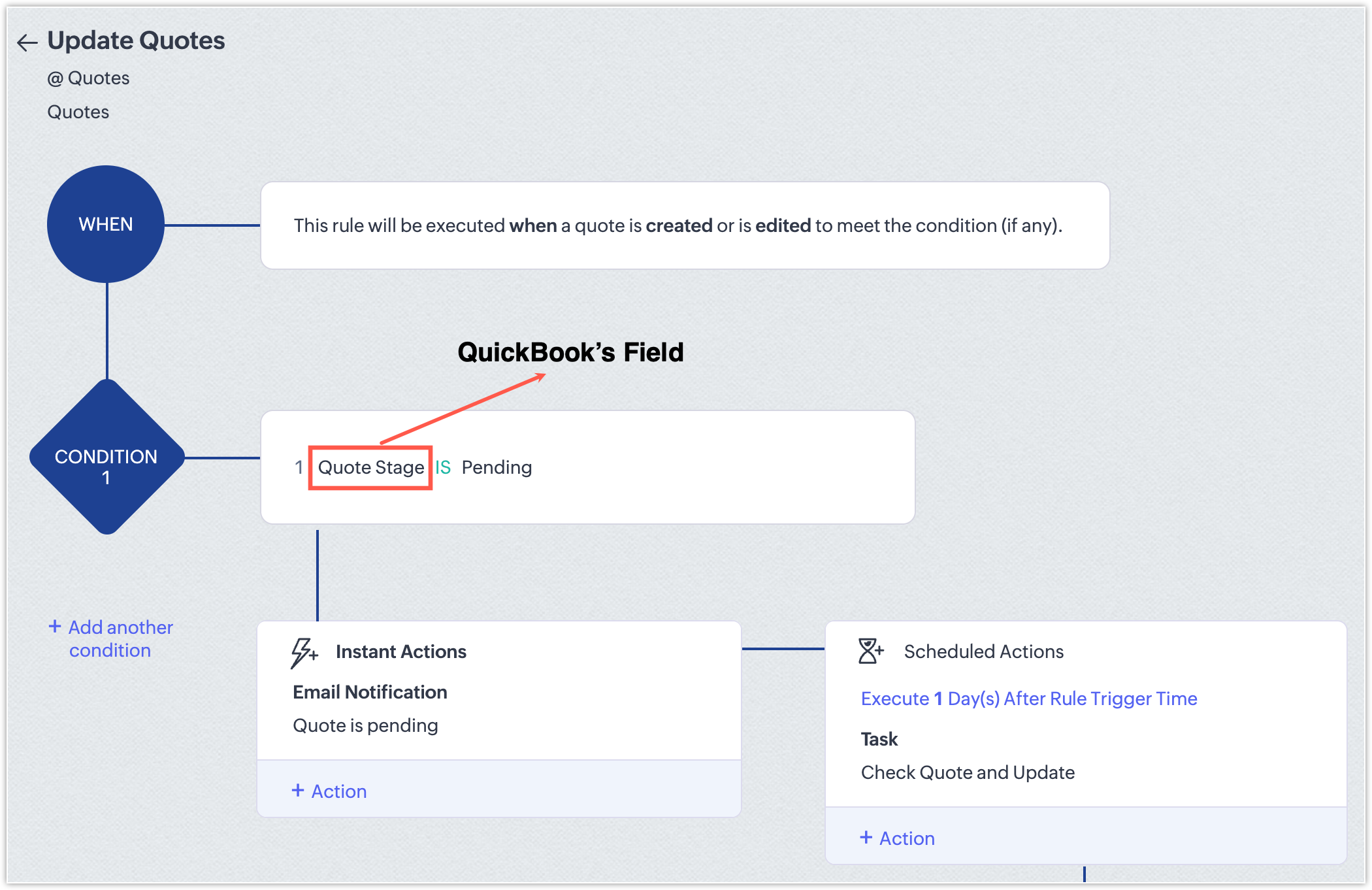
  • Generate reports that combine pipeline and billing information.

With this integration, CRM evolves beyond a simple pipeline tracker; it becomes a central hub for revenue operations that gives teams full visibility and control over sales and finance workflows.

NotesPoints to be noted
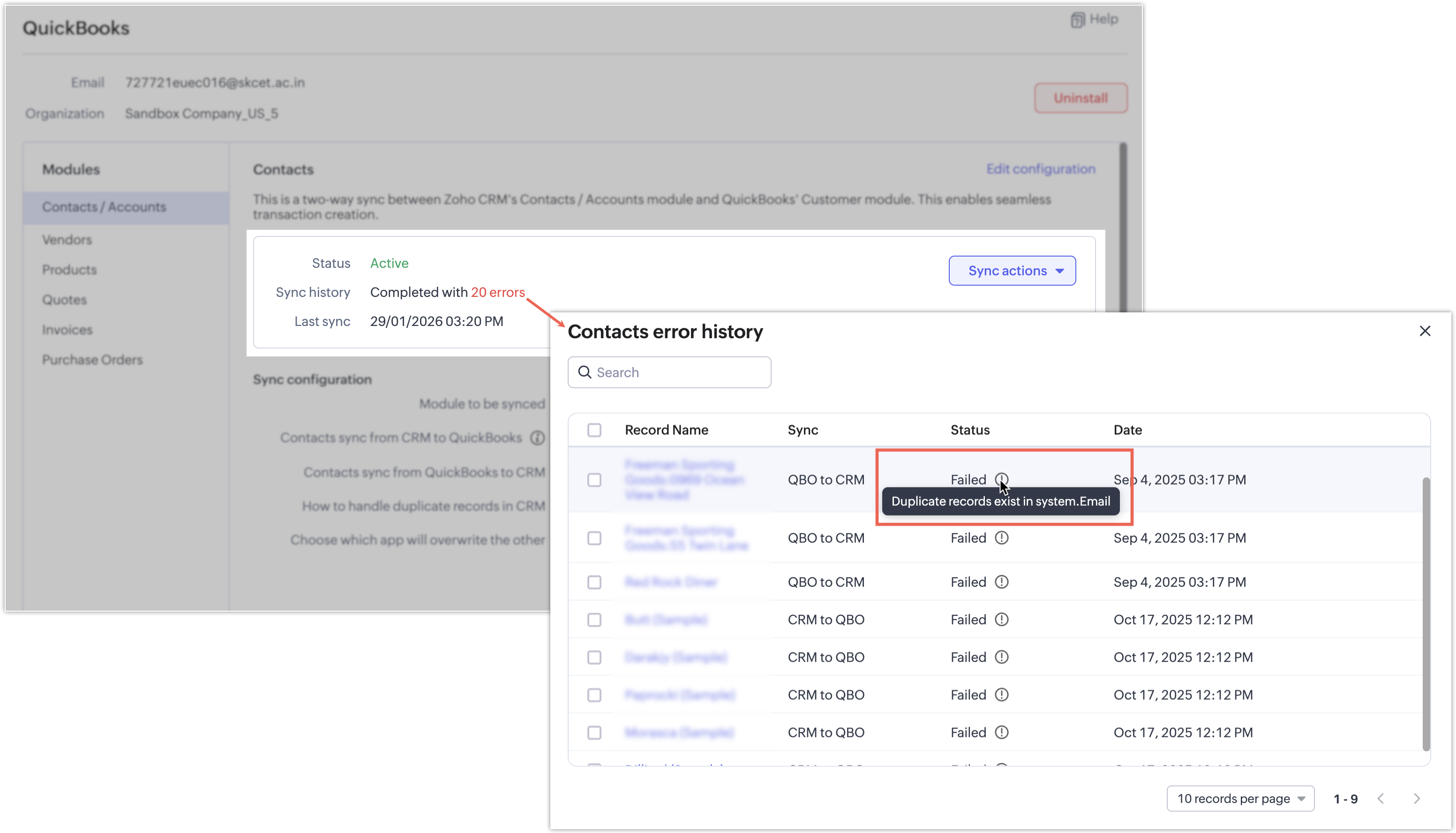
  • If a synchronization attempt fails, the record won't be synced and a clear error message will indicate the reason for the failure.
    Notes

InfoAvailability and pricing
  • Editions: Supported for Enterprise and above editions of Zoho CRM.

  • Pricing: The integration is currently available at no additional cost. Pricing may be introduced in the future.

That's all for this enhancement! We hope this integration helps you manage your sales and finance operations more efficiently. Please give it a try and share your feedback in the comments below.

Thanks and have a great day!

Nizamuddin

Alert
P.S: We're releasing this integration in a phased manner and it's currently available for users across the US, AU, CN, JP, and CA data centers.


        • Recent Topics

        • Zoho Desk MCP doesn't expose all functions

          Hello, I'd like to be able to draft (rather than send) ticket replies using Claude Cowork. However, the Zoho Desk MCP doesn't currently offer that, despite it being available in the API (https://desk.zoho.com/DeskAPIDocument#Threads#Threads_DraftEmailReply).
        • Zoho Community Digest - July 2026 | Part 1

          Hello everyone! Keeping up with everything across the Zoho ecosystem is a lot, so we're bringing back the Zoho Community Digest, now weekly. Each week we round up the need-to-know announcements from the Zoho Community Forums, four editions a month, so
        • Canva Integration

          Hello! As many marketing departments are streamlining their teams, many have begun utilizing Canva for all design mockups and approvals prior to its integration into Marketing automation software. While Zoho Social has this integration already accomplished,
        • Feature Suggestion for Zoho Social: Auto-reply to Comments or Keywords

          Hi Zoho team, I'd like to suggest a very specific feature that would be extremely helpful for customer engagement: the ability to automatically send a reply to comments on posts — either all comments or those containing specific keywords. For example,
        • Bring more clarity to your blueprints with color-coded transitions

          As your hiring processes evolve, blueprints naturally become more detailed. When multiple transitions connect different stages, it can take extra effort to identify approvals, rejections, reviews, and other actions at a glance. With this enhancement,
        • Zoho CRM gets a new email compose and lot more

          Dear Customers,  [UPDATE October 21, 2021: We have started opening these features to some of the customers already. And, it will be available to all the customers before November 2nd Week, 2021. Sorry for the delay caused]  [UPDATE February 21, 2022:
        • Create modules using natural language prompts

          Hello all, We’ve introduced a new enhancement to Zia that allows you to create custom and team modules in Zoho CRM using plain language prompts. Why this enhancement? Creating a custom module traditionally involves multiple steps—choosing field types,
        • Automatic Matching from Bank Statements / Feeds

          Is it possible to have transactions from a feed or bank statement automatically match when certain criteria are met? My use case, which is pretty broadly applicable, is e-commerce transactions for merchant services accounts (clearing accounts). In these
        • How emojis shape customer conversations

          World Emoji Day is celebrated on July 17. Did you know that this date was inspired by the 📅 calendar emoji, which shows July 17 on most platforms? What started as a detail in the emoji's design has turned into a global celebration of these tiny emoticons.
        • Custom Button Creation from Layout Editor in Zoho CRM

          Hello All, Buttons in Zoho CRM act as triggers that perform a specific action when clicked. Zoho CRM includes a set of system buttons that help you carry out common actions with a single click. Beyond these, your organization can create custom buttons
        • Displayed sample tracking for multi branch setup.

          We have multiple branches and one of the biggest challenges for us to be able to track if a particular item is in display or not. I am shooting in the dark but I am wondering if there is a solution for the following : Each product used for display is
        • Using IMAP configuration for shared email inboxes

          Our customer service team utilizes shared email boxes to allow multiple people to view and handle incoming customer requests. For example, the customer sends an email to info@xxxx.com and multiple people can view it and handle the request. How can I configure
        • Introducing Bulk Attachment Download from List View

          We're excited to introduce an update to attachment management in Zoho Recruit that lets you download attachments associated with selected records directly from the List View page of any module. How do I download attachments in bulk? You can now select
        • Advanced Group Settings: Customize and manage your email groups in Zoho Mail

          Email groups in your organization often require more than basic configurations to function effectively. With Zoho Mail's Advanced Group Settings, administrators can configure and manage policies, notifications, and more with greater precision. This gives
        • "code":3001 ["Failed to update data."]

          I would like to seek your expertise - I might be wrong on my approach also.. I highly appreciate your advice. 1 problem remains is when a new row was added on the existing one [from another form that trigger upon Successful form submission ], it gets
        • CRM gets location smart with the all new Map View: visualize records, locate records within any radius, and more

          Hello all, We've introduced a new way to work with location data in Zoho CRM: the Map View. Instead of scrolling through endless lists, your records now appear as pins on a map. Built on top of the all-new address field and powered by Mappls (MapMyIndia),
        • Workdrive on Android - Gallery Photo Backups

          Hello, Is there any way of backing up the photos on my android phone directly to a specific folder on Workdrive? Assuming i have the workdrive app installed on the phone in question. Emma
        • Auto sync Photo storage

          Hello I am new to Zoho Workdrive and was wondering if the is a way of automatically syncing photos on my Android phone to my workdrive as want to move away from Google? Thanks
        • List of Mail Merge Templates via Deluge

          Hello, Is it possible to get a list of the mail merge templates I've created in CRM within a custom function? I want to retrieve them and put them in a dropdown list but all I get is a scopes error! Can anyone see where I'm going wrong? Is this even possible?
        • Feature Request Improve parent-child relationship visibility

          Hi team, The Parent-Child ticket feature is great, but I've struggled to see the relationship between tickets when using ticket list views. It would be a great quality of life enhancement for users if child tickets were nested under parent tickets in
        • Displaying only unread tickets in ticket view

          Hello, I was wondering if someone might be able to help me with this one. We use filters to display our ticket list, typically using a saved filter which displays the tickets which are overdue or due today. What I'd really like is another filter that
        • Is there provision to charge the attendees to join the webinar?

          We want to host some webinar of public interest and want to charge them to participate in this. Does this feature in-build in the application? Offcourse, we will be having Razor pay account activated for these purpose.
        • Desktop app doesn't support notecards created on Android

          Hi, Does anybody have same problem? Some of last notecards created on Android app (v. 6.6) doesn't show in desktop app (v. 3.5.5). I see these note cards but whith they appear with exclamation mark in yellow triangle (see screenshot) and when I try to
        • Don't send customer email when creating a ticket

          Hi Is there an easy way to stop the system sending an email to the customer when we manually create ticket.
        • Connecting a contact with the deal + Emails not showing up under Deals

          Hello. I have two problems. Im not sure if the problem is due to level of my subscription - Im on Proffessional plan. 1. I have a JotForm connected with ZohoCRM which automatically creates a contact and a new deal based on form submission. That is done
        • Accessing GDPR Data Source metadata for workflows and Zoho Analytics

          Hi everyone, We have GDPR compliance enabled in Zoho CRM, which has added the Data Source section within the Data Privacy tab for Leads and Contacts. This section shows useful information such as: Original creation source, for example Zoho Forms Form
        • Tiktok

          When will Tiktok be added to the Zoho Social Platform?
        • Zoho Mail iOS app update: Spam Controls & Sender Verification

          Hello everyone! We are excited to introduce spam control enhancements in the Zoho Mail iOS app update. Let's dive into what's new. Spam Alerts in Mail Preview : Mail preview now shows warning alerts for emails identified as potentially harmful, helping
        • Mise à jour de Zoho Books – France

          Chers clients, Merci pour votre patience et votre soutien continu. Avec les évolutions réglementaires à venir en France nous introduisons de nouvelles fonctionnalités dans Zoho Books pour les clients français. Ces mises à jour ont été conçues pour répondre
        • Admin Logging in as another User

          How can a Super Admin login as another user. For example, I have a sales rep that is having issues with their Accounts and I want to view their Zoho Account with out having to do a GTM and sharing screens. Latest Update (27th April 2026): With the early
        • Zoho Books API: Bulk update thousands of records using Node.js with OAuth refresh, retries and resume support

          Hello everyone, During Zoho Books implementations, one common challenge is updating a large number of existing records. The current options are usually: Update records manually from the UI using Mass Update (with limited batch size). Update records one
        • SalesIQ's Summer '26 Release: For The Moments That Matter

          Every customer journey is made up of moments. The moment someone discovers your business. The moment they need help. The moment you decide to reach out. The moment a simple chat turns into something more. And the moments that continue long after the conversation
        • CNIL - Suivi de Pixel

          Bonjour à tous, À la suite de la nouvelle recommandation de la CNIL sur les pixels de suivi dans les e-mails, savez-vous si Zoho Campaigns permet : de conditionner le suivi des ouvertures au consentement de chaque contact ; de proposer un lien permettant
        • Customer/Vendor Portal session duration - can it be extended?

          Hi all, We'd like to know how long the login session lasts for the Customer/Vendor Portal in Zoho Books, and whether there's any way to extend it (either through settings or via support/API). Right now this is causing a pretty poor experience for our
        • Accessible & Customizable User Governance in Zoho Projects!

          As teams expand and collaborate with multiple external collaborators across projects, keeping control of user access to project data becomes a challenge. Mismanaged access can cause accidental or unauthorized edits, data leaks and lack of accountability.
        • Bulk deleting Zoho CRM records using Deluge, COQL and CRM API

          Hello everyone, During CRM implementations, data cleanup is a common task, especially after testing, migrations, imports, or integration development. The Zoho CRM UI allows deleting records in batches of 100, which is not practical when dealing with thousands
        • CNIL - Suivi de Pixel

          Bonjour à tous, À la suite de la nouvelle recommandation de la CNIL sur les pixels de suivi dans les e-mails, savez-vous si Zoho Campaigns permet : de conditionner le suivi des ouvertures au consentement de chaque contact ; de proposer un lien permettant
        • How to View Part Inventory and Warehouse Location When Creating a Work Order in Zoho FSM

          Hi everyone, We’re currently setting up Zoho FSM and would like to improve how our team selects parts when creating a Work Order. Right now, when we add a part or item to a Work Order, we can select it from our Zoho Inventory list but we don’t see any
        • Zoho Sprints - Q2 Updates for 2026

          Improve your agile project management experience with the newly released capabilities in Zoho Sprints. This quarter we've shipped a few new features and enhancements that are built around smarter planning and execution tools, tighter integrations, and
        • Problem with currency field in Zoho CRM

          Hi Guys Zoho Books has a feature in currency fields that automatically converts decimal numbers with commas ( , ) to period format ( . ) when pasting them. For example: R$ 2,50 --> R$ 2.50 Is this behavior available in Zoho CRM? I couldn't find any configuration
        • Next Page