Organize your workforce efficiently with Locations in the Admin Console

Organize your workforce efficiently with Locations in the Admin Console

Keeping your organization structured becomes increasingly important as teams expand across different offices or regions. For administrators, having clear visibility into where users are based can simplify user management and improve operational clarity. 
The Locations feature in the Zoho Mail Admin Console helps you organize users according to their branch or work location, making it easier to manage distributed teams.

What is the Locations feature?

The Locations feature in Admin Console allows administrators to add and manage the physical branch locations of their organization. Once locations are defined, they can be mapped to individual users, making it easy to identify where each employee is working from. 
Only Super Administrators and Administrators have permission to add and assign locations.

Key use cases

  1. Branch mapping: Define each office or work site — including name, address, and local time zone — and maintain a structured directory of your organization's physical presence.
  2. User-level assignment: Map locations directly to individual users from the Users section, giving you a clear view of where each team member is based.
  3. Time zone accuracy: Associate each branch with the correct time zone, enabling better scheduling and communication across geographically distributed teams.
  4. Bulk location updates: Select multiple users at once in the Users section and assign or change their location in a single action, making it ideal for team-wide reassignments or org restructuring.

Why it matters for admins

  1. Workforce visibility: Maintain a clear, up-to-date record of where employees are located — useful for audits, compliance, and reporting.
  2. Scalable structure: As your organization grows and new branches open, locations can be added or edited at any time without disrupting existing user assignments.
  3. Flexible updates: Locations can be reassigned to users at any time from the Users section, making it easy to reflect transfers or office moves.

Steps to add organization Locations

  1. Log in to Zoho Mail Admin Console.
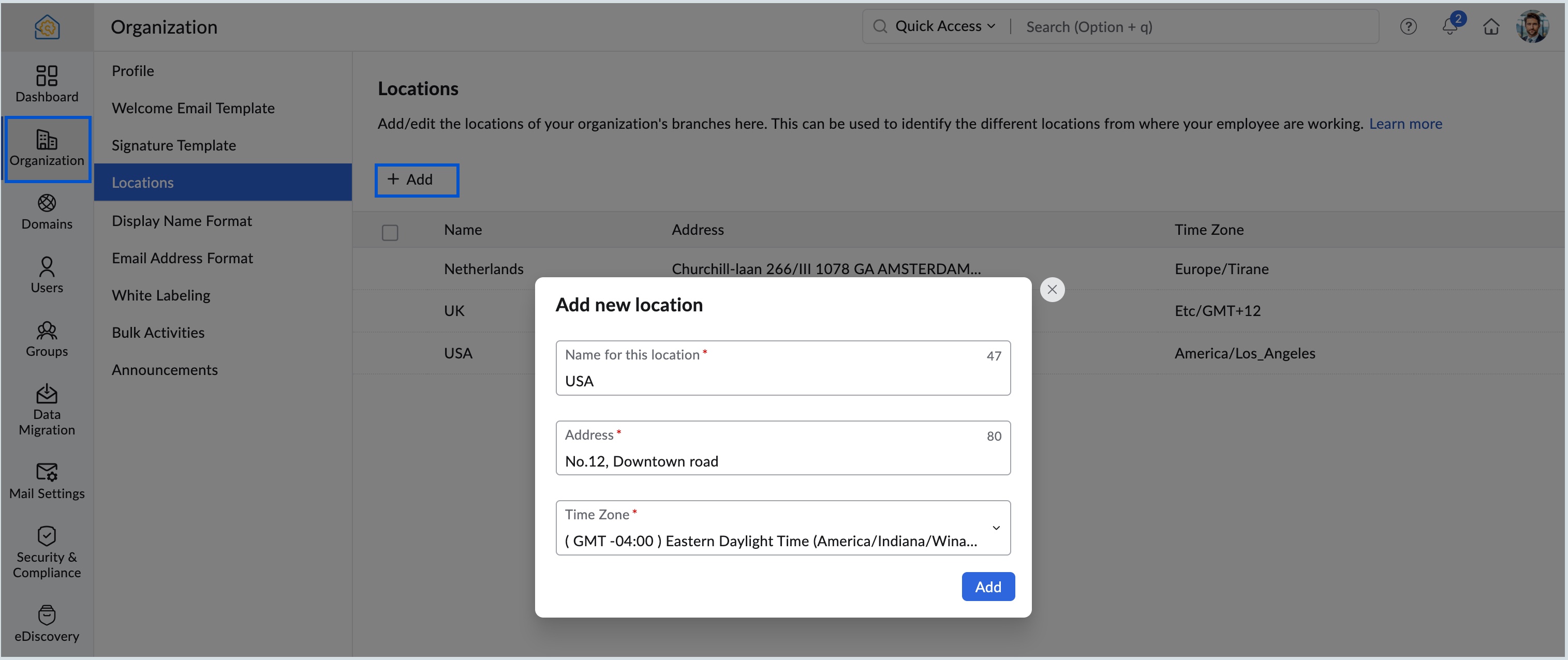
  2. In the Organization menu, navigate to the Locations section.
  3. Click Add. If there are no existing locations, click Create your first location now!.
  4. Enter the location, address and choose the correct time zone from the dropdown, and click Add.
  5. You can select the Edit or Delete options across each location to edit or delete them.


      • Sticky Posts

      • Catch-All Address: A safety net for misdirected emails

        Email is often the first point of contact with an organization. In many cases, a simple typo in a recipient's address can quietly turn into a missed message—a customer query never reaches support, a partner’s reply goes unnoticed, and the sender has no
      • Preferred Name and Email Formats: Bring consistency to user identity

        A user's display name and email address are often the first identifiers that colleagues, partners, and customers see. Maintaining a consistent format across the organization helps reinforce a professional identity and avoids the confusion that comes from
      • Deliver timely updates across your organization

        Keeping your organization informed goes beyond sending emails or sharing links. It requires ensuring that the right information reaches users at the right time, without being missed. Whether it's communicating policy changes, maintenance schedules, webinar/training
      • Organize your workforce efficiently with Locations in the Admin Console

        Keeping your organization structured becomes increasingly important as teams expand across different offices or regions. For administrators, having clear visibility into where users are based can simplify user management and improve operational clarity.
      • Ensure every user starts right with Welcome Email Templates

        Adding a new user to your organization extends beyond account creation–it requires delivering the right information at the right time to ensure a productive start. New users typically require key details upon joining, such as login instructions, security

        • Recent Topics

        • Urgent Issue – Draft Reply Fails to Save When Message Contains Code Snippets

          Hello Zoho Desk Support Team, We are experiencing a critical issue in the ticket reply editor that is directly impacting our support operation. Whenever we write a reply containing code snippets, URLs, or technical content (for example, terms like “curl
        • Introducing parent-child ticketing in Zoho Desk [Early access]

          Hello Zoho Desk users! We have introduced the parent-child ticketing system to help customer service teams ensure efficient resolution of issues involving multiple, related tickets. You can now combine repetitive and interconnected tickets into parent-child
        • Zoho CRM Meetings Module Issues

          We have a use-case that is very common in today's world, but won't work in Zoho CRM. We have an SDR (Sales Development Rep) who makes many calls per day to Leads and Contacts, and schedules meetings for our primary Sales Reps. He does this by logging
        • Huge confusion in zoho crm and zoho analytics

          Context => We have reporting based hierarchy in zoho crm and basically there will be one sales head and couple sales managers and 10 pre sales excutives divided between 2 sales managers we have maintained that in zoho crm and there is complex reporting
        • information on a suggestion how to treat old records in the - pipeline deals, notes, activities (tasks- events-calls) and emails etc.

          Hi, I would like information or a suggestion on how to treat old records in the - pipeline deals, notes, activities (tasks- events-calls) and emails etc. ? As each option (pipeline deal, notes, activities, emails etc.) counts as a record and as we advance
        • Inventory batch details

          Hi there, I'm trying to get the batch details of an item, here's what I've done so far. I've sent cUrl request to the below endpoint and I get a successful response. Within in the response I find the "warehouses" property which correctly lists all the
        • Automated entries past the current month in a calendar report

          Hi all, I have an autmation problem. I have a from which on succesfull entry adds either 5 or 10 more of these entries with a slight change so our customers can see it throug a calendar report on the webiste. The entry put in manually shows up perfectly
        • What's New in Zoho POS - April 2026

          Hello everyone, Welcome to Zoho POS’s monthly update, where we share our latest feature updates, enhancements, events, and more. Let’s take a look at how April went. Access and manage other web applications in Zoho POS with Web Tabs You can now access
        • Zoho Trident Windows - Streams Not Visible

          Namaste We’re having an issue with Streams not being visible in Trident (Windows), which is important for us as we share many emails internally. It appears that the feature to show Streams above the Inbox folder, as seen in the default mailbox view, is
        • Search through email contents

          Is there a way to search through the email history of a lead? Meaning if among the 50 emails to a lead about different topics I want to find all the ones with the word "pizza" in the body of the email, is that possible? Thanks for your help, Hanan
        • Adding Multiple Products (Package) to a Quote

          I've searched the forums and found several people asking this question, but never found an answer. Is ti possible to add multiple products to a quote at once, like a package deal? This seems like a very basic function of a CRM that does quotes but I can't
        • Early Access: Check Printing in Zoho Books

          Hello Everyone,   Are you constantly writing checks to pay your vendors?   We've got a great news to share with you! You can now pay your vendors by writing and printing a check directly from Zoho Books. The feature is ready and we'll be rolling it out to our customers in phases.  It is available in the  US Edition of Zoho Books and also in the Global edition, where the country is selected as USA and the currency is USD.   Here’s a summary of what’s possible:   1. Write and print a check. 2. Make
        • Trash - Delete All

          We use 6 inbox shared (via IMAP). The Trash bin contains a lot of messages. Is it possible to delete them all permanently? Is there a rule to empty trash bin after xx days? Deleted permanently message in TeamInBox are deleted permanently in the related
        • Internal mails on our company domain (managed by Zoho) do not get delivered

          Hi last week Thursday and Friday a colleague had sent me two emails which did not show up at all in my inbox, spam or anywhere else. What this a problem with Zoho mail in general or did this affect just us? From the forum is reads like many problems had
        • Upgraded sentiment analysis model for more accurate detection

          Hello everyone! Sentiment Analysis in Zia is being upgraded to a newer model to improve how customer sentiment is detected and interpreted. This transition is aimed at getting better contextual understanding across all supported channels. As part of this
        • Paste Options don't work

          I've always wondered about this, as I've experienced this issue for quite some time now. Why don't the right-click Paste options work properly in Zoho Writer? I can use Ctrl + V without any issue, but if I right-click and use one of the Paste menu options,
        • What's New - April 2026 | Zoho Backstage

          Hello everyone, April has been focused on improving speed, reliability, and overall platform performance. Here are a few updates from this month. Safaricom M-PESA for event payments in Kenya Organizers hosting events in Kenya can accept payments through
        • Native QuickBooks integration for Zoho CRM: Connecting sales and finance

          Greetings, I hope all of you are doing well. We're excited to announce Zoho CRM's integration with QuickBooks Web, which is designed to synchronize your CRM data with your QuickBooks accounting records and bridge the gap between sales and finance. This
        • Enrich your contact and company details automatically using the Data Enrichment topping

          Greetings, I hope you're all doing well. We're happy to announce the latest topping we've added to Bigin: The Data Enrichment topping, powered by WebAmigo. This topping helps you automatically enhance your contact and company records in Bigin. By leveraging
        • Adding contact to account automatically in helpdesk?

          Hello, We're using Zoho desk to managed our helpdesk tickets.  Is there a way to add contacts (email senders) automatically to an account based on their emails domain name?  For example:  when UserA@companyx.com send an email to our support mailbox, a trigger or a workflow would automatically add the userA to Companyx account if it does exists  Please advise Thank you 
        • Consolidate your workflows and be more productive - Introducing Multiple Conditions in Workflow Rules

          Workflow rules in Zoho CRM helps you automate your routine tasks and save time. Usually, while creating a workflow rule, you'd provide the basic details of the rule, specify when the rule should be triggered and associate set of actions to be executed whenever the rule criteria is met. And you’d create a new workflow rule for every new automation that you required.  Not anymore! You can now combine multiple conditions and the corresponding actions to follow in a single workflow rule. Let’s look at
        • DYK 4 - Reactions

          Did You Know that you can react to comments in Zoho Projects? In a collaborative workspace, comments come in throughout the day. Some need a detailed reply, others just need to be acknowledged, and the more the replies, the harder it is to follow the
        • How has Zoho still not resolved Daylight Savings Time?

          According to these forums Zoho has been working on DST for 12 years. Totally unacceptable. Am I missing something? Why are other customers who observe DST not screaming for this to be fixed? Are there reasonable workarounds? This is a must-have for
        • Overview on users IMAP settings

          We have about 30 users who all have the channels/email/email configuration/IMAP integration/O365 enabled and emails are synchronized. Here my problem: Passwords for the email accounts are expiring on individual bases and most of the users forget to update
        • Digest Avril - Un résumé de ce qui s'est passé le mois dernier sur Community

          Chers utilisateurs, Un nouveau mois riche en nouveautés vient de filer à toute vitesse chez Zoho Community France ! Jetons un œil à ce qu’il s’est passé. Des webinaires à votre image avec Zoho Webinar Vos pages d’inscription sont souvent le premier point
        • Introducing SlyteUI : From Idea to a Working Interface in Minutes

          SlyteUI is now live across all DCs as of 4th May 2026! Hello everyone! Are you spending hours building basic UIs? Does even the smallest customization feel like a major task? CRM customization should feel intuitive and straightforward, not time consuming
        • Integrate QuickBooks with Bigin and streamline your sales and accounting!

          If your business relies on Bigin for customer management and QuickBooks for accounting and invoicing, this new integration is here to make your operations more efficient. By connecting these two platforms, you can now manage your CRM and financial processes
        • Updates to native forms in Zoho LandingPage

          Hello all, We have a couple of updates to native forms in Zoho LandingPage that we think you will find useful. Country code on phone number fields You can now enable a country code dropdown on the phone number field. Visitors select their country code
        • Import KB template OR Export template for zoho desk?

          Greetings. Can you tell me if there is a way to get an EXPORT of my KB articles? OR is there a template you supply for importing KB articles into my zoho desk? I am looking for a method of understanding what fields can be imported, and what their possible
        • Set Custom Icon for Custom Modules in new Zoho CRM UI

        • [Bug] WebAuthn passkey registration blocked on rpIds with TLDs longer than 6 characters (.accountant, .technology, etc.) — isValidDomain regex too strict

          Hi, Filing on behalf of an enterprise customer where Zoho Vault is deployed across the company. The Chrome extension blocks WebAuthn passkey registration on legitimate sites whose Relying Party ID (rpId) has a TLD longer than 6 letters. This affects every
        • Customer Support Portal

          Hi, As I am dealing with and waiting for help with a serious Zoho Mail issue, I tried to submit requests and manage my requests by logging into the Customer Support Portal, but it keeps saying that I do not have a valid email address and cannot login.
        • Rich Text Type Format for Notes Field

          Has it been discussed or is there a way to insert a table in the notes field? We sometimes receive information in a table format, and it would be beneficial to have it in the same format as a note on a record.
        • Can not send or reply to mails

          Hello, I can not send mails or reply. If I try to send a mail i get "Unable to send message;Reason:553 Replaying disallowed. Invalid Domain - invata-programare.ro" Can you help me, please? Thank you!
        • Urgent: Subscription Correction Needed - Org ID 805493328

          Dear Zoho Billing Team, I am writing to request an urgent correction regarding a recent renewal for my account, Master Bed Trading (Organization ID: 805493328). Due to a mistake during the checkout process, I accidentally renewed our Zoho Forms subscription.
        • Zoho Sites Designer/Developer

          Hello, Besides Upwork, are there any other places to find experienced Zoho Sites designers/developers? I couldn't seem to find a page on Zoho that lists these professionals that are certified with Zoho Sites.
        • HTML PDF Templates / Build From Scratch option not visible for Custom Modules

          Hi everyone, I am working with Zoho Books Custom Modules and trying to create a custom 4x4 package label PDF template using HTML/CSS. According to the official Zoho Books documentation for HTML PDF Templates, there should be an option like: Settings →
        • Atlassian Jira integration live in Zoho Apptics

          Tracking crashes and fixing them often happen with different tools. You might use Zoho Apptics to track crashes and understand what went wrong and Jira to resolve those issues. If you use both, you're probably familiar with the manual effort involved
        • Marketing Tip #32: Improve SEO and customer confidence with an FAQ section

          Before making a purchase, customers often have simple questions about delivery times, returns, product usage, or sizing. If they can’t quickly find answers, they may leave your store without buying. Adding a clear FAQ (Frequently Asked Questions) section
        • Activate python application

          Is it possible for a deluge code to activate a python application ? Say i create a deluge program, in that deluge program, i need it to activate a python application stored on my drive Would that be possible, and if so, what would the code look like
        • Next Page