Zoho Cliq REST APIs v3 - A Complete Guide to What's Changed & Why

Zoho Cliq REST APIs v3 - A Complete Guide to What's Changed & Why


APIs are not just consumed by a developer with numerous automations and a series of open browser tabs. They are parsed by LLMs, fed into agent pipelines, and auto-completed by AI coding assistants that have zero tolerance for inconsistency.

A verb tucked into a URL, multiple pagination tokens across each module, inconsistent key naming, etc. These gaps create friction that compounds across every integration built on top of our APIs.

Hence, introducing our new REST API documentation with v3 REST APIs, which act as a comprehensive rule-book detailing proper response structures, error codes, query conventions, URL format and HTTP semantics.

💡
 Switching API Versions

To switch between the two API versions, navigate to the top-right corner of the documentation, where you will find a dropdown menu. We currently support v2 (legacy) and v3 (latest).
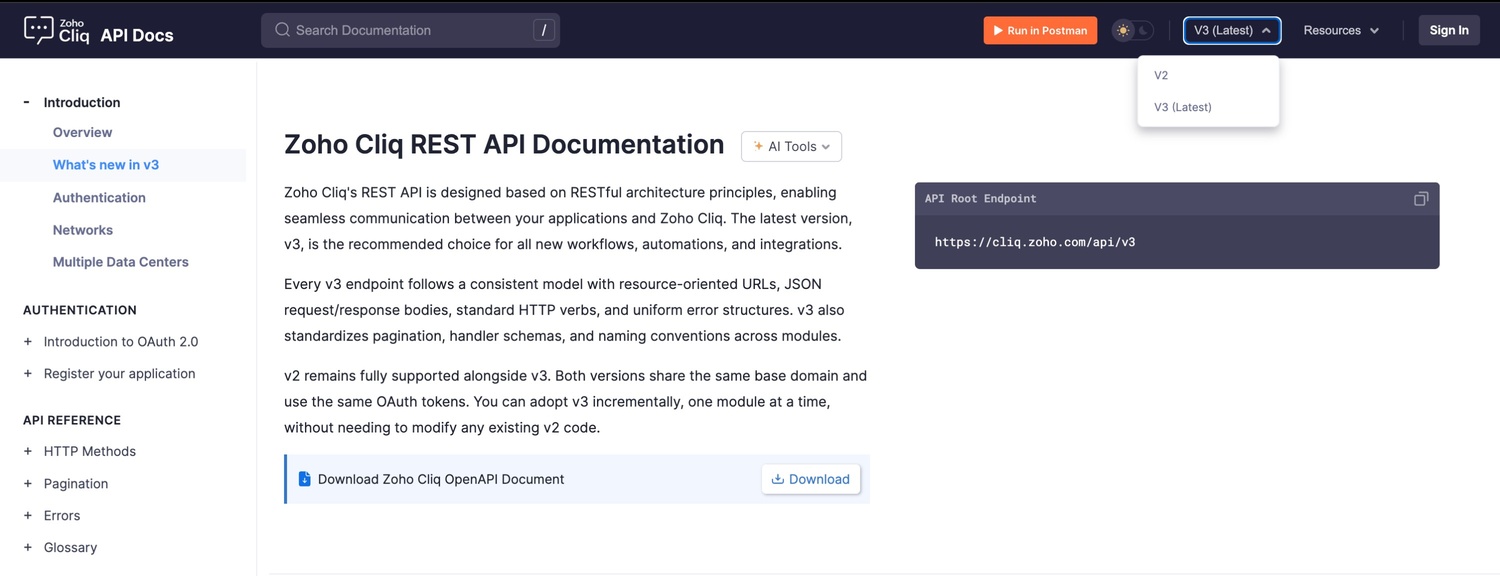
Version switcher dropdown showing V2 and V3 (Latest) options in the top-right corner of Zoho Cliq API Docs

Here's what we have upgraded, why it's essential, and what it means for anyone building with Cliq APIs today.

What's new in v3

Along with standardization, v3 APIs ship with a substantial set of new capabilities that address the inconsistencies left by v2.

Platform components management


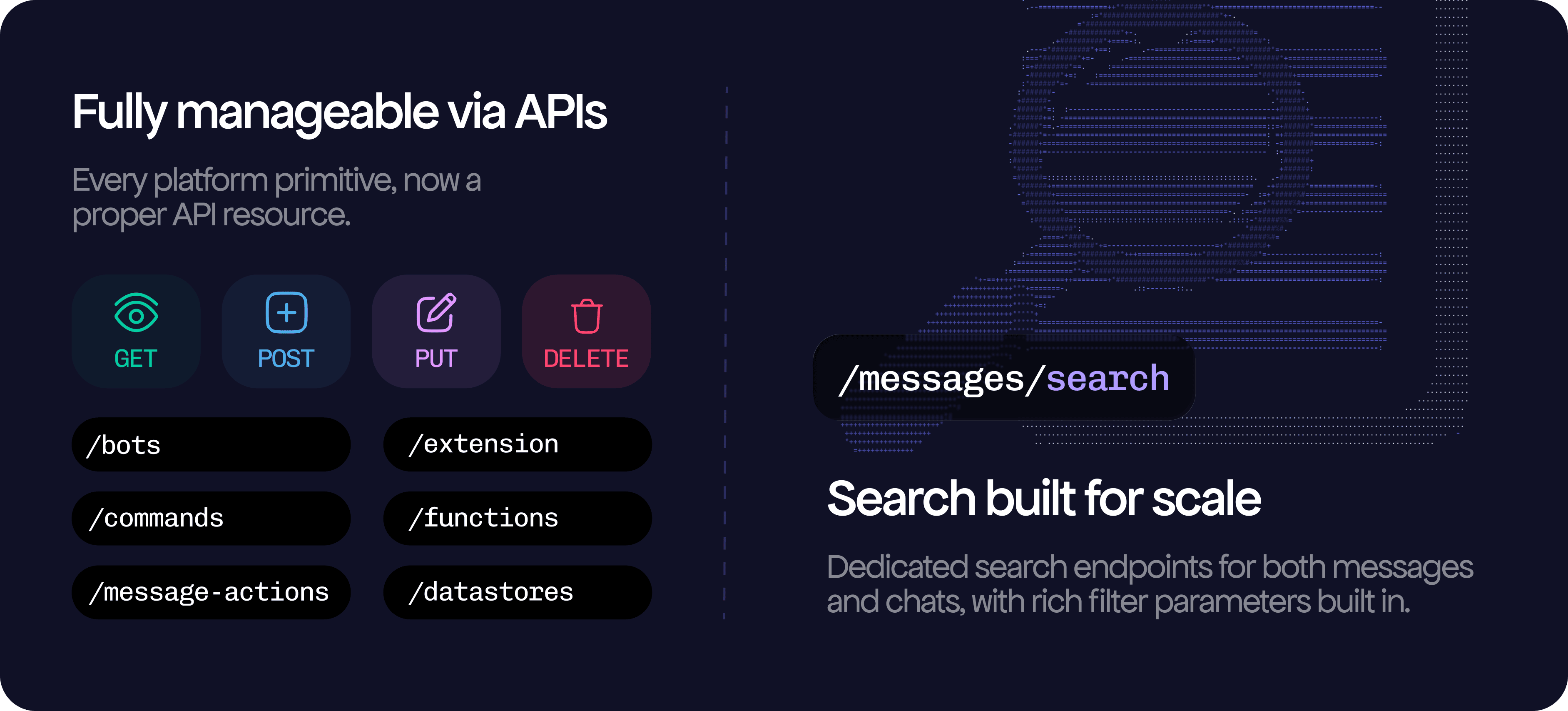
  • Every platform component now has full CRUD API coverage (schedulers and widgets will be launched soon). Creating deluge or webhook bots, adding a script to handlers, and all of this can be automated.

No more endless search exploration

In v2, "search" meant fetching paginated lists, filtering, and manually applying conditional logic, thereby burning bandwidth. v3 includes dedicated search endpoints for both messages and chats, with rich filtering parameters.

Cliq UI via API

The gap between what the UI could do and what the API could do ends with v3. Like, when a user pins a message, stars a chat, or adjusts a notification preference, your integration hits a dead end.

  • Stars, pins, and chat folders are no longer UI-only gestures; they are proper first-class resources with full CRUD endpoints that fit naturally into the same model as everything else in v3.

New documentation template

Along with the APIs and their standardization, we have revamped the documentation theme that's as dynamic as our APIs.


AI tooling


  1. Interrogate implementation questions, debug edge cases, and more by clicking the AI tools dropdown, which populates the Open in Claude, Open in ChatGPT, Copy as Markdown, and View as Markdown options available on every documentation page.
  1. Launch a Claude or ChatGPT session with the full endpoint schema already loaded in context.

OpenAPI Specification, per resource and as a full bundle


  1. Every module overview page ships a module-specific OAS .yml file, and the complete openapi-all.zip bundle is always one click away.
  1. Feed it into OpenAPI Generator for typed client SDKs, drop it into an LLM for schema-accurate code generation, load it into SwaggerHub for an interactive explorer, or wire it into your CI pipeline for contract testing.

Updated Postman collection

  1. At the top of the documentation, access the Postman collection with the correct method, URL, headers, and body for every endpoint. An OAuth folder handles the full token lifecycle and automatically generates and populates both your access and refresh tokens without any manual setup.

  1. Multi-data center support is added into environment variables, two changes switch the entire collection across the US, EU, IN, AU, JP, and CA. Fork it, pull updates as the API evolves, and keep every customization intact.

Glossary as a single source of truth
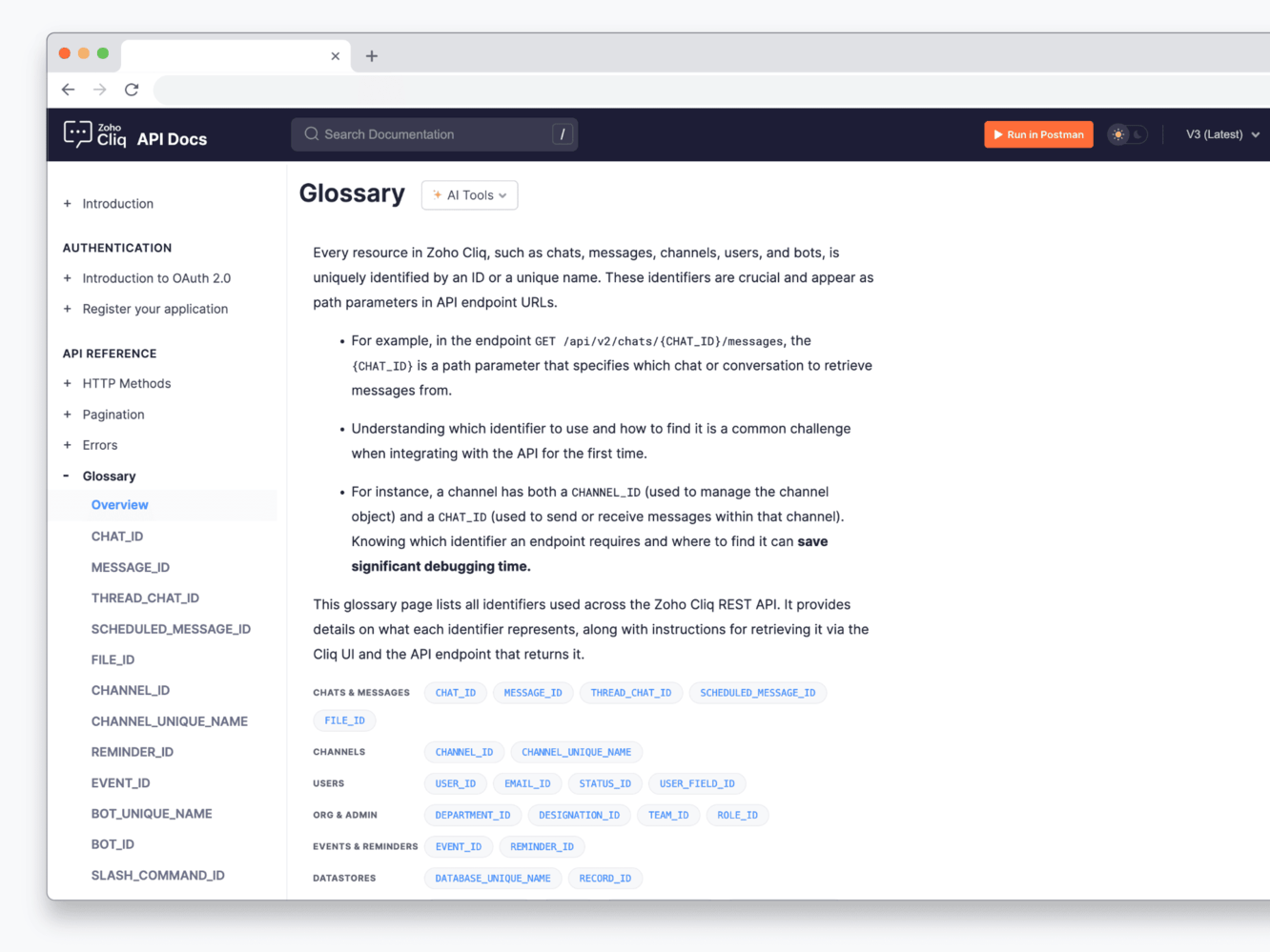
All the unique 25+ identifiers (BOT_ID, CHAT_ID, CHANNEL_UNIQUE_NAME, etc.) are defined once, with retrieval guides (e.g., how to retrieve via API and UI, if possible), and they're linked from every endpoint that uses them, so there's no more cross-referencing tabs or guessing what a parameter expects.

Multiple language code examples

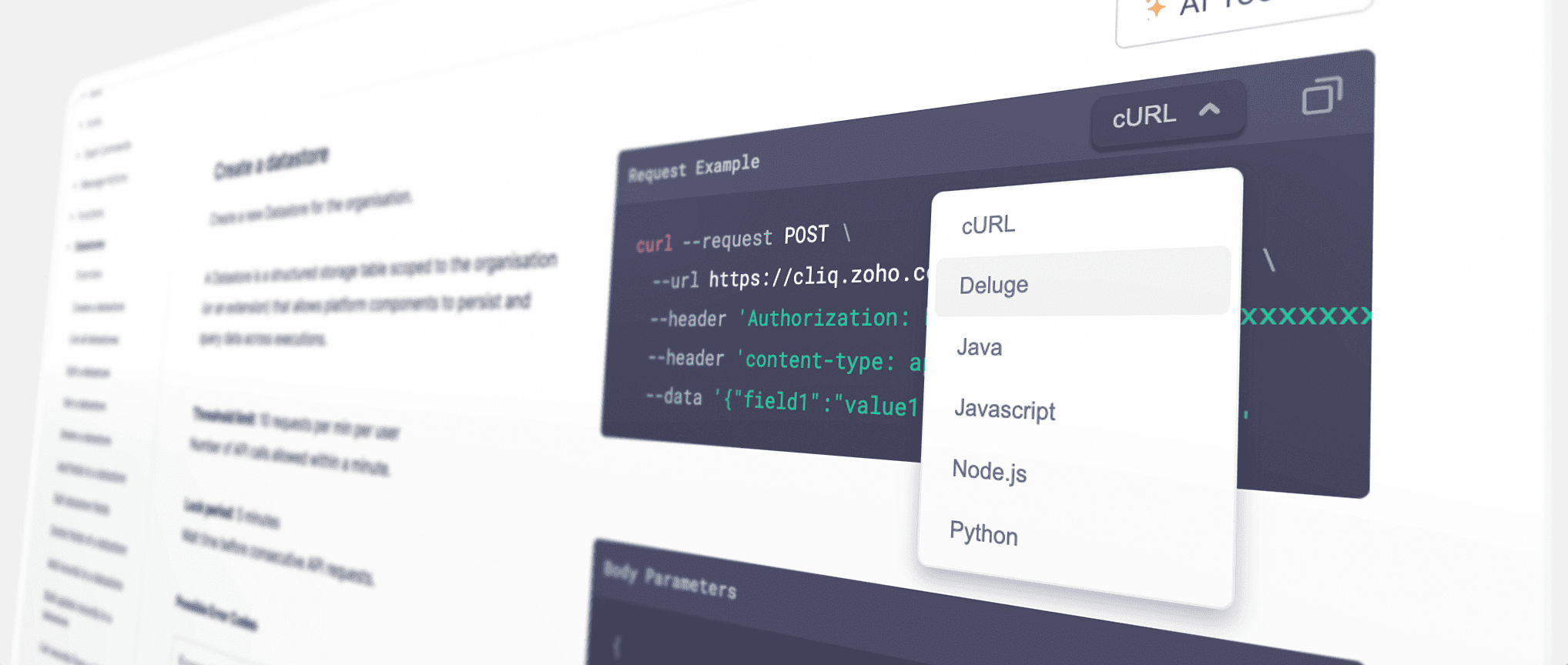
  1. cURL, Deluge, Java, JavaScript, Node.js, and Python are available copy-ready on every endpoint. Default is cURL. Use the dropdown to switch between different code examples. Pick your language, copy, and run.
  2. Fun-fact: We've also got you covered with bonus support for C#, C# HTTPClient, Go, and JavaScript XHR 🥳

Endpoint-specific errors


  1. Every endpoint includes a section called "Possible Error Codes." By clicking this section, you can view error codes along with their HTTP status codes and plain-language descriptions. 
  2. The codes in the table match exactly the strings the API uses. The information is presented in an expandable and collapsible format to enhance the user interface and user experience.
  3. The relevant error handling can be done with your custom scripts without parsing or guessing any more

Multiple request body examples, per endpoint
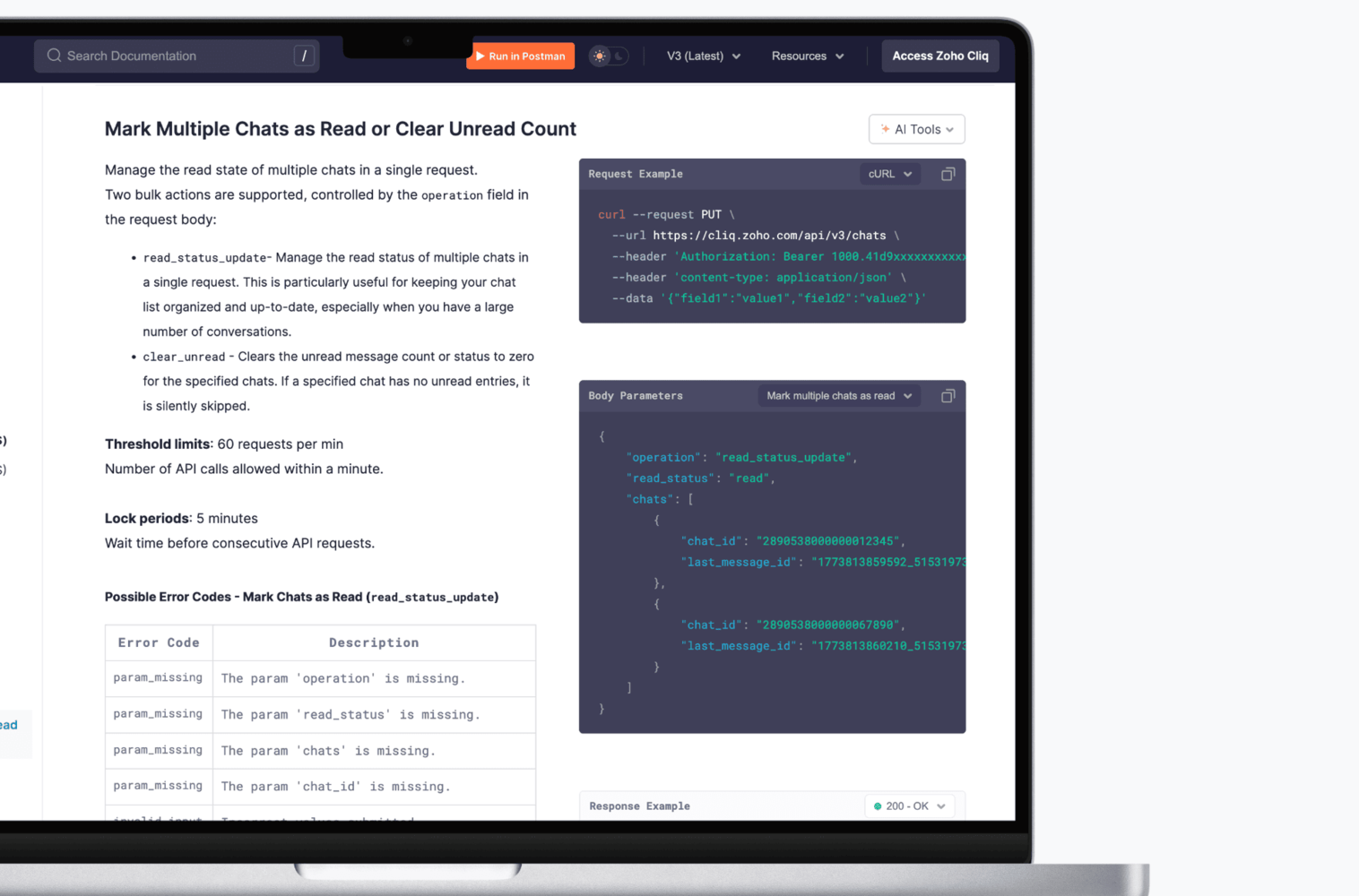

  1. Some endpoints support multiple ways to use them. For those, the documentation ships multiple request body examples, each mapped to a distinct business use case, with its own response example.
  2. Switch between them from the dropdown, understand the intent, and take it straight into your script. No reverse-engineering the schema, no guessing what a field is actually for, every example is a real, working scenario you can adapt and use

Technical Upgrades

Removal of verbs in URL
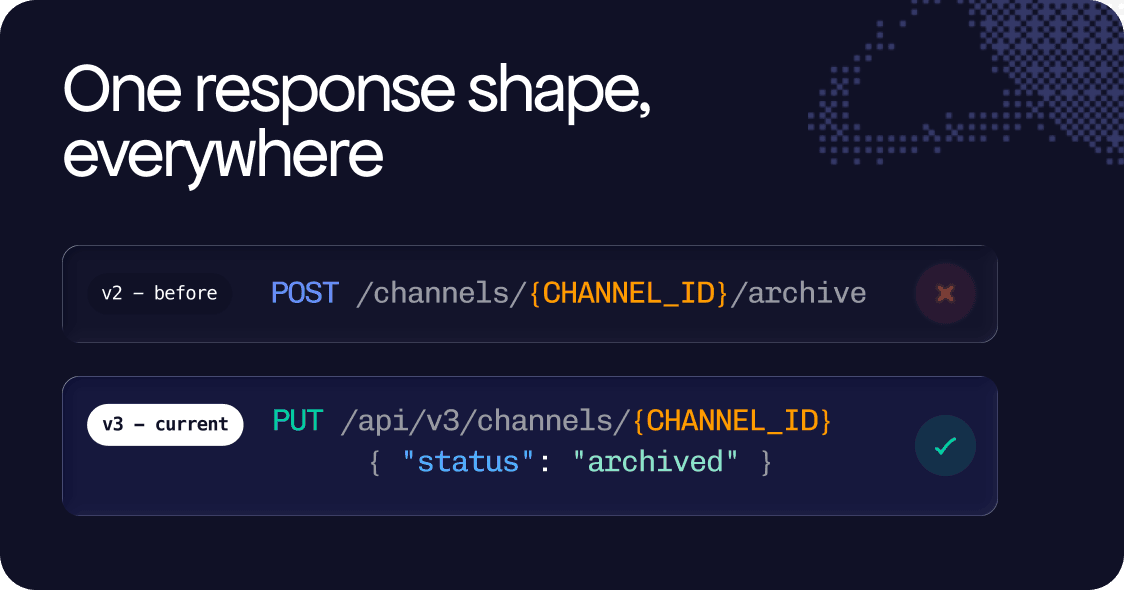

  1. v2 APIs used verb patterns as placeholders in endpoint URLs (e.g., /resource/create or /resource/delete), and these endpoints are spread across every module.
  2. v3 APIs remove these verb placeholders, so every state transition that previously had a unique endpoint now uses a PUT or PATCH on the resource itself, with the new state included in the request body.

Unified response envelope

v2 responses had no consistent shape: some were bare, some wrapped, some ad hoc per endpoint, and all were different. v3 uses one envelope everywhere.
  1. {  
  2.   "type": "bot",  
  3.   "data": { ... }
  4. }

  5. For list responses, the same envelope extends naturally:
  6. {  
  7.   "type": "bot",
  8.   "next_token": "NTB8MTc1Nj...",
  9.   "sync_token": "NTB8MTc3Nz...",
  10.   "deleted": ["53719000001620003"],
  11.   "data": [ ... ]
  12. }
Type uses dot notation for sub-resources: channel. member, chat.read_status, so the resource type is unambiguous regardless of nesting depth. deleted lists IDs removed since the last sync, enabling cache-consistent incremental sync without polling. You write response-parsing logic once. It works across the entire API.

Uniform pagination

Paginating through v2 APIs was genuinely frustrating. Each module used its own token, and you had to account for every variation, and there was no single pattern you could rely on across the board.

The API surface was fragmented across six different tokens: next_token, sync_token, next_set_token, start_token, next_search_token, and page_number, which meant writing and maintaining module-specific pagination code was simply the norm.


v3 fixes this by replacing all of them with exactly two tokens, used identically across every resource:
  1. next_token: A cursor for forward pagination that works the same way regardless of which resource you are querying.
  2. sync_token: Designed for incremental sync, it returns only the records that have changed since your last request, making it significantly more efficient for keeping local state up to date.
Write your pagination logic once, and it works everywhere.

PATCH as a First-class method

In the v2 API, POST and PUT methods were used for almost everything, including partial updates. However, v3 enforces a more proper usage of HTTP methods. PATCH, in particular, is now utilized correctly and consistently.

This means that when updating two fields on a bot, you no longer need to resend the entire configuration. Instead, you only send what has changed, and the rest remains untouched. 

Example:
  1. PATCH /api/v3/bots/{BOT_ID} 
  2. {  
  3.   "name": "CRM Bot",  
  4.   "scope": "organization"
  5. }

Further additions

  1. URL Nesting: URL nesting is only used when it adds real value. If a parent ID can be understood from the authentication token, it is removed from the URL path. This keeps the URLs clean and avoids redundancy.

  2. Plural resource names: Every resource name in every URL, at every nesting level is plural. Hence predictability at URL level means tooling don't need to special case anything, one common rule is applied everywhere.

  3. Hyphens for multi-word segments: All multi-word segments use hyphens not camelCase, not underscores and no concatenation.
    Example: /api/v3/chats/{CHAT_ID}/pin-messages

  4. Consistent Key Formatting: All request and response keys follow a consistent snake_case format. The mix of camelCase and snake_case from v2 modules has been eliminated. This ensures that generated clients and serialization logic function correctly from the outset.

  5. Field Selection and Sorting: Field selection and sorting are standardized across all list endpoints. You can limit the data returned using "?fields=id, name" and control the order with "?order_by=+created_time", maintaining the same syntax throughout.

  6. Granular OAuth Scopes: OAuth scopes are now more detailed and documented for each endpoint. This allows integrations to request only the permissions they need (READ, CREATE, UPDATE, DELETE), with each endpoint clearly stating the required scope.

And that's a Wrap 🚀 !

v3 is live, but it's not done yet. More modules, endpoints, relevant MCP tools and features are on the way, and they will all meet the same high standards you see here
Thank you for building on Cliq, for pushing us to improve, and for trusting us with your integrations.

Try it out now, and if you have any feedback, suggestions or need help integrating our APIs into your internal workflows, please reach out to support@zohocliq.com, and we'd be happy to help :)

💌 With love,
Team Zoho Cliq

      • Sticky Posts

      • Zoho Cliq REST APIs v3 : A complete guide to what's changed and why 

        APIs are not just consumed by a developer with numerous automations and a series of open browser tabs. They are parsed by LLMs, fed into agent pipelines, and auto-completed by AI coding assistants that have zero tolerance for inconsistency. A verb tucked
      • Cliq Bots - Post message to a bot using the command line!

        If you had read our post on how to post a message to a channel in a simple one-line command, then this sure is a piece of cake for you guys! For those of you, who are reading this for the first time, don't worry! Just read on. This post is all about how
      • Automating Real-Time Zoho Bookings Alerts in Zoho Cliq

        Enable your teams to respond in seconds by bridging the gap between booking confirmation and team notification. No sticky notes, no calendar nudges and no follow-up frenzies. For businesses that rely on scheduled appointments, real-time visibility is
      • Add Claude in Zoho Cliq

        Let’s add a real AI assistant powered by Claude to your workspace this week, that your team can chat with, ask questions, and act on conversations to run AI actions on. This guide walks you through exactly how to do it, step by step, with all the code
      • Automate attendance tracking with Zoho Cliq Developer Platform

        I wish remote work were permanently mandated so we could join work calls from a movie theatre or even while skydiving! But wait, it's time to wake up! The alarm has snoozed twice, and your team has already logged on for the day. Keeping tabs on attendance

        • Recent Topics

        • Kaizen #251: From Campaign Leads to Sales Orders with Zoho CRM Mass Action APIs

          Hello all!! In growing businesses, sales teams often deal with a large volume of records every day - leads from campaigns, qualified prospects ready for conversion, and approved quotes that must be converted into sales orders. Performing these actions
        • Introducing the Employee Portal for internal job posting

          Employee referrals and internal applications are one of the most trusted hiring channels. But in many organizations, employees only hear about openings through messages, word of mouth, or after the role has already been open for a while. When employees
        • Inspection Table

          Hello Latha, We created a job sheet that includes the new table (Inspection Table) which was introduced recently. However, agents are not able to see the rows in the inspection table. Could you please investigate this issue and get back to us? Please
        • Zoho Mail is down?

          We stopped getting new emails since 8:42am EST and mail.zoho.com shows an error.
        • Forwarding without verification

          Hi, I use Tripit to keep track of all my business travel. I've recently moved over to Zoho and wanted to set up a forwarding rule to send various travel confirmation emails automatically to plans@tripit.com Obviously this is an email address I don't control,
        • Disappearing Mouse cursor in Zoho Mail / Windows 11 (Chrome + Edge)

          I'm seeing an issue when writing mails with the light theme with the mouse cursor being white and the document area also being white - making it nearly impossible to see the mouse cursor. I see the problem on Windows 11 under Chrome and Edge. (Yet to
        • Request to unblock user creation error (This user is not allowed to add in Zoho)

          Hello Zoho Support Team, I am the Super Admin of my Zoho Mail organization. When I try to create a new business email user account, I encounter the following error message: "This user is not allowed to add in Zoho. Please contact support-as@zohocorp.com
        • Zoho Mail account blocked after malware incident – request for review and unblock

          Hi Zoho team and community, My Zoho Mail account has been blocked due to outgoing email activity that was detected as spam or unusual sending behavior. The root cause was a malware infection on my computer, which compromised several of my accounts, including
        • creating an alias

          your instructions for creating an alias are wrong. there is no add alias in my mail account. also i dont have a control panel link just a settings link how do i really make an alias
        • IP Address blocked by many servers

          hello team this is to inform you that the zoho ip address 103.117.158.51 has been marked spam and not trustworthy by outlook and many other company servers. kindly discontinue using this ip to maintain a healthy domain reputation for your clients. Regards
        • Automatically set the default VAT percentage on a quote

          Every time I create a quote, I have to manually adjust the VAT and activate the checkbox for 21%. But all of our quotes include 21% VAT. So now occasionally, it happens that the checkbox is forgotten, and the customer receives an incorrect quote (without
        • What's New in Zoho Inventory | June 2026

          Hello users, June 2026 introduces a range of exciting enhancements to Zoho Inventory. With the full rollout of the Zoho Inventory Windows application, the launch of Terminal Payments, and new tracking combinations in Advanced Inventory Tracking, you can
        • Time Zone is incorrect

          Time zone is not working properly...I've checked it twice.  I'm eastern U.S. time it's currently 12:22 pm EST.  CRM shows 3:22 pm EST.
        • Send a converted Contact or Deal back to Leads using the Restore Lead extension for Zoho CRM

          Hello everyone, This comes up more than people expect: a Lead gets converted into a Contact, and sometimes a Deal along with it, because at the time it looked ready. Then the situation changes the opportunity turns out to be much further off than expected,
        • Zoho CRM mobile updates: Reports module, record tags, dynamic formula field, and more

          Hello everyone, We've made a few updates to the Zoho CRM mobile app to enhance your mobile CRM experience and efficiency. Here's a quick look at what's new: Reports module (iOS ) Record tags (iOS) Dynamic formula field (Android) WhatsApp business deep
        • Side scroll bar missing from "new editor"

          The "new editor" simply lacks a side scroll bar. Unable to navigate long notes without using the keyboard. Bad upgrade... (using web version)
        • Zoho Desk MCP doesn't expose all functions

          Hello, I'd like to be able to draft (rather than send) ticket replies using Claude Cowork. However, the Zoho Desk MCP doesn't currently offer that, despite it being available in the API (https://desk.zoho.com/DeskAPIDocument#Threads#Threads_DraftEmailReply).
        • Zoho Community Digest - July 2026 | Part 1

          Hello everyone! Keeping up with everything across the Zoho ecosystem is a lot, so we're bringing back the Zoho Community Digest, now weekly. Each week we round up the need-to-know announcements from the Zoho Community Forums, four editions a month, so
        • Canva Integration

          Hello! As many marketing departments are streamlining their teams, many have begun utilizing Canva for all design mockups and approvals prior to its integration into Marketing automation software. While Zoho Social has this integration already accomplished,
        • Feature Suggestion for Zoho Social: Auto-reply to Comments or Keywords

          Hi Zoho team, I'd like to suggest a very specific feature that would be extremely helpful for customer engagement: the ability to automatically send a reply to comments on posts — either all comments or those containing specific keywords. For example,
        • Format of data after export to spreadsheet

          Dear Zoho, can you explain to me what is the point of a report exporting to XLSX if the format of the amounts that will be created there is in text format and not suitable for anything? Why do I need data in a sheet with which nothing more can be do
        • Bring more clarity to your blueprints with color-coded transitions

          As your hiring processes evolve, blueprints naturally become more detailed. When multiple transitions connect different stages, it can take extra effort to identify approvals, rejections, reviews, and other actions at a glance. With this enhancement,
        • Zoho CRM gets a new email compose and lot more

          Dear Customers,  [UPDATE October 21, 2021: We have started opening these features to some of the customers already. And, it will be available to all the customers before November 2nd Week, 2021. Sorry for the delay caused]  [UPDATE February 21, 2022:
        • Create modules using natural language prompts

          Hello all, We’ve introduced a new enhancement to Zia that allows you to create custom and team modules in Zoho CRM using plain language prompts. Why this enhancement? Creating a custom module traditionally involves multiple steps—choosing field types,
        • Automatic Matching from Bank Statements / Feeds

          Is it possible to have transactions from a feed or bank statement automatically match when certain criteria are met? My use case, which is pretty broadly applicable, is e-commerce transactions for merchant services accounts (clearing accounts). In these
        • How emojis shape customer conversations

          World Emoji Day is celebrated on July 17. Did you know that this date was inspired by the 📅 calendar emoji, which shows July 17 on most platforms? What started as a detail in the emoji's design has turned into a global celebration of these tiny emoticons.
        • Custom Button Creation from Layout Editor in Zoho CRM

          Hello All, Buttons in Zoho CRM act as triggers that perform a specific action when clicked. Zoho CRM includes a set of system buttons that help you carry out common actions with a single click. Beyond these, your organization can create custom buttons
        • Displayed sample tracking for multi branch setup.

          We have multiple branches and one of the biggest challenges for us to be able to track if a particular item is in display or not. I am shooting in the dark but I am wondering if there is a solution for the following : Each product used for display is
        • Using IMAP configuration for shared email inboxes

          Our customer service team utilizes shared email boxes to allow multiple people to view and handle incoming customer requests. For example, the customer sends an email to info@xxxx.com and multiple people can view it and handle the request. How can I configure
        • Introducing Bulk Attachment Download from List View

          We're excited to introduce an update to attachment management in Zoho Recruit that lets you download attachments associated with selected records directly from the List View page of any module. How do I download attachments in bulk? You can now select
        • Advanced Group Settings: Customize and manage your email groups in Zoho Mail

          Email groups in your organization often require more than basic configurations to function effectively. With Zoho Mail's Advanced Group Settings, administrators can configure and manage policies, notifications, and more with greater precision. This gives
        • "code":3001 ["Failed to update data."]

          I would like to seek your expertise - I might be wrong on my approach also.. I highly appreciate your advice. 1 problem remains is when a new row was added on the existing one [from another form that trigger upon Successful form submission ], it gets
        • CRM gets location smart with the all new Map View: visualize records, locate records within any radius, and more

          Hello all, We've introduced a new way to work with location data in Zoho CRM: the Map View. Instead of scrolling through endless lists, your records now appear as pins on a map. Built on top of the all-new address field and powered by Mappls (MapMyIndia),
        • Workdrive on Android - Gallery Photo Backups

          Hello, Is there any way of backing up the photos on my android phone directly to a specific folder on Workdrive? Assuming i have the workdrive app installed on the phone in question. Emma
        • Auto sync Photo storage

          Hello I am new to Zoho Workdrive and was wondering if the is a way of automatically syncing photos on my Android phone to my workdrive as want to move away from Google? Thanks
        • List of Mail Merge Templates via Deluge

          Hello, Is it possible to get a list of the mail merge templates I've created in CRM within a custom function? I want to retrieve them and put them in a dropdown list but all I get is a scopes error! Can anyone see where I'm going wrong? Is this even possible?
        • Feature Request Improve parent-child relationship visibility

          Hi team, The Parent-Child ticket feature is great, but I've struggled to see the relationship between tickets when using ticket list views. It would be a great quality of life enhancement for users if child tickets were nested under parent tickets in
        • Displaying only unread tickets in ticket view

          Hello, I was wondering if someone might be able to help me with this one. We use filters to display our ticket list, typically using a saved filter which displays the tickets which are overdue or due today. What I'd really like is another filter that
        • Is there provision to charge the attendees to join the webinar?

          We want to host some webinar of public interest and want to charge them to participate in this. Does this feature in-build in the application? Offcourse, we will be having Razor pay account activated for these purpose.
        • Pricelists

          So we have them in books but I cannot find them in commerce?
        • Next Page