The Canvas module view revamp has been successfully opened for all users in all DCs today.
Dear All,
We hope you're well!
When it comes to business productivity, data organization and accessibility play a crucial role. However, given the reality of a growing business, maintaining a tidy dataset is an uphill battle. For this reason, Zoho CRM enables you to index your data in three systematic module views: list view, Kanban view, and canvas view. While each serves a distinct purpose, today we're here to announce a revamp of our existing canvas view. We're thrilled to talk about it. Let's go!
The all-new Canvas builder is a powerful design suite loaded with sophisticated design elements. True to its name, Canvas is a versatile and highly customizable tool; you can add a range of components to each canvas you create—like your business logo, images, or icons—and apply interactive styling that puts the right emphasis on the most important information.
Now, how does this revamp benefit a CRM user?
The module view serves as the face of your database; it's the first thing a user looks at upon entering a module. The new Canvas revamp not only enables you to design the aesthetic of your database, but also amplifies the user experience and adoption among your employees. It allows you to:
Personalize your CRM to match your brand guidelines.
Enhance data accessibility and user productivity.
Complement your module view designs with that of the designs in your record details page.
Create a memorable customer experience when extended through client portals.
Here's a quick comparison of the outputs of the legacy canvas module view versus the new canvas module view:
In addition to upgrading the canvas view builder, this revamp also comes withnew module views to accommodate different types of data.
New views in Canvas
We understand every business accumulates different types of data that requires distinct representations for better comprehension, so we've come up with three types of Canvas module views.

Custom list view
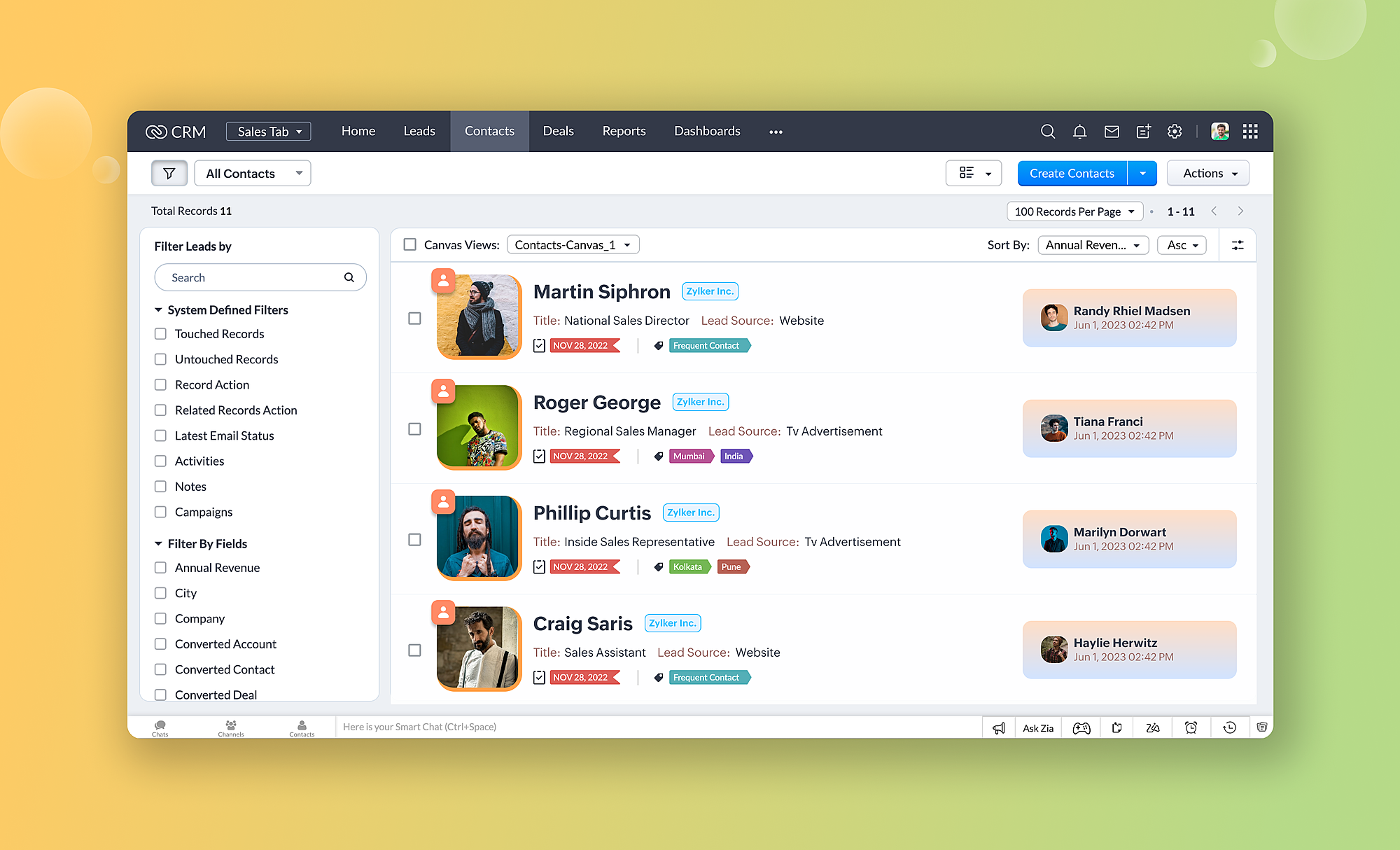
The custom list view is a horizontal stack of your records that offers sufficient space to accommodate vital information without clutter. With elements like sections and lines, you can organize your data within the expanse of the template, giving prominence to each data type. You can also hide or show labels to make more efficient use of the template space.
Tile view
The tile view makes records look like business cards. Much like a product lineup, the tile view arranges your records from left to right, and you can set tiles to be a square or rectangle. This view is a great way to showcase your records in one glance.
Table view
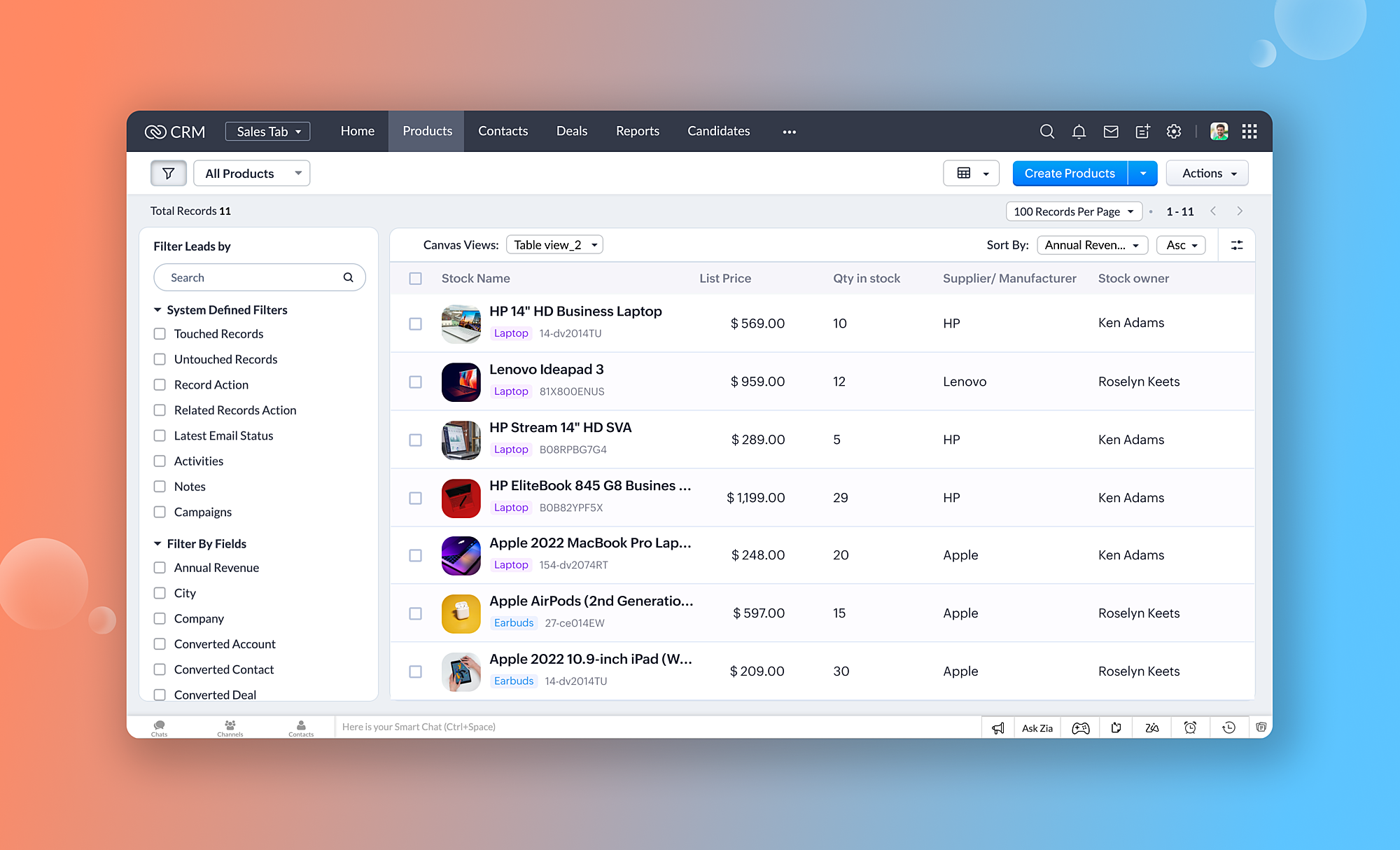
The table view is an extension of the standard list view, which is a simple tabulation of record information. You can keep the entire view in one color or alternate colors between rows. This view is best for displaying simple factual information like inventory, invoices, and so on.
About the new Canvas builder
The Canvas builder is straightforward to use. You can choose designs from the gallery or build from scratch.
Components of the builder
The Canvas builder for module views comes with three fundamental components:
Data
The data component contains all the fields, buttons, and links applicable to the module.
Example: Lead name, email ID, record owner, and so on.
Elements
Elements help you classify and organize your data via images, lines, tables, sections, text boxes, buttons, and icons.
Example: Your logo is an image element that will appear throughout all record items.
Styles
Styles contain formatting options for your data. You can ascribe colors, font types, font sizes, borders, padding, and radiuses, according to your preferences.
Managing canvas templates
Only administrators and users with "manage custom view" permissions can create and manage canvas templates for an organization. Creations are present in a list view under Setup > Customization > Canvas > List view, where you can edit, clone, delete, preview, rename, activate, or deactivate templates. You can also define criteria and manage canvas rules from the same page.
Edition availability and limits
The legacy Canvas editor was available only for organizations using Enterprise and Ultimate editions. Thanks to this revamp, we've extended the new builder to organizations in Standard and Professional editions as well.
Here are the edition-based limits for each view:
If you'd like to downgrade (say, from Enterprise to Professional), only three templates will stay activated for each view, removing the ability to activate/deactivate the rest of your creations. The same will apply when downgrading to the Standard edition.
Important points to note:
While we've provided most design capabilities, native features like reusable components and presets and Client scripts are not available in this first release. We are, however, working on these features and you can expect them soon.
The legacy canvas editor enabled individual CRM users to create and manage templates all by themselves. Now, upon revamping the console, the following points are true:
We will migrate your templates to the new builder without affecting the designs you've created.
All the personal design templates created earlier by users and shared among peers will be publicly available under the Canvas list view tab. Admins or users with "manage custom view" permissions can choose to enable or disable this. If the former designs are enabled, they will be enabled for all users in the organization.
Users without these permissions—even though they might be the original owner or creator of a design—will not be able to view or edit the designs.
Dear Customers, We hope you’re well! In Zoho CRM, formula field with string return type is used in various scenarios where text is involved like concatenating customers’ first and last names, trimming characters from texts, performing find and replace
Dear Customers, We hope you’re well A quick background Intelligent Character Recognition (ICR) comes as part of Zia’s optical recognition capability called Zia Vision. When we introduced it last April, the data extraction was training-based and was applicable
Dear Customers, We are delighted to unveil the revamped calendar UI in Zoho CRM. With a complete visual overhaul aligned with CRM for Everyone, the calendar now offers a more intuitive and flexible scheduling experience. What’s new? Distinguish activities
For instructions on setting up these controls, please check this help document: Configuring accessibility controls. Hello everyone, Today (December 3, 2024), on the International Day of Persons with Disabilities, we begin our journey towards a CRM that
Dear Customers, The last time we connected about CommandCenter, it was about the tool's new controls and revamped UI. Personally, the overhaul of the UI from the last update, still excites me. Today, we're here with news about its scalability and added
One of the main reasons I have gone down the Zoho route is because I need multi-currency support. However, I find that products can only be priced in the home currency, We sell to the US and UK. However, we maintain different price lists for each. There
Hi there, I use recurring annual tasks quite often but sometimes I have a contact leave an organization so I want to re-assign that annual task to a new contact. When I go into the task to change the contact it only does so for the current year. Future
Hello everyone, Zoho CRM now enables you to achieve deeper filtering of records in a module, using fields of a lookup, thereby enhancing your data management experience manifold. This filtering based on lookup module fields is now available in advanced
Hello Team, We are currently using the On Duty Form to record Work From Home (WFH) requests in our organization. However, we are facing an issue where pending On Duty requests are not appearing in the Attendance Module. For example, if I submit On Duty
Hello everyone, We’re improving how business-day calculations work in workflows, especially when triggers happen on weekends. This update ensures that offsets like +0, +1, and +2 business days behave exactly as intended, giving you clearer and more predictable
Currently we can add styles to list and detail page for fields using .addstyle in the Client Script But that is missing for fields of Subform We would really like the feature to addstyle for subforms in the detail page Can you please consider adding it,
Zoho Commerce currently only allows merchants to define the United Kingdom as a single shipping zone, which creates a significant issue for businesses operating between the EU and the UK. Under the Northern Ireland Protocol, Northern Ireland follows EU
Hi, Several month ago Log360 Cloud was added to zoho one - and this is great. But as far as I see there is no prebuilt way to connect Zoho analytics to the logs we have in Log360 Cloud. Please add a prebuilt connection like we have for so many other zoho
Please add date & datetime as available types for the getInput client script function. https://www.zohocrm.dev/explore/client-script/clientapi/Client#getInput
Hi Team, I’m facing an issue with an approval workflow in my application. I have a workflow that updates a record’s Status field from “Pending” to “Waiting for Approval.” I have configured an Approval Workflow with the condition: Status = "Waiting for
I am currently integrating Zoho CRM (v7 API) with our system and I need clarification regarding the Taxes API and OAuth scopes. Context: We are creating Quotes via the API (/crm/v7/Quotes) Each quote contains line items with taxes (e.g., TVA 19%, 10%,
In the past 24 hours we’ve noticed that emails sent via Zoho CRM are being blocked or flagged as phishing, particularly by Google. The issue seems to occur specifically when emails contain links. URLs like www.domain.com or www.example.com are automatically
A well-organized store helps customers find what they want faster, which directly improves conversions. When products are grouped into clear categories or collections, shoppers don’t have to scroll endlessly or search manually. It also makes your store
Hi Desk Team, When creating a Support Plan, it would be great to have an option under Plan Type for Time Based Plan. This would be based on the number of work logs created for a customer account. It's very common to offer a support contract which has
First of, I love the Help Center which I've just decided to integrate into my website to replace its old-fashioned FAQs. So much more to achieve there now! Lots of new benefits to the site visitors and to me in terms of organizing and delivering all the
I am trying to create Sales Orders with data from Jotform submissions. Auto number generation is disabled within Books. Whereas the flow Input recognizes the number (40732 in this example), the Output does not. How can I fix this? I'd like the number
Hello users, The first quarter of 2026 has been dynamic! We’ve shipped a powerful set of updates in Zoho Inventory to enhance item control, improve warehouse efficiency, expand integration and reporting capabilities. From a unified item creation experience
Hi Commerce team, I would like to suggest a feature for the mobile app that would make it much easier to create and process orders on the go. Problem Currently, while it is possible to create a Sales Order in Zoho Inventory, the process is not optimised
Hi All, I heavily use the projects function in Zoho books and can work for one client for successive weeks, providing labour and incurring the occasional general expenses. As an example, during the one purchase, I purchase 10 widgets and of these 10,
I would like to track the clicks from a FB Ad campaign into my website via marketinghub. I cannot currently add a MH form directly to my FB page, as I receive an error telling me I need at least 2000 subscribers on FB to be allows to do that (yikes!) What is the best way to set up MH so I can track which FB are converting well? I know I can reach the FB reports directly, but these do not track conversions from the MH forms on my website. Best regards, Joe
Hello Zoho Projects Team, We hope you are doing well. We would like to submit an urgent security enhancement request regarding the Zoho Projects Client Portal. At this time, as far as we are aware, there is no Multi-Factor Authentication (MFA) available
Hello Zoho Projects Team, We hope you are doing well. We would like to submit a feature request regarding access control limitations in custom user profiles within Zoho Projects. Current Behavior: We created a custom profile intended for support agents,
There are several standard reports in zoho books. Each of these can be 'customized' with various parameters - BUT, these cannot be saved for re-use later. In several of the zoho modules you can customize a search list (eg for Estimates or Invoices etc)
I need to be able to split vendor invoices/ expenses between multiple clients. Entering the bill multiple times is not only time consuming, it defeats the purpose of having a unquie identifity bill number and will allow for possible duplicated entry. Below is an example from Quickbooks Desktop. Splitting costs over various projects is a common job costing function that I am very sad and surprised is not an option in Zoho Books. Unless I am missing it somewhere? Thanks for your help!
I'm confused on how to handle outsourced contractor expenses on a customer project. Between my business and the contractor, the invoice they send me fits obviously into Zoho Books as a Bill. However, I need to be able record those expenses to the client
Hello. I've been evaluating Zoho Books for a small law firm practice. The interface is solid and I like the integration of accounting and time tracking, which is hard to find among cloud based services. I have a few suggestions that would be very helpful in determining whether we can adopt Zoho Books: 1. Be able to assign bills to clients/projects. Quickbooks desktop allows this and is very helpful in keeping track of bills that haven't been paid, but will be invoiced to clients as an expense. Creating
Hi all, New to zoho but far from new to this sort of platform. I've been scouring the web for a suitable platform for my growing business. I'm currently using Xero and WorkFlow Max but it lacks a key need. I signed up to zoho projects and books to test
Just the way timesheet is used to calculate labour cost for a particular project, how do i record other expenses against a project such as materials and consumables used for the project? So that under report, I can view the total amount expended on each
We are finding it difficult to decide the best way track project expenses in Zoho books and would like to know how other users are handling this task. We provide Professional Services and engage 3rd party Suppliers on most projects and provide them with
Hello Zoho Community. I am a recent subscriber to Zoho, and its part of an ongoing evaluation. My company (and my clients) have extensive project-tracking needs. The Projects module seems to be good from a project management standpoint, but I am perplexed
Hi all, I’m running into an issue with Zoho TeamInbox under Zoho One Trial and wondering if anyone has seen this before. We’re trying to set up a shared inbox for orders (orders@), but TeamInbox appears to be in a broken state: • The app does not load
Greetings all! I'm enjoying the Zoho notebook as I tested out over other notebook applications. I would really love the audio transcripts to work as that would save us a lot of time so that we can utilize the notes from an audio recording. Currently when
A recent community post on application architecture made some excellent points about planning architecture early in Zoho Creator projects. The core message is right — Creator applications have a habit of growing organically into maintenance nightmares,
I am running into a function run timeout error after 5 minutes for my schedules. The Functions - Limits documents states it should be 15 minutes: Functions - Limits | Online Help - Zoho CRM. What should it actually be? Due to the 5 minute timeout, I'm
Hello, I had this morning a video call with a colleague. She is using Cliq Desktop MacOS and wanted to share her screen with me. I'm on iPad. I noticed, while she shared her screen, I could only see her video, but not the shared screen... Does Cliq iOS is able to display shared screen, or is it somewhere else to be found ? Regards