The Social Playbook April edition: KPIs in marketing
The Social Playbook April edition: KPIs in marketing


In any field, analyzing performance is essential to understand growth and know what’s working. The same applies to marketing. Tracking and analyzing Key Performance Indicators (KPIs) helps you make smarter, data-driven decisions instead of relying on guesswork.

Let’s explore the top KPIs in marketing that actually matter and how to use them effectively.

Top KPIs in marketing

Click-through rate (CTR)

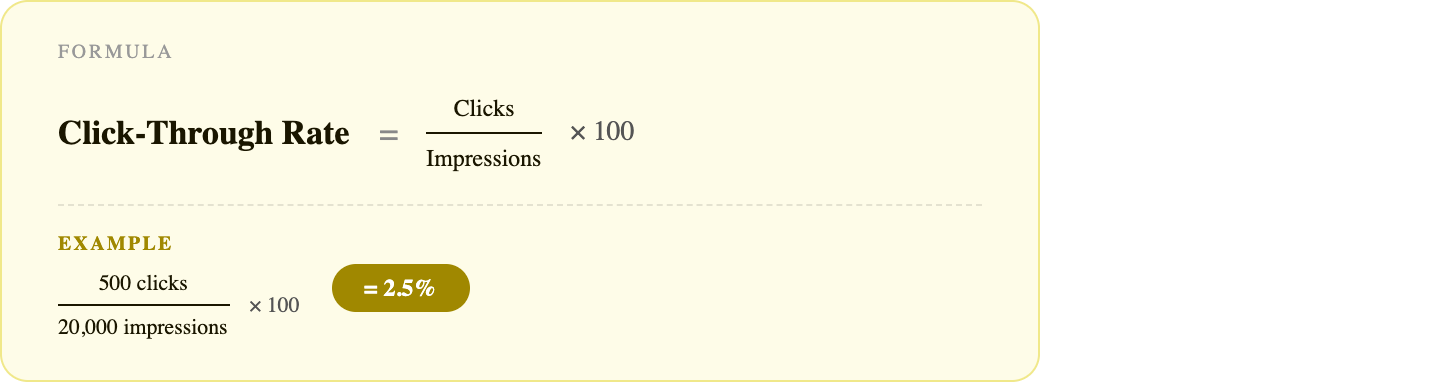
CTR is the percentage of people who click on your ad and visit your website or app. It shows how compelling your creative and message are to the audience it reaches.

How to interpret
  1. High CTR: Your ad is attracting the right audience, and your creative is working well. The next step is to convert that interest into action (sign-ups or purchases).
  2. Low CTR: Your ad or creative isn’t compelling enough to get clicks. It could be due to weak messaging, unclear value, or targeting the wrong audience.
Benchmark
  1. Below 1%: Need to improve
  2. 1 - 3%: Good
  3. 3% and above: Strong
How to improve
  1. Use a strong visual hook. The first 2 seconds matter the most.
  2. Write CTAs that create curiosity or urgency, not just "Learn more"
  3. Test different formats like carousel, video, or static.

Conversion rate (CR)

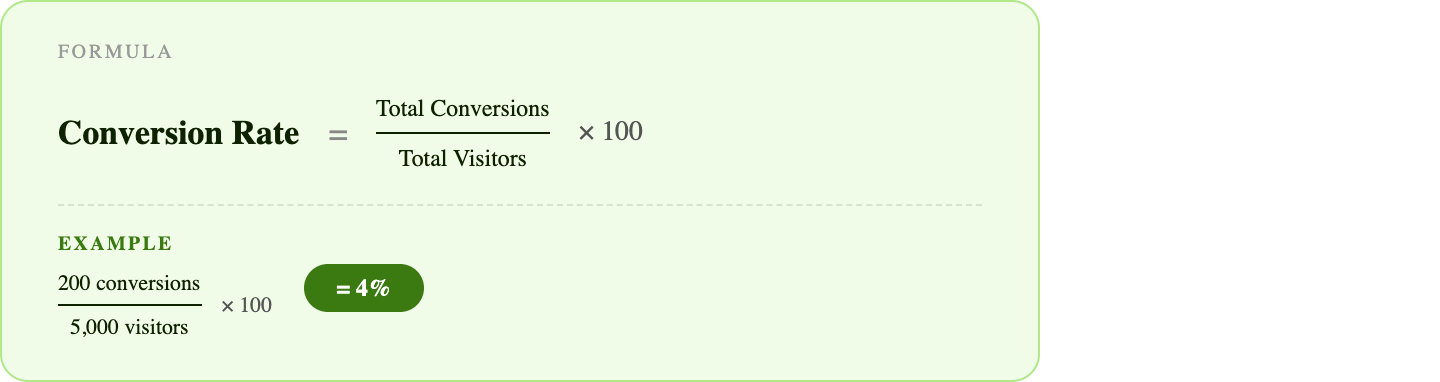
CR is the percentage of people who complete a desired action after clicking your ad, such as signing up or making a purchase. It shows whether your ad is actually driving results.


How to interpret
  1. High rate: Your message, audience, and offer are aligned.
  2. Low rate: People may click your ads, but they aren't convinced enough to take action.
Benchmark
  1. Below 2%: Need to improve
  2. 2 - 5%: Good (varies by industry)
  3. 5% and above: Strong
How to improve
  1. Match your ad copy to your landing page.
  2. A/B test your CTA. For instance, "Start free trial" beats "Submit"
  3. Retarget warm audiences who have already visited your page

Return on ad spend (ROAS)

ROAS is the revenue earned for every dollar spent on ads. It indicates whether your ad spend is generating returns. This is one of the clearest measures of profitability.


How to interpret
  1. 1x ROAS = break-even
  2. Most brands aim for 3 - 5x, but this depends on profit margins.
  3. 2x ROAS can be profitable for high-margin products
Benchmark
  1. 3–4x (depending on margins): Good
How to improve
  1. Focus budget on top-converting audiences and cut the rest.
  2. Optimize landing pages and improve the post-click experience.
  3. Run retargeting campaigns and focus on high-performing ads.

Customer lifetime value (CLV)

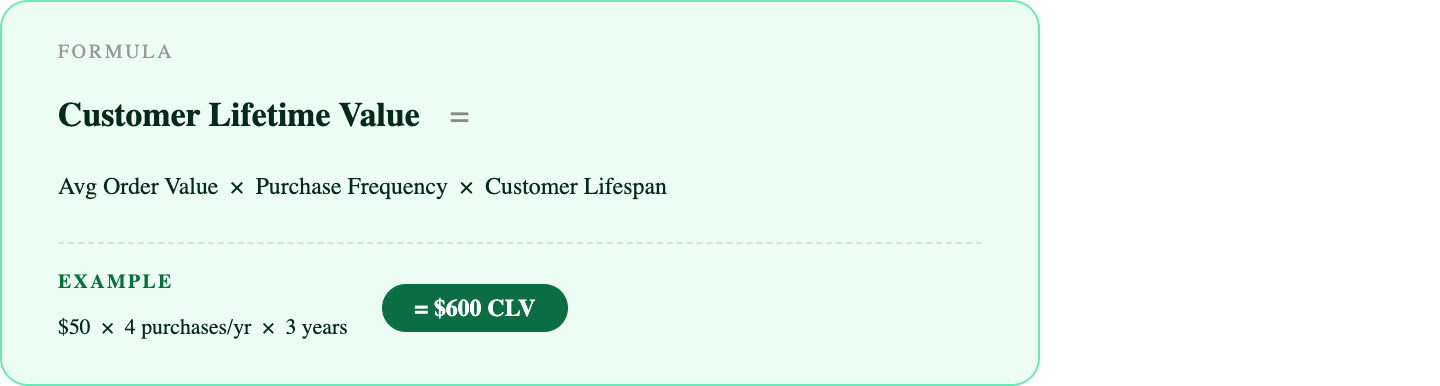
CLV is the total revenue a customer brings over their entire relationship with your brand. It shows how valuable a customer is in the long run.


How to interpret
  1. High CLV: You have loyal customers and can afford to spend more to acquire them.
  2. Low CLV: Customers don’t return or don’t spend much
Benchmark
  1. CLV should be higher than CAC
  2. Ideal: CLV to CAC ratio = 3:1
How to improve
  1. Focus on retention, as keeping a customer is more cost-effective than acquiring a new one.
  2. Use upsell and cross-sell strategies.
  3. Build loyalty programs and reward repeat buyers.
  4. Stay connected through email, social media, and community building.

Cost per customer acquired (CAC)

CAC is how much you spend to acquire one new customer. This includes ad spend, tools, and other marketing costs. It shows how efficiently your marketing is working.
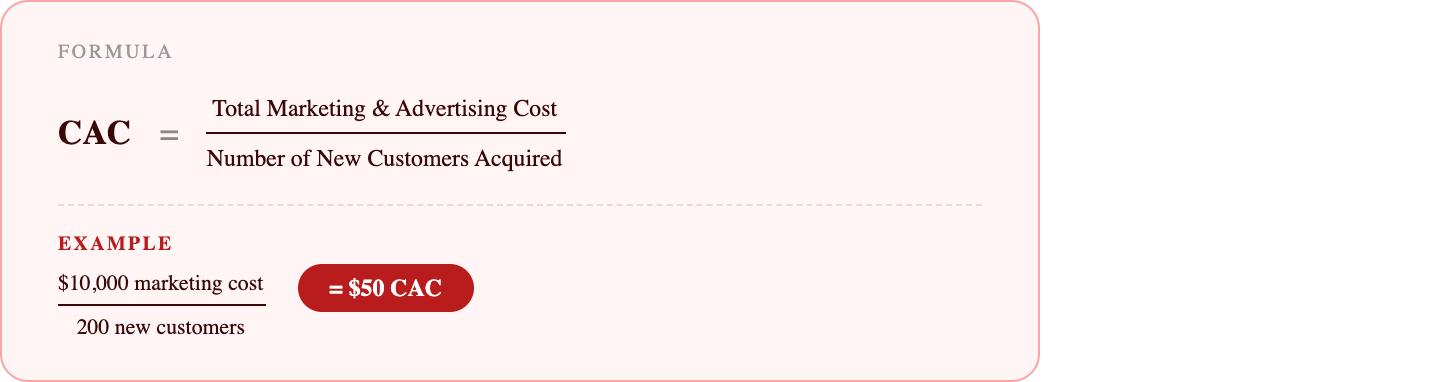


How to interpret
  1. High CAC: You’re spending too much to acquire each customer, which reduces profitability.
  2. Low CAC: You’re acquiring customers efficiently at a lower cost.
Benchmark
  1. Your CAC must be lower than the profit a customer brings in over time (CLTV), or your business model is at risk.
  2. Ideal: CAC to CLV ratio = 1:3 (Spend $1 → Earn $3 over time)
How to improve
  1. Experiment with different channels
  2. Retarget interested users instead of finding new ones
  3. Focus on high-performing channels

Engagement rate (ER)

ER shows how much people interact with your content (likes, comments, shares, saves). It tells you if your content is actually connecting with your audience.


How to interpret
  1. Higher ER: Your content resonates with your audience, and they actively engage with it.
  2. Lower ER: Your content may be seen (reach), but people aren’t engaging with it—they’re scrolling past.
Benchmark
Engagement rate varies by platform and audience size
  1. 1 - 3%: Average
  2.  3 - 6%: Good
  3.  6%+: Strong
How to improve
  1. Post when your audience is most active (use analytics or tools like SmartQ in Zoho Social)
  2. Ask questions, use polls, and give people a reason to respond
  3. Reply to comments quickly to boost interaction and signal activity
When you track the right KPIs, you stop guessing and start growing. Use these insights to refine your strategy and make every campaign count.

Stay tuned for the May edition of The Social Playbook.


        • Recent Topics

        • Team folder not created when creating project using zoho flow

          When I try to automate project creation using zoho flow, and I have enabled workdrive integration to automatically create team folders to attach to the project, this only works when I create a new project through the UI. But I am trying to automate project
        • The Social Wall: April 2026

          Hello everyone, This month, we’re excited to bring you a set of new updates for Threads in Zoho Social, designed to make publishing, monitoring, and managing your content much easier Threads updates You’ll now see a few useful improvements in the compose
        • Sort or filter CRM report by count value

          Hi there, I'm trying to create a report that will show me high frequency bookings (leads) coming through within a time period for any particular account - this is so we can proactively reach out to these accounts. I have a report that shows the information
        • Error when changing user permission from read only to user.

          Hi there, Ive tried to change one of my users to be able to edit, however i kept getting the error user license exceed.
        • Marketing Tip #30: Promote your brand differently on each social platform

          Not all social platforms work the same way. Posting the same content in the same way across every channel can limit your reach. Each platform has its own discovery system, and understanding what it prioritizes can dramatically improve how your brand is
        • Whatsapp Limitation Questions

          Good day, I would like to find out about the functionality or possibility of all the below points within the Zoho/WhatsApp integration. Will WhatsApp buttons ever be possible in the future? Will WhatsApp Re-directs to different users be possible based
        • **Building Role-Appropriate Accountability Layers in Zoho Projects - Looking for Real-World Experience**

          We're a small ISP/telecom operator on Zoho One and I'm trying to solve what I think is a common organizational problem. Would love to hear from others who've tackled it. **The Core Problem** Staff will only consistently use a project management system
        • Duplicate entries for contacts birthdays

          Good morning I have recently started to use my Zoho calendar and noticed that there are multiple birthday events showing for some of my contacts. I have checked my contacts and there were duplicates for some contacts which I have now rectified but the
        • How to Generate Separate Labels for Each Invoice SKU Line Item in Zoho Books?

          Hi everyone, I’m trying to implement a requirement in Zoho Books where separate labels need to be generated for each SKU/item from an invoice. Scenario: One invoice can contain multiple products/SKU items Each item/box should have its own separate label
        • Using IMAP configuration for shared email inboxes

          Our customer service team utilizes shared email boxes to allow multiple people to view and handle incoming customer requests. For example, the customer sends an email to info@xxxx.com and multiple people can view it and handle the request. How can I configure
        • [Bug] WebAuthn passkey registration blocked on rpIds with TLDs longer than 6 characters (.accountant, .technology, etc.) — isValidDomain regex too strict

          Hi, Filing on behalf of an enterprise customer where Zoho Vault is deployed across the company. The Chrome extension blocks WebAuthn passkey registration on legitimate sites whose Relying Party ID (rpId) has a TLD longer than 6 letters. This affects every
        • What's New in Zoho Billing | March 2026

          March is here with a fresh wave of updates to Zoho Billing. From making compliance easier, reporting more flexible, to making day-to-day workflows smoother across the board. Here's everything that's new this month. Introducing Usage-Based Billing Reports
        • Subforms in Creator-Lookup Price

          I've got a modular called Price List with items and prices. Ive got another module called Estimates with a subform that looks up that Price List. I am trying to get the "Price" to auto-enter based on the Lookup field of the item name. Anyone know how
        • Feature request - pin or flag note

          Hi, It would be great if you could either pin or flag one or more notes so that they remain visible when there are a bunch of notes and some get hidden in the list. Sometimes you are looking for a particular name that gets lost in a bunch of less important
        • Map Dependency Upgrades in Zoho CRM

          Map Dependency Fields enhancements are available in CA, SA, JP, CN, UAE, AU and EU DCs. Latest update: Also available in IN and US DCs. Hello everyone, We’ve introduced a set of enhancements to Map Dependency Fields to make setup simpler, faster, and
        • CRM to FSM Setup

          Good Afternoon, I am trying to connect CMS to FSM. My current field mapping is: Companies ↔ Accounts Contacts ↔ Contacts Service And Parts ↔ Products I'm setting this up for an elevator service company. The idea is that: Accounts represent Companies.
        • All new Address Field in Zoho CRM: maintain structured and accurate address inputs

          Availability Update: 29 September 2025: It's currently available for all new sign-ups and for existing Zoho CRM orgs which are in the Professional edition exclusively for IN DC users. 2 March 2026: Available to users in all DCs except US and EU DC. 24
        • Collapsible Sections & Section Navigation Needed

          The flexibility of Zoho CRM has expanded greatly in the last few years, to the point that a leads module is now permissible to contain up to 350 fields. We don't use that many, but we are using 168 fields which are broken apart into 18 different sections.
        • Create custom rollup summary fields in Zoho CRM

          Hello everyone, In Zoho CRM, rollup summary fields have been essential tools for summarizing data across related records and enabling users to gain quick insights without having to jump across modules. Previously, only predefined summary functions were
        • Inventory batch details

          Hi there, I'm trying to get the batch details of an item, here's what I've done so far. I've sent cUrl request to the below endpoint and I get a successful response. Within in the response I find the "warehouses" property which correctly lists all the
        • How do I edit the Calendar Invite notifications for Interviews in Recruit?

          I'm setting up the Zoho Recruit Interview Calendar system but there's some notifications I don't have any control over. I've turned off all Workflows and Automations related to the Calendar Scheduling and it seems that it's the notification that is sent
        • Unable to send emails from iPhone and iPad

          Curious, all of a sudden I'm unable to send emails from iPhone and iPad. I keeps asking for my password again and again. No problems from my MacBook Pro.
        • Journal Entries Do Not Show Multiple Entries to the Same Account

          Another basic accounting function that Books ... Accountants sometimes write journal entries, debiting and/or crediting the same account in the same entry. This is due to the need to record specific activity in an account when we pull reports especially
        • Create static subforms in Zoho CRM: streamline data entry with pre-defined values

          Last modified on (9 July, 2025): This feature was available in early access and is currently being rolled out to customers in phases. Currently available for users in the the AU, CA, and SA DCs. It will be enabled for the remaining DCs in the next couple
        • Partial customer Refund via customer Credit Card used to pay invoice

          How can we process a partial refund through the same credit card that a customer used to pay the initial invoice? - In other words, say a customer was sent an invoice for $1200.00 and they paid it through Zoho with our online credit processor, PayFlow
        • Partial refunds

          I am trying to process refund for a one item invoice, however the refund is partial: i am getting this error while creating credit note, can anyone share some wisdom about this
        • How in the heck do i record a (partial) refund???

          I have a client. wrote an invoice for 3 services totalling $520. He paid it online (we use zoho to authorize.net) We went out and couldn't do one of the services I didn't see a way to initiate a refund through zoho books, so i did a $250 refund through authorize.net. Tried to edit the payment on zoho books, but it won't let me b/c "this payment was made on line" When i try to edit the invoice i get a popup about it no longer matching the payment. What do I do??? And why is it so hard to do something
        • Action Required: Update your Zoho Projects – Zoho Analytics integration

          Dear Zoho Projects integration users, We would like to inform you about an upcoming update to the Zoho Projects–Zoho Analytics integration. Read the full migration announcement here. As shared in the announcement, we are updating the integration to support
        • Mirror Component in Zoho CRM: Access real-time related data without leaving your record

          Hi everyone, This feature is now available for the JP, CA, SA, UAE, and AU DCs. We're excited to bring to you Zoho CRM's mirror component, which presents relevant data on a record's details page and keeps everything users need in one place without having
        • Workflows fail silently in Zoho CRM and there is no native way to know

          Workflow automation is honestly one of the biggest reasons my clients choose Zoho. But there is one problem I keep running into across almost every implementation. When a workflow fails, nobody finds out. Email alerts hit daily limits and just stop. Custom
        • Office365(outlook emails) Zoho CRM integration

          Hi guys We're looking to buy Zoho CRM and are currently trialling. I'm working from a MacBook fyi. I've so spent 3 hours on live chat today with Zoho as we couldn't get the two to integrate properly, even with the plug in installed but finally managed
        • When adding subform records, how do I access member fields of a name field

          I have the following code (runs when a record is added to a form) if (input.P_liza != null) { input_deal = input.P_liza; rec = form_mapping[deal_name == input_deal]; id = input.N_mero_de_documento_de_Identificaci_n_Alfanum_rico; contact = -----redacted------.get_crm_contact_by_id(id);
        • Making "All Day Events" not default

          When I go to schedule an event, the All Day checkbox is ticked by default. Generally, I don't plan all day events, so is there a way to make that not checked by default? I couldn't find a setting for this...
        • Create custom field in multiple modules

          I am trying to create some custom fields that will be in both leads and contacts module without having to create them separately and then mapping them. How is that performed? it is too time-consuming to create 20+ fields and then do the same thing in a different module when they carry the same info. The idea is that when we get a lead from web site, there are items that we capture and once that lead is a client and moved to Contacts, that info should come over. So trying to find an easy way to create
        • Allow 2 logos for Branding, one for Light Mode and one for Dark Mode?

          Our logo has a lot of black text on it. If we leave the background transparent, per recommendation of Zoho, when a user is viewing a file and turns on dark mode, our logo is not really visible and looks really weird. It would be really great if we could
        • Compensation | Salary Packages - Hourly Wage Needed

          The US Bureau of Labor Statistics says 55.7% of all workers in the US are paid by the hour. I don't know how that compares to the rest of the world, but I would think that this alone would justify the need for having an hourly-based salary package option.
        • Tip #20 - Three things you probably didn't know you can do with picklists

          Hello Zoho Sheet users! We’re back with another quick tip to help you make your spreadsheets smarter. Picklists are a great tool to maintain consistency in your spreadsheet. Manually entering data is time-consuming and often leaves typos and irregular
        • In Desk KB article, how do include an image in a numbered list without using a number or bullet?

          We need to include images in our KBA steps as a numbered list. Here I have numbered steps. I want the image no numbering or bullet. Open Purchase Order Entry. Select the mail icon: Select the Save button. I see your own articles have images in number
        • Video Interview features

          I tested the video interview feature. It's supported only on desktop version of chrome/firefox. Most of the times, the candidates are available on their cellphone. Need to have this for mobile devices too.
        • POS and payments

          Have i missed the point can i not use zoho POS as a payment terminal back into stripe like we can in Books?
        • Next Page