The Zoho Meeting Video Quality Crisis

The Zoho Meeting Video Quality Crisis

   I'm evaluating Zoho One for my business in Switzerland, and I must address a critical concern that threatens our potential adoption of the platform—the persistently poor performance of Zoho Meeting's video conferencing capabilities. In today's digital-first workplace, video conferencing isn't just another feature; it's the cornerstone of modern business communication, as essential as email for connecting with clients, conducting training sessions, and maintaining team cohesion across locations.


   While Zoho One offers an impressive suite of integrated business tools, the video quality of Zoho Meeting remains significantly below the standards set by platforms like Zoom and Microsoft Teams. This isn't a new issue—I've discovered that customers have been reporting these same problems for four years without seeing meaningful improvements. The persistence of these issues, despite years of customer feedback, raises serious questions about Zoho's commitment to core business communication tools.


   These performance issues go beyond mere inconvenience—they fundamentally undermine our ability to maintain professional communications. In our test calls, we've consistently experienced choppy video, delayed video, bad looking video, that make it impossible to consider Zoho Meeting as our primary video conferencing solution. For a company positioning itself as an enterprise-grade solution provider, the current state of Zoho Meeting is, frankly, damaging to Zoho's reputation and credibility.


   Now, one might suggest simply bypassing Zoho Meeting and using alternative solutions. However, the continued presence of such an underperforming core business tool raises broader concerns about Zoho's strategic decision-making and quality standards. When a company maintains a subpar product in such a critical category, it inevitably casts shadows on the perception of their overall professional standards and technology capabilities.


   This leads to a critical strategic question: Wouldn't it be more beneficial for Zoho to either forge strategic partnerships with leading video conferencing providers or redirect their resources toward building more robust integrations with platforms like Zoom and Microsoft Teams? This approach would demonstrate both business acumen and a clear understanding of enterprise needs, rather than continuing to offer a solution that falls so far short of market standards. Sometimes, acknowledging that a competitor has built a superior solution and focusing on seamless integration is a stronger strategy than maintaining a weak offering that damages your brand.


   This situation requires immediate attention from Zoho's senior leadership team. The trust of your customer base, built through your other excellent products, is being eroded by what appears to be a lack of prioritization of this critical business tool. While your development team has undoubtedly worked hard, the lack of progress suggests this needs escalation to the highest levels of decision-making within Zoho.


   I strongly urge Zoho's senior leadership to make this a top priority—whether that means committing the resources needed to bring Zoho Meeting up to competitive standards or pivoting to a partnership strategy that better serves your customers. The potential of Zoho One as a comprehensive business solution is remarkable, but in 2024, reliable video conferencing isn't optional—it's a make-or-break feature that influences the entire platform's viability for modern organizations.


   Would other users from around the world share their experiences with Zoho Meeting's performance? And to the Zoho team, particularly senior leadership: What concrete steps are being taken to address these long-standing performance challenges? Is there consideration being given to alternative strategies that might better serve your customers' needs?

   A statement from Zoho's Senior Product Manager for Zoho Meeting would send a strong first signal. 

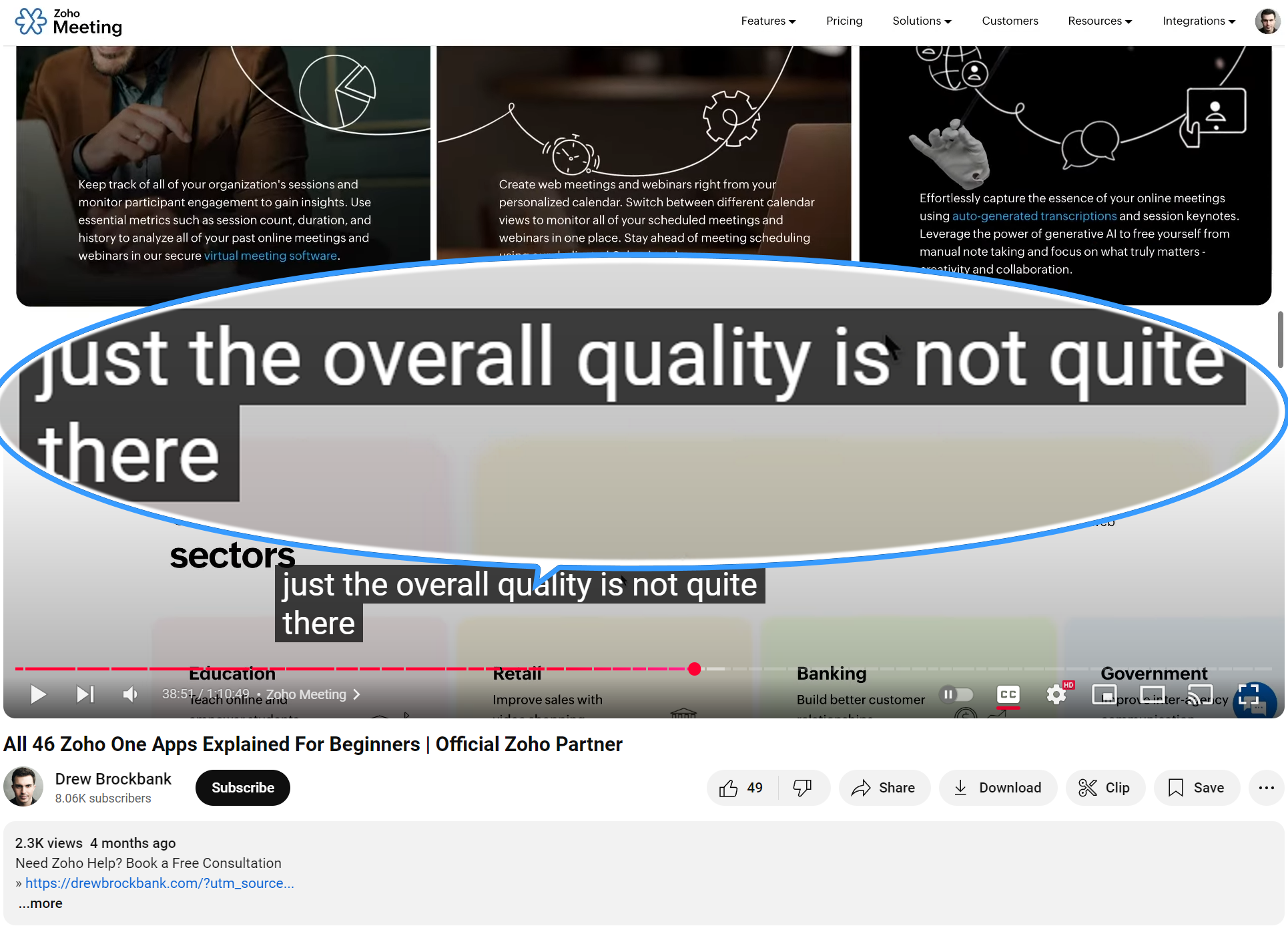
ps. Even Zoho Partners publishing on YouTube admit that Zoho Meeting it is unfit for business
(link to the relevant part below):


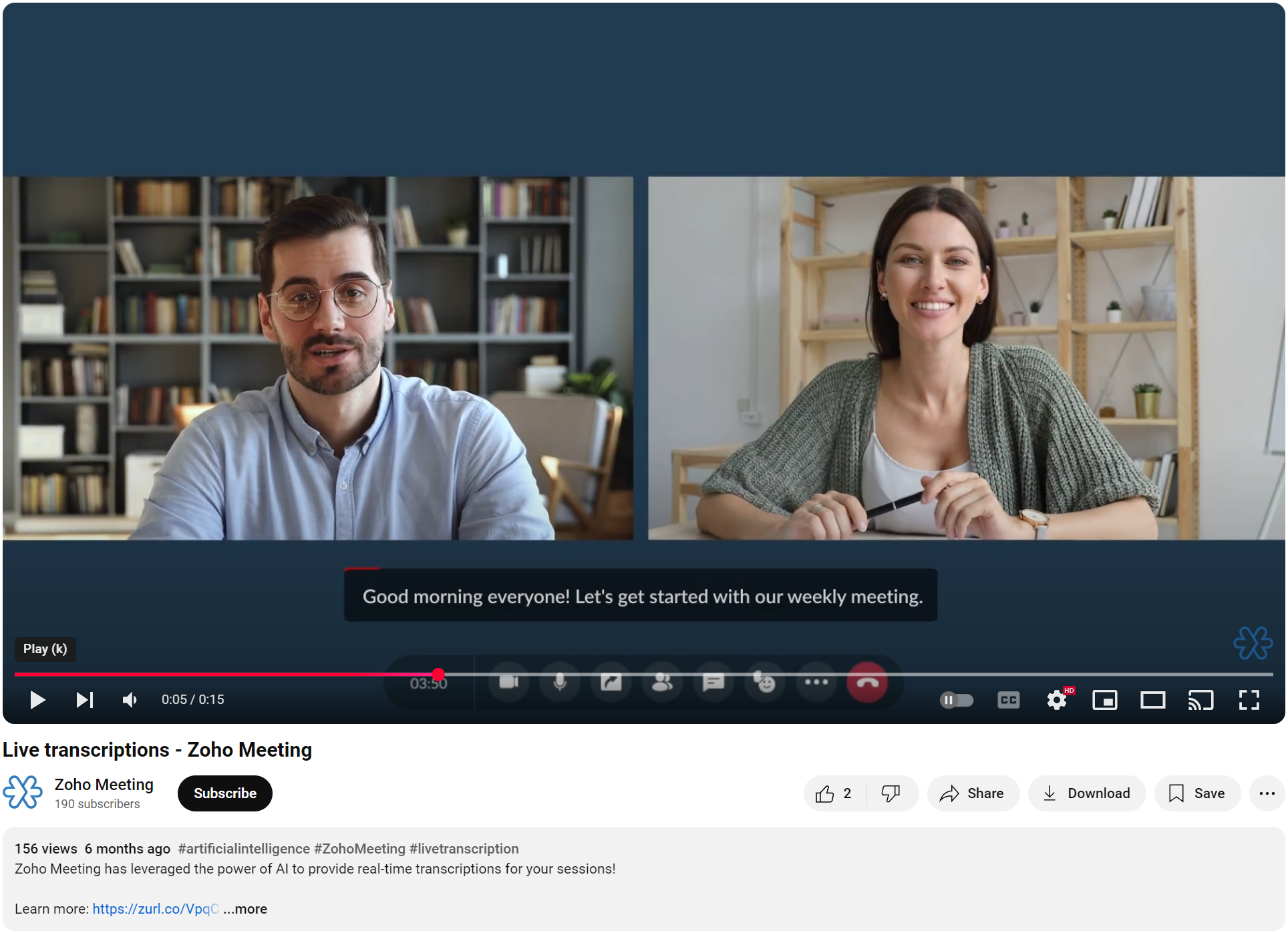
And using simulated footage rather than an actual product demonstration on your YouTube channel does not give potential users an accurate representation of the real user experience:


Remo


      • Sticky Posts

      • Zoho Meeting is included in Zoho One now!

        Hello Everyone, For those who waited for the integration of Zoho Meeting with Zoho One, here is the good news. The integration has been completed and you can now add the Zoho Meeting application in your Zoho One portal. Edition included in Zoho One License You will get Enterprise plan of Zoho Meeting, using which you can host online meetings with up to 100 participants and webinars with up to 100 attendees. You will also get the cloud storage for 25 session recordings/user. Adding Zoho Meeting application
      • Zoho Meeting Updates: Bug Fixes in Meetings and Webinars, and Desktop App Enhancements

        Hi there, We hope you are all safe and well. Following our previous feature release, we have added some enhancements and bug fixes for the improved functioning of Zoho Meeting. Let's take a look at last month's updates: Online meeting updates The microphone button remained active even when a user switched to phone audio. This issue has been fixed. An error caused the microphone status of participants to be wrongly displayed in the meeting toolbar and the attendees list.This issue has been fixed.
      • V2.7: Introducing webinar co-organizers, enhanced screen sharing quality, choosing external webcam, region based dial-in number display and more.

        Dear All, Here comes the new updates from Zoho Meeting that are recently rolled out! We 're introducing co-organizers in the webinar, done major improvements in screen sharing quality and more.   Introducing co-organizers in the webinar You can now invite co-organizers to help you manage your webinar. Co-organizer can launch polls, answer questions, change presenters during the webinar, record webinar, view all attendees/staff and more. Learn more. Webinar CoOrganizers   Enhanced screen sharing quality
      • Live webinar: A complete overview of Zoho Meeting

        Are you looking for ways to engage and communicate with large audiences? Learn how Zoho Meeting can empower you from conducting online meetings with your team to hosting webinars for your sales leads. Join us for a live webinar this Thursday at 8:30 to 9:00 AM PDT.   In this webinar, you will learn how to: Organize and host webinars Engage your audience with polls and Q&A Generate analytical reports Schedule and attend online meetings Record and share meetings and webinars Co-branding and user management
      • Live webinar: A complete overview of Zoho Meeting

        Are you looking for ways to engage and communicate with large audiences? Learn how Zoho Meeting can empower you from conducting online meetings with your team to hosting webinars for your sales leads. Join us for a live webinar this Thursday. Here's what you can learn: Webinar scheduling and preparation Attendee interaction and engagement In-depth post webinar analytics Scheduling and hosting online meetings Managing your recordings Co-branding and user management Date: Thursday, March 29th, 2018

        • Recent Topics

        • ZIA in Zoho Cliq

          Is It possible to use the ZIA feature from Zoho Analytics in the Zoho Cliq?
        • Automating CRM backup storage?

          Hi there, We've recently set up automatic backups for our Zoho CRM account. We were hoping that the backup functionality would not require any manual work on our end, but it seems that we are always required to download the backups ourselves, store them,
        • Multiple upload field CRM

          I desperately need the functionality to add more than one upload field to web to contacts form. How can I do this?
        • Good news! Calendar in Zoho CRM gets a face lift

          Dear Customers, We are delighted to unveil the revamped calendar UI in Zoho CRM. With a complete visual overhaul aligned with CRM for Everyone, the calendar now offers a more intuitive and flexible scheduling experience. What’s new? Distinguish activities
        • Critical Need for Global Search in Zoho FSM

          Hello Zoho FSM Team, We are currently in the process of deciding whether to fully transition to Zoho FSM for managing our field service operations. At present, our team actively uses Zoho Desk (with over 50 users) and Service Fusion, which we are considering
        • Collections Management: # 1 Payment Collection is All About Convenience

          "Sir, can you come tomorrow? My manager wasn't available for the cheque sign-off", the customer said, avoiding eye contact. Ravi forced a polite smile, but inside, he felt a sense of defeat. He had already visited the customer's office twice in the last
        • Can the Product Image on the Quote Template be enlarged

          Hello, I am editing the Quote Template and added ${Products.Product Image} to the line item and the image comes up but it is very tiny. Is there anyway that you can resize this to be larger? Any help would be great! Thanks
        • Deleting Fields in CRM Deletes Views in Analytics

          Hey friends! I'm having some issues when we modify some fields within ZohoCRM. There are times where we need to sunset a field and eventually completely remove it. In these instances, it seems like a lot of views are removed in Analytics. This ranges
        • Updating custom fields in Zoho Projects

          Hi I am wondering if anyone has experience with custom fields in Zoho Projects. I am struggling to update the field using either deluge or the api endpoint. My code is: //custom_Map = map(); custom_Map = {"UDF_DOUBLE_1":"0.27"}; update_Map = map(); update_Map.put("custom_fields",custom_Map.toList());
        • Audio/video quality issues with Zoho Meeting – Any roadmap for improvement?

          Hi Zoho Team, We’ve been using Zoho Meeting for both internal and external meetings, and unfortunately, the experience has been consistently poor. The video and audio quality are so unreliable that it often renders meetings ineffective—especially with
        • Pin multiple columns and adjust column widths in CRM subforms

          Hello all, Subforms act as secondary forms or tables in which you can associate multiple line items to a primary record and thereby ensure more structured and comprehensive data organization. We've made some recent enhancements to subforms. Here's what's
        • Paste issues in ZOHO crm notes

          Hi, since a week or so I have issues with the paste function in ZOHO CRM. I use "notes" to copy paste texts from Outlook emails and since a week or so, the pasting doesnt function as it should: some text just disappears and it gives a lot of empty lines/enters.....
        • Cash based businesses cannot use the new fixed asset module

          Hello all, If your bookkeeping is reporting in cash, you cannot use the new fixed acid module, as it does all the depreciation bookings accrual and not cash. This is definitive and you can't turn them into a cash booking. They will never appear in your
        • Zoho Learn & Zoho Connect

          Hi, Is there a way to sync the knowledge base we have in Zoho Learn with the manuals section is Zoho Connect? Thanks,
        • Calendar not working

          Are we the only ones. On any browser we cannot click on any of our calendar appointments and get them to open. They just make the browser loop. WE have reached out and have been told they are working on it. The office staff are really stuck. The point
        • Modifying iframe data of Zoho booking iframe

          Hello, I have integrated a Zoho Bookings embedded iframe into my website. Currently, I am pre-filling the booking form with default values as part of our process flow. However, I want to ensure that if an input field is already populated with a default
        • New Customization options in the module builder: Quick Create and Detail view

          Hello everyone, We have introduced two new components to the module builder: Quick create and Detail view. The Quick Create Component It is a mini form used to create a record and associate it to the parent record from a lookup field. For example, if you have a Deals lookup in the Contacts module, then you can associate existing deals or create a deal and associate it with the contact. You can customize this Quick Create form by adding standard as well as custom fields. There is no limit to the number
        • Apply Payment Received Amount Zoho Books Invoice

          Hello team here is the sample code How can apply the payment received record over a unpaid zoho books invoice. //......................... paymentID = customer_payment.get("payment_id"); organizationID = organization.get("organization_id"); paymentmaplist
        • Enhance Sign CRM integration

          Hello all, I'm working on a custom Deluge script to enhance the integration between Zoho CRM and Sign by using a writer merge template for additional flexibility. I want to replicate the post-sign document integration that exists between CRM and Sign
        • Zoho Books Finance Modules Not Accessible in Zoho CRM Mobile App

          We have integrated Zoho CRM with Zoho Books using the Zoho Finance Suite integration. In the CRM web version, we can see the Finance modules (Estimates/Quotes, Invoices, Sales Orders, Items, Payments) and are able to create invoices and quotes directly
        • Does Zoho offer a full WhatsApp Marketing Platform (like WATI / GallaBox)?

          lm exploring WhatsApp marketing and I’d like to understand what options are available within the Zoho ecosystem. Currently, I see: Zoho SalesIQ has a broadcast option, but it seems very limited — for example, it doesn’t support uploading contacts via
        • Is it really true that I can't set the default 'deposit to' account in 2025?

          I've been using Books for 7 years and the default account has never been a problem. I usually manually reconcile invoices and have never had a thought about which account. It has always been my account. However, I recently noticed that for the past 4
        • Cliq iOS can't see shared screen

          Hello, I had this morning a video call with a colleague. She is using Cliq Desktop MacOS and wanted to share her screen with me. I'm on iPad. I noticed, while she shared her screen, I could only see her video, but not the shared screen... Does Cliq iOS is able to display shared screen, or is it somewhere else to be found ? Regards
        • [Live Webinar] New in Zoho WorkDrive: AI enhancements, Data Loss Prevention, Version Controls, and more

          Hello everyone, We're excited to bring you another round of powerful updates in Zoho WorkDrive! Join us on May 15 for an exclusive live webinar where we’ll unveil the latest features designed to enhance your team’s productivity, collaboration, and data
        • Live webinar: Streamlining legal operations: Leveraging Zoho WorkDrive for law firm success

          Hello everyone, Managing legal documents across departments and jurisdictions can be complex, but it doesn’t have to be. Join us on March 6 for an exclusive webinar where we’ll show you how Zoho WorkDrive empowers legal teams to stay compliant, organized,
        • Live Webinar: Optimizing back-office operations in the manufacturing industry to maximize profitability

          Hello everyone, We’re excited to invite you to our upcoming live webinar on February 6! Discover how Zoho WorkDrive can help manufacturing businesses optimize back-office operations, improve efficiency, and boost profitability. Our product experts will
        • Live webinar: 2024 recap of Zoho WorkDrive

          Hello everyone, We’re excited to invite you to our year-end live webinar! This session will take you through the transformative features and updates we’ve introduced in Zoho WorkDrive this year, helping you streamline document management like never before.
        • Live webinar: Explore WorkDrive's seamless integrations with key Zoho apps

          Hello everyone, We’re excited to invite you to our upcoming live webinar, where we'll delve into the seamless integration of WorkDrive with other key Zoho applications! This is a fantastic opportunity to enhance your productivity and streamline your workflows
        • Live webinar: Getting the most out of WorkDrive in Zoho Workplace

          Hello everyone, We’re excited to invite you to our upcoming live webinar, where we’ll explore how to maximize your use of WorkDrive as part of the Zoho Workplace bundle. This is a fantastic opportunity to elevate your productivity and streamline your
        • Live webinar: Mastering data migration, organization, and team collaboration

          Hello everyone, We’re excited to invite you to our upcoming live webinar! Discover how to seamlessly migrate your data, optimize file organization, and boost team collaboration using Zoho WorkDrive’s powerful features. This is a fantastic opportunity
        • BARCODE PICKLIST

          Hello! Does anyone know how the Picklist module works? I tried scanning the barcode using the UPC and EAN codes I added to the item, but it doesn’t work. Which barcode format does this module use for scanning?
        • Join our live webinar: Explore the WorkDrive TrueSync application!

          Hello everyone, We are thrilled to invite you to a live webinar focused on mastering the WorkDrive TrueSync application. Discover how to seamlessly sync your content between the cloud and your computer, ensuring smooth and efficient file management. Our
        • Bug tracking

          Hi, does anyone know how to track errors during picking or packing? This way I can keep track and see how to improve and prevent errors in this area.
        • Zoho Creator customer portal limitation | Zoho One

          I'm asking you all for any feedback as to the logic or reasoning behind drastically limiting portal users when Zoho already meters based on number of records. I'm a single-seat, Zoho One Enterprise license holder. If my portal users are going to add records, wouldn't that increase revenue for Zoho as that is how Creator is monetized? Why limit my customer portal to only THREE external users when more users would equate to more records being entered into the database?!? (See help ticket reply below.)
        • Script Editor not an option

          I am trying to apply a script to a sheet and Script Editor is not an option. I don't want to go outside Sheets to do this (like Creator) if it can be done inside Sheets.
        • Send Automated WhatsApp Messages and Leverage the Improved WhatsApp Templates

          Greetings, I hope all of you are doing well. We're excited to announce a major upgrade to Bigin's WhatsApp integration that brings more flexibility, interactivity, and automation to your customer messaging. WhatsApp message automation You can now use
        • Moving data from one pipeline to another

          Hey all, I've got some complex pipelines to build and I'd like to seperate them into seperate pipelines rather than have one mammoth one. If I create 2 pipelines, is there any easy way to use the output of Pipeline1 to be the input into Pipeline2? Or
        • Envio de mails

          Hola! No puedo enviar mails pero si recibirlos. No se como solucionarlo! Mi dominio es chidobebes.com.ar
        • ERROR CODE :554 - Your access to this mail system has been rejected due to poor reputation of a domain used in message transfer

          In my email configuration: The domain's MX Records are pointed to Zoho The domain's SPF Records have been pointed out successfully DKIM is enabled. DMARC Record is pointed for the domain. The domain name is digioorja.in. Still facing the issue of Error:
        • This Operation has been restricted. Please contact support-as@zohocorp.com for further details

          l tried to verify my domain (casalimpaeperfumada.com.br) and its shows this error: This Operation has been restricted. Please contact support-as@zohocorp.com for further details.
        • Next Page