An exclusive system for risk management | Tips and Tricks | Zoho Sprints
An exclusive system for risk management | Tips and Tricks | Zoho Sprints

Zoho Sprints' risk management feature gives teams a structured, industry-grade system for identifying, quantifying, and mitigating risks to eliminate probable impact.

Project or product teams that run on Zoho Sprints might be using sprints, work items, and epics to identify, document, track, and complete the items related to the risk to indicate that it has been mitigated.

Here's what risk management offers:
  1. A risk register to record potential threats along with the probability of occurrence and level of impact
  2. A risk matrix to customize the qualification parameters like impact level, probability, and risk class for the risks
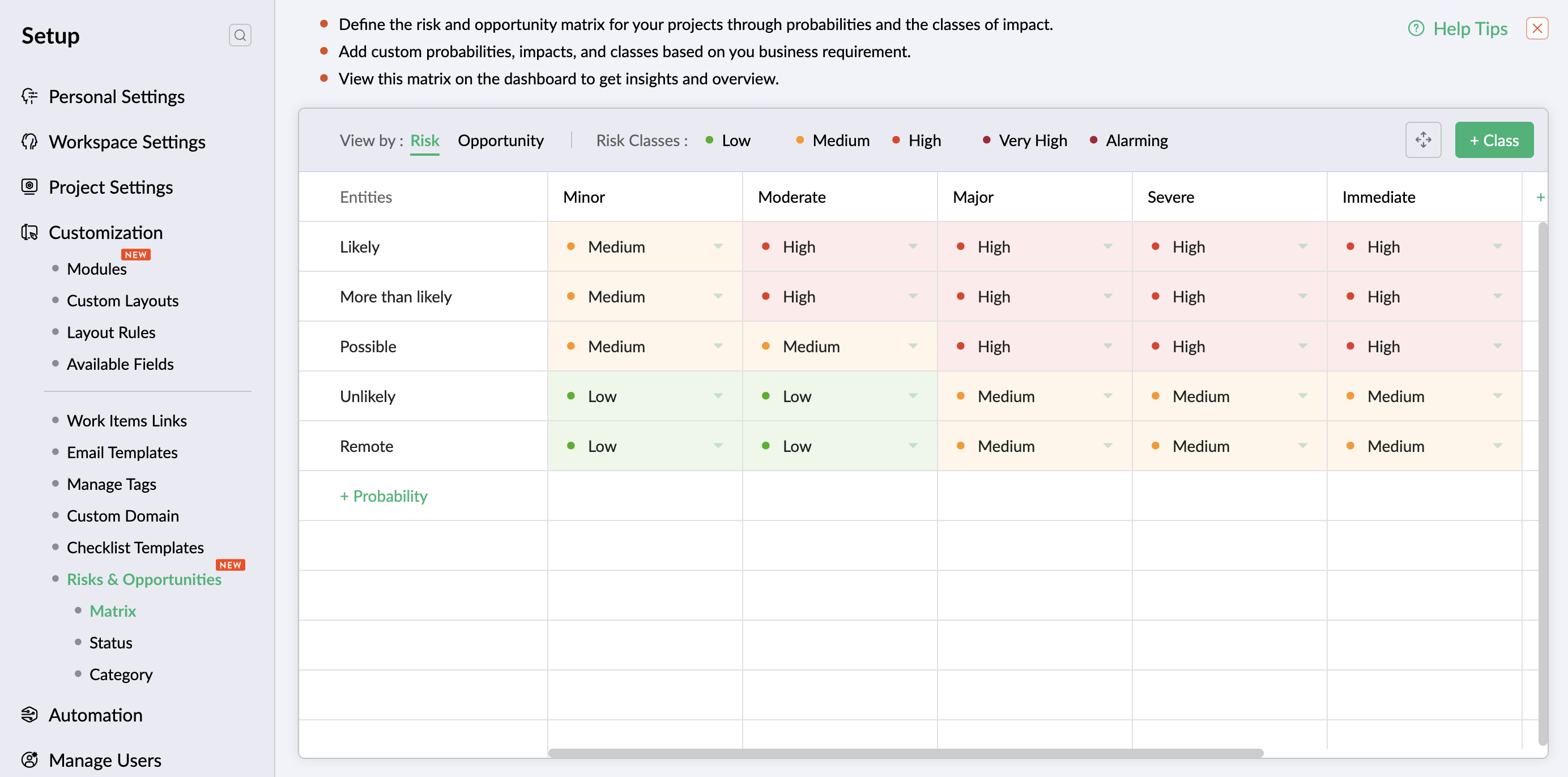
  3. A mitigation control system to add and track the measures taken to bring down the severity of impact
  4. A verification process to review and approve the mitigation efforts
  5. An evaluation mechanism to audit and approve the decrease of impact or probability after due mitigation efforts
  6. A risk dashboard for quantifiable insights and bird's-eye view of progress from initial impact at the time of risk identification (inherent impact) to the final impact after the mitigation and course-correction efforts (residual impact)

Examples of risk management

Financial risks: Cost and budget overruns

Project exceeds the allocated budget due to funds mismanagement, unprecedented scope expansion, and inaccurate budget estimate.

Operational risks: Challenges in talent retention

Organization faces difficulty with retaining skilled resources due to acute workload, inadequate salary benefits, and competitive market.

Reputational risks: Negative customer reviews

Organization's reputation is at stake when customers publish poor ratings and reviews due to dissatisfaction with the product.

Non-compliance risks: Data privacy and security violations

Organization encounters risk of non-compliance due to software that fails to meet GDPR, CCPA, or HIPAA requirements for protecting user data.

Security risk: Critical data breach

Company faces legal implications due to user data being exposed following a vulnerability and non-compliance to legal framework.


Revolutionize your risk mitigation framework and boost the growth of your business. Visit our help page for a thorough understanding of risk management.

Is there a feature you want us to explore more deeply? Let us know in the comments below and we'll try to demystify it for you. For any questions or assistance, reach us at support@zohosprints.com.

      • Sticky Posts

      • Tip #48: An exclusive system for risk management

        Zoho Sprints' risk management feature gives teams a structured, industry-grade system for identifying, quantifying, and mitigating risks to eliminate probable impact. Project or product teams that run on Zoho Sprints might be using sprints, work items,
      • Comprehensive guide to add users

        We've received quite a few questions regarding adding users to the Zoho Sprints workspace. So we decided to address it through a comprehensive post covering the locations (modules or tabs) from which you can add your users. Adding users to your workspace
      • Leverage layout rules to customize workflow

        Layout rules in Zoho Sprints primarily aim to customize the field layout of your creation forms to meet complex requirements. But it doesn't stop there. Its customization can push the boundaries of how your fields behave, how data is gathered, how processes
      • Tip #40 - Control entity and field permissions using profiles

        Building profiles using permission sets equips you with the ability to permit and restrict data access to members belonging to those profiles. Creating different profiles with different combinations of permission sets allows you to set a hierarchical

        • Recent Topics

        • Account review. Does anyone still work here?

          Are accounts still being reviewed? Mine has been under review for over two weeks now. I also created a support ticket and reached out on Twitter but never received any kind of response. Is this company still alive?
        • Seamless and safe way to migrate all my hubspot forms to zoho forms?

          Hi community! Our website (B2B consulting / market research), offers a wide variety of public report in PDF formats stored behind forms previously hosted via Hubspot. As we are migrating to Zoho Forms, I am facing an issue. Example: Form A (Report A),
        • E-Mail Distribution List

          How do I create an e-mail distribution list in Zoho Mail?
        • Zoho Contacts *Web Interface Does Not Load* (Tested in Firefox, Safari)

          When trying to load https://contacts.zoho.com the error shown in the console is: The resource from “https://static.zohocdn.com/zmail/zm/newContactsChange11/js/main.js” was blocked due to MIME type (“application/json”) mismatch (X-Content-Type-Options:
        • Automatically calculate and include tax on quotes

          I've recently been VAT registered and now need to include VAT on my quotes. I have been able to set the tax label and amount but still need to click the tax link and select the tax I wish to include before it appears on the quote. Does anyone know of
        • Zia Agents looks promising, but I still cannot deploy my first agent or connect WhatsApp after weeks of support tickets

          Hi Everyone, I am posting here because I am stuck and need practical help from someone who has successfully deployed a Zia Agent with WhatsApp. Zia Agents looks like a very promising product. I have watched the platform expand quickly, and I have noticed
        • Zoho Desk: Chromium (Google Chrome, Edge) filename issue when opening/download attachments in a ticket.

          Hello Zoho Desk Team. When opening a PDF attachment in a ticket, Chromium-based browsers such as Google Chrome and Microsoft Edge display the file with the title “content” When the file is saved, it is downloaded as content.pdf instead of using the original
        • Subforms and automation

          If a user updates a field how do we create an automation etc. We have a field for returned parts and i want to get an email when that field is ticked. How please as Zoho tells me no automation on subforms. The Reason- Why having waited for ever for FSM
        • crm to books

          We currently sync CRM Contacts to Zoho Books Customers using two-way sync. We now wish to change to "Accounts & their Contacts". What happens to existing Books customers? Will they be merged with CRM Accounts, duplicated, left unchanged, or recreated?
        • Cliq iOS can't see shared screen

          Hello, I had this morning a video call with a colleague. She is using Cliq Desktop MacOS and wanted to share her screen with me. I'm on iPad. I noticed, while she shared her screen, I could only see her video, but not the shared screen... Does Cliq iOS is able to display shared screen, or is it somewhere else to be found ? Regards
        • Zoho Desk Community Module Reporting

          I can't seem to find any reporting for the community module in Zoho Desk. Am I missing something or are there just no reports available?
        • Zia AI capabilities now available in all paid editions

          Hello everyone, We are expanding the availability of AI-powered features in Desk to the other paid subscriptions from 7th July 2026. Right now, the following AI-based features are available for Enterprise edition users: Intelligence: Sentiment analysis,
        • Feature Request: Integración con la Lista del Artículo 69-B del SAT para Zoho Books México

          Feature Request: Integración con la Lista del Artículo 69-B del SAT para Zoho Books México Hola equipo de Zoho, Durante los últimos meses he observado una necesidad recurrente entre varios clientes en México relacionada con el cumplimiento fiscal del
        • Alternate color rows

          After I changed the background color to a dark gray and changed the alternate rows to a light gray. I have discovered that I can no longer change the text in the light gray rows to Bold.
        • Business Day Logic Update: More Accurate Scheduling for Your Workflows

          Hello everyone, We’re improving how business-day calculations work in workflows, especially when triggers happen on weekends. This update ensures that offsets like +0, +1, and +2 business days behave exactly as intended, giving you clearer and more predictable
        • Workflow Assistance in Zoho CRM

          Our client's sales team visits customers on-site and currently fills a physical paper form to capture customer details, and then separately re-enters the same data into Zoho CRM via the mobile app — resulting in double data entry. We want the salesperson
        • Can we generate APK and IOS app?

          Dears, I want to know the availability to develop the app on zoho and after that .. generate the APK or IOS app  and after that I added them to play store or IOS store.. Is it possible to do this .. I want not to use zoho app or let my customers use it. thanks 
        • Pricelists

          So we have them in books but I cannot find them in commerce?
        • Collapsible Sections & Section Navigation Needed

          The flexibility of Zoho CRM has expanded greatly in the last few years, to the point that a leads module is now permissible to contain up to 350 fields. We don't use that many, but we are using 168 fields which are broken apart into 18 different sections.
        • Validation Rule Not Working for Mandatory Field in Zoho Blueprint

          As a Zoho user, we created a validation rule for a specific field. However, we noticed that when we made the same field mandatory within a Blueprint, the validation rule we defined did not work. When we reported this issue to Zoho Support, they stated
        • What is a realistic turnaround time for account review for ZeptoMail?

          On signing up it said 2-3 business days. I am on business-day 6 and have had zero contact of any kind. No follow-up questions, no approval or decline. Attempts to "leave a message" or use the "Contact Us" form have just vanished without a trace. It still
        • Ticket id issues

          When I reply a ticket from desktop, it doesn't have ticket id in the subject and it's great. When I reply a ticket from Zoho desk mobile, Zoho adds ticket id in the subject and I don't want that. Please help in this matter.
        • Une collaboration simplifiée grâce à l’interopérabilité des calendriers

          L’interopérabilité des calendriers permet aux équipes utilisant différentes plateformes, comme Zoho Calendar et Google Calendar, de consulter facilement les disponibilités de leurs collègues sans avoir à utiliser plusieurs outils. Dans les entreprises
        • Overview on users IMAP settings

          We have about 30 users who all have the channels/email/email configuration/IMAP integration/O365 enabled and emails are synchronized. Here my problem: Passwords for the email accounts are expiring on individual bases and most of the users forget to update
        • Format of data after export to spreadsheet

          Dear Zoho, can you explain to me what is the point of a report exporting to XLSX if the format of the amounts that will be created there is in text format and not suitable for anything? Why do I need data in a sheet with which nothing more can be do
        • How to add custom icons in Sites ?

          I've been trying to upload some of my own icons (specific to my business) to my zoho Site draft, and can't find a way to do it. I guess the workaround could be to insert images instead of icons and upload my icons as images, but I was wondering if its possible to customize the icon library.
        • Zoho Forms API

          Is there any way to get all form entry list using API? Looking forward to hear from you
        • #21 Five Minutes Every Monday That Replace an Hour of Digging

          Welcome to the final stretch of our journey. In this series so far, you have configured Zoho Invoice, created and managed your transactions and built a workflow that shares invoices and collects payments almost on its own. You have been doing the work.
        • Kaizen #251: From Campaign Leads to Sales Orders with Zoho CRM Mass Action APIs

          Hello all!! In growing businesses, sales teams often deal with a large volume of records every day - leads from campaigns, qualified prospects ready for conversion, and approved quotes that must be converted into sales orders. Performing these actions
        • Introducing the Employee Portal for internal job posting

          Employee referrals and internal applications are one of the most trusted hiring channels. But in many organizations, employees only hear about openings through messages, word of mouth, or after the role has already been open for a while. When employees
        • Zoho Mail is down?

          We stopped getting new emails since 8:42am EST and mail.zoho.com shows an error.
        • Forwarding without verification

          Hi, I use Tripit to keep track of all my business travel. I've recently moved over to Zoho and wanted to set up a forwarding rule to send various travel confirmation emails automatically to plans@tripit.com Obviously this is an email address I don't control,
        • Disappearing Mouse cursor in Zoho Mail / Windows 11 (Chrome + Edge)

          I'm seeing an issue when writing mails with the light theme with the mouse cursor being white and the document area also being white - making it nearly impossible to see the mouse cursor. I see the problem on Windows 11 under Chrome and Edge. (Yet to
        • Request to unblock user creation error (This user is not allowed to add in Zoho)

          Hello Zoho Support Team, I am the Super Admin of my Zoho Mail organization. When I try to create a new business email user account, I encounter the following error message: "This user is not allowed to add in Zoho. Please contact support-as@zohocorp.com
        • Zoho Mail account blocked after malware incident – request for review and unblock

          Hi Zoho team and community, My Zoho Mail account has been blocked due to outgoing email activity that was detected as spam or unusual sending behavior. The root cause was a malware infection on my computer, which compromised several of my accounts, including
        • creating an alias

          your instructions for creating an alias are wrong. there is no add alias in my mail account. also i dont have a control panel link just a settings link how do i really make an alias
        • IP Address blocked by many servers

          hello team this is to inform you that the zoho ip address 103.117.158.51 has been marked spam and not trustworthy by outlook and many other company servers. kindly discontinue using this ip to maintain a healthy domain reputation for your clients. Regards
        • Automatically set the default VAT percentage on a quote

          Every time I create a quote, I have to manually adjust the VAT and activate the checkbox for 21%. But all of our quotes include 21% VAT. So now occasionally, it happens that the checkbox is forgotten, and the customer receives an incorrect quote (without
        • What's New in Zoho Inventory | June 2026

          Hello users, June 2026 introduces a range of exciting enhancements to Zoho Inventory. With the full rollout of the Zoho Inventory Windows application, the launch of Terminal Payments, and new tracking combinations in Advanced Inventory Tracking, you can
        • Time Zone is incorrect

          Time zone is not working properly...I've checked it twice.  I'm eastern U.S. time it's currently 12:22 pm EST.  CRM shows 3:22 pm EST.
        • Next Page