Unfurling Unlimited Possibilities in Zoho Cliq đź”—

Unfurling Unlimited Possibilities in Zoho Cliq đź”—

Are you tired of your app links looking plain? Imagine if the shared links came to life with custom previews, organized data, and one-click actions, making chats more interactive. With the Cliq platform's unfurl handlers, let's see how developers can enhance links shared from their apps or tools, allow automatic display of relevant details and metadata, and add intuitive buttons and forms to streamline workflows.

Meeting links with action buttons to add Cliq reminders

When sharing meeting links in any channel, instead of showing a basic preview, you can provide a detailed response via preview handler that includes the meeting title, date, time, description, agenda, and an action button to set a Cliq reminder.

This can be implemented by setting the button type to "system.api" and using the action value 'set_reminder' along with the parameters below.

Attribute
Type
Description
date_time*
String
Mandatory
To specify the date and time of the Cliq reminder in yyyy-MM-ddTHH:mm format.


Refer to applicable date-time literals
content*
String
Title of the reminder to be set.
 
Syntax
  1. reminderParams = Map();
  2. reminderParams.put("date_time",$DATE_TIME);
  3. reminderParams.put("content",$CONTENT);
  4.  
  5. setReminderButton = {"type":"system.api","action":"set_reminder","label":$BUTTON_LABEL,"hint":$HINT,"params":reminderParams};


With the Arattai extension, you can expand Arattai links within your Zoho Cliq conversations, access meeting links interactively to schedule Cliq reminders, and see a detailed preview of channel links, group invitations, and user contacts.


 File sharing with post-action access controls 


  • When a file or attachment is shared in a channel, display a response that shows the metadata (title, type, and size) and prompt a follow-up form to manage access control for the attachment.
  • The form can be configured to ask whether the sender wants to share the attachment with all participants in the channel or with specific individuals and the type of access they wish to grant, such as view, edit, or comment.
  • This can be implemented using the after-send action handler, ensuring secure file access and eliminating awkward "I'm unable to open this file" follow-ups. 
Go ahead and share a Zoho Writer document or a Zoho WorkDrive file in any Cliq channel to witness the benefits of the after-send action handler in action!

Task management without tab switching


  • When managing tasks, it’s important to configure how task links are shared in channels or chat. The preview should display key information, including the task name, due date, and status. Additionally, include intuitive buttons such as "Complete," "Edit," and "Delete."
  • The responses for these buttons can be managed in the action handler. The action handler is responsible for executing actions when any of the buttons on the unfurled card are clicked.
  • This enables real-time task management directly from chat. Team members can quickly update or complete tasks without switching apps or losing chat context
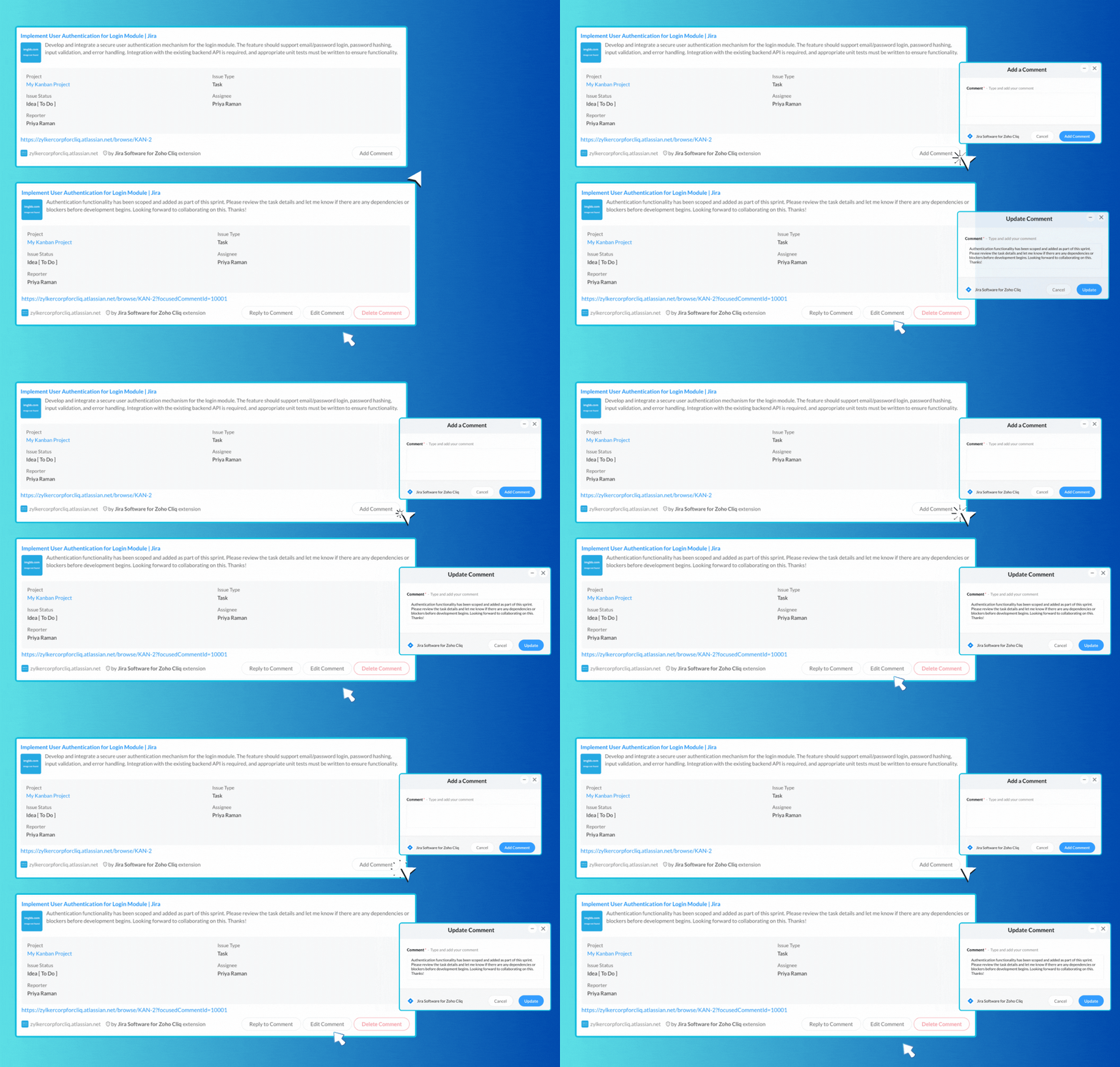
The Jira Software extension for Cliq allows you to share task links in any chat easily, providing a rich and interactive overview of tasks along with buttons for adding comments. You can enhance collaboration by sharing links to task comments, enabling you to reply, edit, or delete them effortlessly.


​
Say goodbye to dull app links! With Cliq’s unfurl handlers, you can create engaging previews that energize your workflow. Streamline automation and centralize tasks, allowing your teams to collaborate efficiently and respond faster, whether it’s for scheduling ,task management or file sharing.

We're here to help, so don't hesitate to reach out to support@zohocliq.com with any questions or if you need assistance in crafting even more tailored workflows.


      • Sticky Posts

      • Cliq Bots - Post message to a bot using the command line!

        If you had read our post on how to post a message to a channel in a simple one-line command, then this sure is a piece of cake for you guys! For those of you, who are reading this for the first time, don't worry! Just read on. This post is all about how
      • Add Claude in Zoho Cliq

        Let’s add a real AI assistant powered by Claude to your workspace this week, that your team can chat with, ask questions, and act on conversations to run AI actions on. This guide walks you through exactly how to do it, step by step, with all the code
      • Automate attendance tracking with Zoho Cliq Developer Platform

        I wish remote work were permanently mandated so we could join work calls from a movie theatre or even while skydiving! But wait, it's time to wake up! The alarm has snoozed twice, and your team has already logged on for the day. Keeping tabs on attendance
      • Customer payment alerts in Zoho Cliq

        For businesses that depend on cash flow, payment updates are essential for operational decision-making and go beyond simple accounting entries. The sales team needs to be notified when invoices are cleared so that upcoming orders can be released. In contrast,
      • Accelerate Github code reviews with Zoho Cliq Platform's link handlers

        Code reviews are critical, and they can get buried in conversations or lost when using multiple tools. With the Cliq Platform's link handlers, let's transform shared Github pull request links into interactive, real-time code reviews on channels. Share

        • Recent Topics

        • Workflows being applied and the Large unwanted popup

          When a workflow is being applied do to an action, then the Agent is left with a large Window asking if they would like the see the changes this workflow did. Is there any way to disable this prompt from appearing?
        • What's New in Zoho Billing | March 2026

          March is here with a fresh wave of updates to Zoho Billing. From making compliance easier, reporting more flexible, to making day-to-day workflows smoother across the board. Here's everything that's new this month. Introducing Usage-Based Billing Reports
        • Business Day Logic Update: More Accurate Scheduling for Your Workflows

          Hello everyone, We’re improving how business-day calculations work in workflows, especially when triggers happen on weekends. This update ensures that offsets like +0, +1, and +2 business days behave exactly as intended, giving you clearer and more predictable
        • How to add a filter

          Hi Team, How can I set a filter like excel, instead of adding a new button.
        • A POS solution to complete the business solution for SME businesses

          For such a long time one aspect of SME business completely ignored has been a suitable POS solution native to Zoho and integrated with all the usual and necessary applications such as Inventory, Books, Commerce and CRM. The first and generally only option
        • Zoho Form not synching with Zoho CRM in CRM email template

          I have in the past successfully created an email template that has access to a Zoho Form in the url link to Forms in the email template. I am in the Contact Module of the CRM and I have created a Form for contacts and mapped the two. I am using the upsert
        • Schedule Timeout 5 minutes vs. stated 15 minutes

          I am running into a function run timeout error after 5 minutes for my schedules. The Functions - Limits documents states it should be 15 minutes: Functions - Limits | Online Help - Zoho CRM. What should it actually be? Due to the 5 minute timeout, I'm
        • Coupon Codes and Cancelling Subscriptions

          We have two Zoho One organizations, one we use for dev/testing. In Zoho Billing when we cancel a subscription, we are getting two different behaviors with regards to coupons. In one environment, the coupon is removed upon cancellation. In the other, the
        • Zoho Books | Product updates | April 2026

          Hello users, Welcome to our April 2026 product updates roundup! Highlights include profit margin for sales transactions, insights in reports, recording deposits from undeposited funds in banking, and faster production workflows with improved assembly
        • Journal Entries Do Not Show Multiple Entries to the Same Account

          Another basic accounting function that Books ... Accountants sometimes write journal entries, debiting and/or crediting the same account in the same entry. This is due to the need to record specific activity in an account when we pull reports especially
        • Email Opt Out Question

          Has the problem where if a customer is emailed opt out prevents you sending standard emails? For me this feature is simply to stop any email marketing and should not block people from receiving emails via Zoho mobile, which makes no sense.
        • Bulk Writer Export

          Pardon me if this has already been discussed (I can't find anything about it in these forums and my last attempt to start a thread seems to have failed). Is it possible to export more than one document at once? I would be really great to be able to burn OpenOffice.Org files of all my Zoho documents once a month to a CDR. If that feature is available/were created, this would be my main word processor. Without being able to do my own bulk backups I'm leery to count on Zoho's servers (which are robust
        • Sites API

          Is there a Sites API and if so where can we find documentation
        • Extracting phone number from variable

          Hi. I've created a flow between Calendly and Zoho CRM. So when someone schedules a meeting in Calendly, there is a lead created in Zoho CRM. However, I am not able to fill in the phone number field in Zoho CRM, because the phone number is included in
        • I can't fetch Calendly Fields

          Hello, I have set up a flow to connect Calendly with Zoho CRM, A few days ago I have mentioned that I should update the Calendly app connection and I have done, After Calendly has been updated I have some issues such as Event location missing I can map
        • Edit a previous reconciliation

          I realized that during my March bank reconciliation, I chose the wrong check to reconcile (they were for the same amount on the same date, I just chose the wrong check to reconcile). So now, the incorrect check is showing as un-reconciled. Is there any way I can edit a previous reconciliation (this is 7 months ago) so I can adjust the check that was reconciled? The amounts are exactly the same and it won't change my ending balance.
        • What's new in Zoho Social - Q1 recap

          Hello everyone, We’ve rolled out a bunch of updates in Q1, and we’re excited to walk you through them. To help you explore these features in detail, we’re hosting a Q1 recap webinar where we’ll show you how to make the most of each update. Q1 recap webinar
        • Ignore Auto Sales Order number generation not working

          Hi, My Flow has broken and I'm no longer able to use the Ignore auto number generation function and instead use the field that came from the trigger (via Jotform) when creating a new Sales Order in Books. Any suggestions how to fix this?
        • Vendor bills cannot be assigned to a customer or a customer project?

          I'm confused on how to handle outsourced contractor expenses on a customer project.  Between my business and the contractor, the invoice they send me fits obviously into Zoho Books as a Bill. However, I need to be able record those expenses to the client
        • Anyone using Books to track Project Profitability? If so, I could use some guidance

          Hello Zoho Community. I am a recent subscriber to Zoho, and its part of an ongoing evaluation.  My company (and my clients) have extensive project-tracking needs.  The Projects module seems to be good from a project management standpoint, but I am perplexed
        • Introducing parent-child ticketing in Zoho Desk [Early access]

          Hello Zoho Desk users! We have introduced the parent-child ticketing system to help customer service teams ensure efficient resolution of issues involving multiple, related tickets. You can now combine repetitive and interconnected tickets into parent-child
        • Problem in usage zoho

          Difficulty to submit the from in my training to handle ticket on your free trial
        • In-House, Non-Billable Projects

          I use Zoho Projects solely for in-house projects with fixed cost budgets.  Only bills and expenses need to be charged against the budget.  There are no customers to be billed or invoices to be created. How can such a non-billable project be set up?   As
        • [Webinar] What's New in Zoho Analytics: Q1, 2026

          To all the data enthusiasts out there, we're back again with another power-packed webinar in the What's New series! This last quarter was marked by exciting new features and product updates focused on offering you top-notch solutions. With new data connectors,
        • Ask The Expert: Deep Dive into Zoho CRM, Desk, SalesIQ, and Campaigns!

          Are you using Zoho to power your sales, support, and marketing, and have questions about configuration, automation, or best practices? We have great news: the “Ask The Expert” session is coming to the Zoho Benelux Community! This session is specifically
        • Users I've shared the sheet with cannot use the Custom Functions

          Hi, I have a Zoho Sheet worksheet that I shared to 2 colleagues, giving them full access: In that worksheet, I created a button with a custom Deluge function and it works flawlessly for me: For those I shared the worksheet to, when they click the button,
        • Limiting the form - Zoho People

          Hi Team, I would like to limit the number of form/request submissions for employees within a given month. For example, if an employee has already submitted 3 requests in the current month, they should not be allowed to submit any further requests. An
        • Automate the file import step

          Hello everyone, I have a Sales - 'Account' category, and currently import the file to update it as follows: Import Accounts - From File - Update existing Accounts only - select and match the field the CRM. Since we have been using Microsoft 365 SharePoint.
        • Zoho Creator In-App Notification

          Hi Team, I have implemented an in-app notification using code, as it required some customization. I followed the example in the link below: https://www.zoho.com/deluge/help/pushnotify-using-deluge.html#Example I have a couple of questions regarding this
        • Deluge Error: "Data type of argument of function 'get' did not match required type [BIGINT]" when working with Lookup fields

          Hi everyone, I’m facing an issue in Zoho CRM Deluge while working with lookup fields. Setup: Module: Monthly Bills Field: Customer (Lookup → Accounts) Module: Laundry Orders Field: Laundry_Account_Name (Lookup → Accounts) Field: Expected_Revenue (Currency)
        • Add Flexible Recurrence Options for Meeting Scheduling in Zoho Cliq (e.g., Every 2 Weeks)

          Hello Zoho Cliq Team, We hope you are doing well. Currently, when scheduling a meeting inside Zoho Cliq, the recurrence options are limited to Daily, Weekly, Monthly, and Yearly. There is no ability to set a meeting to occur every X weeks — for example,
        • Announcing Zoho Sheet desktop app for macOS and Windows (Beta)

          Hello Sheet users, We know you’ve been waiting for this one. It has always been the top priority on our roadmap to provide a single native desktop app for macOS and Windows that works both online and offline. Today, we are excited to announce that the
        • In App Auto Refresh/Update Features

          Hi,    I am trying to use Zoho Creator for Restaurant management. While using the android apps, I reliased the apps would not auto refresh if there is new entries i.e new kitchen order ticket (KOT) from other users.   The apps does received notification but would not auto refresh, users required to refresh the apps manually in order to see the new KOT in the apps.    I am wondering why this features is not implemented? Or is this feature being considered to be implemented in the future? With the
        • Unable to Log In to FSM Mobile App

          Hello FSM Team, We are encountering an issue when logging in to the FSM mobile app. When entering the user email, the system shows the error: “This account does not exist.” However, the same user is able to log in successfully via web (fsm.zoho.com).
        • Clarification on “Change Owner” vs Dispatcher Role in Work Orders

          Hi Mr. Abid, Good day! We would like to understand the purpose and correct usage of the “Change Owner” option in the Work Order module. As we noticed, there is an option to Change Owner in the Work Order. At the same time, there is also a separate field/role
        • New Income Tax Act 2025 and Rules 2026 for India (Effective 1 April 2026)

          Hello everyone, The Income Tax Act 2025 came into effect from 1 April 2026. This new law replaces the old Income Tax Act of 1961. Along with the new Act, the Income Tax Rules 2026 have also been released by the government. These updates bring practical
        • Facturation Ă©lectronique 2026 - obligation dès le 1er septembre 2026

          Bonjour, Je me permets de réagir à divers posts publiés ici et là concernant le projet de E-Invoicing, dans le cadre de la facturation électronique prévue très prochainement. Dans le cadre du passage à la facturation électronique pour les entreprises,
        • How can I delete a user profile created ?

          I can't delete custom profiles created. Why ?
        • Search API filter/sort ignores comment-triggered modifiedTime updates

          Summary When a comment is added to a Call or Account, the parent record's modifiedTime is correctly bumped. This bumped value is visible in: GET /api/v1/calls/{id} ✅ GET /api/v1/calls/search without a filter ✅ — the record's response body shows the new
        • ZOHO Cadence

          Can you edit when a cadence is set to enroll? For instance, I currently have it set up to enroll three days after a new record is created that fits the custom view criteria; however, I would like to change it to enroll immediately. I do not see where
        • Next Page