Unveiling Cadences: Redefining CRM interactions with automated sequential follow-ups

Unveiling Cadences: Redefining CRM interactions with automated sequential follow-ups

Alert
Last modified on 01/04/2024: Cadences is now available for all Zoho CRM users in all data centres (DCs). Note that it was previously an early access feature, available only upon request, and was also known as Cadences Studio. As of April 1, 2024, it's been rolled out for all Zoho CRM accounts. Find out more about Cadences in our help documentation.

Info
Updates to Cadences (6th May 2025):
Option to Resume or Restart follow-ups when re-enrolling records into a Cadence, and specify custom un-enrollment criteria
Read more: Option to resume or restart follow-ups

Info
Updates to Cadences (12th Sep 2025):
You can now add WhatsApp messages as follow-ups inside any Cadence, alongside your existing emails, calls, and tasks. We've also made changes related to Cadence limits.
Read more: WhatsApp follow-ups and upgraded limits


Hello everyone,

In the ever-evolving landscape of customer relationships, businesses face the challenge of standing out with unique and tailored engagement strategies. Gone are the days of generic communications and mass email blasts. Today's customers crave engagement that feels unique, tailored, and truly understands their needs. Zoho CRM proudly unveils its answer: Cadences, a tool that not only enriches customer interaction but also simplifies complex workflow processes. 

What are Cadences?

Cadences in Zoho CRM automates and streamlines customer follow-up processes. It enables users to create targeted, sequential communications, like emails, calls, or tasks, based on customer interactions and behaviours. Ideal for sales and marketing professionals, it maintains consistent, personalized follow-ups with leads and prospects until a desired outcome is achieved.
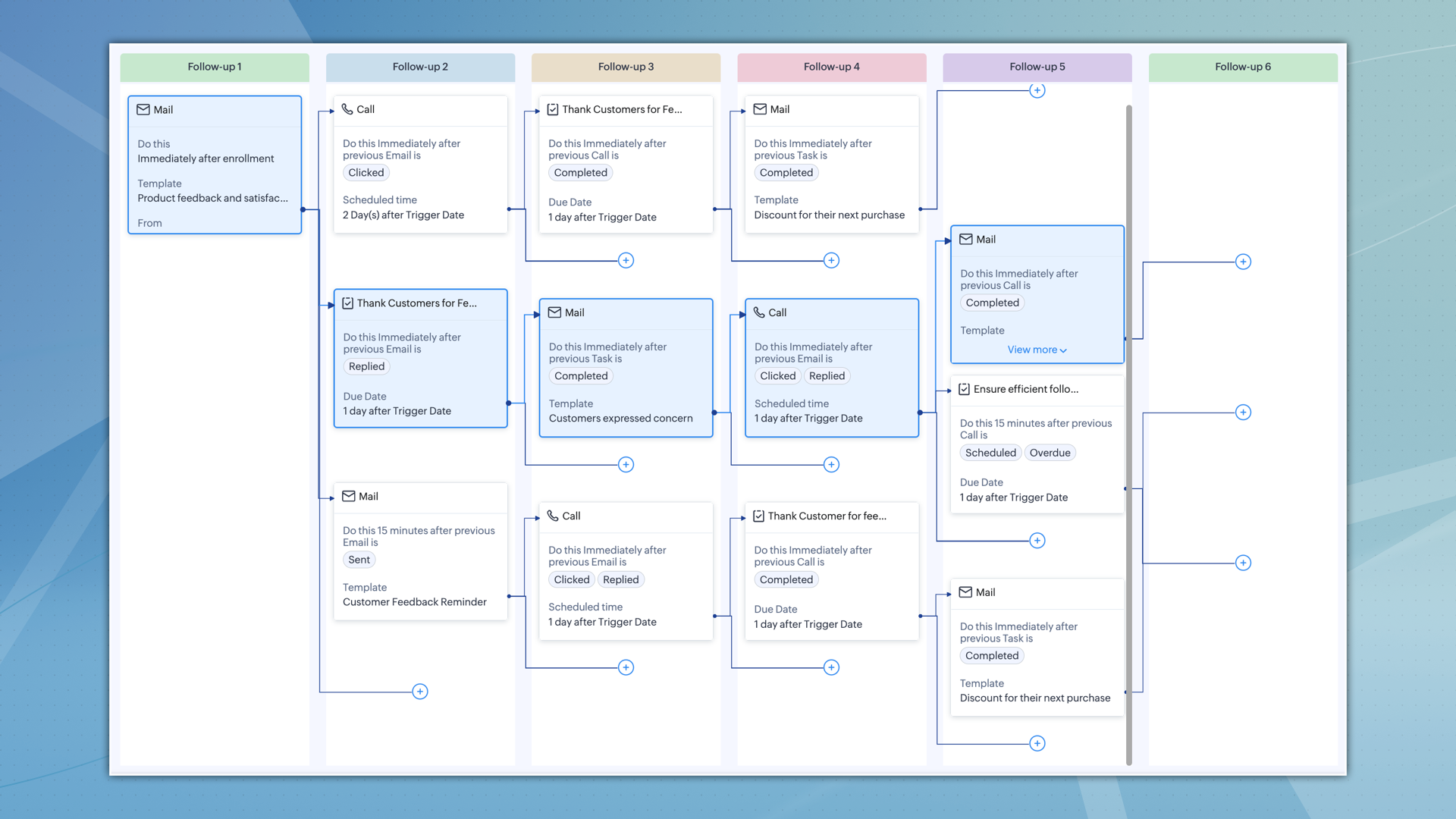

Cadences in Zoho CRM are more than just automation tools for follow-ups; they're a transformative solution for managing customer interactions. 

Previously, a series of responsive follow-ups often meant creating multiple workflows, using different fields and conditions. Cadences streamline this, enabling you to handle what once needed several workflows with just one cadence.

Consider a case where you're sending multiple emails for an event. You want to stop sending them once a customer replies or the event date passes. In the past, this required setting up many workflows, each with its own conditions. Cadences Studio simplifies this by offering a single platform. This single platform does the job of many workflows, saving time and making things less complex.

It's a strategic asset, meticulously designed to enhance your marketing and sales strategies, empowering you to personalize your interactions with every customer, from their first interaction with your follow-up to, ultimately, when you un-enrol them from the cadence. 

The true power of Cadences lies in the ability to transform various business scenarios.

Cadence's adaptability makes it suitable for various industries. Whether it’s for collecting e-commerce customer feedback, managing healthcare appointments, updating SaaS users about new features, or engaging real estate prospects, Cadences can be tailored to meet these diverse requirements.
  • Real estate: Respond promptly to inquiries, schedule property visits, and nurture leads with the right information at the right time. Cadences help realtors convert more leads into happy homeowners, propelling them to the top of the market.
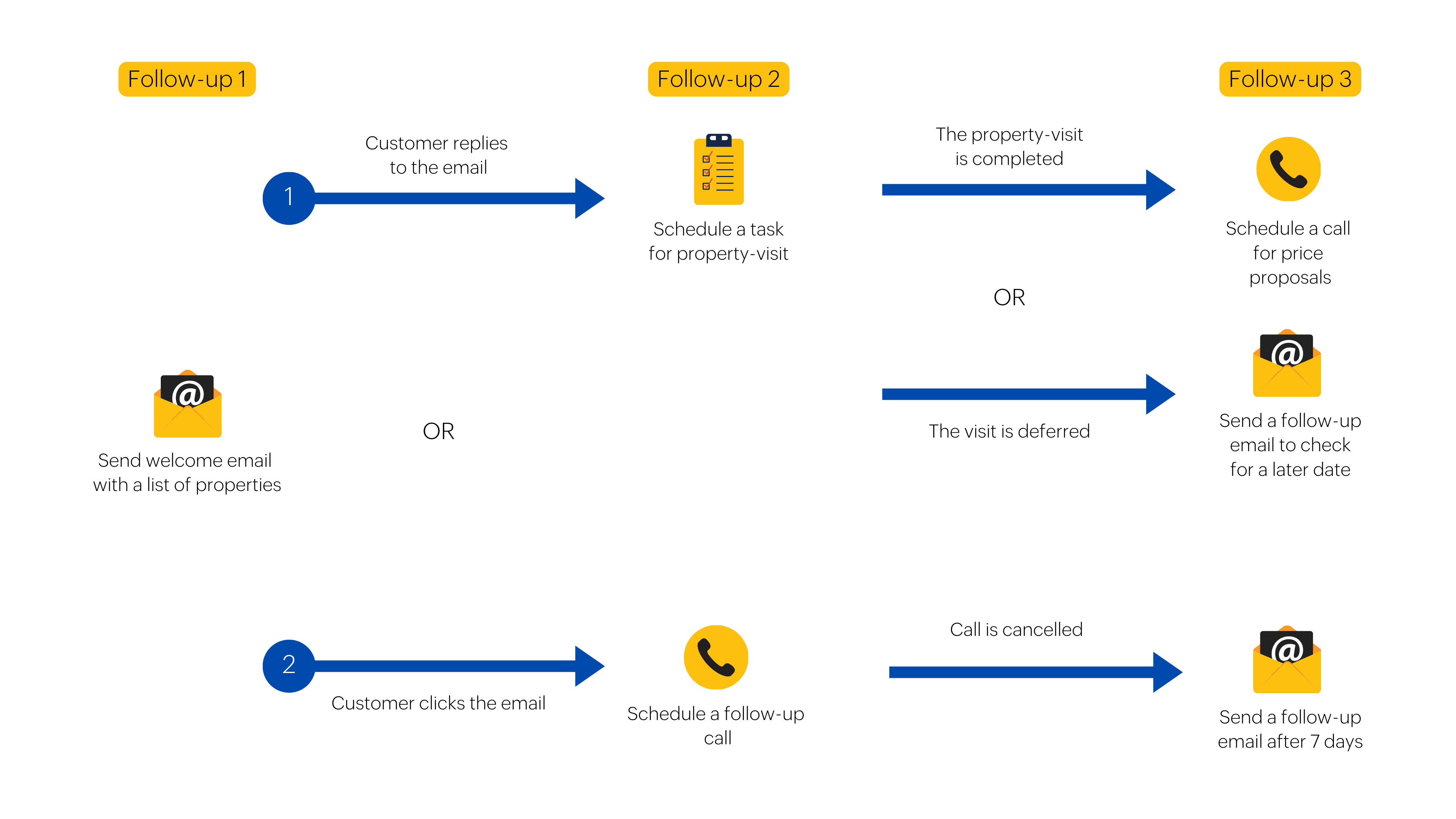
  • E-commerce: Imagine collecting valuable customer feedback after each purchase, automatically prompting reviews, and proactively addressing negative experiences. Cadences help online retailers foster meaningful relationships with customers and drive continuous improvement.
Key highlights of Cadences 
  • Automated sequential follow-ups
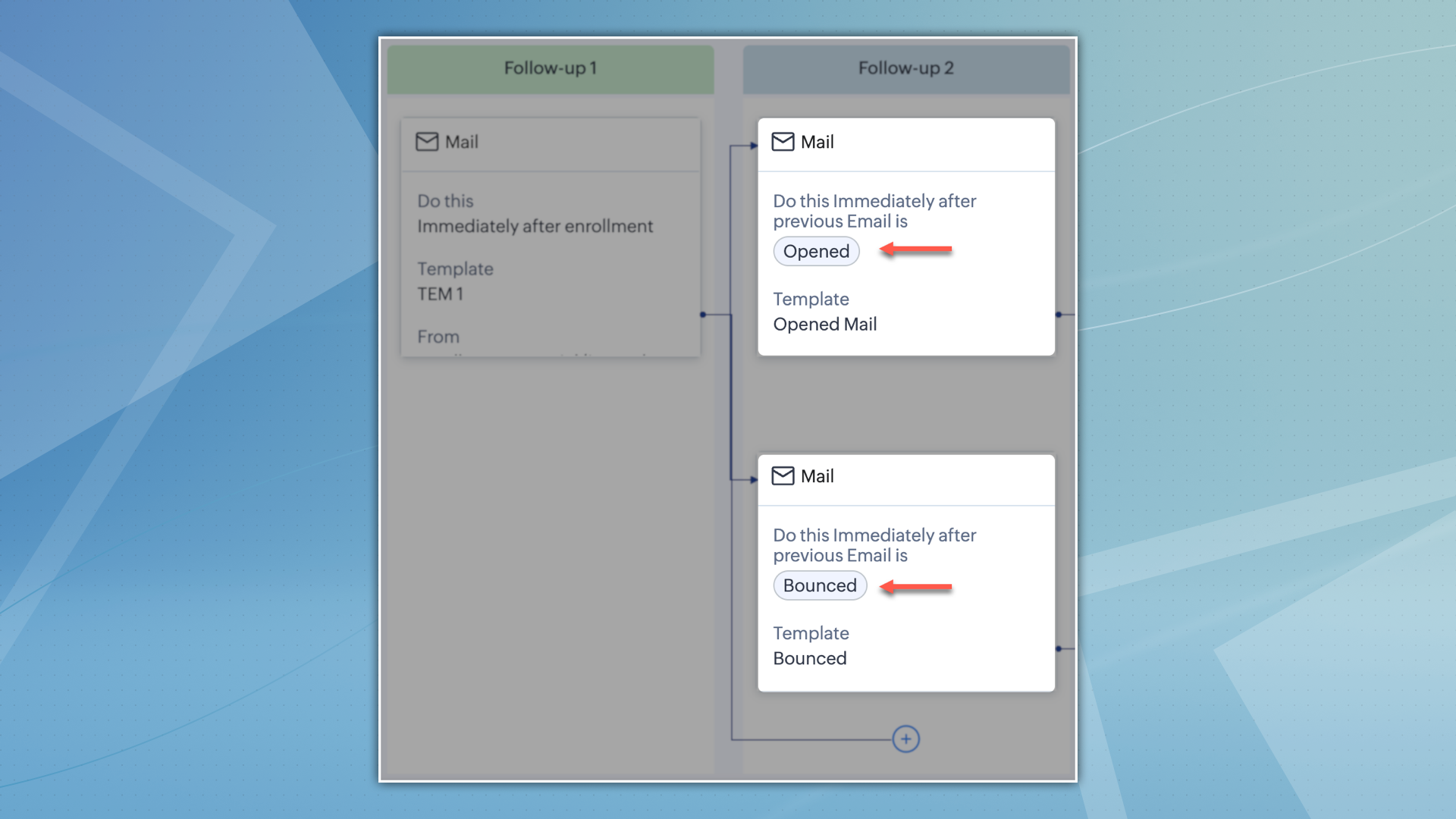
    Automated sequences of actions can be established by businesses, which are activated according to customer responses or the absence of them. For instance, if a customer opens an email but does not reply, a subsequent email can be automatically sent. Similarly, if the email is bounced, a different email can be sent based on the predetermined cadence configuration.

  • Intelligent automation
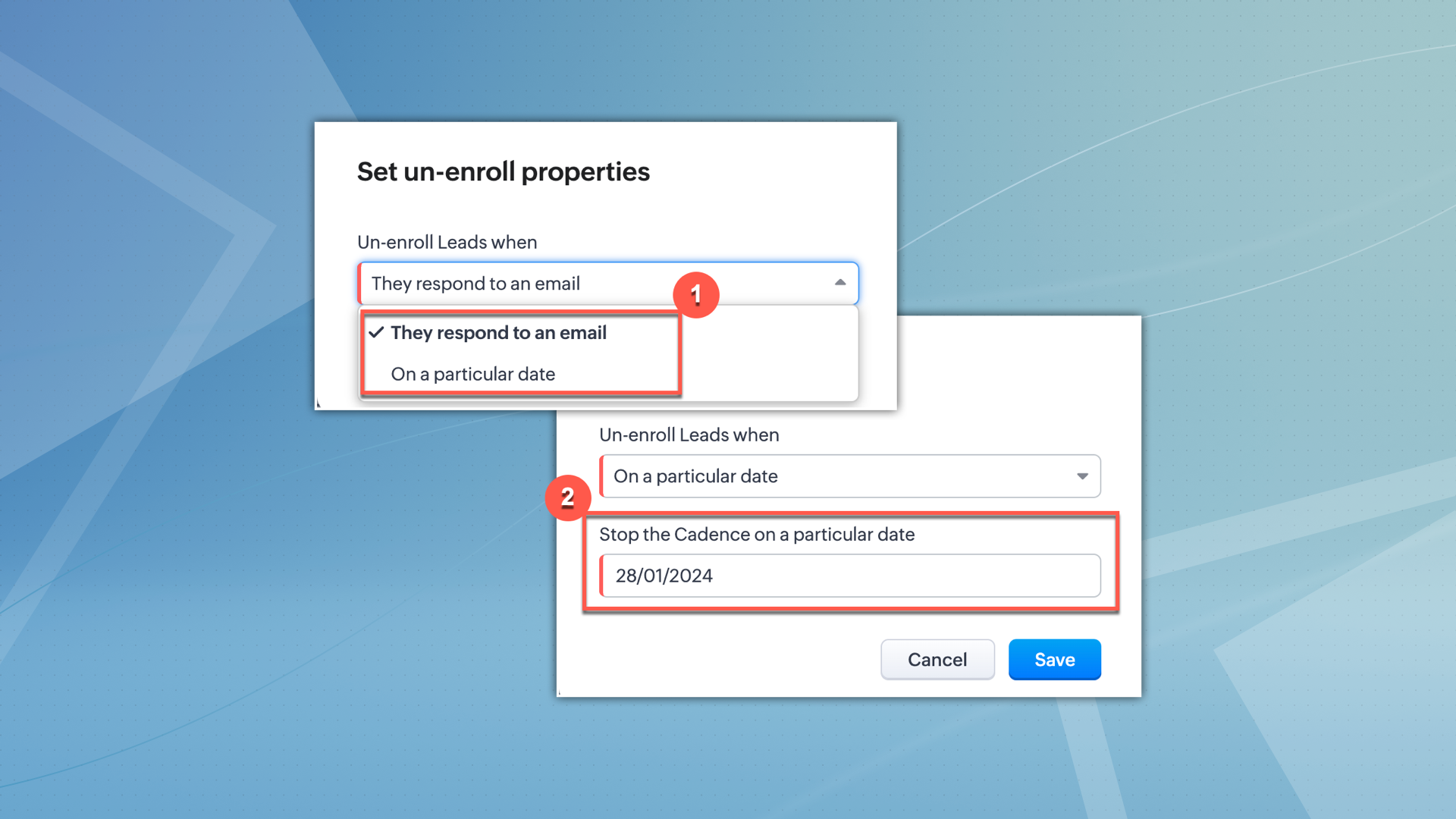
    Cadences' intelligent automation doesn't stop at follow-ups. It automatically removes records that have reached their desired outcome, maximizing your team's efficiency and focusing your efforts on the most relevant interactions.

  • Multiple follow-up capabilities
    Expand your communication beyond the traditional email follow-ups by utilizing Cadences. This platform allows you to incorporate phone call and task follow-ups effortlessly, alongside email follow-ups, resulting in a diverse and personalized experience that aligns with the preferences of every customer.

  • Robust analytics
    Gain a thorough comprehension of customer engagement with the advanced analytics offered by Cadences. Track the effectiveness of campaigns and customer behaviour to obtain valuable insights. These analytics are essential for optimizing strategies and improving engagement, serving as a reliable tool for continuously enhancing customer engagement efforts.
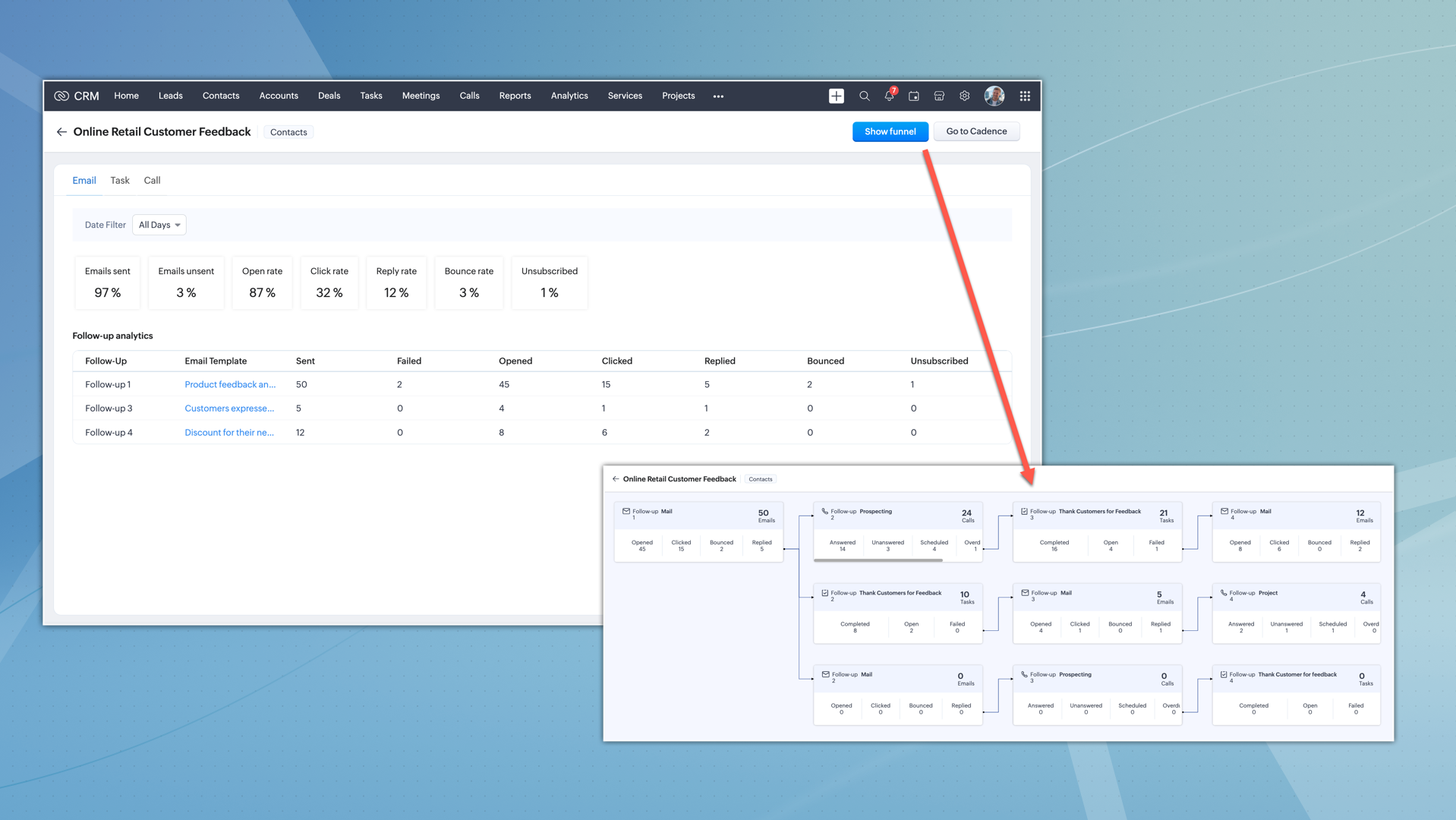
Configuration and utilization 
Setting up Cadences involve choosing your target audience and configuring up to three types of follow-ups (emails, tasks, and calls), each with specific configuration options to suit your unique campaign needs.

Configuring Cadences is a streamlined process:
  • Target audience selection
    Choose between manual enrollment or custom views in your chosen module. This allows for precise targeting and effective campaign execution.
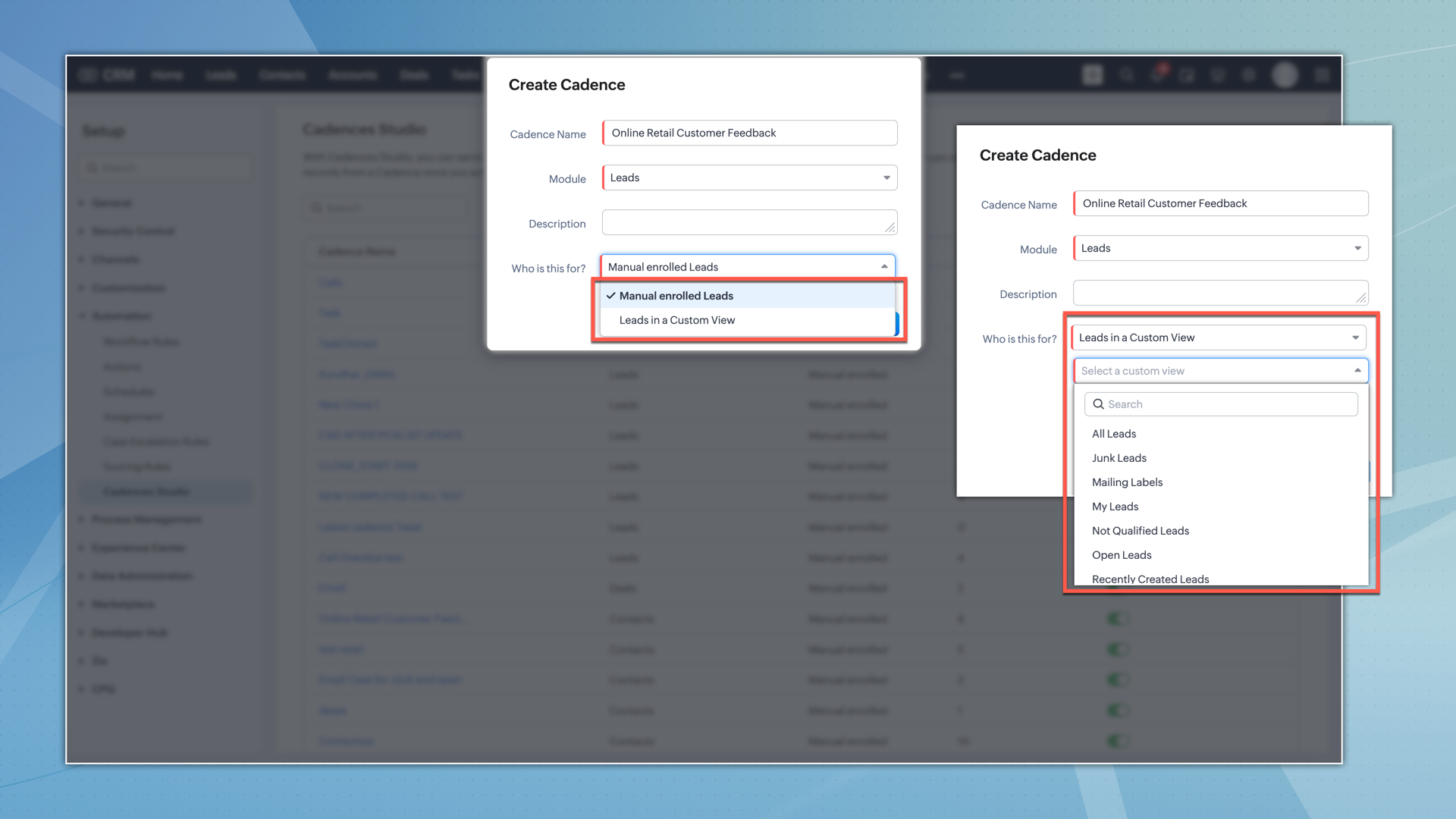

  • First follow-up configuration
    You can configure the first follow-up as either an email, task, or call. You can also choose when the first follow-up should be triggered.
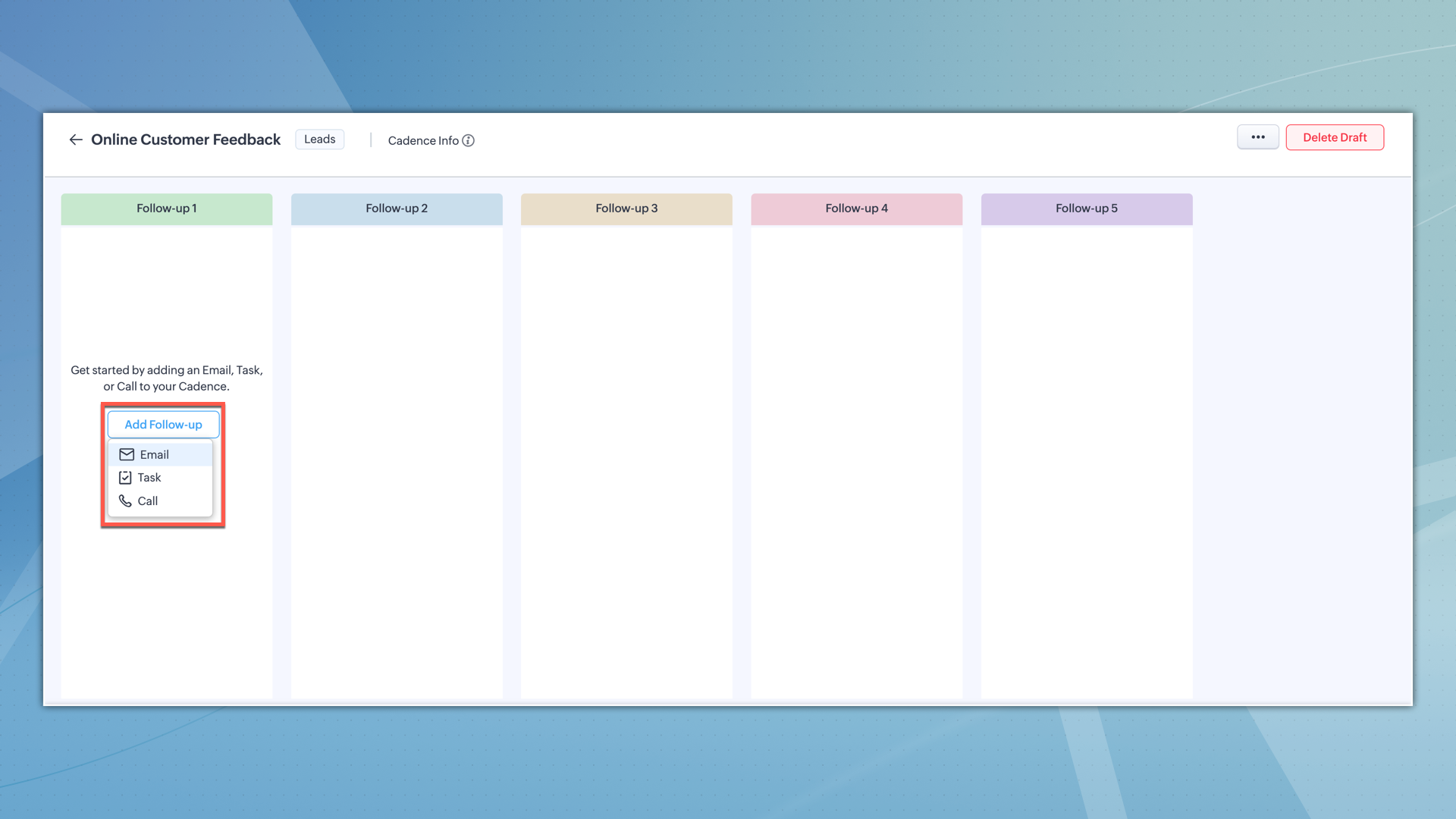

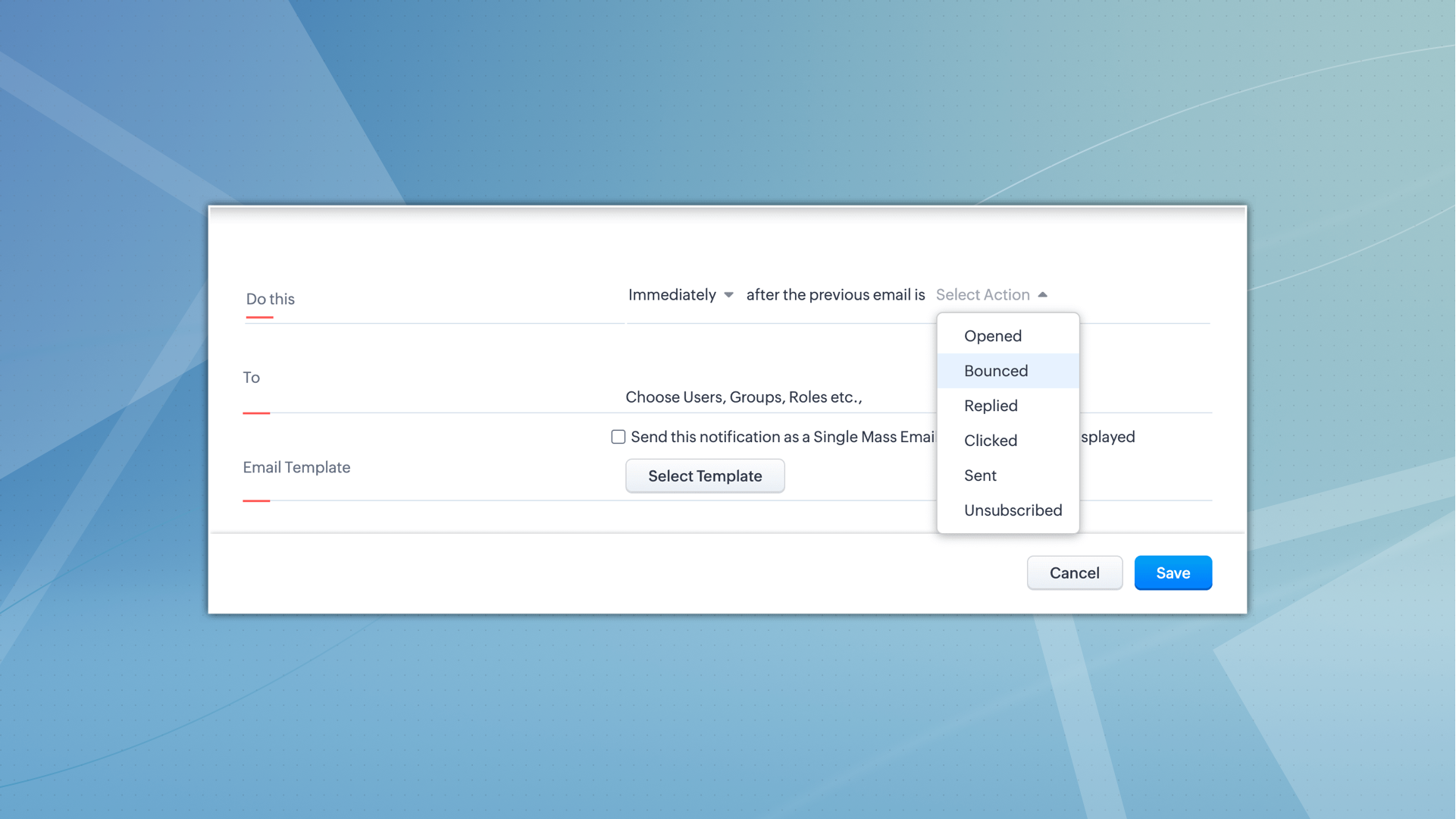
  • Responsive follow-up configuration
    The successive follow-ups within a cadence can be intricately configured based on the actions taken on the previous follow-up. For instance, if an email in the first follow-up is opened or clicked, you can set the subsequent follow-up to be a personalized call or a task, depending on the customer's interaction.
In summary, Cadences empower you to automate and personalize lead engagement, driving efficiency and effectiveness in your CRM strategy, and ultimately fostering stronger customer relationships and enhanced business growth.


Thanks!
Nizamuddin


        • Recent Topics

        • CRM Portal Lookup Linkage and Related Fields

          hi, if someone can give me the right path, would be greatly appreciated. we want to do a customer portal for our partners who we issue work orders for our customers, the linkage via lookup fields Partner -> Work Order -> Customer in our portal, the primary
        • HOW TO: Searching a thread (email body/text) with a custom function, allowing filtering and specific actions

          We are still trialing out Zoho at this time, but have found a major expected feature to be missing - the ability to search within the text of an email for automation/workflows. NOTE: You need to create a connection for zohodesk under settings -> Developer
        • Cold emails not allowed?

          I planned to use Zoho Mail to send businesses some cold emails to offer my freelance writing services, but I noticed that the anti-spam policy is very strict -- no commercial emails whatsoever without prior permission from the recipient? I would be very
        • Zoho Team Inbox - roadmap

          Hi, would be good to understand the Teaminbox roadmap, in particular: 1. API / Zoho Deluge connections. We have a process where the each email needs to be either tagged or assigned daily. It would be great if we could automate a 5pm alert for any exemptions
        • Leave Time - Past Dates by Pay Period

          Under Settings | Leave Policy | [policy name] | Restrictions, one can set a number of days that an employee can go back to apply leave. This is very good and very needed. However, in most organizations, the real deadline isn't X number of days from the
        • Link webform to a job opening

          I have a webfrm embeded on my website and everytime a candidates fill the form, their candidate status is to new. Is it possible that it links to a specific job opening instead of me having to assing it manually ? Thanks
        • New in WorkDrive: Organize your storage using Data Templates

          Organizations generate huge volumes of data day in and out. From financial reports, client details, and resumes to promotional images, product videos, and more. The list is endless. When you have so much data to manage, you need to classify your documents and structure them in a way that makes them more accessible.  This is exactly what WorkDrive's Data Templates lets you do! You can create Data Templates, add meta data as custom fields, and associate those fields with files and folders based on
        • Need Native Support for docx files in Zoho Writer

          Absolutely love Zoho Writer, but often need to share files by email with people who are in the Office ecosystem. Downloading a file as docx, then sending it by email, getting the comments back, converting it to Zoho format, editing it, then converting
        • Mirror Component in Zoho CRM: Access real-time related data without leaving your record

          Hi everyone, This feature is now available for the JP, CA, SA, UAE, and AU DCs. We're excited to bring to you Zoho CRM's mirror component, which presents relevant data on a record's details page and keeps everything users need in one place without having
        • Associate records via the Multi-select lookup RELATED LIST via API

          In the REST API, is there a way to associate records for a multi-select lookup related list other than via the linking module? There are two methods for the lookup: 1. via insert records API 2. via the linking module ...as described in https://help.zoho.com/portal/en/community/topic/kaizen-125-manipulating-multi-select-lookup-fields-mxn-using-zoho-crm-apis
        • What's New - May 2026 | Zoho Backstage

          Another month, another round of improvements in Zoho Backstage. We’ve been busy refining existing experiences and introducing new capabilities to help you plan, manage, and deliver successful events with less effort. Here’s a quick look at everything
        • Product sorting in Zoho Commerce - how can I influence standard behaviour?

          Hello Zoho, I want to sort my products by e.g. name, SKU (Ascending / Descending) or by another attribute. I could neither find any solution in the settings, nor an entry in this help. Can you advice how this would work? Seems the standard sorting is
        • Dynamically prefill ticket fields

          Hello, I am using Zoho Desk to collect tickets of our clients about orders they placed on our website. I would like to be able to prefill two tickets fields dynamically, in this case a readonly field for the order id, and a hidden field for the seller
        • Price Managment

          I have been in discussions with Zoho for some time and not getting what I need. Maybe someone can help explain the logic behind this for me as I fail to understand. When creating an item, you input a sales rate and purchase rate. These rates are just
        • Workflow Assistance in Zoho CRM

          Our client's sales team visits customers on-site and currently fills a physical paper form to capture customer details, and then separately re-enters the same data into Zoho CRM via the mobile app — resulting in double data entry. We want the salesperson
        • Integration problem between zoho crm and zoho forms for an update in zcrm, with two mapped custom fields

          Hello everyone, I need to correct an existing integration between Zoho CRM and Zoho Forms: the use case is that a user needs to send an email to a contact, who will click on a button in this email, redirecting to a Zoho Forms. The contact can update or
        • Delivery Note without services

          Hi all, It there a possibility to create a delivery note from an invoice without the listed services "idem type: service"? Thank you in advance, Michel
        • Automation Series: Auto-assign Task Followers

          As task progresses, several users are required to stay aware of the updates to plan their upcoming work items efficiently. Manually adding users as followers for an active task might create additional overhead. With this automation, followers can be added
        • Send Email Directly to Channel

          Hi, We are coming from Slack. In Slack each channel has a unique Email address that you can send emails too. I currently forward a specific type of email from my Gmail InBox directly do this channel for Verification Codes so my team doesn't have to ask
        • Terms & Conditions

          I have defined Terms & Conditions in the invoice setting and have set %TermsAndCondition% where I want it to appear but nothing shows up in that area. Is this something we have to define per invoice or can we have a global variable?
        • Billing Status Update

          Hello Latha, I’m working on a new automation (deluge) to fulfill one of our requirements. In this automation, there is a step to update the Work Order billing status from “Not Yet Invoiced” to “Non-Billable.” I tried to find the API information relevant
        • Export to pdf. Images not showing

          My report contains a column with images. When I export it as a list, the images do not show in the PDF document. I have published the report but the images are still not visible. What should I do so that the photos appear in the export?
        • Zoho CRM Kiosk question – Passing Screen Fields to a Function

          I am building a Kiosk in Zoho CRM to create new Supplier (Vendors) records. Current setup: Screen 1 contains user input fields: Supplier Name (Vendor_Name) First Name (First_Name) I created a Deluge function: createSupplier(vendor_name, first_name) The
        • パスワード

          ログインするためのパスワード取得したい。
        • Associate Zoho Project with Deal that is in a specific stage?

          Hi there, When a deal hits a certain stage, I'd like to associate it with an pre-exisiting zoho project? I am using blueprints. Using a custom function and deluge, how could I do this? I was thinking that the easiest option would be the modify the pre-made
        • [Product Update] Locations module migration in Zoho Books integration with Zoho Analytics

          Dear Customers, As Zoho Books are starting to support an advance version of the Branches/Warehouses module called the Locations module, users who choose to migrate to the Locations module in Zoho Books will also be migrated in Zoho Analytics-Zoho Books
        • Canvases Auto-Skewing/Adding Scroll Bars When They Were Not There Prior

          Is anyone else noticing rendering issues in their canvases today? It seems to be mainly icons which now have scroll bars added which makes them all look off, though some fields seemed to revert to squished length as well. Were the icons replaced with
        • New UI for Writer - Disappointed

          I've been enjoying Zoho Writer as a new user for about 6 months, and I really like it. One of my favorite things about it is the menu bar, which you can hide or leave out while still seeing most of your page because it is off to the left. I think this
        • Client Script Button in Related List become invalid

          Hi, I am the admin of our organization. And I setup a client script button in related list to raise payment refund request While this button become non selectable recently. I believe there is something wrong from zoho as this button had run for a year.
        • SMTP outgoing problem

          Hello I have a website where the SMTP email is connected through Zoho Mail SMTP. Today I am no longer receiving emails from the website. Joomla shows that the email was sent successfully, but I do not receive it.
        • Fiscal year setting

          Hi, I am looking into using Zoho Books. I cannot understand the organisation fiscal year setting. Our fiscal year runs from 1 April to 31 March. In the organisation profile, I need to set Fiscal Year to “April to March” and Start Date to “2” for the period
        • Issue with payments on invoices

          Hello, I’m having the following issue. When I create an invoice and try to apply a partial payment in a single transaction, the system does not allow it — it only allows full payment. Is this the expected behavior, or am I missing some configuration?
        • auto add as member the contact owner

          is there a way that i can make a zoho flow that will add the owner of the contact as a member of the chat after the round robin assignment?
        • Welcome to Zoho CommunitySpaces

          Hello everyone, This is your space to ask questions, share ideas, and connect with others building and growing their own communities. For those new here, Zoho CommunitySpaces is a platform for building and managing online communities—from discussion spaces
        • Announcing new features in Trident for Windows (v.1.20.4.0)

          Hello Community, Trident for Windows is here with some new features to elevate your work experience. Let's take a quick look at what's new. Export emails. You can now export emails in the .eml file format as compressed zipped files to create a secure
        • Announcing new features in Trident for Windows (v1.14.5.0)

          Hello Community, Trident for Windows is here with new features to elevate your workplace productivity. Let's take a quick look at what's new. Add and edit contacts Previously, you could view all of your personal and organizational contacts in Trident.
        • Announcing Trident desktop app for Zoho Mail & Zoho Workplace users

          Hello Community, I hope you are doing well and staying safe. As you know, our Mail & workplace teams have been constantly working on adding more value to our offerings to ensure you and your organization continue enjoying your Zoho experience. As part
        • Quick way to add a field in Chat Window

          I want to add Company Field in chat window to lessen the irrelevant users in sending chat and set them in mind that we are dealing with companies. I request that it will be as easy as possible like just ticking it then typing the label then connecting
        • Please Remove the Confirmation Popup

          Currently, every time a recruiter changes the status of a candidate in Zoho Recruit, a popup confirmation appears that requires clicking “OK, Got it” before proceeding. This creates unnecessary friction in the workflow, especially for users handling high
        • Team Module Issues?

          We are testing Team Licenses for use by our Customer Service staff. I created a Teamspace called CSR and only assigned two users to this space: Administrator (me) and “Team License Test.” Team License Test is assigned to the Team User profile, with a
        • Next Page