User Tips: Auto-Create Opportunity/Deal upon Quote Save (PART 1)

User Tips: Auto-Create Opportunity/Deal upon Quote Save (PART 1)

Problem:
We use quotes which convert to sales orders but Users / Sales Reps do not create opportunities / deals and go straight to creating a quote. This leads to poor reporting. Implementing this solution improves reporting and makes it easier for users.

Summary Solution:
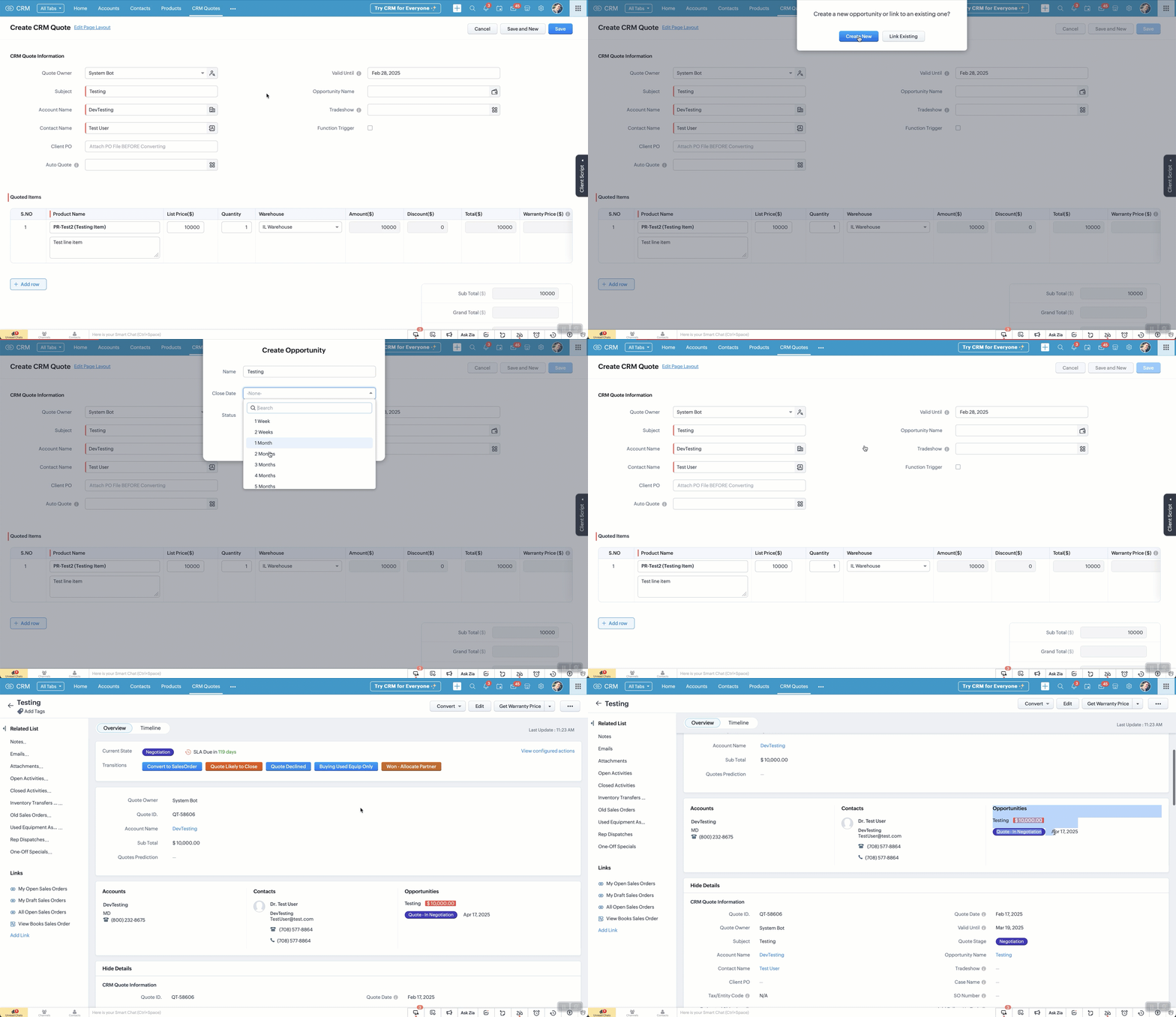
If a quote is created / edited. OnSave a client script checks to see if a deal is linked. If NOT (and it's over $x) then the user is prompted to Create One (via popup) or Link an Existing One. They can't save the quote until this is done.

Prompt options:
  1. If Create One is selected, the user selects options clicks save
  2. If Link One is selected, the user is directed to links an existing deal from the lookup field (manually).
Steps involved.
  1. Create a Client Script for "Edit Page", "Create Page" and paste in the code below.
  2. Change your API names as needed and click save.

Pro's of this method
  1. Opportunities / Deals get auto-created
  2. Allows for more accurate reporting
Con's of this method
  1. It won't help training your reps to create deals before a quote is needed!
  2. If you're not familiar with Client Script, you'll likely struggle

FAQ:
  1. When the quote is marked as won...
  2. When a quote subtotal is updated...
  3. When you have multiple quotes...
  4. When a note is added to the quote... will it update the deal?
    1. No to all of the above BUT you can implement a workflow to achieve this (see PART 2, coming soon)
  5. What will PART 2 of the solution do?
    1. If a quote is marked as won, the deal will update
    2. If quote subtotal is updated, the deal amount will update
      1. If multiple quotes are linked, the quote with highest amount will be used
    3. If a quote note is added, it gets auto-added to the deal
    4. If a quote is marked as Declined the deal is updated, unless it has other active quotes, then it does not change the deal stage
  6. Does it assign the correct Account, Contact and Owner?
    1. Yes. It takes the details from the Quote
  7. Does this solve every scenario?
    1. Absolutely not!!
  8. I don't know Client Script, can I still implement this?
    1. Yes, however it will likely come with some frustration but it's worth it!
  9. Do I need multiple scripts for each action (create, edit, clone?)
    1. Ideally you would have a static resource that you call just once... if you don't know what that is, then it's easier to create one script for each.

Steps for Creating Quote (repeat for edit or clone):
  1. Go to Settings > Client Script
  2. Click "New Script" and add name, description.
    1. Category: Module.
    2. Page: Create Page (Standard)
    3. Module: Quotes
    4. Layout: whichever is relevant to you
    5. Event Details:
      1. Type: Page Event
      2. Event: onSave
  3. Click "Next" and paste in code below (see auto-create-deal.txt)
    1. Note: Please verify all your API names match up.


      • Sticky Posts

      • Function #46: Auto-Calculate Sales Margin on a Quote

        Welcome back everyone! Last week's function was about displaying the discount amount in words. This week, it's going to be about automatically calculating the sales margin for a particular quote, sales order or an invoice. Business scenario Where there is sales, there's also evaluation and competition between sales reps. A healthy rivalry helps to better motivate your employees to do smart work and close deals faster and more efficiently. But how does a sales rep get evaluated? 90% of the time, it's
      • Zoho CRM Functions 53: Automatically name your Deals during lead conversion.

        Welcome back everyone! Last week's function was about automatically updating the recent Event date in the Accounts module. This week, it's going to be about automatically giving a custom Deal name whenever a lead is converted. Business scenario Deals are the most important records in CRM. After successful prospecting, the sales cycle is followed by deal creation, follow-up, and its subsequent closure. Being a critical function of your sales cycle, it's good to follow certain best practices. One such
      • User Tips: Auto-Create Opportunity/Deal upon Quote Save (PART 1)

        Problem: We use quotes which convert to sales orders but Users / Sales Reps do not create opportunities / deals and go straight to creating a quote. This leads to poor reporting. Implementing this solution improves reporting and makes it easier for users.
      • Custom Function : Automatically send the Quote to the related contact

        Scenario: Automatically send the Quote to the related contact.  We create Quotes for customers regularly and when we want to send the quote to the customer, we have to send it manually. We can automate this, using Custom Functions. Based on a criteria, you can trigger a workflow rule and the custom function associated to the rule and automatically send the quote to customer through an email. Please note that the quote will be sent as an inline email content and not as a PDF attachment. Please follow
      • Function #50: Schedule Calls to records

        Welcome back everyone! Last week's function was about changing ownership of multiple records concurrently. This week, it's going to be about scheduling calls for records in various modules. Business scenario Calls are an integral part of most sales routines.. Sales, Management, Support, all the branches of the business structure would work in cohesion only through calls. You could say they are akin to engine oil, which is required by the engine to make all of it's components function perfectly. CRM

        • Recent Topics

        • Cliq iOS can't see shared screen

          Hello, I had this morning a video call with a colleague. She is using Cliq Desktop MacOS and wanted to share her screen with me. I'm on iPad. I noticed, while she shared her screen, I could only see her video, but not the shared screen... Does Cliq iOS is able to display shared screen, or is it somewhere else to be found ? Regards
        • Alternate color rows

          After I changed the background color to a dark gray and changed the alternate rows to a light gray. I have discovered that I can no longer change the text in the light gray rows to Bold.
        • Collapsible Sections & Section Navigation Needed

          The flexibility of Zoho CRM has expanded greatly in the last few years, to the point that a leads module is now permissible to contain up to 350 fields. We don't use that many, but we are using 168 fields which are broken apart into 18 different sections.
        • Important update on our transition to the new video platform framework

          As part of our ongoing platform changes, users in select regions, including the United States and other supported data center locations, have been migrated to our new video platform framework. Due to this migration, some participants may notice changes
        • Zoho CRM Layout Rules: Nine New Actions, Profile-Based Execution, and Interactive Preview

          Hello everyone, Availability: This feature is now available for customers in the JP and SA DCs. It is planned to be released for other customers in soon. We’re excited to announce powerful new enhancements to Layout Rules in Zoho CRM - a feature built
        • Validation Rule Not Working for Mandatory Field in Zoho Blueprint

          As a Zoho user, we created a validation rule for a specific field. However, we noticed that when we made the same field mandatory within a Blueprint, the validation rule we defined did not work. When we reported this issue to Zoho Support, they stated
        • CRM x WorkDrive: We're rolling out the WorkDrive-powered file storage experience for existing users

          Release plan: Gradual rollout to customers without file storage add-ons, in this order: 1. Standalone CRM 2. CRM Plus and Zoho One DCs: All | Editions: All Available now for: - Standalone CRM accounts in Free and Standard editions without file storage
        • Ticket id issues

          When I reply a ticket from desktop, it doesn't have ticket id in the subject and it's great. When I reply a ticket from Zoho desk mobile, Zoho adds ticket id in the subject and I don't want that. Please help in this matter.
        • Zoho Desk Community Module Reporting

          I can't seem to find any reporting for the community module in Zoho Desk. Am I missing something or are there just no reports available?
        • Une collaboration simplifiée grâce à l’interopérabilité des calendriers

          L’interopérabilité des calendriers permet aux équipes utilisant différentes plateformes, comme Zoho Calendar et Google Calendar, de consulter facilement les disponibilités de leurs collègues sans avoir à utiliser plusieurs outils. Dans les entreprises
        • Zia AI capabilities now available in all paid editions

          Hello everyone, We are expanding the availability of AI-powered features in Desk to the other paid subscriptions from 7th July 2026. Right now, the following AI-based features are available for Enterprise edition users: Intelligence: Sentiment analysis,
        • Overview on users IMAP settings

          We have about 30 users who all have the channels/email/email configuration/IMAP integration/O365 enabled and emails are synchronized. Here my problem: Passwords for the email accounts are expiring on individual bases and most of the users forget to update
        • Format of data after export to spreadsheet

          Dear Zoho, can you explain to me what is the point of a report exporting to XLSX if the format of the amounts that will be created there is in text format and not suitable for anything? Why do I need data in a sheet with which nothing more can be do
        • How to add custom icons in Sites ?

          I've been trying to upload some of my own icons (specific to my business) to my zoho Site draft, and can't find a way to do it. I guess the workaround could be to insert images instead of icons and upload my icons as images, but I was wondering if its possible to customize the icon library.
        • Zoho Forms API

          Is there any way to get all form entry list using API? Looking forward to hear from you
        • #21 Five Minutes Every Monday That Replace an Hour of Digging

          Welcome to the final stretch of our journey. In this series so far, you have configured Zoho Invoice, created and managed your transactions and built a workflow that shares invoices and collects payments almost on its own. You have been doing the work.
        • Kaizen #251: From Campaign Leads to Sales Orders with Zoho CRM Mass Action APIs

          Hello all!! In growing businesses, sales teams often deal with a large volume of records every day - leads from campaigns, qualified prospects ready for conversion, and approved quotes that must be converted into sales orders. Performing these actions
        • Introducing the Employee Portal for internal job posting

          Employee referrals and internal applications are one of the most trusted hiring channels. But in many organizations, employees only hear about openings through messages, word of mouth, or after the role has already been open for a while. When employees
        • Inspection Table

          Hello Latha, We created a job sheet that includes the new table (Inspection Table) which was introduced recently. However, agents are not able to see the rows in the inspection table. Could you please investigate this issue and get back to us? Please
        • Zoho Mail is down?

          We stopped getting new emails since 8:42am EST and mail.zoho.com shows an error.
        • Forwarding without verification

          Hi, I use Tripit to keep track of all my business travel. I've recently moved over to Zoho and wanted to set up a forwarding rule to send various travel confirmation emails automatically to plans@tripit.com Obviously this is an email address I don't control,
        • Disappearing Mouse cursor in Zoho Mail / Windows 11 (Chrome + Edge)

          I'm seeing an issue when writing mails with the light theme with the mouse cursor being white and the document area also being white - making it nearly impossible to see the mouse cursor. I see the problem on Windows 11 under Chrome and Edge. (Yet to
        • Request to unblock user creation error (This user is not allowed to add in Zoho)

          Hello Zoho Support Team, I am the Super Admin of my Zoho Mail organization. When I try to create a new business email user account, I encounter the following error message: "This user is not allowed to add in Zoho. Please contact support-as@zohocorp.com
        • Zoho Mail account blocked after malware incident – request for review and unblock

          Hi Zoho team and community, My Zoho Mail account has been blocked due to outgoing email activity that was detected as spam or unusual sending behavior. The root cause was a malware infection on my computer, which compromised several of my accounts, including
        • creating an alias

          your instructions for creating an alias are wrong. there is no add alias in my mail account. also i dont have a control panel link just a settings link how do i really make an alias
        • IP Address blocked by many servers

          hello team this is to inform you that the zoho ip address 103.117.158.51 has been marked spam and not trustworthy by outlook and many other company servers. kindly discontinue using this ip to maintain a healthy domain reputation for your clients. Regards
        • Automatically set the default VAT percentage on a quote

          Every time I create a quote, I have to manually adjust the VAT and activate the checkbox for 21%. But all of our quotes include 21% VAT. So now occasionally, it happens that the checkbox is forgotten, and the customer receives an incorrect quote (without
        • What's New in Zoho Inventory | June 2026

          Hello users, June 2026 introduces a range of exciting enhancements to Zoho Inventory. With the full rollout of the Zoho Inventory Windows application, the launch of Terminal Payments, and new tracking combinations in Advanced Inventory Tracking, you can
        • Time Zone is incorrect

          Time zone is not working properly...I've checked it twice.  I'm eastern U.S. time it's currently 12:22 pm EST.  CRM shows 3:22 pm EST.
        • Send a converted Contact or Deal back to Leads using the Restore Lead extension for Zoho CRM

          Hello everyone, This comes up more than people expect: a Lead gets converted into a Contact, and sometimes a Deal along with it, because at the time it looked ready. Then the situation changes the opportunity turns out to be much further off than expected,
        • Zoho CRM mobile updates: Reports module, record tags, dynamic formula field, and more

          Hello everyone, We've made a few updates to the Zoho CRM mobile app to enhance your mobile CRM experience and efficiency. Here's a quick look at what's new: Reports module (iOS ) Record tags (iOS) Dynamic formula field (Android) WhatsApp business deep
        • Side scroll bar missing from "new editor"

          The "new editor" simply lacks a side scroll bar. Unable to navigate long notes without using the keyboard. Bad upgrade... (using web version)
        • Zoho Desk MCP doesn't expose all functions

          Hello, I'd like to be able to draft (rather than send) ticket replies using Claude Cowork. However, the Zoho Desk MCP doesn't currently offer that, despite it being available in the API (https://desk.zoho.com/DeskAPIDocument#Threads#Threads_DraftEmailReply).
        • Zoho Community Digest - July 2026 | Part 1

          Hello everyone! Keeping up with everything across the Zoho ecosystem is a lot, so we're bringing back the Zoho Community Digest, now weekly. Each week we round up the need-to-know announcements from the Zoho Community Forums, four editions a month, so
        • Canva Integration

          Hello! As many marketing departments are streamlining their teams, many have begun utilizing Canva for all design mockups and approvals prior to its integration into Marketing automation software. While Zoho Social has this integration already accomplished,
        • Feature Suggestion for Zoho Social: Auto-reply to Comments or Keywords

          Hi Zoho team, I'd like to suggest a very specific feature that would be extremely helpful for customer engagement: the ability to automatically send a reply to comments on posts — either all comments or those containing specific keywords. For example,
        • Bring more clarity to your blueprints with color-coded transitions

          As your hiring processes evolve, blueprints naturally become more detailed. When multiple transitions connect different stages, it can take extra effort to identify approvals, rejections, reviews, and other actions at a glance. With this enhancement,
        • Zoho CRM gets a new email compose and lot more

          Dear Customers,  [UPDATE October 21, 2021: We have started opening these features to some of the customers already. And, it will be available to all the customers before November 2nd Week, 2021. Sorry for the delay caused]  [UPDATE February 21, 2022:
        • Create modules using natural language prompts

          Hello all, We’ve introduced a new enhancement to Zia that allows you to create custom and team modules in Zoho CRM using plain language prompts. Why this enhancement? Creating a custom module traditionally involves multiple steps—choosing field types,
        • Automatic Matching from Bank Statements / Feeds

          Is it possible to have transactions from a feed or bank statement automatically match when certain criteria are met? My use case, which is pretty broadly applicable, is e-commerce transactions for merchant services accounts (clearing accounts). In these
        • Next Page