Weekly Tips :Instantly find what you need with Attachment Viewer

Weekly Tips :Instantly find what you need with Attachment Viewer

Your inbox must be packed with project emails, shared notes, and scattered attachments. You are looking for one specific file—a presentation slide or maybe a media clip from a team update—but don’t want to dig through endless email threads or switch between apps.

Instead, what if you could access a space where all your attachments are neatly organized by type in one place—all without leaving your inbox?

Attachment Viewer 

Attachment viewer offers a single consolidated view of all the attachments received in a single place. You can view the attachments sent to you by email, or shared to you via Streams or added in your Tasks or Notes in a centralized view.  The files are neatly sorted based on their types:

  • Images

  • Documents

  • Media Files

  • Compressed Files and

  • Other types

 Access Attachment Viewer 

  1. Log into your Zoho Mail account.

  2. In the right pane of your Mailbox,  click on the Attachment Viewer icon.
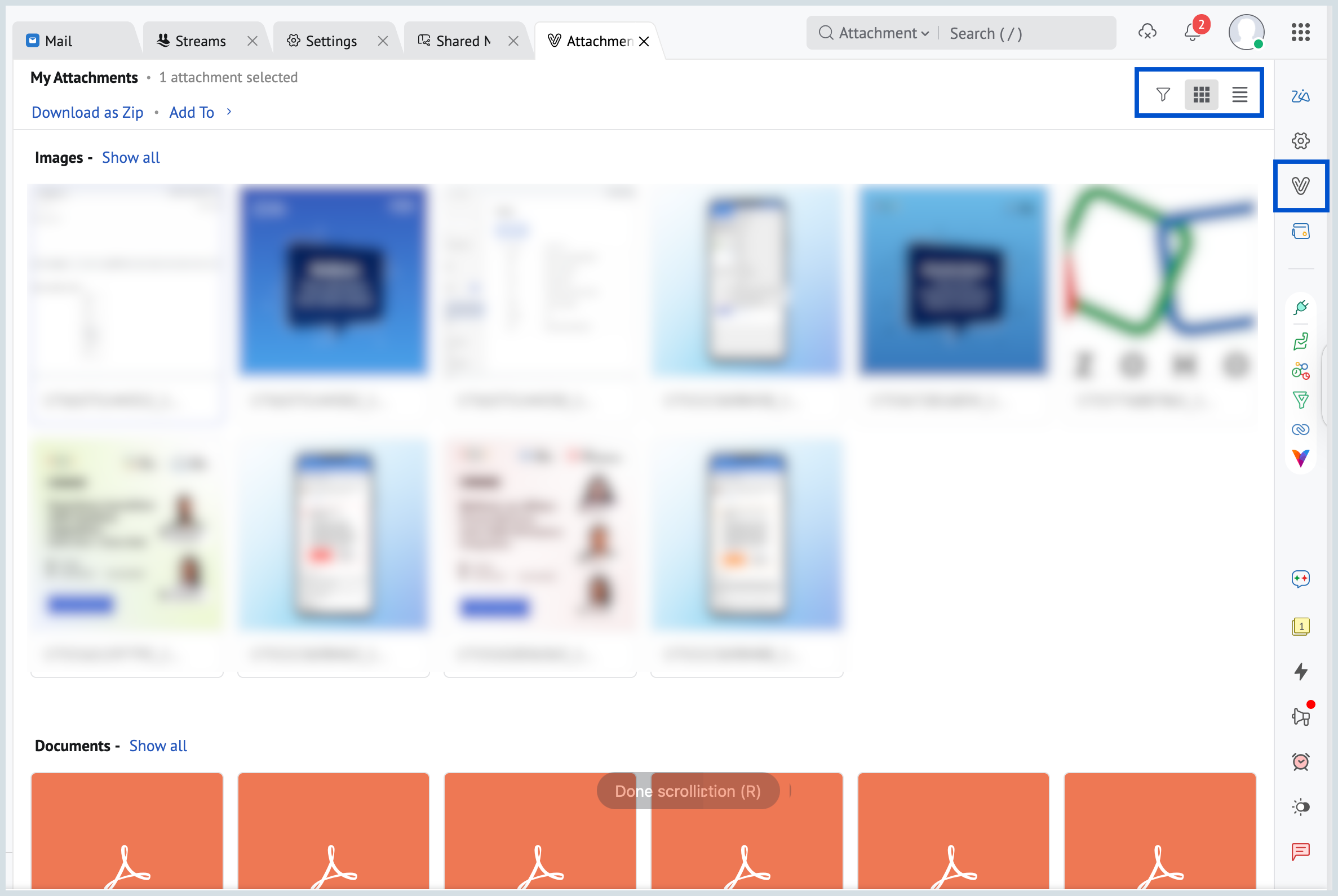
  3. All your attachments will be listed.

  4. You can use the filter option to filter available at the top right corner and view your attachments based on your requirements.

  5. By default, the attachments will be displayed as Thumbnails. You can choose either the List View or the Thumbnail View from the right corner of the Attachment viewer.

No more digging through emails—Zoho Mail's Attachment Viewer brings all your files to your fingertips, instantly.


      • Sticky Posts

      • Weekly Tips : Save Time with Saved Search

        Let's assume your work requires you to regularly check emails from important clients that have attachments and were sent within a specific time period. Instead of entering the same conditions every time—like sender, date range, and attachments included—you
      • Weekly Tips: Protect Confidential Information with PGP in Zoho Mail

        We deal with confidential information almost every day, whether it is being sent out or received. Though emails sent using Zoho Mail are encrypted both during transit and at rest, attempts to access and steal your sensitive data are always a threat that
      • Get Holiday ready with Zoho Mail's Templates

        As the holiday season approaches, it’s time to step away from work and unwind. You may not be able to respond to every email or send individual messages to wish everyone holidays greetings—but It is still important to stay connected. How do you send thoughtful
      • Weekly Tips: Secure your attachment downloads with Zoho Mail

        Safety is one of our main concerns, whether it’s about device security or online protection. We use tools like fingerprint scanners, facial recognition, and two-factor authentication to keep our devices and email accounts secure. We use methods like OTP
      • Get Holiday ready with Zoho Mail's Offline mode

        With the holiday season right around the corner, this is the perfect time to get ready to unplug, relax, and enjoy a well-deserved break. In addition to preparing yourself, you can also make sure your organization members are set for their time away from

        • Recent Topics

        • Secondary Reporting Manager permission level

          Hi, same time last year I was speaking to Zoho about the use of a Secondary Reporting Manager and certain challenges that I was facing. at the time, I was told that this functionality did not exist. I am still facing challenges, so I would like to ask
        • アナリティクスで商談中のパイプライン(ステージ)の件数比較

          アナリティクスで商談中のパイプライン(ステージ)の件数を前週と前々週で比較したい。前々週の件数が更新することで変動してしまう。対象方法をご教授ください。
        • why is my folder list is gone?

          Hi, All my email folders are gone, i cant found any email. could you please check it?
        • Our ZOHO mail is not working

          ZOHO mail is not working for any of our company's employees. All are able to access it in mobile. But not in laptops as a app or in webpage. please help asap.
        • Request to Release Email Aliases for Our Domain

          Dear Zoho Support Team, Greetings, We are currently configuring the email system for our organization in Zoho Mail and encountered an issue while creating several email aliases. When attempting to create these aliases, we receive the following error message:
        • Changing Base Currency to USD (we are based in the UAE)

          Hello everyone, Good day. We are based on the UAE and our bookkeeping is in USD. I followed the online resource that I select the country first where the currency I want as base is native then later on changed the country once the whole setup is done.
        • Error "The domain pinakajewels.com appears to be already in use in another organization. Learn More"

          Hi Team, I have the following account with zoho mail Organization ID: 644368849 This zoho mail account was earlier mapped to www.senacareese.com I no longer own the domain www.senacareese.com I wish to map www.pinakajewels.com to the same zoho mail account.
        • Add personal Facebook to Zoho Social

          Hi. is there any way i can post to my business and personal Facebook and Instagram at the same time when I make or schedule a post?
        • Option to Delete Chats in IM

          Currently, there is no option to delete any chats in IM, regardless of their source.
        • Billing Status Update

          Hello Latha, I’m working on a new automation (deluge) to fulfill one of our requirements. In this automation, there is a step to update the Work Order billing status from “Not Yet Invoiced” to “Non-Billable.” I tried to find the API information relevant
        • Please Enter Valid Amount

          Where to enter amount while importing file in journal.?
        • How to create a custom motorbike rental contract based from the customer list and print it.

          I would like to enter the customers information and then print out the contract with there name and information needed. how can I do this. I have the Zoho Books only. I'm just starting. Thanks
        • LAST YEARS TRANSACTIONS

          How do I obtain a statement for transactions from last year - 2025
        • Missing Company Name on Estimate

          Hi there, I noticed that On some of my estimates (either new or old) the Company name disappeared and not shown neither on Zoho Book Client page nor on the estimate. Please note that on the PDF generated months ago, the estimate contains the company name.
        • Não estou recebendo código de autenticação (Instagram)

          Olá, utilizei uma das minhas contas de email Zoho para criar um cadastro no Instagram, o email com o código de autenticação de confirmação da conta não chega no meu email Zoho (nem.ma caixa de spam, nem na lixeira, e nem em outras pastas). . Já solicitei
        • Automation #7 - Auto-update Email Content to a Ticket

          This is a monthly series where we pick some common use cases that have been either discussed or most asked about in our community and explain how they can be achieved using one of the automation capabilities in Zoho Desk. Email is one of the most commonly
        • Recurring Invoices not generating – "Next Invoice Date" has passed despite "Active" status

          Hi everyone, We are currently experiencing an issue in Zoho Books where our recurring invoice profiles are not generating invoices/drafts as scheduled. The Problem: As shown in the attached screenshot, the "Next Invoice Date" (Nächstes Rechnungsdatum)
        • #3 Stop Retyping the Same Things

          Imagine a store where customers keep walking in and placing different orders throughout the day. The store owner manually enters every product name, price, tax and description while creating invoices. During a busy day at work, the store owner had to
        • Rename system-defined labels in Zoho CRM

          Renaming system-defined labels is now available across all DCs. Hello everyone, Zoho CRM includes predefined system fields across modules to support essential CRM operations. Until now, the labels of these fields were fixed and could not be edited from
        • Creator List not showing

          I've edited a list in creator, but when I open it in the live version the list is completely different. Anyone know why this is happening? Edit Version: Live Version:
        • Mirror Component in Zoho CRM: Access real-time related data without leaving your record

          Hi everyone, This feature is now available for the JP, CA, SA, UAE, and AU DCs. We're excited to bring to you Zoho CRM's mirror component, which presents relevant data on a record's details page and keeps everything users need in one place without having
        • Functionality based URL to find records due today or in the next week

          I need to construct a URL to filter a view to records where the evaluation is due soon (i.e. in the next 7 days). To me, that includes today, but Zoho has a different opinion. Zoho defines 39 as NEXT_7_DAYS but this gives unexpected results. https://creatorapp.zoho.eu/...#Report:My_Evaluations?Evaluation_due_by_op=39
        • Automated entries past the current month in a calendar report

          Hi all, I have an automation problem. I have a form which on successfull entry adds either 5 or 10 more of these entries with a slight change so our customers can see it throug a calendar report on the webiste. The entry put in manually shows up perfectly
        • Problem: New Email Consistently Failing to Sync/Display in Inbox

          Recently, I have noticed that my Zoho Email inbox does not indicate I've received a new email, until I go to *another* folder and then return to the inbox. Only then will new emails be displayed. This has happened 100% of the time, during the past few
        • Upcoming Webinar: Landing page optimization strategies you need in 2026

          If users are visiting your landing page but not converting, your page is trying to tell you something. The key is knowing what to optimize. Sometimes a landing page doesn’t need a complete redesign. A better CTA, fewer form fields, clearer messaging,
        • Nueva edición de Meetups de Español Zoho Community - Junio 2026

          ¡Vuelven los Meetups de Español Zoho Community a España! ¿Te gustaría convertir más visitas y clics a tu página web en clientes de tu empresa? Esto es muy sencillo gracias a las soluciones de software de Zoho, como bien sabéis. Y es por ello que estamos
        • How to make the birthday date field available without the year?

          Hello, I wonder if I can have the date of birthday field without the year. A lot of people dont like to say the year they were born. 
        • Marketing Tip #33: Build trust with behind-the-scenes content

          Customers are more likely to trust a brand when they can see the people, process, and care behind it. Behind-the-scenes content adds that human layer to your business. It shows that there’s a real team behind the store packing orders, checking quality,
        • Marketing Tip #9: Track your traffic sources

          Not all marketing channels work equally well. Knowing whether your visitors come from Google, Instagram, or email helps you focus on what actually drives sales. Try this today: Check your Zoho Commerce reports or connect Zoho PageSense to see your top
        • Remove ####,####.## Placeholder from Number & Decimal Fields in Zoho Creator

          Just wanted to share a small UI workaround I used in Zoho Creator. By default, Number and Decimal fields show placeholders like: ####,####.## Sometimes this doesn’t look clean, especially for read-only calculated fields in custom UI designs. I was able
        • Default ticket template in helpcenter

          Hello, I have a web form and a ticket template created. How can I make that my default ticket template? If an user clicks New ticket or create a ticket, I want that template to be the default one. Thank you for the time and info.
        • Whatsapp Limitation Questions

          Good day, I would like to find out about the functionality or possibility of all the below points within the Zoho/WhatsApp integration. Will WhatsApp buttons ever be possible in the future? Will WhatsApp Re-directs to different users be possible based
        • Adding a custom formula field from sub-forms

          I have used my 5 Aggregated Sum fields in the subform. I have another column I want to add a summary of. This can be in a separate section/field. The formula field won't pull in information from the sub-form. How do I pull information from the sub-form
        • Custom Buttons & Links Now Supported in Portals

          We’ve just made portals in Zoho Recruit more powerful and customizable than ever! You can now bring the power of Custom Buttons and Links to your Candidate, Client, Vendor, and Custom Portals, enabling portal users to take direct action without recruiter
        • Mastering Zia Match Scores | Let's Talk Recruit

          Feeling overwhelmed by hundreds of resumes for every job? You’re not alone! Welcome back to Let’s Talk Recruit, where we break down Zoho Recruit’s features and hiring best practices into simple, actionable insights for recruiters. Imagine having an assistant
        • New feature: Usage dashboard in Zoho Sign

          Hello! Zoho Sign's new usage dashboard lets organization administrators monitor product adoption across teams, identify unused plan features, and view the environmental impact of every envelope. The dashboard includes six panels: Envelopes sent, Feature
        • Introducing the New Zoho Assist Quick Support Plugin

          We are thrilled to announce the new Zoho Assist Quick Support Plugin, the upgraded and enhanced version of the Zoho Assist Customer Plugin. This new plugin allows organizations and IT administrators to deploy it directly onto their customers’ devices,
        • Native QuickBooks integration for Zoho CRM: Connecting sales and finance

          Greetings, I hope all of you are doing well. We're excited to announce Zoho CRM's integration with QuickBooks Web, which is designed to synchronize your CRM data with your QuickBooks accounting records and bridge the gap between sales and finance. This
        • Account Reconciliation via API

          I am suggesting that the Zoho Books team considers making it possible to do an Account Reconciliation via API. The use case I have in mind is specific, but also fairly common: merchant services clearing accounts. Currently, the only way to reconcile an
        • Edit a previous reconciliation

          I realized that during my March bank reconciliation, I chose the wrong check to reconcile (they were for the same amount on the same date, I just chose the wrong check to reconcile). So now, the incorrect check is showing as un-reconciled. Is there any way I can edit a previous reconciliation (this is 7 months ago) so I can adjust the check that was reconciled? The amounts are exactly the same and it won't change my ending balance.
        • Next Page