What’s New in Zoho Analytics – September 2025

What’s New in Zoho Analytics – September 2025

Hello Users!!
In this month’s update, we’re raising the bar across multiple touchpoints, from how you bring in data, plan and track projects to how you design and brand your dashboards. 
We’ve added the all-new Gantt chart for project visualization, expanded our database integrations, introduced support for modern file formats, redesigned key user experiences with a visual refresh, and a brand new guide for white label solutions.


Let’s dive into what’s fresh this month!

Introducing Gantt Chart 

Manage projects more effectively with the brand-new Gantt Chart in Zoho Analytics. Use it to track tasks, monitor progress, and quickly identify delays in project execution.
You can customize your Gantt charts with:
  • Different chart styles to suit your project needs
  • Color schemes to visually distinguish tasks in progress and completed tasks
  • Flexible date display ranges to match your preferred project view
Click here to learn more.


Database Connectivity

We’ve expanded our support to help you bring in data from more sources, more flexibly.
  • Cassandra 
    You can now import data from Cassandra, a distributed NoSQL database widely used for handling high-volume, high-velocity data. Zoho Analytics automatically normalizes the collections into parent-child table structures, making it easy to analyze your data once imported.
    Learn more about importing from Cassandra.

  • SAP HANA & ClickHouse 
    Now import data directly from cloud-hosted SAP HANA and ClickHouse databases. Alongside local server connection, we’ve added cloud server connection as an additional option to give you more flexibility with how and where you connect.
    Learn more about importing from SAP HANA.
    Learn more about importing from ClickHouse.
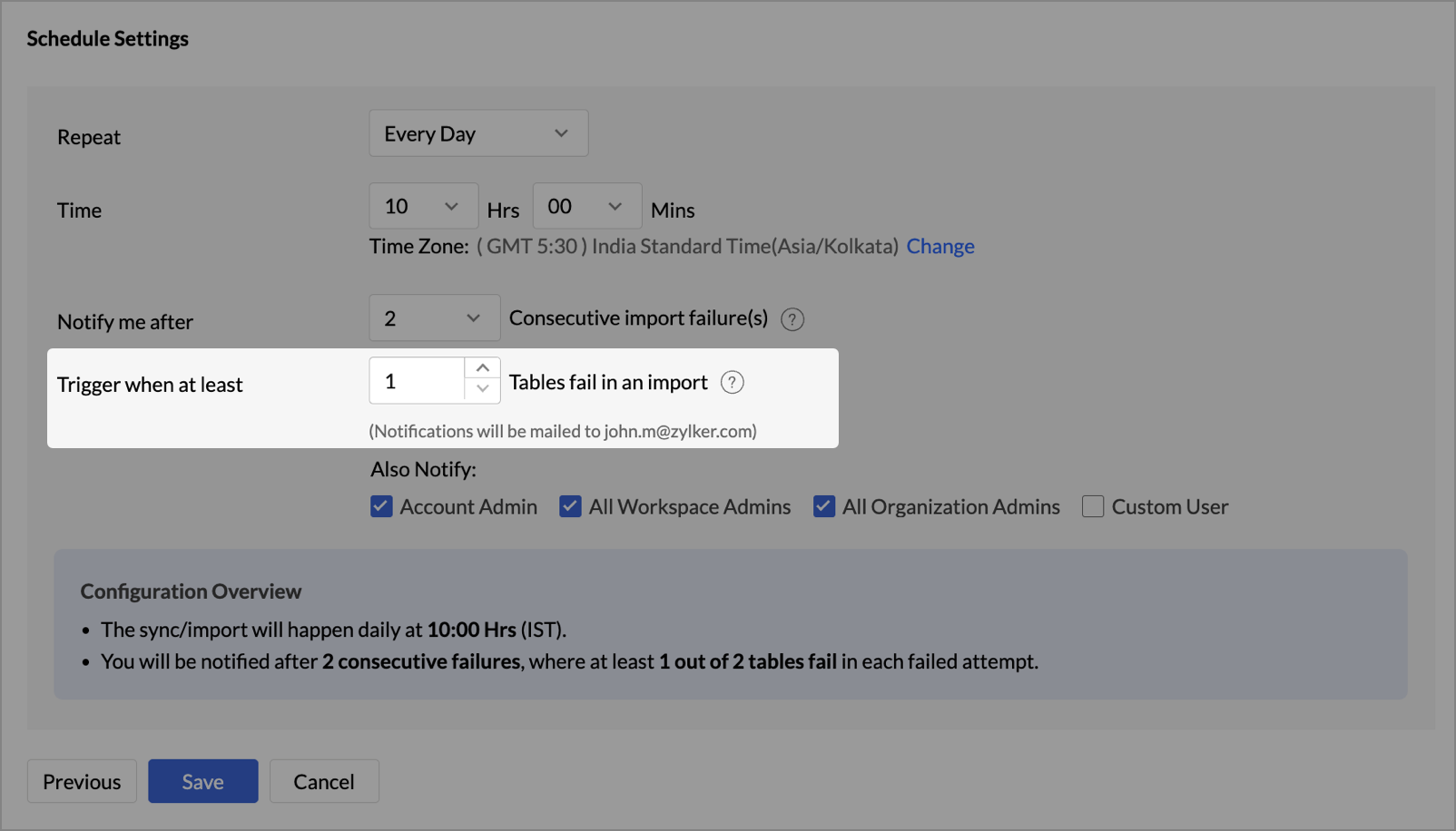
  • Cloud Database Synchronization – Failure Notification Settings 
    You can now configure synchronization settings to trigger a failure notification when a chosen number of table imports fail. Simply set the value for “n” failed tables, and Zoho Analytics will notify you when the condition is met. This gives you more control over monitoring imports and helps avoid missing critical sync issues.
  • Snowflake - New Authentication options
    Zoho Analytics now supports two new authentication methods for connecting to your Snowflake data:
    • Private Key
    • OAuth

These options provide more flexibility and enhanced security when configuring your Snowflake connections.

Learn more about Snowflake integration.

Local File Formats

Working with local files is now more powerful and flexible.
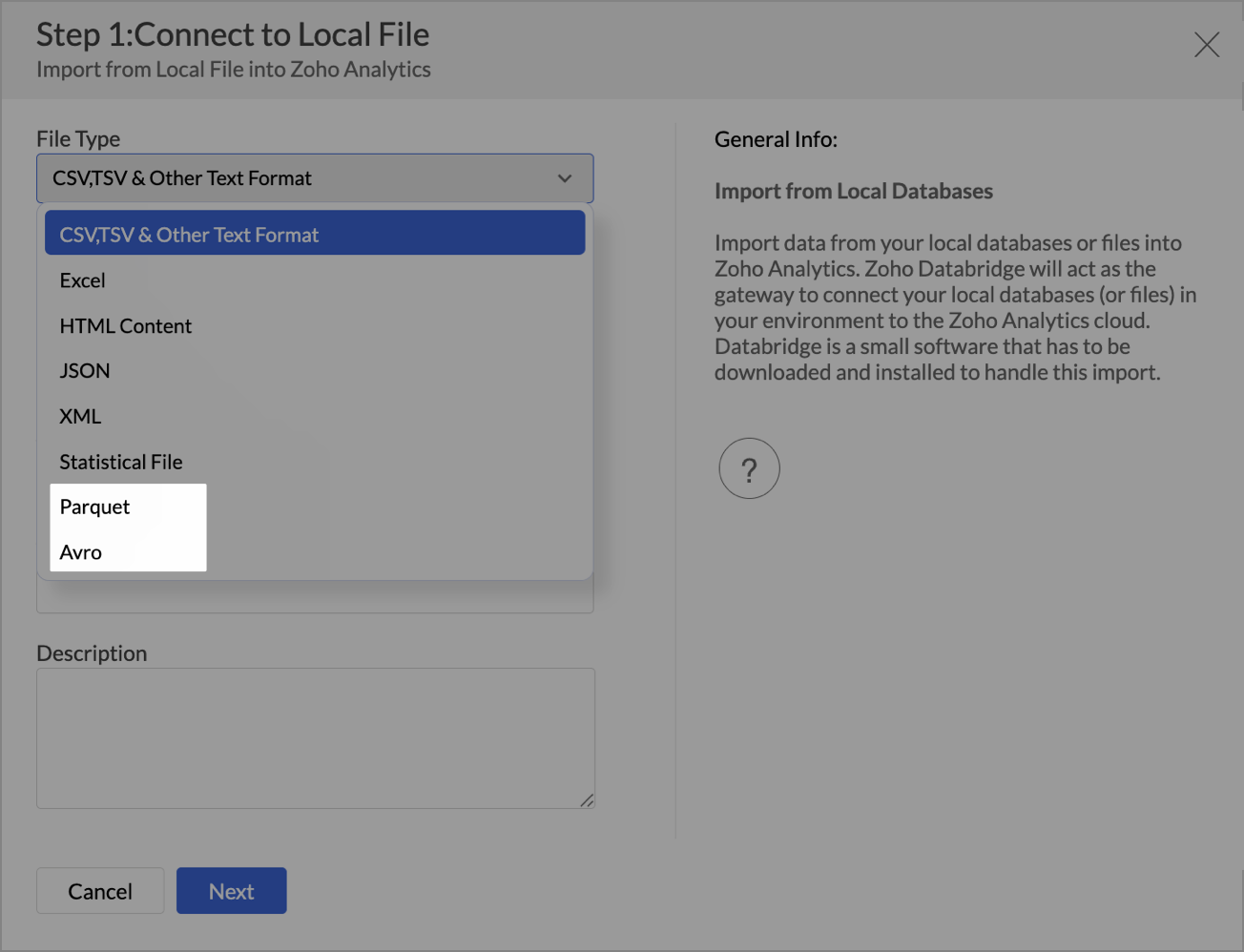
  • New File Format Support - Parquet and Avro

    You can now import Parquet and Avro files. These modern, columnar file formats are optimized for analytical workloads and are commonly used in big data pipelines.

  • Larger file uploads
    Until now, Zoho Analytics supported large file uploads only for CSV files. With this update, you can now upload files larger than 100 MB for the following formats through Zoho Databridge:
    • Excel
    • HTML
    • JSON
    • XML
    • Statistical files
This enhancement removes the hassle of file size limits when working with heavy datasets across multiple formats.
Learn more about local file formats

Invitation-based User Invite Flow

Zoho Analytics now uses an invitation-based model for adding users to your organization.
You can invite users in multiple ways, based on your workflow:
  • From the Organization Settings or Workspace Settings
  • While sharing reports or dashboards using email addresses
  • By adding users to Groups
Invited users will receive an email and must accept the invitation to join. Access to your organization and its shared content will be granted only after they accept the invite. This ensures better control and visibility over user access.

Learn more about inviting users.


Dashboard Background Image Customization

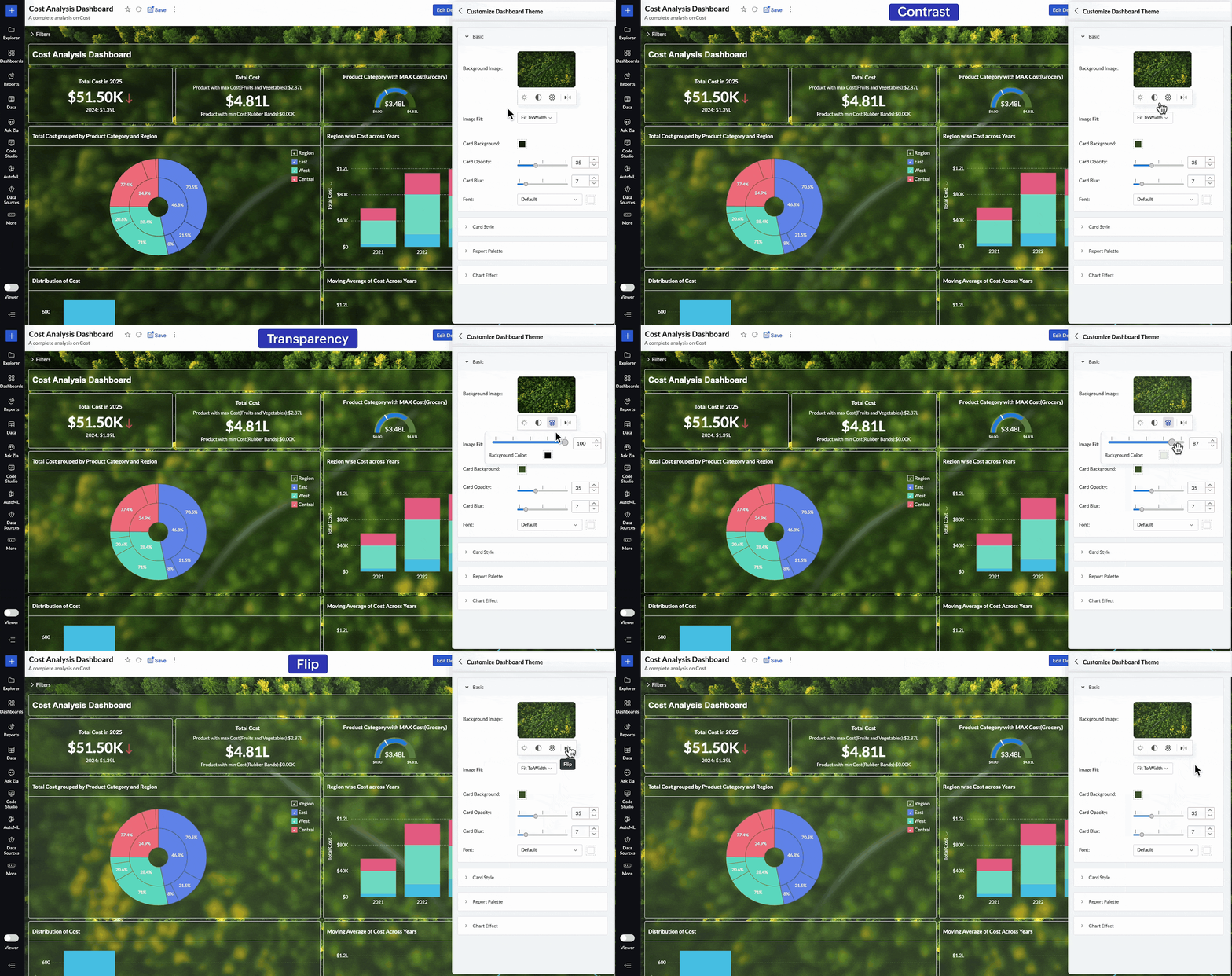
Personalize your dashboards like never before with new background image adjustment options. You now have greater control over how background images appear across your dashboards, helping you fine-tune visual impact and maintain readability.
You can now adjust:
  • Brightness – Lighten or darken the image for visual balance
  • Contrast – Enhance details and visual clarity
  • Transparency – Soften the background to highlight dashboard elements
  • Flip – Mirror the image horizontally for better composition
These controls allow you to create cleaner, brand-aligned dashboards that look professional and feel polished.

Learn more about dashboard customization.

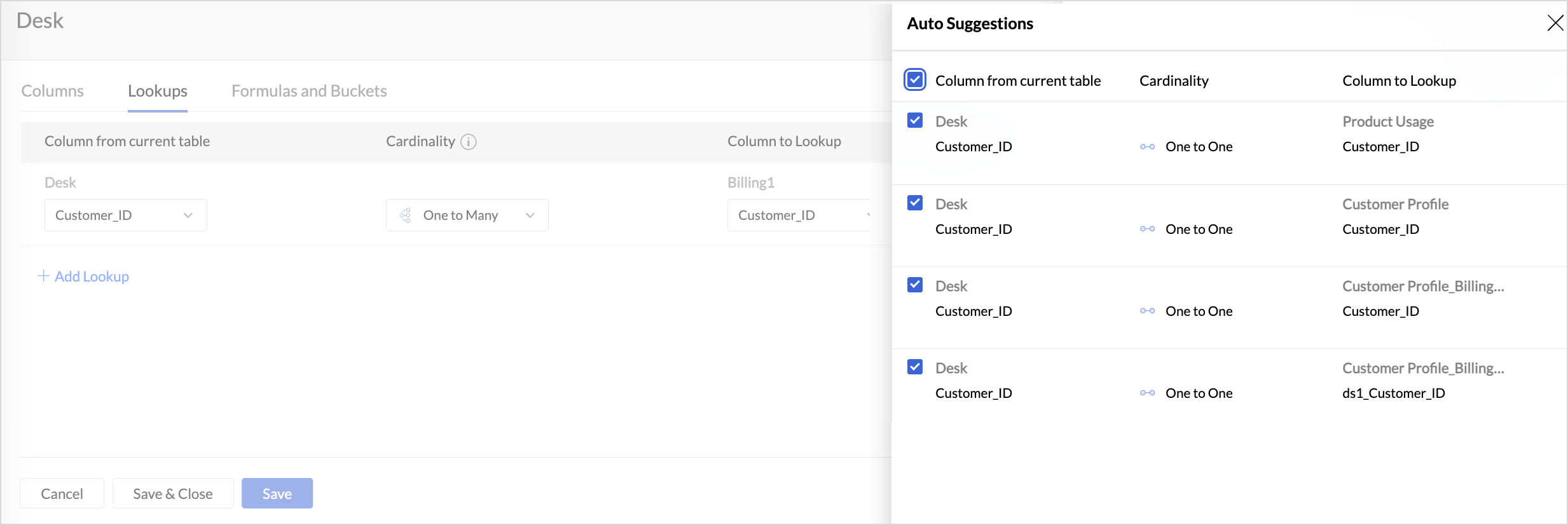
Lookup Suggestions

Creating relationships between tables is now even easier.
Zoho Analytics now offers lookup suggestions based on your table’s metadata. These smart recommendations help you:
  • Quickly identify potential relationships between tables
  • Reduce manual guesswork
  • Simplify your data modelling process
Learn more about Lookup Suggestions

White Label Updates

We have introduced a more modern and consistent experience for white label.
  • Zoho Analytics latest UI is now available for White Label
    Users who opt for white label deployment can now offer the latest Zoho Analytics user interface to their end users. This includes the updated layout, navigation, and overall design, providing a seamless and branded analytics experience.
    Click here to learn more.
  • Dedicated White Label Guide
    To help you make the most of white label capabilities, we’ve introduced a comprehensive guide covering everything from setup to branding best practices. This guide is now available as a separate resource for quick reference.
    Click here to access White Label guide.

Access Log Support for Zoho Analytics Mobile BI App

Zoho Analytics now extends access log tracking to the Mobile BI App, giving admins greater visibility into how users interact with reports and dashboards from mobile devices.

These updates are designed to make your Zoho Analytics experience more connected, customizable, and intelligent.
As always, we’re just a click away if you need help or have feedback to share.

      • Sticky Posts

      • What's New in Zoho Analytics - February 2026

        Hello Users! We're back with another round of updates for Zoho Analytics. This month's release focuses on giving you greater flexibility in how you visualize, manage, and act on your data - with new features like custom visualizations, remote MCP server,
      • What's New in Zoho Analytics - January 2026

        Hello Users! We are starting the year with a strong lineup of updates, marking the beginning of many improvements planned to enhance your analytics experience. Explore the latest improvements built to boost performance, simplify analysis, and help you
      • What's New in Zoho Analytics - November 2025

        We're thrilled to announce a significant update focused on expanding your data connectivity, enhancing visualization capabilities, and delivering a more powerful, intuitive, and performant analytics experience. Here’s a look at what’s new. Explore What's
      • What's New in Zoho Analytics - October 2025

        Hello Users! We're are back with a fresh set of updates and enhancements to make data analysis faster and more insightful. Take a quick look at what’s new and see how these updates can power up your reports and dashboards. Explore What's New! Extreme
      • What’s New in Zoho Analytics – September 2025

        Hello Users!! In this month’s update, we’re raising the bar across multiple touchpoints, from how you bring in data, plan and track projects to how you design and brand your dashboards. We’ve added the all-new Gantt chart for project visualization, expanded

        • Recent Topics

        • Inventory batch details

          Hi there, I'm trying to get the batch details of an item, here's what I've done so far. I've sent cUrl request to the below endpoint and I get a successful response. Within in the response I find the "warehouses" property which correctly lists all the
        • How do I edit the Calendar Invite notifications for Interviews in Recruit?

          I'm setting up the Zoho Recruit Interview Calendar system but there's some notifications I don't have any control over. I've turned off all Workflows and Automations related to the Calendar Scheduling and it seems that it's the notification that is sent
        • Unable to send emails from iPhone and iPad

          Curious, all of a sudden I'm unable to send emails from iPhone and iPad. I keeps asking for my password again and again. No problems from my MacBook Pro.
        • Journal Entries Do Not Show Multiple Entries to the Same Account

          Another basic accounting function that Books ... Accountants sometimes write journal entries, debiting and/or crediting the same account in the same entry. This is due to the need to record specific activity in an account when we pull reports especially
        • Create static subforms in Zoho CRM: streamline data entry with pre-defined values

          Last modified on (9 July, 2025): This feature was available in early access and is currently being rolled out to customers in phases. Currently available for users in the the AU, CA, and SA DCs. It will be enabled for the remaining DCs in the next couple
        • Partial customer Refund via customer Credit Card used to pay invoice

          How can we process a partial refund through the same credit card that a customer used to pay the initial invoice? - In other words, say a customer was sent an invoice for $1200.00 and they paid it through Zoho with our online credit processor, PayFlow
        • Partial refunds

          I am trying to process refund for a one item invoice, however the refund is partial: i am getting this error while creating credit note, can anyone share some wisdom about this
        • How in the heck do i record a (partial) refund???

          I have a client. wrote an invoice for 3 services totalling $520. He paid it online (we use zoho to authorize.net) We went out and couldn't do one of the services I didn't see a way to initiate a refund through zoho books, so i did a $250 refund through authorize.net. Tried to edit the payment on zoho books, but it won't let me b/c "this payment was made on line" When i try to edit the invoice i get a popup about it no longer matching the payment. What do I do??? And why is it so hard to do something
        • Action Required: Update your Zoho Projects – Zoho Analytics integration

          Dear Zoho Projects integration users, We would like to inform you about an upcoming update to the Zoho Projects–Zoho Analytics integration. Read the full migration announcement here. As shared in the announcement, we are updating the integration to support
        • Mirror Component in Zoho CRM: Access real-time related data without leaving your record

          Hi everyone, This feature is now available for the JP, CA, SA, UAE, and AU DCs. We're excited to bring to you Zoho CRM's mirror component, which presents relevant data on a record's details page and keeps everything users need in one place without having
        • Workflows fail silently in Zoho CRM and there is no native way to know

          Workflow automation is honestly one of the biggest reasons my clients choose Zoho. But there is one problem I keep running into across almost every implementation. When a workflow fails, nobody finds out. Email alerts hit daily limits and just stop. Custom
        • Office365(outlook emails) Zoho CRM integration

          Hi guys We're looking to buy Zoho CRM and are currently trialling. I'm working from a MacBook fyi. I've so spent 3 hours on live chat today with Zoho as we couldn't get the two to integrate properly, even with the plug in installed but finally managed
        • When adding subform records, how do I access member fields of a name field

          I have the following code (runs when a record is added to a form) if (input.P_liza != null) { input_deal = input.P_liza; rec = form_mapping[deal_name == input_deal]; id = input.N_mero_de_documento_de_Identificaci_n_Alfanum_rico; contact = -----redacted------.get_crm_contact_by_id(id);
        • Making "All Day Events" not default

          When I go to schedule an event, the All Day checkbox is ticked by default. Generally, I don't plan all day events, so is there a way to make that not checked by default? I couldn't find a setting for this...
        • Create custom field in multiple modules

          I am trying to create some custom fields that will be in both leads and contacts module without having to create them separately and then mapping them. How is that performed? it is too time-consuming to create 20+ fields and then do the same thing in a different module when they carry the same info. The idea is that when we get a lead from web site, there are items that we capture and once that lead is a client and moved to Contacts, that info should come over. So trying to find an easy way to create
        • Allow 2 logos for Branding, one for Light Mode and one for Dark Mode?

          Our logo has a lot of black text on it. If we leave the background transparent, per recommendation of Zoho, when a user is viewing a file and turns on dark mode, our logo is not really visible and looks really weird. It would be really great if we could
        • Compensation | Salary Packages - Hourly Wage Needed

          The US Bureau of Labor Statistics says 55.7% of all workers in the US are paid by the hour. I don't know how that compares to the rest of the world, but I would think that this alone would justify the need for having an hourly-based salary package option.
        • In Desk KB article, how do include an image in a numbered list without using a number or bullet?

          We need to include images in our KBA steps as a numbered list. Here I have numbered steps. I want the image no numbering or bullet. Open Purchase Order Entry. Select the mail icon: Select the Save button. I see your own articles have images in number
        • Video Interview features

          I tested the video interview feature. It's supported only on desktop version of chrome/firefox. Most of the times, the candidates are available on their cellphone. Need to have this for mobile devices too.
        • POS and payments

          Have i missed the point can i not use zoho POS as a payment terminal back into stripe like we can in Books?
        • Delugeサーバーページ(HTML)での関数の使用方法

          Zoho Creator、Deluge並びに初心者です。 題名の通りDelugeサーバーページ(HTML)で関数が使用する方法を教えて頂きたいです。 ざっくりと説明します。 現在、1週間だけカレンダーを表示するページをelugeサーバーページ(HTML)内で作っております。 カレンダー内のボタンには翌週や先週を表示するボタンを追加しようとしています。 それらのボタンを押下した際、現在の日時に±7日をしてページを表示しなおす処理が走るようにさせたいです。 ボタンが押下されたとき、用意していた関数でその処理を実行する想定です。
        • Automatically remove commas

          Team, Please be consistent in Zoho Books. In Payments, you have commas here: But when we copy and paste the amount in the Payments Made field, it does not accept it because the default setting is no commas. Please have Zoho Books remove commas autom
        • Why does my salesiq dashboard doesn't look like the one on the admin guide?

          https://help.zoho.com/portal/en/kb/salesiq-2-0/for-administrators/setup-brand/articles/setting-up-the-website-channel#Launcher
        • ENDPOINT ZOHO CREATOR

          I created a function to perform the action of POST, GET and PUT in order to use it outside our portal and create more dynamic forms using a cloud server. Params = “qAvhbBBJJsQysd45DdkvTR34A” Curl = “https://www.zohoapis.com/creator/custom/admin2844/vallesalud_julaje_private?publickey=”;
        • MCP > Creator connection failing with Claude

          I'm trying to get claude to access any of my Zoho Creator apps and it keeps failing. I have enabled all tools for creator and ensured in claude settings that everything is authorised. Here is what claude says : Unfortunately, the error messages I'm receiving
        • Gantt Chart - Multiple Projects

          Hello, I have about 6 projects set up in Zoho and I am looking to see if it is possible to see all my projects on one gantt chart? Thanks Alex
        • milestone dependencies

          It would be exceptionally useful to be able to assign dependencies on milestone/tasks. For example, if within a project I have three milestones for creating three ads for publication, but each ad also requires the logo to be finished by the graphic designer (a separate milestone), it would be useful to have the start dates of the later items dependent on another prerequisite component. That way, not only would I not have to enter the logo creation as a separate task for each of the three milestones,
        • Need Easy Way to Update Item Prices in Bulk

          Hello Everyone, In Zoho Books, updating selling prices is taking too much time. Right now we have to either edit items one by one or do Excel export/import. It will be very useful if Zoho gives a simple option to: Select multiple items and update prices
        • Upgraded sentiment analysis model for more accurate detection

          Hello everyone! Sentiment Analysis in Zia is being upgraded to a newer model to improve how customer sentiment is detected and interpreted. This transition is aimed at getting better contextual understanding across all supported channels. As part of this
        • Notebook Al

          Why was our organisation's Notebook AI disabled, even though our admin said it wasn't done on their side?
        • Dashboard Filtering with 2 query tables using one filter field

          Hi There, I have been using user filters on the dashboard and for the most part they are fine. However I have one issue I would like to see if there is a fix for it. I have a main query that most of my widgets use. Then I have a second query for another widget. The dashboard uses the field "brand" in the main query for the filter.  The second query uses the main_query.brand field alongside fields from a second table. I have set the widget to use main_query.brand as a filter, but when the dashboard
        • How to get static reports via Desk API

          Hello, we are hoping to use the Desk API to automatically export the default static reports in Zoho Desk, or reconstruct them via other API calls. What's the best way to do this? For example, if I want to recreate the Response Time static report via the
        • What's New in Zoho POS - April 2026

          Hello everyone, Welcome to Zoho POS’s monthly update, where we share our latest feature updates, enhancements, events, and more. Let’s take a look at how April went. Access and manage other web applications in Zoho POS with Web Tabs You can now access
        • Issue with adding “Roblox” as an answer option in Zoho SurveyО

          Hello Zoho Support Team, I’m experiencing an issue while editing a survey in Zoho Survey. For some reason, I’m unable to add “Roblox” as an answer option. The same issue occurs with any answer option that contains this exact combination of letters, regardless
        • How to import MBOX to Gmail?

          In order to import or restore MBOX file backup Gmail account you can go for Advik MBOX to Gmail Import utility. This utility will import MBOX to Gmail or G Suite account without any configuration. This tool is considered as the most easiest and simplest process to perform email migration. Key Feature of this tool Import MBOX to Gmail in Bulk Maintain folder struture Retain Key elements Single Panel Interface 100% accuracy rate Download source : http://www.adviksoft.com/mbox/gmail.html
        • Free webinar! Accelerate deals with Zoho Sign for Zoho CRM and Bigin by Zoho CRM

          Hello, Paperwork shouldn’t slow you down. Whether you’re growing a small business or running a large enterprise, manual approvals and slow document turnaround can cost you time and revenue. With Zoho Sign for Zoho CRM and Bigin by Zoho CRM, you can take
        • Automatically set the default VAT percentage on a quote

          Every time I create a quote, I have to manually adjust the VAT and activate the checkbox for 21%. But all of our quotes include 21% VAT. So now occasionally, it happens that the checkbox is forgotten, and the customer receives an incorrect quote (without
        • Don't understand INVALID_REQUEST_METHOD when I try to post up an attachment

          When I make the POST request (using python requests.post() for files): https://www.zohoapis.com/crm/v8/Calls/***************01/Attachments I get this response: r:{ "code": "INVALID_REQUEST_METHOD", "details": {}, "message": "The http request method type
        • Bigin & Booking. Associate the appointment with existing customers in bigin.

          I tried to change the stage of the pipeline associated to a existing contact after he book a appointment in Booking. I use flow to create a event in booking when a appointment is done. But.... How can I relate the appointment with the existing contact
        • Can Zoho Books support an Asset account as an item's purchase/COGS account? (Prepaid reseller use case)

          Hi everyone, I run a prepaid digital plan reseller business where I fund a vendor account upfront and draw it down as I make sales — essentially a float-based model, similar to a gift card or prepaid airtime reseller. The correct accounting treatment
        • Next Page