What’s New in Zoho Analytics – September 2025

What’s New in Zoho Analytics – September 2025

Hello Users!!
In this month’s update, we’re raising the bar across multiple touchpoints, from how you bring in data, plan and track projects to how you design and brand your dashboards. 
We’ve added the all-new Gantt chart for project visualization, expanded our database integrations, introduced support for modern file formats, redesigned key user experiences with a visual refresh, and a brand new guide for white label solutions.


Let’s dive into what’s fresh this month!

Introducing Gantt Chart 

Manage projects more effectively with the brand-new Gantt Chart in Zoho Analytics. Use it to track tasks, monitor progress, and quickly identify delays in project execution.
You can customize your Gantt charts with:
  • Different chart styles to suit your project needs
  • Color schemes to visually distinguish tasks in progress and completed tasks
  • Flexible date display ranges to match your preferred project view
Click here to learn more.


Database Connectivity

We’ve expanded our support to help you bring in data from more sources, more flexibly.
  • Cassandra 
    You can now import data from Cassandra, a distributed NoSQL database widely used for handling high-volume, high-velocity data. Zoho Analytics automatically normalizes the collections into parent-child table structures, making it easy to analyze your data once imported.
    Learn more about importing from Cassandra.

  • SAP HANA & ClickHouse 
    Now import data directly from cloud-hosted SAP HANA and ClickHouse databases. Alongside local server connection, we’ve added cloud server connection as an additional option to give you more flexibility with how and where you connect.
    Learn more about importing from SAP HANA.
    Learn more about importing from ClickHouse.
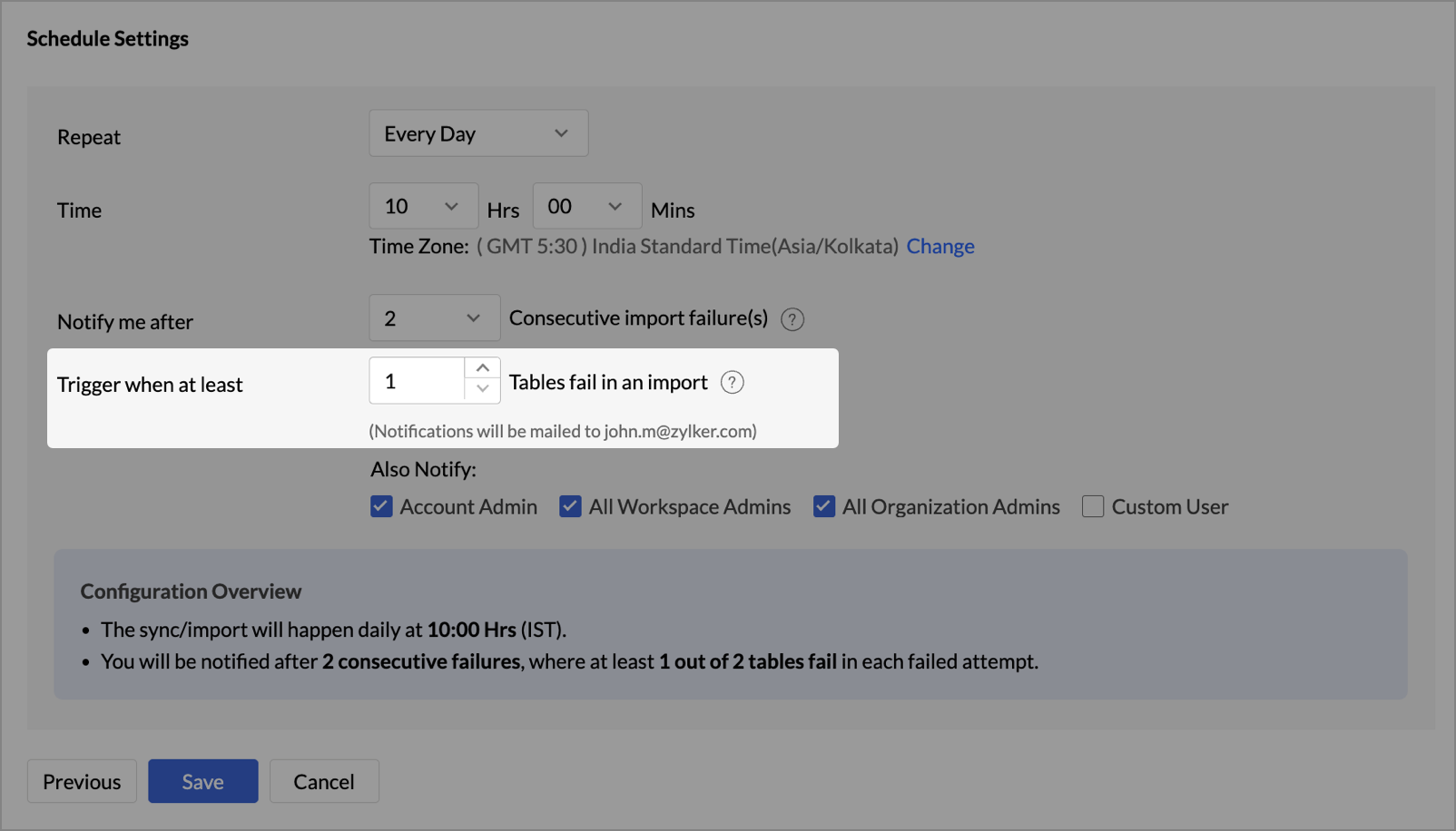
  • Cloud Database Synchronization – Failure Notification Settings 
    You can now configure synchronization settings to trigger a failure notification when a chosen number of table imports fail. Simply set the value for “n” failed tables, and Zoho Analytics will notify you when the condition is met. This gives you more control over monitoring imports and helps avoid missing critical sync issues.
  • Snowflake - New Authentication options
    Zoho Analytics now supports two new authentication methods for connecting to your Snowflake data:
    • Private Key
    • OAuth

These options provide more flexibility and enhanced security when configuring your Snowflake connections.

Learn more about Snowflake integration.

Local File Formats

Working with local files is now more powerful and flexible.
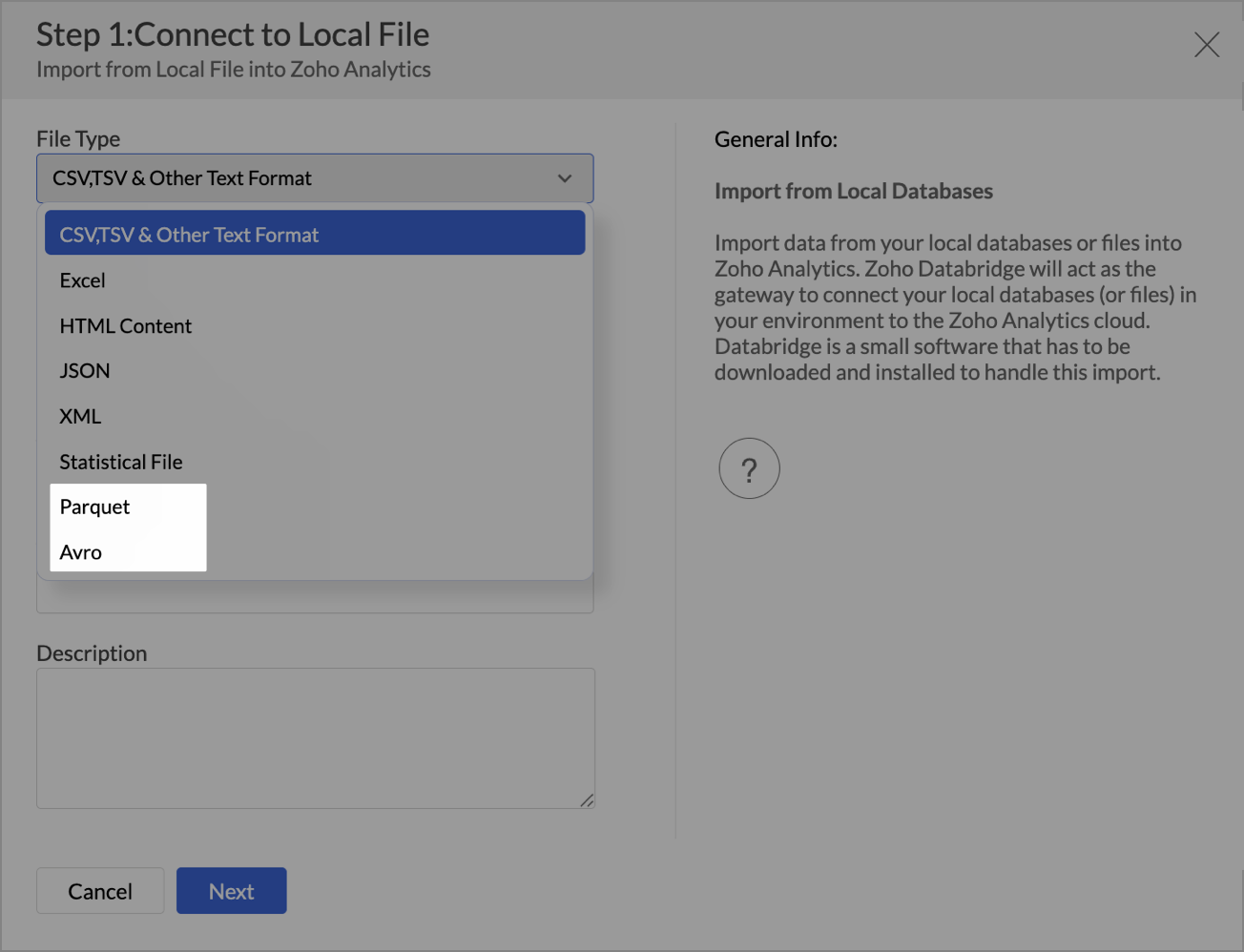
  • New File Format Support - Parquet and Avro

    You can now import Parquet and Avro files. These modern, columnar file formats are optimized for analytical workloads and are commonly used in big data pipelines.

  • Larger file uploads
    Until now, Zoho Analytics supported large file uploads only for CSV files. With this update, you can now upload files larger than 100 MB for the following formats through Zoho Databridge:
    • Excel
    • HTML
    • JSON
    • XML
    • Statistical files
This enhancement removes the hassle of file size limits when working with heavy datasets across multiple formats.
Learn more about local file formats

Invitation-based User Invite Flow

Zoho Analytics now uses an invitation-based model for adding users to your organization.
You can invite users in multiple ways, based on your workflow:
  • From the Organization Settings or Workspace Settings
  • While sharing reports or dashboards using email addresses
  • By adding users to Groups
Invited users will receive an email and must accept the invitation to join. Access to your organization and its shared content will be granted only after they accept the invite. This ensures better control and visibility over user access.

Learn more about inviting users.


Dashboard Background Image Customization

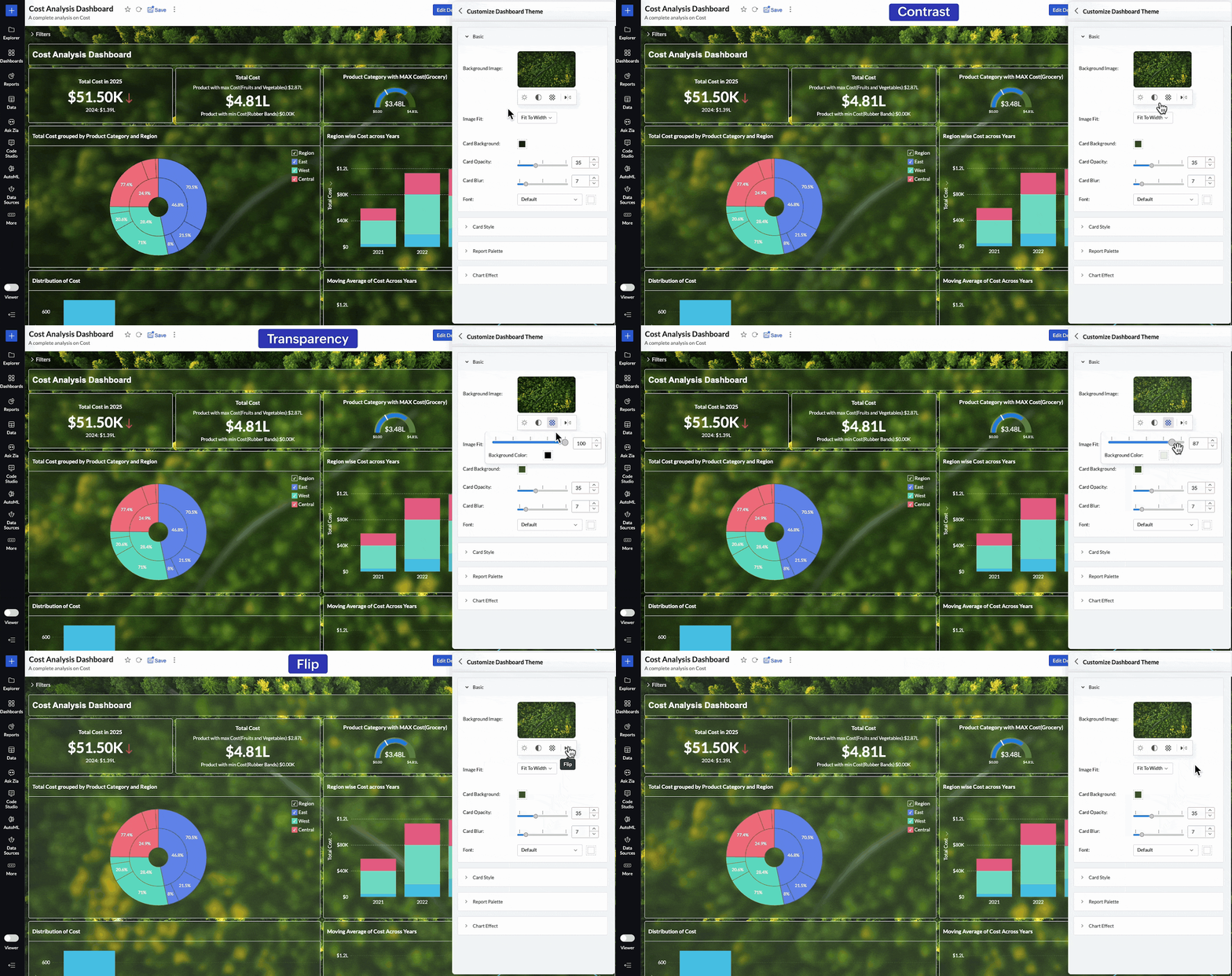
Personalize your dashboards like never before with new background image adjustment options. You now have greater control over how background images appear across your dashboards, helping you fine-tune visual impact and maintain readability.
You can now adjust:
  • Brightness – Lighten or darken the image for visual balance
  • Contrast – Enhance details and visual clarity
  • Transparency – Soften the background to highlight dashboard elements
  • Flip – Mirror the image horizontally for better composition
These controls allow you to create cleaner, brand-aligned dashboards that look professional and feel polished.

Learn more about dashboard customization.

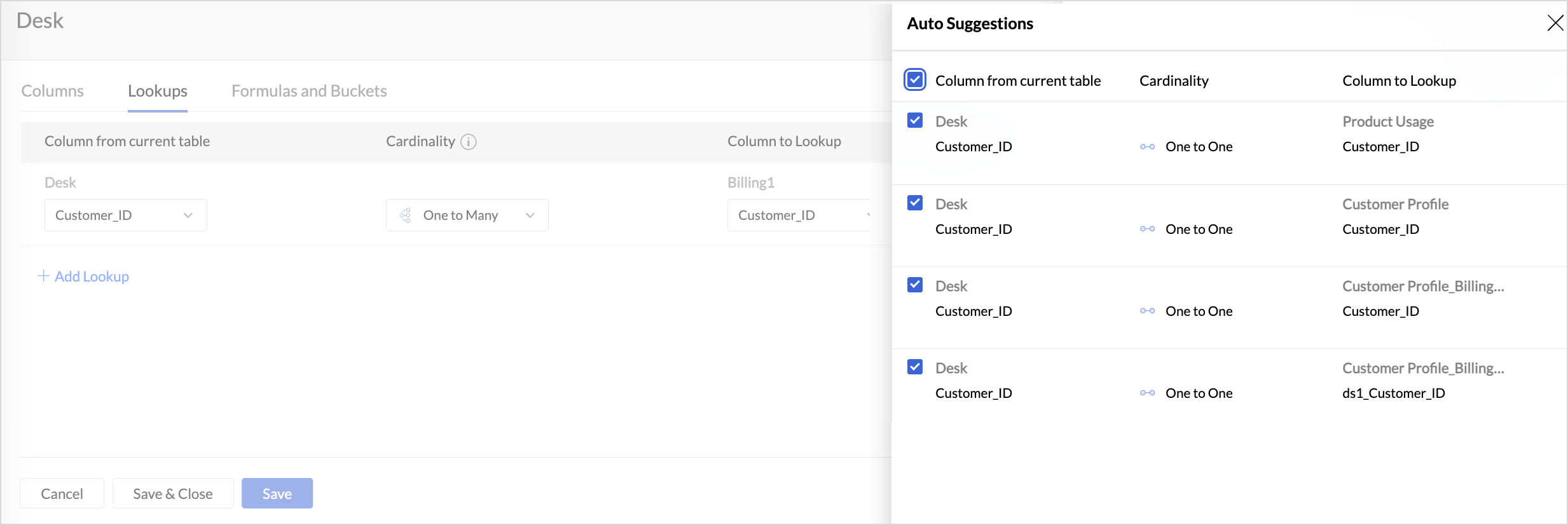
Lookup Suggestions

Creating relationships between tables is now even easier.
Zoho Analytics now offers lookup suggestions based on your table’s metadata. These smart recommendations help you:
  • Quickly identify potential relationships between tables
  • Reduce manual guesswork
  • Simplify your data modelling process
Learn more about Lookup Suggestions

White Label Updates

We have introduced a more modern and consistent experience for white label.
  • Zoho Analytics latest UI is now available for White Label
    Users who opt for white label deployment can now offer the latest Zoho Analytics user interface to their end users. This includes the updated layout, navigation, and overall design, providing a seamless and branded analytics experience.
    Click here to learn more.
  • Dedicated White Label Guide
    To help you make the most of white label capabilities, we’ve introduced a comprehensive guide covering everything from setup to branding best practices. This guide is now available as a separate resource for quick reference.
    Click here to access White Label guide.

Access Log Support for Zoho Analytics Mobile BI App

Zoho Analytics now extends access log tracking to the Mobile BI App, giving admins greater visibility into how users interact with reports and dashboards from mobile devices.

These updates are designed to make your Zoho Analytics experience more connected, customizable, and intelligent.
As always, we’re just a click away if you need help or have feedback to share.

      • Sticky Posts

      • What's New in Zoho Analytics - May 2026

        Hello Users! We're back with another round of updates for Zoho Analytics. This month's release focuses on giving you greater flexibility in how you visualize, manage, and act on your data. We are introducing richer data visualizations, smarter AI-powered
      • What's New in Zoho Analytics - February 2026

        Hello Users! We're back with another round of updates for Zoho Analytics. This month's release focuses on giving you greater flexibility in how you visualize, manage, and act on your data - with new features like custom visualizations, remote MCP server,
      • What's New in Zoho Analytics - January 2026

        Hello Users! We are starting the year with a strong lineup of updates, marking the beginning of many improvements planned to enhance your analytics experience. Explore the latest improvements built to boost performance, simplify analysis, and help you
      • What's New in Zoho Analytics - November 2025

        We're thrilled to announce a significant update focused on expanding your data connectivity, enhancing visualization capabilities, and delivering a more powerful, intuitive, and performant analytics experience. Here’s a look at what’s new. Explore What's
      • What's New in Zoho Analytics - October 2025

        Hello Users! We're are back with a fresh set of updates and enhancements to make data analysis faster and more insightful. Take a quick look at what’s new and see how these updates can power up your reports and dashboards. Explore What's New! Extreme

        • Recent Topics

        • Clone entire dashboards

          If users want to customize a dashboard that is used by other team members, they can't clone it in order to customize the copy. Instead they have to create the same dashboard again manually from scratch. Suggestion: Let users copy the entire dashboard
        • Zoho Cliq REST APIs v3 : A complete guide to what's changed and why 

          APIs are not just consumed by a developer with numerous automations and a series of open browser tabs. They are parsed by LLMs, fed into agent pipelines, and auto-completed by AI coding assistants that have zero tolerance for inconsistency. A verb tucked
        • Allow native Webhooks to authenticate via Connections

          Allow native Webhooks to authenticate via Connections (Basic Auth) instead of plaintext custom headers Summary Please allow native Webhooks (Workflow Rules > Instant Actions > Webhooks) to authenticate against the destination endpoint using the existing
        • Zoho desk extension update custom field

          Hi all, I'm trying to update a custom field in my zohodesk extension. But the documentation is fairly unclear. The custom field is named "testveld". The api name is cf_testveld I'm trying to update it like this: ZOHODESK.set('ticketForm.cf_testveld',
        • Introducing Custom Columns in Forecasts in Zoho CRM

          Release Plan: Enabling in Phased Manner, Enabled for JP DC Hello all, Forecasts in Zoho CRM help sales representatives, managers, and business stakeholders evaluate performance and plan future sales activities. While standard metrics such as Target, Achieved
        • Zoho Expense Auto Tracking Sync Fails "Request Timed out"

          I am testing this feature to move away from MileIQ who significantly raised their prices. It seems to be tracking but it is not syncing unless I manually perform a resync under "Drives pending Sync". I am not sure what would be causing this, as some drives
        • How to show product cards in your chatbot

          Hey everyone, If you are using Guided Conversations to help customers find products, you have probably run into this problem: the bot gives customers a list of options, but they still have no idea which one to pick. There will be no images, no specs,
        • Zoho Team Inbox - roadmap

          Hi, would be good to understand the Teaminbox roadmap, in particular: 1. API / Zoho Deluge connections. We have a process where the each email needs to be either tagged or assigned daily. It would be great if we could automate a 5pm alert for any exemptions
        • Zoho Projects Coming to CRM Teamspaces

          Availability: The US DC Standard Edition is now available. It will be rolled out to customer accounts in all DCs in phased manner. Hello all, You are probably already familiar with Teamspaces, the dedicated workspaces where teams organize the CRM modules
        • Canva Integration

          Hello! As many marketing departments are streamlining their teams, many have begun utilizing Canva for all design mockups and approvals prior to its integration into Marketing automation software. While Zoho Social has this integration already accomplished,
        • Editing Draft Fixed assets

          I have a few Fixed Assets still currently in Draft Status that I need to edit. I need to edit the Fixed Asset Type, the Fixed Asset Account, the Accumulated Depreciation account and the Depreciation account. Once I have done it and attempt to "Save as
        • Zoho Status Pages: Our Domain Has Changed — Here's What You Need to Know

          We're making a change to how you access Zoho Status Pages. Our status page domains have been updated to provide a more consistent and region-specific experience across all locations. If you have the old domain bookmarked or referenced anywhere — emails,
        • Zoho Books and TRAINING SALES receipt label for eTims?

          Hi, Can Zoho Books implement TRAINING SALES receipts and push them to eTims for test? In other words how can we send to Zoho or even create in Zoho training mode invoices and TEST the workflow POS>Zoho Books>eTims and back without actually registering
        • The Social Wall: May 2026

          Hello everyone, This month, we're excited to introduce two powerful features designed to help you create more engaging content and streamline your team's communication workflow. Adding audio via Zoho Social Audio is one of the biggest drivers of engagement
        • SalesIQ : How to disable "Idle chat handling" ?

          Hello SalesIQ Team. SalesIQ, How to disable "Idle chat handling" ? I would like to disable the option “Automatically close chats that have been idle for a specified amount of time.”
        • Zoho Webinar - Sharing System Audio (NOT AVAILABLE)

          Hi, We are having a serious problem with Zoho Webinar. In the webinars we run, we very often share the audio from a video we are streaming directly from YouTube or other applications. Until recently we were using Zoom, but as we use other Zoho applications
        • Customising Outcome drop down

          Is it possible to customize the drop down list for appointment outcomes?
        • Automate Backups

          This is a feature request. Consider adding an auto backup feature. Where when you turn it on, it will auto backup on the 15-day schedule. For additional consideration, allow for the export of module data via API calls. Thank you for your consideration.
        • Mirror Component in Zoho CRM: Access real-time related data without leaving your record

          Hi everyone, This feature is now available for the JP, CA, SA, UAE, and AU DCs. We're excited to bring to you Zoho CRM's mirror component, which presents relevant data on a record's details page and keeps everything users need in one place without having
        • Partial payments for retainer invoices

          When a customer does not pay the entire retainer invoice there is no way to apply a partial payment. PLEASE add this function.
        • Custom Display Field for Lookup Dropdowns in Zoho CRM

          Could Zoho CRM support changing the display field in lookup dropdowns, like Zoho Creator does? This would make it much easier to select the right record by showing a more useful field instead of only the default one. It would improve speed, clarity, and
        • Create custom field in multiple modules

          I am trying to create some custom fields that will be in both leads and contacts module without having to create them separately and then mapping them. How is that performed? it is too time-consuming to create 20+ fields and then do the same thing in a different module when they carry the same info. The idea is that when we get a lead from web site, there are items that we capture and once that lead is a client and moved to Contacts, that info should come over. So trying to find an easy way to create
        • Add Specific Identification as an Inventory Costing Method

          --- Business Context We are a security systems distributor handling high-value, serialized products such as IP cameras, NVRs, and RAID storage systems. Each unit is uniquely identified by a serial number and arrives in separate shipments at varying purchase
        • Creator Portal Page Customization Issues

          I have been using Creator to make Portals recently. Yesterday, I created a new portal and noticed that the page customization editor ("Open Builder") was different. Using the new page builder, I was able to customize and add an image to the various sign
        • Zoho Books - Budget Creation and Reporting Tags

          Is there a way to create one budget for multiple reporting tags. For example, if my company has 4 different divisions I would like to be able to enter in what the budgeted revenue for each division is and view that information in 1 budget. I would then
        • Razorpay + Zoho Billing + Zoho Books Integration

          Please help us set up this integration.
        • Why is Approval Hierarchy Not Available for the Expenses Module in Zoho Books?

          Hello, I noticed that Zoho Books allows us to configure approval workflows and approval hierarchies for modules such as Bills, Vendor Credits, and Invoices. However, the same approval hierarchy option does not seem to be available for the Expenses module.
        • Zoho Mail Android app update - Traditional Chinese language and contact nickname support

          Hello everyone! The Zoho Mail Android app now includes support for the Traditional Chinese language. You can change the language to Chinese (Traditional) from the Settings module of the Zoho Mail app. You can also view the nickname of the contacts within
        • Get Cliq Meetings in my O365 calendar

          Hi, we are currently evaluating to replace the Teams Messaging and Meetings with Cliq. We currently still have all our email and calendars in O365. What i want to achieve is, to create a (ZOHO) meeting from Cliq and have this meeting added to my Outlook/O365
        • Latest update in Zoho Meeting | On-demand webinars

          Hello everyone, We’re excited to introduce our new on-demand webinar feature, you can now provide pre-recorded sessions that your audience can access immediately, no need to wait for scheduled sessions. Benefits of On-demand webinars : Scheduling flexibility
        • Replicating Zoho Books "Accounts" and "Accrual Transactions" in Analytics via API: Best Endpoint Strategy?

          Hi everyone, I am working on a custom integration where I need to programmatically replicate two specific tables in Zoho Analytics via API on an hourly schedule: Accounts and Accrual Transactions. Those two tables sync from Zoho Books. (Note: I am aware
        • Terms & Conditions

          I have defined Terms & Conditions in the invoice setting and have set %TermsAndCondition% where I want it to appear but nothing shows up in that area. Is this something we have to define per invoice or can we have a global variable?
        • BUG and HANGUP - Add Row with Fields DOUBLES the amount of rows instead of Adding Just 1 Row

          As it says in the title, there is a bug with forms generated with Zoho Writer where the Add Row With Fields ends up DOUBLING the amount of rows instead of Adding just 1 row.
        • Subform edits don't appear in parent record timeline?

          Is it possible to have subform edits (like add row/delete row) appear in the Timeline for parent records? A user can edit a record, only edit the subform, and it doesn't appear in the timeline. Is there a workaround or way that we can show when a user
        • From Zoho CRM to Paper : Design & Print Data Directly using Canvas Print View

          Hello Everyone, We are excited to announce a new addition to your Canvas in Zoho CRM - Print View. Canvas print view helps you transform your custom CRM layouts into print-ready documents, so you can bring your digital data to the physical world with
        • On-prem version of Zoho Desk

          Is there an on-prem version of Zoho Desk available for enterprise customers if we have additional aspects of security that aren't covered with current legal and data security terms?
        • SPAM Filter cleanup

          I was under the impression that the SPAM filter would automatically clear itself, however re-reading the message it says: What does this mean? How often does this get emptied automatically?
        • Hyphen in domain names

          I am facing problems while hard-coding an email address with a - in the domain name. I get the error Lexical error at line 4, column 24. Encountered: "@" (64), after : "" I recall that Zoho Domains also had an issue with hyphens and I think the issue with the sendmail api is the same. Could this be fixed?
        • Latest updates in Zoho Meeting | Breakout rooms and End to end encryption

          Hello everyone, We’re excited to share a few updates for Zoho Meeting. Here's what we've been working on lately: Introducing Breakout Rooms for enhanced collaboration in your online meetings and End-to-end encryption to ensure that the data is encrypted
        • Latest updates in Zoho Meeting | New End of session notification to remind everyone about the session end time

          Hello everyone, We’re excited to share a new feature for Zoho Meeting ; End of session notification. With this new setting, you can choose to remind all participants or only the host about the scheduled end time of a meeting. You can also choose when
        • Next Page