What's New in Zoho Books - May 2024

What's New in Zoho Books - May 2024

Hello users,

We've rolled out new features and enhancements to elevate your accounting experience in Zoho Books. Dive in to discover what's new in Zoho Books this May.

Alipay Payment Method for Stripe

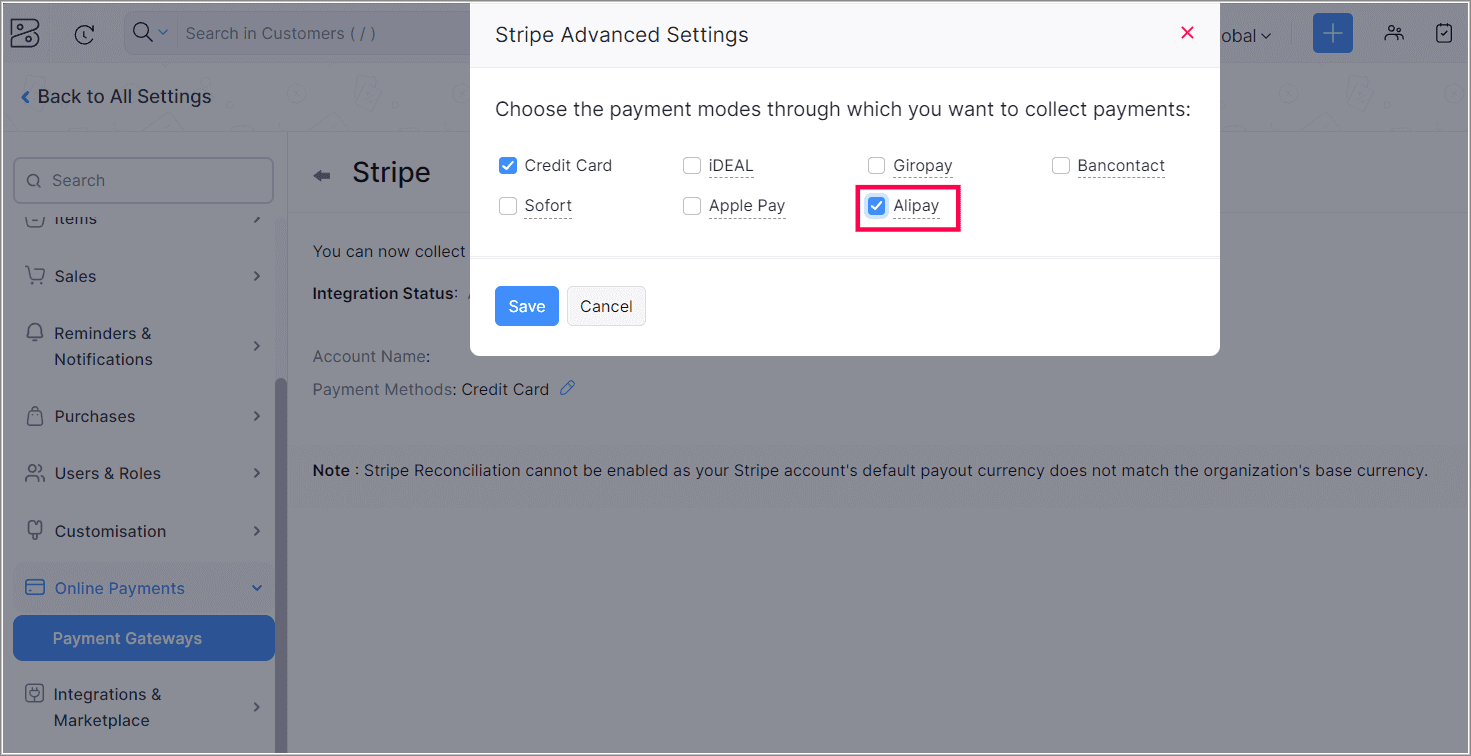
Alipay, a popular digital wallet in China, is now available as a payment method for Stripe payments in Zoho Books. With Alipay, you can securely make payments online or via mobile devices.You can collect payments in CNY currency from any location. Additionally, based on your Stripe account's location, you can receive payments in AUD, CAD, EUR, GBP, HKD, JPY, SGD, MYR, NZD, and USD.

To enable Alipay, navigate to Settings > Online Payments > Payment Gateways, and click Edit Settings under Stripe. Then, select the Edit icon next to Payment Methods, and choose Alipay from the list of payment methods.

Note: This feature is not available for the India edition of Zoho Books.


Generate BACS Files [UK Edition]

BACS or Bankers Automated Clearing System, is a payment system used for bank transfers in the UK. You can now generate and export BACS files in Zoho Books and use them to make BACS payments for your bills.

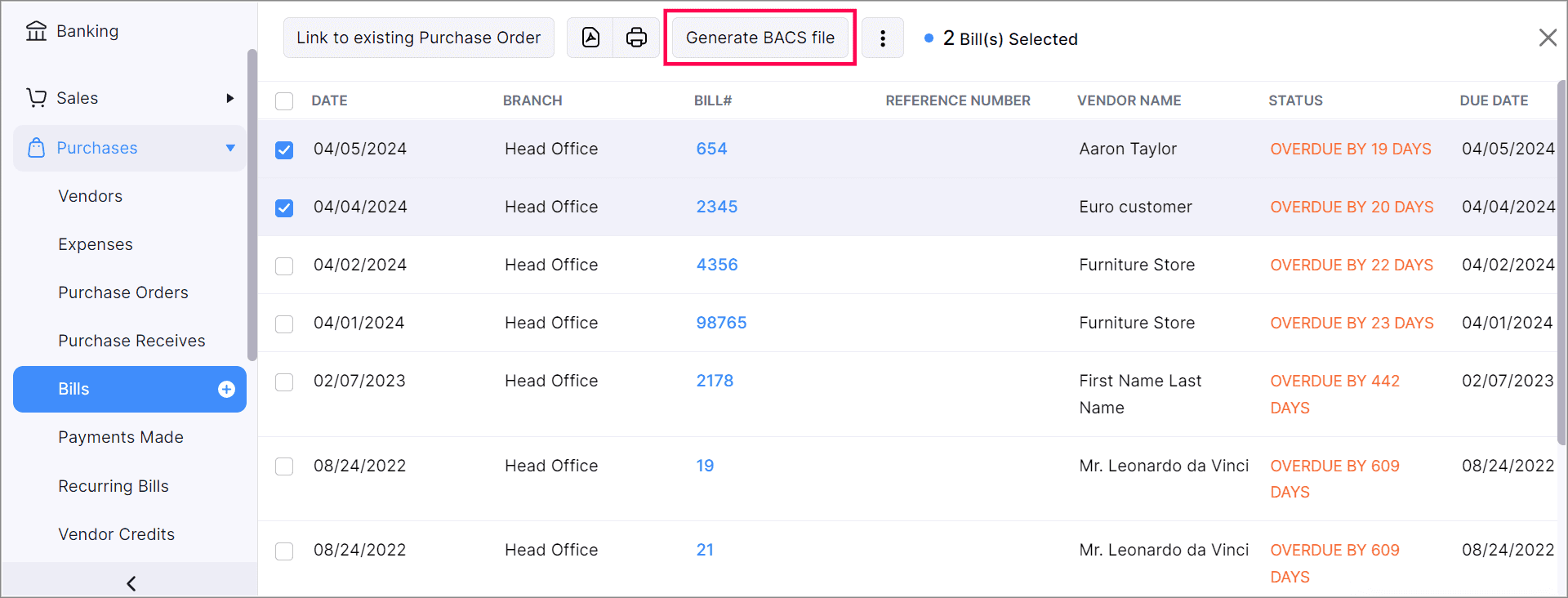
To generate a BACS file, go to Purchases from the left side bar and click Bills. Then, bulk select the bills that you want to pay using a BACS file and click Generate BACS File at the top of the page.

Additionally, you can save your organization's Service User Number in the Organization Profile page under Settings.


Split Your Invoice Payments

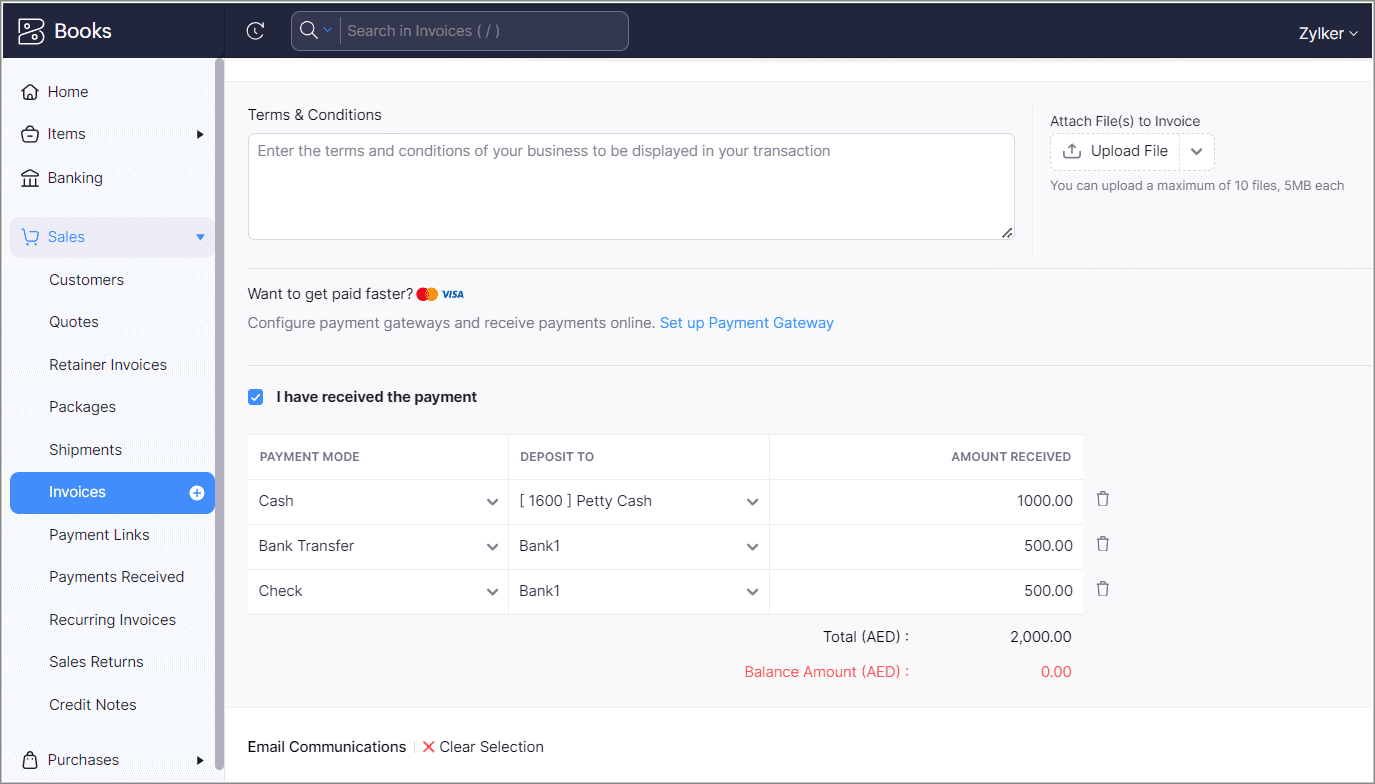
We have introduced an option to split your invoice amount into three parts when creating an invoice. You can assign different payment methods and bank accounts to each part and record separate payments automatically.

To configure split payments, go to Invoices and click +New. In the next page, enter the necessary details and click the I have received the payment checkbox. Add the split amounts and their corresponding payment methods and save the invoice. 

Note: This feature is not available for the Mexico edition of Zoho Books.


Other Feature Enhancements

UPI Payment Mode [India Edition]

For new India edition organizations, we've set UPI as the default payment mode to record payments for your transactions. For existing organizations, Cash will remain as the default payment mode.

Recall Option for E-invoices [India Edition]

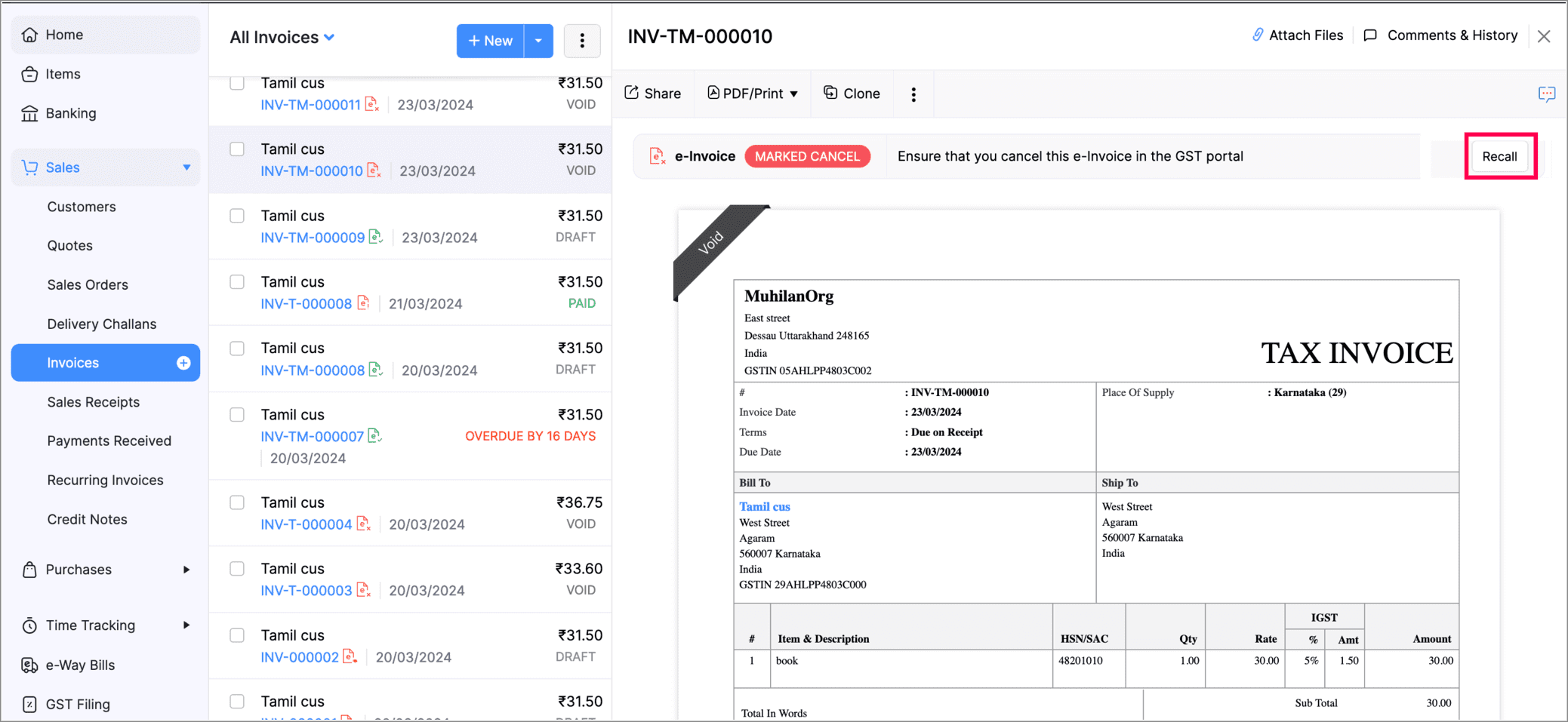
We have introduced the new e-invoice recall option for both invoices and credit notes. This option will be displayed only for invoices marked as cancelled, ensuring accuracy when updating your invoice status. Once recalled, the invoice status will be changed to Draft automatically.


Customer and Vendor Numbers

Assign unique identification numbers to your customers and vendors to avoid any confusions while creating transactions for them.

Go to Settings and select Customers and Vendors under Preferences. In the Customer & Vendor Numbers section, you can choose to enable the feature for your customers, vendors, or both.


Create Transactions in Zimbabwe's New ZiG Currency 

We have introduced the new Zimbabwe Gold (ZiG) currency in Zoho Books, which you can associate with your customers, vendors, and transactions. You will also be able to set ZiG as the base currency when you're creating a new organisation.


That's it from us for this month's product updates! We hope the latest enhancements are helpful for your business. You can also visit the What's New timeline for byte-sized information about our previous feature updates and enhancements.

We'll catch you in next month's product updates. Until then, if you require any assistance or need clarifications, feel free to write to us at support@zohobooks.com, we'd be happy to help!

Best regards,
The Zoho Books Team


        • Recent Topics

        • How do I import Connected Records for a Deal?

          Can you point me to an example of the CSV file that would add related records to an existing CRM Deal? I imported a Deal, then tried importing a connected record using a unique ID that references the Deal ID, but it doesn't attach it to the Deal rec
        • File Upload Field in Zoho Forms Not Updating Existing File in Zoho CRM

          Hi everyone, I’m trying to understand the behavior of a file upload field mapped from Zoho Forms to Zoho CRM. Scenario There is a File Upload field in a Zoho CRM module. A Zoho Form also has a File Upload field, which is mapped to that CRM field. When
        • Zoho Training

          Greetings! I am trainer. My focus area is Project Management and MS Project. I have used Zoho CRM to a good extent. Though, I was interested in using ZOHO projects, as there were no live projects, I could not take it up for studies. Recently a client
        • Detailed list of scoring rules in Zoho CRM

          Good morning Zoho community, warm greetings The reason for my message today is that I have a problem with my CRM, which I will explain below: Our organization has scoring rules designed to rate our potential customers or leads in the application based
        • How to create a summary document from Projects details

          Hi, Our team is creating many projects inside Zoho Project. When closing a project, they write a summary document containing data from the projects it-self (understand project budget, customers, etc...), and editable (ie the document is either a Writer
        • Request to Recover Deleted Task List – Project ID: RIV-MOD-10722

          Hi Zoho Team, I hope this message finds you well. My Zoho task list associated with Project ID: RIV-MOD-10722 appears to have been deleted. When I clicked on the task link from the email notification, I received the following message: "Task has been deleted
        • Host in US Data Centre

          I humble apply to be registered on US Data centre
        • convert the project to templet

          i have some deployment ME product for different customer , i need to create a fixed template for use it rather then keeping creating this template every time
        • Best practices for managing Project Charters, Business Case and RAID logs within Zoho?

          Hello everyone, I’m currently refining our PMO setup within Zoho Projects and I’m curious how others are handling high-level governance documentation. We’ve been using the standardized Project Charter, Business Case and RAID frameworks from projectmanagertemplate.com
        • Resource Management System built using Zoho CRM, Creator, Projects, and People:

          In a Resource Management System built using Zoho CRM, Creator, Projects, and People: CRM Deal Closed → Creator Allocation Engine → Zoho Projects Task Assignment What is the recommended architecture to handle dynamic reassignment when: an employee goes
        • Dynamic Remaining Quantity in Lookup During Allocation

          Hi everyone, From what I understand in Zoho Creator, lookup fields only display the stored value from the source record and do not dynamically update while a form is being filled. Because of this, showing a real-time updated remaining quantity inside
        • connect zoho creator with google drive

          Hello everyone, I need to connect to a folder drive. The idea, is that google drive loads a text document with some data, I must read that text document to be able to autofill a form that I have in zoho creator with that data. I also attach PDFs and place
        • Ability to Attach Record-Specific Files Automatically in Workflow Email Templates

          Currently in Zoho CRM, email templates allow attachments to be added, but these attachments are static and remain the same for every recipient. There is no straightforward option to automatically attach a file that is stored within the specific CRM record
        • Uploaded files are not included when using "Include user submitted data" in Email Notification

          In Send Email notification workflow in Zoho Creator, there is an option called "Include user submitted data" which allows the email to contain all the form submission details. However, when this option is enabled, files or images uploaded through File
        • kanban view for client portal

          Are kanban views an option for client portals? Access to Kanban views in the client portals would solve some mobile-compliant issues I have with the UI. Kanban functions very nicely on mobile and would be a super asset for my clients and vendors as they
        • Credit Card Pre-Authorization with later Capture/Settlement

          We really enjoy the convenience of being able to pay off a customer's invoice using our Auth.Net integration with Zoho Books. Unfortunately, we can only take advantage of this feature with a small percentage of our customers as it leaves a gaping hole
        • Zoho Cliq not working on airplanes

          Hi, My team and I have been having this constant issue of cliq not working when connected to an airplane's wifi. Is there a reason for this? We have tried on different Airlines and it doesn't work on any of them. We need assistance here since we are constantly
        • Zoho Sign 2025–2026: What's new and what's next

          Hello! Every year at Zoho Sign, we work hard to make document signing and agreement execution easy for all users. This year we sat down with our head of product, Mr. Subramanian Thayumanasamy, to discuss what we delivered in 2025 and our goals for 2026.
        • Work Orders / Bundle Requests

          Zoho Inventory needs a work order / bundle request system. This record would be analogous to a purchase order in the purchasing workflow or a sales order in the sales cycle. It would be non-journaling, but it would reserve the appropriate inventory of
        • Izettle or Sumup Integration for Zoho Books.

          The Stripe & Square clearing works great in Zoho Books. Any further integrations planned in the future for Izettle or Sumup? These card processors are very common for taking payments with a card reader.
        • Train Zoho Answer Bot Based on Customer

          Hi all, Is it currently possible to mark Help Centre articles to a specific customer, and restrict the answer bot to only use relevant information if it is either marked as "General", or tagged for the specific customer in question? We currently have
        • Trying to access records in a custom module in Zoho Desk and not having luck

          I've built a custom module in Zoho Desk and am using a custom function to query the records in the module and I'm not having any luck. The only way I have found to retreive a record is by getting it by its recordID (the long zoho assigned one). The function
        • Composite items inside of composite items; bill of materials needed

          Hi Zoho and Everyone, I am evaluating whether Zoho Inventory will work for my small business. I grow and harvest herbs and spices but also get from wholesalers. I use all these items to make herbal teas, but also sell them as individual items on my Shopify store and Etsy. I discovered the composite item bundling and am wondering if I could get some assistance since there is no bill of materials: Our herbal company's best selling tea is a sleepytime tea. Sleepytime Tea can be purchased in three weights
        • ZOHO Books Smart Accounting Software for Travel Agency

          Dear Travel partner, Contact for Travel Agency Accounting Setup & Training Vansh Travel (ZOHO Books Authorised partner) Email: info@vanshtravel.com Mo: +91 98984 95155 Please find PDF   
        • 452 Mailbox delivery restricted by policy error

          We have been testing Zoho desk for about a week now and have been forwarding emails in via an Exchange Online Mail flow rule without issue until yesterday. Suddenly yesterday morning we started getting the vast majority of the emails stuck in Pending
        • Send Email reply on behalf of Agent

          Hi, When using the send email reply via the API I can set the reply on behalf of the customer by using impersonatedUserId in the header of the API call. Is there a way to do this for Agents too? I need to be able to send an email reply on behalf of an
        • Sharing Tickets to a team within a department

          Hi there, We have a need for one department to be able to share tickets to a specific team within a department, I'm wondering if this is possible? All the shared tickets are going into the 'Shared Tickets' view for the whole department but is there a
        • Removing To or CC Addresses from Desk Ticket

          I was hoping i could find a way to remove unnecessary email addresses from tickets submitted via email. For example, a customer may email the support address AND others who are in the helpdesk notification group, in either the TO or CC address. This results
        • Do not use isnull()

          Does not always return booleans. Can also return null. Never use this function. Just use var==null instead.
        • Organization wide Account and Contacts Visibility/Sharing Capabilities?

          Has anyone figured out a way to make visibility or sharing of Accounts and Contacts to be available across the entire organization without having to have every individual user edit their Sharing permissions? For our sales folks they need to be able to
        • Is there a way to configure dark mode for Campaigns emails that go out to customers?

          I've found a lot of information on how to configure dark mode for my (The user) personal Zoho workspace and email, but is there any way to edit dark mode settings on emails that we send out to customers via campaigns?  We sent out a test email the other
        • When Does WorkDrive integrate with Books?

          When Does WorkDrive integrate with Books?
        • FSM integration with Books

          Hi, I have spent a few months working with FSM and have come across a critical gap in the functionality, which I find almost shocking....either that, or I am an idiot. The lack of bi-directional sync between Books and FSM on Sales Orders/ Work Orders
        • How to close an estimate ?

          Hello, I have created estimates, and converted them to invoices to get 50% payment. Now I have 2 cases where the estimate stills shows status partially invoiced, however: 1. for one of them, project stopped half way, so the remaining part will never be
        • Power up your Kiosk Studio with Real-Time Data Capture, Client Scripts & More!

          Hello Everyone, We’re thrilled to announce a powerful set of enhancements to Kiosk Studio in Zoho CRM. These new updates give you more flexibility, faster record handling, and real-time data capture, making your Kiosk flows smarter and more efficient
        • How do you print out the invoices comments

          I have some invoices where i need to print out the comments that show when reminders and etc were sent how do we print those out in Zoho Books.
        • Unable to load a specific image

          Hi I am trying to upload an svg file, which reports that there is "a problem with the file", but does not say what sort of problem. I can't find anything which says which files are supported, so it may be it does not support svg. (which would be a real shame) The file itself will open in either Firefox or Chrome without problem. For the moment I am using a png file, which does not zoom well of course. David
        • Why does the Address field show the wrong map location even with a correct Pincode?

          I am noticing an issue with the Address field map in Zoho Creator. When I enter a city name that exists in multiple locations within the same state, the map sometimes points to the wrong area even if I have entered the correct Pincode. Currently, it seems
        • Books <-> CRM synchronisation with custom Fields

          Hello, We are synchronising Books Customers with CRM Accounts. In CRM Accounts I set up last year a "segments" multiselect field shown below In Books, I set up a custom multi-select field with the same value as in the CRM And set up the synchronisation inside Books. Want to synchronise the Books Segments with the CRM Segments, but the later doesn't exist, and another non-existing is there ?! First, I don't understand where the field Segmentation is coming from. Second, I set CRM Segmentation to sync
        • CRM x WorkDrive: We're rolling out the WorkDrive-powered file storage experience for existing users

          Release plan: Gradual rollout to customers without file storage add-ons, in this order: 1. Standalone CRM 2. CRM Plus and Zoho One DCs: All | Editions: All Available now for: - Standalone CRM accounts in Free and Standard editions without file storage
        • Next Page