Zoho Creator Upcoming Updates - October 2023
Hello all!
As we step into the final quarter of this year, we're ushering in a fresh wave of improvements and new features to supercharge your experience with
Zoho Creator. Join us today as we present the newest updates and enhancements for this month:
-
App menu builder
- Notification preferences
- - - - - - - - - -
Without further ado, let's delve in and explore each of the updates!
App menu builder
We’re excited to announce our newest addition: the App menu builder. This tool will soon be your one-stop shop for creating easy-to-use, multi-level menus for your apps. With this powerful tool, you can control how your components are organized and make user navigation easier than ever.
-
Intuitive drag-and-drop interface:
This lets you effortlessly organize your components by simply dragging and dropping them to start crafting your design for the desired menu structure.
-
Hierarchical menus:
Create categorized menus with ease, enabling users to explore your application's depth seamlessly.
-
Customization options:
Make accessing the various sections of your app a breeze by customizing them based on your needs. Add elements (which include existing sections) and components (your forms, reports, pages) to come up with the structure.
-
We listened to your feedback and allowed the approvals menu to be rearranged. We refer to this as a system component and introduced a few others to make menu listing more flexible for the application model.
- Finally, we'll also be launching the new Favourites option. This lets you mark your most frequently used forms, reports, and pages as favourites and easily access them.
How do I access it?
Navigate to the
Design
tab in the edit mode of the application and click the
App Menu Builder
option.

How does it work?
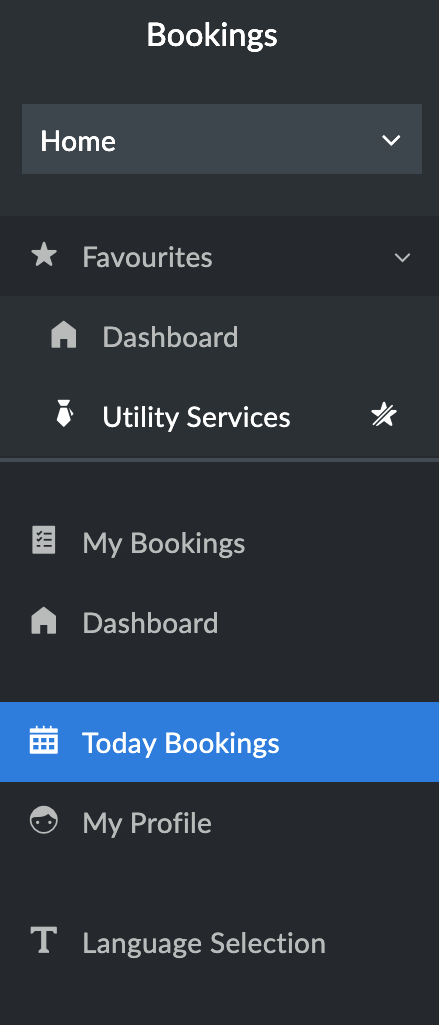
Here's a sample of how a customized menu would look in Live mode.

Illustration of a multi-level menu

Illustration of a multi-level menu
A glimpse into the new Favourites
section within the App Menu
How do I benefit from this?
The flexible app menu builder will provide your users with customized menus for an exceptional user experience.
Applicable for:
C5, C6
Availability:
All DCs
- - - - - - - - - -
Notification preferences
The soon-to-be launched
Notification preferences
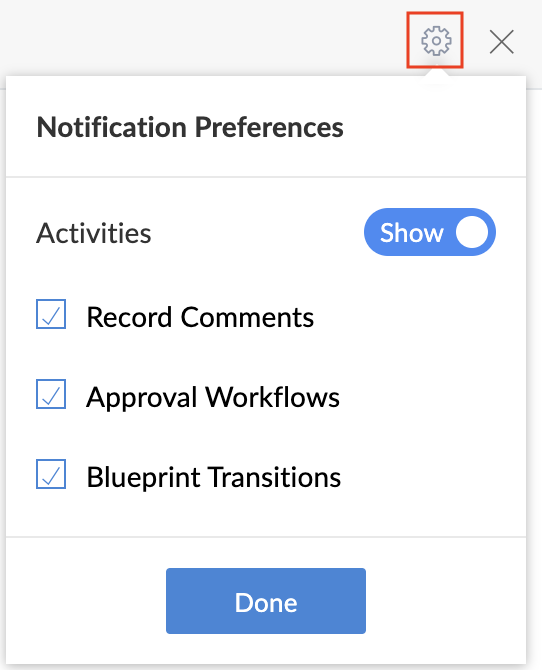
feature will be a nifty addition that provides you with complete control over customizing your notifications. You'll now have the power to fine-tune your notifications by enabling/disabling the alerts on
Record comments,
Approval actions, and
Transition
actions. This helps in preventing unwanted notifications from bombarding you.
Moreover, you'll also have the option to completely turn off notifications.
Moreover, you'll also have the option to completely turn off notifications.
How do I access it?
Navigate to the
Notifications
pane and click the
Settings
icon.
How do I benefit from this?
The Notification preferences feature offers a range of valuable benefits—enhanced relevance, minimized interruptions, improved productivity, and more—to make your user experience more pleasant.
Applicable for:
C5, C6
- - - - - - - - - -
With that, we conclude this month's updates. Your continued support keeps us motivated, and we're gearing up to introduce even more thrilling enhancements in the upcoming months.
Regards,
The Zoho Creator Team
Topic Participants
Ashwin Vishal R
Damien Cregan
Peter Zijlstra
Marks
admin
Sticky Posts
Zoho Creator + LLMs using Zoho MCP: Bring contextual AI into your apps
Hello everyone, We're excited to share that Zoho Creator can now be integrated with leading AI models(like Claude) using Zoho MCP. As you know, Zoho Creator has been a pioneering low-code platform with a razor-sharp focus on making it easy to build businessIntroducing Zoho Creator's 2025 Release Projection 2
Hello Creators! I'm Prakash, from the Creator product management team, and today I'm delighted to unveil our next set of features as part of Release Projection 2 for 2025. With thoughtful analysis and planning, we've curated powerful new capabilitiesZoho Creator - 2023 Release Projection 1
Hello everyone! A very Happy New Year to you and your family. Hope you're all good and having a great time using Zoho Creator to make your lives easier and your businesses prosper. 2022 was an action-packed year for us at Creator, and we hope to continueZoho Creator User Group meetups in a city near you! - Oct - Nov, 2023
Greetings from the Zoho Creator team! We're hosting a series of Zoho Creator meetups in various cities across the globe, and we'd love to meet you there! Our meetups are a great opportunity to network with industry peers, exchange ideas and best practices,Zoho Creator - 2023 Release Projection 2
Hello everyone! Time truly flies when you're having an incredible journey, and today we mark the completion of an eventful and action-packed six months. It feels like just yesterday when we embarked on this adventure together with the launch of our new
Recent Topics
Calendar Booking - Related Deal
Is it possible to automatically associate a Calendar Booking with an existing Deal in Zoho CRM? We're trying to use the native Calendar Booking feature. Our goal is to send a booking link to a customer from an existing Deal record, so that when the customerApproval Process configuration is now more flexible and fully customizable
Hello everyone! Approval Process is back with a better user experience that makes it easier to add rules to your processes. This enhancement includes some UI updates that help you create highly structured approval stages—and more. Let's look at the enhancementsKaizen #268: Using Zoho MCP to Build and Configure Zoho CRM Cadences
Hi everyone! Welcome back to the Kaizen series! In the previous Kaizen posts, Kaizen #265 and Kaizen #266, we explored how Zoho MCP can be used to work with Zoho CRM records, retrieve metadata, customize CRM, configure automation, and even coordinateDeliverability Update: Impact of the Ongoing Microsoft 365 Service Disruption on Email Delivery
Update (November 16, 2026): This incident is resolved. In its final update on November 14, Microsoft confirmed that all affected services have fully recovered and the backlog of email messages has been processed. Microsoft lists the end of impact as NovemberZoho Inventory - Imporoved Order Fulfillment Reporting
Hi Inventory Team, i've tried to contact you through support@eu.zohoinventory.com but haven't received a response. I am contacting you on behalf of a client. Our client is a car parts wholesale business and we set them up on Zoho Inventory earlier thisSay Hello to Telephony in Zoho FSM
Zoho FSM now brings complete telephony support so your team can manage inbound and outbound calls without switching tabs. Faster responses, smarter routing, and total call visibility—all in one place. Choose the telephony setup that works for you Zoho’sIncreasing API Credits
Hello everyone! Organizations consume Zoho CRM APIs for various business needs, and it's a show-stopper when you exhaust your API credits before the 24-hour rolling window replenishes your credits. To meet your growing needs and help you keep your business[Online Training] Zoho RPA masterclass: Fundamentals, SAP® automation, & AI workflows
Hello everyone! Greetings from the Zoho RPA Training Team! We're excited to announce our upcoming Online Training on Zoho RPA. Manual, repetitive tasks like entering data, updating spreadsheets, managing files, and extracting information from documentsZoho Inventory | Can't uncheck/turn off Advance Tracking
Hi, I wanted to know if there's a way to turn off Advanced Tracking (such as Serial Number or Batch Tracking) for an item in Zoho Inventory. I’ve read that you might need to delete associated transactions and clear the opening stock to disable these features.CNIL - Suivi de Pixel
Bonjour à tous, À la suite de la nouvelle recommandation de la CNIL sur les pixels de suivi dans les e-mails, savez-vous si Zoho Campaigns permet : de conditionner le suivi des ouvertures au consentement de chaque contact ; de proposer un lien permettantJoin Zoho Meeting only via Web browser and not with Zoho Meeting App
Dear Zoho team, according to the documentation [1], Zoho Meeting only offers web view for Chrome and Firefox on a desktop. For other browsers and devices, participants can only join a Zoho Meaning with the Zoho Meeting App installed. This is a big hurdleGetting an error when trying to use the Zoho Desk Resources with our Zobot chat
Hello, When I try to set our Zobot AI Card Training to Zoho Desk resources I get an error when testing it and it bypasses the bot completely. When I try to switch it to the Zoho SalesIQ resources option in there it will list some articles but not giveKB Articles from Zoho Learn - Import as .md
I love the concept of being able to use articles from Zoho Learn as knowledge base articles for Zia Agents. This will absolutely help with proper documentation and organization of company processes and SOPs. This was a great concept. However, even whenCannot reorder fields in Page Layout in Expenses and Purchase Requests
It is very inconvenient that the custom fields in Page Layout cannot be re-ordered. The only way is to remove the fields and re-create them; however, it is impractical. This would affect the reports and dashboards we are having. Not able to re-order thePurchase Requisition in Zoho Books
I want to understand if Zoho Books is having the following workflow: PR ( Purchase Requisition ) >> PO ( Purchase order) >> GRN/SRN ( Goods/Services receipt note) >> BillZoho Books | Product Updates | November 2026
Hello users, As the year winds down, we've introduced several enhancements to make compliance, inventory management, and everyday bookkeeping easier in Zoho Books. This month's updates include an improved TDS experience, a new way to exchange transactionsTips & Tricks #8 | Zoho Mail: Seguridad, privacidad y control para tu empresa
El correo electrónico sigue siendo una herramienta fundamental para cualquier organización. Por él circulan comunicaciones internas, información de clientes, documentos confidenciales y datos esenciales para el negocio. Por eso, elegir un proveedor dePersonalize Email Campaigns using CRM Data
Recently, few of our CRM users wanted to send an email campaign with personalized sender details and signature so that recipients can instantly recognize the sender. We are happy to announce the new enhancement in campaign creation through which you can personalize your email campaign using CRM Contact/Lead Owner's data. Let’s see how we can use those data to send emails. Personalize sender details Using Zoho Campaigns, you can send an email campaign with a personalized sender name and email address集めて終わりにしない。― Zoho FormsからCRMへデータをつなぐ
ユーザーの皆さま、こんにちは。ゾーホージャパンの友田です。 Zoho Formsで問い合わせや資料請求を受け付けた後、その情報をどうしていますか? 例えば、 フォームから届いた氏名や会社名、メールアドレスを確認して、Zoho CRMにも同じ情報を入力している。 そんな作業が発生している場合、FormsとCRMをつなぐことで、その手間を減らせるかもしれません。 Formsに入力された情報をCRMへ Zoho Formsは、Zoho CRMと連携できます。 例えば、Webサイトから資料請求を受け付ける場合、Sheet co-edit: no live presence — also on Collaborate demo?
Two Sheet co-edit sessions open OK (same document_id, document.edit: true), but there’s no real-time collaboration: no cell highlights, Group Chat → Users stays empty. Writer co-edit works on the same Office Integrator setup. We see the same on the officialShort product videos on Zoho Commerce product pages: what works?
Short product videos are becoming a normal part of online store pages, and I have been thinking about how to use them well on a Zoho Commerce store. A few points that seem to matter: Keep them short. 6 to 15 seconds showing the product from a few anglesHow to embed Google Analytics GA4 tracking on a standalone Public Page (outside Customer Portal)?
Hi, Is there an official or recommended way to embed Google Analytics (GA4) tracking directly onto a standalone public Zoho Creator Page (outside of a Customer Portal)? I’m considering using an invisible Custom JS Widget as a workaround, but I’d loveUnable to integrate Whatsapp Messaging into Zoho CRM - Business Messaging
Hello, I want to set up Business Messaging in our Zoho CRM and am struggling to set it up. I have logged into the account and our facebook business page, our business shows in the dropdown for WhatsApp Business Account but does not for WhatsApp BusinessZoho CRM calendar merge with outlook
Hi Zoho team! I did the steps for syncing the zoho CRM calendar with outlook. Everything works well as long as the user creates meetings inside the newly created Zoho CRM calendar in outlook, but I need a way to also display the meetings which are receivedThunderbird cannot authenticate Zoho on android
I keep getting a message from Thunderbird on Android that it could not authenticate for my account, dadashton@zoho.com., and to update my server settings. Now the settings are exactly the same for my other devices (1 Windows, 1 Mac and 2 Linux) Can anybodyBills import rejects the Account column (The account does not exist), although the accounts exist in the Chart of Accounts
Hello Zoho Books Team, I am unable to import bills into my Zoho Books. The import keeps rejecting the Account column, even though the accounts exist and work when I create a bill manually. What I am doing Bills > Import Bills, CSV/XLSX file, 145 rows,How do I reorder the item table columns in my invoice template?
There must be a way I just cannot find it. Anyone?Zoho Desk API returning 403 SCOPE_MISMATCH for Ticket Search API
Hello Zoho Support Team, We are experiencing an authorization issue with the Zoho Desk Ticket Search API. Our integration was working correctly yesterday, but we are now receiving the following error when calling the Search Tickets endpoint: API: GETFree webinar: Zoho Sign in Q3 2026
Hi there! From smarter signing on your Apple devices to new ways to verify and personalize your documents, Zoho Sign had a busy Q3—and we're bringing it all together in one session. Join us for a complete walkthrough of everything new this quarter, plusZoho Desk - Delete an email conversation
When using Zoho support desk I see an option to delete and edit conversations that are comments, BUT if the conversation was automatically added as a conversation from an email, then the option to delete it seems not to be available. Is there a way toMessages do not open and I cannot reply to messages in Zohodesk
Hi, this is an unusual behaviour. I cannot reply to messages: Accessing a draft message - runs endlessly. Sending Emails fail:Link item in purchase order to Customer
Is it possible to link each item in purchase order to a customer which would create an associated list, so I can easily find where, when and what my customer have order from us. Thanks!Passing the CRM
Hi, I am hoping someone can help. I have a zoho form that has a CRM lookup field. I was hoping to send this to my publicly to clients via a text message and the form then attaches the signed form back to the custom module. This work absolutely fine whenI want to test some payment subscription with a test credit card from stripe
I have a test customer and place https://stripe.com/docs/testing#international-cards test credit card number to the Add New Card in subscription.zoho customer page. After I added, the test card was declined. Am I missing something?This user is not allowed to add in Zoho. Please contact support-as@zohocorp.com for further details
Hello, Just signed up to ZOHO on a friend's recommendation. Got the TXT part (verified my domain), but whenever I try to add ANY user, I get the error: This user is not allowed to add in Zoho. Please contact support-as@zohocorp.com for further details I have emailed as well and writing here as well because when I searched, I saw many people faced the same issue and instead of email, they got a faster response here. My domain is: raisingreaderspk . com Hope this can be resolved. Thank youStrengthen your account security with Password Policy
Still using the same password for all your accounts? Or perhaps your password is easy to guess or follows a predictable pattern? If so, your account could be at risk. Once someone gets hold of a password that you reuse, they could potentially gain accessExpanding sales, marketing, and support capabilities in Zoho CRM Plus 3.0
Hey everyone, It's been more than 10 years since we launched Zoho CRM Plus back in 2014. This is quite a milestone, and we've come a long way in empowering you with everything you need to offer an exceptional customer experience. On that note, we expandedIntroducing PRM: Build, manage, and scale your partner ecosystem
Growing a partner ecosystem is a good problem to have. What starts as a handful of partners can quickly turn into a maze of spreadsheets, emails, and disconnected processes. More partners mean more opportunities, greater reach, and new ways to growLive connection to DS files in Zoho Creator / ChatGPT
As an idea, we are using ChatGPT to build with Zoho Creator (outside of Zia), which is works brilliantly to assist write deluge, provide test suggesitons etc. Currently we are uploading the DS files which are very point in time, it would be great to haveZoho Forms - Feature Request - Embed iFrame or Dynaic URLs in Description fields
Hi Zoho Forms team, I'm working with a client who uses Zoho Forms internally to collect information over the phone from potential work placement candidates. At the end of the form, the candidate needs to be booked in for an induction, which we've configuredNext Page