Access millions of Unsplash photos directly from the Theme Builder

Access millions of Unsplash photos directly from the Theme Builder

Hello form builders,

We're excited to introduce a new enhancement to the Zoho Forms Theme Builder.

You can now browse and apply millions of high-quality images from Unsplash without leaving the Theme Builder. There's no need to download images, switch tabs, or upload them manually.


Why Unsplash?

Unsplash is one of the world's largest collections of high-resolution photography, contributed by professional photographers across the globe. By integrating it directly into Zoho Forms, we've made it easier than ever to access quality visuals while designing your forms.

Browse images the way you work

Different users have different workflows, so Unsplash within Zoho Forms offers multiple ways to discover images.

Search individual photos

Already know what you're looking for?

Simply enter a keyword, such as office, education, healthcare, flowers, or technology and browse relevant images from the Unsplash library. This is perfect when you have a specific theme or subject in mind.

Explore Collections

Collections group together carefully curated images around a common theme.

If you're designing multiple forms for the same campaign or want a consistent visual style across your forms, Collections make it easy to find images that work well together.
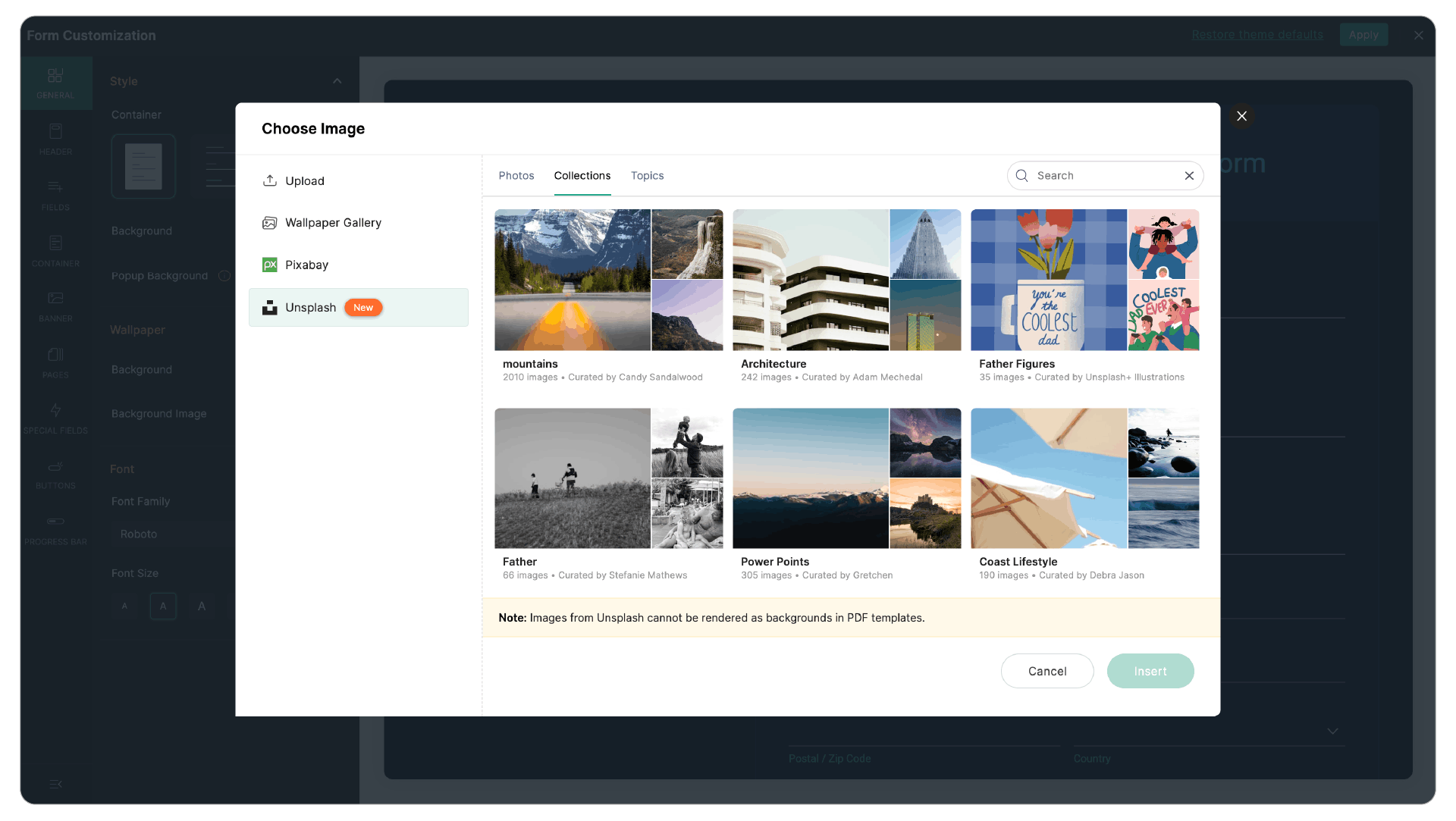
Browse by Topics

Not sure exactly what image you want? Topics let you explore broad categories which is a great way to discover inspiration before choosing a background.
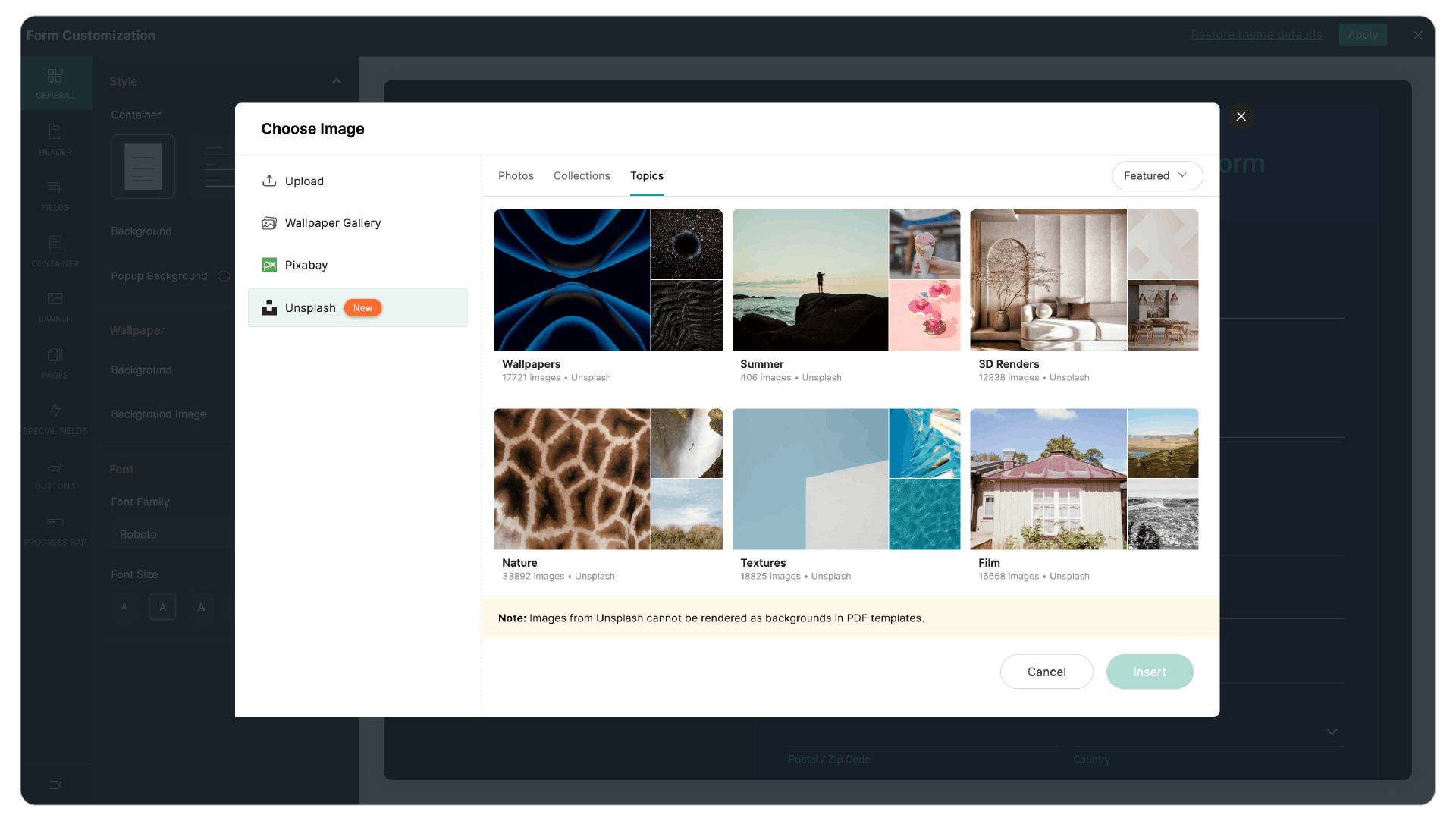
Find images faster with filters

Large image libraries are only useful if you can quickly find what you need. That's why Unsplash in Zoho Forms includes built-in filters that help narrow your search.

You can filter images based on:
  1. Orientation: Choose landscape or portrait images depending on your form layout.
  2. Color: Match images to your brand colors or create a consistent visual theme.

These filters help reduce browsing time and make it easier to find images that fit your design.

Design without compromising readability

A beautiful background shouldn't make your form difficult to complete.

After selecting an image, you can adjust several display settings to ensure your form remains clear and accessible.
  1. Image alignment
  2. Image fit
  3. Background opacity
These controls allow you to balance aesthetics with readability, ensuring your questions and fields remain easy to see while still benefiting from an attractive background.

We hope Unsplash helps you create more engaging and visually appealing forms with less effort. Give it a try and let us know what you think in the comments. 


Cheers,
Samhita

    • Sticky Posts

    • Step up your lead generation game with online forms

      Hello fellow form builders,   Generating leads for your sales team gets easier when you integrate your CRM with online forms. To help show you how to use forms as part of your lead generation strategy, we have exclusive tips and tricks on how to collect, update and prioritize lead information in Zoho CRM based on form responses.  1. Create new leads If CRM software is designed to help you handle your business easily, that means getting data into it should also be easy. Check out the article on how
    • New field in Zoho Forms: Validate structured data with the Regex field

      Have you ever received form submissions where the information looked almost correct but wasn't quite in the format you expected? Maybe an employee ID was missing a character. A PAN number was entered in lowercase. A license number had an extra space.
    • Password-Protected PDFs in Zoho Forms

      Hello form builders, PDFs generated from your form submissions travel through email, across devices, and between hands you didn't intend. For a restaurant's event inquiry, that's fine. But for a signed legal agreement, a loan application, or personal
    • Introducing Spotlight Forms

      Hey form builders! If someone opens your form, sees the wall of fields ahead, and quietly closes the tab. It may not be because the questions were hard. It could be because the experience felt like too much. Which is why we have now introduced a new form
    • Access millions of Unsplash photos directly from the Theme Builder

      Hello form builders, We're excited to introduce a new enhancement to the Zoho Forms Theme Builder. You can now browse and apply millions of high-quality images from Unsplash without leaving the Theme Builder. There's no need to download images, switch
    • Recent Topics

    • unable to join meeting due to speaker issue

      unable to join meeting due to speaker issue
    • How to add formatting in zoho.cliq.postToUser(...) message?

      In a CRM Deluge function, I'm trying to use the message formatting guidelines given here: https://www.zoho.com/deluge/help/cliq/posting-to-zoho-cliq.html#message-formats My message is: message: #Title text. The result in Cliq is: #Title text. (no large
    • Marketing Tip #50: Sell digital products and use them to grow your store

      Physical products need packaging, shipping, and stock management. Digital products need none of that. Once created, they can be sold an unlimited number of times, delivered instantly, and never go out of stock. What counts as a digital product? A digital
    • Turn off Mobile Optimize

      Hello is it possible to stop the automatic mobile optimization of my site as it looks much better on a mobile in full site format rather than mobile format. Thanks
    • How to select from pricebook when creating a salesorder or quote

      I am creating a sales order and when selecting the Products I do not see any where to select from pricebooks. How do i associate this to my orders?
    • API - Available Stock Definitions

      Okay, Zoho team... your copywriters fell down on the job for this one :) I think these warrant a bit more explanation as to what they include and what they don't.
    • Cross-application Deluge calls fail when application link name starts with a number

      I encountered an issue when calling a custom function in another Zoho Creator application within the same account. The target application’s URL/application link name began with a number, similar to: 27_example_application The following cross-application
    • Transformez vos webinaires en opérations automatisées

      Organiser un webinaire, c’est bien plus que passer en direct. Il faut gérer les inscriptions, suivre les participants, envoyer les enregistrements, mettre à jour le CRM… et s’assurer que chaque étape se déroule au bon moment. L’automatisation des workflows
    • Item/service subtotal

      Just discovered & really pleased that we can drag to re-order the line items in Sales orders & Invoices, a very nice feature which doesn't seem to be documented? It would be nice to be able to insert a subtotal as a line item to complete this great feature
    • Cash Basis VAT RETURN REPORT Required in Saudi Arabia

      Zoho Books in Saudi Arabia not showing TAX RETURNS report on CASH Basis.. It only showing accrual basis. Oforur requirement is both reports (Cash Basis and Accrual Basis ) , same like indian Edition of Zoho Books showing. CASH BASIS RETURN is our Basic
    • Marketing Tip #1: Optimize item titles for SEO

      Your item title is the first thing both Google and shoppers notice. Instead of a generic “Leather Bag,” go for something detailed like “Handcrafted Leather Laptop Bag – Durable & Stylish.” This helps your items rank better in search results and instantly
    • How can I filter inactive/disable agent tickets?

      Hello, We have an user-agent that left the company and we inactive/disabled his agent. So, now I can no longer filter or search tickets that he is the current owner, or even create a rule to reassign tickets to another person when the ticket is reopen.
    • How do i move multiple tickets to a different department?

      Hello, i have several tickets that have been assigned to the wrong department.  I am talking about hundreds of automatically generated ones that come from a separate system. How can i select them all at once to move them to another department in one go? I can select them in "unsassigned open tickets view" but i can't find a "move to another department" option. I also can't seem to assign multiple tickets to the same agent in that same view. Could somebody advice?
    • Add Reauthentication Option for Zoho Bug Tracker Integration in Zoho Desk

      Hello Zoho Desk Team, We hope you're doing well. We would like to request an enhancement to the Zoho Bug Tracker integration within Zoho Desk. Current Limitation: At the moment, there is no option to reauthenticate the Zoho Bug Tracker integration in
    • Create Package From A Picklist

      Dear Zoho, Can it be made possible to create a package from a picklist? The reason our company makes a picklist is for that to become a package Our sales orders have 600-1000 items I hope that makes it clear that it's hard to delete 990 items when we
    • Migrating from Zoho Checkout to Zoho Billing

      I have an active Zoho Checkout account where I'm charging customers for subscriptions. Now I'm looking to upgrade and only use Zoho BIlling, in which my account in on read only mode at the moment. I can see is also tracking the customers and its payments.
    • Step up your lead generation game with online forms

      Hello fellow form builders,   Generating leads for your sales team gets easier when you integrate your CRM with online forms. To help show you how to use forms as part of your lead generation strategy, we have exclusive tips and tricks on how to collect, update and prioritize lead information in Zoho CRM based on form responses.  1. Create new leads If CRM software is designed to help you handle your business easily, that means getting data into it should also be easy. Check out the article on how
    • API - Bank Accounts | Reconciliation Discrepancy

      Unless I'm reading it wrong, the documentation for the Bank Reconciliations API is inconsistent with itself. https://www.zoho.com/books/api/v3/bank-accounts/#create-a-bank-reconciliation The text definition says that the transaction_id should be a string,
    • another little issue

      So to get over showing prices with VAT we used the price lists and made the prices inclusive. The problem is now on the items it wants to show the orginal retail value which makes no sense. Ideas please
    • Request to update VAT registration date for Brikz And Bolt Technical Services L.L.C S.O.C

      Dear Zoho Books Support Team, I am writing to request assistance with updating the VAT registration date to 01 June 2026 in our Zoho Books account (Organization: Brikz And Bolt Technical Services L.L.C S.O.C, TRN: 105420963800003). Currently, the system
    • Handle Leading Zeros in a Number Field

      Hi, If I use a Number Field, set with Min 7 Digits and Max 7 Digits, and enter 0000001, it will result in 1 and an error as it removes the leading zeros, the same with entering 0012340 will result in 12340 and error. So I have to use a Text Field and
    • can't access zoho account

      I can't log in to my zoho account, can you help me
    • HTML PDF Templates / Build From Scratch option not visible for Custom Modules

      Hi everyone, I am working with Zoho Books Custom Modules and trying to create a custom 4x4 package label PDF template using HTML/CSS. According to the official Zoho Books documentation for HTML PDF Templates, there should be an option like: Settings →
    • Virtual Option for Fields

      Hi, I would like to be able to choose another option other than Read-Only or Disabled, such as Virtual. And with Virtual, the field is shown on the form and avilable in rules, but NOT saved to the Database. A use case is having multiple Large Lists of
    • Prefix & Suffix on Single Line, Number, etc.

      Hi, I would like to have the same Prefix and Suffix that was added to the Unique ID on Text and Number Fields. Use case could be as basic as temperature, as per another Idea I have to use Single Line (Text) for a number that might have leading zeros today,
    • Customer User Fields for use in Rules

      Hi, I would like to be able to add custom fields to the users, such as Department or Role, which can then be used in Rules, Reports, etc. as a condition. A use case is limiting Global lists or Choices based on the users Custom Field, so one form can be
    • Locked out of MFA due to changing phones

      I have been locked out of my Zoho Books account since i changed my mobile phone over. I can get the OTP through the ZOHO Books software but i cant confirm using my phone app as nothing appears to authorise. I need to know how to register/set up my new
    • 👍 Zoho CRM's Notes now gets Reactions and a new look

      Available in SA and JP DCs. Rolling out to other DCs in phases. Hello everyone, Notes help users capture important updates, collaborate with teammates, and maintain context for records. Now with Note Reactions, users can quickly acknowledge updates, express
    • Updating Unit Code for New Item Creation, Quote and Invoicing is so inconvenient

      The Zoho Team has implemented many updates, but these updates should be optional. Before rolling out any new feature, they should already have a solution in place that allows users to remove or disable it if they choose not to use it. Just yesterday,
    • All new Address Field in Zoho CRM: maintain structured and accurate address inputs

      Availability Update: 29 September 2025: It's currently available for all new sign-ups and for existing Zoho CRM orgs which are in the Professional edition exclusively for IN DC users. 2 March 2026: Available to users in all DCs except US and EU DC. 24
    • Zoho books and venmo

      Hi, Is there a way to hook Venmo into zoho books? I have a Venmo business account and want to be able to sync that. I know you can do it with the paypal integration but I dont want to use paypal for the fees and that doesnt allow me use/integrate my current
    • Payroll needs to automatically remit taxes, not just give me the calculations

      Wagepoint, PayEvo, Waveapps, etc... All your competitors deposit employee payroll, but they ALSO remit taxes automatically. Get with the program, your Payroll app is extremely sparse.
    • Creating new Teams meeting from CRM doesn't enable Team functions in the meeting

      Hi I'm trying to set up the meeting integration and I've seen that when I create a Meeting in the CRM and set the location to Online and the Provider to Teams, and complete the boxes, add a participant etc, whilst the meeting is created in Teams, the
    • Approval Process configuration is now more flexible and fully customizable

      The Approval Process is back with an improved user experience designed to make it easier to build structured, flexible, and intuitive approval workflows. Here’s a look at some of the key enhancements: Name Your Rules & Stages You can now give each approval
    • Introducing Approval SLA for Approval Processes

      Approvals can sometimes be delayed when approvers do not respond within the expected timeframe, which can slow down your recruitment processes. With the new Approval SLA in Zoho Recruit, you can set deadlines for approval requests and define automated
    • Introducing Microsoft Word Integration in Zoho Contracts

      We are excited to announce a new feature that brings contract authoring and negotiation in your familiar environment — the Microsoft Word Integration. What This Integration Brings The Microsoft Word Integration connects Zoho Contracts with the Microsoft
    • Map My Client Locations for Zoho CRM Extension: Turn CRM Addresses Into Action

      Hello everyone, Your CRM knows who your customers are. Now, see where they are on the interactive map directly from Zoho CRM. Introducing Map My Client Locations for Zoho CRM, an extension built for businesses that rely on sales visits, field service,
    • Scheduled and Automated Report Delivery from Zoho Projects

      Zoho Projects has useful reports including task reports, timesheet summaries, and workload charts. However, there is currently no way to schedule these reports to be automatically delivered to stakeholders on a recurring basis. This means: Project managers
    • Collaborate Visually with Whiteboard in Zoho Projects

      Whiteboard in Zoho Projects allows you to collaborate visually by creating diagrams, annotating designs, and sketching project workflows using shapes, text, and images within project modules. Team members can work simultaneously, improving productivity
    • Fields in MS-Word Template

      With the new MS-Word integration, how does one create fields in an imported MS-Word document which can then automatically be populated with an Intake Form?
    • Next Page