Automating Attendance Tracking with Zoho Cliq Developer Platform

Automating Attendance Tracking with Zoho Cliq Developer Platform

I wish remote work were permanently mandated so we could join work calls from a movie theatre or even while skydiving! But wait, it's time to wake up! The alarm has snoozed twice, and your team has already logged on for the day.


Keeping tabs on attendance shouldn't feel like guiding a flock of rebellious sheep. Hence, let's automate check-in and check-out notifications using the Zoho Cliq Platform Schedulers and the Zoho People API, eliminating the guesswork in attendance management and reducing the risk of errors associated with manual monitoring.

How does this solution benefit a business?

  1. Real-time reminders reduce instances of ghost check-ins and ensure accurate recording of everyone's logged hours.
  2. Essential for attendance tracking, payroll accuracy, compliance with labour laws, and audits.
  3. The entire team stays informed, fostering a cohesive workflow that eliminates the need for micromanagement.      
Pre-requisites:  

Before beginning to script the code below, we must create a connection in Cliq with Zoho People. Once a connection is created and connected, you can use it in Deluge integration tasks and invoke URL scripts to access data from the required service.

Create a Zoho People default connection with any unique name with the scopes - ZohoPeople.Attendance.ALL , ZohoPeople.forms.ALL and ZohoPeople.leave.ALL

ⓘ Document for reference : Connections in Cliq 


How to obtain or locate the channel unique name in Cliq?

  • Navigate to the top right corner of the channel and locate the three dots. Click it.

  • In the menu that appears, select "Channel info" and a pop-up will open, displaying detailed channel information.

Hover over the "Connectors" section and click it. Under "API Parameters," you will find the Channel ID and unique name.
We need to create two schedulers, specifically one for check-in and another for check-out.
  1. After a successful login in Cliq, hover to the top right corner and click your profile. Post clicking, navigate to Bots & Tools > Schedulers.
  2. On the right, click the "Create Scheduler" button.
  3. To learn more about schedulers and their purposes, refer to the Introduction to Schedulers.
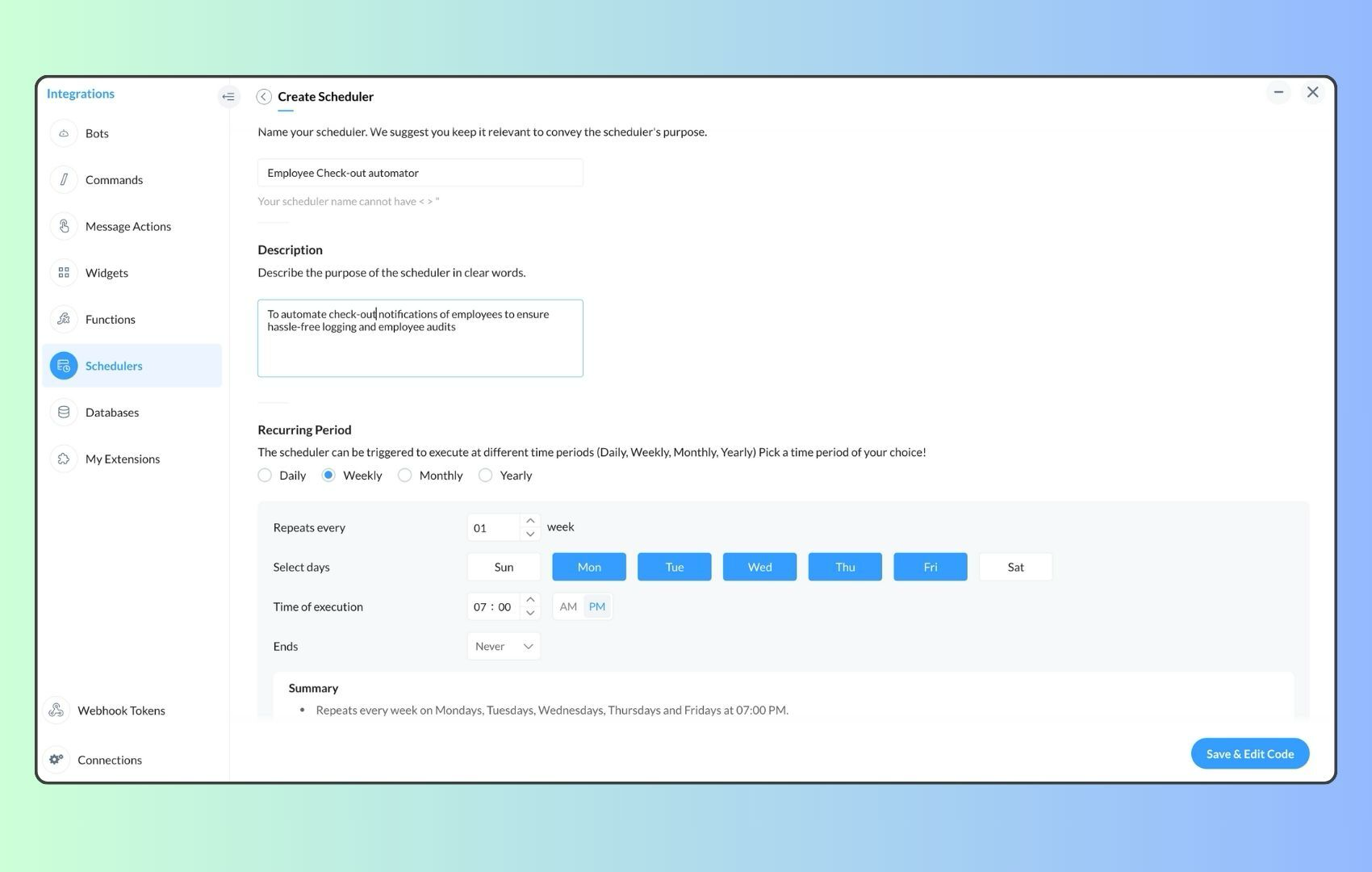
  4. Create a scheduler using your preferred name. Specify the following details: the scheduler name and a description.  

  1. For the recurring period, choose the type "Weekly." Select Monday through Friday and set the time of execution to 11 AM or any other time that aligns with your company's check-in time, or customise the recurring period based on your specific use case.
  2. Finally, click "Save & edit code" and paste the following code.
  1. currentDate = zoho.currentdate;
  2. currentDateString = currentDate.toString("dd-MMM-yyyy");
  3. fromIndex = 1;
  4. toIndex = 200;
  5. // Get all active users
  6. users = zoho.people.getRecords("employee",fromIndex,toIndex,{},"{CONNECTION_LINK_NAME}");
  7. usersList = List();
  8. usersList.addAll(users);
  9. iterations = {1,2,3,4,5,6,7,8,9,10,11,12,13,14,15,16,17,18,19,20,21,22,23,24,25};
  10. // Get All Employees ( 4000 MAX )
  11. if(users.size() == 200)
  12. {
  13. for each  iteration in iterations
  14. {
  15. fromIndex = fromIndex + toIndex;
  16. toIndex = toIndex + 200;
  17. users = zoho.people.getRecords("employee",fromIndex,toIndex,{},"{CONNECTION_LINK_NAME}");
  18. if(users.size() > 0 && users.size() == 200)
  19. {
  20. usersList.addAll(users);
  21. }
  22. else if(users.size() > 0 && users.size() < 200)
  23. {
  24. usersList.addAll(users);
  25. break;
  26. }
  27. else
  28. {
  29. break;
  30. }
  31. }
  32. }
  33.  
  34. // Get all the employees checkedin from the morning.
  35. getAttendenceEntries = invokeurl
  36. [
  37. url :"https://people.zoho.com/api/attendance/fetchLatestAttEntries?duration=240"
  38. type :GET
  39. connection:"{CONNECTION_LINK_NAME}"
  40. ];
  41. latestAttendanceRecords = getAttendenceEntries.get("response").get("result");
  42. checkedInUsers = List();
  43. for each  userRecord in latestAttendanceRecords
  44. {
  45. checkedInEmployeeEmail = userRecord.get("emailId");
  46. checkedInUsers.add(checkedInEmployeeEmail);
  47. }
  48.  
  49. // Get all the employees who applied for leave both approved and pending ( Remove PENDING to exclude only the leave approved employees )
  50. leaveApprovedEmployees = invokeurl
  51. [
  52. url :"https://people.zoho.com/api/v2/leavetracker/leaves/records?from=" + currentDateString + "&to=" + currentDateString + "&dateFormat=dd-MMM-yyyy&approvalStatus=[APPROVED,PENDING]"
  53. type :GET
  54. connection:"{CONNECTION_LINK_NAME}"
  55. ];
  56. info  leaveApprovedEmployees;
  57. leaveApprovedEmployeesList = List();
  58. for each  member in leaveApprovedEmployees.get("records")
  59. {
  60. leaveApprovedEmployeesList.add(member.get("EmployeeId"));
  61. }
  62. info leaveApprovedEmployeesList;
  63.  
  64.  
  65. // Add the users to yet to checkin list if they are not checked from the morning and not applied for leave
  66. usersYetToCheckIn = list();
  67. for each  user in usersList
  68. {
  69. employeeEmail = user.get("EmailID");
  70. employeeId = user.get("EmployeeID");
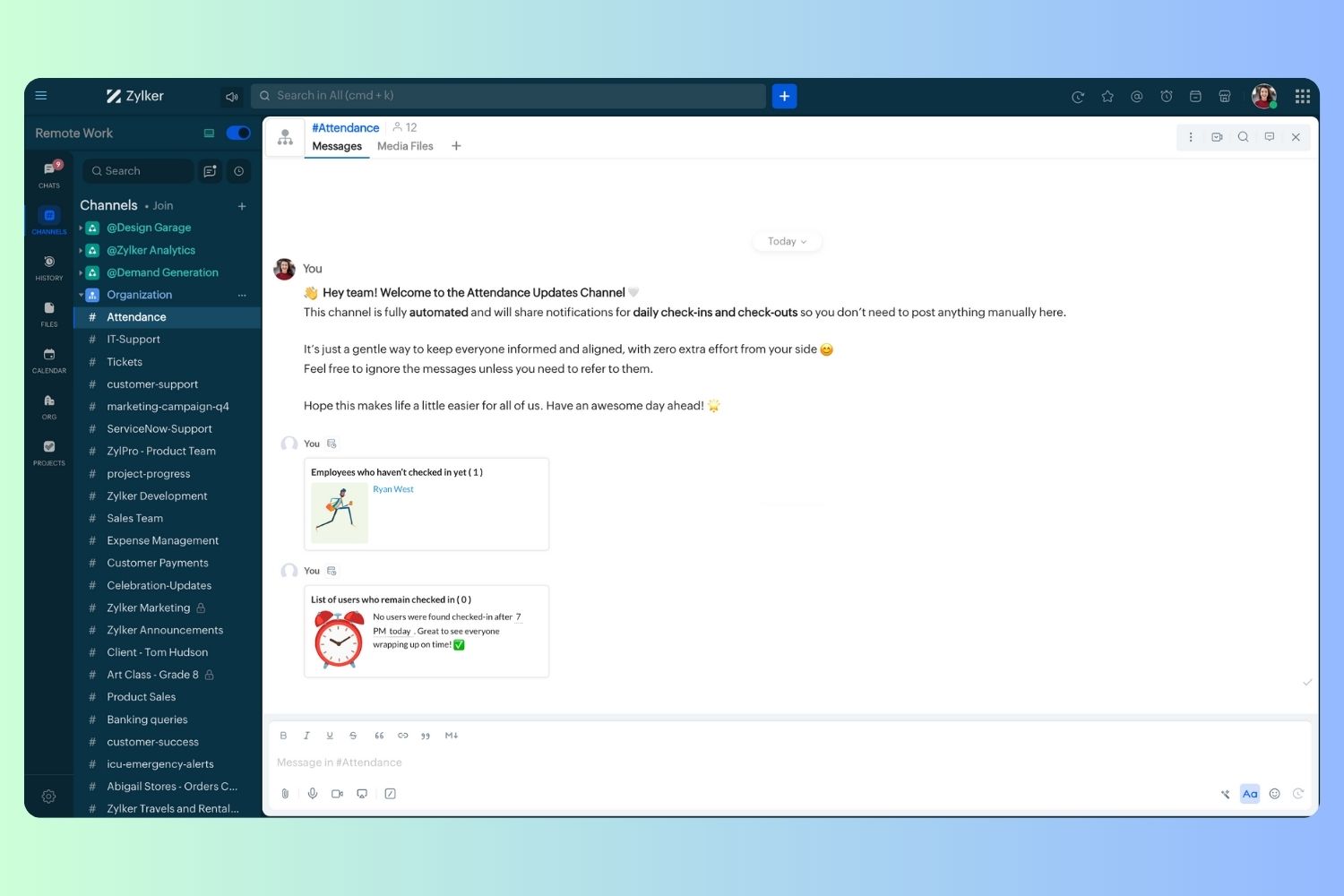
  71.     employeeStatus = user.get("Employeestatus");
  72. if(!checkedInUsers.contains(employeeEmail) && !leaveApprovedEmployeesList.contains(employeeId) && employeeStatus.equals("Active"))
  73. {
  74. usersYetToCheckIn.add(employeeEmail);
  75. }
  76. }
  77.  
  78. // Mention the list of users in the channel.
  79. if(usersYetToCheckIn.size() == 0)
  80. {
  81. info "No users were found yet to checked-in at 11 PM today. Great to see everyone wrapping in on time! ✅";
  82. }
  83. else
  84. {
  85. usersYetToCheckInString = "";
  86. for each  user in usersYetToCheckIn
  87. {
  88. usersYetToCheckInString = usersYetToCheckInString + "[" + user + "](mail:" + user + ") \n";
  89. }
  90. usersYetToCheckInString = usersYetToCheckInString.subString(0,usersYetToCheckInString.length() - 2);
  91. response = Map();
  92. card = Map();
  93. card.put("title","Employees who haven’t checked in yet ( " + usersYetToCheckIn.size() + " )");
  94. card.put("thumbnail","https://i.pinimg.com/originals/85/e9/f3/85e9f3f5ac31fc5aab586e208297f43d.gif");
  95. card.put("theme","modern-inline");
  96. response.put("card",card);
  97. response.put("text",usersYetToCheckInString);
  98. info zoho.cliq.postToChannel("{CHANNEL_UNIQUE_NAME}",response);
  99. }

  1. Now, let's follow the same steps and create a scheduler for checkout reminders. Under the recurring period, choose the type as "Weekly." Select Monday through Friday and set the time of execution to 7 PM or any other time that aligns with your company's checkout time, or customise the recurring period based on your specific use case.
  2. Click "Save & edit code" and paste the following code.
  1. attendanceResponse = invokeurl
  2. [
  3. url :"https://people.zoho.com/api/attendance/fetchLatestAttEntries?duration=600"
  4. type :GET
  5. connection:"{CONNECTION_LINK_NAME}"
  6. ];
  7. info attendanceResponse;
  8. todayDate = zoho.currenttime.toString("YYYY-MM-dd");
  9. latestAttendanceRecords = attendanceResponse.get("response").get("result");
  10. usersWithoutCheckout = list();
  11. if(latestAttendanceRecords.size() > 0)
  12. {
  13. for each  userRecord in latestAttendanceRecords
  14. {
  15. userEmail = userRecord.get("emailId");
  16. dailyEntries = userRecord.get("entries");
  17. for each  dailyEntry in dailyEntries
  18. {
  19. if(dailyEntry.containsKey(todayDate))
  20. {
  21. todayEntryDetails = dailyEntry.get(todayDate);
  22. attendanceLogs = todayEntryDetails.get("attEntries");
  23. for each  logEntry in attendanceLogs
  24. {
  25. if(!logEntry.containsKey("checkOutTime"))
  26. {
  27. usersWithoutCheckout.add("{@" + userEmail + "}");
  28. }
  29. }
  30. }
  31. }
  32. }
  33. }
  34. usersWithoutCheckoutString = usersWithoutCheckout.toString("\n");
  35. if(usersWithoutCheckoutString.trim().length() == 0){
  36. usersWithoutCheckoutString = "No users were found checked-in after 7 PM today. Great to see everyone wrapping up on time! ✅";
  37. }
  38. response = Map();
  39. card = Map();
  40. card.put("title","List of users who remain checked in ( " + usersWithoutCheckout.size() + " )");
  41. card.put("thumbnail","https://media.tenor.com/Hd8nLZZTPRYAAAAi/alarm-clock-alarm.gif");
  42. card.put("theme","modern-inline");
  43. response.put("card",card);
  44. response.put("text",usersWithoutCheckoutString);
  45. info zoho.cliq.postToChannel("{CHANNEL_UNIQUE_NAME}",response);

Wrapping up and checking out for the day, hopefully

Whether you're from HR, tired of chasing attendance logs, or an enthusiastic team lead trying to increase your team's visibility and adjust workload accordingly, Cliq Platform's schedulers are essential and ensure that accurate tracking is consistent and compliance is maintained. Additionally, this would be scalable to handle organizations of any size.

If attendance tracking is a binge-watchable series, what plot twist would these reminders add to your team's script? Let us know in the comments below!

    • Sticky Posts

    • Cliq Bots - Post message to a bot using the command line!

      If you had read our post on how to post a message to a channel in a simple one-line command, then this sure is a piece of cake for you guys! For those of you, who are reading this for the first time, don't worry! Just read on. This post is all about how
    • Add Claude in Zoho Cliq

      Let’s add a real AI assistant powered by Claude to your workspace this week, that your team can chat with, ask questions, and act on conversations to run AI actions on. This guide walks you through exactly how to do it, step by step, with all the code
    • Automating Employee Birthday Notifications in Zoho Cliq

      Have you ever missed a birthday and felt like the office Grinch? Fear not, the Cliq Developer Platform has got your back! With Zoho Cliq's Schedulers, you can be the office party-cipant who never forgets a single cake, balloon, or awkward rendition of
    • Automate attendance tracking with Zoho Cliq Developer Platform

      I wish remote work were permanently mandated so we could join work calls from a movie theatre or even while skydiving! But wait, it's time to wake up! The alarm has snoozed twice, and your team has already logged on for the day. Keeping tabs on attendance
    • Customer payment alerts in Zoho Cliq

      For businesses that depend on cash flow, payment updates are essential for operational decision-making and go beyond simple accounting entries. The sales team needs to be notified when invoices are cleared so that upcoming orders can be released. In contrast,
    • Recent Topics

    • Push Notification for New Bookings in Zoho Bookings App

      when a someone schedules an appointment through the booking page, is there any option to receive a push notification in the mobile app?
    • Trying to access records in a custom module in Zoho Desk and not having luck

      I've built a custom module in Zoho Desk and am using a custom function to query the records in the module and I'm not having any luck. The only way I have found to retreive a record is by getting it by its recordID (the long zoho assigned one). The function
    • Intergrating multi location Square account with Zoho Books

      Hi, I have one Square account but has multiple locations. I would like to integrate that account and show aggregated sales in zoho books. How can I do that? thanks.
    • Add the same FROM email to multiple department

      Hi, We have several agents who work with multiple departments and we'd like to be able to select their names on the FROM field (sender), but apparently it's not possible to add a FROM address to multiple departments. Is there any way around this? Thanks.
    • Zoho Desk View Open Tickets and Open Shared Tickets

      Hi, I would like to create a custom view so that an agent can view all the open tickets he has access to, including the shared tickets created by a different department. Currently my team has to swich between two views (Open Tickets and Shared Open Tickets).
    • Sharing Tickets to a team within a department

      Hi there, We have a need for one department to be able to share tickets to a specific team within a department, I'm wondering if this is possible? All the shared tickets are going into the 'Shared Tickets' view for the whole department but is there a
    • Clone Banking Transaction

      Why is there no option to CLONE a Transaction in the Banking module?? I often clone Expenses (for similar expense transactions each month) so I would also like to clone Income transactions. But there is no option in Banking to clone an existing Income
    • Organization wide Account and Contacts Visibility/Sharing Capabilities?

      Has anyone figured out a way to make visibility or sharing of Accounts and Contacts to be available across the entire organization without having to have every individual user edit their Sharing permissions? For our sales folks they need to be able to
    • Zoho Expense - Bi-Weekly Report Automation

      Hi Zoho Expense Team, My feature request is to please include an option to automate creation of reports bi-weekly (every 2 weeks)
    • Application Architecture in Zoho Creator: Why You Should Think About It from the Start

      Many companies begin using Zoho Creator by building simple forms to automate internal processes. This is natural — the platform is extremely accessible and allows applications to be built very quickly. The challenge begins to appear when the application
    • Arquitetura de Aplicações no Zoho Creator: Por que pensar nisso desde o início

      Muitas empresas começam a utilizar o Zoho Creator criando formulários simples para automatizar processos internos. Isso é natural — a plataforma é extremamente acessível e permite construir aplicações rapidamente. O problema começa a aparecer quando a
    • New 2026 Application Themes

      Love the new themes - shame you can't get a little more granular with the colours, ie 3 different colours so one for the dropdown menu background. Also, I did have our logo above the application name but it appears you can't change logo placement position
    • Dark Mode - Font Colors Don't Work

      When editing a document in Dark Mode and selecting font colors, they don't show up on screen.  Viewing/editing the same document in Light Mode shows them just fine.
    • How to Customize & Reorder Spaces in Zoho One 25 (Spaces UI) — Admin Tips Not in the Docs

      Hey Zoho Community, After digging around in the new Spaces UI, I found a couple of admin features that aren't well documented yet but are really useful. Sharing here in case others are looking for the same things. 🔁 How to Change the Default Space Users
    • Including attachments with estimates

      How can attachments be included when an estimate is sent/emailed and when downloaded as a .pdf? Generally speaking, attachments should be included as part of an estimate package. Ultimately, this is also true for work orders and invoices.
    • Detailed list of scoring rules in Zoho CRM

      Good morning Zoho community, warm greetings The reason for my message today is that I have a problem with my CRM, which I will explain below: Our organization has scoring rules designed to rate our potential customers or leads in the application based
    • System Components menu not available for Tablet to select language

      I have attached a screenshot of my desktop, mobile, and tablet menu builder options. I am using 2 languages in my application. Language Selection is an option under the System Components part of the menu, but only for my desktop and phone(mobile). My
    • Placeholder format in Number field does not reflect Max Digits configuration

      When the Max Digits (Maximum digits of number) property is set to a smaller value (for example, 2 digits), the placeholder in the input field still displays a 7-digit format (#######). The same behavior can also be observed in Decimal and Currency field
    • Approvals in Zoho Creator

      Hi, This is Surya, in one of  my creator application I have a form called job posting, and I created an approval process for that form. When a user submits that form the record directly adding to that form's report, even it is in the review for approval.
    • How Zoho Desk contributes to the art of savings

      Remember the first time your grandmother gave you cash for a birthday or New Year's gift, Christmas gift, or any special day? You probably tucked that money safely into a piggy bank, waiting for the day you could buy something precious or something you
    • Estimate PDF Templates - logo too large

      Hello, I cloned a standard estimate template, but my logo is showing up much larger than intended. This doesn’t happen with the standard invoice template, where the logo displays correctly. How can I adjust the logo size in the estimate template? Thank
    • Select CRM Custom Module in Zoho Creator

      I have a custom module added in Zoho CRM that I would like to link in Zoho creator.  When I add the Zoho CRM field it does not show the new module.  Is this possible?  Do i need to change something in CRM to make it accesible in Creator?
    • Invoice emails not sending but reminders are

      I am a new user. I have been creating some dummy invoices before I go live and have struck a block. Emails for the invoice are not being recieved by the recipient, however, when I send a reminder for the same invoice the email is sent. NOTE: I have checked
    • How to close an estimate ?

      Hello, I have created estimates, and converted them to invoices to get 50% payment. Now I have 2 cases where the estimate stills shows status partially invoiced, however: 1. for one of them, project stopped half way, so the remaining part will never be
    • Deleted account recovery

      I ended up accidentally deleting our Zoho invoice account while trying to work something out. Emailed support for recovery and restoration of the deleted account, if possible, but they responded by saying they can't find an account associated with that
    • CRM Cadences - working timesThe Friday afternoon? The next Monday morning? Not at all?

      I think I’m writing saying that cadence emails are only sent during the organisations set working hours in CRM. So if a particular email is set to send for example in three days and that lands on a Sunday (when working hours are not operational) when
    • CRM Cadences - working times

      I think I’m right in saying that cadence emails are only sent during the organisations set working hours in CRM. So if a particular email is set to send for example in three days and that lands on a Sunday (when working hours are not operational) when
    • Cannot find zpuid for Zoho Projects user

      I'm using the Zoho Projects v3 API to create a task. The task is created successfully, but in order to assign the task owner, the "Create a Task" API also requires the zpuid of the task owner. Unfortunately I cannot find any user-related API calls that
    • Devis et factures multipage coupées

      Bonjour, je suis sur Zoho invoice et je rencontre un problème sur mes devis et factures lorsqu'ils dépassent 1 page. je me retrouve souvent avec des lignes coupées ou le sous total page 1 et le total page 2. j'aimerai savoir s'il existe une possibilité
    • Custom Related List Inside Zoho Books

      Hello, We can create the Related list inside the zoho books by the deluge code, I am sharing the reference code Please have a look may be it will help you. //..........Get Org Details organizationID = organization.get("organization_id"); Recordid = cm_g_a_data.get("module_record_id");
    • How does SKU work when selling products in parts in Zoho Inventory

      Hello everyone, Zoho Inventory does not understand the physical cutting of the piece.. It only tracks quantities of the unit (like feet ). So when you sell part of an item, the system simply reduces quantity for that SKU. Assume that i have a 50 ft long
    • Zoho Meeting - Feature Request - Introduce an option to use local date and time formating

      Hi Zoho Meeting Team, My feature request is to add an option for dates to be displayed in the users local format. This is common practice across Zoho applications and particularly relevant to an application like Zoho Meeting which revolves around date
    • Incorrect Functioning of Time Logs API (Version 3)

      We need to fetch the list of time logs for each task for our company internal usage. We are trying to achieve it by using the next endpoint: https://projects.zoho.com/api-docs#bulk-time-logs#get-all-project-time-logs Firstly, in the documentation the
    • Cannot give public access to Html Snippet in Zoho Creator Page

      Hi, I created a form in Zoho Creator and published it. The permalink works but I want to override the css of the form. (style based URL parameters is not good enough) So I created a page and added an Html snippet. I can now override the css, which is
    • How can Outlook 365 link back into Zoho Projects so meetings and events in Outlook calendar show in Zoho?

      We use Outlook 365 for our emails and diaries and have integrated Zoho Projects with Office 365. One challenge we face is getting Zoho Projects to recognise when we have meetings and events in Outlook and not allow project managers to assign tasks over that period. Is there a way to resolve this? Thanks
    • IMPORTANT: It doens´t show full article name on search - Should add line break

      When we search for articles, it doesn´t show the full name. There should be a line break so the user can see the full article name, otherwise the user can´t know if that´s the article he/she is looking for. This is very important, otherwise the user has
    • IMPORTANT: It doesn´t search for letters with portuguese characters.

      Some of my articles have for example the word "vídeo". But if I search for "vídeo" it doesn´t find them. If I search for "video" it does find them. Idealy, it should find the articles either way. But if I have to choose, it would be better to find the
    • On Edit Validation Blueprint

      Hello, I have a notes field and a signature field. When the Approve button is clicked, the Signature field will appear and must be filled in. When the Reject button is clicked, the Notes field will appear and must be filled in. Question: Blueprint will
    • Zoho Invoice en Navarra (Spain)

      Hola, ¿Alguien usa Zoho Invoice en la Comunidad Foral de Navarra? En Navarra tenemos un sistema tributario diferente y no aplica Verifactu (la Hacienda Foral de Navarra ha anunciado su alternativa, NaTicket, pero no ha informado cuándo entrará en vigor).
    • Conect chat of salesiq with zoho cliq

      Is there any way to answer from zoho cliq the chat of salesiq initiated by customers?
    • Next Page