Automation Series: Assign Subsequent Task Owner on Completion

Automation Series: Assign Subsequent Task Owner on Completion

When a project progresses, tasks get piled up over time. As new tasks are created, tracking ownership and assigning them can become time consuming. In Zoho Projects, this can be addressed by automating task assignment using Custom Function, so that ownership is assigned once the previous task is Closed.

Use-case

In a pharmaceutical manufacturing unit, the procurement phase involves a set of tasks such as raw material sourcing, quality checks, approvals etc. These tasks are often repetitive and handled within the task list. Even if tasks are added by different teams based on requirements, and the list continues to expand, task ownership might remain unassigned until a user is assigned manually. This delays the other upcoming tasks and project timelines.

With this automation, a workflow rule is triggered when a task is marked as Closed. When a Custom Function is associated with the rule, it automatically assigns the next task to a particular user. This ensures related tasks continue with the same owner without manual intervention.

To configure this flow in your Zoho Projects portal,

      1. Navigate to the upper-right corner of the page.
      2. Click  → Developer Space → Connections.
      3. Click Create Connection and add the following scopes:
  1. ZohoProjects.users.READ
  2. ZohoProjects.tasks.READ
  3. ZohoProjects.tasks.UPDATE


      4. Navigate to Custom Functions under Developer Space.
      5. Click on the Tasks tab in the upper navigation panel.
      6. Create a new custom function and add the below Deluge script.
Notes
Ensure that the portal URL aligns with your data centre. If not, the function may not execute as expected.
  1. // scopes: ZohoProjects.users.READ, ZohoProjects.tasks.READ, ZohoProjects.tasks.UPDATE
  2. // replace userEmail - ["alex@abc.com","bob@abc.com"] with your next task owner email id
  3. userEmail = ["alex@abc.com","bob@abc.com"];
  4. projectsV3Endpoint = "https://projectsapi.zoho.com/api/v3/portal/";
  5. params = Map();
  6. params.put("filter",{"criteria":{{"field_name":"status","criteria_condition":"custom_condition","value":{"${ALL_OPEN}"}}},"pattern":"1"});
  7. params.put("sort_by","ASC(created_time)");
  8. getTasks = invokeurl
  9. [
  10. url :projectsV3Endpoint + portalId + "/projects/" + projectId + "/tasks"
  11. type :GET
  12. parameters:params
  13. connection:"connectionprojects"
  14. ];
  15. nextTaskId = getTasks.get("tasks").get(0).get("id");
  16. owners = List();
  17. for each email in userEmail {
  18. userEmails = List();
  19. userEmails.add(email);
  20. params = Map();
  21. params.put("type",1);
  22. params.put("page",1);
  23. params.put("view_type",1);
  24. params.put("per_page",50);
  25. params.put("filter",{"criteria":{{"cfid":"4","criteria_condition":"contains","value":userEmails}},"pattern":"1"});
  26. getAllUsers = invokeurl
  27. [
  28. url :projectsV3Endpoint + portalId + "/projects/" + projectId + "/users"
  29. type :GET
  30. parameters:params
  31. connection:"connectionprojects"
  32. ];
  33. userId = getAllUsers.get("users").get(0).get("id");
  34. zpuids = Map();
  35. zpuids.put("zpuid",userId);
  36. owners.add(zpuids);
  37. }
  38. updateTaskParameter = Map();
  39. updateTaskParameter.put("owners_and_work",{"owners":owners});
  40. updateTaskResponse = invokeurl
  41. [
  42. url :projectsV3Endpoint + portalId + "/projects/" + projectId + "/tasks/" + nextTaskId
  43. type :PATCH
  44. parameters:updateTaskParameter.toString()
  45. connection:"connectionprojects"
  46. ];
  47. return "success";
Info
Line 3: Add the user email IDs to whom the tasks should be assigned.
Line 4: Modify the data centre URL to match your Zoho Projects portal.
Lines 13, 31 and 45: Replace "connectionprojects" with your Zoho Projects connection name.
      7. Add the following arguments during configuration.


      8. Navigate to   → Automation → Workflow Rules.
      9. In the upper navigation panel click on Tasks Tab → New Workflow Rule.
      10. Select the execution condition as Based on User Action and execute the rule when a task is Updated.
      12. Click Add Criteria+ and set this trigger Task Status Is Closed from the drop-down
      11. Click +Add Action and select Associate Custom Function and select the previously created custom function.
      12. Click Save Rule.
      13. Toggle the Workflow Rule Status on to enable it.
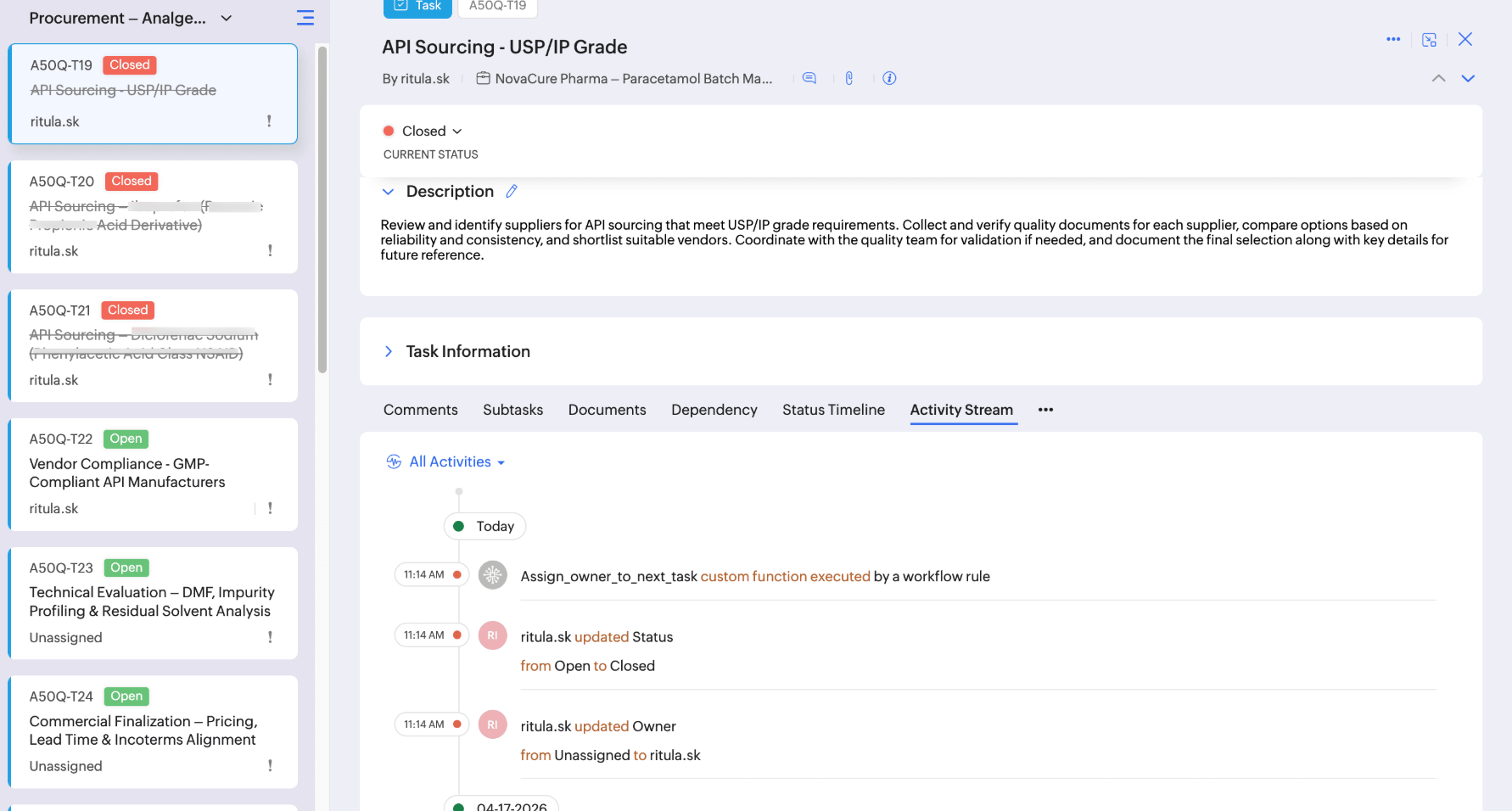


With this automation in place, ownership assignment becomes effortless, ensuring tasks are taken up as ongoing ones are complete.

If you have any questions, feel free to drop a comment below or reach out to us at support@zohoprojects.com.
    • Sticky Posts

    • Enhanced Collaboration and Global Web Tabs

      Hello Users, We are rolling out two key enhancements in Zoho Projects that will be part of our November release. Here’s what to expect: 1. Collaboration Section in the Left Navigation Panel What’s new? All communication and interactive tools will be grouped
    • Choosing the Right Automation in Zoho Projects

      In any project, different types of actions are needed at different points. Some projects require control on how tasks move, some require reacting to updates, and some require executing additional actions beyond the task. Automation in Zoho Projects is
    • Introducing Version-3 APIs - Explore New APIs & Enhancements

      New Update - The end of life timeline for V2 APIs has now been extended to 30th June, 2026 Happy to announce the release of Version 3 (V3) APIs with an easy to use interface, new APIs, and more examples to help you understand and access the APIs better.
    • CodeX Scripts for Enforcing Custom Project Logic

      Every organization has a defined way of executing projects. There are clear expectations around how tasks should move, when projects should progress, and which actions require validation. When these rules are consistently followed, projects remain structured
    • Automation Series: Auto-create Dependent Task on Status Change

      In Zoho Projects, you can automatically create and assign a dependent task when a task’s status is updated. This helps teams stay aligned, ensures reviews happen on time, and reduces manual effort. In this post, we’ll walk through an easy setup using
    • Recent Topics

    • Introducing the revamped What's New page

      Hello everyone! We're happy to announce that Zoho Campaigns' What's New page has undergone a complete revamp. We've bid the old page adieu after a long time and have introduced a new, sleeker-looking page. Without further ado, let's dive into the main
    • Picklist values out-of-date in Campaigns

      Hi I use a CRM (Global) picklist set of values for my field "Connection Strength" (see screenshot 1). . I use Campaigns to follow-up and change the Connection Strength value depending on their stage. The picklist values that appear in the dropdown for
    • Multiple Pipelines

      Is it possible to create multiple candidate pipelines?
    • Insert Template not inserting

      I have been using the "Insert Template" feature for years and I use it every single working day. Yesterday it was working fine. Today, on two different browsers (Chrome and Edge), I can select "Insert Template", select the template I want to insert, but
    • Default ticket template in helpcenter

      Hello, I have a web form and a ticket template created. How can I make that my default ticket template? If an user clicks New ticket or create a ticket, I want that template to be the default one. Thank you for the time and info.
    • Zoho Books bill pay option not available with zoho one

      Why isn't Zoho Books bill pay add-on not available for Zoho one customers not even as a purchasable option. I think this is very inconvenient for companies wanting to use this feature all in one system
    • SalesIQ Email Delivery Issues to Microsoft

      Is anyone else having delivery issues to Hotmail, Outlook, and Live inboxes when sending transcripts and replies via email from SalesIQ? We’ve detected that emails sent from SalesIQ to these accounts aren't arriving—they don’t even bounce back; they simply
    • Zoho Commerce and Third-party shipping (MachShip) API integration

      We are implementing a third-party shipping (MachShip) API integration for our Zoho Commerce store and have made significant progress. However, we need guidance on a specific technical challenge. Current Challenge: We need to get the customer input to
    • Access images from form submission in power automate

      Images from form submission show up as links in power automate. How do I access the image data?
    • Need help to evaluate if Commerce is good for me

      Hi, I just want to quickly check if Zoho Commerce can fulfill my needs. Here is what I am looking for: - Multi-vendor plateform : We will be 3-4 different farms that will offer similar products (ex. tomatoes) to few selected customers (retaurants). All
    • Can't access google from toppings menu

      So... When I click the manage button in toppings, nothing happens. it won't let me access the settings.
    • Smart Feature Compatibility Indicators for CRM Field

      Zoho CRM offers a wide range of field types and advanced customization options. However, several field types have feature-specific limitations that are currently documented only in help articles. For example, while configuring a Rich Text field, admins
    • Ask the Experts: A Live Q&A Session

      Session Closed We've locked this post as the session has ended. We'll see you again in the next session! We’re back with another exciting edition of the Ask the Experts series, this time exclusively for our Zoho Recruit users from the USA & Canada regions!
    • T&C acceptance gate before estimate Accept, with audit trail

      We had to settle a Florida small-claims case in 2025 because we couldn't prove our customer was bound to the venue clause in our Terms & Conditions. The estimate footer mentioned the T&Cs, and Zoho Books logged the customer's IP and timestamp when they
    • Best sales insights for target accounts?

      Question for all the sales power-users out there: I would like to gain insights from Zoho CRM for a rotating list of target accounts. Each Outside Salesperson has 5 target accounts, and they can change these targets quarterly with management approval.
    • Contract to payment flow

      Hi everyone, I’m trying to set up a contract-to-payment flow and want to avoid duplicating invoices or customers in Zoho Books. The flow should be: contract generated from CRM, sent via Zoho Sign, client signs, deposit is paid, and the invoice should
    • Zoho Books | Product updates | May 2026

      Hello users, We're back with the latest updates and enhancements we've rolled out in Zoho Books. From sales tax automation to scanning receipts for free, explore the updates designed to upgrade your bookkeeping experience. Sales Tax Automation [US & Canada
    • Show backordered items on packing slip

      Is it possible to show a column on the Packing Slip that shows number of backordered items when a PO is only partially filled? I would also like to see the Backordered column appear on POs after you receive items if you didn't get ALL of the items or partial amounts of items. And lastly, it would be nice to have the option of turning on the Backordered column for invoices if you only invoice for a partial order. -Tom
    • Control Fields on Mobile App

      On the mobile app, how do we control which fields appear on the screen for records that have a related list? In the example below I want the Inspection Stage and Inspection Type fields to appear, not the record owner (Dev Admin). I changed the Inspections
    • 预期结果 实际结果 "zmverify.zoho.com" "zmverify.zoho.com."

      My domain is tenmokucup.com, I have a TXT record, but verification failed,Please help me, my TXT record is "zoho-verification=zb03390953.zmverify.zoho.com", I have added to DNS. You can confirm it. 预期结果 实际结果 "zmverify.zoho.com" "zmverify.zoho.com."
    • Adding options in the salutation drop down list (Books)

      Hello,  I am a new user still in the trial phase so I apologize if I have missed this. I did search the knowledge base and community first. I need to add a "Mr and Mrs" option in the salutation drop down options in Books. I have tried to find the edit
    • Zoho Desk - Event Calendar View

      Hi Desk team, Are there any plans to introduce a calendar or timeline view for Events in Zoho Desk? It would be very helpful if we could see Events visually in a calendar and/or timeline. This is very helpful when desk side support activities need to
    • Google Drive shared folder

      My deluge script has stopped working, no longer collecting files from Google Drive - have these connections finally been deprecated ?? They seem to be active but errors occur when updating them ?
    • All new Address Field in Zoho CRM: maintain structured and accurate address inputs

      Availability Update: 29 September 2025: It's currently available for all new sign-ups and for existing Zoho CRM orgs which are in the Professional edition exclusively for IN DC users. 2 March 2026: Available to users in all DCs except US and EU DC. 24
    • Journal Entries Do Not Show Multiple Entries to the Same Account

      Another basic accounting function that Books ... Accountants sometimes write journal entries, debiting and/or crediting the same account in the same entry. This is due to the need to record specific activity in an account when we pull reports especially
    • How to setup pricing in Zoho

      Hi everyone, I am relatively new here and have just moved from my old inventory system to the Zoho one. I am trying to get my head around how it all works. I am mostly setup connected to a shopify store, but I do manual sales also For manual invoicing,
    • Work Orders / Bundle Requests

      Zoho Inventory needs a work order / bundle request system. This record would be analogous to a purchase order in the purchasing workflow or a sales order in the sales cycle. It would be non-journaling, but it would reserve the appropriate inventory of
    • Windows agent 2026_M06 release notes

      Agent Version: 2026.03.19.0 Release date: 21 April, 2026 Major Enhancement: Connect as Individual Active users allowing you to connect to the same computer as different users in different tabs. Internal tool implementation to check for vulnerability in
    • Windows agent 2026_M05 release notes

      Agent Version: 111.0.3.335 Release date: 25 March, 2026 Major Enhancement: Quick Support feature compatibility code released. Code refactoring and removal of old code. Minor Enhancement: Updates to trackpad functionalities during remote session. Calendar
    • Windows agent 2026_M04 release notes

      Agent Version: 111.0.3.334 Release date: 10 March, 2026 Agent stickiness on multiple Windows Desktops to avoid confusion. Various other bug fixes and performance improvements.
    • Notes - Reaction Buttons

      Using the native notes option within CRM is fine, it works and the RTF features are great, however, would it be possible - if there isnt already something in place, where we can add a reactions button, similar to teams/whatsapp to show that its been read
    • Can't add my domain to Zoho zeptomail because of error code DE_150

      Hello there, I'm trying to add my domain to ZeptoMail but it's rejected I checked the network tab and I'm getting { "error": { "code": "TM_3601", "details": [ { "code": "DE_150", "message": "Antispam validation failed for your domain in Accounts." } ],
    • Proforma Invoice

      Is there an option to create proforma and advance invoices in professional
    • Rename system-defined labels in Zoho CRM

      Renaming system-defined labels is now available across all DCs. Hello everyone, Zoho CRM includes predefined system fields across modules to support essential CRM operations. Until now, the labels of these fields were fixed and could not be edited from
    • Windows agent 2026_M03 release notes

      Agent Version: 111.0.3.333 Release date: 19 February, 2026 Event Viewer Windows agent code release. Optimised the unattended agent uninstallation process to properly cleanup residual files and registry entries to prevent registry orphans.
    • Windows agent 2026_M02 release notes

      Agent Version: 111.0.3.332 Release date: 11 February, 2026 Code refactoring and removing of old unused code to optimise performance in specific versions of Windows Operating System.
    • Windows agent 2026_M01 release notes

      Agent Version: 111.0.3.331 Release date: 09 February, 2026 Enhancements and updates for improved Video Codec performance and stabler video rendering. Refactored legacy code for optimised performance with legacy devices. Upgrades to monitoring protocols
    • how to fix this error as soon as possible?

      how to fix this error as soon as possible? i have purchased it for monthly at 59₹ paid for an annum please let me know how to fix this issue as this one is urgent Server error: Message failed: 550 5.4.6 Unusual sending activity detected. Please try after
    • Transaction Rule Matching

      Q1. Is there a method to have the Transaction Rules applied across multiple Bank Accounts? Q2. To match "contains" text in Transaction Rules, is a wildcard or regular expression required? Is it case sensitive? Would searching for "issue" in the following
    • Native QuickBooks integration for Zoho CRM: Connecting sales and finance

      Greetings, I hope all of you are doing well. We're excited to announce Zoho CRM's integration with QuickBooks Web, which is designed to synchronize your CRM data with your QuickBooks accounting records and bridge the gap between sales and finance. This
    • Next Page