Building a Simple Raspberry Pi + Keypad IoT PoC with Zoho Flow
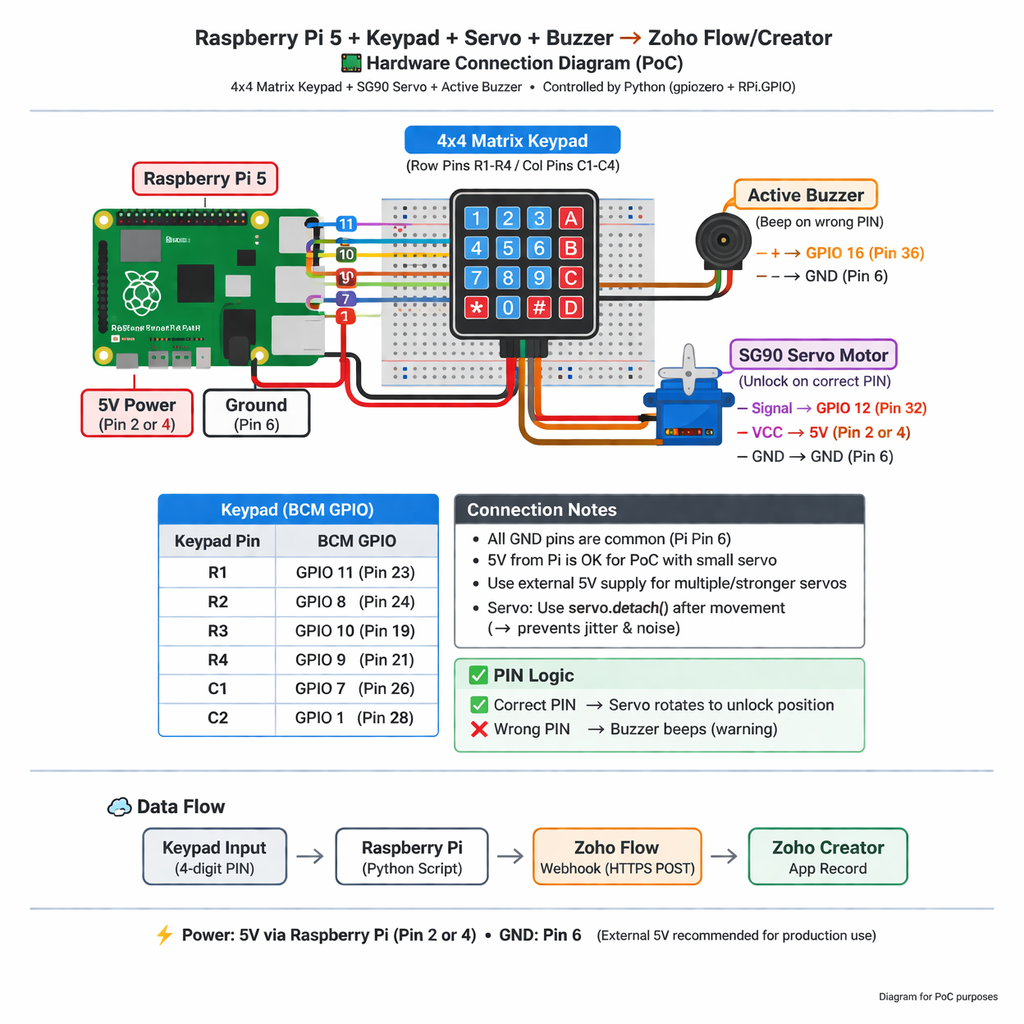
I want to share a simple IoT PoC I recently built that connects a Raspberry Pi to Zoho Flow and Zoho Creator. The goal was to send PIN input data from a hardware keypad to Zoho and trigger a servo and buzzer for visual/audible feedback. This can serve as a reference for others experimenting with IoT + Zoho integrations.
Hardware Used
-
Raspberry Pi 5
-
4x4 Keypad
-
Small Servo Motor (SG90 or similar)
-
Active Buzzer
-
Powered by Raspberry Pi 5V (for PoC; external 5V recommended for multiple/stronger servos)
Software & Setup
-
Python 3 with gpiozero and RPi.GPIO
-
Zoho Flow Webhook to capture PIN input
-
Zoho Creator app to store data
How It Works
-
User enters a 4-digit PIN on the keypad.
-
Raspberry Pi sends the PIN, along with device ID and timestamp, to Zoho Flow.
-
Zoho Flow forwards the data to a Creator app record.
If the PIN is correct:
-
Servo rotates to “unlock” position for a short time.
-
If the PIN is incorrect:
-
Buzzer beeps as a warning.
-
Key PoC Notes
-
Servo Stability: Using servo.detach() stops unnecessary PWM signals and prevents jitter.
-
Power: Small servo works with Pi’s 5V for PoC, but external 5V is recommended for long-term or multiple servo operation.
-
Time Stamps: Python datetime formatted to match Creator’s DateTime field.
Example Code Snippet
- from gpiozero import Servo
- import time
- servo = Servo(12)
- servo.value = 0 # Initialize
- time.sleep(0.5)
- servo.detach() # Prevent jitter
- def unlock_servo():
- servo.value = 0.6 # Move to unlock position
- time.sleep(0.8)
- servo.detach() # Stop signal
Summary
This PoC shows that even with basic hardware and Python knowledge, you can integrate IoT devices with Zoho Flow and Creator. It’s a great starting point for experimenting with IoT + Zoho before moving to more complex setups or SaaS deployments.