CRM gets location smart with the all new Map View: visualize records, locate records within any radius, and more

CRM gets location smart with the all new Map View: visualize records, locate records within any radius, and more

Hello all,

We've introduced a new way to work with location data in Zoho CRM: the Map View. Instead of scrolling through endless lists, your records now appear as pins on a map.

Built on top of the all-new address field and powered by Mappls (MapMyIndia), the Map View turns your records into an interactive map for smarter planning, faster visits, and better field execution.

Why Map View?

Until now, even if addresses were stored in Zoho CRM, users had to search through lists manually or run broad filters to find location insights. There was no quick way to spot nearby leads, contacts, or other opportunities while traveling, or to plan visits efficiently.

Map View solves this by plotting records on an interactive map based on the coordinates available in the address field. You can zoom in, filter for records within a radius, sort by distance, and launch navigation—all without leaving the module.


You can enable Map View via Setup > Modules and Fields > Preferences. 

Once enabled, Map View appears in the module's view selector.

What will this update offer?

1. Create, plot, and manage records with geographic coordinates
Map View plots every record with coordinates as a pin on the map. A quick glance shows you exactly where your customers, leads, or deals are. 

Records without coordinates appear in the left pane, ready for updates.

You can add or correct coordinates in multiple ways, each designed to save time and improve accuracy:

  • Type with auto-suggestions
    Start entering an address and select from the suggestions provided. The system captures the complete address along with the coordinates in your address field, reducing the occurrence of typos and misplaced pins.
  • Drop a pin on the map
    In cases when the exact address is unclear or unavailable, you can mark the correct spot directly, ensuring the record reflects the actual location without manual entry.
  • Import pre-mapped data
    When large sets of records already contain latitude and longitude, importing them ensures pins are placed correctly at scale, avoiding the need for future manual updates.
  • Update through APIs
    Integrations can keep coordinates in sync with external systems. This prevents mismatches and ensures map data remains reliable over time.

You can also move a pin to update only the geo-coordinates instead of the entire address. 

These controls keep both the visual map and the address field aligned, and reduce the need for users to manually rearrange pins later.

2. Apply nearby filters and sort by distance

Custom views and smart filters now include a "nearby" condition that helps narrow down records based on proximity. You can instantly focus on the records that matter most.

Simply choose your reference location and then set a radius (preset or custom).

You can choose the reference point in different ways:

  • Current device location
    Use your live position to see which records are closest while you're on the move—say, when you're traveling between meetings and client visits. This makes it easy to fit in additional visits without backtracking.
  • Typed address
    Enter a specific location to filter around. This is useful for planning ahead from the office or targeting records near a branch, warehouse, or event venue.
  • Point on the map
    Select any location directly on the map and set a radius. This provides flexibility in targeting areas without formal street addresses, like localities or industrial zones.

When a nearby filter is applied, a radius circle appears on the map, and a distance column is added in the list view. You can also choose to display this distance on map pin cards. These details help prioritize visits, deliveries, or follow-ups based on how far records are from your chosen point.

3. Customize the view for quick decisions

You can decide which fields are shown both in the left pane and on the map pins. This ensures the most useful information is always visible at a glance.

  • Left pane highlights
    Along with the primary field, you can choose two additional fields. This makes it easier to scan records in the list to spot deal value, industry, or upcoming activities without opening each record.
  • Map pin card details
    Each pin can display one field from the layout. Showing a critical value directly on the map—such as deal size—helps you decide which locations to prioritize during a route.
  • Clustering records at the same address
    If you have multiple records at the same address—like clients from the same company or businesses located at the same IT park—they'll be clustered into a single pin. Upon clicking on the clustered pin, you can see the list of available contacts (or records). 

New map view in mobile apps

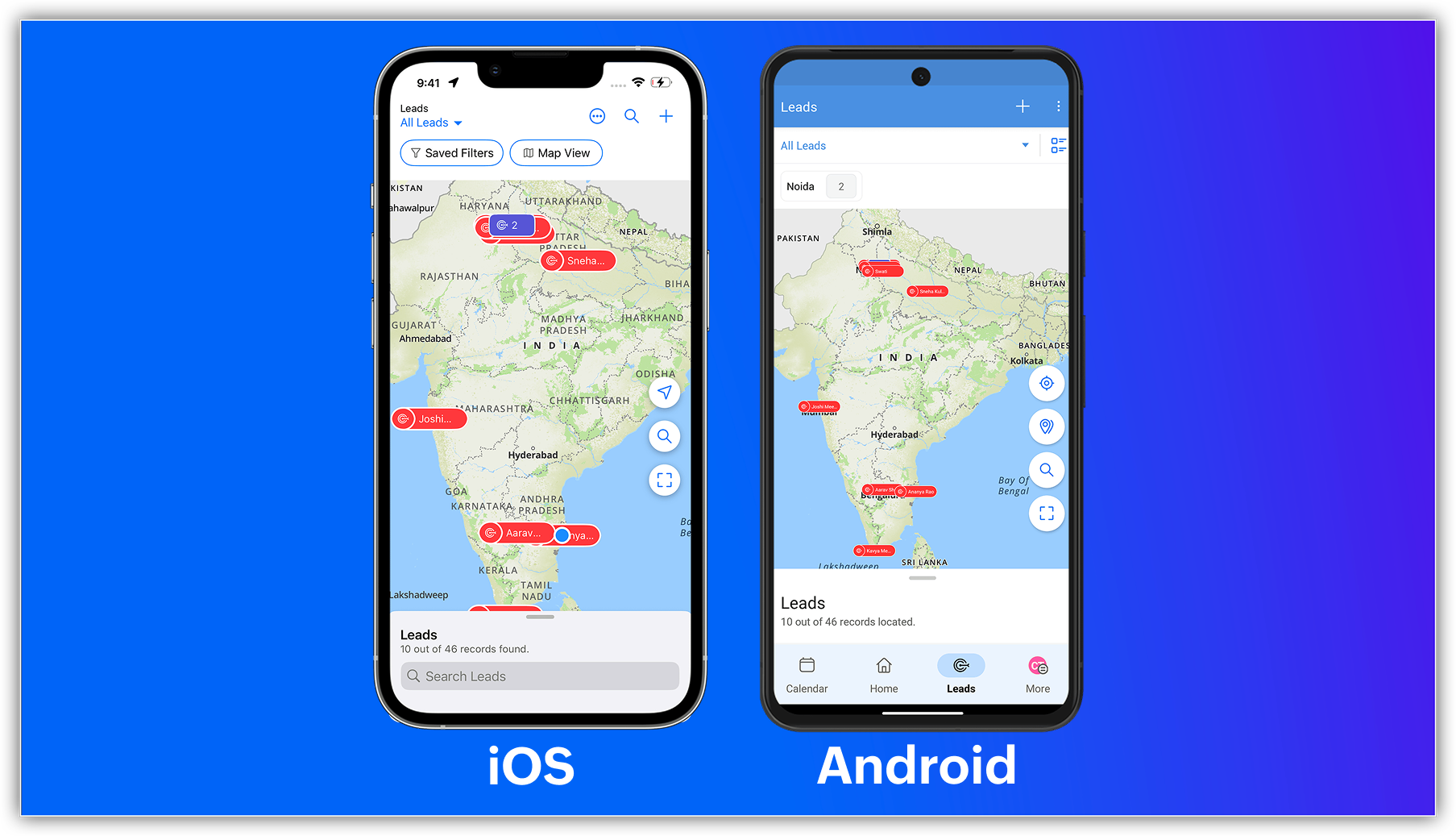
The capabilities of Zoho CRM's all-new address field and map view aren't just limited to your web app; they're now supported in the mobile app as well.

Previously, you could use the Near Me mobile feature in the map view, which uses Google Maps (Android and iOS) or Apple Maps (iOS) to show records within a 100 KM radius of your current location or a custom location.


With the latest enhancements, you can now access the Mappls-powered map view in Zoho CRM's mobile app. Simply enable the map view and address suggestions for the address field in the web app, and turn on the in-app map view from the app's map settings.


Once enabled, you can:

    • View your record's location as a pin on the map.
    • Group pins (available for Android).
    • See location suggestions while searching.
Alert

Feature availability and limits

    • Editions supported: All paid editions.
    • Modules supported: Any module with at least one address field.
    • Availability: Only the IN DC. 
That's all for this enhancement. Please share your feedback in the comments below.


Thanks,
Nizamuddin
NotesP.S. Map View is currently available for users in the IN DC.

    • Recent Topics

    • Creator -Dynamic addition of Customer Portal User Licenses

      Hi, We have a Creator App for B2C about to get released. We are experiencing the Portal User license challenge. Unable to predict the number of users who will download and Subscribe. When a User is about Subscribe and the portal licenses does not exists,
    • Migrate Mailbox between Microsoft 365 tenants - Safe, Fast & Easy

      Moving mailboxes between Microsoft 365 tenants is a difficult proposition when you've got a large number of user accounts, a lot of email data and a number of Microsoft 365 services to contend with. This is a common scenario when a business is undergoing
    • 👍 Zoho CRM's Notes now gets Reactions and a new look

      Available in SA and JP DCs. Rolling out to other DCs in phases. Hello everyone, Notes help users capture important updates, collaborate with teammates, and maintain context for records. Now with Note Reactions, users can quickly acknowledge updates, express
    • Widget Height were destroyed

      All widget heights in the Details Canvas view are broken. Moderation Update: This is a known issue with widget heights in Client Script popups and flyouts. A fix is in progress, and this post will be updated once it's released.
    • Introducing Incentives for Zoho CRM: Build, automate, and track sales commissions

      Dear Customers, We are here with an amazing news! We built a direct solution to help manage your commission provisioning activity in your business. From creating commission plans to issuing payouts, this application leverages your sales reps’ performance
    • Enhanced Zoho CRM and Office 365 calendar synchronization features!

      Dear customers, We're excited to share some significant improvements to our Office 365 calendar synchronization features, aimed at providing you with more control and a more personalized experience. What’s new Choose your Office 365 calendar: During the
    • Introducing Zoho Key Service, a simpler way to access LLMs without API keys

      Available in the Professional, Enterprise, and Ultimate editions in the US, IN, AU, JP, and CA DCs. Hello everyone, We are excited to bring Zoho Key Service (ZKS) in Zoho CRM, a simpler way for organizations to access and use third party LLMs. You can
    • Zoho Books Support

      Dear Team, Zoho Books offers a demo before you purchase zoho books. But after that when he actually purchases the product he has to rely on toll free number or help documents. But this might get frustrated in the initial period. Specially in initial period.
    • How to add a fee based on payment method

      I currently accept both ACH payments and credit card. I want to add a 3% fee to a number of my subscription plans if the customer chooses to use a credit card (and not ACH/checking). How do I do this? Is there an in-built feature, or would i have to create
    • Mirror Component in Zoho CRM: Access real-time related data without leaving your record

      Hi everyone, This feature is now available for the JP, CA, SA, UAE, and AU DCs. We're excited to bring to you Zoho CRM's mirror component, which presents relevant data on a record's details page and keeps everything users need in one place without having
    • What's New in Zoho Invoice | July – September 2026

      Hello everyone! We're back with the latest updates and enhancements we've rolled out in Zoho Invoice from July to September 2026. Here's what's new this quarter: Zoho Invoice is Now Available in Nigeria Introducing the Super Admin Privilege E-Invoicing
    • Convert MBOX to PDF Free on Mac and Windows

      MBOX files are widely used for storing email messages in email clients such as Thunderbird, Apple Mail, and other programs that support the MBOX format. Although this format is useful for handling emails, it can at times be inconvenient to access the
    • Notes - Reaction Buttons

      Using the native notes option within CRM is fine, it works and the RTF features are great, however, would it be possible - if there isnt already something in place, where we can add a reactions button, similar to teams/whatsapp to show that its been read
    • ZohoBooks - "Account transactions" report doesn't have any "Desciptions"

      Hi, I'd like to push for this to be included in ZohoBooks: In a "account transactions" report all the numbers are right, but I'd really like to see the "Description" as part of this report, i.e. the line-item-description as I would see it in the bank statement. Essentially all you see is a list of numbers adding up to the total. It is very difficult to see if things are right without being able to see what exactly each transaction refers to. Going into each transaction one-by-one is not a workable
    • Address limits per customer by edition

      I’m on the Standard edition and have reached a limit of 30 addresses under a single customer. Before I move to an annual Professional subscription, I need to confirm the following: What is the maximum number of addresses allowed under one contact, and
    • Export from List view

      I'm constantly having the issue where my users are building lists in ListView for various objects and then realising they cant export the data, then they have to go and build the data set in reports to export. I would like to see the ability to export to excel/csv from ListView.
    • Cannot apply tags to multiple items at once

      It is very frustrating needing to apply tags to notes individually. Even worse that it takes multiple clicks to do it. Can there please be an update to: 1.) Allow us to apply tags to batches of notes in one go. 2.) Make it less clicks to add a tag 3.)
    • Get all hiring updates via Zoho Cliq bot notifications

      We’re introducing a new way to stay updated on recruitment activities: Cliq Bot notifications. Now you can receive Zoho Recruit notifications directly in Zoho Cliq—alongside your existing in-app alerts and emails. Whether it’s a candidate status change,
    • Notes Acknowledgement

      It would be great to have emojis that can be used for Notes. Emojis such as Thumbs Up to let someone know you agree with them or a emoji for thanks. It's a simple way to acknowledge that you read someone's note. Moderation update: Emoji reactions for
    • Is it possible to log text messages from iphone into Zoho CRM

      My team is more and more utilizing text messaging to communicate with clients. Does Zoho have a solution for logging these text messages when clicking "Send Text Message" from the Zoho app. Much like when you call, you get prompted to log a call, can
    • Project Finances: Fully Accessible within Projects

      Project finances and work items are now on the same screen and it transforms the way you run your project. Managing your project finances is now much easier and in the same screen as your work items. Access quotes, invoices, bills, sales orders, and purchase
    • zoho stream web notifications

      since im locked out of IMAP and cant use my mail app that lets my team collaborate and chat below emails, im trying out the zoho version of this... zoho streams. On the bottom of an email in the zoho mail web app, i "comment" and mention another user.
    • UI / UX Improvements

      Please consider changing the Dependency Details window from a column-based layout to a list-based layout, or allowing users to choose their preferred layout. The current column-based view uses screen space inefficiently and makes navigation difficult,
    • Zoho CRM and Desk sandboxes for testing native integration

      Hello team, We are evaluating the native integration between Zoho CRM and Zoho Desk, We have sandbox instances of both products and want to test the integration there, without any effect on our production CRM or production Desk data. While setting up
    • Function #24: Automatically display deal name from Zoho CRM on quotes in Zoho Books

      Deals allow businesses to organize and visualize their sales pipeline. This provides a clear overview of all potential opportunities and helps in making informed decisions. Zoho CRM empowers you to create deals or potentials for your clients and monitor
    • Zoho Books | Product updates | August 2026

      Hello users, July has been an exciting month for Zoho Books! This month, we're excited to introduce HTML PDF Templates, Placeholders as Pills, expanded approval workflows for Sales Returns and Journals, and significant compliance updates across the India,
    • Auto-Sync Field of Lookup Values When Parent Record Changes

      Hi Zoho Team, Currently, when you use a "Field of Lookup" in Zoho CRM, the value is captured as a snapshot at the time the lookup is set. If the parent record is later updated, the Field of Lookup value on the child record does NOT update and stays stale.
    • [Request] Pivot filter date option : from set date to relative value ie from 01Jan to LastMonth

      I don't think I can currently do this... but it's worth asking if it's possible. My use case is concerning annual leave which is calculated from the beginning of the calendar year (01Jan) then each month I want to have details of leave taken etc... In
    • Customer Statement Showing Incorrect Negative Balance Due to Unused Advance

      Dear Zoho Support Team, We are facing an issue with the Customer Statement in Zoho Invoice related to customer advances/mobilization advances. The issue is that when a customer has made an advance payment that has not yet been fully utilized against invoices,
    • Mois de la sensibilisation à la cybersécurité 2026 : faites de la sécurité un réflexe avec Zoho

      Imaginez : vos systèmes informatiques répondent aux normes de sécurité en vigueur et votre entreprise est assurée contre les cyberattaques. Pourtant, un matin, tout bascule. Vos données sont chiffrées et un message glaçant s’affiche à l’écran : « Si vous
    • Specifying time increments on a Date/Time field

      Hi all, Im using a Date/Time field in my CRM module. At the moment the increments are 30 minutes. How can I change these to be 15 minutes? Thanks
    • Read, View, Access, or Open an OST File Without Outlook

      Have you at any time needed to open an old OST file only to find that Microsoft Outlook is not installed on your computer? It is very annoying, particularly in the case where the file includes important emails, attachments, contacts, or calendar items.
    • What's new in Zoho Workplace | August 2026

      Hello Zoho Workplace community! Here's a roundup of all the new features and announcements that went live across Zoho Workplace applications in August. Zoho Mail Zoho Mail is now available in AWS Marketplace! AWS Marketplace users can access and subscribe
    • Read, View or Open MBOX File without Any Email Clients

      Since email messages are stored in a single file by MBOX files, they are useful for keeping email data in one location. Many email programmes, such as Thunderbird and other mail clients, support this format. However, if you have an old MBOX file and the
    • What's new in Zoho Social - Q3 recap

      Hello everyone, We've rolled out a bunch of exciting updates in Q3, and we're thrilled to walk you through them. Here's a quick look at everything we released in July, August, and September to help you experiment with content, automate engagement workflows,
    • The Social Wall: September 2026

      Hello everyone! This month, we’re bringing Snapchat to Zoho Social. You can now connect your Snapchat account and manage your content alongside your other social channels. Whether you want to reach a wider audience through Spotlights or share quick updates
    • How to Convert Apple Mac Mail to PST for Outlook for Free?

      Apple Mail is a widely used email program among Mac users, but what do you do if you want to transfer your emails to Microsoft Outlook? In such a situation—for example, when you are moving from a Mac to a Windows computer or when you need to use Outlook
    • Turning off the recorded welcome in Zoho Webinar

      Is there a way to turn off the recorded voice that comes up at the beginning of every webinar session? It devalues the experience for attendees from feedback, interrupting their connection with our brand and delaying webinar start unnecessarily.
    • Option to Disable Knowledge Base Section in Feedback Widget Popup Hello Zoho Desk Team

      Hello Zoho Desk Team, How are you? We are actively using Zoho Desk and would like to make more use of the Feedback Widget. One of the ways we implement it is through the popup option. At the moment, the popup always displays the Knowledge Base section,
    • Losing description after merging tickets

      Hello, We merge tickets when they are about the same topic from the same client. It happens sometimes. We recently noticed that after the merger only the description from the master ticket is left in a thread. And the slave-ticket description is erased.
    • Next Page