Customer Satisfaction (CSAT) Report

Customer Satisfaction (CSAT) Report

From data to decisions: A deep dive into ticketing system reports


The customer satisfaction (CSAT) report helps teams understand how customers feel about their support experience, identify service gaps, and continuously improve the help desk. It turns post‑interaction feedback into actionable insights that lead, and agents can all use.

What is the customer satisfaction report?

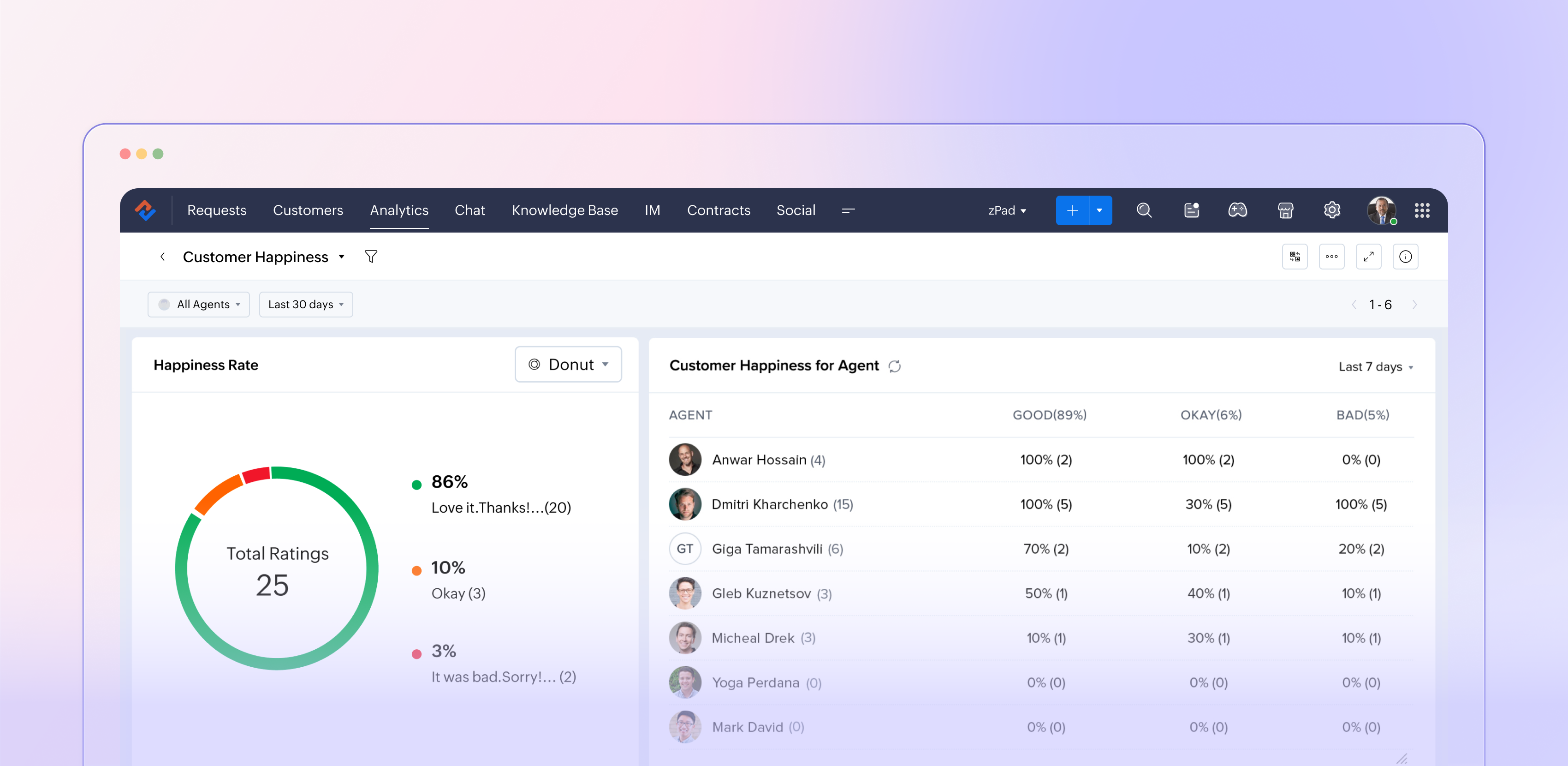
The customer satisfaction report in Zoho Desk (typically powered by the Customer Happiness Rating feature and corresponding surveys) aggregates customer feedback captured after ticket responses or closures. It translates that input into metrics such as positive, negative, and neutral ratings, trends over time, and performance by agents, departments, and channels. This data helps support managers move from guesswork to data‑driven decisions about service quality.

Why customer satisfaction reporting matters

Customer satisfaction reporting is more than just a supplemental dashboard; it plays a crucial role in companies' efforts to shape customers' overall perception of the brand. It indicates whether your support truly addresses customer problems in a way that matters, rather than simply measuring ticket closure. 

This reporting acts as an early indicator of potential churn by highlighting dissatisfied customers and recurring issues. Additionally, it supports the case for investments in training, staffing, and tools by relying on data rather than personal opinions. When utilized effectively, customer satisfaction reports create a link between everyday support activities and long-lasting customer loyalty.

How Zoho Desk captures customer satisfaction  

Zoho Desk lets you initiate a straightforward rating or survey at key moments during the support experience, such as after an agent responds or when a ticket is closed. Customers can quickly express their satisfaction using options such as "Happy / Neutral / Unhappy" and may also leave a comment if they wish. When gathered on a larger scale, these micro-interactions become fundamental to the customer satisfaction report. 

Since this feedback is linked to specific tickets, it allows for in-depth analysis, revealing which agents or teams consistently impress customers, identifying the types of issues or communication channels (such as email, chat, phone, or social media) that lead to dissatisfaction, and observing how satisfaction levels fluctuate with changes in SLAs, new processes, or feature launches. This integration of feedback with contextual information transforms a simple survey into a valuable layer of strategic insights.

Key metrics

  • Overall satisfaction score: Your high‑level health metric, usually expressed as a percentage or rating based on all collected responses for a chosen period.
  • Rating distribution: The Split between positive, neutral, and negative responses helps you see whether a high score is built on many “okay” experiences or truly delighted customers.
  • Trends over time: How satisfaction moves week‑over‑week or month‑over‑month, especially before and after significant changes like feature releases or holiday seasons.
  • Agent and team performance: Side‑by‑side comparisons showing which agents or departments win the most positive feedback and where coaching is needed.
  • Channel performance: Satisfaction by email, chat, phone, and other channels, so you can align staffing and training with where the experience is weakest.

Turning report insights into action  

The real value of the customer satisfaction report comes from what your team does with it. 

Close the loop with customers

Use low ratings and negative comments as triggers for follow‑ups, callbacks, or escalations. This not only recovers at‑risk relationships but also shows customers that their feedback matters.

Coach and celebrate agents

Highlight agents with consistently high satisfaction scores in team meetings and use their interactions as best‑practice examples. For those struggling, use the report to identify patterns across issue types, channels, or time slots, and create targeted coaching plans.

Fix process and product issues

Look for recurring themes in comments linked to low ratings: confusing policies, slow approvals, missing macros, or product bugs. Feed these patterns into internal improvement projects or backlogs so the same pain points don’t repeat.

Experiment and measure

Treat your support process like a product. When you change an SLA, tweak a template, or introduce a new self‑service flow, watch the satisfaction report over the following weeks. If scores move up, standardize the change; if they drop, roll back or refine.

The bottom line

We recommend you use it in a continuous‑improvement loop; Zoho Desk’s customer satisfaction report becomes more than a static KPI board. It becomes a living feedback engine that keeps your support experience aligned with what customers actually feel and expect.


Please stay tuned for more in the Desk Reports series.


Regards,


Kavya Rao

The Zoho Desk Team


    • Sticky Posts

    • Zoho Desk Partners with Microsoft's M365 Copilot for seamless customer service experiences

      Hello Zoho Desk users, We are happy to announce that Zoho Desk has partnered with Microsoft's M365 to empower customer service teams with enhanced capabilities and seamless experiences for agents. Microsoft announced their partnership during their keynote
    • WhatsApp pricing changes: Pay per message starting July 1, 2025

      Starting July 1, 2025, WhatsApp is shifting from conversation-based pricing to per-message billing. That means every business-initiated message you send will count. Not just the first one in a 24-hour window. Pricing updates on the WhatsApp Business Platform
    • Live Webinar - Work smarter with Zoho Desk and Zoho Workplace integration

      Hello customers! Zoho Desk and Zoho Workplace are coming together for a webinar on 14th May, 2024. Zoho Workplace is a suite of productivity apps for email, chat, docs, calls, and more at one single place. Zoho Desk is closely integrated with a few tools
    • Apple iOS 17 and iPadOS 17 updates for Zoho Desk users

      Hello Zoho Desk users! Apple recently announced the release of iOS 17 and iPad OS 17. These latest OS updates will help you stay productive and efficient, through interactive and seamless user experiences. Zoho Desk has incorporated the updates to help
    • Zoho Desk Cheat Sheet For The Year-End

      Check out these Zoho Desk best practices to end this year on a high and have a great one ahead! #1 Set Business (Holiday) Hours - If you have limited working hours, please make sure you restrict your business hours or set them as holidays for the coming days. Let your customers know when you will, and won't, be available. #2 Update the Annual Holiday List - Check the holidays for the new year and update the holiday schedule. Usually, holidays from the current year will be carried over for the next
    • Recent Topics

    • Setting defaults for "Find and Merge Duplicate for..."

      To remove some of the extreme tedium from Zoho's poorly implemented merge function, I would like to set defaults.  Currently I am defaulted to match "ANY" when I would never do that, so I always have to click "ALL". Then it makes me click on several totally irrelevant drop boxes to turn off phone, mobile and other useless match criteria. Is there a way I can set: Match to default as "ALL" Firstname to default to "IS" Lastname to default to "IS" every other match field default to "-NONE-" This will
    • Linux agent 2026_M05 release notes

      Agent Version: 3.6.5.3 Release date: 28 April, 2026 Major Enhancement: Quick Support feature release. Security improvements and enhancement to in session features.
    • Automated Sales Order Fulfillment Based on Inventory Availability (Allocation / Commitment Modes)

      Hi everyone, I recently reached out to Zoho Inventory support regarding a workflow challenge and wanted to share both the issue and their response here for visibility. Zoho confirmed: “Zoho Inventory does not currently support automatic notifications
    • Linux agent 2026_M04 release notes

      Agent Version: 3.6.5.2 Release date: 30 April, 2026 Code refactoring and improvements to function efficiently in minimal hardware environments.
    • Simple Totals on all pages?

      Hi there. I'm surprised this isn't implemented yet (since most other software has this by default). Can you display a simple total at the bottom of all invoice lists? ie: I click in SALES tab, select INVOICES and on that page please show us a simple total? Yes, I realize I can go the long way around and generate reports and select my date options and select the type of invoices etc...but honestly that shouldn't be necessary when just viewing a list of unpaid invoices and how much total is outstanding.
    • Linux agent 2026_M03 release notes

      Agent Version: 3.6.5.1 Release date: 27 February, 2026 Bug fixes and performance improvements for optimised session experience.
    • Linux agent 2026_M02 release notes

      Agent Version: 3.6.5.0 Release date: 26 February, 2026 Major enhancement: File Manager feature release Issue fixing of idle session timing interfering with backend activities.
    • Linux agent 2026_M01 release notes

      Agent Version: 3.6.4.8 Release date: 13 February, 2026 Optimised the unattended agent uninstallation process to properly cleanup residual files and complete uninstallation process. Fixed issues with CTRL+ALT+DEL command not functioning properly in some
    • Using API for multiple organizations

      I am busy building an app to load data from a retailer into Zoho Books. We are planning on selling the app to multiple organizations that use this retailer. Is there a way to get a single oauth app to access multiple organizations? From what I can find
    • MacOS agent 2026_M04 release notes

      Agent Version: 3.120.0 Release date: 23 April, 2026 Retry mechanism for end users to enable Accessibility and Screen Share permissions to successfully join remote sessions. Agent stickiness on multiple desktops to avoid confusion. Improvements to audio
    • MacOS agent 2026_M03 release notes

      Agent Version: 3.117.0 Release date: 02 March, 2026 Bug fixes and performance improvements for optimised session experience.
    • MacOS agent 2026_M02 release notes

      Agent Version: 3.116.0 Release date: 23 February, 2026 Major enhancement: File Manager feature release Minor enhancement: Improved peer to peer connectivity across various network conditions. Minor enhancement: Improvements to Elevate to Admin mode
    • MacOS agent 2026_M01 release notes

      Agent Version: 3.111.0 Release date: 11 February, 2026 Major Enhancement: Quick Support feature release. Upgrades to monitoring protocols for analysing performance. Issue fixing of idle session timing interfering with backend activities.
    • Account Unblock Request

      Dear Sir/Madam, I hope you are doing well. I noticed that my account has been blocked for violation of the usage policy which I believe comes from it being associated with sending spam. I have since then removed the old keys which were compromised in
    • Kaizen #242 - Enabling In-Context Order Creation from Deals Using SlyteUI

      Hello everyone! Welcome to another interesting Kaizen post. Today’s spotlight is on SlyteUI, the new UI builder designed to create powerful, intuitive user interfaces in minutes. Built for speed and simplicity, SlyteUI empowers teams to deliver high-impact
    • Clone a Module??

      I am giong to repurpose the Vendors module but would like to have a separate but very similar module for another group of contacts called Buyers. I have already repurposed Contacts to Sellers. Is it possible to clone (make a duplicate) module of Vendors
    • Auto-sync field of lookup value

      This feature has been requested many times in the discussion Field of Lookup Announcement and this post aims to track it separately. At the moment the value of a 'field of lookup' is a snapshot but once the parent lookup field is updated the values diverge.
    • CRM gets location smart with the all new Map View: visualize records, locate records within any radius, and more

      Hello all, We've introduced a new way to work with location data in Zoho CRM: the Map View. Instead of scrolling through endless lists, your records now appear as pins on a map. Built on top of the all-new address field and powered by Mappls (MapMyIndia),
    • Can't access google from toppings menu

      So... When I click the manage button in toppings, nothing happens. it won't let me access the settings.
    • Best sales insights for target accounts?

      Question for all the sales power-users out there: I would like to gain insights from Zoho CRM for a rotating list of target accounts. Each Outside Salesperson has 5 target accounts, and they can change these targets quarterly with management approval.
    • Emails Disappearing From Inbox

      I am experiencing the unnerving problem of having some of the messages in my inbox just disappear.  It seems to happen to messages that have been in there for longer than a certain amount of time (not sure how long exactly). They are usually messages that I have flagged and know I need to act on, but have not gotten around to doing so yet.  I leave them in my inbox so I will see them and be reminded that I still need to do something about them, but at least twice now I have opened my inbox and found
    • Cadence not stopping on reply (in some cases) – anyone else?

      Hi everyone, we’ve noticed that in a few cases, Cadences don’t stop even though the contact replied (setting “stop on reply” is active). It works fine most of the time, but occasionally the reply is visible in CRM without stopping the Cadence. Our assumption
    • Issue with Resume Parsing and Storage Limit in Zoho Recruit

      Hello Team, We are currently facing an issue with resume parsing in Zoho Recruit. While parsing resumes, we are receiving a message indicating that the storage is full. We would like to delete multiple old resumes from the system to free up storage space.
    • BUG: Related List Buttons with Client Script action now erroring

      There appears to have been a bug introduced over the last few days with Related List buttons that invoke a Client Script action. Button configuration: Configured Client Script: Results: The default loader is presented at the top of the page, and an error
    • SalesIQ Email Delivery Issues to Microsoft

      Is anyone else having delivery issues to Hotmail, Outlook, and Live inboxes when sending transcripts and replies via email from SalesIQ? We’ve detected that emails sent from SalesIQ to these accounts aren't arriving—they don’t even bounce back; they simply
    • Introducing the revamped What's New page

      Hello everyone! We're happy to announce that Zoho Campaigns' What's New page has undergone a complete revamp. We've bid the old page adieu after a long time and have introduced a new, sleeker-looking page. Without further ado, let's dive into the main
    • Multiple Pipelines

      Is it possible to create multiple candidate pipelines?
    • Insert Template not inserting

      I have been using the "Insert Template" feature for years and I use it every single working day. Yesterday it was working fine. Today, on two different browsers (Chrome and Edge), I can select "Insert Template", select the template I want to insert, but
    • Access images from form submission in power automate

      Images from form submission show up as links in power automate. How do I access the image data?
    • Smart Feature Compatibility Indicators for CRM Field

      Zoho CRM offers a wide range of field types and advanced customization options. However, several field types have feature-specific limitations that are currently documented only in help articles. For example, while configuring a Rich Text field, admins
    • Ask the Experts: A Live Q&A Session

      Session Closed We've locked this post as the session has ended. We'll see you again in the next session! We’re back with another exciting edition of the Ask the Experts series, this time exclusively for our Zoho Recruit users from the USA & Canada regions!
    • T&C acceptance gate before estimate Accept, with audit trail

      We had to settle a Florida small-claims case in 2025 because we couldn't prove our customer was bound to the venue clause in our Terms & Conditions. The estimate footer mentioned the T&Cs, and Zoho Books logged the customer's IP and timestamp when they
    • Contract to payment flow

      Hi everyone, I’m trying to set up a contract-to-payment flow and want to avoid duplicating invoices or customers in Zoho Books. The flow should be: contract generated from CRM, sent via Zoho Sign, client signs, deposit is paid, and the invoice should
    • Zoho Books | Product updates | May 2026

      Hello users, We're back with the latest updates and enhancements we've rolled out in Zoho Books. From sales tax automation to scanning receipts for free, explore the updates designed to upgrade your bookkeeping experience. Sales Tax Automation [US & Canada
    • Show backordered items on packing slip

      Is it possible to show a column on the Packing Slip that shows number of backordered items when a PO is only partially filled? I would also like to see the Backordered column appear on POs after you receive items if you didn't get ALL of the items or partial amounts of items. And lastly, it would be nice to have the option of turning on the Backordered column for invoices if you only invoice for a partial order. -Tom
    • Control Fields on Mobile App

      On the mobile app, how do we control which fields appear on the screen for records that have a related list? In the example below I want the Inspection Stage and Inspection Type fields to appear, not the record owner (Dev Admin). I changed the Inspections
    • 预期结果 实际结果 "zmverify.zoho.com" "zmverify.zoho.com."

      My domain is tenmokucup.com, I have a TXT record, but verification failed,Please help me, my TXT record is "zoho-verification=zb03390953.zmverify.zoho.com", I have added to DNS. You can confirm it. 预期结果 实际结果 "zmverify.zoho.com" "zmverify.zoho.com."
    • Adding options in the salutation drop down list (Books)

      Hello,  I am a new user still in the trial phase so I apologize if I have missed this. I did search the knowledge base and community first. I need to add a "Mr and Mrs" option in the salutation drop down options in Books. I have tried to find the edit
    • Google Drive shared folder

      My deluge script has stopped working, no longer collecting files from Google Drive - have these connections finally been deprecated ?? They seem to be active but errors occur when updating them ?
    • Journal Entries Do Not Show Multiple Entries to the Same Account

      Another basic accounting function that Books ... Accountants sometimes write journal entries, debiting and/or crediting the same account in the same entry. This is due to the need to record specific activity in an account when we pull reports especially
    • Next Page