Happy new year, everyone!
We have an exciting addition to our suite of features and would like to introduce you to VoC (Voice of the Customer) for Zoho CRM, powered by Zia.
2023 is definitely the best time to be a customer with rapid innovations and advancements in the field of CX. Brands these days lose customers within minutes if they refuse to pay attention to what they're saying. The right VoC tool can help you stay on top of your CX game!
VoC for Zoho CRM offers insights into your customers' needs and sentiments which can translate into effective problem redressal, better planning and increased revenue.It also provides context from your CRM data and helps you get a clear picture of what your customers feel or expect from the product/service. While the end goal of VoC may look like just running customer satisfaction polls, it's not merely the act of putting out these surveys. Launching and carrying out customer satisfaction polls won't help a business truly understand their customers. The end goal of VoC is much deeper— it is about listening to your customers and valuing their thoughts, and using these insights for your business to thrive.
Use case
For example, an electronics store that sells laptops and mobiles also provides servicing of these products. The customer and product details are stored in CRM. They regularly send out surveys to gather customer feedback on the products and services. Additionally, they have a separate customer support team to help resolve challenges with products. The company notices a drop in their revenue in spite of the offers and discounts they've rolled out. Manually studying customer purchase patterns and collating feedback from multiple communication channels will cost a business valuable time that can be invested to develop the business further. The answer to this problem lies in automating such processes with better visualization of data within a centralized platform. VoC for Zoho CRM aims to digest customer information and make these results available for users in a single place to grasp information quickly and make goal-oriented as well as contextually-rich modifications to business plans and processes.
How to use VoC?
VoC for Zoho CRM can be activated under "Zia", located on the settings page within CRM.
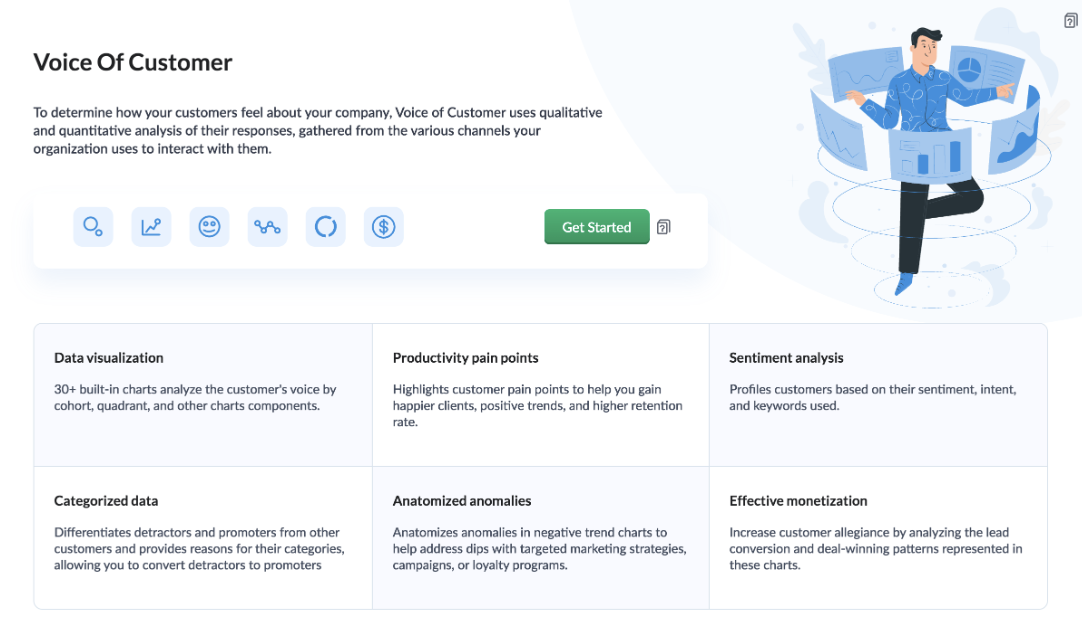
Once you click the 'Get Started' button, the activation page opens. Click 'Activate'.
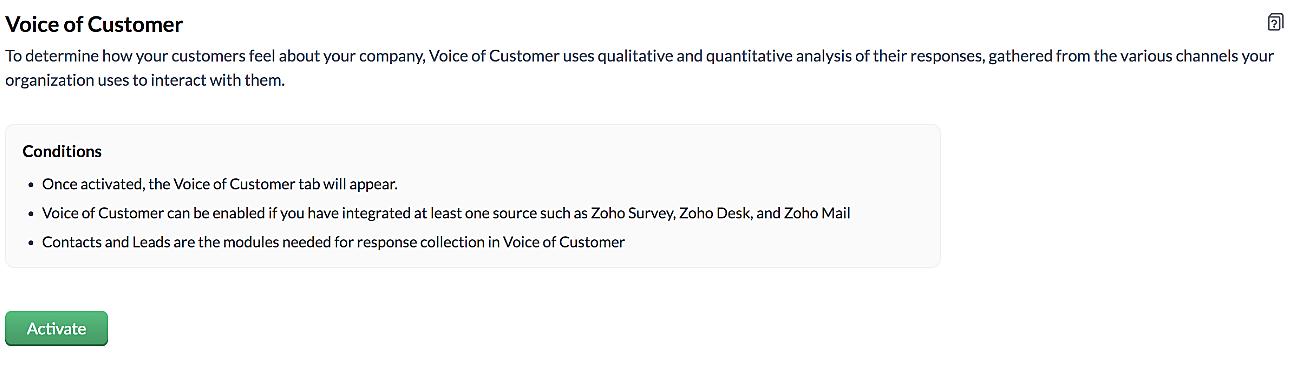
VoC for Zoho CRM is trained to conduct sentiment and intent analysis, keyword extraction, emotion & root cause analysis, customer trend analysis and predictions. It presents several accurate dashboards within your CRM account that showcase customer opinions on your business, competitor activity and sentiment, as well as the customer emotion behind emails, surveys and customer feedback.
Let us take a look at different dashboards that can help the management identify the root cause of inconsistencies in results and chalk out next steps to resolve them quickly.
The Sentiment-based Profile Analysis
The Sentiment Dial Analysis chart provides you with an overall picture of the customer sentiment shared across multiple communication channels such as surveys, emails, and customer ratings.
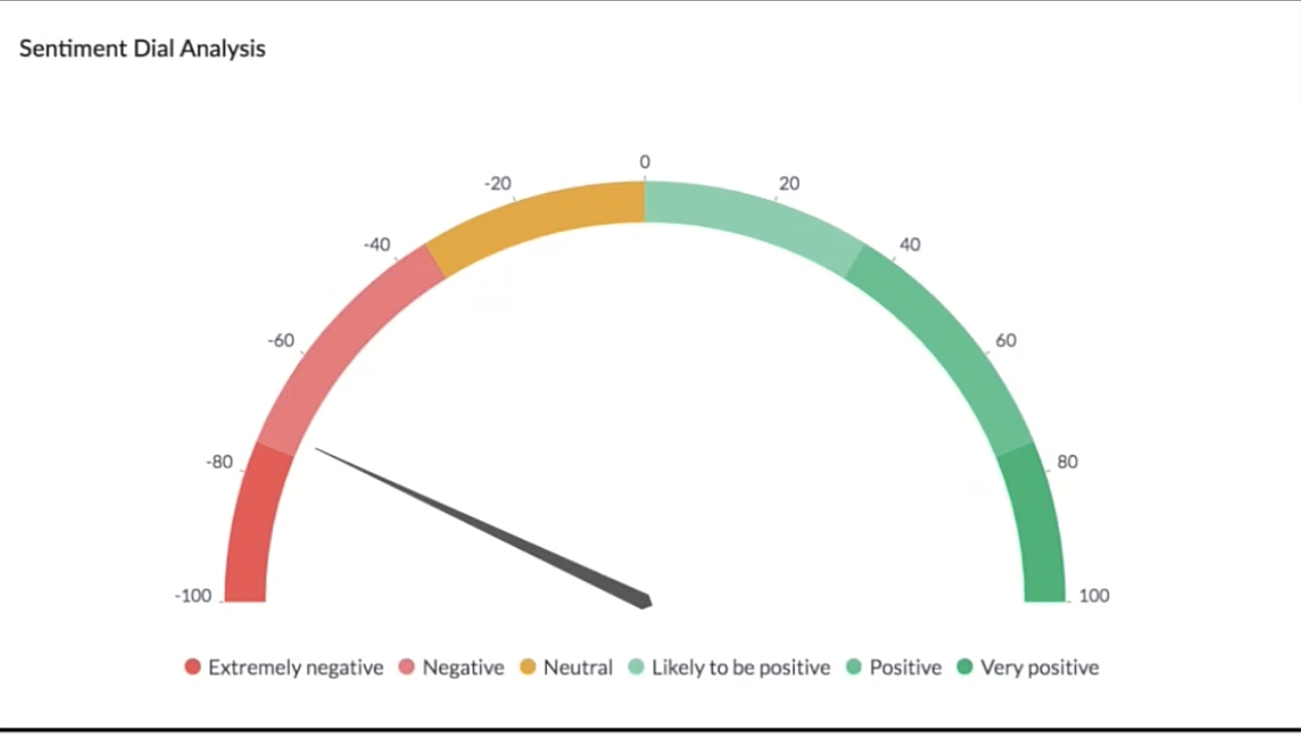
The dial chart shows that the overall sentiment expressed by the customers is on the negative end. This analysis incorporates the feedback from Desk, Survey and CRM emails. With a conservative approach that doesn't incorporate VoC, this requires a separate team to gather the feedback, digest it and incorporate it into business activities.
Even though this dial chart gives you a fair idea of the customers' views, the management needs more clarity on where the problem lies to increase customer satisfaction.
The frequently occurring keywords by sentiment narrow down the customer views expressed.
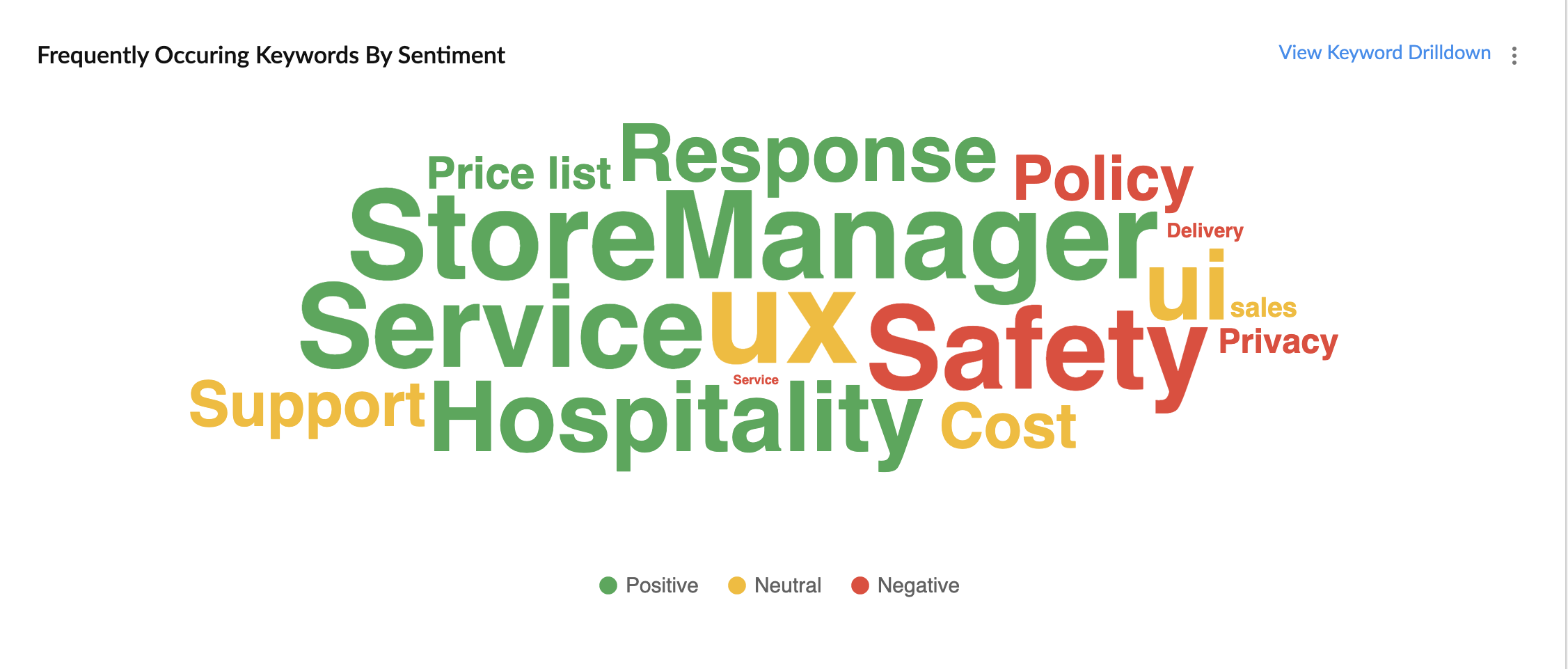
In the image above, the words in green have been used in a positive connotation by the customers. We can infer that customers are happy with the service, hospitality and price list. Whereas, delivery, policy and safety haven't been our strongholds. Therefore, we can now focus on improving our delivery, safety and privacy policies.
A drill down of the number of customers and channels from where their feedback has been gathered can also be viewed a table.
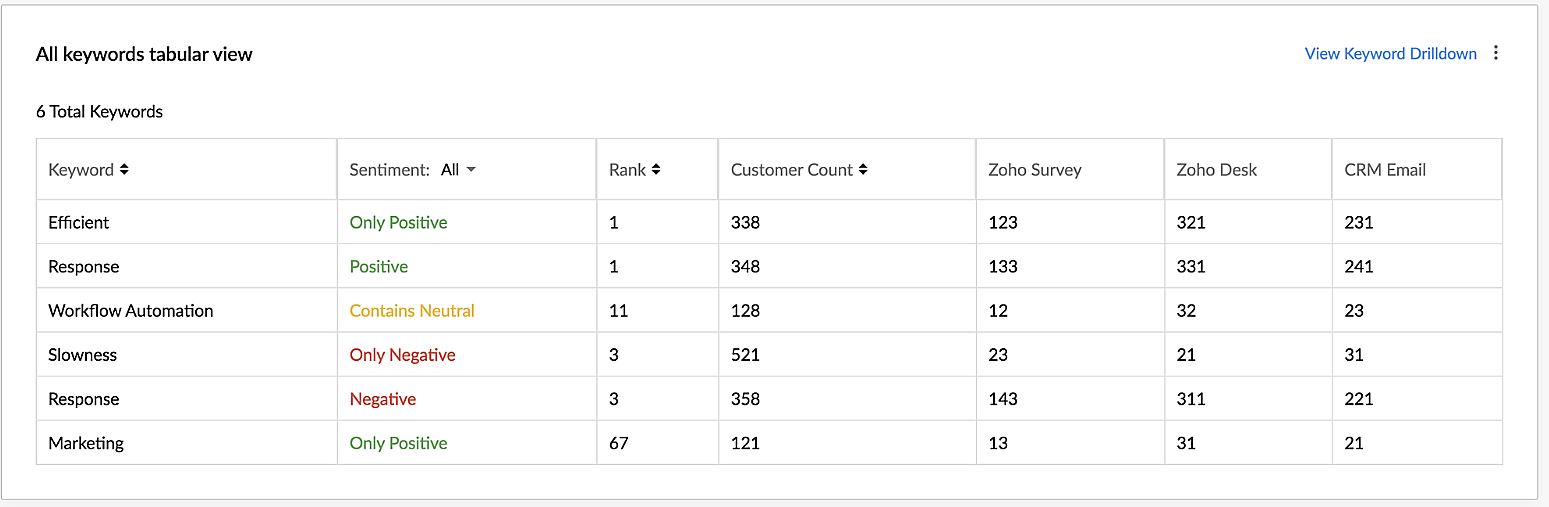
VoC for Zoho CRM helps you derive powerful insights on customer opinions and sentiment by processing data in minutes from several communication channels without burdening your team.
Response-based sentiment analysis
VoC for Zoho CRM captures the underlying emotion and intent behind customer responses and categorizes them by sentiment, intent, medium and revenue based on a particular timeframe.
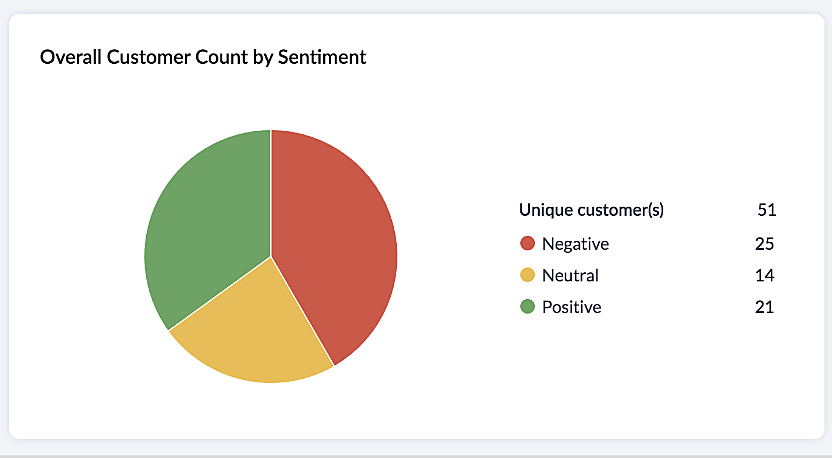
This chart paints an overall picture of the positive, neutral, and negative feedback count based on the responses gathered via surveys and customer rating.
The Sentiment Cohort chart, a variation of the above, showcases the customer feedback with respect to the timeframe.
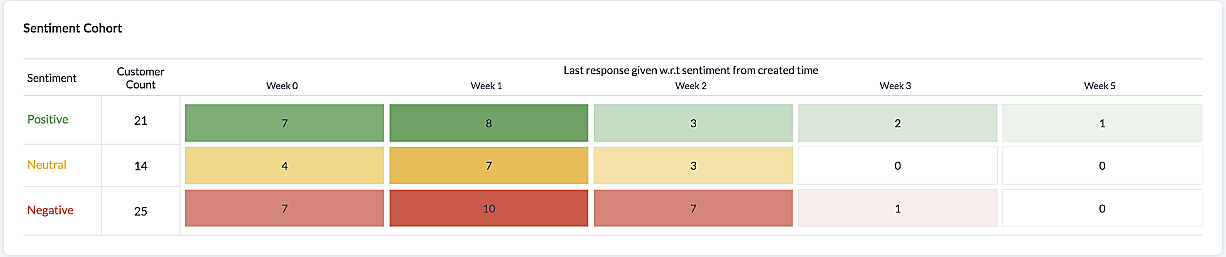
There are a few more dashboards that VoC offers to extract insights from - Competitor analysis, Cross-sell Analytics and Survey comparison.
Competitor Analysis
Staying on par with our competitors is an important aspect of customer satisfaction and retention. VoC helps in this regard by offering prominent insights. If the deal closure rate has come down after the mention of the competitor, we can focus on our offerings against our competitors'.
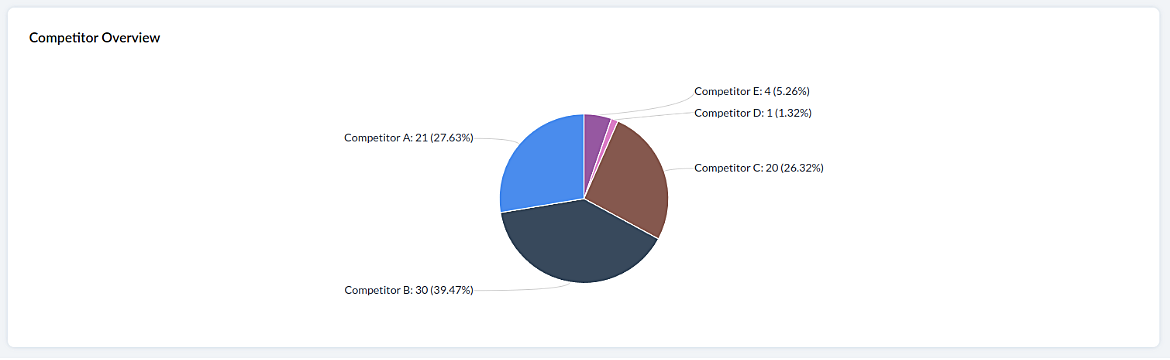
Cross-sell Analytics
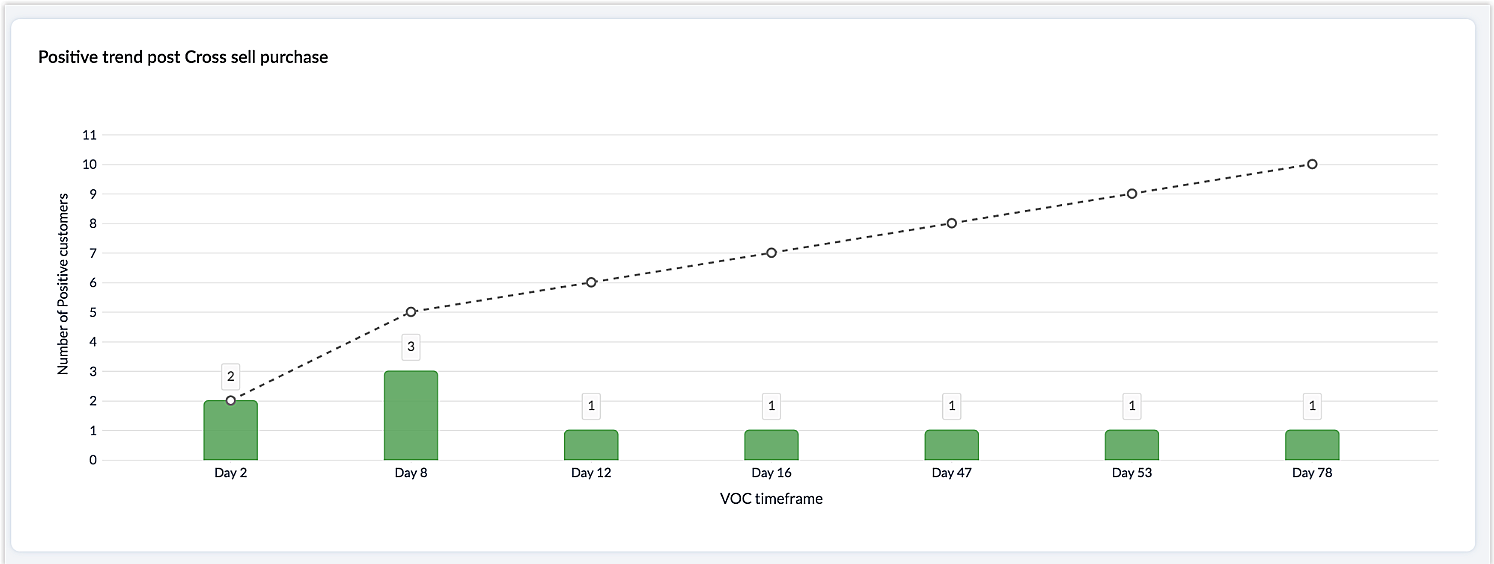
Cross-sell Analytics in VoC is designed to measure the effectiveness of cross-selling efforts. Zia studies the feedback after a cross-sell initiative is made and whether it is positive or negative. Depending on the feedback collected, it predicts the right product/service.
Survey comparison
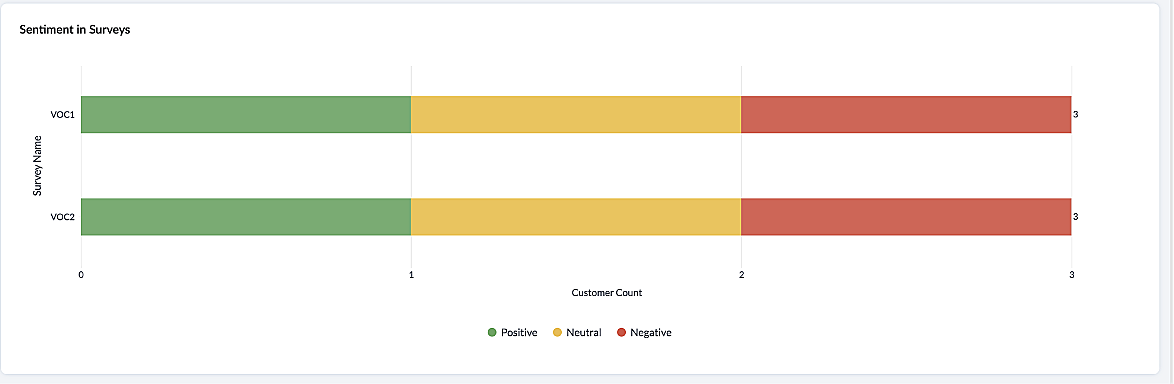
These dashboards come in handy when you want to evaluate your marketing efforts. If the customer feedback for an email offer is positive, you can plan your marketing strategies based on it. You can also improve your product/services based on survey responses.
Listed below are the different charts that VoC supports -
1. Pie chart and donut chart
2. Line graph
3. Bar graph—single, multi, stacked
4. Cohort
5. Quadrant
6. Waterfall
7. Gauge chart/ Dial chart
8. Anomaly dashboards
9. Word-cloud and Table
Please click here to watch a video about VoC for Zoho CRM to gain a deeper understanding of the feature.
Prerequisites/Notes:
VoC insights are available for surveys, customer rating and emails, using Zoho Survey, Zoho Desk and Email integration (IMAP) respectively.
Zia Competitor Alert should be configured for the competitor analysis dashboard. Additionally, Zia Recommendation needs to be configured for the cross-sell analytics dashboard.
All insights are a result of processing historical data. Collection of relevant data will be initiated upon activation of VoC and we will be processing this data over a period of three months.
Currently only admin profile users can view the VoC tab.
Pricing
VoC will be available for Zoho CRM to begin with. This will be a priced offering. The final pricing and editions supported will be announced during the time of public release.
What's in the roadmap
a) Option to customize dashboards and charts
b) Identify our vanishing customers and declining products
c) Evaluating strategies to attain a target
d) Feedback Summaries, and much more.
Please click here to get early access to VoC for Zoho CRM. We would love to hear your feedback and can't wait for you all to try this.
Note:
Early Access for customers: The Early Access to VoC is provided only for organizations with a license count greater than or equal to 20.
Recent Topics
Accessing shared mailboxes through Trident (Windows)
Hi, I have a created a couple of shared mailboxes. The mailboxes are showing up on the browser based Zoho workplace, but I cannot seem to figure out how to access my shared inboxes through Trident (Windows). Am I missing something or is this feature not
Unusual activity detected from this IP. Please try again after some time
When i try to create new addresses on my account i am getting this error, it has been 24 hours now and i am still getting this error can anyone help
temporary system errorlouis
J'essaye d'envoyer des mails avec mes 2 adresses mail qe nous avons sur le compte arthur@lepunch.fr et louis@lepunch.fr mais j'ai toujours le message temporaire system error, je reçois les mails mais impossible d'en envoyer a qui que ce soit
How to Cancel/Delete Queued Mail Merge?
Hi. I just tried to do a mail merge before realizing there's a limit on number of sends. I accidentally sent one of my lists twice, and all of those emails are currently queued. Is there any way to cancel or delete a queued mail merge? Would love to be
Need to add a new admin for my domain
Hello Zoho Support, I am the owner of the domain localeistanbul.com. The current super admin account (admin@localeistanbul.com) is not accessible. I do not want to reset or delete the existing account because I need to keep all existing emails. Please
Possible Fraud Site.
Hello. I received a text with the sender's name as zoho, claiming that my account was at risk and that I should sign in at https://verify.zohomails.ru/signin to verify my account. I signed in on the web address above, and a few days later someone hacked
Zoho mail to Teaminbox
Hello, We're searching for new mail program. Now I'm testing a bit with zoho mail and team inbox. My findings in the research: Pop mail throught zoho mail is almost instant. Any pop or imap via external provider takes a couple minutes to 15 minutes before
Crear tarea CRM con recordatorio desde Zoho Flow
Hola, estoy intentando crear desde Zoho Flow una tarea en CRM. Lo he logrado hacer pero sin recordatorio, ya que no se como se debe escribir el string adecuado. He probado varias alternativas, pero ninguna me funcionó hasta ahora. - FREQ=NONE;ACTION=EMAIL;TRIGGER=DATE-TIME:${FechaVto}
Tip of the week #16 - Search and filter threads based on criteria
Zoho TeamInbox lets you search and filter threads with any information that you have about the thread. You just have to input the criteria and Zoho TeamInbox will list all the threads that match the condition. Firstly, there is a global search you can
Inquiry Regarding Automated Assignment of Zoho TeamInbox Messages using Zoho Flow and Deluge
Hello, Our company is currently using Zoho TeamInbox, and we are interested in automating the assignment of responsible parties using tools such as ZOHO Flow and Deluge. Is it possible to achieve this? Allow me to provide more details. Currently, when
Customizing Global Search Settings for All Users
Hi Our team use the brilliant global search functionality within CRM many many times daily. But, we struggle with the out-of-the box columns that CRM gives you. We are always telling users to customize this look to more suit our business, to show the
Qwen to be the default open source Generative AI model in Zoho Desk
Hello everyone, At Zoho Desk, we will make the latest Qwen (30B parameters) the default LLM for our Generative AI features, including Answer Bot, Reply Assistant, and others. As a subsequent step, we will discontinue support for Llama (8B parameters).
Condition based aggregate fields in subforms
Hello everyone, We're excited to inform you about the latest enhancements made to our aggregate field capabilities in subforms; create aggregate fields based on conditions! An aggregate field is a column on which a mathematical function has been applied.
Upgrade Zoho Desk Agent-Side Answer Bot to GenAI
Hello Zoho Desk Team, We hope you're doing well. Following the recent announcements and rollout of the GenAI-based Answer Bot in Zoho SalesIQ (Nova '25), we’d like to formally request a similar upgrade for the Answer Bot used by agents inside Zoho Desk.
Marketers' Space: The importance of warming up your sender domain
Hello Marketers, Welcome back to yet another post! Today, we'll talk about why warming up your sender domain matters. Imagine you've recently started a business and want to share the news with your customers. You've designed a great email campaign using
An Exclusive Session for Zoho Desk Users: AI in Zoho Desk
A Zoho Community Learning Initiative Hello everyone! This is an announcement for Zoho Desk users and anyone exploring Zoho Desk. With every nook and corner buzzing, "AI's here, AI's there," it's the right time for us to take a closer look at how the AI
Search Just Got Smarter in Notebook
Hello there! Introducing Our New & Improved Search Experience! We heard your feedback! Many of you shared that our previous search had some challenges like • Inconsistent results across different clients • Limited accuracy in finding the right content
Client Portal ZOHO ONE
Dear Zoho one is fantastic option for companies but it seems to me that it is still an aggregation of aps let me explain I have zoho books with client portal so client access their invoice then I have zoho project with client portal so they can access their project but not their invoice without another URL another LOGIN Are you planning in creating a beautiful UI portal for client so we can control access to client in one location to multiple aps at least unify project and invoice aps that would
Zoho Desk app update - AI Integration for IM Chats
Hello everyone! We have now introduced AI integration for IM Chats within the Zoho Desk mobile app. To access the feature, please enable the 'Generative AI' settings on the desktop site(desk.zoho.com). Please refer to the help link attached below: Zoho
Open A.I assistant Connect with Zoho Desk instant Message Conversations
I would like to know how do I connect my instant messenger in Zoho desk with my Open A.I Gpt Assistant. this is very easy to setup using the Salesiq Zobot but when it comes to Zoho Desk i cannot figure how to make the connection. Ideal workflow Customers
Cannot upgrade subscription plan due to payment error message
Hi Zoho team, This is to request support on an issue I am facing during an upgrade I am trying to make to our company's yearly Zoho subscription. I am trying to add 3 more license to my plan and during the payment phase I get the below error as in the
Synchronise item image between Zoho Commerce and Zoho Books/Inventory/CRM
Here is a blindingly simple idea to tie several Zoho products together. Zoho - please include a method to synchronise the item image (or images) from one Zoho application to another. For example, if you upload an item image in Zoho Inventory, a user should
Enhancing Zia's service with better contextual responses and article generation
Hello everyone, We are enhancing Zia's Generative AI service to make your support experience smarter. Here's how: Increased accuracy with Qwen One of the key challenges in AI is delivering responses that are both contextually accurate and empathetic while
Zoho Desk app update: AI powered features
Hello everyone! We’ve introduced various AI-powered services on the Zoho Desk app. Let's take a look at what's new. Generate Content: Generate Content uses AI to formulate responses based on the your query and provides a ready-to-use reply which can be
Passing the CRM
Hi, I am hoping someone can help. I have a zoho form that has a CRM lookup field. I was hoping to send this to my publicly to clients via a text message and the form then attaches the signed form back to the custom module. This work absolutely fine when
Bulk update Archived Ticket
Dear All We would like to update the "Category" values to the new filed. We found the archived Ticket seems to be don't support the bulk action. Do we have any way to update it. Finally, we would to generate a report for our ticket system. Regards I
SalesInbox
Sorry for saying this but SalesInbox is a really mess. BIG FAIL. Bad UX and VERY bad IMAP sync. I don't know how can someone use this to be more productive. It's just the oposite. I'm trying to use SalesInbox for a while but sales people do not have just sales activities so we still have to came back to the mail app anyway. Folders of SalesInbox are not in sync with folders of mail server (wich syncs Ok to mobile) and vice-versa wich leads to double work as now you have to cleanup 3 inboxes (Mail
Channel Configuration and Default Channels
There are some of the default fields that cannot be removed or changed. Examples are the social media ones, such as Facebook. It would be nice to be able to remove these fields as it would be confusing if someone selected this but it's not configure
Automating Employee Birthday Notifications in Zoho Cliq
Have you ever missed a birthday and felt like the office Grinch? Fear not, the Cliq Developer Platform has got your back! With Zoho Cliq's Schedulers, you can be the office party-cipant who never forgets a single cake, balloon, or awkward rendition of
Delay function execute
I've got a workflow which uses a webhook to send information to Flow, which in return updates a record in Creator. Problem is, by the time this has executed, the rest of my script has run and can't find the (yet to be) updated info in the record. Is there
Kiosk Button Actions
I need to add an action to a Kiosk Button to loop me back to start the kiosk again and I am not sure what that looks like (function, etc.).
Support www.camcard.com
Hi, Is it possible CRM Zoho have integrations with https://camcard.com/? Thanks Br, Andy
Option to Customize Career Site URL Without “/jobs/Careers”
Dear Zoho Recruit Team, I hope you are doing well. We would like to request an enhancement to the Career Site URL structure in Zoho Recruit. In the old version of the career site, our URL was simply: 👉 https://jobs.domain.com However, after moving to
Can't make a document editable to anyone
Hey everyone, I am using Zoho Workdrive and trying to share a document so that it is editable by anyone with the link. I am trying to convince people to shift from Google to Zoho, but they don't have accounts yet. When I try to change the share settings
Edit Default Print
What I want to do is create / edit the "Default Print" template without changing the layout I'm using. Currently I can create "Email Templates" but I don't use them for emailing and getting to that selection takes multiple clicks. If an email template could be set to be the Default Print template that would be helpful. I'd also like to print these in bulk but don't see that option (there is a mail merge macro but that goes straight to emailing, not to print or PDF).
Widget shows error
Hi, May I ask why below characters will be auto added into the widget link and how to solve this error? As my widget shows 404 error now. ?serviceOrigin=https%3A%2F%2Fcrm.zoho.com&frameorigin=https%3A%2F%2Fcrm.zoho.com
How to print envelope labels from Zoho CRM
Can anybody give me any clue how to print envelope/package labels directly from Contacts view? Regards, Alexandru Moderation Update: The Canvas Print View, which also facilitates the formatting of mailing labels, is now available! Learn more here: Zoho
Data Import: New interface, improved field mapping, and more
Hello everyone! We’ve redesigned the data import process to ensure accurate field alignment and verify that every column in the uploaded file maps correctly with Desk fields before import. Here's how: Streamlined Import Steps Importing data is now more
Address labels
Hi, we've been searching for a long time for a simple way for our employees to print address labels using a Dymo Label Writer 450. We came up with two alternatives that work, bur aren't really optimal. First one is WebMerge. Webmerge is a great application that does 100% what we need but it is way too expensive for our needs. We only need to print a couple of labels per month. The second one is the integrated print tool in Zoho CRM, (Print preview) You would think this is the obvious way to do this
This domain is not allowed to add. Please contact support-as@zohocorp.com for further details
I am trying to setup the free version of Zoho Mail. When I tried to add my domain, theselfreunion.com I got the error message that is the subject of this Topic. I've read your other community forum topics, and this is NOT a free domain. So what is the
Next Page